
BackReload – Backup, Restore & Migration
| 开发者 | shiponkarmakar |
|---|---|
| 更新时间 | 2026年8月31日 01:30 |
| PHP版本: | 7.4 及以上 |
| WordPress版本: | 7.1 |
| 版权: | GPLv2 or later |
| 版权网址: | 版权信息 |
详情介绍:
wp-content into split zip archives, encrypts them at rest, and uploads them to one or more remote destinations of your choice. When something goes wrong, you can restore your full site — database, media uploads, plugins, themes, and other content — back onto the same site, or onto a different site with automatic URL and path rewriting.
Direct site-to-site migration is full-fidelity: it moves the complete site — database, uploads, other content, and plugins, themes, and mu-plugins — so the destination works immediately after the move. Restore and import are full-fidelity too — they bring back plugins, themes, and mu-plugins along with the database and uploads. A fully-compliant, data-only build (no code ever deployed) is available by defining the BACKRELOAD_DATA_ONLY constant.
Storage destinations
- Local Storage: files written to
wp-content/uploads/backreload/inside the site itself. - FTP: any standard FTP server.
- SFTP: over SSH, using the PHP ssh2 extension when available.
- AWS S3: buckets in any AWS region, with full SigV4 signing.
- Wasabi: Wasabi-compatible signing built in.
- S3-compatible: works with any provider that speaks the S3 API (Backblaze B2, DigitalOcean Spaces, MinIO, and so on).
wp-content files. If the backup came from a different site, BackReload rewrites URLs and absolute paths inside the database as part of the restore, including inside serialized values, so the site comes up correctly on the new domain without any manual search-and-replace.
Maintenance mode can be automatically engaged for the duration of a restore, then turned back off when the work finishes.
Site-to-site migration via key
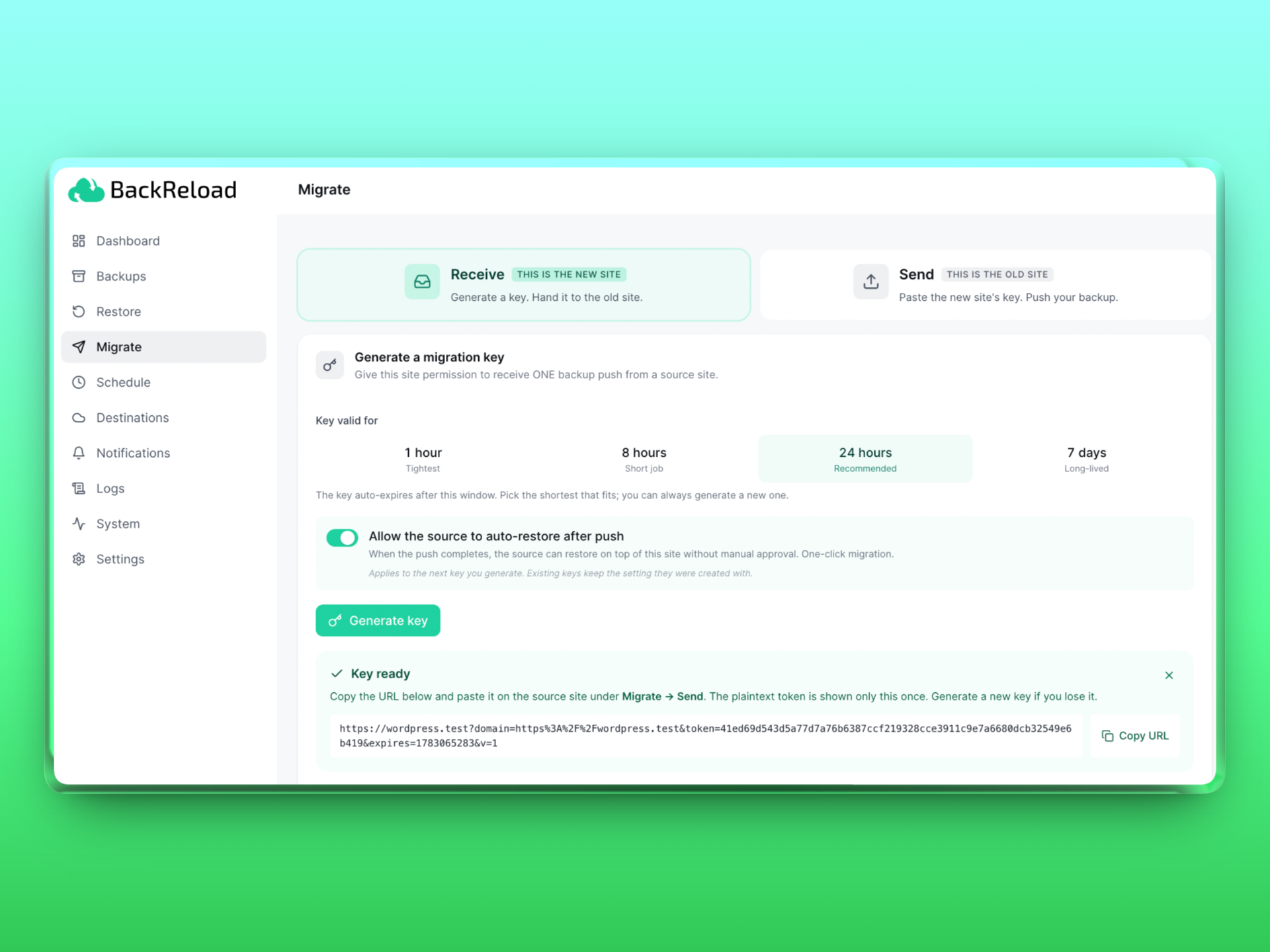
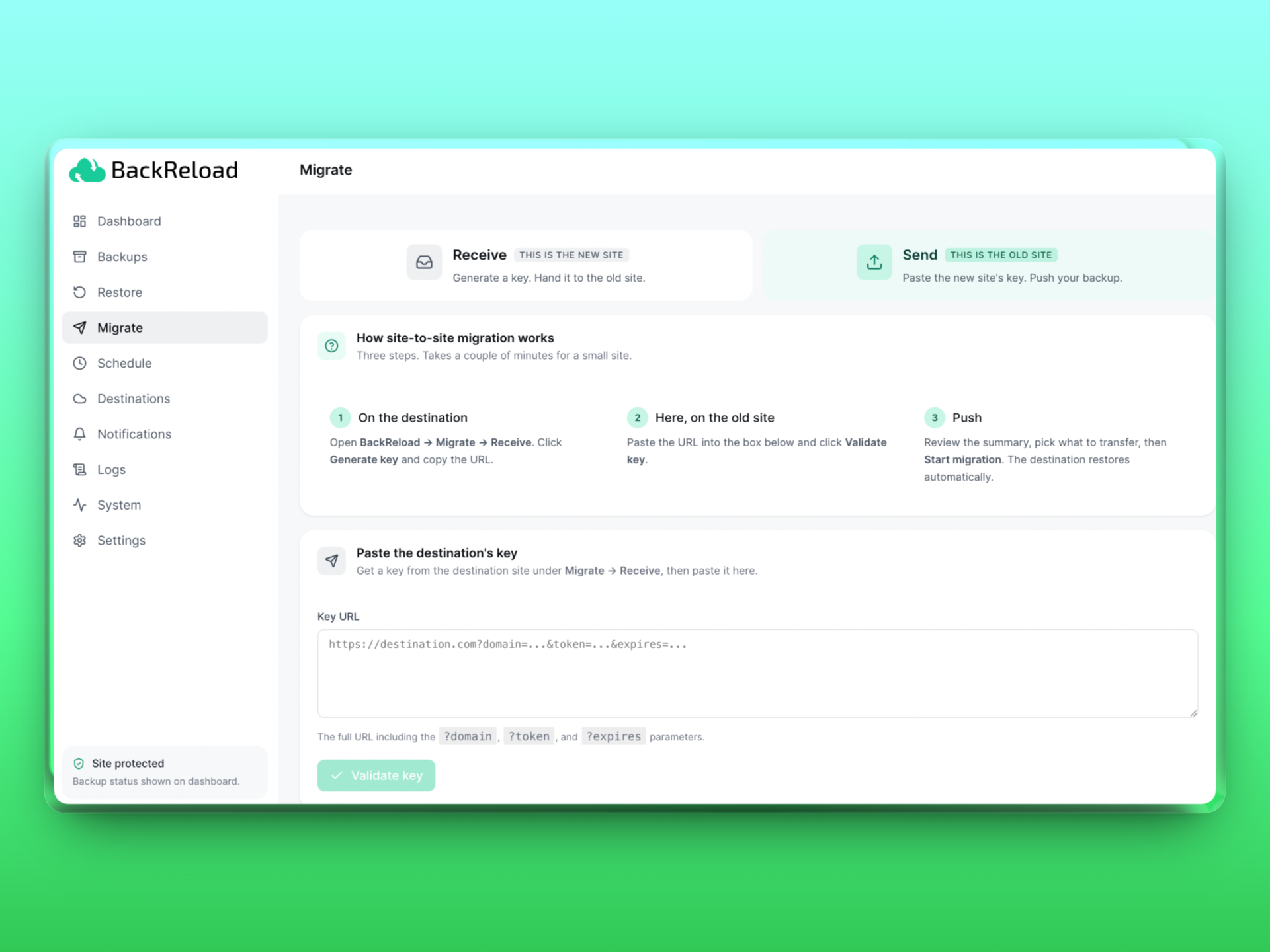
For moving a site to a new host or domain, BackReload ships a direct site-to-site push. The destination site generates a one-time key URL under Migrate → Receive. You paste that URL on the source site under Migrate → Send, click Start migration, and the source builds a backup and streams it to the destination in encrypted chunks over HTTPS. With auto-restore enabled (default), the destination unpacks and applies the backup automatically. One-click migration.
There's no FTP step, no manual download, no shared cloud storage required. Chunked transport with WAF / mod_security tolerance, cross-tick retry caps, table-prefix fixup, and a live progress UI with phase stepper, throughput, and log feed on the source side.
Encryption
Archives can be encrypted at rest with AES-256-GCM using a passphrase you set in Settings. The passphrase is required to restore. The encryption layer is fail-closed: a corrupted or tampered archive refuses to extract rather than producing partial output.
Scheduling
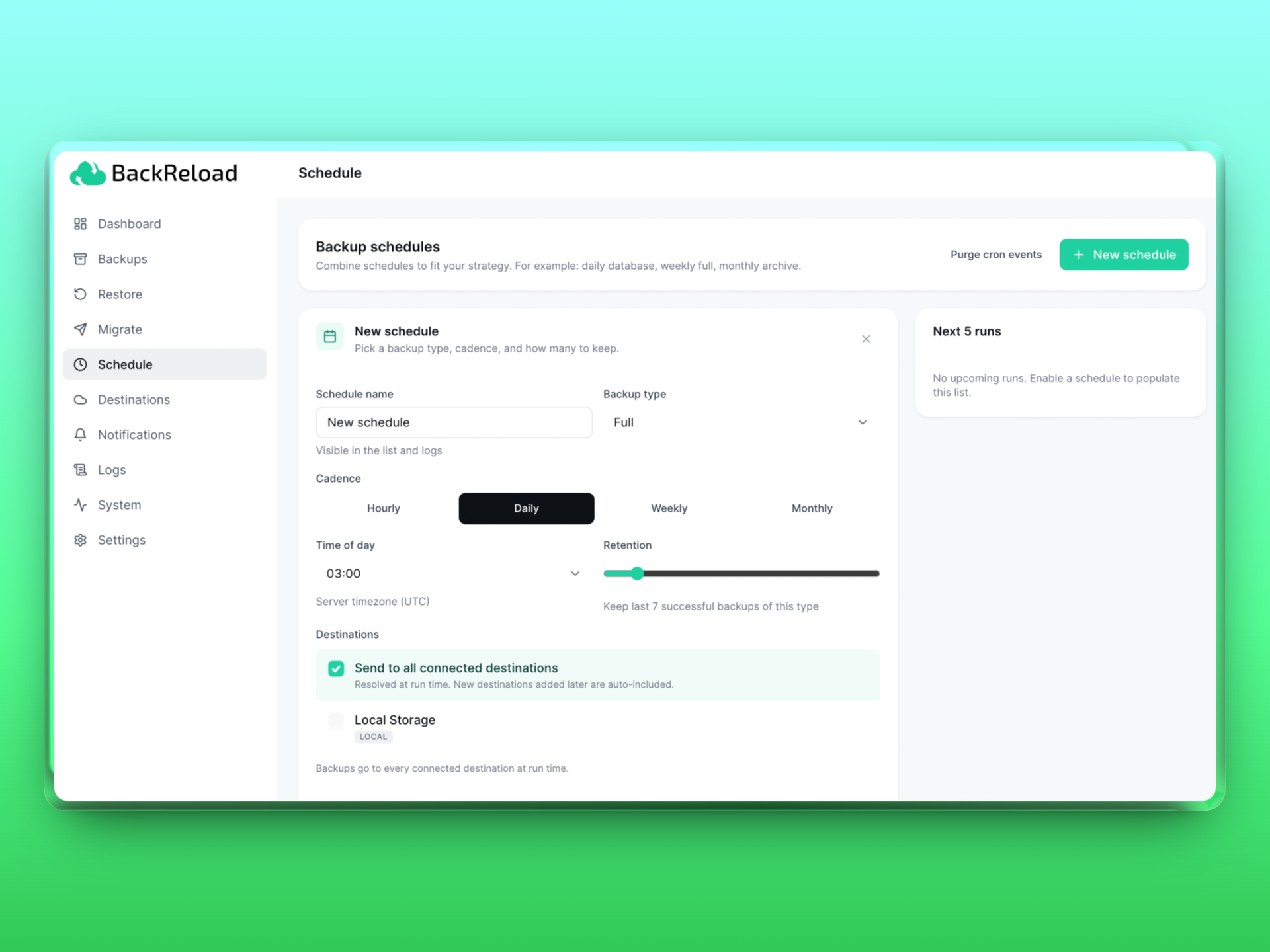
Multiple independent schedules are supported. Common patterns: a daily database-only backup, a weekly full backup, and a monthly archive backup, each retaining a different number of historical copies.
Notifications
Send backup-completion and failure alerts to email, Slack, Discord, Telegram, Microsoft Teams, Google Chat, Pushover, or any custom webhook. Each channel is opted into success and failure events independently.
Privacy
The plugin does NOT send analytics, telemetry, or usage data to any external server. The only outbound network traffic is to the storage destinations you configure and the notification channels you opt into. OAuth flows for Google Drive and OneDrive run only when you explicitly start them.
安装:
- Upload the plugin folder to
/wp-content/plugins/backreload/or install from the WordPress Plugins screen. - Activate BackReload in Plugins → Installed Plugins.
- Open the plugin from the WordPress admin sidebar.
- Visit Destinations to attach at least one storage location (Local Storage is created by default).
- Optional: open Settings to enable encryption, configure exclusions, and set the compression level.
- Optional: open Schedule to set up daily, weekly, or monthly automated backups.
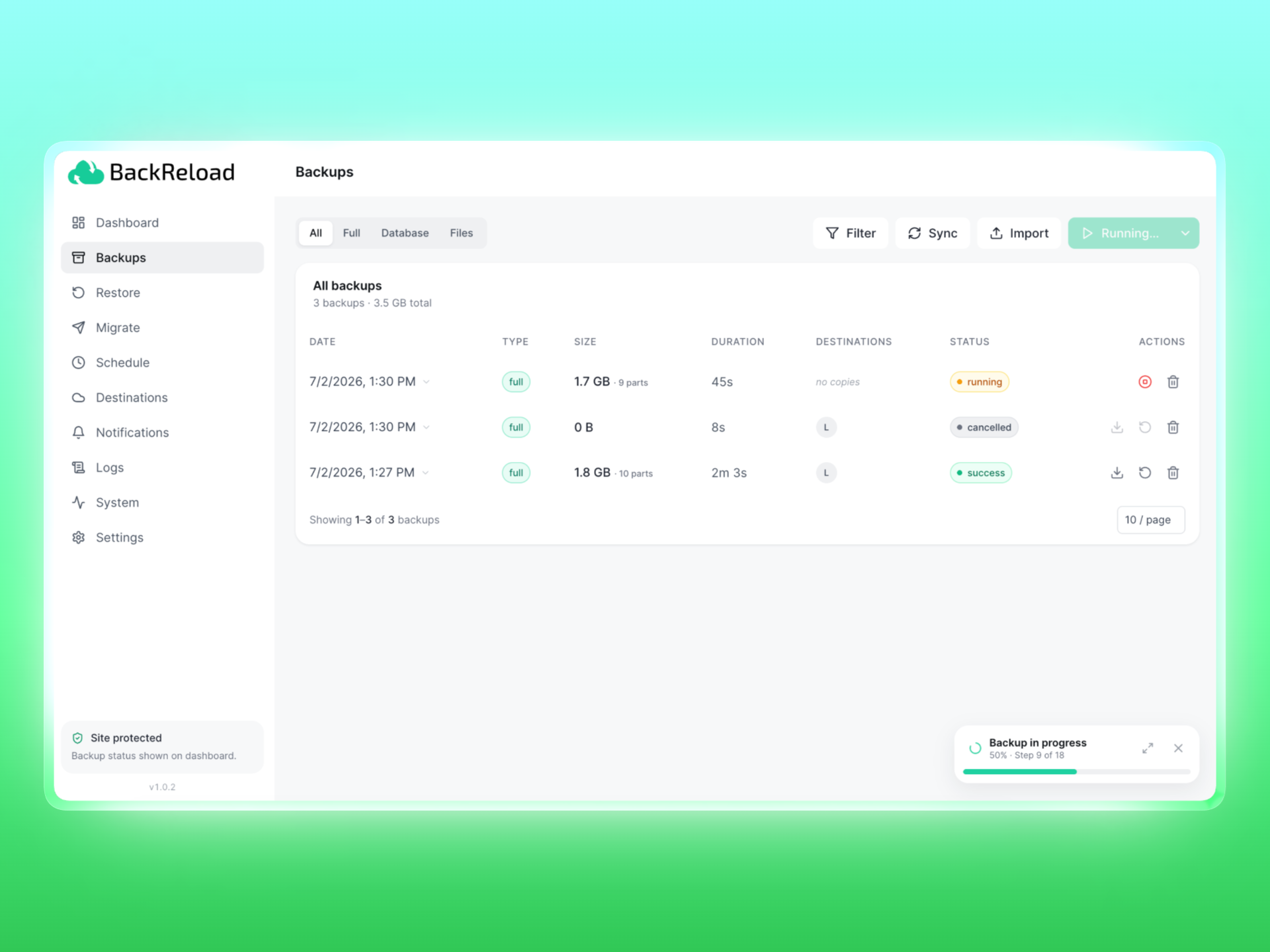
- From the Dashboard or Backups page, click Backup now to create your first backup.
屏幕截图:



常见问题:
Does this work on shared hosting?
Yes. The backup engine is tick-based: it does a small amount of work on each cron tick rather than holding a long-running request. This keeps memory and time per request well within shared hosting limits.
How large can my site be?
The engine streams files into zip parts and uploads each part as it finishes, so disk and memory use stay bounded regardless of total site size. The largest single zip part is auto-tuned to roughly 80% of your PHP memory_limit (capped between 200 MB and 1 GB).
Can I restore a backup to a different domain?
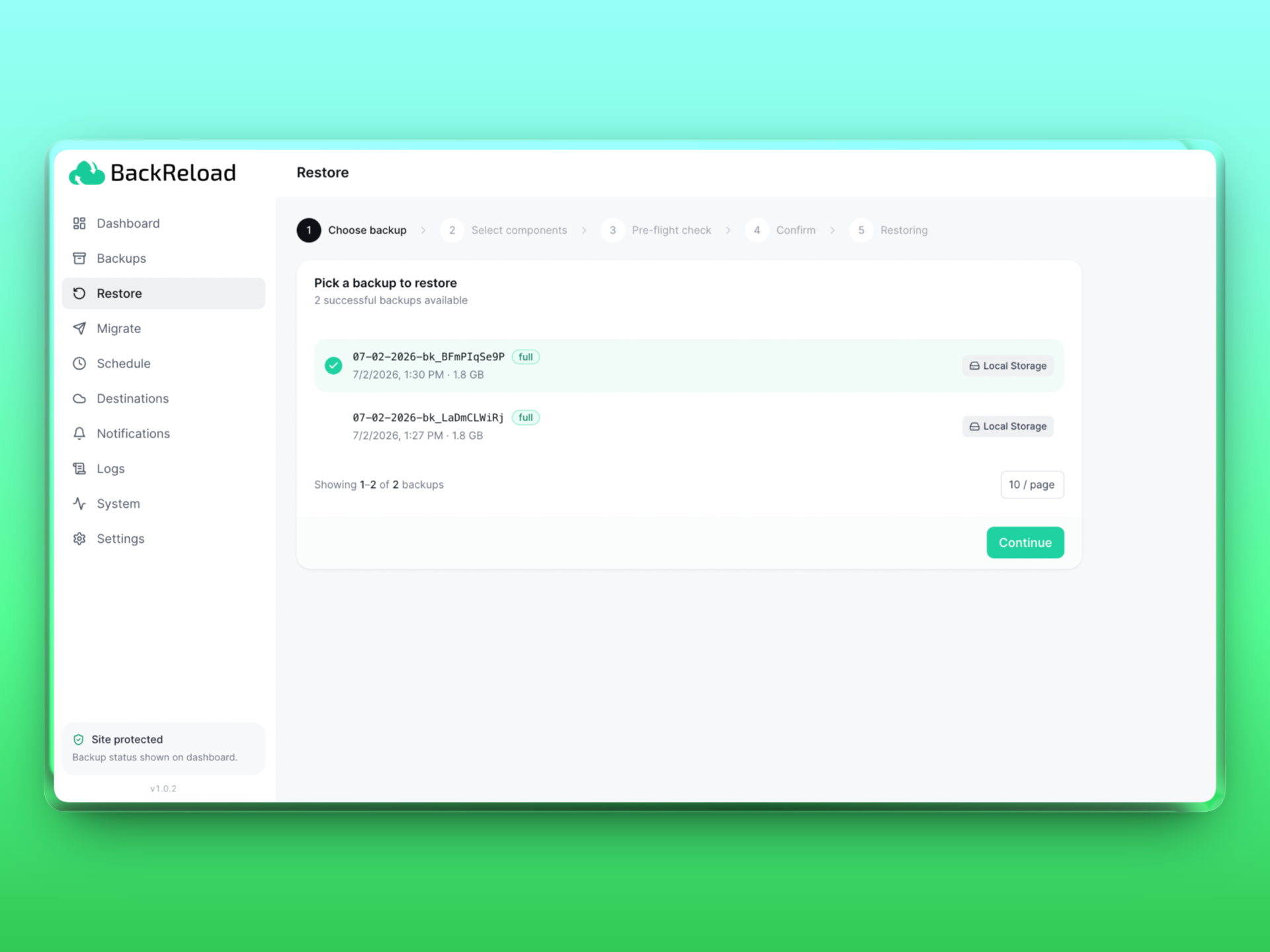
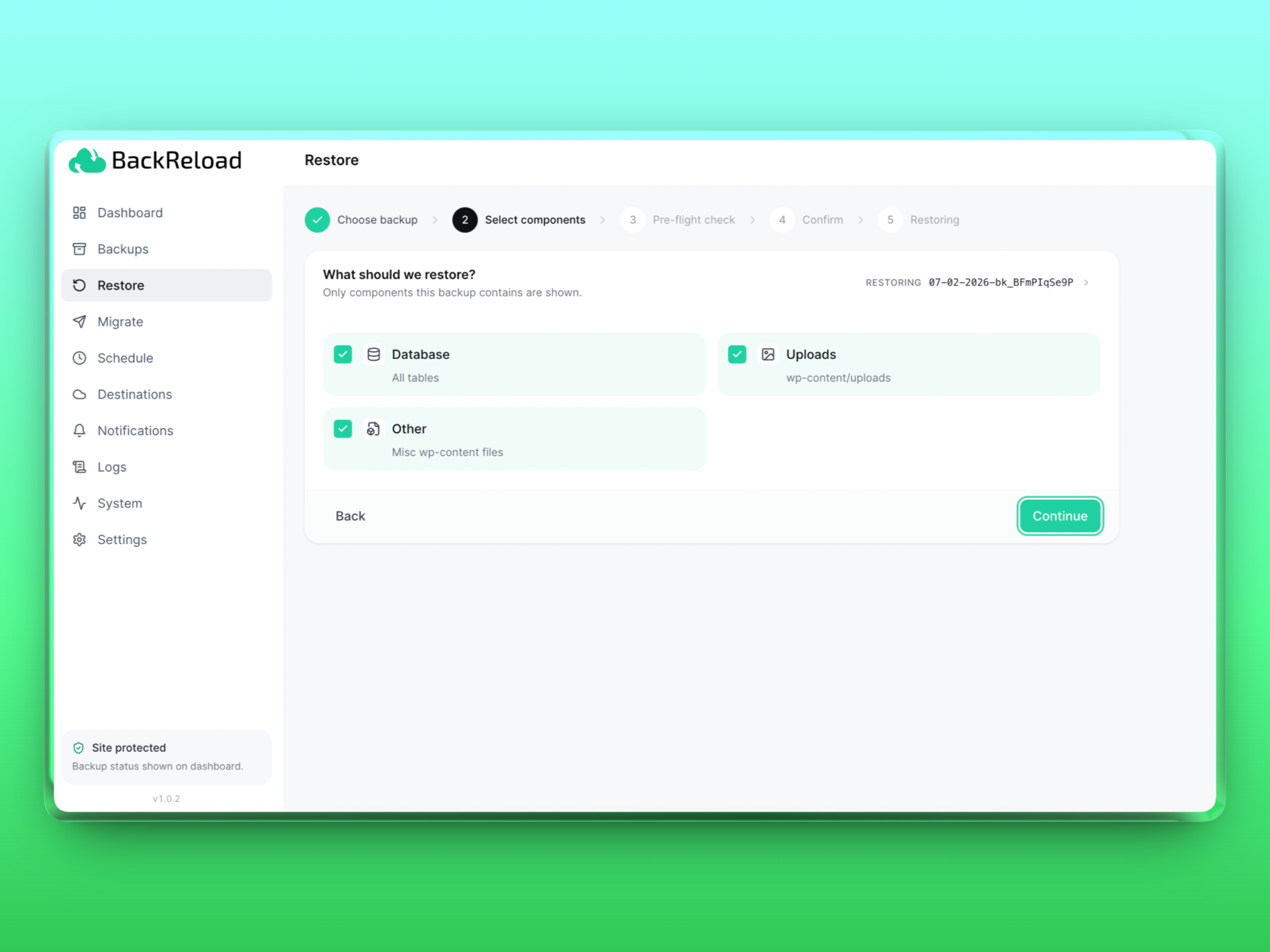
Yes. The Restore wizard detects that the source domain doesn't match the destination domain and runs an automatic URL/path rewrite during restore. Serialized values are walked safely.
My backups are encrypted. What happens if I lose the passphrase?
You will not be able to restore them. There is no recovery mechanism. That's the entire point of encryption. Store your passphrase in a password manager.
Can I import a backup from another WordPress site?
Yes, three ways:
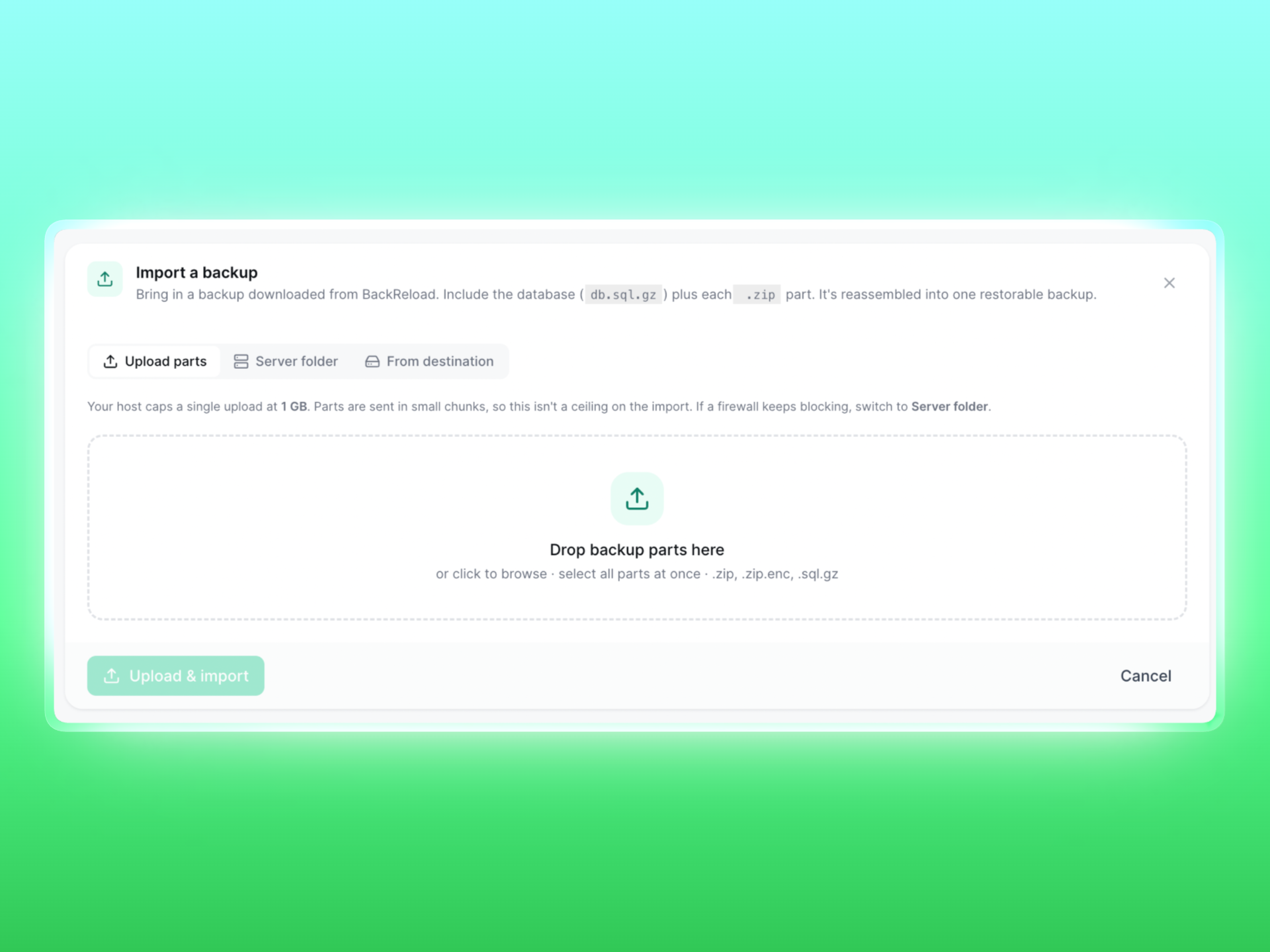
- Upload the backup parts via Backups → Import.
- Drop the part files into
wp-content/uploads/backreload/backreload-import/on the server and use Server folder import. - Configure the same storage destination on both sites and use Import → From destination to bring it across (no upload required).
Does the plugin send data to a third party?
No. The plugin only contacts storage destinations and notification channels that you explicitly configure. There is no telemetry.
Does restore bring back my plugins and themes?
No. BackReload restores your database, uploads (media), and other non-code wp-content files, but it never deploys plugin, theme, or mu-plugin code into your live site. Full backups still contain those files for off-site safekeeping, but after a restore you reinstall plugins and themes through the normal WordPress installer. This keeps the plugin from ever writing executable code into your site.
What happens when I uninstall the plugin?
Uninstalling deletes all plugin settings, custom database tables, scheduled cron events, and transients. The backup archive files inside wp-content/uploads/backreload/ are NOT deleted. Those are your data and survive the uninstall in case you want to reinstall later. Delete that folder manually if you want a fully clean removal.
更新日志:
- Site-to-site migration is more likely to get past a destination's server firewall. The transfer chunks were sent as file uploads, which a server firewall (LiteSpeed / mod_security) inspects much more strictly than ordinary requests - so on some hosts it blocked them with a 403 error while letting the rest of the migration through. Chunks are now sent the same way as the migration handshake that those firewalls already allow (a plain JSON request, not a file upload), which should clear that block. Migrating to a site running an older version still works; the destination accepts both formats.
- Tested and confirmed compatible with WordPress 7.1. No functional changes - BackReload's admin is a self-contained interface that does not rely on the parts of WordPress 7.1 that changed (the block editor, jQuery UI, or the editor component library), so nothing needed updating for the new version.
- Fixed fonts (and other assets) still loading from the OLD site after an Elementor migration, which broke the design and could stop tabs and other widgets from working. Elementor keeps its self-hosted Google Fonts stylesheet in a separate folder (uploads/elementor/google-fonts/css) that the migration's URL rewrite wasn't touching, so those font files were still requested from the source domain and blocked by the browser's cross-origin (CORS) rules. The rewrite now covers Elementor's font stylesheets and ElementsKit's cached CSS too, so all builder asset URLs point at the migrated site.
- Added a one-click way to let incoming site-to-site migrations past the destination site's own firewall. When a source site can't push to a destination because the destination's security (LiteSpeed / mod_security, or a security plugin such as All-In-One WP Security) blocks the transfer with a 406 error, the destination's Migrate > Receive page now shows a notice with an "Allow migrations past this site's firewall" button. It writes a narrow exemption for only the migration and import URLs, immediately checks that the site still loads, and undoes itself automatically if the server rejects it - so it can never leave the site broken. Previously the exemption covered only manual imports, never migration.
- Fixed site-to-site live migration failing with a firewall "406" error that started in 1.0.15. That release lowered the transfer chunk size, which unintentionally multiplied the number of upload requests (for example 47 instead of 6). Security layers on the destination site (such as All-In-One WP Security) treat that burst of requests as suspicious and start blocking them, so migrations that worked in 1.0.14 stopped working. The chunk size is back to the 1.0.14 value, so live migration works again. The clearer error message added in 1.0.15 (explaining a destination firewall block and how to work around it) is kept.
- Restores now resume instead of restarting on large sites. A restore that took longer than the host allows for a single request used to be killed partway — leaving the site half-restored (some folders replaced, the database not yet imported) with no way to continue except starting over, which hit the same wall again. Restores now work in short segments that each stay within the host limit, saving progress as they go, so a big restore continues across as many segments as it needs and finishes. A folder that has already been restored is never wiped again on resume.
- Fixed a 500 Internal Server Error that could take a whole site down on Apache/LiteSpeed hosts running mod_security. Earlier versions wrote a firewall exemption into the site's root .htaccess automatically on activation (and re-wrote it daily). That block used a directive that is not valid in .htaccess on Apache, which made the server return a site-wide 500. The plugin no longer writes to your .htaccess automatically, and on update it removes the old block so an affected site recovers on its own. Backups, restores, and migrations are unaffected by this change.
- The import firewall exemption is now opt-in and self-checking. If you ever need it (only for manual zip-upload imports on a firewall-strict host), you can enable it from the System page with one click. It writes the change, immediately confirms your site still loads, and undoes it automatically if your server rejects it — so it can never leave your site broken. A no-server-change alternative (import from a storage folder) is offered too.
- Site-to-site migration to a firewall-strict destination is more likely to succeed, and fails clearly when it can't. Transfer chunks are now sent in smaller pieces, which are less likely to be flagged by a security firewall on the destination (LiteSpeed / mod_security or a security plugin). If the destination still blocks the transfer, the error now explains that it's the destination's firewall — not a BackReload fault — and how to migrate anyway (build a backup and Restore it on the destination, which bypasses the firewall entirely).
- Migration key validation now records why it failed in the Logs. Validation is a check between the two sites and can fail for several reasons (the destination unreachable, a security or caching plugin on the destination intercepting its response, an expired key, and so on); previously a failure just showed on screen and left nothing in the log to diagnose from. Every failure reason is now logged.
- Clearer message when a migration target is a local or private address. If the destination resolves to a private/loopback address (common when testing between local development sites), the error now explains this and shows the one-line setting to allow it for deliberate local testing, instead of only saying the target must be publicly reachable.
- The Dashboard now shows a system health score next to the backup success rate, so problems that would stop a backup are visible without opening the System page. It turns amber for warnings and red when a check has failed outright, and clicking it opens the full System report.
- The migration confirmation screen now shows a clear "Migrating from -> to" summary of the source and destination sites before you start, so the direction of the transfer is unmistakable before anything is overwritten.
- Hardened restore against crafted archives: entries with absolute or parent-directory paths are now refused outright and logged, rather than relying on PHP to defuse them. No archive produced by this plugin contains such paths; this protects against a tampered or third-party archive supplied through Import.
- Fixed files being silently left out of a backup on large sites. When a very large folder was being archived across several passes and the host killed the process mid-part, the plugin's record of what it had already archived included files whose archive part was never finished. On the next pass those files were skipped, so they were missing from the finished backup while it still reported success - only discovered when restoring. The record is now trusted only as far as the parts that genuinely completed, and anything beyond that is archived again.
- Fixed the same class of problem when a partly-built component has to be rebuilt: leftover progress notes from the discarded attempt are now cleared, so the rebuild archives everything rather than skipping files whose parts were just deleted.
- Stopping a backup is no longer delayed. A backup being cancelled could be re-queued once by the stall detector before it was finalized, leaving the UI on "Stopping..." longer than necessary.
- A backup that pauses at a time checkpoint is no longer reported in the log as though the host had killed it.
- Fixed a restored site keeping the original site's web address when the backup was picked up from a shared storage destination. Connecting a second WordPress site to the same FTP, SFTP, or cloud destination and restoring a backup found there worked, but if that backup folder had no manifest file - an older backup, or one whose manifest failed to upload - the plugin had no record of which site the backup came from and skipped the URL rewrite entirely. The restored site then kept the original site's address and redirected back to it. The address is now read from the database dump itself when it isn't otherwise known, so the rewrite happens either way.
- Fixed backups sticking at 5-10% and never moving. The first and largest component (uploads) was archived in a single uninterruptible operation, and its progress was only recorded once that operation finished. On a site whose uploads cannot be packed inside one request, the server would end the request partway, nothing had been recorded, and the next attempt started the same component again from zero - so the backup could never get past its first step no matter how many times it retried. Archiving now stops cleanly when it runs out of time, keeps the parts it has finished, and continues from that point on the next pass. Each pass is guaranteed to archive at least one file, so progress is always made.
- Fixed a healthy backup being marked failed while it was still working. The plugin treats an internal "a backup is running here" marker as proof that work is in progress, and gives up on the backup if that marker goes more than five minutes without being refreshed. But the database dump and the archive build refresh nothing while they run, and on a large site either can take longer than five minutes on its own - a dump of a big postmeta table can run for six or seven. The backup therefore aged out its own marker and was declared dead mid-dump, throwing away every archive already built. Both steps now refresh the marker as they work, so a long dump or a large archive is no longer mistaken for a crash. Genuinely stalled backups are still detected exactly as before.
- Fixed backups stalling on large sites. A backup that needs more than one or two passes would stop partway with "No engine activity for 15+ minutes", usually after the archives were built but before anything was uploaded. The plugin schedules a follow-up pass whenever it pauses at a time checkpoint, but that follow-up was scheduled two seconds into the future while the request meant to run it fired immediately - so it always found nothing to do. The same request was also being rejected by WordPress's own cron lock, because it was sent from inside a cron run that still held it. Both are fixed: the follow-up is scheduled as due immediately and sent once the lock has been released, so passes now chain straight through. Small sites finished in a single pass and were never affected, which is why this only showed up on large ones.
- A backup that has paused cleanly is no longer given up on. If a follow-up pass goes missing (a host that blocks internal requests, or one where WP-Cron only runs on its own schedule), the plugin now re-queues it once instead of immediately marking the backup failed and discarding completed work - which on a large site could be an hour of archiving.
- Added diagnostics for large sites. When a backup or restore stopped on a big site it previously left no trace - the log simply ended - because the host had killed the process outright. The plugin now records which step was running before each heavy operation, so if the process is killed the NEXT attempt reports exactly which step died and how long it ran. Fatal errors such as "Allowed memory size exhausted" are now captured too, along with the host limits and database size needed to interpret them.
- Backups now warn up front when encryption cannot succeed at this site size. AES-GCM encryption needs a whole archive part in memory and refuses parts above a third of the PHP memory limit, which on a large media-heavy site is smaller than the parts the plugin produces. Rather than failing partway through, the log now says so before the work starts and suggests the workaround (raise memory_limit, lower the chunk threshold, or turn encryption off) until streaming encryption ships.
- No change to how backups or restores are performed in this release - the new code only observes and reports.
- Fixed: scheduled backups ran on UTC instead of the site timezone set in Settings > General. On a site set to Asia/Dhaka (UTC+6), a schedule saved for 3:00 PM actually ran at 9:00 PM. The time you pick is now read as your site's local time, and existing schedules are corrected automatically on update - no need to re-save them.
- Fixed: dates throughout the admin screens (Next 5 runs, backup lists, dashboard) rendered in the browser's timezone rather than the site's, so they disagreed with the site clock for anyone working from a different zone. All dates now display in site time.
- The Time of day field now names your actual site timezone instead of claiming UTC.
- Improved reliability when restoring very large uploads/other archives. The previous build handed the archive an explicit list of every file it contained, which is slower and much heavier on memory on sites with tens of thousands of files, and could make a restore fail. Archives are now extracted wholesale unless something genuinely has to be left out, and those exclusions are applied in batches.
- Backups are now portable between servers with different MySQL settings, and values stored in binary-capable columns are migrated too (genuine binary data such as images is left untouched). Non-finite numbers no longer produce a dump that fails to import.
- The percent-sign repair now also fixes settings stored in WordPress's serialized format (theme options, widgets, and plugin option blocks). Those were the worst affected — the damage left them unreadable to WordPress entirely — and they are now restored along with everything else.
- Restores now repair percent signs damaged by a backup taken with an older version. Those backups replaced every
%with an internal WordPress token, breaking permalinks, CSS widths and keyframes, and encoded URLs. Restoring such a backup now detects the token and converts it back, including inside serialized data, so an already-affected backup still produces a correct site. - Fixed percent signs being destroyed in backups. Every
%in the database was written into the backup file as a long internal WordPress token, so restoring produced corrupted data: permalink structures (/%postname%/), CSS percentages and keyframes, and encoded URLs were all replaced by that token — visibly breaking page layouts, menus and links on the restored site. Values are now escaped correctly and percent signs survive a backup/restore intact. IMPORTANT: backups taken with an earlier version already contain this corruption; take a fresh backup after updating. - A migrated site now always comes up on the address you sent it to. If the destination had previously been cloned or restored from another site, its stored address could still name that other site — and the migration would keep it, leaving the site reachable at one domain while WordPress believed it lived at another. The address the backup was actually pushed to now takes precedence.
- The site can no longer be left stuck in maintenance mode. If a restore stopped before it finished (a server timeout, memory limit, or an error in the restored site), maintenance mode stayed switched on and every visitor kept seeing the "be right back" page. Restore-owned maintenance mode is now released automatically once no restore is running, and is also cleared if the restore hits a fatal error. Maintenance mode you switch on yourself is never touched.
- The address bar and the WordPress admin menu now follow the page you're on inside BackReload. Previously the URL stayed on whichever page you first opened, so WordPress highlighted the wrong menu item and refreshing sent you back to the Dashboard.
- Fixed backups disappearing from the list after a restore. Restoring a database also replays the original site's storage settings, so the plugin started looking for backup files at the ORIGINAL server's path. Finding nothing there, its housekeeping concluded the backups were gone and removed the records — even though the files were still safely on disk. Local Storage locations are now corrected immediately after the database is restored, before any housekeeping runs.
- Fixed the design changing slightly after a restore or migration on Elementor sites (borders, spacing and other styling shifting). The previous build deleted Elementor's compiled CSS so it would rebuild for the new domain, but the rebuild is not identical to what the source produced. The compiled CSS is now kept exactly as generated and only the old site's URLs inside it are rewritten, so the restored site renders identically to the original.
- Fixed "Refusing to clean-wipe a directory outside wp-content / uploads" on Windows (Local by Flywheel, WAMP, XAMPP). Windows paths use backslashes, and the safety check compared them with forward slashes, so a clean restore rejected the site's own wp-content directories. Paths are now normalized before the containment test, on both platforms. The same normalization was applied to the exemption check that protects the plugin's own folder and local backups from being wiped.
- Fixed site-to-site auto-migration failing at the final step on a destination that had itself been migrated before. The destination's Local Storage still held the previous source server's absolute path, so landing the incoming backup failed ("Local Storage path is unusable"). The storage location is now resolved at runtime with the same self-healing fallback used for import.
- Fixed "Storage path is not writable" on import/restore after a migration or host move. The Local Storage destination stored an absolute path, and the migrated database carried the OLD server's path (e.g. a Cloudways /home//... path) to the new host where it doesn't exist. The plugin now resolves the storage directory at runtime and falls back to this site's real uploads folder (via wp_get_upload_dir), healing the stored path automatically.
- The BackReload admin menu now includes the System page (it was reachable inside the app but missing from the WordPress sidebar submenu).
- Restore and Import now bring back plugins, themes, and mu-plugins too (previously data-only). Uploading or importing a full backup restores the complete site. A data-only build that never deploys code remains available via the BACKRELOAD_DATA_ONLY constant.
- Import now skips plugin/theme parts gracefully instead of failing. Selecting every downloaded part (including plugins-N.zip / themes-N.zip) no longer errors the whole import — the code parts are flagged "not imported" and only the data parts (database, uploads, other content) are brought in. Reinstall plugins/themes through WordPress, or use a site-to-site migration to move them.
- After migrating an Elementor site, stale compiled CSS (built with the old domain) is now cleared so styling — including the header — rebuilds correctly on the destination. This runs only AFTER the dynamic-tag repair from 1.0.6, so the CSS rebuild can't re-trigger the Elementor crash.
- Site-to-site migration now moves the complete site — plugins, themes, and mu-plugins included — so the destination works immediately after the move (previously the database came across but the plugin/theme files did not). Restoring a backup and importing an archive remain data-only.
- Auto-restore on the destination now runs reliably in the background on sites where WP-Cron is disabled, instead of blocking (and sometimes timing out) the migration's finalize request.
- Added a live restore-progress panel on the destination's Migrate → Receive page, so you can watch an incoming migration restore (download → files → database → URL rewrite) as it happens.
- Fixed a false "migration failed" error where the source's stale-record watchdog marked a long, still-progressing migration as failed.
- Hardened the admin app against optimization/cache plugins that append an HTML comment (e.g. a cache signature) to REST API responses. That trailing text broke JSON parsing and could leave the BackReload screens blank; responses are now salvaged so the UI loads regardless.
- Fixed a critical error ("There has been a critical error on this website") that could appear on the destination after a migration. WordPress drop-ins (object-cache.php, advanced-cache.php, db.php and similar) are tied to the origin server's environment and are no longer carried across — they were loading before the rest of WordPress on a host that couldn't support them and taking down the whole site. Backups skip them and restore ignores any a previous version included; each drop-in's plugin recreates it on activation.
- Migrated sites now always come up on the destination's own domain. Previously the site address could keep the source domain if it was stored in a slightly different form (www vs non-www, a trailing slash, or the opposite scheme) than the search-replace expected; the destination's real siteurl/home are now pinned authoritatively after the URL rewrite.
- Migration is now resilient to caching/optimization plugins on the OTHER site that append an HTML comment to REST responses — the source-to-destination probe, handshake, and finalize calls no longer fail with a confusing "HTTP 200" error. When a destination's REST API is genuinely intercepted (by a "coming soon", security, or cache plugin), the error now explains exactly what to deactivate.
- After a migration restore, the destination's Migrate page no longer shows a phantom "still pushing…" panel or the source site's migration keys. The migration bookkeeping replayed from the source database is now reset so the page reflects the destination itself.
- Added a pre-flight check on the Send page that detects active caching, security/firewall, redirect, and page-builder plugins and advises how to handle them before migrating (including an Elementor "Regenerate CSS" tip).
- URLs stored in encoded form are now migrated too. Page builders keep links inside encoded blobs (Elementor's dynamic-tag settings are URL-encoded JSON, and raw JSON escapes slashes), so a plain search-replace skipped them and those links kept pointing at the old site. The rewrite now also matches the JSON-escaped, URL-encoded, and URL-encoded-JSON shapes of every URL and path.
- Fixed the "There has been a critical error on this website" white screen that could appear on the destination after migrating an Elementor site. Elementor stores dynamic tags whose settings sometimes cannot be parsed; when it rebuilds its CSS (which a move prompts, and add-ons like ElementsKit force on every page load) it passes that unreadable value into code that requires an array and crashes the whole front end. Such tags are already non-functional, so BackReload now normalises them during a migration and the site loads normally. Working tags are left untouched.
- Fixed a critical error on the destination after migrating an Elementor site. BackReload no longer deletes Elementor's compiled CSS after a move — doing so forced Elementor to regenerate CSS on the next visit, which could hit an Elementor-internal crash and white-screen the front end. The compiled CSS is now left in place (as other migration tools do), so the site loads normally after migrating.
- The destination's live restore panel now shows a full activity log and a clear notice that you'll be signed out when the database is restored (sign back in with the source site's login). The migration progress panel also flags when a task stops responding.
- Fixed site-to-site migrations stalling after the build on sites where WP-Cron is disabled (common with managed hosts and cache plugins). The push now self-continues in the background via a loopback driver — completing even if you close the tab — with the Send page's live status as a fallback.
- The migration Send page now re-attaches to an in-progress migration after a browser reload, so you no longer lose the live progress view while a push is running.
- Fixed Abort not stopping a migration mid-push — the push now honours an abort immediately instead of overwriting it and resuming.
- Fixed database restore failing on migrations between sites with different table prefixes when a plugin table (e.g. All-In-One WP Security's
aiowps_logged_in_users) confused prefix detection. The source prefix is now detected reliably, so cross-prefix restores complete.
- Restore is now data-only: BackReload no longer extracts plugins, themes, or mu-plugins into live WordPress paths. Restore, import, and site-to-site migration bring back the database, uploads (media), and other non-code content only. Full backups still capture everything for off-site safekeeping; reinstall plugins and themes through the WordPress installer after restoring.
- Import no longer accepts uploaded plugin, theme, or mu-plugin archive parts.
- Unified all internal identifiers under a single
backreloadprefix (PHP namespace, constants, functions, hooks, options, transients, custom database tables, REST namespace, and the WP-CLI commandwp backreload).
- Update the bundled phpseclib library to 3.0.55 (latest stable).
- Initial release.
- Full-site backup engine with multi-zip splitting and per-category resumption.
- Restore wizard with component picker, source-destination override, and live progress.
- Storage destinations: Local, FTP, SFTP, AWS S3, Wasabi, S3-compatible, Google Drive (OAuth), OneDrive (OAuth).
- Notification channels: email, Slack, Discord, Telegram, Microsoft Teams, Google Chat, Pushover, custom webhook.
- Encryption at rest (AES-256-GCM, PBKDF2 key derivation).
- Site-to-site migration via one-time key: destination generates a key URL, source pastes it and clicks Start. Backup builds, streams direct between the two servers in chunks, and the destination optionally auto-restores. No FTP, no shared cloud storage, no manual download. Works through host upload caps and most WAF / mod_security setups.
- Cross-site migration with URL/path rewrite including inside serialized values. Cross-prefix data fixup ensures admin capabilities survive migrations between sites that use different
$table_prefixvalues. - Cross-server import via shared storage destination (no upload required).
- Sync button to discover backups created by sibling sites on the same destination.
- Maintenance mode with branded "be right back" page that engages automatically during restore.
- Multi-schedule support: combine independent daily/weekly/monthly schedules, each with its own destinations list and retention count.
- Honours the
DISALLOW_FILE_MODSconstant: when file modifications are locked (as on many managed hosts), restoring/importing executable code components (plugins, themes, mu-plugins) is skipped, mirroring WordPress core's own lockout. Database, uploads, and other content still restore. - WP-CLI command suite:
wp backreload ....