BASIX Auto Links
| 开发者 | chirobasix |
|---|---|
| 更新时间 | 2026年6月24日 00:09 |
| PHP版本: | 7.4 及以上 |
| WordPress版本: | 6.9 |
| 版权: | GPLv2 or later |
| 版权网址: | 版权信息 |
详情介绍:
- Custom Keyword Rules — You define rules like
web design, website design, /services/web-design. Whenever those keywords appear in your content, the plugin automatically links them to the URL you specified. - Post Title Matching — The plugin scans your content for mentions of other post/page titles on your site and links them automatically.
- Taxonomy Term Matching — Category and tag names found in your content are linked to their archive pages.
- Custom keyword-to-URL rules — Map any keyword or phrase to any internal URL
- Post title auto-linking — Automatically link mentions of your other posts and pages
- Taxonomy auto-linking — Link category and tag mentions to their archive pages
- AI-powered suggestions (optional) — Use Claude (Anthropic) or OpenAI to scan your site and automatically discover linking opportunities
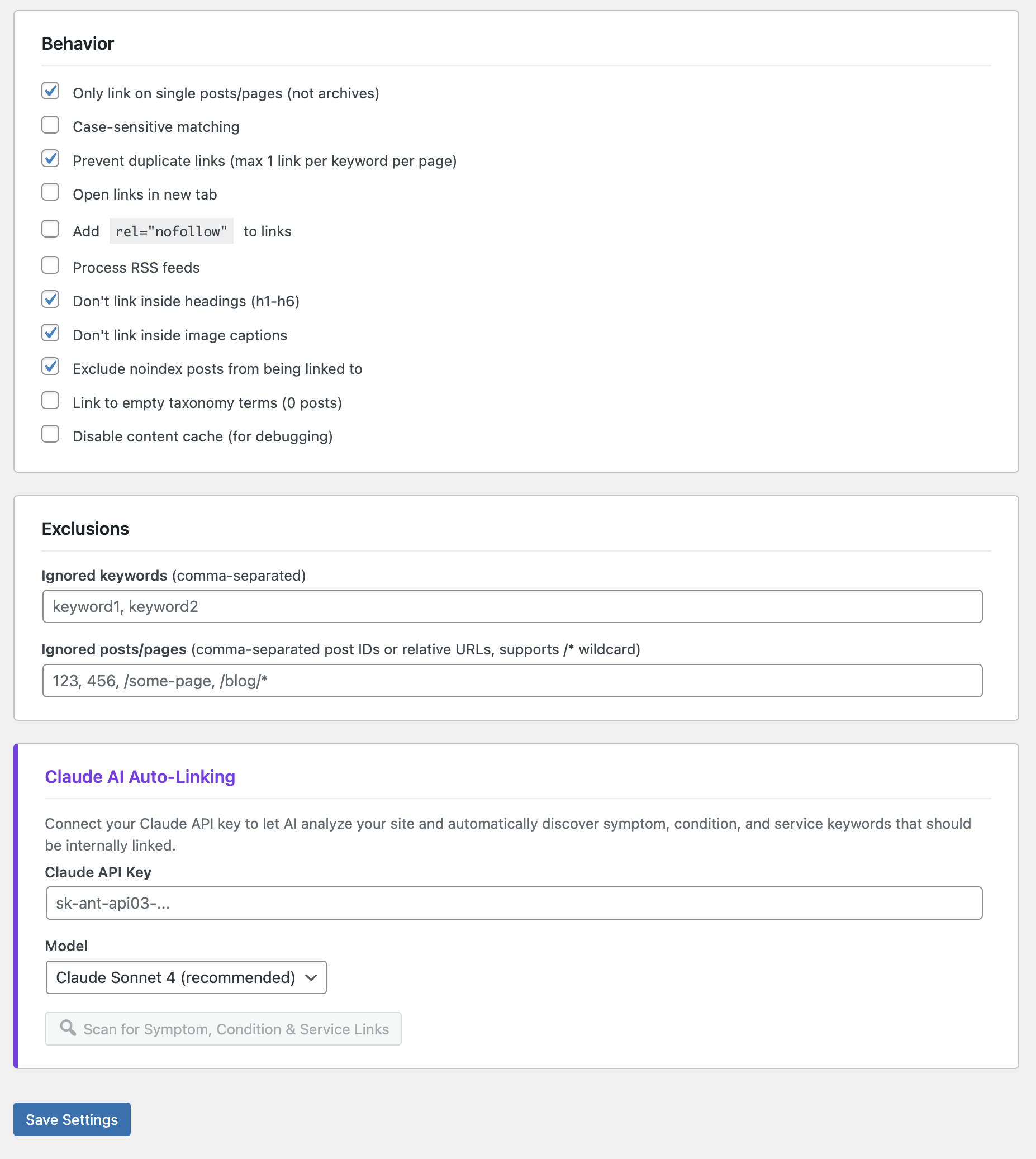
- Smart duplicate prevention — Prevents the same keyword from being linked multiple times on one page
- Configurable link limits — Set max links per page and per keyword
- Heading protection — Never inserts links inside h1-h6 headings
- Image caption protection — Skips links inside figcaption elements
- Self-link prevention — Never links a page to itself
- Dead link prevention — Automatically skips rules pointing to URLs that do not exist on your site
- WooCommerce compatible — Automatically skips cart, checkout, and account pages
- Noindex exclusion — Optionally exclude noindex posts from being linked to (Yoast and SmartCrawl supported)
- Custom post type support — Works with any public post type
- Per-post exclusion — Disable auto-linking on individual posts via post meta
- Case-sensitive or insensitive matching
- Wildcard URL exclusions — Exclude entire URL patterns from processing
- RSS feed support — Optionally process RSS feeds
- Open in new tab and nofollow options
- Divi theme compatible
- Object cache friendly — Results are cached for performance
- Import / Export settings — Move your configuration between sites with a single JSON file
- Claude (Anthropic) — Using Claude Sonnet 4 or Claude Haiku 4.5
- OpenAI — Using GPT-4o, GPT-4o Mini, or GPT-4.1
安装:
- Go to Plugins > Add New in your WordPress admin.
- Search for BASIX Auto Links.
- Click Install Now, then Activate.
- Go to Settings > Auto Links to configure.
- Download the plugin ZIP file.
- Go to Plugins > Add New > Upload Plugin in your WordPress admin.
- Upload the ZIP file and click Install Now.
- Activate the plugin.
- Go to Settings > Auto Links to configure.
屏幕截图:
常见问题:
Does this plugin modify my post content in the database?
No. Links are inserted at display time using WordPress content filters. Your actual post content is never changed.
Will this slow down my site?
The plugin uses WordPress object caching to minimize database queries. On most sites, the performance impact is negligible. If you use a persistent object cache plugin (like Redis or Memcached), results are cached even more efficiently.
Can I disable auto-linking on a specific post?
Yes. Add a custom field with the key _basix_al_exclude and any truthy value (like 1) to any post where you want to disable auto-linking.
Does it work with custom post types?
Yes. Any public custom post type registered on your site will appear in the settings and can be used both as a content source (where links are inserted) and as a link target.
Do I need an AI API key to use this plugin?
No. The AI feature is completely optional. The plugin works perfectly with manual keyword rules, post title matching, and taxonomy linking — no API key required.
How are my AI API keys stored, and is that secure?
For the most secure setup, define your key as a constant in your wp-config.php file so it is never stored in the database at all:
define( 'BASIX_AL_CLAUDE_API_KEY', 'sk-ant-...' );
define( 'BASIX_AL_OPENAI_API_KEY', 'sk-...' );
When a constant is set, the matching settings field is locked and the key is read directly from wp-config.php. If you enter a key in the settings field instead, it is stored in your site's options table — but the field never prints the saved key back into the page (you see only a masked hint such as "ending ••••aB12"), so the key cannot be read from the page source, and keys are always excluded from exported settings files. To replace a saved key, just type a new one; to keep it, leave the field blank.
What happens if I delete a page that keyword rules point to?
The plugin automatically validates that target URLs exist before inserting links. If a target page is deleted or unpublished, the corresponding rules are silently skipped. No broken links will be created.
Is it compatible with WooCommerce?
Yes. The plugin automatically skips WooCommerce cart, checkout, and account pages to avoid interfering with the shopping experience.
Is it compatible with Divi?
Yes. The plugin includes specific compatibility handling for the Divi theme builder.
Can I use relative URLs in my keyword rules?
Yes, and it is recommended. Using relative URLs (like /services/web-design instead of https://example.com/services/web-design) ensures your rules continue to work if you change domains.
更新日志:
- Security: API keys are no longer rendered back into the settings form, so they can never be read from the page source. A saved key is shown only as a masked hint — leave the field blank to keep it, or type a new one to replace it.
- Security: You can now define your API keys as
wp-config.phpconstants (BASIX_AL_CLAUDE_API_KEY/BASIX_AL_OPENAI_API_KEY) so the key never needs to be stored in the database. When set, the settings field is locked. - Security: API keys are now always excluded from exported settings files (the "include API keys" option has been removed).
- No changes to internal-linking behavior; existing saved keys are preserved on upgrade.
- Initial release.
- Custom keyword-to-URL linking rules.
- Automatic post title and taxonomy term linking.
- AI-powered link discovery with Claude and OpenAI support.
- Import and export settings as JSON for multi-site setups.
- Configurable link limits, heading protection, and duplicate prevention.
- WooCommerce and Divi compatibility.
- Per-post exclusion support.
- Dead link prevention with URL validation.