
Baton – AI Walkthroughs, Guided Tours & Client Handover
| 开发者 | jovialcore |
|---|---|
| 更新时间 | 2026年11月19日 21:29 |
| PHP版本: | 8.0 及以上 |
| WordPress版本: | 7.1 |
| 版权: | GPLv2 or later |
| 版权网址: | 版权信息 |
详情介绍:
- In your dashboard, click Baton → Record a walkthrough in the admin bar.
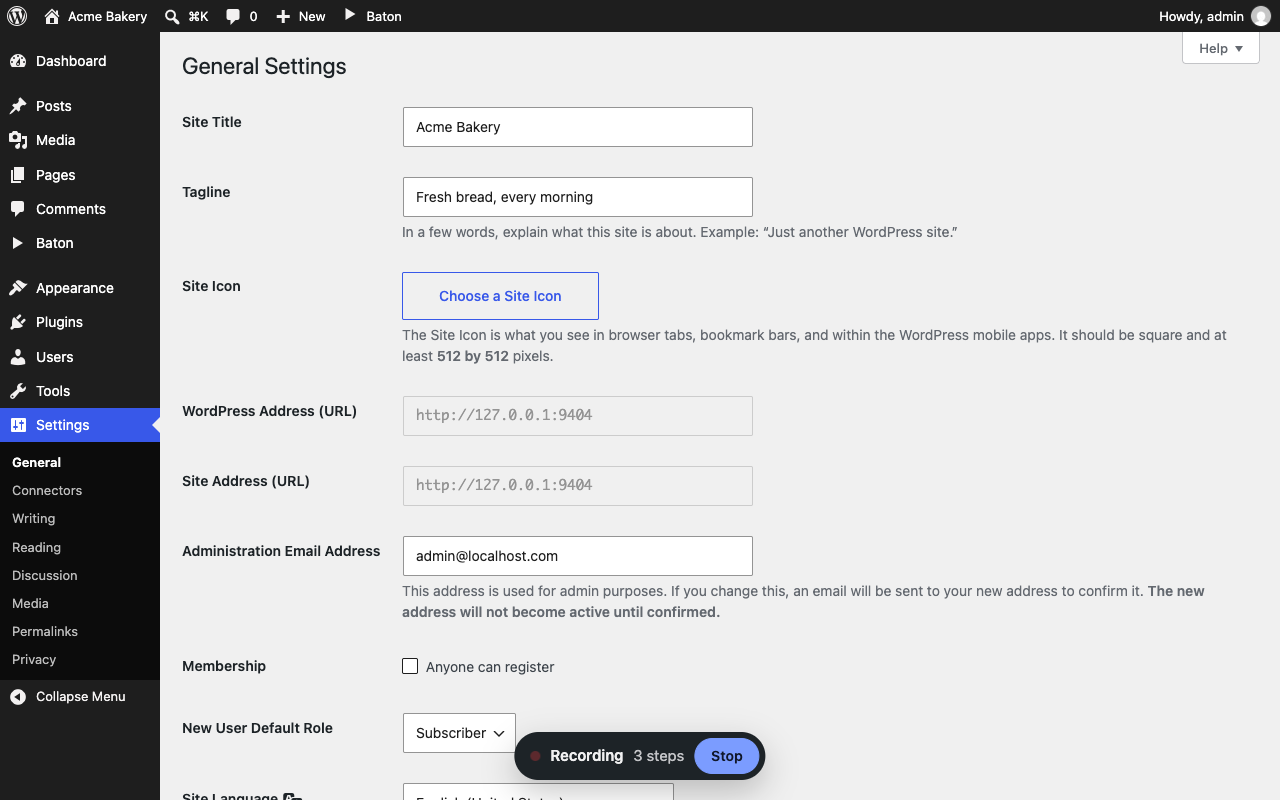
- Do the task you want to show, across as many screens as you need.
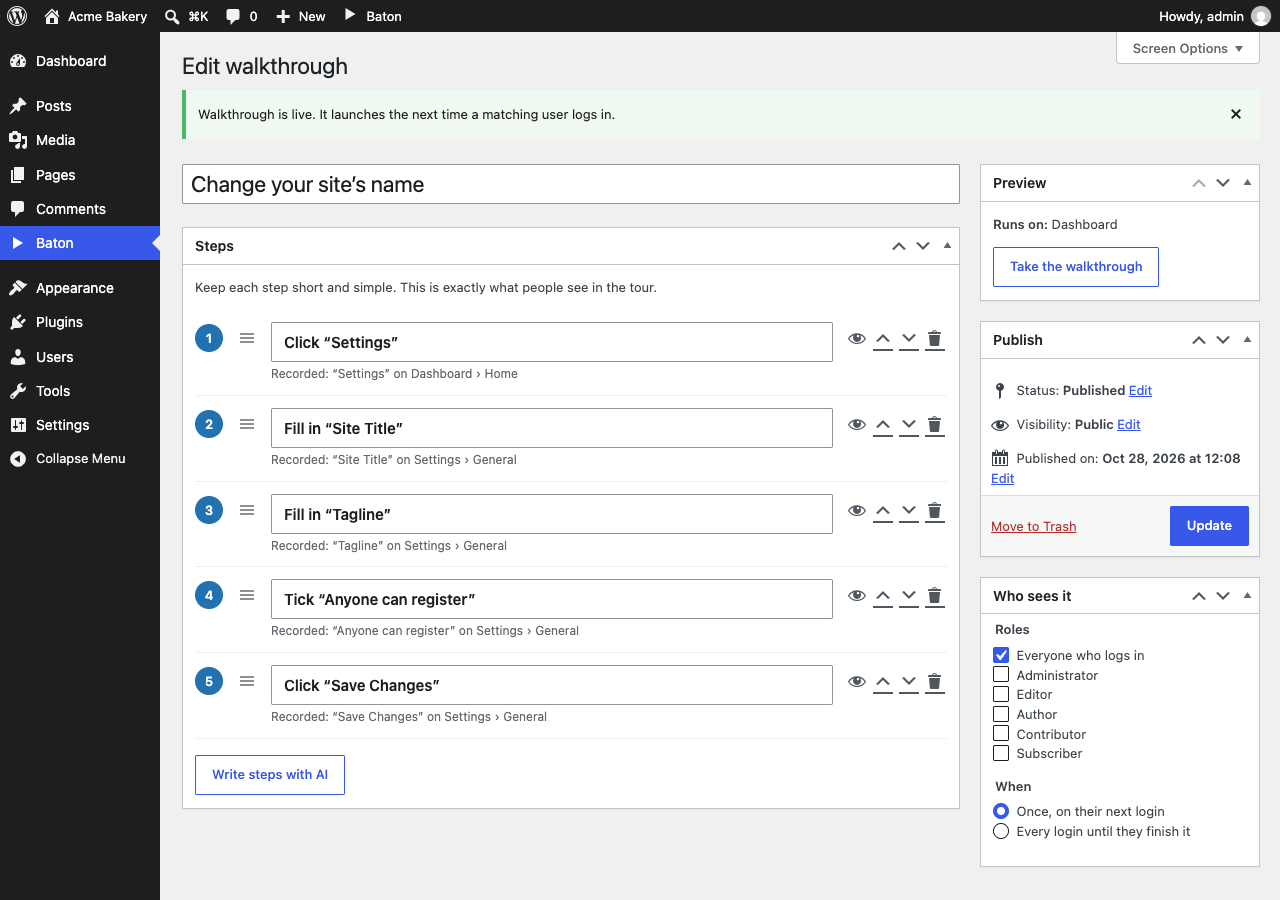
- Click Stop, give it a name, and let AI write the steps (or write them yourself).
- Click "Take the walkthrough" to try it yourself, then pick who should see it and publish.
- A practice copy of every screen, with each menu, button or box highlighted and a plain-words tip
- Clicking the highlighted spot moves on, typing goes in the boxes, so people learn by doing
- Publish, Install and Activate happen for real, for people allowed to do them
- "Watch it", to see the whole task played step by step
- The same steps every time, whatever has changed on the site since you recorded
- Works in the block editor too, including inside the writing area
- AI that writes ridiculously simple steps like "Click “Pages”", "Fill in “Site title”" or "Tick “Allow comments”", and leaves out side trips like opening Help
- Control over who sees each walkthrough (by role) and when (once, or every login until they finish)
- A list of walkthroughs in the admin bar, so people can take them again any time
- A preview button, so you can try any walkthrough (even a draft) before anyone else sees it, or jump to a single step
- Works on multisite: each site keeps its own walkthroughs and progress
- A tour link for each published walkthrough, to put on a button, a menu item or in a help doc
- Edit, reorder (drag and drop) or remove any step
- Recording is only for site administrators, and only while you've pressed Record
- Only clicks and a copy of each screen are saved, on your own site. Passwords are never kept in the copies
- Clicks on Baton's own menu are left out
- AI is optional, and never sees anything typed
- Walkthroughs on the front end of your site, for customers, members and students
- Tours for guests and visitors who aren't logged in
- Record inside Elementor's editor
- Start a tour automatically, or suggest it on the pages you choose
- Invite-only walkthroughs, shared with a private link
- Your own name in the dashboard menu, and no "Made with Baton"
- Unlimited AI step writing
安装:
- Install and activate Baton.
- Go to any page in your dashboard.
- Click Baton → Record a walkthrough in the admin bar and start clicking.
屏幕截图:

常见问题:
Who sees a walkthrough?
Logged-in users with the roles you tick. Tick none and everyone who logs in sees it. Drafts are never shown.
When does it launch?
Right after login, in the dashboard. It opens over whatever screen they land on. You choose whether it starts straight away or asks first, and whether it shows once or at every login until they finish it.
What if a screen changes after I record?
Nothing breaks. People practise on the screens as you recorded them, so every step is always where you left it. If the real screen has changed a lot, record the walkthrough again.
What about pop-ups that only show once, like the editor's welcome guide?
If you click one while recording, it becomes a step, and it shows in the practice just like it did for you. You can remove that step on the walkthrough's edit screen.
Do I have to use AI?
No. AI only runs when you click "Save and let AI write the steps" or "Write steps with AI". Otherwise, Baton writes simple steps from the button and link names, and you can edit every one of them.
How much AI can I use?
Each site can use AI to write steps 10 times a day, for free. After that, steps are written the plain way until the next day. Baton Pro removes the daily limit.
How do I add a "Take the tour" button?
In the Walkthroughs list, click "Copy tour link" under a published walkthrough. Put that link on any button or menu item. Only people in "Who sees it" get the tour.
Does Baton add any links?
Practice in your dashboard shows a small "Made with Baton" link in the top bar. Baton never adds links to the public side of your site.
Can I use it on the front end of my site?
Yes, with Baton Pro.
更新日志:
- Practice on a safe copy: people click through screens exactly as you recorded them, and nothing they click there can break the site.
- Publish, Install and Activate happen for real at the end, with the title and words they typed and the categories they ticked.
- Watch it: sit back and see the walkthrough play itself, or play it again after the end.
- Record inside Elementor with the Record with Baton button in its top bar (Baton Pro).
- AI tidies recordings by leaving out side trips, and you can put them back.
- After recording, Baton offers to remove the test posts and plugins it left behind.
- Walkthroughs only go to people who can open every page in them.
- "How was this?" at the end, and a Send feedback page to reach the author.
- Each walkthrough's size shows in the list.
- Screen copies never keep passwords, keys, tokens or security codes.
- First release: record dashboard walkthroughs, click-by-click guided tours on login, block editor support, previews, tour links, AI step writing.