Beplus Security Headers & Script Auditor
| 开发者 | rimbeplus |
|---|---|
| 更新时间 | 2026年10月18日 12:03 |
| PHP版本: | 7.4 及以上 |
| WordPress版本: | 7.1 |
| 版权: | GPLv2 or later |
| 版权网址: | 版权信息 |
详情介绍:
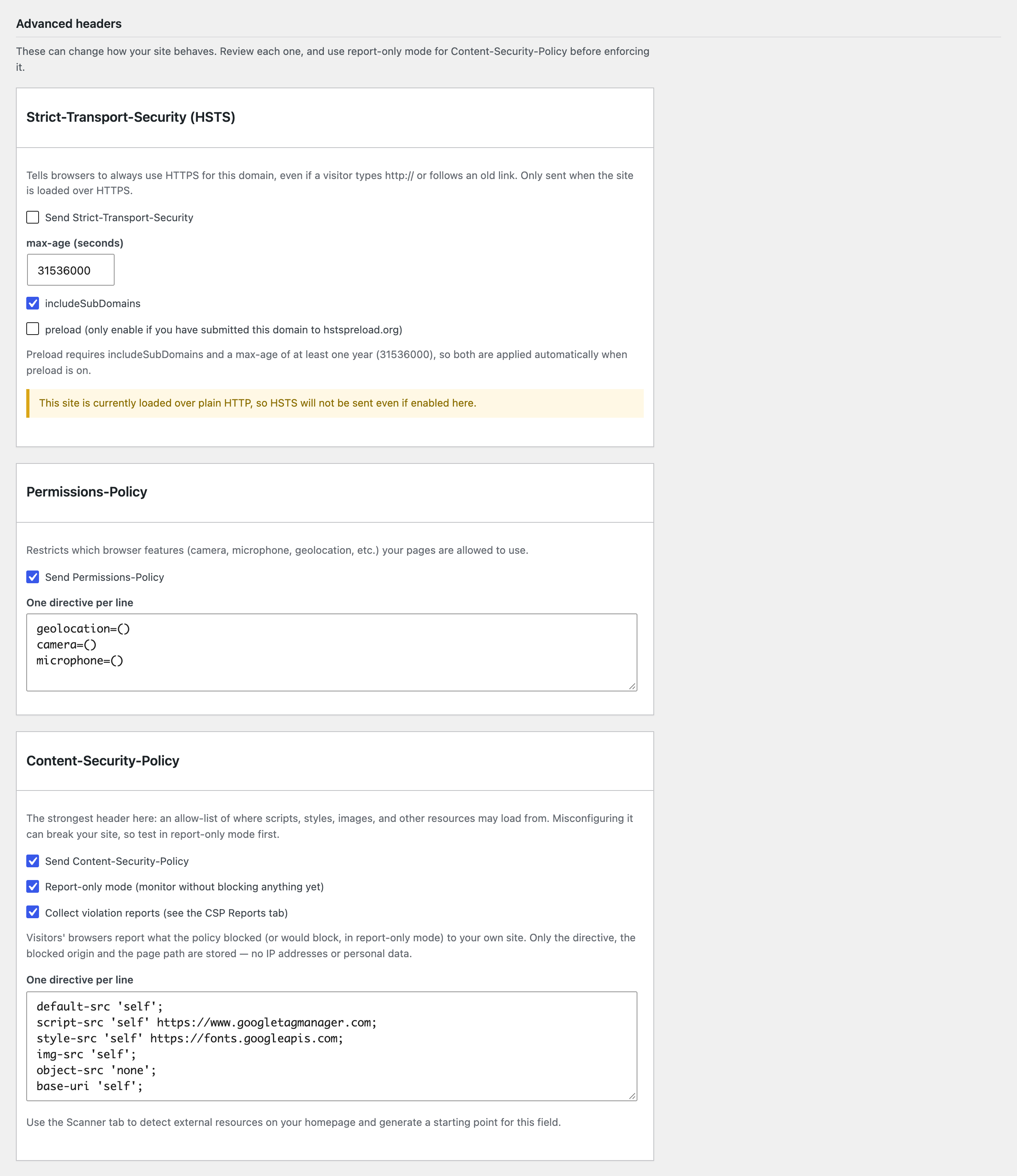
- Security header toggles — enable X-Frame-Options, X-Content-Type-Options, Referrer-Policy, Strict-Transport-Security, Permissions-Policy, Content-Security-Policy (with an optional report-only mode), and the legacy X-XSS-Protection header, each with sensible defaults. Headers are sent on your public pages and, optionally, on wp-admin, the login page and the REST API too.
- A live header check — requests your site the way a visitor would and shows which headers actually arrive. If a page cache, CDN or server configuration drops or overrides a header, you'll see it.
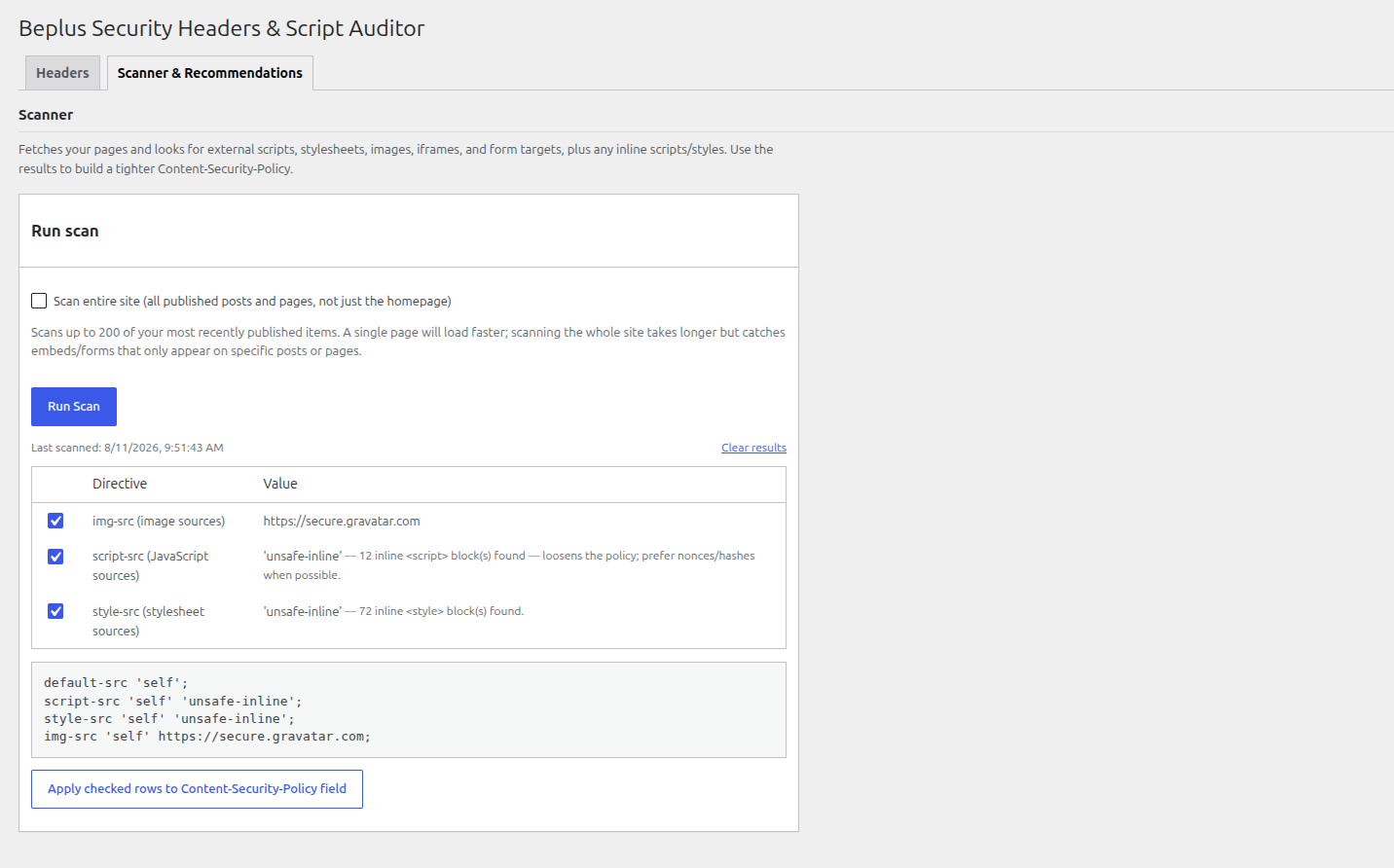
- A scanner — fetches your homepage, or optionally your whole site (up to 200 of your most recently published posts/pages), and lists every external script, stylesheet, font, image, video/audio, iframe and form target it finds, plus inline scripts/styles. Well-known services such as Google Fonts, Google Analytics, Stripe and reCAPTCHA also get the extra origins they load at runtime, so the suggested policy doesn't break them.
- Recommendations you control — every finding is listed as a checkbox row; uncheck anything you don't want, and the Content-Security-Policy preview updates live. Apply the checked rows to the CSP field with one click, review it, then press Save. Nothing is ever applied automatically.
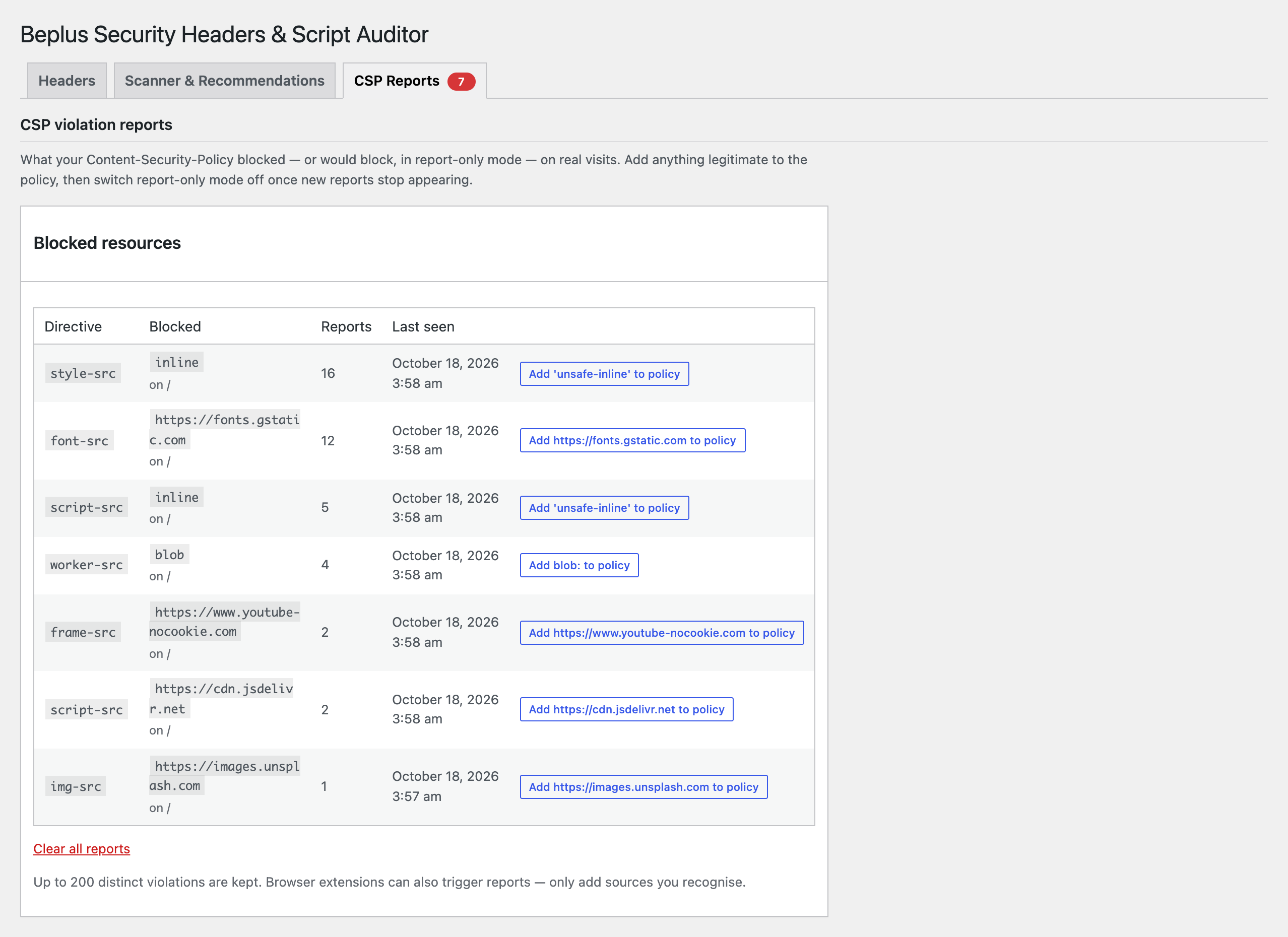
- CSP violation reports — in report-only mode, visitors' browsers report what the policy would block to your own site. The CSP Reports tab lists each blocked resource with a one-click "Add to policy" button, so you can tighten your policy from real data before enforcing it.
- No external service calls, tracking, or phone-home behaviour — the scanner and header check only request pages on your own site, and CSP reports are sent by browsers to your own site.
- Every setting is sanitized on save, and header values are stripped of line breaks to prevent HTTP header injection.
- Sensible, conservative defaults: only X-Frame-Options, X-Content-Type-Options, and Referrer-Policy are enabled out of the box. HSTS, Permissions-Policy, CSP, and X-XSS-Protection are opt-in since they can affect how your site behaves and should be reviewed first.
/wp-json/beplus-shsa/v1/csp-report). The plugin stores only the violated directive, the blocked origin or keyword (e.g. https://cdn.example.com or inline), the path of the page, a count and timestamps. IP addresses, user agents, query strings and full URLs are never stored. Reports are kept until you clear them or uninstall the plugin. This feature is off by default.
安装:
- Upload the plugin files to the
/wp-content/plugins/beplus-security-headers-script-auditordirectory, or install the plugin through the WordPress plugins screen directly. - Activate the plugin through the 'Plugins' screen in WordPress.
- Go to the "Security Headers" menu item (in the main admin sidebar) to review the default header configuration.
- Open the Scanner tab and click "Run Scan" (optionally ticking "Scan entire site" first) to see what external resources your site loads, uncheck anything you don't want, then apply the checked rows to the Content-Security-Policy field.
- Click "Save Changes" to apply your configuration.
屏幕截图:
常见问题:
Will this break my site if I enable everything at once?
It can, especially Content-Security-Policy. Start with the scanner recommendations, use "Report-only mode" for CSP first to observe without blocking anything, and only switch to enforcing mode once you've confirmed the policy covers everything your site actually loads.
Does the scanner send my data anywhere?
No. It performs normal HTTP requests from your own server to pages on your own site, using the built-in WordPress HTTP API. Nothing is sent to any third party.
My settings are saved but the headers don't show up. Why?
Click "Check live headers" on the Headers tab. If headers are missing, a page cache, CDN or your web server is usually serving the page without going through WordPress — clear the cache, or add the headers in your server/CDN configuration. If a header is shown as overridden or sent twice, it's also being set somewhere else (server, CDN or another plugin); set each header in only one place.
Are headers sent on wp-admin and the login page?
Yes, by default (since 1.1.0): every header except Content-Security-Policy and X-Frame-Options is also sent on wp-admin, the login page, admin-ajax and the REST API. CSP is left out because it could break the block editor and other admin screens, and WordPress already protects these pages from being framed. You can turn this off on the Headers tab.
How do CSP violation reports work?
Enable Content-Security-Policy in report-only mode and tick "Collect violation reports". Browsers then report anything your policy would block to your own site, and the CSP Reports tab lists each blocked resource with an "Add to policy" button. Browser extensions can trigger reports too, so only add sources you recognise. Counts are approximate under heavy traffic. On HTTPS sites, Chromium-based browsers use the Reporting API, which can delay reports by up to a minute.
Does this replace a full security audit?
No. Even the whole-site option only scans your homepage plus your most recently published posts/pages (capped at 200) and is meant as a starting point for building a Content-Security-Policy, not a substitute for a complete security review of your site.
更新日志:
- New: Live header check — requests your site like a visitor and shows which headers actually arrive, flagging headers dropped by a page cache/CDN or overridden by the server.
- New: CSP violation reports — collect report-only (or enforced) CSP violations from visitors' browsers on your own site, review them on the new CSP Reports tab and add sources to your policy in one click.
- New: Headers (except CSP and X-Frame-Options) are now also sent on wp-admin, the login page, admin-ajax and the REST API. Previously they were only sent on front-end pages. Can be turned off.
- New: The scanner now detects web fonts, video/audio, srcset images, preloaded resources and fonts/images referenced from inline CSS, and adds the extra origins well-known services need at runtime (Google Fonts, Google Analytics/Tag Manager, Stripe, reCAPTCHA, Meta Pixel, Cloudflare Web Analytics, YouTube, Vimeo).
- New: Suggested policies include
object-src 'none',base-uri 'self'andframe-ancestors 'self'. - New: "Settings" link on the Plugins screen.
- Fix: A policy suggested for a site using Google Fonts or Google Analytics blocked the fonts and analytics requests once enforced, because font and connect sources were never detected.
- Fix: Ticking HSTS "preload" now also applies includeSubDomains and a max-age of at least one year, which preloading requires.
- Fix: JSON-LD and other non-JavaScript script blocks no longer count as inline scripts.
- Fix: The Permissions-Policy and Content-Security-Policy fields ("one directive per line") joined lines with a plain space instead of the separator each header actually requires. Permissions-Policy needs a comma between directives — the plugin's own default value (three directives, no commas) sent an invalid header out of the box whenever the feature was enabled. CSP needs a semicolon between directives; a manually-added line without a trailing
;merged into the previous directive.
- Initial release: security header toggles, homepage/whole-site scanner with a pick-and-choose CSP checklist, and custom header repeater.