Better Click To Share – Shareable Quote Boxes for X (Twitter)
| 开发者 |
ben.meredith@gmail.com
wpsteward |
|---|---|
| 更新时间 | 2026年4月4日 03:52 |
| 捐献地址: | 去捐款 |
| PHP版本: | 3.8 及以上 |
| WordPress版本: | 7.0 |
| 版权: | GPLv2 or later |
| 版权网址: | 版权信息 |
标签
下载
详情介绍:
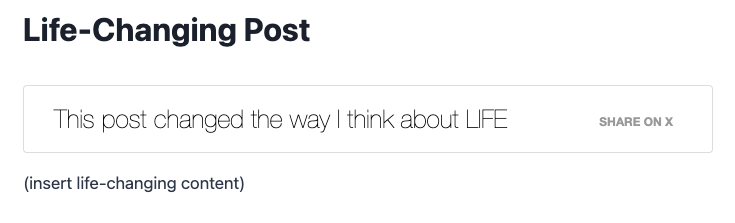
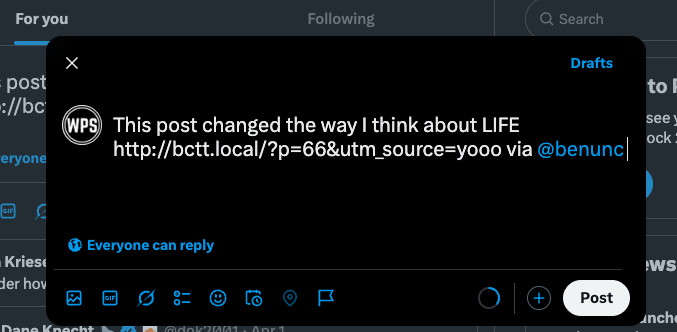
- One-click share on X — Readers see a styled quote box; one click opens X with your quote and your post link ready to post.
- More engagement — Make your best lines easy to share so your content spreads further and drives traffic back to your site.
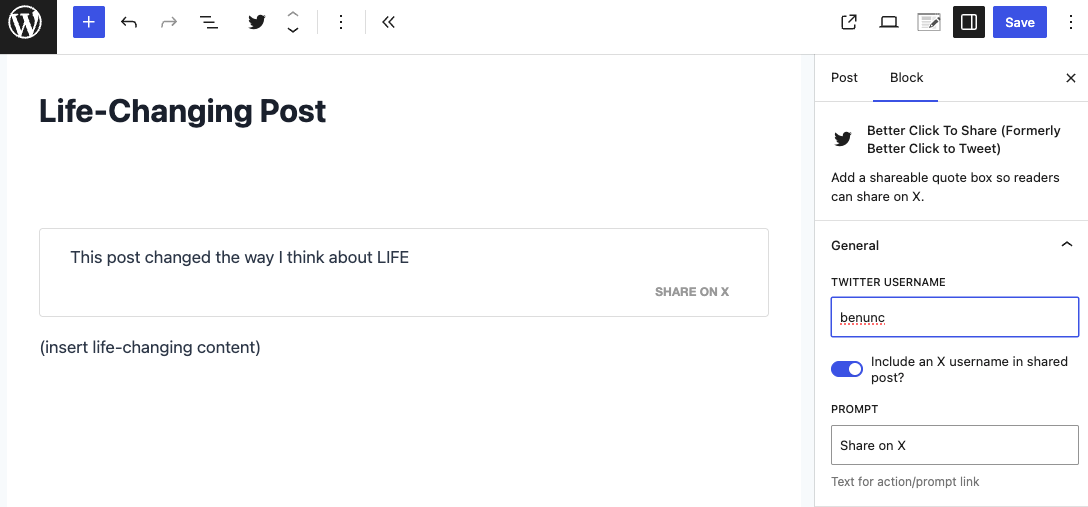
- Block editor + shortcode — Use the "Better Click To Share" block (slash command
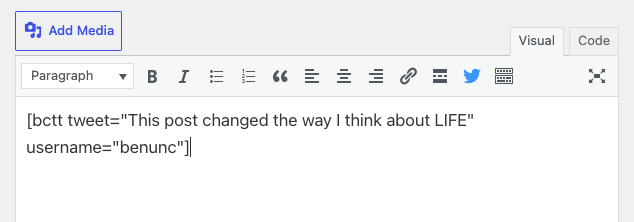
/tweet) or the classic[bctt]shortcode in any post or page (full shortcode support keeps BCTS compatible with things like Elementor, Divi, and even WP Bakery!). - Smart character count — Stays within X’s limits and accounts for your "via @username" and link so shares never get cut off.
- Optional AI suggestions — With WordPress Connectors, get draft share text suggested from your content (usage charges apply per your provider). You can turn this off in settings.
- Premium styles and add-ons — Premium Styles let you pick different looks without touching CSS; Power User Guide and custom CSS options for developers.
安装:
- Log in as an administrator.
- Go to Plugins → Add New.
- Search for "Better Click To Share" or "shareable quote".
- Click Install Now, then Activate.
- Download the plugin zip from this page.
- Go to Plugins → Add New → Upload Plugin and choose the zip file.
- Install Now, then Activate.
- Unzip
better-click-to-tweet.zipand upload the folder to/wp-content/plugins/. - In your WordPress dashboard, go to Plugins and activate "Better Click To Share".
屏幕截图:
常见问题:
How do I add shareable quote boxes to my WordPress posts?
Use the block editor: type /tweet and select the Better Click To Share block, then enter the quote you want readers to share. Or use the shortcode: [bctt tweet="Your shareable quote here."] in the classic editor. The plugin adds a styled box; when readers click, X opens with the quote and a link to your post.
How do I let readers share my content on X (Twitter)?
Better Click To Share adds "share on X" boxes to your posts. You choose the quote; readers click once to open X with that quote and your post link already filled in. Set your X username in Settings → Better Click To Share so shares include "via @yourhandle" and link back to you.
Does Better Click To Share work with the block editor?
Yes. There is a dedicated block: use the slash command /tweet to insert it. You can set the quote, optional "via" handle, and prompt text. WordPress 6.9+ also has an optional "Suggest X Content" panel to get share suggestions from your content (and optional AI drafts if you use WordPress Connectors).
Can I customize the look of my share on X boxes?
Yes. Developers can use custom CSS (see the Power User Guide and custom style options). If you prefer not to code, the Premium Styles add-on lets you pick from several styles in the dashboard.
How does the X character count work for shareable quotes?
X allows 280 characters per post and shortens links (e.g. via t.co) to 23 characters. Better Click To Share reserves space for your "via @username" and the post link, so your quote is automatically shortened to fit. You get the maximum shareable length without broken posts. If you use shortlinks (e.g. with a plugin that customizes the WordPress shortlink), you can enable "Use Short URL?" in settings for trackable links.
Why is it called "Better Click To Share" and not "Tweet"?
We rebranded to Better Click To Share to reflect that readers are sharing on X (formerly Twitter). The plugin name and shortcode [bctt] stay familiar; all user-facing text says "share on X" where it used to say "tweet." The product is the same — one-click shareable quote boxes for X.
Are there other style options for my share boxes?
Yes. The Premium Styles add-on offers multiple designs. Developers can style boxes with custom CSS or the Power User Guide for advanced shortcode options.
What if I need help?
Support is active in the WordPress.org support forums. Start a thread there; you can usually expect a response within a day or two. For bugs or feature requests, open an issue on GitHub.
How can I help?
- Translations: Translate the plugin
- Code & ideas: GitHub issues and pull requests
- Donate: Support the plugin
更新日志:
- rebrand — Major refresh of the admin interface to emphasize "Better Click To Share" and align with the X rebrand. Settings and plugin UI have been reorganized and restyled for clarity; all existing functionality is unchanged and nothing should break. We're bumping to 6.0.0 only because the interface is being so thoroughly overhauled — same shortcodes, same block, same behavior.
- enhancement — Add-on update order: when an add-on requires a newer core version than the one installed, its settings tab now shows a clear message asking you to update Better Click To Share instead of deactivating the add-on. Add-ons stay active; update core when ready and your existing settings are unchanged.
- fix — the updater for folks who have premium add-ons was not working. Now it is. No functionality changes to the plugin at all.
- feature — "Suggest X Content" panel in the block editor sidebar (WordPress 6.9+): get tweet suggestions from your post and drop in a Better Click To Share block with one click. No AI required — we'll pull smart excerpts from your content.
- feature — Optional AI-powered suggestions when you've connected a model (WordPress Connectors): our cheekily named assistant "Bill" steps in as a senior social media marketer and drafts an engaging tweet for you. Usage charges apply per your connected provider; we're not responsible for those, but we make sure you can say so before anyone hits the button.
- enhancement — Site-wide usage agreement for AI: agree once in the editor to accept responsibility for charges; only admins can revoke it (Settings → Better Click To Share). Non-admins see a friendly note that an admin can connect a model.
- enhancement — Settings page now has an "Allow AI tweet suggestions?" checkbox so admins can turn AI features off for everyone without touching the editor. The editor even links you there with a "disable AI features for all users here" that scrolls straight to the checkbox. We're helpful like that.
- enhancement — Block updated to API version 3 for iframe editor compatibility. Better Click To Share works in the iframed post editor and won't nag you in the console about deprecation. Tested and ready for WordPress 7.0.
- chore — Tested and confirmed compatibility with WordPress 7.0
- random — Bill (the AI) has not yet asked for a raise. The promo code CHANGELOG at https://benlikes.us/bcttps remains unclaimed.
- fix — Fixed translation loading issues for WordPress 6.8 compatibility by ensuring translations are loaded at the proper time
- enhancement — Modernized block editor code to use the latest WordPress block editor APIs and patterns
- enhancement — Added block.json for improved block registration
- enhancement — Updated React components to use modern patterns and hooks
- chore — Tested and confirmed compatibility with WordPress 6.8
- random — Still waiting for someone to use the promo code CHANGELOG at https://benlikes.us/bcttps
- enhancement — finally gave up hope that Elon Musk would come to his senses on this whole "rebrand" thing, and went about removing the words "Tweet" and "Twitter" from the user interfaces throughout the plugin. Of course, you'll note that we didn't change the name of the plugin, but any place where your readers see it we made it such that you can talk about "sharing on X" instead of "clicking to Tweet." To the future of this platform!
- chore — checked for compatibility with the latest version of WordPress
- random — Checking to see if there's a record to be broken on age-of-unused-promo-code (the promo code is CHANGELOG at https://benlikes.us/bcttps) but the folks at Guinness won't return my calls.
- fix — the title was immediately overwriting things if users cleared the text from the block. Now it waits three seconds, and if you've not typed anything, it'll overwrite it.
- chore — I forgot to mention in the 5.11.1 changelog, but I also tested for compatibility with WordPress 6.2
- news — Twitter has been doing some relatively aggressive repositioning under Elon Musk, but so far none of the changes there have adversely affected Better Click To Tweet. I'm obiviously keeping an eye on things, but overall just kinda sad that lots of good people have left Twitter.
- random — I still feel like more of you could be using the promo code CHANGELOG at https://benlikes.us/bcttps, considering nobody ever has.
- chore — update the dependencies related to wp_scripts. This should have no effect other than stabilizing performance related to the block editor and compatibility with other plugins that use the block editor.
- chore — remove the MailChimp sign-up option from the settings pages, replacing it with mailerlite.
- chore — attempted to get my 5-year-old to do his homework. Was way harder than anticipated. You should use the code CHANGELOG at https://benlikes.us/bcttps
- security — prevent unauthenticated access to some settings.
- updated compatibility for PHP 8.0 and 8.1
- checked to make sure it works on the forthcoming WordPress 6.1
- fix – patch minor security issue. Short version: if an attacker already has admin access to your site (or feeds a vulnerable admin user a specific string) they could execute code remotely on sites with very specific server configurations. But if an attacker already has admin access to your site, there are much easier and effective ways of doing nefarious things. Still, it's good to remove unescaped potential vulnerable inputs. So we did.
- chore – tested for compatibility with WordPress 6.0
- chore – the number of people using promo codes is too (darn) low. Use promo code CHANGELOG at https://benlikes.us/bcttps
- fix — resolved a bug where Better Click To Tweet was not playing nicely with other plugins that made changes to the title related filters.
- chore — unrelated to the plugin, there's so much pollen in the air in South Carolina. You can see it like a cloud. Use promo code CHANGELOG at https://benlikes.us/bcttps
- feature — adding a blank [bctt] shortcode populates the Better Click To Tweet box with the post/page's title.
- bonus — moved to the country. Incorrectly assumed I'd eat a lot more peaches, based on my extensive knowledge of Presidents Of The United States songs from the 90s
- chore — confirm compatibility with WordPress 5.7 and PHP 8.0
- sale — you should reward yourself with the promo code CHANGELOG at https://benlikes.us/bcttps
- chore — check for compatibility with the upcoming WordPress version 5.6
- enhancement — update some of the links and text on the settings page.
- fix — the upsell nag was previously showing on any page that was related to plugins, including the update interface. now it only shows up on the plugins page itself.
- chore — tested up to WordPress version 5.5
- fix — a woocommerce function somehow made it into my setup wizard, which has been removed now. It was causing errors on a select few installs on installation.
- switcheroo — going back to featuring the Premium styles add-on in the plugins page upsell. You should buy that with a coupon of CHANGELOG at https://benlikes.us/bcttps
- fix — the links being sent to mailchimp for those opting into the newsletter were sending an incorrect subset, resulting in incorrect data.
- fix — resolve a minor error on the Premium Styles tab of the settings with folks who had their own custom styles enqueued but not the offical Premium Styles add-on.
- bonus — there's still not-so-much usage for the CHANGELOG discount code at https://benlikes.us/bcttps I'm personally fine with folks paying full price, tho.
- enhancement — new onboarding/welcome wizard to help users maximize their productivity with the plugin.
- fix — at long last, this plugin doesn't eat up valuable Top Level Menu space, and all menu items for the free plugin or premium addons are moved to tabs.
- chore — tested up to 5.3, and listen, if you're not on at least 5.2 for the massive enhancements like recovery mode, you definitely should be.
- bonus — people keep giving me extra money when they check out at betterclicktoshare.com because they don't read changelogs. You've got a leg up and can get a discount with code CHANGELOG.
- fix — resolving PHP notices related to the custom URL not being set.
- fix — resolve outstanding errors around UTM tags add-on integration.
- chore — tested up to WordPress version 5.2. you should definitely be on 5.2. It's awesome.
- bonus — I feel like you people aren't reading my changelogs. I'm over here handing out discounts, and y'all just keep paying full price. try CHANGELOG to see if you get 10% off!
- new — created a new nag for the plugins page announcing the UTM tags add-on.
- new — added a link to the main settings page for folks to check out the new UTM Tags addon.
- bonus — people who read change logs should get a discount. Use the code CHANGELOG at checkout for 10% off. https://benlikes.us/bcttaddons (good on the bundle, too!)
- new — adding a filter and various other enhancements to support a new UTM tags add-on
- fix — testing with the newest version of the block-based editor (Gutenberg)
- new — added a constant to define the core BCTT version, allowing add-ons to make sure that BCTT core is up to date before activating.
- fix — two spelling typos in the new License activation page. Thanks to @garrett-eclipse on Github for the fix.
- fix — on certain installs I was getting a front end notice about an undefined variable. This patch fixes that. Thanks to @dannycooper for the help!
- fix — replace premium styles page for premium styles users.
- feature — moved license management for premium add-ons (get them at https://www.betterclicktoshare.com today!) to the core plugin. Free plugin users will not notice a difference here at all. Premium users: check your email!
- enhancement — several updates to code comments for clarity.
- enhancement — the callback URL (from tweet back to website) is now filterable.
- not much in terms of user-focused enhancements in this release, but a ton happened "under the hood."
- fix — added a parameter to the mailing list signup in the admin to help determine where some suspicious signups are originating from.
- enhancement — gave the readme file a makeover so that the page on the plugin directory is more focused and provides greater value.
- fix — resolve an error for folks running both WordPress 5.0 and PHP version 5.3.x
- fix — changes to make the code more legible for humans. But only the total geeks.
- fix — update language on the settings page about the tweet length (280 character support added earlier, this is updating the help text to reflect that)
- fix — tested up to WordPress 5.0
- random — updated the text on the email signup box on the settings page. I don't offer a PDF any more... It's more of a email drip sequence at this point.
- fix — resolving zip problem.
- fix — another attempt at the "invalid headers" intermittent problem.
- fix — improving compatibility with WordPress 5.0 and the new block-based (Gutenberg) editor. Thanks again to @ajitbohra for the help
- fix — resolve "invalid headers" problem on certain new installs
- Enhancement — added compatibility with WordPress 5.0's new editor, codenamed Gutenberg (thanks to Ajit Bohra @ajitbohra for all the great work!)
- Enhancement — Some CSS modifications to make the plugin play nicely with the new editor.
- Enhancement — changed the twitter bird icon for an updated one on the front end. (Thanks to @oliverpitsch for the PR on Github.)
- Security fix — added a line to the output that secures the target _blank vulnerability. Thanks to @dmv912 on the wordpress forums for the call-out!
- Fix — removed a line that was breaking things.
- Fix — made the settings page more accessible with the help of Rachel Cherry's fantastic wa11y plugin. https://wordpress.org/plugins/wa11y/ Thanks Rachel!
- Started tinkering with Gutenberg compatibility, the new editor experience coming to WordPress, to make BCTT compatible with the Future of WordPress (no file changes on this, just wnate to let you know it's on the radar. Learn more at https://wordpress.org/gutenberg
- Enhancement — Now supports Twitter's new 280 character limit. Note that non-roman characters may effect the new truncation in strange ways. Please report any such strangeness to me in the support forums.
- Enhancement — updated some links in the back end to link to the all new (and still kinda bland) https://www.betterclicktoshare.com
- Security Fix — potential XSS vulnerability on settings page. (mild security risk only affecting logged-in administrator accounts previously compromised). Thanks Robbie at DXW @robbiepaul on Github for the responsible disclosure.
- If the last point didn't make any sense, please translate it to "UPDATE NOW. Previous versions of the plugin are mildly vulnerable to enterprising attackers."
- enhancement — cleaned up the various options checks that were happening on the front end (thanks @igmoweb on GitHub!)
- Readme changes. I also celebrated a milestone of 20K active installs, which was cause for great celebration, and at least one undocumented happy dance.
- fix — unused $handle_code variable has been removed. Was causing some errors for folks.
- fix — code introduced in 5.2 messed up the "via" option and the option to not include the URL. This has been fixed.
- security fix — adds (more) escaping throughout the plugin. Thanks to Paul de Wouters from HumanMade for the PR!
- enhancement — tested for compatibility with WordPress core 4.8
- but seriously, you should check out Premium Styles. https://benlikes.us/bcttps
- enhancement — I added a highly dismissable notice to the plugins page upon update, encouraging people to purchase my Premium styles add-on. The notice only shows to folks who have not previously customized their own styles, and once dismissed will never be shown to that user again.
- enhancement — I made several changes to the readme file so that the plugin is showcased nicely in the WordPress Plugin Directory's new design.
- fix — I was incorrectly calling translation module, breaking things when people updated to the latest version of Yoast SEO.
- fix — "subscribe" text on plugin settings page was not translatable.
- New customers are enjoying Premium Styles: https://benlikes.us/bcttps
- enhancement — settings page now looks good on mobile. Before it looked a bit like someone was actively hitting it with a bat.
- enhancement — added multiple action hooks to the settings page. This provides third party developers with the ability to add things to that page without hacking the core code.
- enhancement — made the function enqueuing the front end styles DRYer.
- change — the previous way (version 4.9) I had filtered the function enqueuing styles was throwing PHP warnings when I used it, so I introduced an options-based method for never enqueueing it in the first first place. Updated gist for that: https://benlikes.us/bcttgist2 This method will also pave the way for the most exciting update (for me) in the history of Better Click To Tweet:
- change — introduced the first premium add-on (Premium Styles), and made some changes to the settings page to facilitate that. The goal is threefold: (1) Don't introduce the option to folks who have already replaced the custom stylesheet using the power user guide https://benlikes.us/7r or by dequeueing the stylesheet using this gist https://benlikes.us/bcttgist1 (2) Introduce the option to purchase custom styles in a non-sleazy way. (3) Um, introduce the option to my tens of thousands of happy users to pay me for something.
- enhancement — added a 'prompt' shortcode attribute, so not you can change the words "Click To Tweet" on a per-box basis. Thanks to @apearlman on the Wordpress.org support forums for the suggestion!
- fix — changed the way the shortcode attributes are called, because my IDE kept throwing strange errors because the code wasn't clean enough.
- fix — removed some unused local variables because I used to not know how to code things good.
- dream — thought about ways to monetize this plugin, but ultimately decided against it for now, because I hate dashboard nags. But if you like it, donate: https://benlikes.us/donate
- change — decided to go with 4.10 instead of 5.0 in an attempt to move toward a version numbering system that makes sense, because I have learned much since 0.X --> 1.0.
- just for kicks and totally unrelated — wrote a cool post about rolling back WordPress plugins: https://benlikes.us/fk
- enhancement - Made the function that registers and enqueues the scripts filterable, so that developers who want to put all styles for Better Click To Tweet boxes in their theme files are able to do so using this snippet: https://gist.github.com/Benunc/533985231bbfde551d019620f628a921
- two updates in a row with no love for the non developer, but MUCH love for the developer. Trust me, this one is big time for CSS developers to be able to add styles to themes.
- changed some specifics in the FAQ, and the Readme in general. Encouraged people to donate at https://benlikes.us/donate
- made span classes filterable, so that other developers don't hate me when they try to extend the plugin.
- I know that first point doesn't sound like much, but it's huge for developer geeks. You're just gonna have to trust me.
- removed the names of translators from the "description" since they are now being handled by official language packs, and giving credit where it is due was getting complicated.
- updated links throughout the back end of the plugin to send me money, for people who are into that sort of thing. Shoutout to https://givewp.com for the SWEET donation integration on my site.
- added the ability to change the "via" addendum on a per-box basis using the new "username" shortcode attribute. The default behavior is (still) to go with the username you saved on the settings page.
- (non-geek explanation of that first point) Now if you have a guest post by @KanyeWest, your Better Click To Tweet box can add "via @KanyeWest" automatically to your reader's tweets!
- made some changes to the toolbar popup in the visual editor to facilitate the new "username" attribute, limiting confusion and causing much rejoicing.
- Made unsuccessful attempt at getting Kanye West to guest post as the ultimate demonstration of the new feature.
- Tested for compatibility with the upcoming WordPress 4.5, and I don't mean to sound arrogant, but it pretty much NAILS compatibility with 4.5.
- Added a module that shows up when a user is using WordPress in a language for which there is incomplete (or non-existent) translations for this plugin. For users where there is a complete (+90%) translation, nothing will show up. But for users where the translation is incomplete, they'll be encouraged to help with the translation efforts!
- Removed extra (old and unused) js file.
- changed some back-end links to go to my new page, www.wpsteward.com
- realized that my use of tags in the WP repo miiiight have been a touch on the obnoxious and unhelpful side, so now I just use 3.
- successfully overthrew an oppressive regime in my 5-year-old's preschool "mystery reader" cartel. Take that, Fox in Socks.
- Removed call to external twitter script for security concerns.
- changed some wording on the description.
- The click to tweet box is now output as a
<spaninstead of a<div>giving the ability (with custom CSS) to "inline" a click to tweet box.
- fixed an issue that was causing browsers to load older cached versions of the css.
- made no noticable attempts at overthrowing governments, but I did post something on facebook about Donald Trump which made some waves.
- updated css for compatibility with the twenty sixteen theme.
- updated compatibility to WordPress 4.4.
- unsuccessful overthrow of all world governments. I would have gotten away with it too, if it weren't for those meddling kids.
- fixed bug introduced in v 4.5 incorrectly displaying ellipses on truncated tweets.
- added Greek translation.
- fixed issue causing tweets to display incorrectly on iOS Twitter App (thanks to Cameron Conaway for the bug report in the forums)
- Ampersands are now correctly displayed.
- began master plan moving toward world domination.
- Fixed CSS issue with spacing in the default theme.
- Twitter now opens in a new modal box instead of a new tab, (developers: this is done using a call to platform.twitter.com/widgets.js within the code of the output from the shortcode. This means that the script won't be loaded on pages or posts where it's not needed.)
- added Italian language
- added translation support (internationalization or i18n) to the button on the visual editor. Now the entire plugin is translatable!
- updated swedish, finnish, and spanish language files.
- added German and Swedish translations, updated info in readme with link to instructions for migrating from Click To Tweet to Better Click To Tweet.
- made minor change to the bcttstyle.css (sample) file that was bugging me on hover.
- added the ability to specify a custom URL as a shortcode parameter. (more info at the power user tutorial at https://benlikes.us/7r )
- added Russian translation
- added sample bcttstyle.css file (for moving to the root of the /uploads folder) to assets/css
- the plugin now looks for a custom css stylesheet before falling back to the default style, giving designers and developers full access to the CSS, without disrupting user experience for folks just looking to plug and play.
- added Finnish (fi) translation courtesy of Sampsa Daavitsainen at http://calltoaction.fi
- complete overhaul of the visual editor button courtesy @norcross
- added the ability to make all links "nofollow" by adding the parameter
nofollow="yes"to the shortcode. - complete overhaul of the settings page for better readability.
- added Serbian translation courtesy of Borisa Djuraskovic
- small change to the outputted URL for vc3 compliance. Thanks to @tomazzaman on Github for the fix!
- fixed a bug that was creating (rare, server-configuration-related) "Fatal Error" notices for
mb_strlen()and related multibyte functions. - various code tweaks for readability and compliance with WordPress standards.
- fixed bug that was causing the URL not to display on certain clicks after the 3.2 update (thanks @aa_stardust for the heads up!)
- fixed the truncation math given the new options to remove the url (as of 3.2) and via (as of 3.1), to correctly get back all those lost characters.
- added the ability to leave off the url on a tweet-by-tweet basis (handwritten shortcodes only, the visual editor will not show it as an option on the popup window)
- code modifications for clarity.
- added the ability to leave off the
via @YourTwitterNameon a tweet-by-tweet basis. - complete overhaul of the javascript file to enable that functionality without having to mess with hand-coding the shortcode.
- added option to use WordPress shortlink in place of full URL.
- further refinement of the math used in calculating tweet truncation length.
- updated CSS to remove underline on "Click to Tweet" on Twenty Fifteen theme (and others!)
- fixed bug introduced in 2.0 related to javascript.
- added in support for RSS feeds: when outputting to an RSS feed, the click-to-tweet text will be smartly formatted.
- added css declarations to deal with issues in the Twenty Fifteen theme.
- readme enhancements for better user experience.
- Major version release for internationalization: added Spanish (ES) translation, and updated code throughout for internationalization. Still to-do: add translation support for the tinymce plugin on the visual editor.
- updated the tweet length math to correctly parse text with non-standard characters. Thanks to WordPress forum user zachop at https://wordpress.org/support/topic/incorrect-handling-length-count-of-multi-byte-strings for the tip.
- various code cleanup issues, to make my code more readable and complaint with WordPress standards.
- rescued 9 characters that were being stolen by some incorrect math in my tweet-generating function. (now tweets won't be truncated until they actually need to be).
- added margin on the bottom of the bcct-clicktotweet div
- fixed a bug that was not displaying the CSS correctly.
- updated the FAQ and other readme items.
- Initial release.