
Bloatwright – Performance Profiler & Site Speed Audit
| 开发者 | emtiazzahid |
|---|---|
| 更新时间 | 2026年11月7日 18:35 |
| PHP版本: | 7.4 及以上 |
| WordPress版本: | 7.1 |
| 版权: | GPLv2 or later |
| 版权网址: | 版权信息 |
详情介绍:
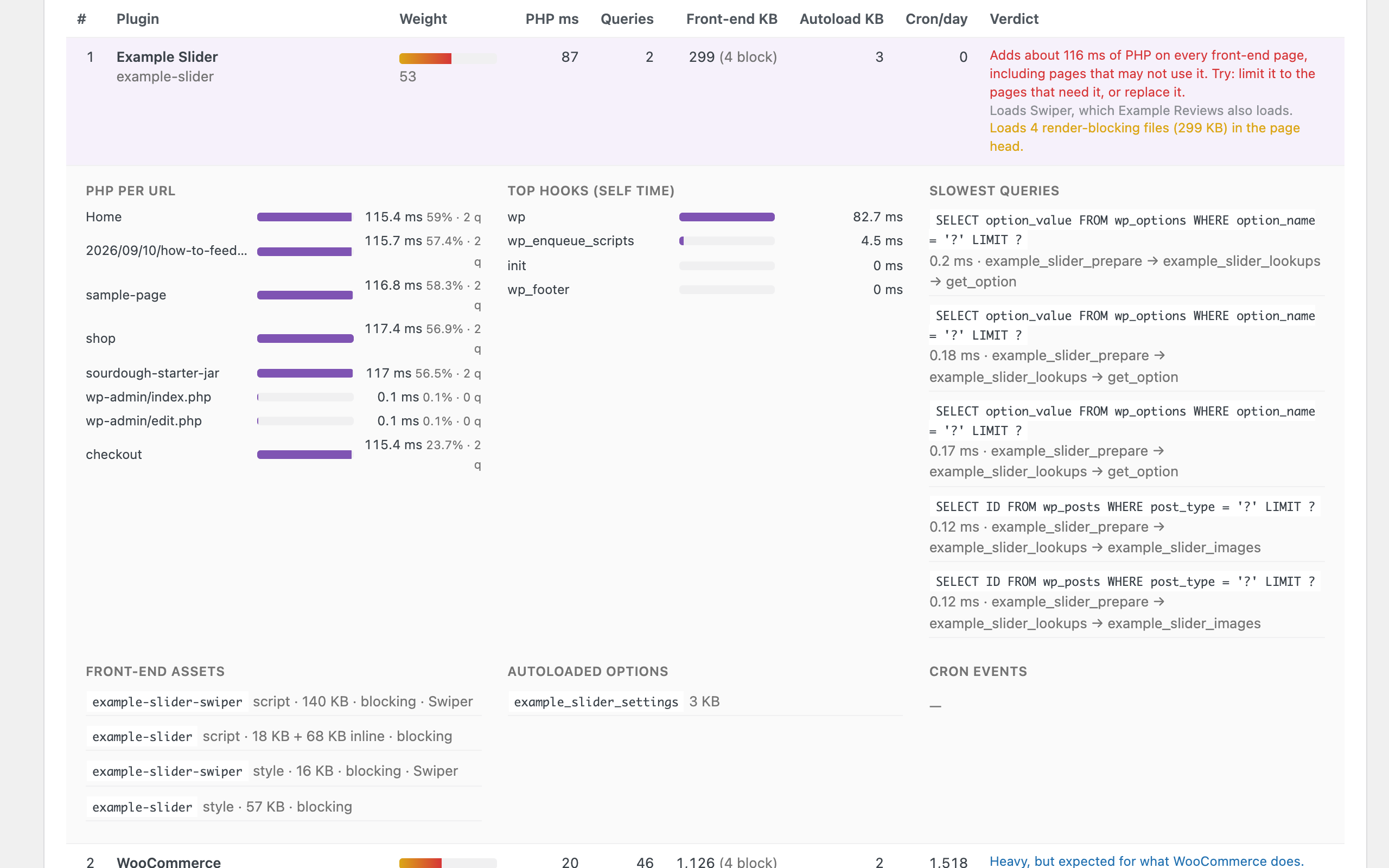
- PHP time (self time, with nested hooks charged to the plugin that actually did the work), averaged per page; its tooltip shows the lowest and highest figure of any single request (any page, any pass). It is the time spent in those of its hook callbacks that the profiler times (see "Which hook callbacks are timed?" below; callbacks in the active theme's folder count for the theme, those in a parent theme's folder for the parent theme) plus, for regular and must-use plugins, the time their main file takes to load, measured until
plugins_loaded. That load time includes any hook callbacks that run while the file loads, so it overlaps with the time charged to those callbacks' owners. Not measured separately: the theme'sfunctions.phpload time and, on multisite, the load time of network-activated plugins (their hook callbacks are still timed). - Database queries it triggered, with the slowest ones and the caller.
- Front-end assets served from its folder on the front-end pages of the run (a remote file counts for the plugin whose local script or style depends on it), their size (file size on disk plus inline code, on its heaviest front-end page), whether they block rendering, and libraries loaded twice by different plugins (jQuery UI, Swiper, Font Awesome …). A local URL that does not map to a file counts as 0 KB. What a plugin loads on admin pages does not count toward front-end KB, render-blocking KB or the weight; it is shown separately in the tooltip of the Front-end KB column. A remote file whose size was not measured (see External services) is shown as "size unknown" and left out of the KB figures; a measured one counts with the size from its Content-Length header, which is often the compressed size.
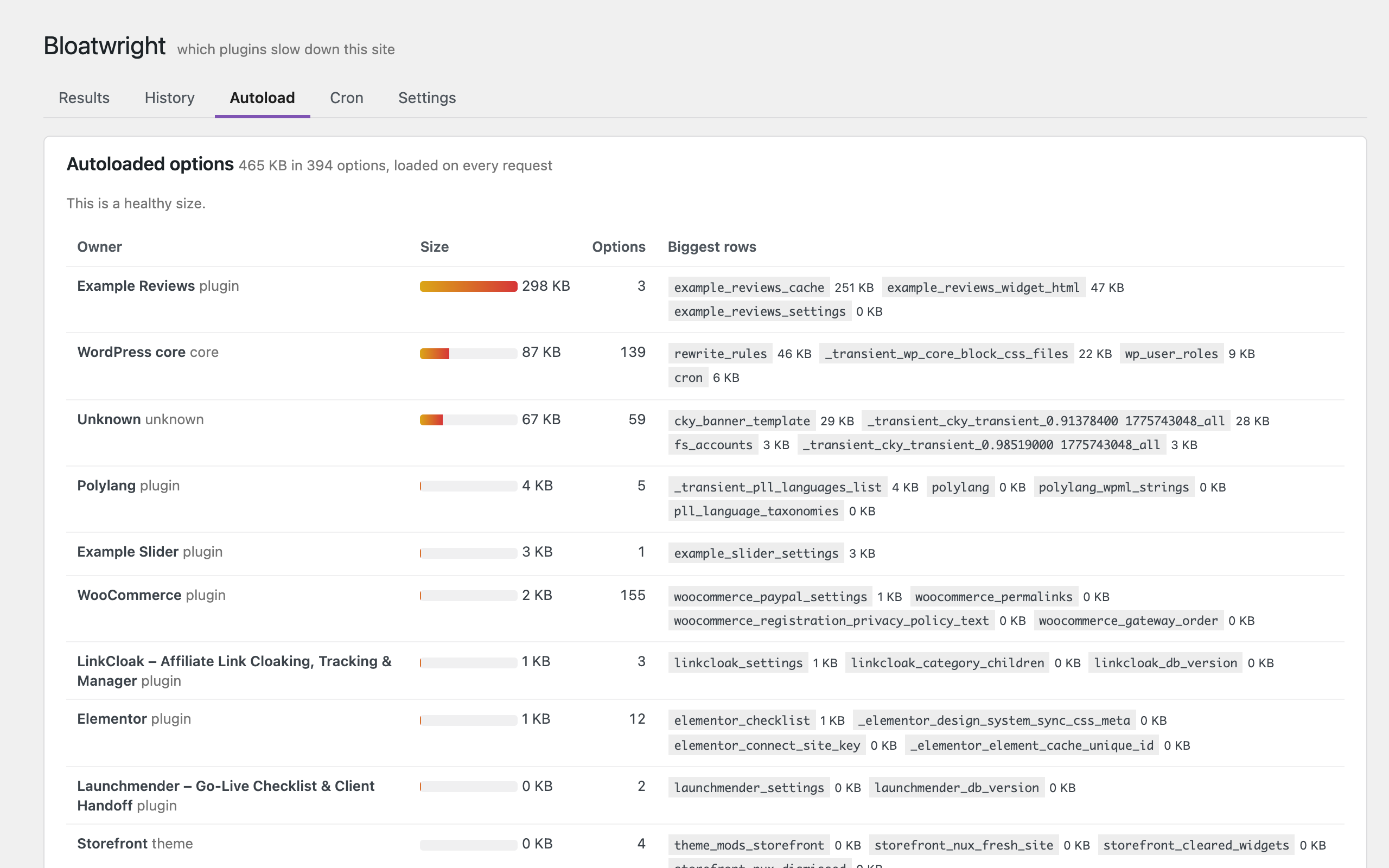
- Autoloaded options matched to it by name (your own prefix overrides, a bundled list of option prefixes, or its folder name; must-use plugins only through overrides), with their size in the database. They load on every request.
- Cron events it schedules and how often they run.
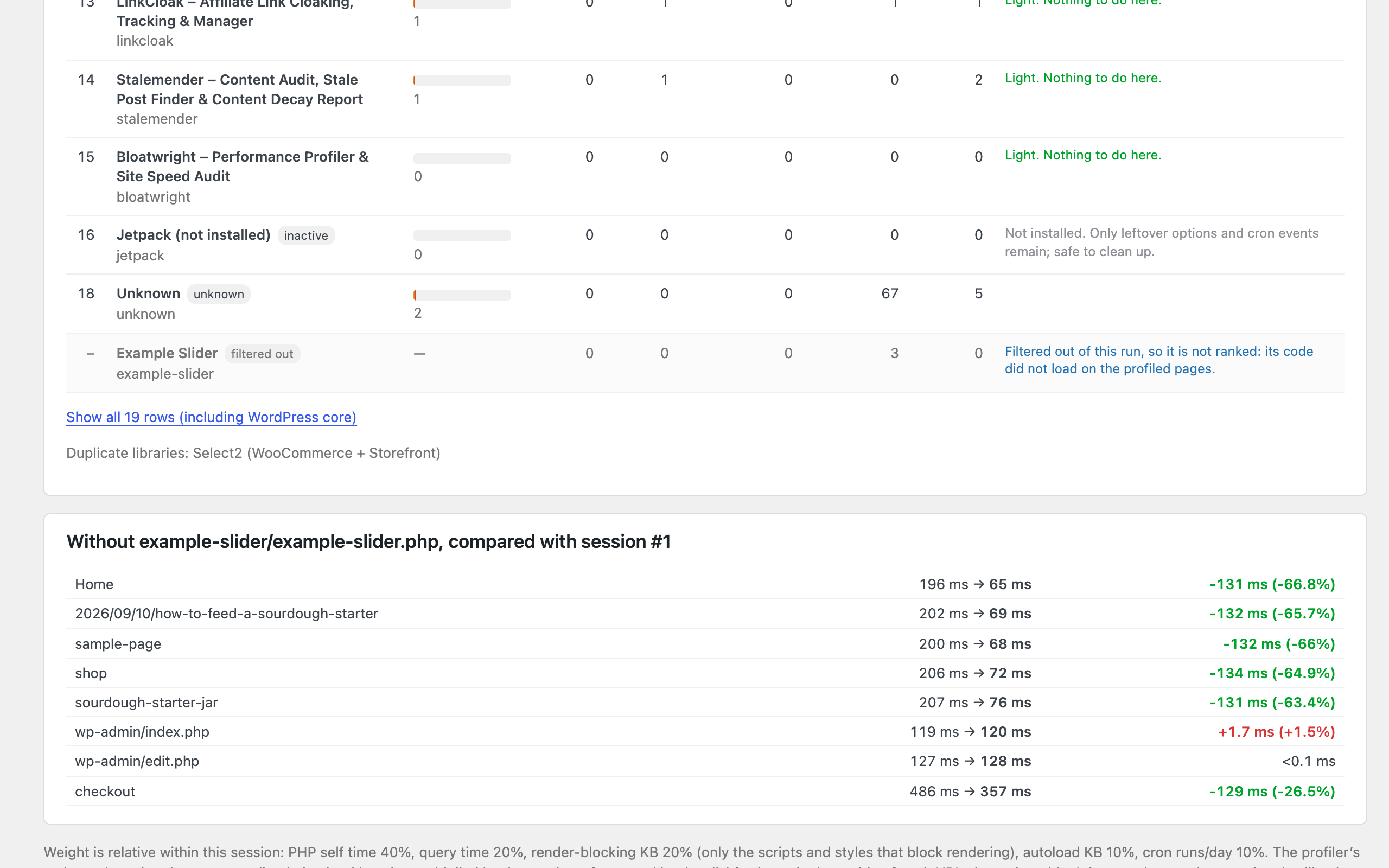
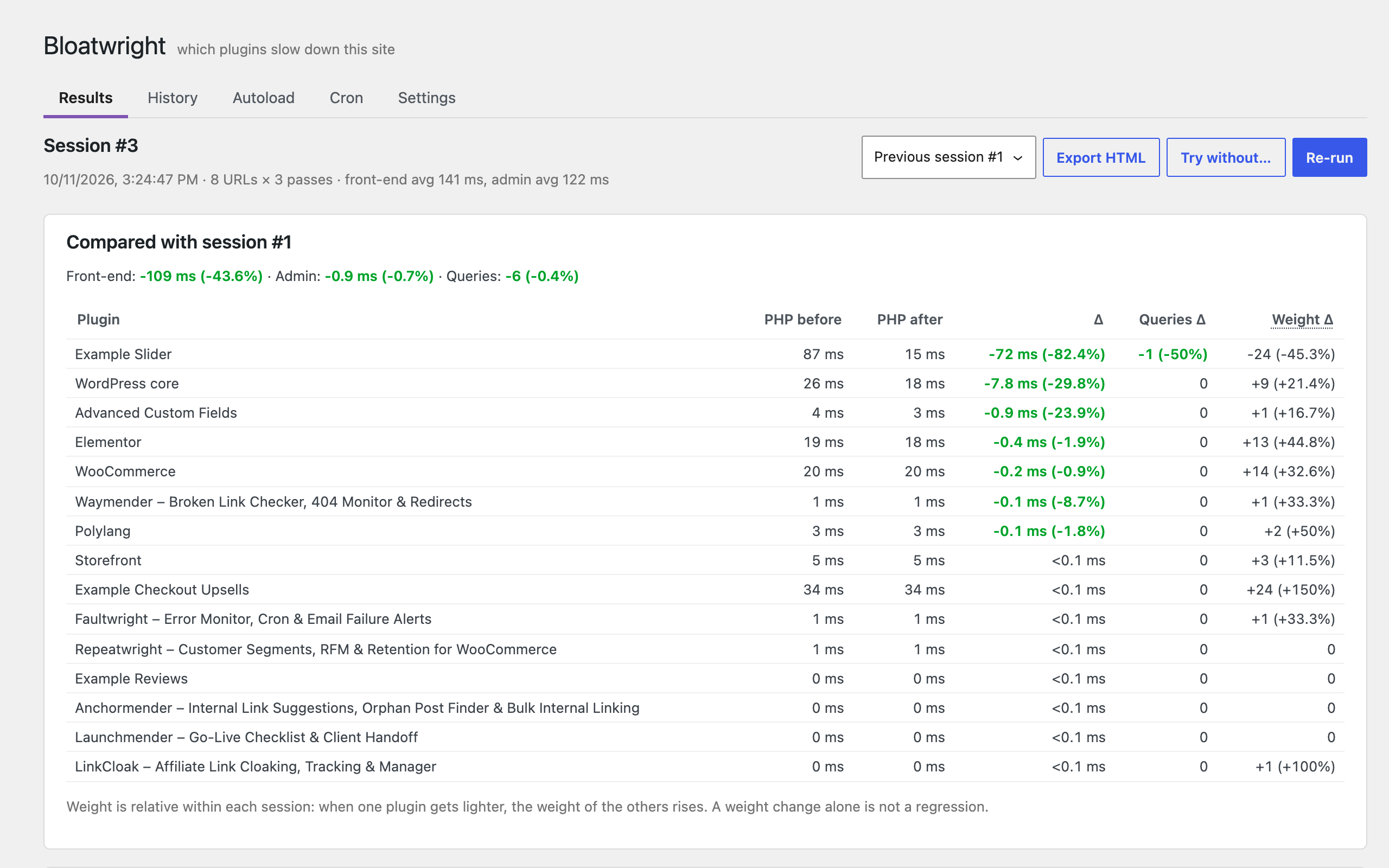
wp bloatwright profile compare <a> <b> or the REST API (/wp-json/bloatwright/v1/sessions/<b>/compare/<a>). The History tab lists past sessions and, once there are two finished regular sessions, a PHP-time trend for the heaviest plugins; every session can be exported as a self-contained HTML report you can send to a client or a developer.
Autoload and cron pages
Two extra tabs break down the autoloaded options and the cron queue by owner, including cron hooks that have no callback attached (usually left behind by a removed plugin).
WP-CLI
wp bloatwright profile run [--urls=<a,b>] [--passes=<n>] [--without=<plugin/file.php>] [--format=table|json] [--user=<id|login>]wp bloatwright profile listwp bloatwright profile compare <a> <b>wp bloatwright autoloadwp bloatwright cron
--user is WP-CLI's global parameter: admin URLs are requested as that user and skipped (with a warning) when no user is given. Like the admin screen, profile run writes the must-use loader first when it is missing or out of date.
How it works
When a profiling run, a "Try without" run, a WP-CLI run or a browse-and-profile recording starts and the loader is missing or out of date, the plugin writes one small must-use plugin, 0-bloatwright-loader.php, into the must-use plugins folder (normally wp-content/mu-plugins). That file does nothing unless a request carries a signed, short-lived token; only then it starts the profiler, which sends no-cache headers, wraps hook callbacks with timers, records SAVEQUERIES output, reads the enqueued scripts and styles, and stores the result. You can remove the loader at any time from Settings → Advanced (it is written again on the next run), and it is removed when Bloatwright is deactivated. On multisite it is kept while Bloatwright is still active on another site of the network, and removed on network deactivation or when the last site deactivates it.
Hooks for developers
bloatwright_urls_default, bloatwright_owner_for_file, bloatwright_option_prefixes, bloatwright_verdicts, bloatwright_expected_slugs, bloatwright_session_complete, bloatwright_capability, bloatwright_loopback_sslverify, bloatwright_remote_head, bloatwright_remote_asset_owner, bloatwright_record_wait, and the action bloatwright_record, which runs at shutdown at the end of every profiled request (warm-up passes included, though they are not stored) with the request's measurement record and its context (session id, URL, pass, excluded plugin).
More plugins by Emtiaz Zahid
- Launchmender: 44 pre-launch checks with one-click fixes, a manual checklist and a client handoff report
- Faultwright: PHP errors, JavaScript errors, failed cron jobs, emails and updates on one timeline
- Stalemender: content audit that gives every post a Freshness Score (0–100) and tells you why
- Waymender: finds broken links without hammering your server, logs 404s and fixes both in one click
- Anchormender: internal link suggestions while you write, an orphan post report and bulk internal linking
- Repeatwright: RFM customer segments, repeat rate, LTV and cohort retention from your own WooCommerce orders
- Hoverbuy: sticky add to cart bar with image, price and quantity once the real button scrolls away, variable products included
- Dynafield: ACF, Pods, Meta Box and post meta as dynamic tags in free Elementor: text, link, image, number, colour and date
- Shipeach: shipping cost per product and per variation, by country, state or postcode, as its own method or added to other rates
安装:
- Upload the plugin to
/wp-content/plugins/bloatwrightor install it from the Plugins screen. - Activate it, then go to Tools → Bloatwright and click Run profile.
- The first run writes
0-bloatwright-loader.phpinto the must-use plugins folder (normallywp-content/mu-plugins); if that folder is not writable, the Bloatwright screen (or the WP-CLI run) names the directory to make writable.
屏幕截图:
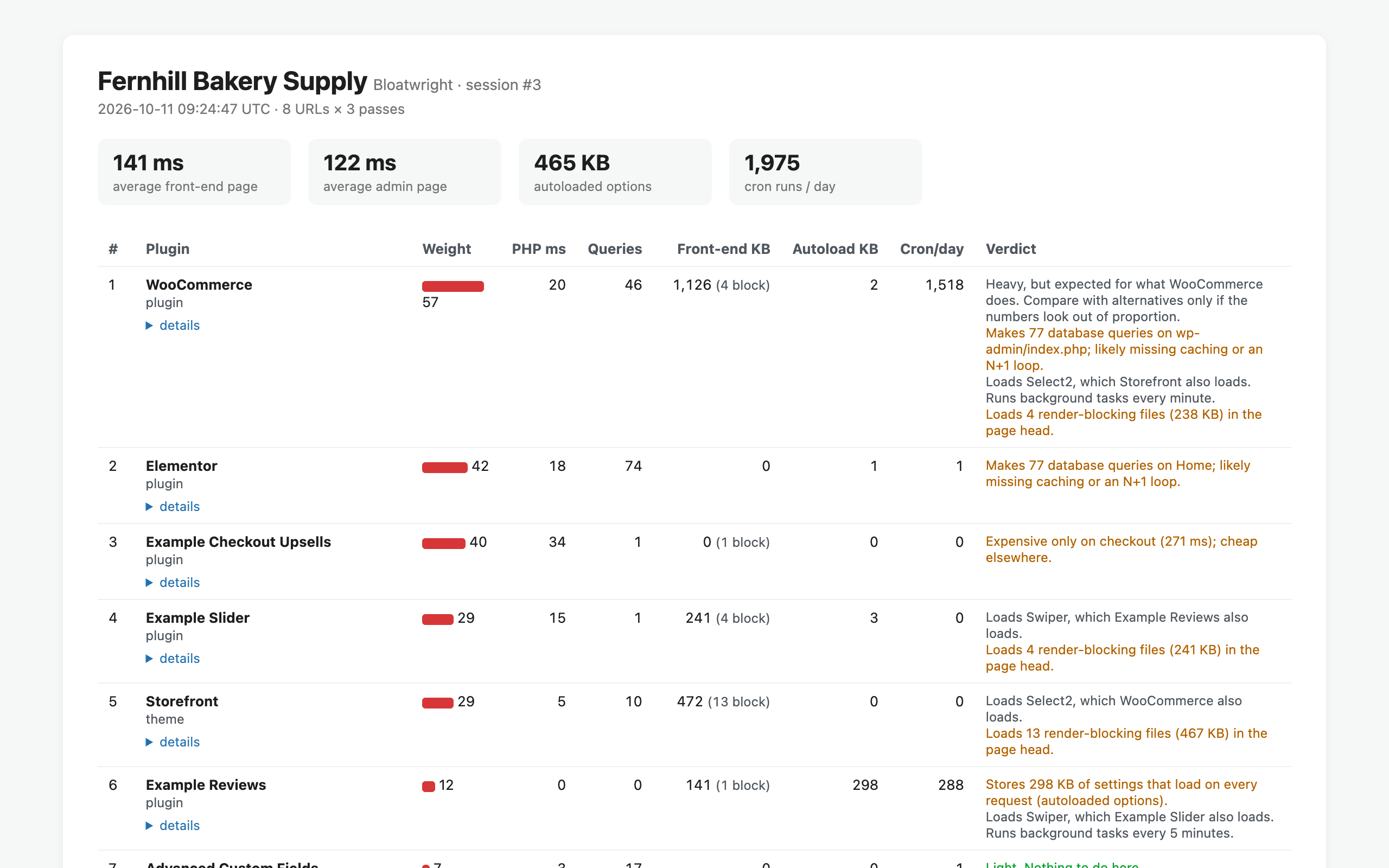
常见问题:
Does profiling affect my visitors?
No. Only requests carrying a valid signed token are profiled. Those requests are made by your own server (or by your own browser in browse-and-profile mode), and every profiled response is sent with no-cache headers and DONOTCACHEPAGE set, whether or not the request is logged in.
Why does it need a must-use plugin?
Normal plugins load in alphabetical order after all must-use plugins, so a profiler that is a normal plugin cannot time the plugins loaded before it. Must-use plugins load in file-name order, and the loader is named 0-bloatwright-loader.php, so it normally loads before your other must-use plugins. It checks for the token and otherwise returns immediately. A must-use plugin whose file name sorts even earlier loads before the profiler starts, so its load time is not measured (its hook callbacks still are). The loader is generated when your first run starts, can be removed from Settings → Advanced, and is deleted when Bloatwright is deactivated (on multisite: on network deactivation, or when the last site that has Bloatwright active deactivates it).
Can profiling change how a plugin behaves?
During a profiled request each timed hook callback (see the next question) is temporarily replaced by a timing wrapper stored under the same key and priority as the original. remove_action(), remove_filter(), has_action() and has_filter() called with the original callback still find it, so removals work as usual. Only code that reads the global $wp_filter directly sees a difference (a wrapper closure where the original callback was), and a backtrace taken inside a callback has one extra frame. The wrappers are taken off again when shutdown starts. This only affects the profiled requests themselves, never visitors.
Which hook callbacks are timed?
A hook's callbacks are wrapped the first time that hook fires after the profiler starts, and are timed from then on. Not timed:
- callbacks added to a hook after it has already fired once during the request (for example a filter added to
the_contentwhile the page is being rendered); - callbacks on the special
allhook; - callbacks on the translation filters
gettext,gettext_with_context,ngettextandngettext_with_context, which run thousands of times per page; - callbacks on
shutdown, and anything they trigger: the wrappers are taken off when shutdown starts; - callbacks that take an argument by reference (for example
function ( &$links )onpre_ping), because a wrapper could only pass them a copy, and callbacks whose parameters cannot be inspected; - Bloatwright's own callbacks.
__()), it counts toward that plugin's time.
The results say “served from a cache”
A page cache or CDN answered instead of WordPress. The profiler sends bypass headers and a cache-busting query string, but some setups still serve cached HTML. Use browse-and-profile while logged in, or exclude the profiling requests in your cache: they carry the User-Agent Bloatwright/<version>, the X-BLOATWRIGHT-Bypass header and the bloatwright_nocache query argument.
How accurate is the PHP time?
Each timed hook callback runs inside a small timing wrapper, and the time recorded for a callback includes that wrapper's own small cost, so plugins with many cheap callbacks read slightly high. The overhead is not subtracted. Bloatwright estimates it per request by timing its own bookkeeping and multiplying by the number of wrapped callback calls, and shows the estimate in the tooltip of each URL above the results table. Use several passes and compare min/avg/max; a plugin that is consistently heavy is the one to look at.
Why are the queries empty?
Bloatwright turns on SAVEQUERIES for the profiled requests only when wp-config.php does not define it. If wp-config.php defines SAVEQUERIES as false, no queries are recorded and the queries column stays empty; the results screen says so.
Can it profile the checkout, cart or logged-in pages?
Admin URLs are requested as the logged-in administrator whose admin screen runs the profile (or the WP-CLI --user): Bloatwright creates a separate login session for that user, sends its cookies with the admin requests only, and only to this site's own addresses (matching scheme, host and port; never over plain http when the admin uses https). The session is ended when the step or WP-CLI run finishes, or when the PHP request running it ends; at worst it expires after ten minutes. Your browser's cookies are never copied. From WP-CLI add --user=<id|login>; without it admin URLs are skipped. For pages that need a browser session (cart, checkout), use browse-and-profile.
Is anything sent to an external service?
Nothing is sent by default. The only outbound requests Bloatwright can make are the optional HEAD requests that read the size of remote scripts and styles (CDN copies, font stylesheets). They are off until you turn on "Measure remote asset sizes" under Tools → Bloatwright → Settings. Each goes to the asset's own URL with the User-Agent Mozilla/5.0 (compatible; Bloatwright/1.0.0), does not follow redirects, and its result is cached for a day.
Does the plugin send anything to its author?
No. Bloatwright has no server of its own and sends no usage statistics or telemetry. Profiling requests go to your own site's URLs. The only third-party requests are the optional HEAD requests to remote assets your pages already load, described under "External services"; that setting is off until you turn it on.
Where is the JavaScript source?
The admin app is built from assets/src/ with @wordpress/scripts; the shipped bundle is assets/build/admin.js. package.json and webpack.config.js are included in the plugin. To rebuild, run npm ci && npm run build in the plugin directory.
更新日志:
- Initial release.