Blocdash – Frontend Dashboard & User Management Toolkit
| 开发者 | digitaldive |
|---|---|
| 更新时间 | 2026年2月23日 10:17 |
| PHP版本: | 7.4 及以上 |
| WordPress版本: | 6.9 |
| 版权: | GPLv2 or later |
| 版权网址: | 版权信息 |
详情介绍:
Blocdash is a modular frontend dashboard framework built for modern WordPress block themes.
It allows you to create a complete frontend user dashboard, including:
• Frontend login, registration, and profile management
• Role-based dashboard access
• Frontend announcements with replies and badges
• Optional Google OAuth / One Tap login
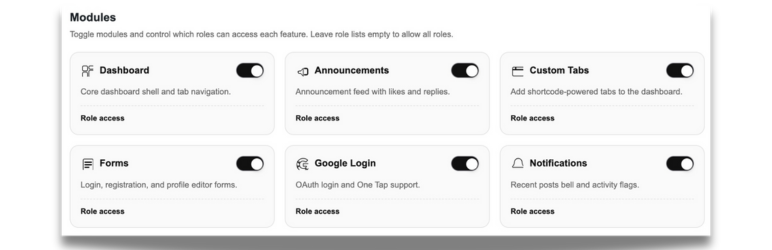
• Modular system — enable only what you need
• Designed for block themes and modern WordPress installs
Perfect for:
- Membership sites
- Client dashboards
- Community portals
- Internal business tools
- SaaS-style WordPress projects
安装:
- Upload the plugin to
/wp-content/plugins/or install via the WordPress Plugin Directory. - Activate Blocdash – Backend Dashboard Toolkit.
- Visit Blocdash → Dashboard to enable modules.
- (Optional) Auto-create frontend pages from the settings panel.
常见问题:
Does Blocdash automatically create pages?
Yes. On activation, Blocdash can generate Login, Register, Profile, and Dashboard pages. You can disable this behavior using the blocdash_create_default_pages filter.
Can I disable features I don’t need?
Yes. All major features are modular and can be toggled from the admin dashboard.
Can users edit their profiles on the front end?
Yes. Users can update profile information, passwords, and account settings without accessing wp-admin.
Can users delete their own accounts?
Yes. You can enable account deletion from: Blocdash → Register Form → Account Management
Can admins delete their own accounts or reassign content?
Yes. Use the following filters: ``` add_filter( 'blocdash_allow_admin_account_delete', '__return_true' ); add_filter( 'blocdash_account_delete_reassign', function( $reassign_id, $user_id ) { return 1; // Reassign posts to user ID 1 }, 10, 2 ); ```
更新日志:
1.0.1
- Security: sanitize password reset inputs
- Security: escape announcement author output
- Security: fix JS-context encoding for Google One Tap
- I18n: align text domain across all plugin files
- Docs: add external services disclosure
- Initial public release