
BlockSieve – Display Conditions for Blocks
| 开发者 | jahirulwp |
|---|---|
| 更新时间 | 2026年10月30日 00:42 |
| PHP版本: | 7.4 及以上 |
| WordPress版本: | 7.1 |
| 版权: | GPLv2 or later |
| 版权网址: | 版权信息 |
详情介绍:
- Logged In / Logged Out: show a block to signed-in users only, or to guests only.
- User Role: show a block to one or more roles, including custom roles from plugins such as WooCommerce or membership plugins.
- Date Range: schedule a block to go live on a start date and expire on an end date.
- Weekdays / Time Range: show a block on selected days of the week or between two times of day, in your site's time zone.
- Device: hide a block on mobile, tablet or desktop using CSS media queries, not user-agent detection.
- Post Type: show a block only on selected post types, such as posts, pages or products.
- Page / Post: show a block only on specific pages or posts, picked from a search box.
- Page View: show a block only on the front page, the blog index, category, tag, author, date or post type archives, search results, the 404 page or single views.
- URL Contains: show a block when the page address contains a piece of text.
- Query Parameter: show a block when the URL carries a parameter such as
utm_campaign, optionally with a specific value.
- Members-only content: a welcome message, download link or announcement for logged-in users, subscribers, customers or editors.
- Guest calls to action: a sign-up or login prompt that only logged-out visitors see.
- Scheduled content: a sale banner, holiday notice or event announcement that starts and ends on set dates, with no manual edits.
- Opening hours: a "we are open" notice, phone number or live-chat block that only shows on business days and hours.
- Responsive blocks: hide a large hero image on phones, or show a compact menu on mobile only.
- Conditional headers and footers: in a template part, show a block only on the front page, the blog, an archive, search results or the 404 page.
- Campaign landing pages: show a matching offer when a visitor arrives from a link with a tracking parameter.
blocksieve_register_conditions action and the editor lists them automatically. Override any decision with the blocksieve_result filter, and tune the report's cache lifetime, scan limit and post types with filters. The docs/ folder documents every hook and filter, and the readable editor source ships in src/.
Privacy
BlockSieve runs entirely on your own server. It does not contact any external service, load files from a CDN, collect usage data or set cookies. It stores one option for its settings and one short-lived transient for the cached report, and removes both when you delete the plugin. Your visibility rules are saved inside the block content itself.
安装:
- In your dashboard, go to Plugins → Add New Plugin, search for BlockSieve and click Install Now. Or upload the
blocksievefolder to/wp-content/plugins/. - Activate the plugin.
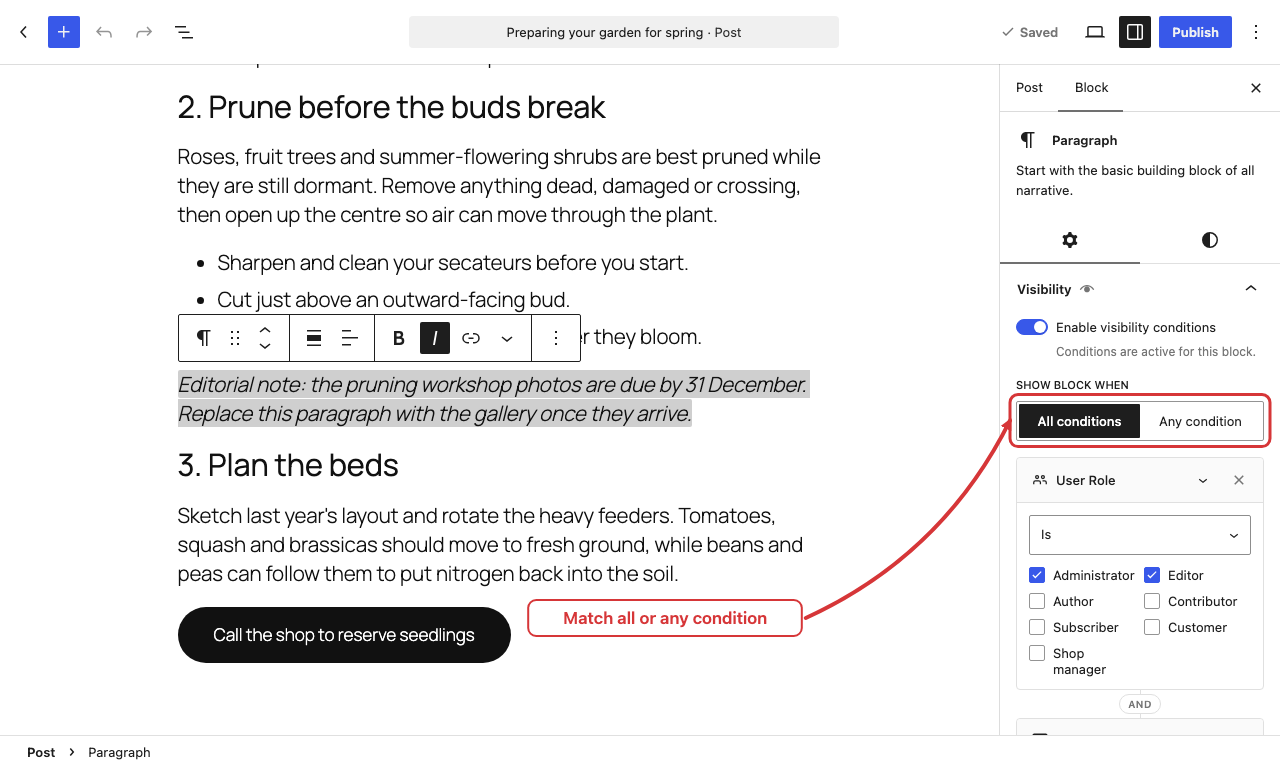
- Select a block, open the Visibility panel in the block sidebar, turn on Enable visibility conditions and add the conditions you need.
屏幕截图:
常见问题:
How do I show a block only to logged-in users or a specific user role?
Add a Logged In condition to the block. To limit it further, add a User Role condition and tick the roles that should see it.
Can I schedule a block to appear and expire automatically?
Yes. Use Date Range for a one-off schedule, or Weekdays and Time Range for a recurring one, for example weekdays from 9:00 to 17:00.
Can I hide a block on mobile, tablet or desktop?
Yes. Add a Device condition and keep only the devices the block should appear on. Mobile is narrower than 782 pixels, tablet is 782 to 1024 pixels, and desktop is wider. Because it uses CSS, it reacts when a window is resized.
WordPress already has a Hide option for blocks. Why use BlockSieve?
WordPress can hide a block everywhere, and since version 7.0 it can hide a block on chosen screen sizes. BlockSieve adds conditions based on who is visiting, when they visit and which page they are on. You can use both on the same site.
Can I hide several blocks at once?
Yes. Put them in a Group or any other container block and add the conditions to the container. When the container is hidden, everything inside it is hidden too.
Does it work with third-party blocks, block themes and the Site Editor?
Yes. The Visibility panel is added to every block type registered with the editor, including blocks from block library plugins and WooCommerce, and conditions are enforced wherever those blocks are used.
Does it work with the Classic Editor, Elementor or other page builders?
No. BlockSieve works with content built in the block editor. Classic Editor content, the Classic block and page builder layouts are not blocks and do not get the Visibility panel.
Will I still see hidden blocks while editing?
Yes. Conditions only apply on the front end, so every block stays visible in the editor.
Is this a security or membership plugin?
No. It is a content display tool for tailoring what people see, not for protecting files or sensitive data. Use a membership or access-control plugin for those.
Does it work with page caching?
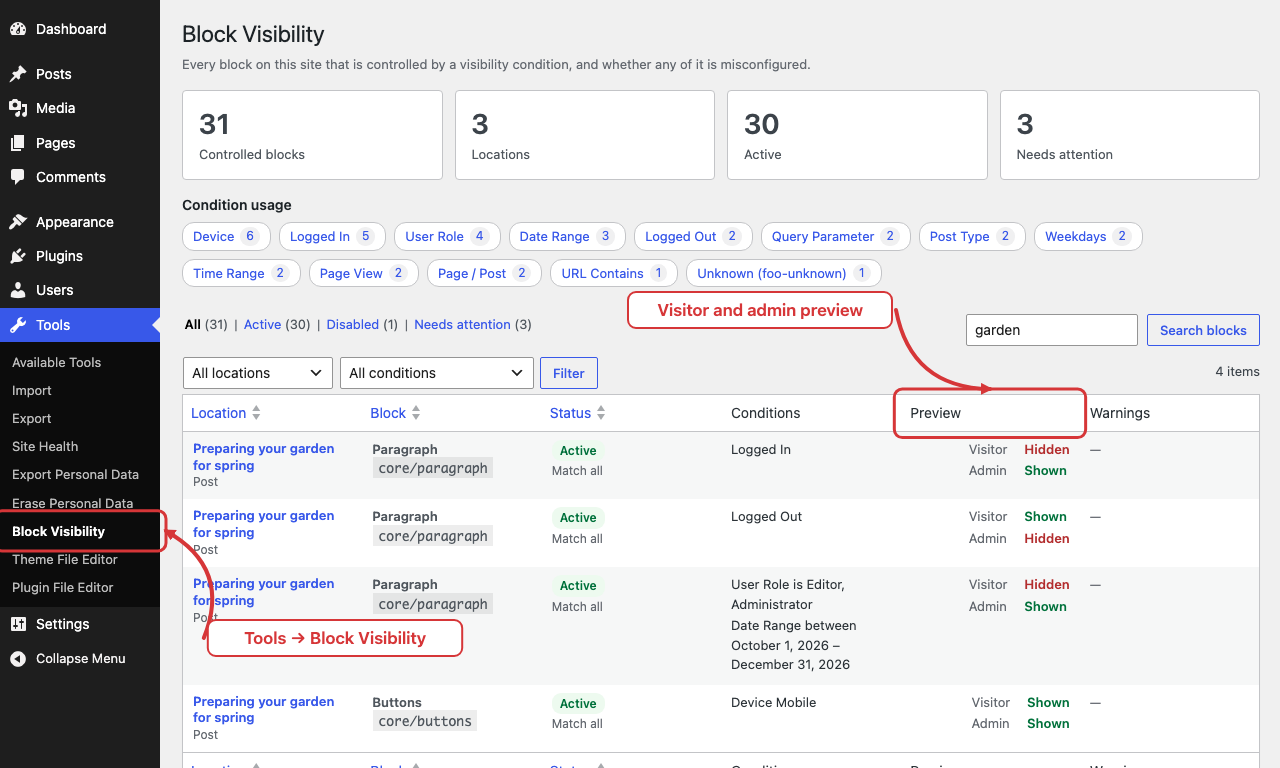
Conditions are checked when a page is built, so a page cache serves whatever version it stored first. Visitor-based conditions (Logged In, Logged Out, User Role, URL Contains, Query Parameter) and time-based conditions need a fresh page: bypass the cache for logged-in users and exclude pages that use the other conditions. The Device condition works with any cache because it uses CSS.
What happens if I deactivate the plugin?
Nothing is lost. Conditions are stored inside your block content, every block shows while the plugin is inactive, and the conditions apply again when you reactivate it.
Does it work on multisite?
Yes. Activate it per site or network-wide. Each site keeps its own settings, and deleting the plugin cleans up every site.
更新日志:
- Renamed to "BlockSieve – Display Conditions for Blocks". Slug, settings and saved rules are unchanged.
- Minimum PHP version lowered to 7.4.
- Page View: select several page types in one condition.
- Page / Post: the picker now lists drafts, pending and scheduled items you can edit, and shows each item's type and status.
- Fixed: a malformed Page / Post value could match the post with id 1.
- Developers: the Page View definition's
valueSchemaonblocksieve/v1/conditionsis now an array schema; read its options fromitems.enum.
- Initial release.