
Botpass – WebMCP & MCP Server for WooCommerce and AI Agents
| 开发者 | botpass |
|---|---|
| 更新时间 | 2026年11月13日 00:49 |
| PHP版本: | 7.4 及以上 |
| WordPress版本: | 7.1 |
| 版权: | GPLv2 or later |
| 版权网址: | 版权信息 |
详情介绍:
- An agent browsing your store can search your catalogue by words, category and price range, instead of guessing from the page layout.
- It gets exact product details: price, sale price, SKU, availability and stock, straight from WooCommerce.
- It sees the promotions and discount codes valid today, and none that have expired.
- It can book a meeting, request a quote or send a contact request on the visitor's behalf, with the visitor's confirmation.
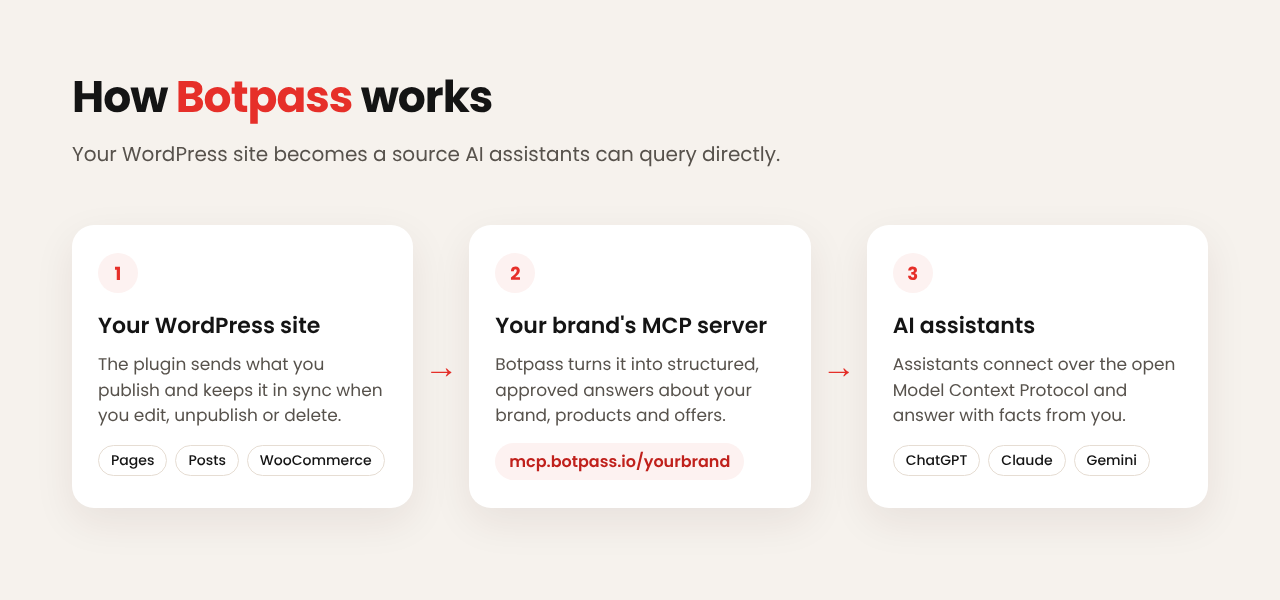
mcp.botpass.io/your-brand, so ChatGPT, Claude and Gemini give the same accurate answers outside the browser. In browsers without WebMCP the script does nothing, and your store looks and works exactly the same.
Why it matters for ecommerce
- Accurate answers, fewer lost sales. Assistants stop quoting old prices, out-of-stock products or a competitor's offer.
- Always up to date. Every change to a product, price or stock level is sent automatically.
- Your rules. Hidden, private, draft and "noindex" products are never shared.
- Nothing to maintain. No feeds to build, no API to program, no theme changes.
- Connects in one click. Click "Connect with Botpass", sign in or create your free account, confirm. No key to copy, no code, no theme edits.
- Syncs your content automatically. Pages, posts, public custom post types and WooCommerce products are sent when you publish, edit, unpublish or delete them.
- Keeps your catalogue fresh. Prices, sale prices, SKUs and stock status reach AI assistants as soon as they change in WooCommerce.
- Respects your SEO decisions. Drafts, private and password-protected content, and anything marked "noindex" in Yoast SEO, Rank Math or SEOPress is never sent.
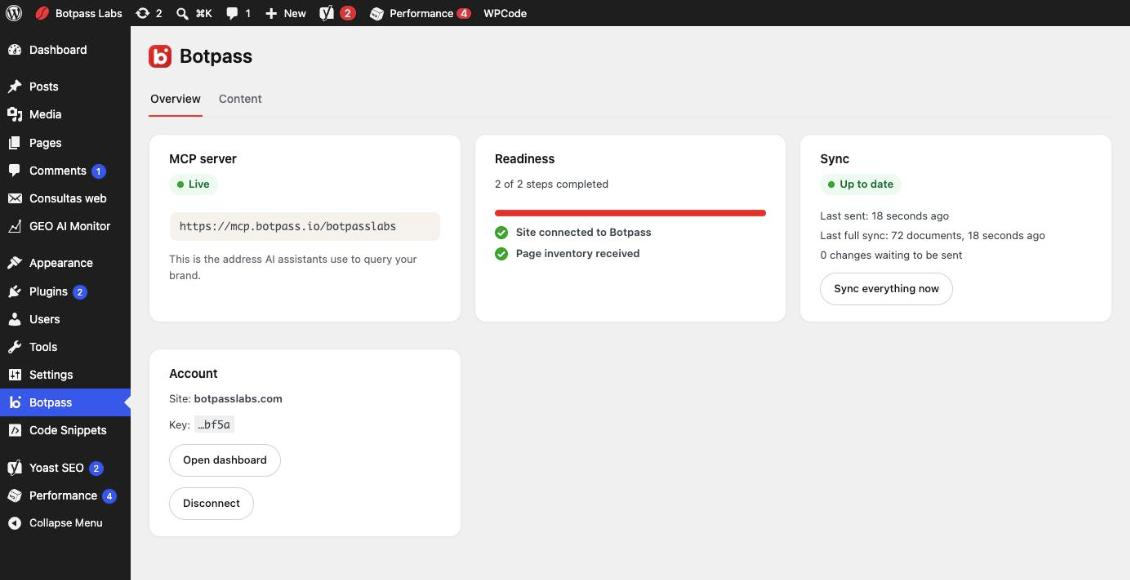
- Shows you what's live. See your MCP server address, your setup checklist and the sync status right from the WordPress dashboard.
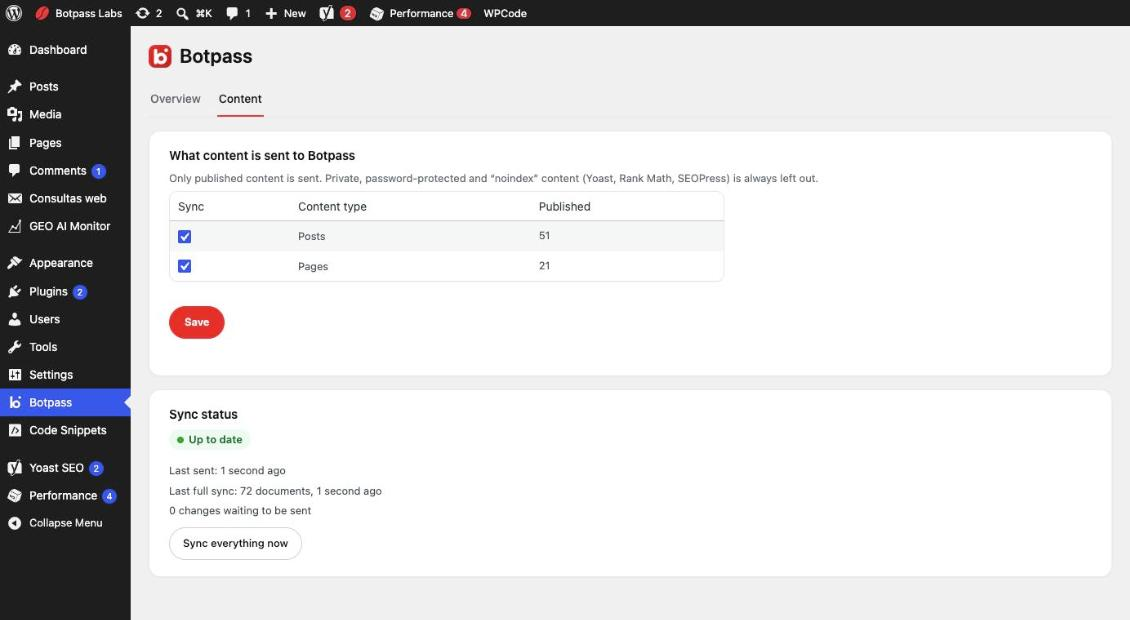
- Lets you choose. Pick which content types are synced from the Content tab.
- llms.txt with your server address, your brand actions and a natural-language endpoint (served only if your site doesn't already have one).
- /.well-known/mcp.json and /.well-known/mcp/server-card.json, a
Linkheader and<link rel="mcp">in the page head, plus a line in your virtual robots.txt. - WebMCP: your brand's tools are registered in the visitor's browser, so AI agents working there can call them directly.
- NLWeb-compatible endpoint: assistants can ask your brand questions in plain language at
mcp.botpass.io/your-brand/ask.
mcp.botpass.io/your-brand lets them ask your brand directly – what you sell, what it costs, whether it's in stock, how to get in touch – and answer with facts you approved.
Built to be light
- Sends signed requests (HMAC-SHA256) to the Botpass API in small batches, in the background via WP-Cron.
- Discovery data is cached locally and refreshed daily, so your pages never wait for Botpass.
- No tracking pixels and no changes to your theme. The only front-end script is the tiny WebMCP loader, which does nothing in browsers without WebMCP and can be turned off with the
botpass_webmcp_enabledfilter. - Works with page builders and block themes: content is sent as visitors see it.
- Multilingual-aware: detects the language of each post with Polylang or WPML.
- Includes Spanish translations (Spain and Latin America).
- validate your site key and the site linked to it;
- send your published content (title, content, excerpt, categories, tags, language, URL and, for WooCommerce, price, SKU and stock status) whenever it changes;
- send a daily count of published pages per content type;
- show your MCP server status in the WordPress dashboard;
- fetch, once a day, the discovery data (MCP server address, brand actions and tool list) that your site publishes in llms.txt, /.well-known and WebMCP.
安装:
- Install Botpass from Plugins → Add New (search for "Botpass") and activate it.
- In WordPress, go to the Botpass menu and click Connect with Botpass.
- Sign in (or create your free account) and confirm. That's it: no key to copy.
屏幕截图:
常见问题:
What is MCP?
The Model Context Protocol is an open standard that lets AI assistants such as ChatGPT, Claude and Gemini connect to external tools and data sources. Botpass hosts an MCP server for your brand and keeps it in sync with your site.
Do I need a Botpass account?
Yes. It's free to create at botpass.io. The account is where you approve the information AI assistants can use about your brand.
Does it work with WooCommerce?
Yes. Products are synced with their price, sale price, SKU, categories and stock status, and updates are sent whenever a product or its stock changes. Hidden products are not sent.
Which content is sent?
Only published content from the content types you enable. Private, password-protected and "noindex" content (Yoast SEO, Rank Math, SEOPress) is always excluded. If you unpublish or delete something, it is removed from Botpass too.
What is WebMCP?
WebMCP is a proposed web standard, introduced by Google and being tested in Chrome, that lets a website register tools that AI agents in the browser can call, such as "search products" or "book a meeting". Botpass registers your brand's tools for you. Browsers without WebMCP simply ignore it, and you can turn it off with the botpass_webmcp_enabled filter.
Is it useful for a WooCommerce store?
Yes, that's where it helps most. Agents can search your catalogue by category and price, read exact prices and stock, and see today's promotions, all from your live WooCommerce data instead of a scraped or outdated page.
How do AI assistants find my MCP server?
The plugin publishes it on your own domain: llms.txt, /.well-known/mcp.json, a <link rel="mcp"> tag, an HTTP Link header, robots.txt and WebMCP in the browser. Botpass can also list your server in public MCP directories, so assistants find it without visiting your site.
Do my visitors need to install anything?
No. Assistants with MCP support connect to your server directly; agents in the browser use WebMCP; and assistants that only read the web get your information and pre-filled action links from llms.txt and your public MCP page.
Will it slow down my site?
No. Syncing runs in the background with WP-Cron, in small batches, and the plugin adds nothing to your public pages.
Is it compatible with page builders?
Yes. Content is rendered the way visitors see it, so Elementor, Divi, Beaver Builder, Bricks and the block editor all work.
I updated from version 3.x. What do I need to do?
Version 4 is a new plugin built for Botpass 4. After updating, go to the Botpass menu and click Connect with Botpass to reconnect your site.
How do I disconnect?
Go to Botpass → Overview → Disconnect. Content already sent stays in your Botpass account until you delete it there. Deleting the plugin removes all its settings from WordPress.
更新日志:
- WebMCP: turns WebMCP on for visitors in Chrome by loading Botpass's origin-trial token from mcp.botpass.io before registering the tools. Without it, Chrome only offered WebMCP behind a developer flag.
- WebMCP: registers your brand's MCP tools (catalogue search, product details, promotions and brand actions) with the browser, so AI agents working inside the visitor's browser can call them directly. Uses document.modelContext, the current API in Chrome, with a fallback to navigator.modelContext. Does nothing in browsers without WebMCP. Turn it off with the botpass_webmcp_enabled filter.
- MCP discovery on your website: serves /llms.txt (when the site has none), /.well-known/mcp.json and /.well-known/mcp/server-card.json, adds a Link header and to the , and lists the server in the virtual robots.txt.
- Discovery data is cached locally and refreshed daily, so pages never wait for Botpass.
- New "Connect with Botpass" button: sign in, confirm and the site connects by itself. The key never travels through the browser.
- Pasting a site key is still available under "I already have a site key".
- Setup checklist titles follow the WordPress language instead of the server's.
- English interface, with Spanish translations included for Spain and Latin America.
- Refreshed design of the plugin screens.
- Clearer messages when a key is invalid or belongs to another site.
- New plugin for Botpass 4: connect with your site key and sync content and WooCommerce products with signed requests.
- Daily page inventory and setup checklist in the dashboard.