
BotSubmit
| 开发者 | naumov22 |
|---|---|
| 更新时间 | 2026年6月10日 22:05 |
| 捐献地址: | 去捐款 |
| PHP版本: | 7.4 及以上 |
| WordPress版本: | 7.0 |
| 版权: | GPLv2 or later |
| 版权网址: | 版权信息 |
详情介绍:
- SpeedyIndex - Fast Yandex indexing service
- Link Indexing Bot - Multi-engine indexing (Google, Yandex, Bing)
- IndexBotik - Universal and Yandex indexing
- IndexNow integration - free instant submission to Bing, Yandex, Naver, Seznam
- Multiple paid indexing services - choose from 3 different services
- Automatic URL submission on post and page publish
- Custom Post Types support - works with any public CPT
- Taxonomy support - submit category and tag archive URLs
- Flexible settings - separate control for each content type
- Per-post control - override global settings for individual posts
- Submit on update - optionally re-index updated content
- Bulk actions - submit multiple posts at once from posts list
- Export/Import settings - easily transfer configuration between sites
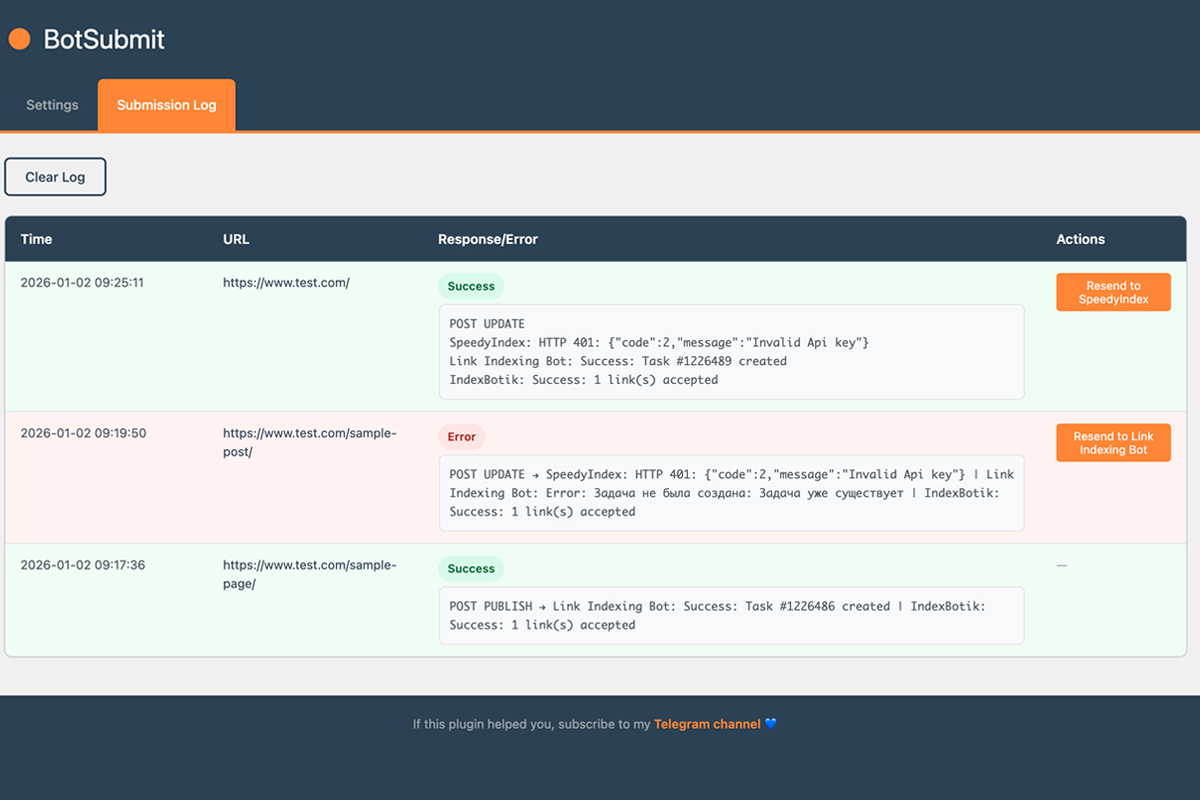
- Detailed log - history of all submissions with resend buttons
- Multi-service support - send to multiple services simultaneously
- Secure API key storage - keys encrypted with AES-256 in database
- Lightweight and fast - minimal performance impact
- Privacy-focused - only URLs are sent to indexing services
- Posts
- Pages
- Categories
- Tags
- Custom Post Types (auto-detected)
- Choose your indexing service(s):
- IndexNow (FREE) - Bing, Yandex, Naver, Seznam - just enable, no API key needed!
- SpeedyIndex Bot - Yandex (paid)
- Link Indexing Bot - Google, Yandex, Bing (paid)
- IndexBotik - Google, Yandex (paid)
- For paid services: Get API key(s) and purchase credits
- Enter API key(s) in plugin settings
- Configure additional parameters (User ID, search engine, etc.)
- Select content types for automatic submission
- Done! Plugin will automatically submit URLs
- New websites - accelerate initial indexing of your content
- News sites - ensure timely indexing of breaking news
- E-commerce - quickly index new products and categories
- Blogs - get faster indexing for new posts
- SEO optimization - improve content visibility in search results
- English
- Russian (Русский)
- All user inputs are sanitized and validated
- Nonce verification on all forms
- All outputs are escaped
- Capability checks for admin functions
- No external scripts or styles loaded
- API keys encrypted with AES-256-CBC before storage
- Encryption uses WordPress salts for key derivation
- Purpose: Submit URLs to Bing, Yandex, Naver, Seznam for indexing
- Data sent: Only your content URLs and auto-generated verification key
- Service provider: IndexNow Protocol (Microsoft/Yandex initiative)
- Documentation: https://www.indexnow.org/
- Cost: FREE - no registration or credits required
- Purpose: Submit URLs to Google for indexing
- Data sent: Only your content URLs (sent when you publish or update content, or manually via bulk action)
- Service provider: SpeedyIndex
- Terms of Service: https://en.speedyindex.com/terms-of-service/
- Privacy Policy: https://en.speedyindex.com/privacy-policy/
- Purpose: Submit URLs to Google, Yandex, Bing for indexing
- Data sent: Your content URLs and Telegram User ID (sent when you publish or update content, or manually via bulk action)
- Service provider: Link Indexing Bot
- Privacy Policy: https://link-indexing-bot.ru/rulez.html
- Purpose: Submit URLs to Google and Yandex for indexing
- Data sent: Only your content URLs (sent when you publish or update content, or manually via bulk action)
- Service provider: IndexBotik
- Privacy Policy: https://inderixingbot.com/PRIVACYPOLICY.pdf?v=1
- URLs will be sent to the selected indexing service(s) servers
- Paid services require purchasing credits
- You agree to the terms of service of each indexing service you use
- The plugin developer is not responsible for the indexing services or their pricing
安装:
- Go to "Plugins" → "Add New"
- Search for "BotSubmit"
- Click "Install" and then "Activate"
- Go to "Tools" → "BotSubmit" to configure
- Download the plugin ZIP file
- Upload the plugin folder to
/wp-content/plugins/ - Activate the plugin through the "Plugins" menu in WordPress
- Go to "Tools" → "BotSubmit" to configure
- Navigate to "Tools" → "BotSubmit"
- Choose your indexing service(s):
- IndexNow (FREE) - just enable the checkbox, no API key needed
- SpeedyIndex Bot for Yandex (paid)
- Link Indexing Bot for Google/Yandex/Bing (paid)
- IndexBotik for Google/Yandex (paid)
- For paid services: enter API keys and configure parameters
- Select content types to submit on publish
- Optionally enable submission on content updates
- Save settings
屏幕截图:
常见问题:
Which indexing services are supported?
The plugin supports four indexing services:
- IndexNow (FREE) - Bing, Yandex, Naver, Seznam
- SpeedyIndex (paid) - Yandex
- Link Indexing Bot (paid) - Google, Yandex, Bing
- IndexBotik (paid) - Google, Yandex You can enable one or multiple services simultaneously.
Where can I get API keys?
IndexNow: No API key needed! Just enable it in settings. Paid services - get API keys from Telegram bots:
- SpeedyIndex: https://t.me/SpeedyIndexBot?start=437061
- Link Indexing Bot: https://t.me/Link_indexing_bot?start=437061
- IndexBotik: https://t.me/InderixingBot?start=CF2F3E3B26
Can I use the plugin for free?
Yes! The plugin includes IndexNow which is completely free - no registration, no API key, no credits needed. Just enable it and start submitting to Bing, Yandex, Naver, and Seznam. For Google indexing, you'll need one of the paid services (SpeedyIndex, Link Indexing Bot, or IndexBotik).
What content types are supported?
The plugin supports posts, pages, categories, tags, and all public custom post types. You can choose which types to submit automatically.
Can I submit URLs when updating content?
Yes, there are separate settings for submitting URLs when editing each content type. This is useful for re-indexing updated content.
Can I disable indexing for specific posts?
Yes! Each post/page has a meta box where you can override the global settings for that specific item.
Can I submit old posts for indexing?
Yes! Use the bulk action feature in the posts list. Select the posts you want to submit and choose "Submit to Indexing" from the bulk actions dropdown.
Where can I see the submission history?
Go to "Tools" → "BotSubmit" → "Submission Log" tab. The log shows the last 50 submissions with timestamps and response details.
How do I resend a failed URL?
In the Submission Log, failed submissions show a "Resend" button. Click it to retry sending to that specific service.
What happens if I run out of credits?
The plugin will log an error when the API returns a credits-related error. You'll need to purchase more credits from the respective service.
Does the plugin slow down my website?
No, the plugin is lightweight and uses WordPress' built-in HTTP API. URL submission happens asynchronously and doesn't slow down your site.
Will this guarantee my pages get indexed?
The plugin submits your URLs to indexing services, which helps speed up the indexing process. However, actual indexing depends on search engine algorithms and your content quality. This tool facilitates the submission process but doesn't guarantee indexing.
Can I see what was sent to the API?
Yes, the submission log shows all sent URLs, timestamps, and API responses (including any errors).
What happens if my API key is invalid?
If the API key is invalid or missing, the plugin will skip submissions and log the error in the submission log with a red background.
更新日志:
- CRITICAL FIX: 1.4.4 removed the BotSubmit_Services class as dead code, but the queue processor and the global log still call $plugin->services->... — every cron queue run and every log write fataled. Restored via a $services self-alias; the four called methods (get_available_services, send_to_service, send_to_indexnow, is_result_successful) are now public.
- The plugin instance is now exposed as $GLOBALS['botsubmit'] so external integrations (e.g. the pharma theme settings importer) can call save_api_keys() and store keys encrypted instead of plain text
- Compatibility: tested up to WordPress 7.0 "Armstrong"
- Raised minimum PHP requirement to 7.4 (WordPress 7.0 dropped support for PHP 7.2/7.3); PHP 8.3 recommended
- Hardening: API key encryption now guards against missing AUTH_KEY/SECURE_AUTH_KEY salts instead of degrading to a predictable key
- Cleanup: removed unused BotSubmit_Services class (dead code); made queue timestamp locale flag explicit
- Submission logic is unchanged and fully compatible with WordPress 7.0
- SpeedyIndex: Google indexing is available again (Pay-per-Indexed mode — 100 tokens per URL, full refund for links not indexed after 7 days)
- Inderixing/IndexBotik migrated to the new API v2 on domain inderixingbot.com
- IndexBotik: added engine selection (Google / Yandex / Bing / Universal) and queue selection (Slow / Fast)
- Bug fix: Scheduled posts (status
future) could be submitted to indexers before their actual publication when third-party plugins firedtransition_post_statuswith statuspublishon a post still infuture/draftstate — resulting in raw?p=<id>URLs being sent - Added defensive re-read of post status from database in
handle_post_publishto ignore phantom publish transitions - Added guard against
publishstatus withpost_date_gmtstill in the future - Added safety filter in queue: URLs containing
?p=,?page_id=or?preview=query parameters are now rejected at queue insertion, regardless of source
- Bug fix: Queue processing cron could silently stop, leaving tasks stuck in "Pending" forever
- Added self-healing cron re-registration on every admin page load
- NEW: REST API endpoint for external indexing submissions (POST /wp-json/botsubmit/v1/submit)
- Allows external tools to submit URLs for indexing via authenticated REST API calls
- Endpoint requires edit_posts capability and supports url and context parameters
- Bug fix: Fixed taxonomy hooks incorrectly receiving array parameter causing "Invalid taxonomy" error
- Bug fix: Fixed logs table not being created on fresh installations
- Bug fix: Added physical table existence check for seamless updates from older versions
- Bug fix: Added fallback to wp_options when logs table doesn't exist
- NEW: Queue display in Log tab - see pending tasks with status and timing info
- NEW: "Send Now" button - send queued tasks immediately without waiting for cron
- Added IndexNow support (FREE) - instant URL submission to Bing, Yandex, Naver, Seznam
- Auto-generated IndexNow key with virtual verification file
- Resend functionality for IndexNow in logs
- No registration or API purchase required for IndexNow
- NEW: Export/Import settings - transfer configuration between sites
- NEW: API keys now encrypted (AES-256-CBC) in database for security
- NEW: Logs stored in dedicated database table for better performance
- Improved: Rate limiting between API calls (0.5 sec delay)
- Improved: Modular code architecture for better maintainability
- Fixed: Various bug fixes and performance improvements
- Background URL submission via WP Cron - no more delays when publishing
- Increased log limit to 1000 records
- Added pagination for log (50 records per page)
- Fixed duplicate submission on post update
- Fixed checkbox sync between global settings and post meta box
- Improved multi-line log format for better readability
- New custom design with branded color scheme
- Improved settings page UI with service cards
- Better log table with status badges
- Enhanced visual feedback and animations
- Initial release
- Three indexing services support: SpeedyIndex, Link Indexing Bot, IndexBotik
- Automatic URL submission on publish
- Custom Post Types support
- Per-post indexing control
- Bulk actions for mass submission
- Detailed submission log with resend functionality
- Multi-service simultaneous submission