
SendBSV BSV Payments for WooCommerce
| 开发者 | BSVanon |
|---|---|
| 更新时间 | 2026年1月29日 11:51 |
| PHP版本: | 7.4 及以上 |
| WordPress版本: | 6.9 |
| 版权: | GPL-2.0-or-later |
| 版权网址: | 版权信息 |
详情介绍:
This plugin enables your WooCommerce store to accept Bitcoin SV (BSV) payments directly to your wallet using BIP32 address derivation. No third-party payment processors, no monthly fees, complete self-custody.
Key Features:
- Direct payments to your ElectrumSV or BIP32-compatible wallet
- Automatic per-order address derivation from your Master Public Key (xpub/MPK)
- Real-time exchange rate conversion via CoinGecko w/ CoinPaprika fallback (configurable markup)
- Payment detection via blockchain APIs (WhatsOnChain + Bitails fallback)
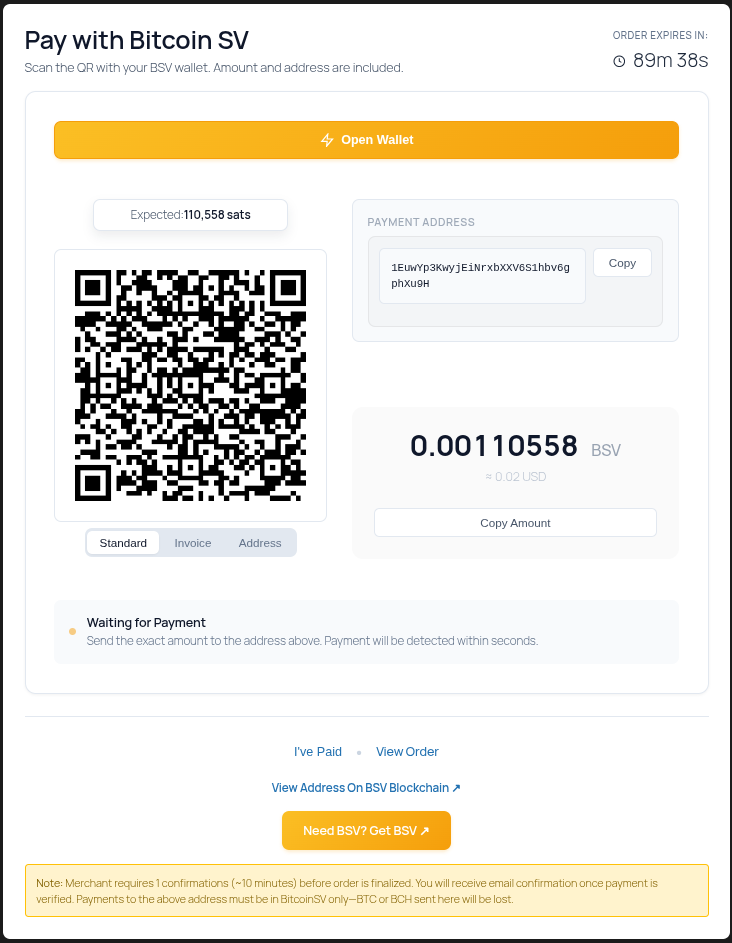
- Modern payment console with live status updates and countdown timer
- Aggregate payment support (handles multiple transactions to same address)
- QR code generation for easy mobile payments
- Wallet top-up links for customer convenience
- WooCommerce HPOS (High-Performance Order Storage) compatible
- WooCommerce Blocks checkout support
- PHP 8+ compatible
- Modern WordPress 6.9 and WooCommerce 10.4 support
createActionpayloads enumerate required outputs (satoshis, locking scripts, metadata) so compatible wallets build the right transaction on the first try.- Wallet responses can submit txid, raw transaction, and optional BEEF blobs that we store on the WooCommerce order for audits/SPV workflows.
- Successful submissions immediately mark the payment
detected, keeping the checkout stepper responsive before confirmations. - postMessage handlers validate origin/source and bind to the order nonce to block spoofed payment events.
- Order binding checks (ID, key, expected sats, nonce) prevent receipts from being replayed across orders.
- Accept payment directly into your personal ElectrumSV wallet.
- No third-party payment processor required—payments settle directly to your wallet.
- Accept payment in Bitcoin SV for physical and digital downloadable products.
- Add Bitcoin SV payments option to your existing online store with alternative main currency.
- Flexible exchange rate calculations fully managed via administrative settings.
- Supports multiple currencies, including Bitcoin SV
- Automatic conversion to Bitcoin SV via exchange rate feed and calculations.
- Ability to set exchange rate calculation multiplier to compensate for any possible losses due to bank conversions and funds transfer fees.
安装:
- Clone the git repo or download the zip and extract. Move 'bitcoin-sv-payments-for-woocommerce' dir to /wp-content/plugins/
- Install "Bitcoin SV Payments for WooCommerce" plugin just like any other Wordpress plugin.
- Activate.
- Configure plugin with your local ElectrumSV (electrumsv.io) master public key
[woocommerce_checkout] and modern WooCommerce Blocks checkout. No special configuration needed.屏幕截图:
常见问题:
Why doesn't the Bitcoin SV payment option appear at checkout?
The plugin supports both WooCommerce Blocks checkout and classic shortcode checkout. Ensure:
- Your checkout page contains either the WooCommerce Checkout block OR the [woocommerce_checkout] shortcode
- The gateway is enabled in WooCommerce → Settings → Payments → Bitcoin SV
- Your Master Public Key is configured correctly
- PHP extension gmp or bcmath is loaded
What are the minimum requirements?
- WordPress 5.8 or higher
- WooCommerce 6.0 or higher
- PHP 7.4 or higher (8.x recommended)
- PHP extension: gmp (preferred) or bcmath
Do I need an API key?
No! v5.0.0 uses CoinGecko's free API for exchange rates and WhatsOnChain for blockchain lookups. No API keys required.
Is my Master Public Key (xpub) safe?
Yes. The xpub only allows receiving payments. It cannot be used to spend funds. Your private keys remain secure in your ElectrumSV wallet.
How do I get my Master Public Key from ElectrumSV?
- Open ElectrumSV wallet
- Go to Wallet → Information
- Copy the Master Public Key (xpub format, 111 characters)
- Paste into plugin settings
What happens if exchange rates fail?
As a workaround, you can temporarily set your WooCommerce store currency to "BTC" for 1:1 pricing. Check your server's ability to make outbound HTTPS connections.
How long does payment detection take?
The plugin checks for payments via WP-Cron (default: every 2.5 minutes). For faster detection, configure a real cron job. Payments show as confirmed after your configured number of blockchain confirmations (recommended: 1-6).
更新日志:
6.1.1 - 2026-01-25
Critical WordPress.org compliance fix
- Fixed translators comment placement in gateway-validation.php to satisfy WordPress.org Plugin Check
- Applied WordPress coding standards formatting (phpcbf)
- Fixed Blocks checkout script registration paths
- Fixed payment console CSS/JS asset loading
- Added richer BRC-100 wallet request/response flow with immediate
detectedstates - Stored txid/raw hex/BEEF receipts on WooCommerce orders for audit trails
- Hardened postMessage handlers (origin + nonce binding) to block spoofed events
- Improved WooCommerce Blocks checkout support and payment console UX
- Fixed partial settings reset to only touch submitted keys (no
$_POSTiteration) - Enforced sanitized + unslashed input for all settings saves
- Escaped all dynamic SQL table names and removed unsafe JSON flags
- CRITICAL: Gateway ID changed from 'bitcoin' to 'bitcoin_sv' to prevent plugin collisions (auto-migrates existing installations)
- CRITICAL: Enabled TLS verification for all external API calls (fixes MITM vulnerability)
- CRITICAL: Removed public hardcron trigger (DoS vulnerability)
- CRITICAL: Disabled legacy IPN callback (security risk)
- CRITICAL: Removed external QR code services - all QR generation now client-side via jquery.qrcode.js
- Hardened all unserialize() calls with ['allowed_classes' => false]
- Replaced date() with gmdate() for WP.org compliance
- Added External Services disclosure section in readme.txt ARCHITECTURE & MODULARIZATION:
- Reduced core utilities file from 1,215 LOC to 75 LOC (94% reduction)
- Created 12 focused modules in includes/ directory:
- address-generation.php (529 LOC) - BIP32 address derivation
- blockchain-api.php (157 LOC) - WhatsOnChain/Bitails integration
- exchange-rates.php (142 LOC) - Rate fetching with caching
- payment-state.php (257 LOC) - Canonical state machine
- expiry.php (193 LOC) - Payment window enforcement
- http.php (130 LOC) - Secure WordPress HTTP API wrapper
- logging.php (155 LOC) - WooCommerce logger integration
- gateway-validation.php (126 LOC) - Settings validation
- string-utilities.php (196 LOC) - String helpers
- gateway-migration.php - Auto-migration for gateway ID change
- providers/* - Modular API provider system (CoinGecko, CoinPaprika, WhatsOnChain, Bitails)
- And more... PAYMENT STATE MACHINE:
- 7 canonical states: waiting, detected, verified, expired, underpaid, overpaid, conflict
- Idempotent state transitions with validation
- Automatic state logging and order notes
- Payment state displayed in admin order metabox EXPIRY & LATE PAYMENT:
- Scheduled sweep finds and expires unpaid orders automatically
- Late payment monitoring with configurable 7-30 day watch window
- Proper handling of payments received after expiry/cancellation MULTI-FORMAT PAYMENT CONSOLE:
- Single QR code with BIP21 payment links plus optional BIP270-style invoice tab (pay:?r=) for compatible wallets
- Local QR generation (no external services)
- Real-time payment status updates
- Countdown timer with expiry display
- Copy buttons for address and amount EMAIL IMPROVEMENTS:
- Payment instructions with address, amount, and pay link
- Note directing to payment page for QR code (no external QR in email)
- Clean, modern styling with responsive design ADMIN FEATURES:
- Order metabox showing payment state, expected/received amounts
- Force recheck button with cooldown protection
- Transaction ID display and blockchain explorer links RATE PROVIDERS:
- CoinGecko primary with correct BSV ID (bitcoin-cash-sv)
- CoinPaprika fallback provider
- 60-second chain height caching to reduce API calls
- Removed legacy/broken providers (Blockchair, etc.) SETTINGS & DEFAULTS:
- Unified on confs_num with legacy compatibility
- Minimum 1 confirmation enforced (no 0-conf)
- Safe defaults: autocomplete OFF, delete expired OFF, reuse addresses OFF CODE QUALITY:
- PHPCS configuration (WordPress coding standards)
- PHPStan configuration (level 5)
- WordPress stubs for static analysis
- All PHP files pass syntax validation REMOVED:
- Legacy XXXbitcoinway.com dead code
- Public unauthenticated endpoints
- Insecure cURL with disabled TLS verification
- File-based logging (replaced with WooCommerce logger)
- WordPress.org submission fixes
- All escaping, sanitization, and security issues resolved
- Plugin-check compliant
- CRITICAL FIX: Infinite page reload loop eliminated using sessionStorage persistence
- FIXED: Stepper UI now appears immediately when payment detected (dynamic creation)
- FIXED: Polling correctly stops when order status reaches completed/processing
- IMPROVED: Frontend/backend state synchronization for payment confirmation flow
- IMPROVED: Console logging for debugging payment state transitions
- FIXED: AJAX polling now stops on final payment states (no more screen flickering)
- FIXED: Cron job skips completed/cancelled orders to reduce API calls
- ENHANCED: Stepper UI now works across all payment states with visual feedback
- ADDED: Pending state shows pulsing yellow dot while awaiting confirmations
- ADDED: Underpaid state shows orange dot for partial payments
- ADDED: Expired/failed state shows red dots
- IMPROVED: Payment console messaging for all scenarios (success, late payment, expiration, failure)
- IMPROVED: Page reload only triggers once when order completes
- DOCUMENTED: WP-Cron Docker networking fix in DOCKER RULE.md
- CRITICAL FIX: Payment detection now works correctly
- FIXED: Blockchain explorer URLs now generate correctly (was missing /address/ and /tx/ paths)
- FIXED: Transaction IDs are now stored and displayed in payment console
- FIXED: "I've Paid" button now triggers immediate payment check
- ADDED: Bitails API as fallback provider for improved reliability
- FIXED: Order meta fields (expected_sats, address_expires_at, payment_state) now initialized on order creation
- FIXED: Countdown timer now displays correctly
- Added: Modern payment console UI with QR code, copy buttons, and live countdown
- Added: Real-time payment status updates via AJAX polling
- Added: Enhanced email payment instructions with QR codes and styled blocks
- Added: Payment state tracking (waiting/detected/confirmed/expired/underpaid/overpaid)
- Added: "I've Paid" force recheck button with cooldown protection
- Added: Admin settings for email instructions and status polling interval
- Added: Dark mode support for payment console
- Improved: Mobile-responsive payment interface
- Fixed: Type safety for number_format() calls in payment console
- Security: Nonce-protected AJAX endpoints with order key validation
- NEW: WooCommerce Blocks checkout support (modern block-based checkout)
- IMPROVED: Payment timeout display now shows fractional hours (e.g., 90 mins = 1.5 hours)
- IMPROVED: Readme and metadata updated for WordPress 6.9 / WooCommerce 10.4
- IMPROVED: Documentation reflects simultaneous support for Blocks and classic checkout
- FIXED: Ensured gateway instructions reference dynamic timeout text without rounding
- IMPROVED: All PHPECC cryptography classes prefixed with BWWC_PhpEcc_ for WordPress naming compliance
- IMPROVED: Removed debug code from PHPECC library
- IMPROVED: Updated Bitcoin SV description to "electronic cash" terminology
- IMPROVED: Modernized personal address availability text for BIP32/BIP44 HD Wallet
- SECURITY: Added direct file access protection to all PHP files
- SECURITY: Secured all database queries with proper $wpdb->prepare() usage
- FIXED: Global constant and variable naming compliance (USE_EXT, WP_USE_THEMES)
- FIXED: Updated readme.txt for WordPress 6.9 compatibility
- ADDED: Woo-BSV branding image for plugin icon
- BREAKING: Bumped minimum requirements to WordPress 5.8+, WooCommerce 6.0+, PHP 7.4+
- NEW: Full PHP 8.0+ compatibility with proper type safety and input validation
- NEW: WooCommerce HPOS (High-Performance Order Storage) compatibility declared
- NEW: Modern exchange rate provider using CoinGecko API (free, no API key required)
- NEW: WhatsOnChain blockchain API integration for payment detection
- FIXED: All undefined array access warnings (PHP 8 deprecations)
- FIXED: Replaced defunct BitcoinAverage API with working providers
- IMPROVED: Input sanitization and security hardening throughout
- IMPROVED: Updated plugin metadata for WordPress.org compatibility
- IMPROVED: Comprehensive documentation (DEV_NOTES.md, CAPABILITIES.md)
- IMPROVED: Docker-based development environment for testing
- Bitcoin SV support. Use Weighted Average exchange rate calculation. ElectrumSV wallet is compatible with this plugin. Previous wallet, Electron Cash version 3.3.2 is last compatible version with BSV.
- Rebase from sanchaz's fork, minus cashaddr
- Made the gateway payment icon selectable. (Adding new ones is possible by uploading it to /images/checkout-icons, make sure to scale the image to a height of 32px). Changed the defaut icon to a new orange icon.
- Hardcron behaviour now also happens if soft_cron is set and DISABLE_WP_CRON = true, ie the user is running it manually or through real cron
- The template now features the amount after the address and a message.
- Added reuse_expired_addresses option in the menus for everyone
- Added exchange rate to order metadata
- Changed qr code to cashaddr. Only one qr is displayed to avoid clutter and encourage use of cashaddr.
- Added simple casdddr support. This means displays cashaddr on pay page, also adds it to the post metadata for easier search. (Does not use it to query apis, will be added later)
- Fixed styling issues using php cs fixer v2 using PSR2 rules
- Remove donation address and plea
- Fixed multiple currency.
- Added new price provider.
- Forked original bitcoin payment plugin, modified for Bitcoin Cash. Supports Electron Cash wallet's Master Public Key
- Upgraded to support WooCommerce 2.1+
- Upgraded to support Wordpress 3.9
- Fixed bug in cron forcing excessive generation of new bitcoin addresses.
- Fixed bug disallowing finding of new bitcoin addresses to use for orders.
- Fixed buggy SQL query causing issues with delayed order processing even when desired number of confirmations achieved.
- Added support for many more currencies.
- Corrected bitcoin exchange rate calculation using: bitcoinaverage.com, bitcoincharts.com and bitpay.com
- MtGox APIs, services and references completely eliminated from consideration.
- Added 'bitcoins_refunded' field to order to input refunded value for tracking.
- Minor upgrade - screenshots fix.
- Added support for much faster GMP math library to generate bitcoin addresses. This improves performance of checkout 3x - 4x times. Special thanks to Chris Savery: https://github.com/bkkcoins/misc
- Improved compatibility with older versions of PHP now allowing to use plugin in wider range of hosting services.
- Improved upgradeability from older versions.
- Added full support for Electrum Wallet's Master Public Key - the math algorithms allowing for the most reliable, anonymous and secure way to accept online payments in bitcoins.
- Improved overall speed and responsiveness due to multilevel caching logic.
- Added QR code image to Bitcoin checkout screen and email. Credits: WebDesZ: http://wordpress.org/support/profile/webdesz
- Fixed: very slow loading due to MtGox exchange rate API issues.
- Fixed PHP warnings for repeated 'define's within bwwc-include-all.php
- Implemented security check (secret_key validation logic) to prevent spoofed IPN requests.
- Fixed IPN callback notification invocation specific to WC 2.x
- Fixed incoming IP check logic for IPN (payment notification) requests.
- Fixed inability to save settings bug.
- Added compatibility with both WooCommmerce 1.x and 2.x