
BTC Checkout — Bitcoin Payment Gateway for WooCommerce
| 开发者 | joelledesma |
|---|---|
| 更新时间 | 2026年3月26日 15:10 |
| 捐献地址: | 去捐款 |
| PHP版本: | 8.1 及以上 |
| WordPress版本: | 6.9 |
| 版权: | GPLv2 or later |
| 版权网址: | 版权信息 |
详情介绍:
- Self-Hosted & Secure — Payments go directly to your wallet address. No third-party service holds your funds.
- Lightweight & Fast — Minimal footprint. Zero impact on Core Web Vitals or page load speed.
- Real-Time Verification — Automatic blockchain verification via public APIs. Orders are confirmed without manual checking.
- No KYC Required — Accept Bitcoin payments without identity verification or account registration.
- WooCommerce Native — Built on the WooCommerce Payment Gateway API. Works with both classic and block checkout. HPOS compatible.
- Bitcoin (BTC)
- Direct Wallet Payments — Customers pay directly to your Bitcoin wallet address.
- Automatic Order Verification — Blockchain-based payment verification updates order status automatically.
- Admin Payment Dashboard — View pending, confirmed, and expired Bitcoin orders from a dedicated WooCommerce admin screen.
- Manual Payment Check — Re-check pending Bitcoin payments from the order screen or dashboard with one click.
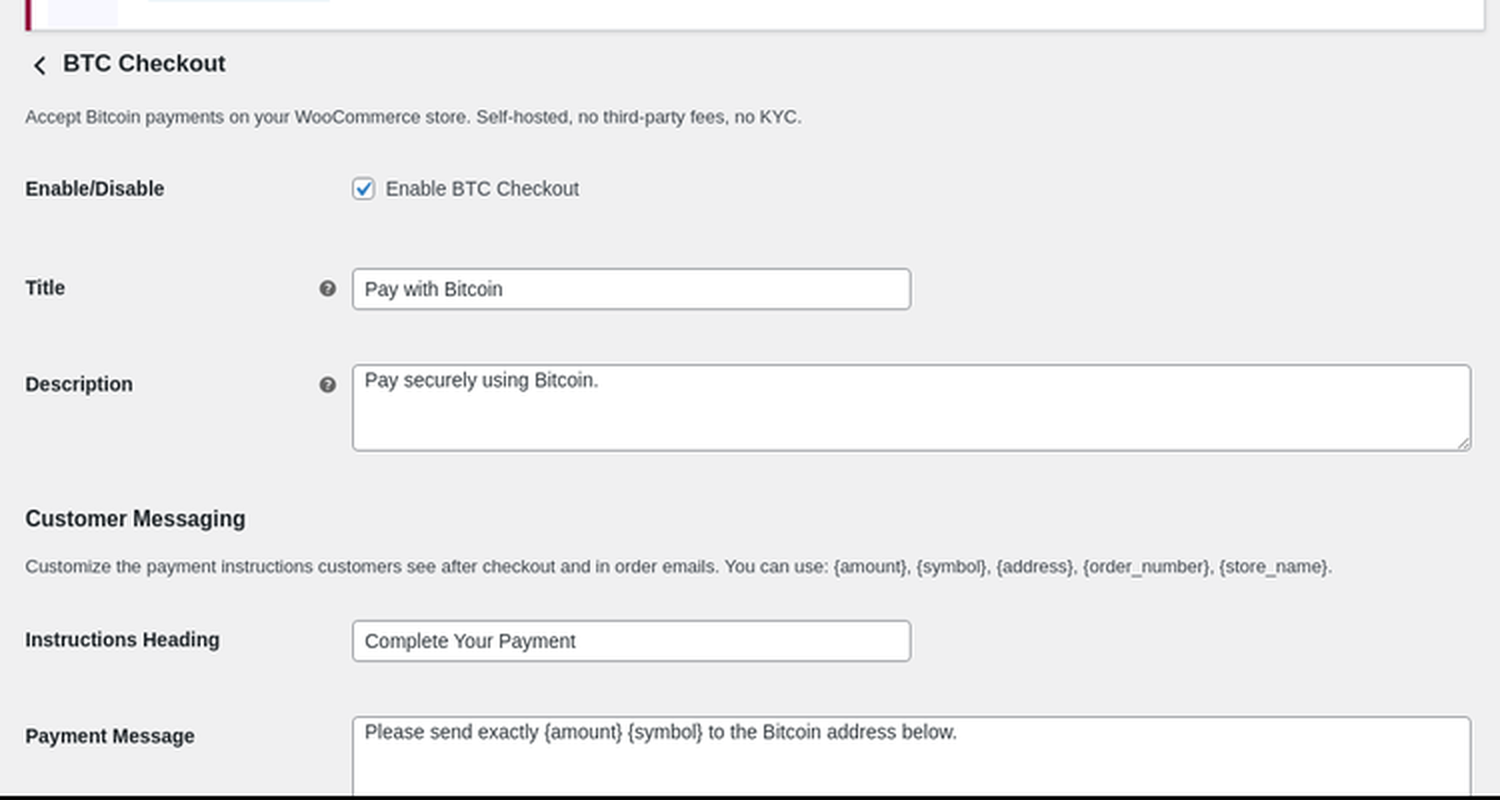
- Custom Payment Messaging — Customize the customer-facing payment heading and instructions without touching code.
- Bitcoin Discount Incentives — Offer percentage or fixed-amount discounts to customers who pay with Bitcoin. Displays a "Save X%" badge at checkout.
- Multi-Wallet Support — Configure multiple wallet addresses per currency with automatic round-robin load balancing.
- QR Code Checkout — Auto-generated QR codes for easy mobile payments.
- Real-Time Exchange Rates — Converts order totals to BTC using live market rates from CoinGecko.
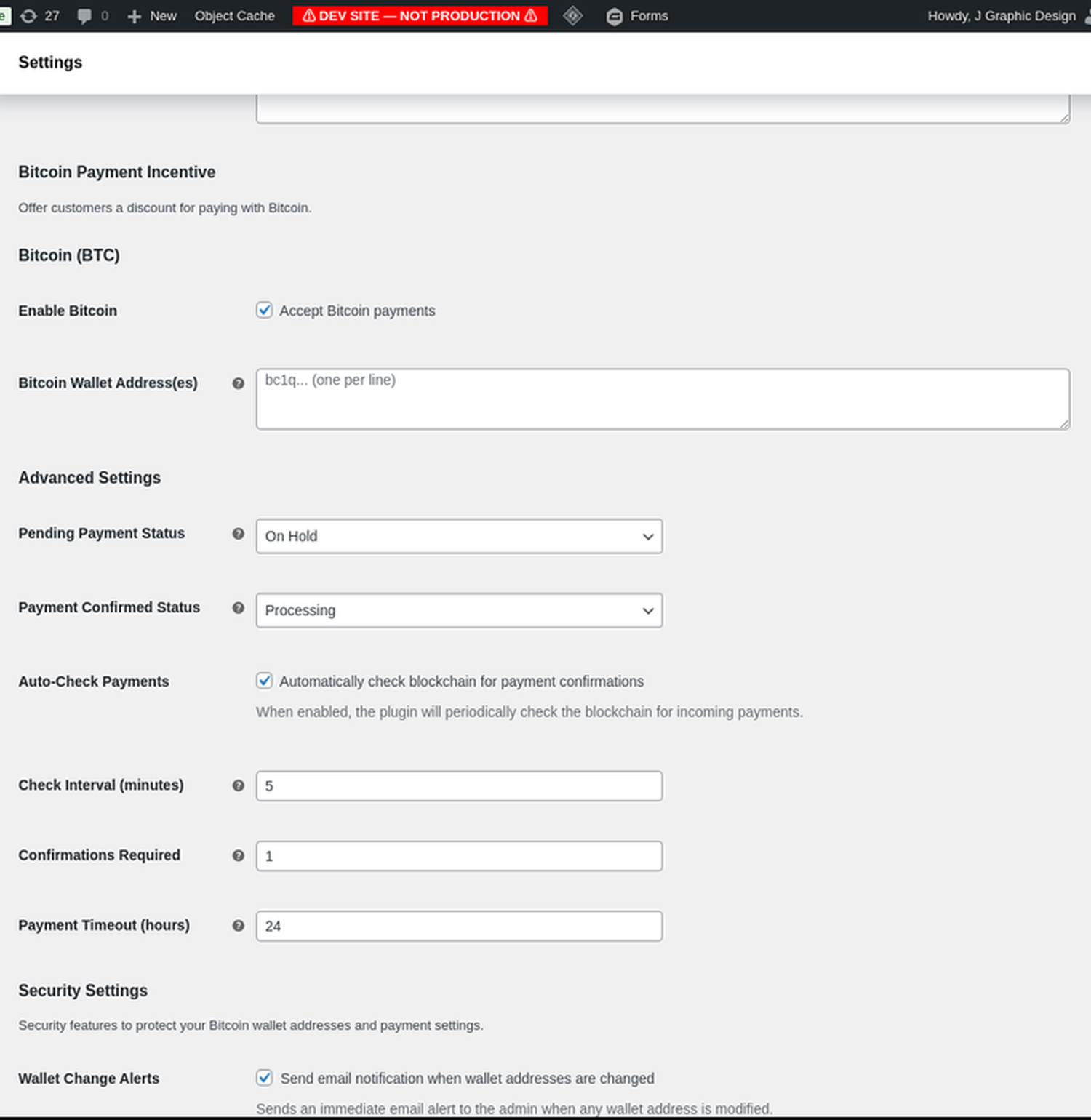
- Configurable Confirmations — Set the number of blockchain confirmations required before marking an order as complete.
- Enterprise Security — Input sanitization, nonce verification, CSRF protection, and rate limiting built in.
- Multilingual Ready — Translation-ready with full i18n support.
- Install the Plugin — Upload via WordPress dashboard or install from the plugin directory. Activate with one click.
- Add Your Wallet — Enter your Bitcoin wallet address in WooCommerce → Settings → Payments → BTC Checkout.
- Accept Payments — Customers pay with Bitcoin at checkout, send payment to your wallet, and the order is verified automatically.
安装:
- Log in to your WordPress dashboard.
- Navigate to Plugins → Add New.
- Search for "BTC Checkout".
- Click Install Now, then Activate.
- Go to WooCommerce → Settings → Payments → BTC Checkout to configure your wallet address.
- Download the plugin ZIP file from the WordPress plugin directory.
- Log in to your WordPress dashboard.
- Navigate to Plugins → Add New → Upload Plugin.
- Choose the downloaded ZIP file and click Install Now.
- Click Activate Plugin.
- Go to WooCommerce → Settings → Payments → BTC Checkout to configure your wallet address.
- WordPress 5.8 or higher
- WooCommerce 5.0 or higher
- PHP 8.1 or higher
- SSL certificate (HTTPS) recommended for secure checkout
- Navigate to WooCommerce → Settings → Payments.
- Click Manage next to "BTC Checkout".
- Enter your Bitcoin wallet address.
- Configure optional settings:
- Payment confirmation threshold
- Bitcoin discount percentage
- Order status after payment
- Payment timeout duration
- Click Save Changes.
屏幕截图:
常见问题:
Is BTC Checkout free?
Yes! Bitcoin (BTC) payments are completely free. There are no transaction fees, no monthly costs, and no limits.
Do I need a third-party account?
No. BTC Checkout is fully self-hosted. Payments go directly to your wallet address. There is no account registration and no KYC verification required.
How are payments verified?
BTC Checkout uses public blockchain APIs to verify payments in real time. When a customer sends a payment, the plugin monitors the blockchain for the transaction and automatically updates the order status once the required number of confirmations is reached.
What happens if a customer underpays?
If a customer sends less than the required amount, the order remains in "Pending Payment" status. You can configure the plugin to allow a tolerance percentage for minor rounding differences.
Is it compatible with the WooCommerce block checkout?
Yes. BTC Checkout works with both the classic WooCommerce checkout and the newer block-based checkout editor.
Does it work with WooCommerce HPOS (High-Performance Order Storage)?
Yes. BTC Checkout is fully compatible with WooCommerce HPOS.
Can I offer discounts for Bitcoin payments?
Yes. You can configure a percentage or fixed-amount discount for customers who choose to pay with Bitcoin. A "Save X%" badge is displayed at checkout to incentivize Bitcoin payments.
Is the plugin secure?
Yes. BTC Checkout includes input sanitization, nonce verification, CSRF protection, and rate limiting. No sensitive data (private keys, card numbers) is ever stored or transmitted.
Where can I get support?
Open a support topic on the WordPress.org plugin support forum, or email support@btccheckout.ai.
更新日志:
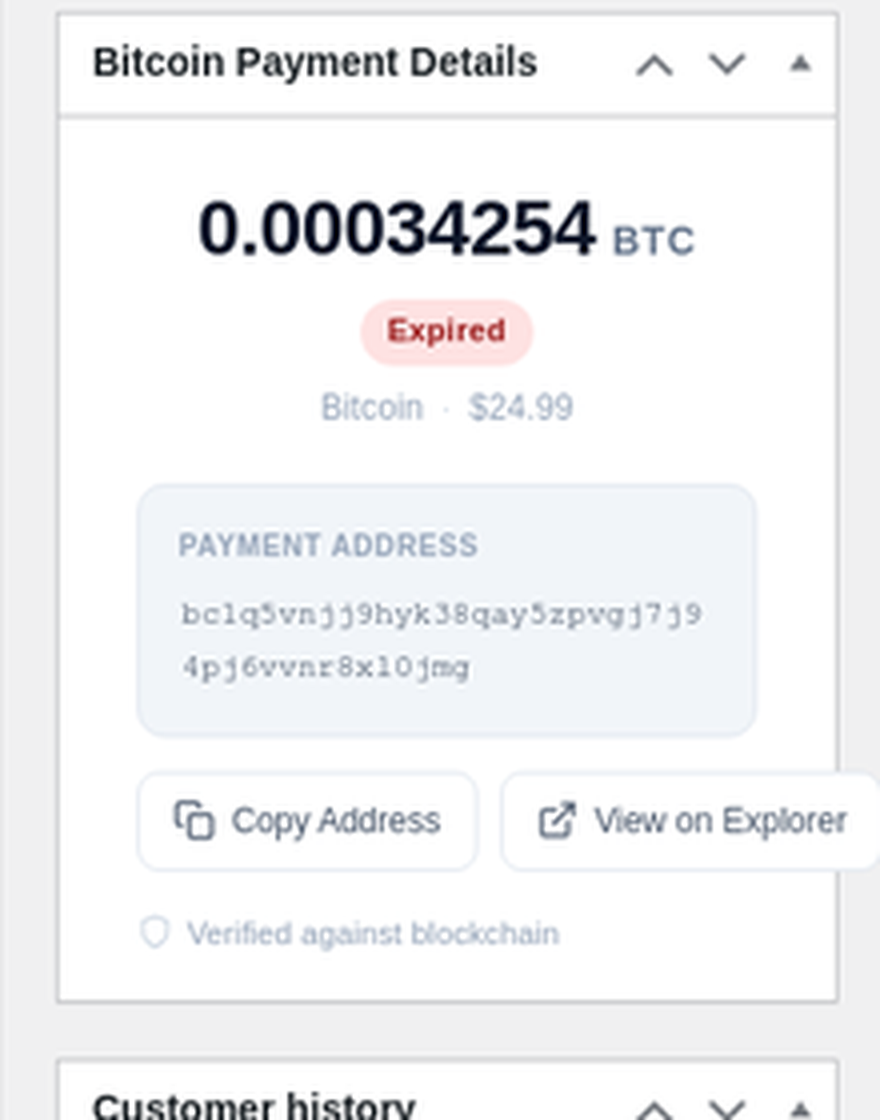
- New: Redesigned admin order metabox with large crypto amount display, color-coded status badges, and clean payment address card.
- New: Redesigned frontend payment card with dominant BTC amount hero, horizontal QR + fields layout, and improved CTA button.
- New: Elementor compatibility tag added to plugin header.
- Improved: Admin metabox uses BEM-style CSS architecture (cc- prefix) for zero-conflict styling.
- Improved: Frontend payment card uses BEM-style CSS architecture (cc-pay prefix) for zero-conflict styling.
- Improved: Copy-to-clipboard and blockchain explorer buttons with inline SVG icons.
- Improved: Grouped trust section with blockchain verification footer.
- Security: Replaced direct SQL queries with WooCommerce-native wc_get_orders() for Plugin Check compliance.
- Security: Added rate limiting to all frontend AJAX endpoints (payment status check and manual verify).
- Security: Added explicit capability check in bulk actions handler (edit_shop_orders).
- Security: Added nonce/referer verification to bulk order actions for CSRF defense-in-depth.
- Security: Added absint() normalization for order IDs in bulk action processing.
- Security: Upgraded Bitcoin address validation with full Bech32/Bech32m checksum verification (BIP-173/BIP-350).
- Security: Added heartbeat token format validation before HMAC comparison.
- Improved: Added user-facing error feedback when payment status check fails.
- Improved: Added admin notice when neither bcmath nor gmp PHP extensions are available.
- Improved: Enhanced bcmath diagnostics logging with GMP status.
- Fixed: Deprecated current_time('timestamp') replaced with time().
- Fixed: Removed unused global $wpdb reference in admin class.
- i18n: All new strings are translation-ready with proper text domain.
- Refreshed the admin dashboard and order payment UI for faster review and a more polished first impression.
- Added clearer payment status badges, stronger empty states, and better manual check feedback.
- Fixed: CoinGecko external service documentation updated with Trust Center and API documentation links for reliable access.
- Fixed: All transient keys now use full
crypto_checkout_hb_prefix instead of abbreviatedcc_hb_prefix (WordPress.org naming compliance). - Fixed: JavaScript localization object names updated to
btcCheckoutParamsandbtcCheckoutHeartbeatfor consistent prefixing. - Fixed: Uninstall cleanup updated to match new transient key naming.
- Removed: Stale legacy references from changelog entries.
- Fixed: Refactored inline JavaScript to external enqueued file (WordPress.org compliance).
- Fixed: Consolidated duplicate AJAX payment check handlers into single reusable script.
- Improved: Dashboard order counts now cached with 5-minute transient for better performance.
- Improved: Custom message sanitization uses wp_kses instead of wp_strip_all_tags to preserve basic formatting.
- Improved: All translatable strings in admin JS now passed via wp_localize_script.
- Updated: readme.txt tags updated to bitcoin-focused keywords.
- Added: Payment Tracking Dashboard — dedicated WooCommerce admin screen showing pending, confirmed, and expired Bitcoin orders at a glance.
- Added: Manual Payment Verification — one-click "Check Now" button on pending orders to re-verify blockchain payment status on demand.
- Added: Customizable Payment Instructions — configure the payment page heading, instructions text, and confirmation message from WooCommerce settings without editing code.
- Added: Token replacement system for payment messages — use {amount}, {currency}, {address}, and {timeout} placeholders.
- Improved: Admin order list now shows crypto payment status column with color-coded badges.
- Improved: Currency selector badge hidden in free (BTC-only) mode to avoid redundant "Bitcoin" labeling at checkout.
- Improved: Badge only renders when multiple currencies are enabled.
- Improved: All user-facing strings updated from "Crypto Checkout" to "BTC Checkout" for consistent BTC-only branding.
- Improved: Admin notices, settings labels, security emails, and privacy strings now reference Bitcoin instead of generic cryptocurrency.
- Improved: Code comments updated across all files for reviewer trust and consistency.
- Improved: Changelog entries simplified to remove unnecessary altcoin references.
- Removed: Unused icon asset.
- Simplified: QR code URI generation — removed unnecessary switch/case for BTC-only plugin.
- Rewritten: README.md updated to BTC-only content (removed outdated multi-coin documentation).
- Removed: Unnecessary load_plugin_textdomain() call (WordPress.org handles translations automatically since WP 4.6).
- Removed: Legacy multi-coin code from security, gateway, privacy, QR, and uninstall files.
- Changed: WooCommerce method_title updated to "BTC Checkout" for consistent naming.
- Cleaned: Debug comments removed from gateway code.
- Improved: Readme and changelog cleaned for BTC-only consistency.
- Fixed text domain to match WordPress.org assigned slug (btc-checkout)
- Renamed main plugin file to btc-checkout.php for slug consistency
- Regenerated translation template (.pot) file
- Fixed: Text domain updated to match WordPress.org assigned slug (btc-checkout-crypto-payment-gateway-for-woocommerce).
- Fixed: Translation template (.pot) renamed and updated to match new text domain.
- Plugin Check: 0 errors, 0 warnings.
- Removed: All legacy upsell references from plugin source code, settings descriptions, and readme.
- Removed: Legacy upgrade notice section from WooCommerce payment gateway settings.
- Regenerated: Clean translation template (.pot) with no stale strings.
- Improved: All user-facing text now accurately reflects free version capabilities.
- Removed: Empty legacy WooCommerce settings tab. All BTC settings remain accessible via WooCommerce → Settings → Payments → BTC Checkout.
- Improved: Cleaner admin interface with no redundant menu items.
- Changed: Focused on Bitcoin (BTC) support.
- Changed: Requires PHP 8.1 (aligned with bundled BaconQrCode library requirements).
- Removed: License key system from free version.
- Removed: Legacy multi-coin code (payment checker methods, currency definitions, checkout UI).
- Added:
Requires Plugins: woocommerceheader for WordPress 6.5+ dependency management. - Added: Full external service documentation in readme.txt per WordPress.org guidelines.
- Improved: Clean BTC-only checkout display (no unnecessary currency selector).
- Changed: Cloudflare IP detection now uses bundled ranges only (no remote fetching).
- Changed: Contributors field updated to match WordPress.org username.
- Improved: Code quality and documentation throughout.
- Fixed: Text domain corrected across all 254 translatable strings for WordPress.org compliance.
- Improved: Heartbeat Protection interval optimized from 5s to 10s to reduce server load.
- Improved: Heartbeat token storage switched from full order save to lightweight meta update.
- Added: Cron overlap guard with transient-based lock to prevent concurrent payment verification runs.
- Added: BCMath polyfill for hosts without the bcmath PHP extension.
- Added: Enhanced security class with input sanitization, nonce verification, and rate limiting.
- Improved: Precision math for payment calculations.
- Replaced bundled phpqrcode library with BaconQrCode (BSD-2-Clause) for WordPress.org compliance.
- Eliminated all unprefixed class and constant warnings.
- Added SVG fallback renderer for hosts without GD extension.
- Added: Frontend Heartbeat Protection to prevent wallet address swap attacks at checkout.
- Added: HMAC-SHA256 per-order signature system for cryptographic address verification.
- Added: MutationObserver-based instant DOM tampering detection.
- Security: Timing-safe hash comparison to prevent side-channel attacks.
- Added: Privacy policy integration via wp_add_privacy_policy_content() for GDPR compliance.
- Added: Personal data exporter and eraser for WordPress privacy tools.
- Added: Proper uninstall.php for clean plugin removal.
- Added: Full internationalization support with .pot translation template.
- Added: Multi-wallet address support with automatic round-robin load balancing.
- Improved: Wallet address validation.
- Improved: Exchange rate caching and fallback logic.
- Added: Multi-wallet address rotation.
- Improved: Exchange rate caching and fallback logic.
- Added: Crypto discount incentive system.
- Improved: QR code generation with amount encoding.
- Improved: Block checkout compatibility.
- Added: Configurable blockchain confirmation thresholds.
- Improved: Payment verification reliability with retry logic.
- Added: Payment timeout configuration.
- Improved: WooCommerce HPOS compatibility.
- Added: Real-time exchange rate conversion via CoinGecko API.
- Improved: Checkout page styling and mobile responsiveness.
- Initial release.
- Bitcoin (BTC) payment support.
- Automatic blockchain payment verification.
- QR code generation for checkout.
- WooCommerce Payment Gateway API integration.