
Bubuku Post View Count
| 开发者 |
lruizcode
bubuku |
|---|---|
| 更新时间 | 2026年10月25日 01:19 |
| PHP版本: | 7.4 及以上 |
| WordPress版本: | 7.1 |
| 版权: | GPL-3.0-or-later |
| 版权网址: | 版权信息 |
详情介绍:
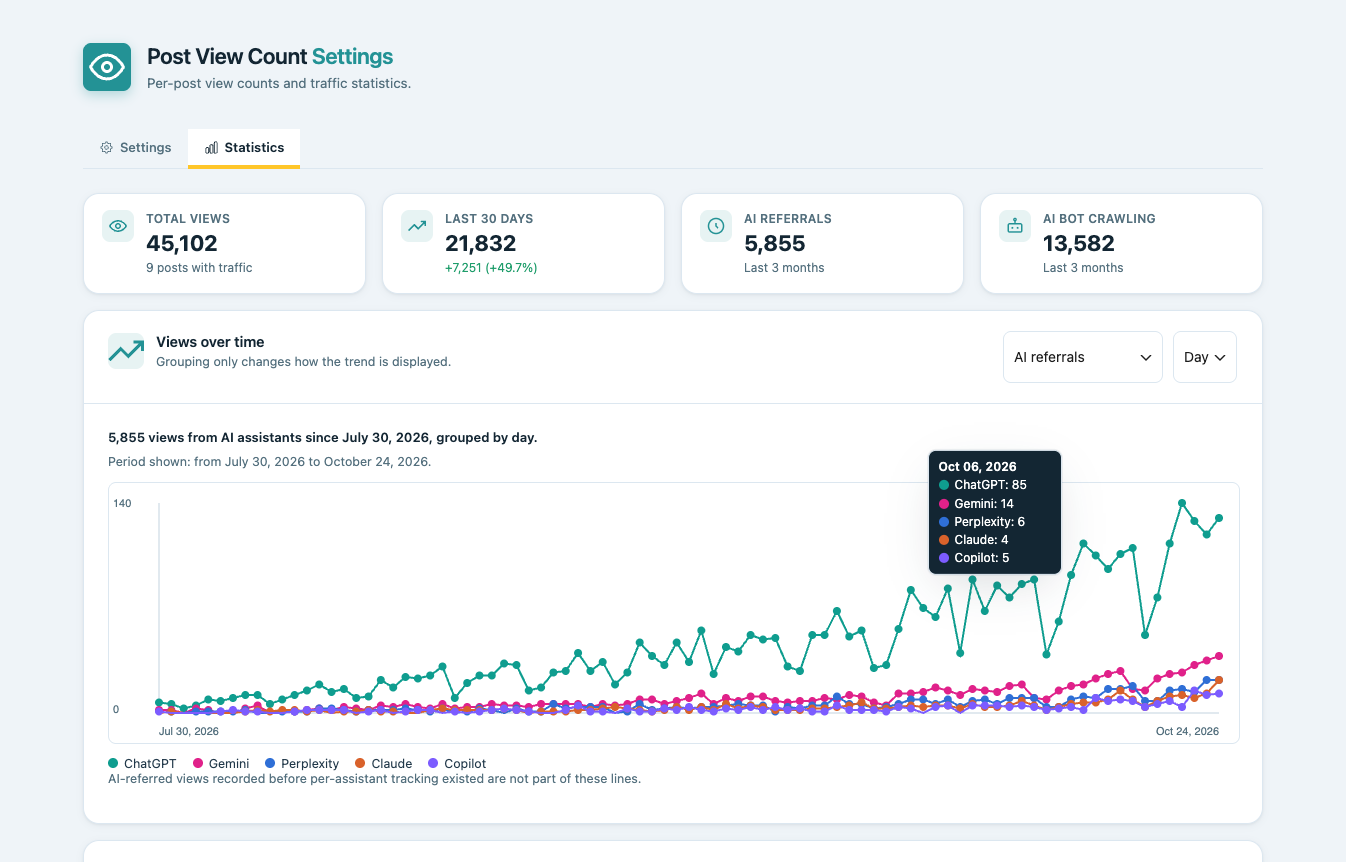
- Summary cards: total views, last 30 days (and the change vs. the previous 30), AI referrals and AI bot crawling.
- Views over time by day, week or month, plus "Rising & falling" content.
- Most viewed and stale content, and sortable "Views" and "Last view" columns in the list tables.
- A dashboard widget with a 7-day trend, rendered from a background snapshot.
- Optional device and referrer breakdown (direct, search, social, AI assistants).
- Optional tracking of 63 known AI crawlers, kept apart from human views.
[bbk_post_views] shortcode or the "Bubuku · Vistas del post" block. The total is also mirrored to the views post meta.
Built for privacy and performance
No raw IP address or User-Agent is stored, Do Not Track and Global Privacy Control are honored, and you choose which content types count and which roles or bots are excluded. WP-CLI and multisite are supported.
More information in Spanish: Show the most viewed Articles, without affecting the loading speed
安装:
- Unzip the plugin ZIP file on your computer.
- Copy or move the resulting folder to the "wp-content/plugins/" directory of your WordPress installation.
- Log in to the WordPress admin area and navigate to the "Plugins" screen.
- Locate "Bubuku Post View Count" in the plugins list and click "Activate" to enable the plugin.
- Go to Settings → Post View Count to choose which content types count views and to explore your statistics.
屏幕截图:


常见问题:
How do I read the view count in code?
Use get_post_meta( $post_id, 'views', true ); the last view date is in views_last. The plugin's own tables are the source of truth, and the total is mirrored to post meta for compatibility.
Will updating lose my existing view counts?
No. Existing views post meta is copied into the plugin's tables in the background, in batches. Only the last-view date is missing for posts counted before 1.2.0.
Does uninstalling delete my data?
Yes by default (tables, options and deduplication data). You can turn this off in Settings → Post View Count.
Can I choose which content types count, or exclude roles and bots?
Yes. In Settings → Post View Count choose the content types (Posts by default), exclude user roles and optionally exclude known bots. Unchecking a type never deletes recorded views.
Can I reset the counts without uninstalling?
Yes, with the "Delete all data now" button in Settings → Post View Count.
Does it affect page load speed?
The counter is deferred and sends its request after the page has been visible for a few seconds, so it stays outside the initial rendering path.
Does it work on multisite?
Yes, including the uninstall routine.
Can I show the view count on a post or page?
Yes: the [bbk_post_views] shortcode (add show_last_viewed="1" for the last view date) or the "Bubuku · Vistas del post" block.
Does it respect Do Not Track and Global Privacy Control?
Yes, by default: the view is still counted, but the device and referrer breakdown is skipped.
更新日志:
- Stats: "Loading data..." while each section loads, full-width chart and a new AI referrals view with one trend line per assistant.
- Improved WordPress.org listing: description and screenshots.
- Fixed number formatting in the chart and the "Rising & falling" comparison.
- The dashboard widget no longer depends only on WP-Cron to refresh.
- New summary cards in Stats and a dashboard widget.
- 63 AI crawlers recognized, Do Not Track / GPC setting and optional write buffer.
- Charts, rising/falling lists, device and referrer breakdown, AI traffic report, shortcode and block.
- Sortable Views columns, WP-CLI commands and trends REST endpoint.
- Own database tables, settings page and automatic data migration.
- Security, stability and multisite fixes.
- Initial release.