
Bulk Edit Products – Price, Stock, SKU & Inventory Manager for WooCommerce
| 开发者 | themefunda |
|---|---|
| 更新时间 | 2026年7月19日 14:19 |
| PHP版本: | 7.4 及以上 |
| WordPress版本: | 7.0 |
| 版权: | GPLv2 or later |
| 版权网址: | 版权信息 |
详情介绍:
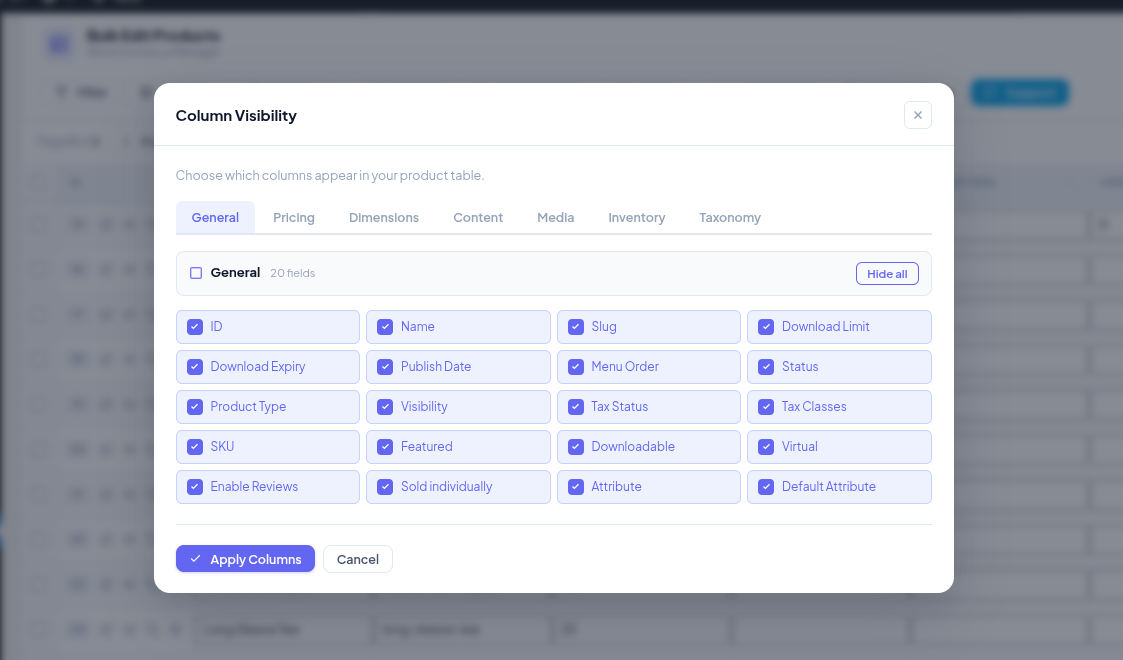
⚡ Save hours of manual work. Bulk edit hundreds of WooCommerce products in seconds.✅ BULK EDITABLE PRODUCT FIELDS Update all of these fields across multiple products at once: ✔ Product Name ✔ Regular Price ✔ Sale Price ✔ Stock Quantity ✔ Stock Status (In Stock / Out of Stock / On Backorder) ✔ SKU ✔ Manage Stock ✔ Allow Backorders ✔ Sold Individually ✔ Weight (kg) ✔ Length / Width / Height (dimensions) ✔ Tax Status ✔ Tax Class ⭐ KEY FEATURES – Bulk edit prices — update Regular Price and Sale Price across hundreds of products at once – Bulk edit stock — update Stock Quantity and Stock Status in seconds – Bulk edit SKUs — reset or update product SKUs across your entire catalog – Bulk edit dimensions & weight — update shipping data after a supplier change – Bulk edit tax classes — apply new tax rules across multiple product categories – Filter & search products — target exactly the products you need before editing – Simple & variable products — supports all standard WooCommerce product types – No coding required — works out of the box, right inside WordPress admin 💡 POPULAR USE CASES ✦ Flash sale setup — bulk update sale prices across 50+ products before a promotion ✦ Inventory restock — set stock status to "In Stock" for an entire product range after delivery ✦ Supplier change — bulk update weight, length, width, and height after a packaging update ✦ Tax compliance — apply a new tax class across multiple product categories in one click ✦ Post-stocktake — reset or bulk update stock quantities across your full catalog ✦ Store reorganization — bulk update SKUs to a new naming convention instantly ⚙ HOW IT WORKS
- Install and activate the plugin
- Go to WP Admin → Products → Bulk Edit
- Filter or search for the products you want to update
- Select your products and enter the new field values
- Click Save — all selected products update instantly
安装:
- Go to WP Admin → Plugins → Add New
- Search for "Bulk Edit WooCommerce Products"
- Click Install Now, then Activate
- Go to Products → Bulk Edit to start editing
- Download the plugin zip file
- Upload to
/wp-content/plugins/bulk-edit-product-for-woocommerce/ - Activate through WP Admin → Plugins
- Go to Products → Bulk Edit
屏幕截图:
常见问题:
What is the fastest way to bulk edit WooCommerce products?
Install this plugin, go to Products → Bulk Edit, filter the products you need, update the fields, and click Save. Hundreds of products can be updated in seconds — no coding required.
Can I bulk edit WooCommerce product prices?
Yes. You can bulk update Regular Price and Sale Price across as many products as you need in one action. Perfect for setting up flash sales, seasonal discounts, or price increases.
Can I bulk update WooCommerce stock quantity and stock status?
Yes. Both Stock Quantity and Stock Status (In Stock, Out of Stock, On Backorder) are fully supported. Ideal after a stocktake, supplier delivery, or product discontinuation.
Does this plugin support bulk editing WooCommerce SKUs?
Yes. You can bulk update SKUs across multiple products at once — useful when migrating to a new SKU format or fixing incorrect SKUs after an import.
Can I bulk edit WooCommerce product dimensions and weight?
Yes. Length, Width, Height, and Weight are all bulk editable. This saves significant time when updating shipping data after a supplier or packaging change.
Can I bulk edit tax status and tax class in WooCommerce?
Yes. Both Tax Status and Tax Class are supported, so you can apply tax changes across your entire product range in one action.
Does it work with variable products?
Yes. The plugin supports both simple and variable WooCommerce products.
Will it work with large WooCommerce catalogs?
Yes. The plugin includes filtering and search so you can target specific products quickly, even in stores with hundreds or thousands of products.
Is any coding required?
No. Everything is managed through a clean interface inside your WordPress admin dashboard. No PHP, no CSS, no technical knowledge needed.
Where is the bulk edit screen in WordPress?
After activating the plugin, go to WP Admin → Products → Bulk Edit.
Does this plugin support custom product fields?
Currently only the listed standard WooCommerce fields are supported. Custom field support may be added in a future release.
更新日志:
- Initial release
- Bulk edit support for: Product Name, Regular Price, Sale Price, Stock Quantity, Stock Status, SKU, Manage Stock, Allow Backorders, Sold Individually, Weight, Length, Width, Height, Tax Status, Tax Class