
BundleBoss - Product Bundles, Mix and Match & Build a Box for WooCommerce
| 开发者 | bundleboss |
|---|---|
| 更新时间 | 2026年10月21日 03:55 |
| PHP版本: | 8.0 及以上 |
| WordPress版本: | 7.1 |
| 版权: | GPLv2 or later |
| 版权网址: | 版权信息 |
标签
下载
详情介绍:
- Per-unit configuration: the customer sets the size, colour and options of every unit, restricted to the variations you allow
- Three pricing modes (percentage off, set amount off, fixed price), plus quantity tier discounts
- Bundle rules: quantity ranges per item, optional items customers can skip
- A guided creation wizard: pick what you are making, add products, preview, and create, no manual field wrangling
- A guided product page: per-item cards, colour swatches, the "All the same" shortcut, three unit layouts
- Promotions: sale countdown timer, related-bundles carousel, the progress-to-discount cart nudge
- Oversell-proof stock and fulfilment-ready orders with a component pick list
- Store plumbing: shipping weight modes, Cart and Checkout blocks, WPML and Polylang, JSON export and import
- Item links, if you want them: an optional small arrow beside each item name opens the product's own page in a new tab, so customers can check details without losing their bundle
- Choice slots: customers pick each component from pools you define, with compatibility and quantity rules and conditional items, all enforced on the server
- Two more layouts: the full-page Configurator and a step-by-step walkthrough
- Build-a-box (mix and match): a box builder for a custom gift box, a wine box or a hamper the customer fills themselves, from a pool with a target size and per-product limits
- Self-updating category pools: point a choice slot or box at a product category instead of a fixed list, and it stays current, a product added to that category later shows up in the slot automatically
- Size-run quantity grid for bundle items: a colours-by-sizes matrix for bulk orders
- Per-item personalisation with fees, plus logo and file upload with GDPR export and erase
- Order growers: frequently bought together (on the page and in the cart), buy X get Y, gift mode
- Shareable build links (any shop can open one; creating them is Pro), hero slots, deal badges, and the Composite Products importer
Ready to grow every order? BundleBoss Pro has a 14-day trial, no card needed. Upgrading keeps every bundle you built in the free plugin.When you find something BundleBoss does not do yet, tell us. We are small, we ship often, and we build what shop owners actually ask for (see "Tell us what you need" below). The free plugin, in detail
- Per-unit configuration: every unit of a bundle item can be configured independently
- Guided configurator: collapsible cards with sticky headers, one-line summaries and full keyboard support
- "All the same" toggle: configure once and every unit follows; switch it off afterwards and the picks stay, ready for individual tweaks
- Three unit layouts: arrange a multi-quantity item's units as stacked cards, compact cards, or a comparison table, chosen per bundle
- Progress-to-discount nudge: the cart shows "Add 1 more to unlock 15% off" with a progress bar and a one-click button to add another identical bundle
- Colour swatches: give attribute terms a colour and chips become swatch circles
- Three pricing modes: a percentage discount, a set amount off, or one fixed bundle price
- Quantity tier discounts: "buy 3+, save 20%"
- Sale countdown timer: live countdown bar with start/end scheduling
- Related bundles carousel: cross-sell between bundle pages
- Oversell-proof stock: component stock validated while configuring, at add-to-cart and at checkout, reduced on sale and restored on refund
- Fulfilment-ready orders: pick list with component SKUs and quantities on every order
- Shipping weight modes: automatic (sum of chosen components) or manual
- Export / import: move every bundle between sites as one JSON file
- Multilingual: WPML and Polylang supported out of the box
- Choice slots: customers pick each component from pools you define (PC-builder style), with live pricing on every option
- Compatibility and quantity rules: stop impossible combinations, enforced on the server, not just in the browser
- Per-item personalisation: optional add-on fields (names, options, notes), each able to carry a fee, captured per unit and shown on the order and the warehouse pick list. Built for team kit, workwear and promo
- Logo and file upload: customers attach a logo or artwork to an item; secure upload, a download link on the order, GDPR export and erase included
- Hero slots: the customer's chosen product takes over the page's main product image
- Deal badges: products on sale and featured products surface in the chooser
- Step-by-step layout: walk customers through one item at a time, with progress and free navigation
- Shareable build links: customers copy a finished build to a link anyone can open and buy (free shops can open a shared link; creating one is Pro)
- Migrate from Composite Products: one click converts existing composites to draft bundles
- Configurator layout: a full-page, two-pane builder with a docked "Your build" summary and a price on every option, for big or many-part products like a gaming PC
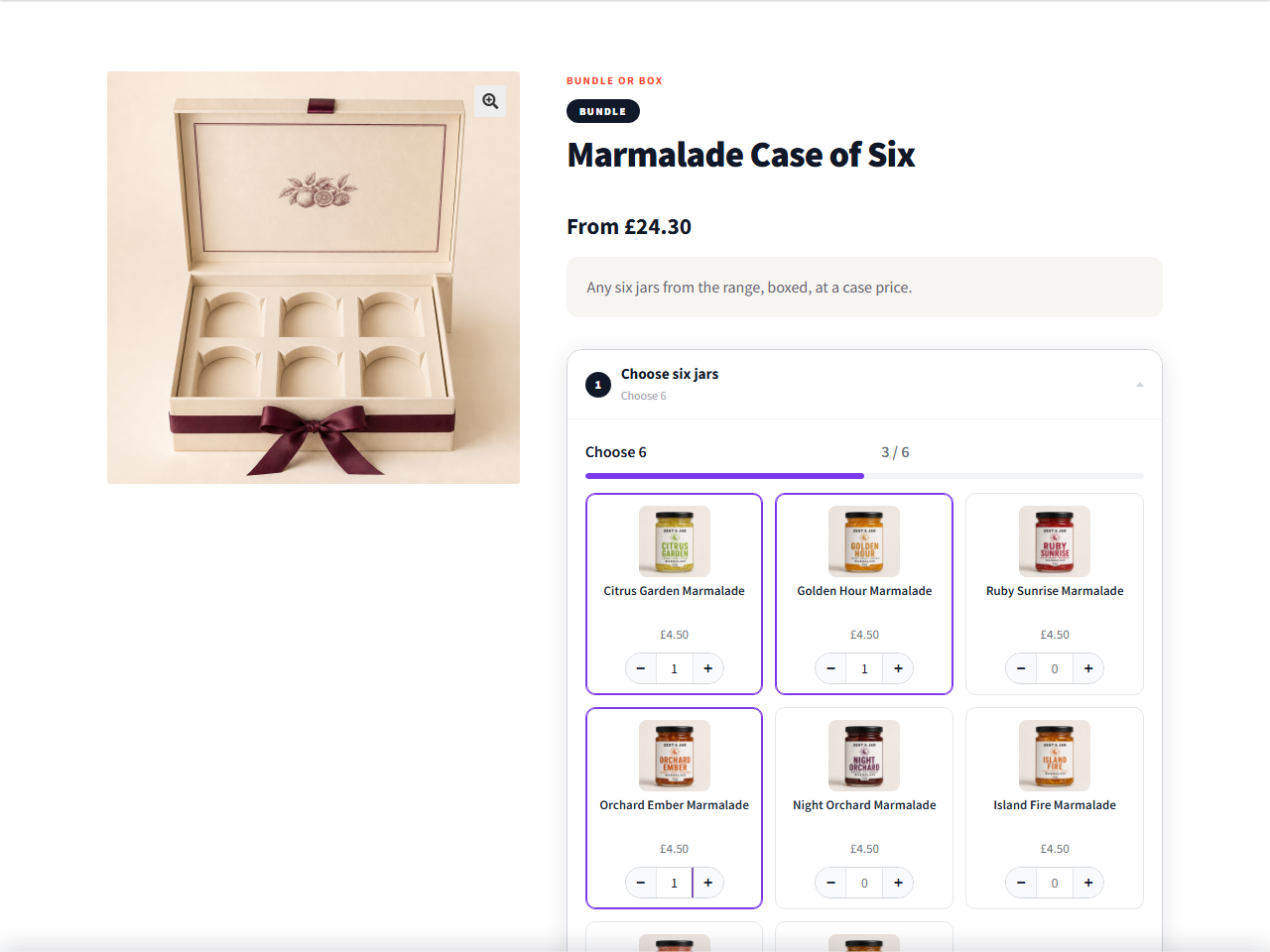
- Build-a-box (mix and match): customers fill a box by choosing any number from a pool, with a target size, per-product limits, and a live count and total (any 6 chocolates, any 4 candles)
- Self-updating category pools: build a choice slot or box pool from a product category, by hand, or both. A category pool maintains itself, add a product to the category and it appears in the slot with no edit to the bundle, and cross off the odd products you want left out, ideal for a rotating range or a large catalogue
- Gift mode: a recipient, a gift message, optional gift wrap with a fee, and a no-prices gift receipt, all carried through to the order
- Frequently bought together: surface companion products with a combined price and a set discount, the add-the-whole-set upsell
- Buy X get Y: buy-two-get-one-free style offers scoped to the bundle's own items (the cheapest goes free), shown clearly as was, pay, and you save
- Conditional items: show or hide a bundle item based on what the customer has already chosen, enforced on the server (pick the tagged top and the matching-joggers slot appears)
- WordPress 6.4+
- WooCommerce 8.0+
- PHP 8.0+
安装:
- In your WordPress admin go to Plugins > Add New, search for BundleBoss, then install and activate it. WooCommerce needs to be installed and active.
- Go to BossMage > Create a bundle. The guided wizard takes you from picking products to a finished bundle page in a few minutes, with a live preview of what your customers will see.
- Prefer the full editor? Create a product and choose the Bundle product type: the products go on the Bundle Items tab, the deal (a percentage off, an amount off, or one fixed price) on Bundle Pricing, and extras like gift options or Buy X Get Y on Bundle Promotions.
- Publish and open the product page. The bundle is ready to sell, with live totals, per item options and stock checks built in.
屏幕截图:



常见问题:
How do I create product bundles in WooCommerce?
Install BundleBoss, then go to BossMage → Create a bundle. The guided wizard takes you from picking products to a published product bundle in about two minutes, with no code. Prefer the full editor? Create a product, choose the Bundle type, and set your items, pricing and promotions on their own tabs.
Can customers mix and match, or build their own box?
Yes. A build a box (mix and match) product lets customers fill a box from a pool you choose, with a target size, per-product limits, and a live count and total (any 6 chocolates, any 4 candles). That's a Pro feature. On any bundle, customers also pick the size and colour of every item and buy the lot as one order.
Does it work with variable products?
Yes, that's the core use case. Customers pick a variation for every unit, restricted to the options you allow per bundle item.
Where did product options on single products go?
In 5.0.0 they became AddOnBoss, a companion plugin from the same family: option sets, personalisation fields and print positions on a product's own page. Install it and everything you built is where you left it, nothing needs rebuilding. BundleBoss stayed the bundle builder, and the two share one option-set library when both are active.
Can a bundle include virtual or downloadable products?
Yes. Virtual items (services, licence keys you fulfil yourself) just work. Downloadable items deliver their files like any normal purchase: permissions are granted when the order is paid, the customer gets the links in the order email and under My Account → Downloads, and a refund cuts access automatically.
Does selling a bundle reduce the stock of the products inside it?
Yes. Component (and variation) stock is reduced when the bundle sells and restored if the order is cancelled or refunded. Stock is also validated during configuration, at add-to-cart, and again at checkout.
Will the price and VAT come out right?
Yes. Every price on the bundle page follows your store's setting for showing prices with or without tax, and the total a customer sees on the page is the total they pay in the basket, in every tax set-up we test, including shops that use the Tax Switch plugin to let customers flip between the two. A bundle is taxed at one rate, the tax class you give it, like any WooCommerce product. If your bundles mix rates, such as a hamper of zero-rated food with a standard-rated mug, ask your accountant how to rate the hamper before you set its tax class.
What does the order show, and can my stock or accounting system read it?
Each bundle is one line on the order, with every item the customer picked listed under it: colour, size and quantity, plus a pick list with each item's SKU for whoever packs it. Stock comes off the real products. If your till, ERP or accounting system needs every item as its own line, BundleBoss Pro's Itemise on the order records each one as its own priced order line, while the customer still buys and pays for the bundle as one.
Do coupons work on bundles?
Yes, as on any product. If a bundle's price is already a discount and you don't want codes stacking on top, switch on Exclude from coupons on that bundle. Percentage and fixed product coupons then skip it, and a fixed basket discount comes off the other items instead. You set it once on the bundle, not on every coupon you make.
Can I give a bigger discount for buying more?
Yes, in the free plugin. Bulk discounts reward buying several bundles at once, for example 10% off from 2 and 20% off from 3, and the basket shows the customer how many more they need for the next step.
Is the free version limited?
No limits on how many bundles you make, how many items go in them, or how long you use it. Variable products and choosing the size and colour of every item are free, as are the three pricing modes, bulk discounts, stock control and the order pick list. Pro adds the builder tools listed above, such as build-a-box and choice slots.
Will it work with my theme and on phones?
BundleBoss is tested across 18 popular themes, including Astra, Kadence, GeneratePress, OceanWP, Blocksy, Neve, Storefront and the default WordPress block themes, with fixes for Divi and Enfold, and on screens down to 320 pixels wide. If something looks wrong on yours, post in the support forum with the theme's name and we'll look.
Will an update break my shop?
Every release runs more than 1,400 automated tests before it goes out, many of them checking what each page charges, and bigger releases also run over 300 browser checks of real shopping journeys. When an update changes how an existing bundle looks or works, the changelog says so in plain words.
Does it work with currency switchers?
Yes. The bundle is charged once, in the customer's currency, and every figure on the page converts with it: the total, the saving, size prices and extra fees. Tested with FOX Currency Switcher.
Where do I get help?
Post in the support forum here on WordPress.org. Every thread gets an answer, and your question and its answer stay there to help the next shop with the same problem. If you'd rather not post publicly, for example because it involves your store's details, you can email us through bossmage.com.
Can I set one fixed price for the bundle?
Yes. Each bundle can use a percentage discount off the sum of the chosen items, a set amount off, or a fixed price that never changes regardless of the customer's choices.
Can I make the configurator match my store's branding?
Yes. The configurator inherits your theme's fonts automatically, and every colour it uses is exposed as a CSS variable. Set a handful of values in Appearance → Customize → Additional CSS and the whole interface follows your brand:
:root { --bb-accent: #c2410c; /* step highlights */ --bb-ink: #1e2a4a; /* headlines and the total bar */ --bb-surface: #fffdf8; /* cards */ --bb-border: #e8e0d0; }
The full token list is documented at the top of the plugin's bundle.css.
Can I show my own information next to the configurator (total weight, nutrition, performance)?
Yes. The configurator fires a JavaScript event, bundle_boss:build_changed, after every change the customer makes. The event detail carries the whole build: which products and variations are picked, quantities, and the running totals. Listen for it, derive whatever your store cares about, and render the result into the container printed by the bundle_boss_after_summary action:
document.addEventListener( 'bundle_boss:build_changed', function ( e ) { if ( ! e.detail.complete ) { return; } // e.detail.items gives [ { productId, qty, units: [ { variationId, attributes } ] } ] myPanel.textContent = 'Total weight: ' + myWeightFor( e.detail.items ) + ' kg'; } );
A PC store renders performance estimates, a hamper store calories, a ski shop carry weight. The event works on every bundle, free and Pro alike.
Does it work with the block (Gutenberg) cart and checkout?
Yes, both. The classic shortcode pages and the block-based Cart & Checkout are fully supported: bundle pricing, the selections summary, stock protection and order details all work identically, and the progress-to-discount nudge appears in the block cart too. Block themes (Full Site Editing) are also tested.
Is my data removed when I uninstall?
By default, no: bundle products and their configuration are deliberately kept, so reinstalling restores everything. If you want uninstalling to remove all bundles and settings, switch on "Delete all BundleBoss data when the plugin is uninstalled" under BossMage → BundleBoss (download an export first, on the same page).
Can I back up my bundles or move them to another site?
Yes. BossMage → BundleBoss exports every bundle (items, choice pools, rules, pricing and promotions) as one JSON file. Importing matches products by SKU, then slug, so the file survives the move to a site where product IDs differ; anything that can't be matched is reported, never guessed.
Does it work on multilingual sites (WPML / Polylang)?
Yes. Bundle settings copy to translations, slot labels are translatable per language, and product/term references are mapped to the language being browsed.
更新日志:
- Fixed (Pro): an option set to Always added behind a question set to Not offered now saves and is included. A bundle that turned off its "Blank or personalise" question and included a print position behind it lost the print position on every Update, and the page and basket left it out. A question whose answer charges is still never added for the customer.
- Fixed (Pro): a product with colours or sizes in a box shows again when the options you offer can be bought, even if WooCommerce's overall price for that product reads 0. It was left out of the box although its own page sold it.
- New (Pro): the bundle editor says on that product's row when WooCommerce's price for it is out of date, with a link to the product.
- Fixed: on a big bundle, every setting saves. A bundle with many products and choices sent more fields than many servers accept (PHP's max_input_vars), and the server dropped the last ones, so switching an option from Customer picks to Always added did not save while everything above it did.
- Fixed (Pro): on a big bundle, the Other product options card keeps following your edits. On a server with a low field limit it stopped updating.
- Fixed (Pro): switching an option to Always added no longer ticks its first answer, such as None, for you, so the answer you tick is the only one included.
- Fixed (Pro): a box with pack sizes fills to the size chosen. Its + stopped at the box's earlier maximum, so a bucket of 6 could hold only one.
- Fixed: with a VAT display switch active, such as Tax Switch for WooCommerce, a box's pack size prices and a bundle's amount off show one price instead of two side by side.
- Fixed: where a theme or page builder prints each product's buying form in its shop cards, a bundle shows its button there instead of its whole builder squeezed into the card.
- New (Pro): in a box step, a product with colours and sizes shows a Select options button and dots for its colours, where the plain products show their counter. Once something is picked, the button fills with the count, such as 2 chosen, and the card says what it holds, such as Red M ×2. Cards in a row share one height, with the prices and buttons level.
- Changed (Pro): opening that product leaves its card where it was clicked. Its colours and sizes open under its row, with Done to close them, instead of the card jumping to the top of the step. The step's header and a phone's size window show how many of the box are chosen.
- Changed: product photos show whole on bundle cards, under You Might Also Like and, with Pro, in Frequently bought together and Complete your order in the cart. The shop's square catalogue thumbnail cut the collar and hem off tall garment photos.
- Changed: with a brand colour set, finished steps, the progress bar, the chosen price, You save and a card's running total take its shades instead of a fixed green.
- Fixed (Pro): a picked product with colours and sizes keeps its outline beside the photo and lists its picks under the price.
- Fixed (Pro): in a full box, + on another colour or size looks spent, and pressed, it says why, as Pick many does. It did nothing before.
- New: British English. Shops in English (UK) see basket wherever WooCommerce's own British English does, and BundleBoss's English text says cart, as WooCommerce's does.
- Fixed: on shops using WP Rocket, BundleBoss's scripts are no longer held back by "Delay JavaScript execution", so a shopper's first tap on a bundle works instead of only waking the page.
- Fixed: after a BundleBoss update, WP Rocket's cached and minified copies are cleared once, so shoppers get the new version. WP Rocket kept serving the old files until its cache was cleared by hand.
- Fixed (Pro): a picked card's tick sits in its top-right corner, so a product on sale keeps its discount badge in view, and in place, once it is chosen.
- Fixed (Pro): on a phone, a picked product's row fits the screen. With a theme's larger type it ran off the edge, cutting the name and the Change button.
- Fixed: the label above a bundle's title uses the word you set in Tools, such as Kit, instead of always saying Bundle.
- Fixed (Pro): a product or category name with an ampersand, such as "H & Secuencial", reads correctly on Pick cards instead of showing "&". For the full history of earlier releases, see changelog.txt in the plugin folder, or https://plugins.svn.wordpress.org/bundle-boss/trunk/changelog.txt