
BYLTCommerce Toolkit
| 开发者 | byltcommerce |
|---|---|
| 更新时间 | 2026年11月9日 02:46 |
| PHP版本: | 7.4 及以上 |
| WordPress版本: | 7.1 |
| 版权: | GPLv2 or later |
| 版权网址: | 版权信息 |
详情介绍:
BYLTCommerce Toolkit replaces a pile of single-purpose plugins with one plugin made of modules. Switch on the modules a site needs under Toolkit → Modules. A module that's off loads no code at all: no hooks, scripts or database queries.
It works with or without WooCommerce. Store modules say "Requires WooCommerce" and switch on once it's active.
Free modules
Customer Manager (WooCommerce)
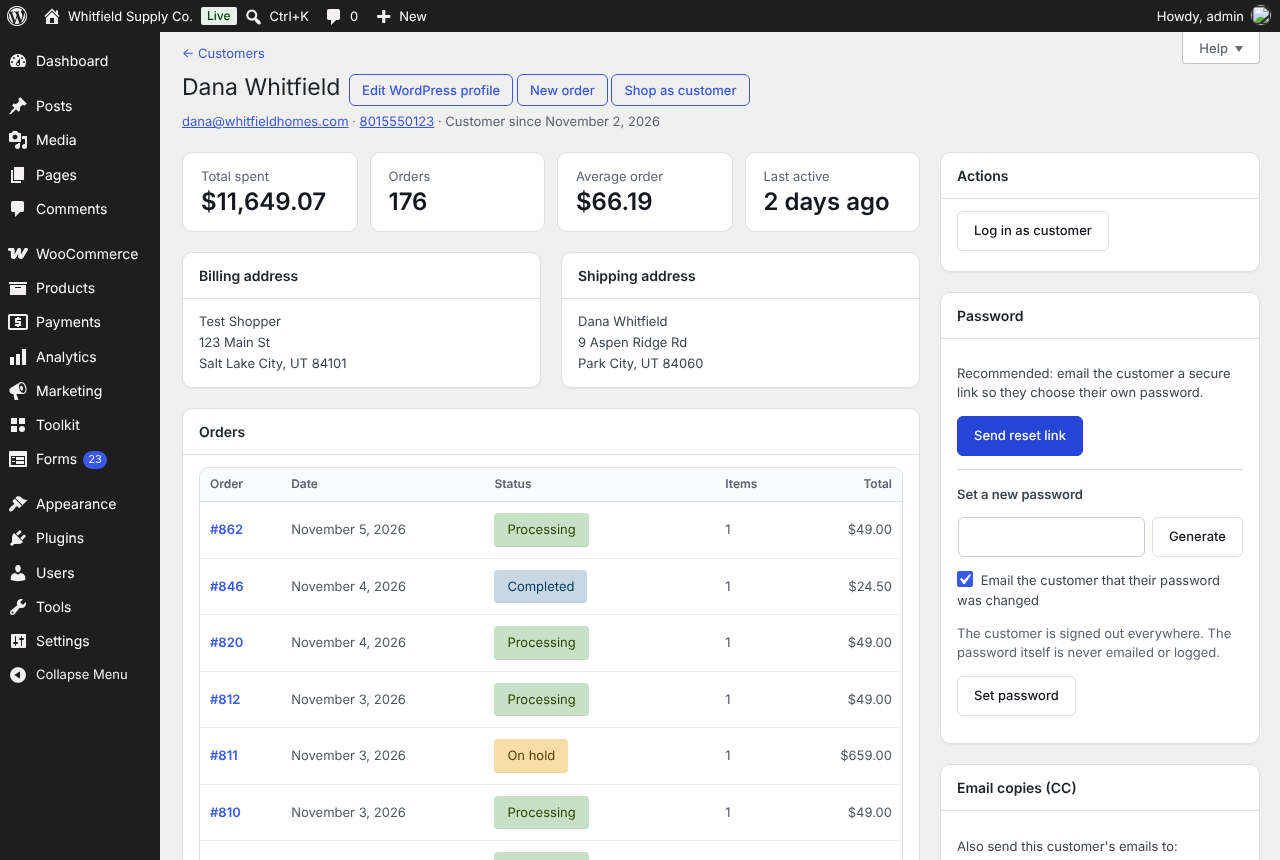
A real customer screen: profile, billing and shipping addresses, total spent, order count, average order, recent orders and an activity log. Customer names in WooCommerce → Customers open it instead of the WordPress user editor.
- Email a password reset link, or set a password for the customer. The password is never emailed or logged.
- Guest customers: see their guest orders and create an account that keeps them.
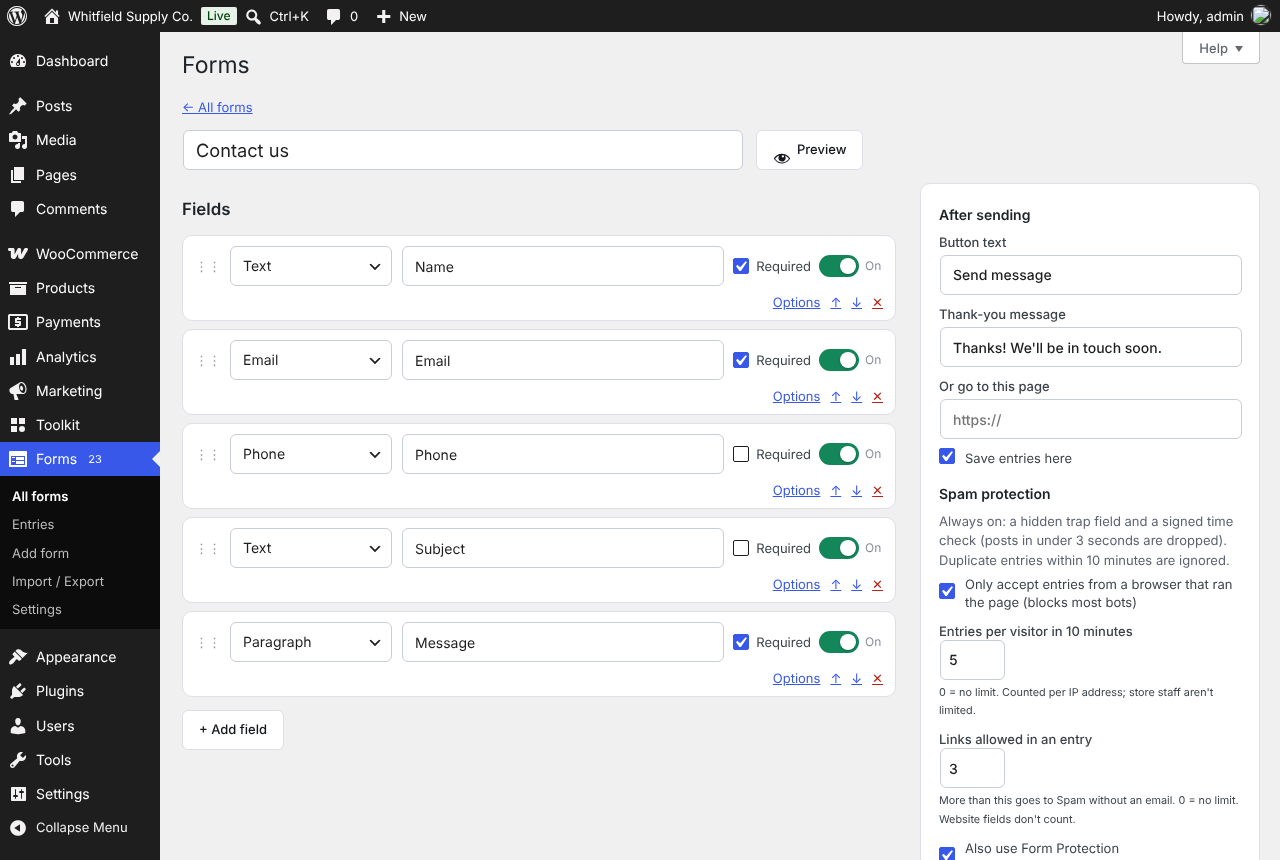
- 15 field types (including password and private file uploads), on/off fields, CSS classes, a full-width preview, required fields, email notifications and a thank-you message or redirect.
- Every entry is saved. Mark entries read or spam, and export them to CSV or JSON.
- Quote forms can add a "Request a quote" button to products, with the product filled in.
- Import and export forms and entries between sites.
- Add a form with the "Form" block or
[bylt_form id="12"].
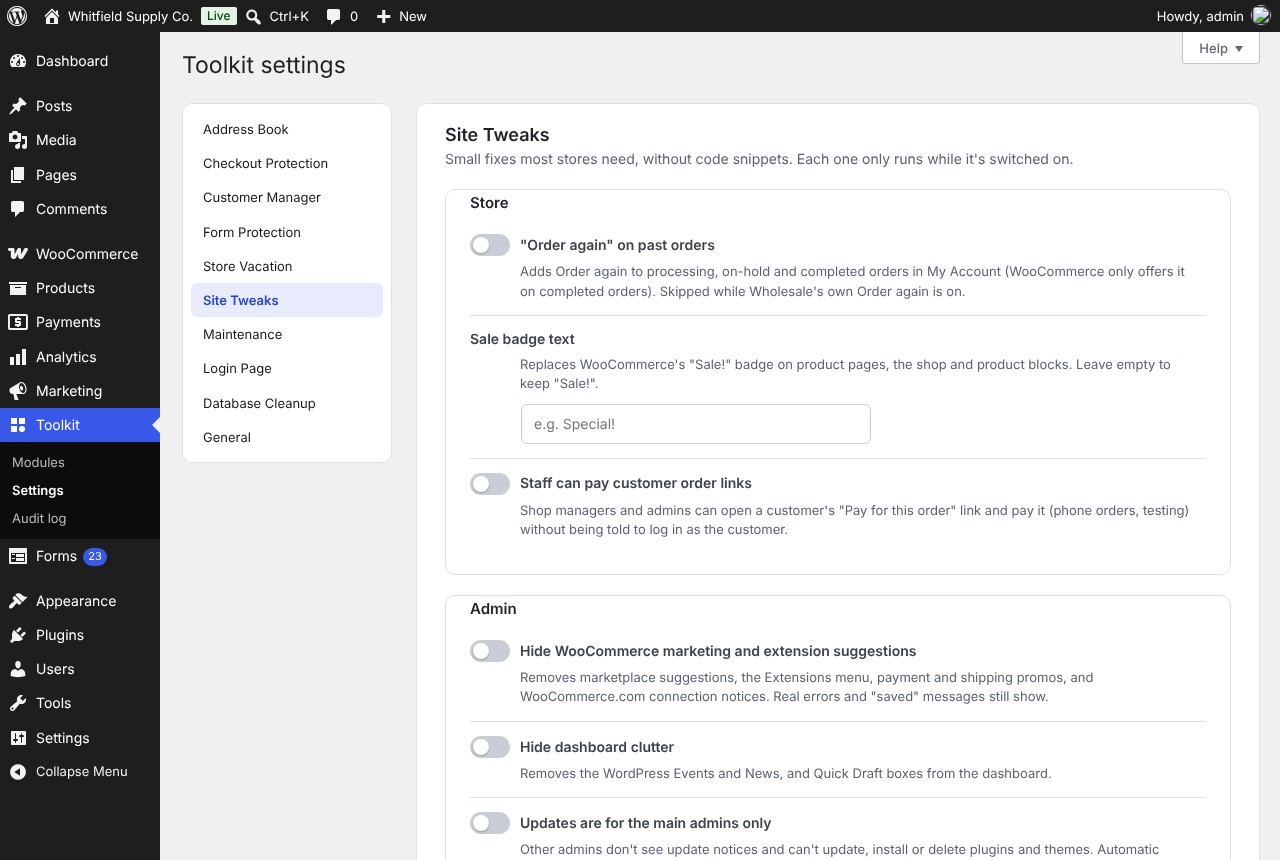
- Menus only where you work. Settings share one page under Toolkit → Settings. Work areas such as Forms get their own menu only while they're switched on.
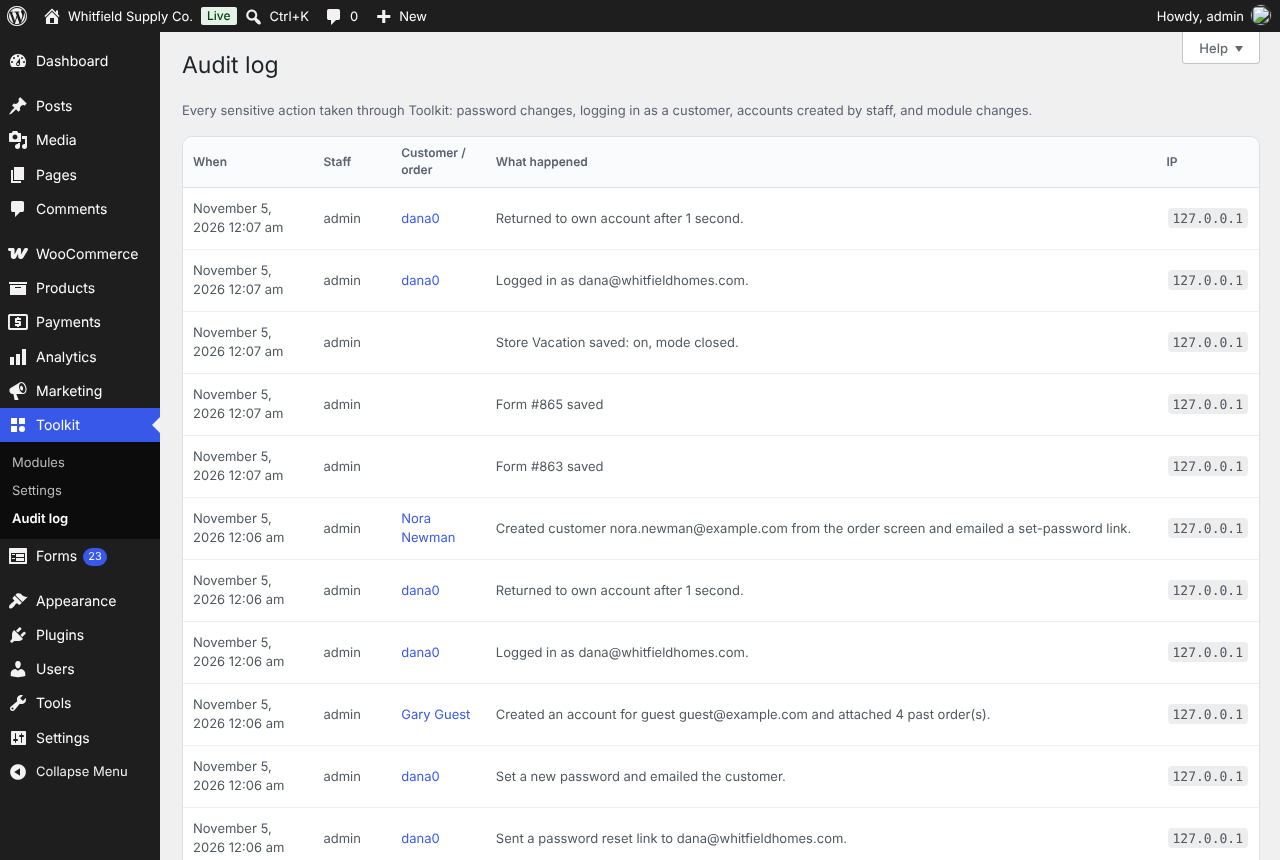
- Audit log. Password changes, account switches and settings changes are recorded under Toolkit → Audit log.
- Plays well with caching. Toolkit doesn't cache pages itself. It clears your cache when something visitors see changes: WP Rocket, LiteSpeed Cache, W3 Total Cache, WP Super Cache, WP Fastest Cache, SiteGround Optimizer and Nginx Helper.
- Off means off. A module that's switched off loads nothing.
安装:
- In WordPress, go to Plugins → Add New, search for BYLTCommerce Toolkit, then click Install Now and Activate.
- Go to Toolkit → Modules, tick the modules you want and click Save modules.
- Modules with options add a section to Toolkit → Settings.
屏幕截图:
常见问题:
Do I need WooCommerce?
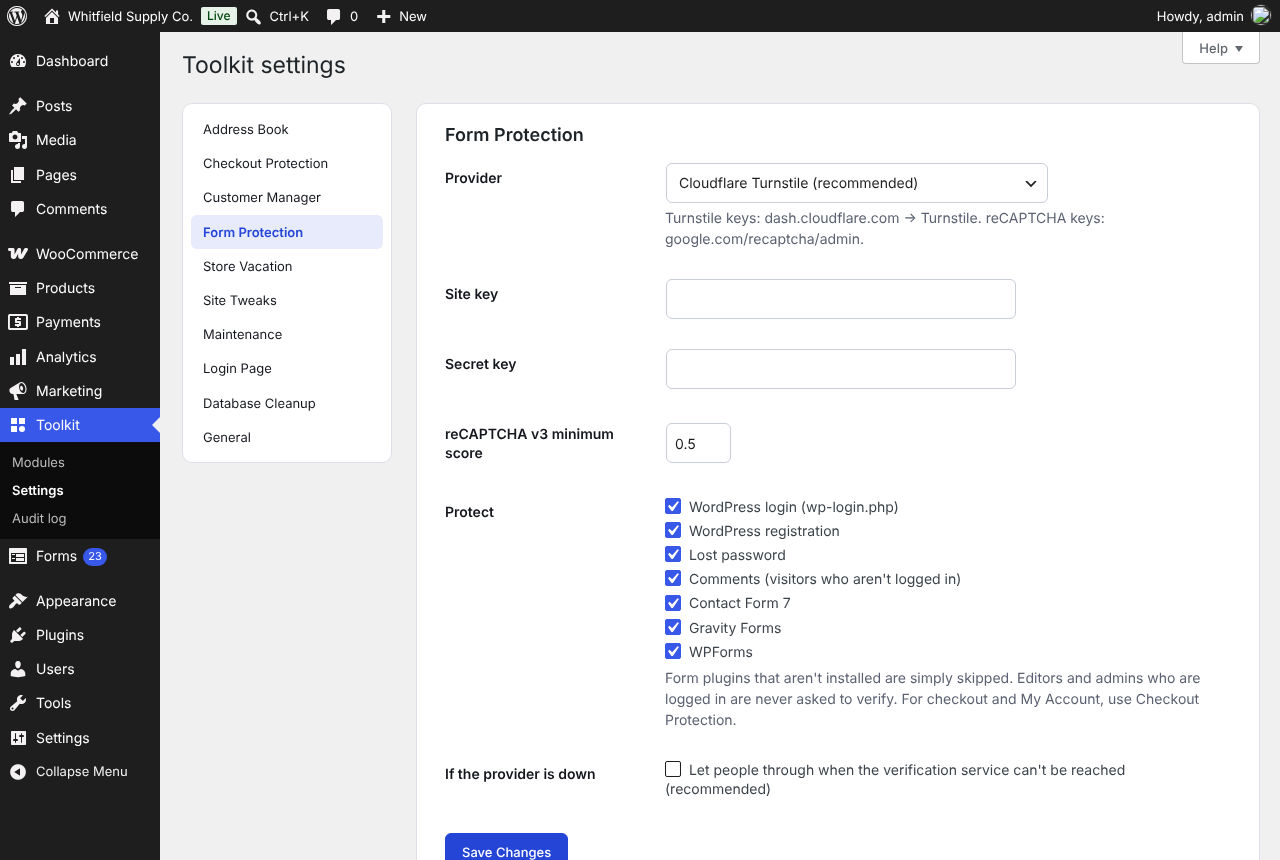
No. Forms and Form Protection work on any WordPress site. Modules that need WooCommerce show "Requires WooCommerce" and switch on once it's active.
Will it slow my site down?
Modules you haven't switched on load nothing. The ones you use only load their scripts on the pages that need them.
What happens to my data if I delete the plugin?
Nothing is removed unless you ask. To remove everything BYLTCommerce stored, tick Delete all BYLTCommerce data under Toolkit → Settings → General before deleting the plugin.
Who can use the customer tools?
The customer screen needs the manage_woocommerce capability (administrators and shop managers). Password tools and Login as Customer also require permission to edit that user, so shop managers can't touch staff accounts. Only administrators can switch modules on or off.
Where are the full docs?
更新日志:
0.42.1
- Sales Reps (Pro): code-quality fixes.
- New Pro module: Sales Reps. Assign customers to reps; reps sign in to My Account to see only their customers and those customers' orders, shop and order as a customer ("Shop as customer"), add new customers, and follow their earnings. Commission as one store rate, a rate per rep, or per product (also per rep). Refunds reduce commission; cancelled orders earn none. Commissions screen with payouts and CSV export. Imports reps, customers, rates and order history (including paid-out commissions) from WooCommerce B2B Sales Agents.
- Login as Customer: the "Return" link and where it goes can be changed by other modules (used by Sales Reps).
- Purchase Orders (Pro): the "Purchase order number" field now appears on new admin orders as soon as Purchase order is chosen as the payment method (it used to show only after the order was saved).
- Checkout Protection: on the classic checkout the human check now always sits right above the Place order button and stays there when the checkout refreshes. Some themes printed it at the bottom of the page, where customers couldn't see it.
- Subscriptions (Pro): extra safety check when switching a product option.
- Subscriptions (Pro): "Buy once or subscribe". Customers choose a one-time purchase or a subscription on the product page, with an optional "Subscribe & save" discount and a choice of frequencies (e.g. every 1, 2 or 3 months).
- Subscriptions (Pro): customers can change how often their subscription renews, switch product options (size, flavor), add products from the product page or their whole cart, and remove products, all in My Account. Changes apply from the next payment. Can be turned off in Subscriptions → Settings.
- Subscriptions (Pro): the subscription list has coloured status badges, Start / Trial end / Next payment / Last order / End date columns, sortable headers, and Suspend / Reactivate / Cancel links on each row.
- Login as Customer: choose where staff land after switching (Home page, My account, Shop, Cart or any page) in Toolkit → Settings → Login as Customer. Every "Log in as customer" and "Shop as customer" link uses it. The default is My account.
- Licensing: the Pro version's address now matches the store settings (byltcommerce-toolkit-pro).
- Licensing now uses the plugin's WordPress.org address (byltcommerce-toolkit).
- Readme: new screenshots; older changelog entries moved to changelog.txt.
- Renamed to BYLTCommerce Toolkit. The text domain is now byltcommerce-toolkit. Settings, data and the Toolkit menu are unchanged.
- All styles and scripts now load through WordPress's enqueue functions (no inline style or script tags).
- Forms: submissions from logged-in visitors are protected with a nonce, since they can update the visitor's account.
- Forms: file uploads are saved with WordPress's upload handler.
- Customer Manager: attaching guest orders also checks that you can edit that user.
- Store Locator import: upload Excel (.xlsx) files as well as CSV.
- Store Locator import: files with one yes/no column per category (as other store locators export) are recognised. Each column is matched to an existing category or creates a new one, or can be skipped.
- Store Locator import: addresses written on one line ("2005 E Main Rd, Portsmouth, RI 02871") are split into street, city, state and ZIP, and rows with map coordinates no longer need a ZIP or city.
- Store Locator import: different stores at the same address are both kept and listed on the report; the same store listed twice is merged.
- Customer Manager: "Shop as customer" button beside "New order" on the customer screen. It logs you in as the customer (like Log in as customer) and opens the Shop.
- Customer Manager: email copies (CC). Add up to 5 extra addresses to a customer (a bookkeeper, a purchasing team) and pick which order emails they get copies of. Staff set them on the customer screen; customers can set their own in My Account → Account details. Password and account emails are never copied, and changes are recorded in the activity log.
- Invoices & Packing Slips: a PDF column on the orders list with one-click invoice and packing slip icons (the old icons were in WooCommerce's Actions column, which is hidden by default).
- Invoices & Packing Slips: "Email invoice to customer" bulk action on the orders list. It sends WooCommerce's order details email (with the invoice PDF, if attached) for every selected order and adds an order note; more than 25 are sent in the background.
- Invoices & Packing Slips: the invoice PDF can now be attached to the store's New order email too (Settings → Invoices & Slips → Attach invoice PDF to).
- Subscriptions: automatic renewals with WooCommerce PayPal Payments. Subscribers who pay with PayPal, Venmo or a card through PayPal have it saved by PayPal (with "Save PayPal and Venmo" / "Save card details" on in PayPal Payments), and each renewal is charged to it using PayPal Payments' own renewal payment; cards are charged as merchant-initiated recurring payments. Declines, retries, "Pay now" emails and card updates work the same as for Stripe and Authorize.Net, and Subscriptions → Settings shows whether PayPal is ready.
- Subscriptions: automatic renewals with Stripe and Authorize.Net. When a customer subscribes with the WooCommerce Stripe Gateway or Authorize.Net CIM, their card is saved by that plugin, and every renewal is charged to it automatically using the plugin's own renewal payment (no card details pass through BYLT). If a card is declined, the subscription goes on hold, the customer is emailed a link to pay, and the card is tried again after the days you set (3 and 7 by default). Paying a renewal with a new card makes it the card for future renewals. Subscriptions → Settings shows which payment methods renew automatically and what to switch on if one can't ("Saved cards" in Stripe, "Tokenization" in Authorize.Net). Subscriptions imported from WooCommerce Subscriptions that renewed automatically can be turned back to automatic with one click. Other payment methods keep the "Pay now" email.
- New: Bookings (Pro). Sell appointment times: customers choose a date and an open time on the product page, check out, and the booking is confirmed when the order is paid. With Google Calendar connected (a service account, no extra plugins), open times leave out anything busy on the calendar and each booking becomes an event with the customer invited. Opening hours, closed dates, buffers, minimum notice, how far ahead, and a hold while the time is in the cart so nobody can double-book. Variations can have their own length. WooCommerce → Bookings lists upcoming, past, cancelled and needs-attention bookings; staff can move or cancel a booking (the calendar event follows). Customers see their bookings in My Account and can move them up to a set time before; reminder emails go out beforehand. Works with the classic and block checkout. Switching over from the WC Google Calendar Booking plugin copies its settings, products and current bookings.
- Wholesale: sub-accounts. A wholesale customer adds the people who buy for their company in My Account → Sub-accounts. Each buyer gets their own login (by an email with a set-password link) and shops with the company's prices, offers, payment terms, shared credit limit, tax certificates and purchase lists. Per buyer: whether they can place orders, whether orders need approval (never, always, or over an amount) and whether they see all company orders. Orders that need approval are sent with "Send for approval": the company account is emailed and approves (the buyer gets a link to pay; the company can pay it too) or declines with a note, right from the order in My Account. The company sees every buyer's orders with a "Placed by" column, and can turn buyers off and on. New order status "Awaiting approval" (no stock taken, not counted as a sale). Staff see the company link on the customer screen and can unlink a buyer. The B2BKing importer now brings subaccounts and their permissions across. Older versions: see changelog.txt in the plugin folder.