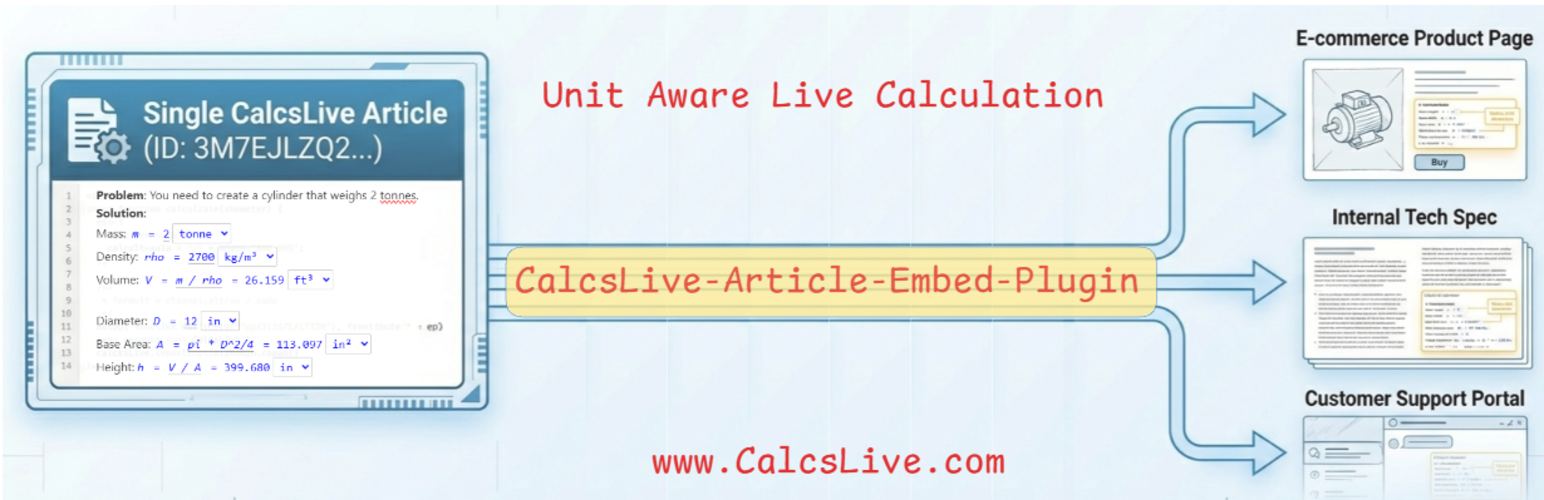
From Unit Converter to Unit-Aware Quantities & Calculators
| 开发者 | dreamwell |
|---|---|
| 更新时间 | 2026年6月18日 06:26 |
| PHP版本: | 7.4 及以上 |
| WordPress版本: | 6.9 |
| 版权: | GPLv2 or later |
| 版权网址: | 版权信息 |
详情介绍:
25.4 mm, 10 x 20 x 30 cm, or 2.5 bar becomes a Self-converting Quantity in place. Visitors can switch to inches, feet, psi, pounds, gallons, or other compatible units without leaving the page.
For authors, this means you write correct quantities once. For readers, it means they are free to understand and compare the product in the units that make sense to them. That is Unit Freedom.
More Than a Calculator: Unit-Aware Calculation
Most calculator plugins compute numbers. CalcsLive computes physical quantities with units.
That matters for technical products because formulas should represent the real relationship, not a hard-coded unit system. A unit-aware calculator can accept inputs in metric, imperial, or mixed units and still produce consistent results.
Examples:
- AC sizing from room dimensions
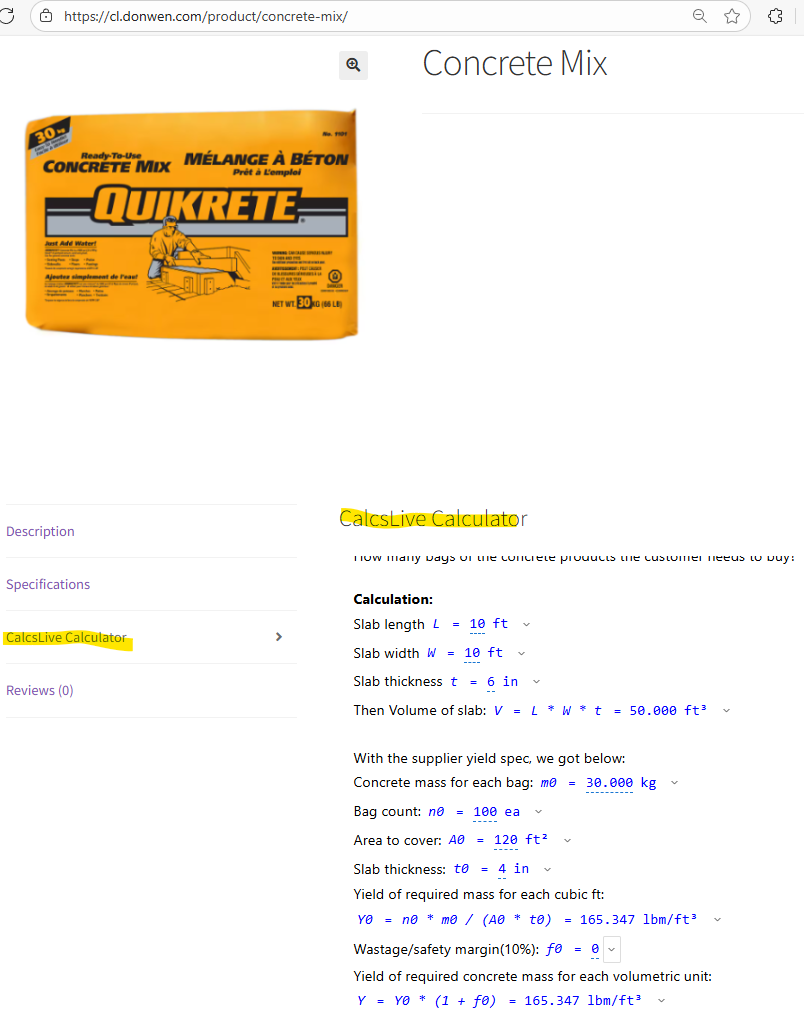
- Concrete bag quantity from length, width, and depth
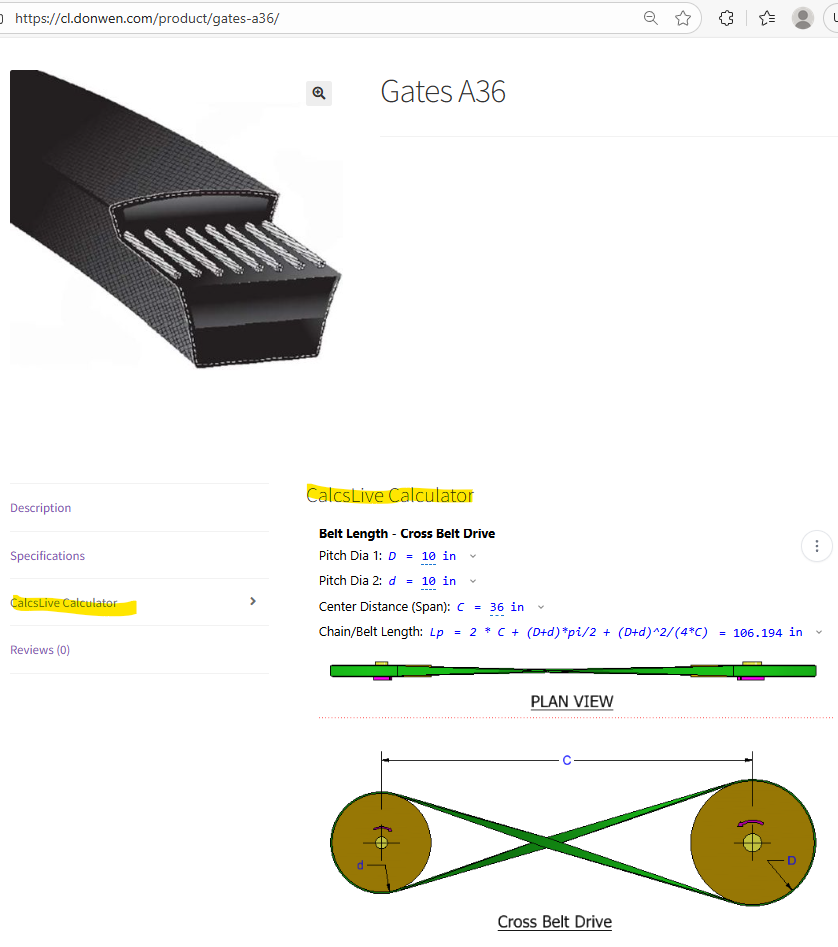
- Belt sizing from pulley data
- Cylinder force from pressure and bore diameter
- Pump or flow calculations using customer-entered values
- WooCommerce and e-commerce stores – AC sizing, concrete quantity, flooring coverage, paint calculators
- Technical products – live unit-aware specifications such as mm ↔ inches, kg ↔ lb, psi ↔ bar
- Building materials – "How many bags, sheets, rolls, or boards do I need?" calculators
- Industrial equipment – belt sizing, cylinder selection, pump sizing, capacity calculators
- Product documentation – interactive unit-aware specs inside technical articles and manuals
- 570+ Units, 67 Categories – Full CalcsLive unit library: length, mass, temperature, pressure, force, flow rate, energy, power, torque, electrical units, and more
- Unit-aware Quantity Shortcodes – Free, no account needed. Turn static values into Self-converting Quantities with
[calcslive_qty],[calcslive_qty_pair], and[calcslive_qty_triplet] - Single, Pair, and Triplet Quantities – Support individual specs, 2D dimensions, 3D dimensions, ranges, and coordinate-style values
- Calculator Embed – Embed full unit-aware buying calculators with
[calcslive id="YOUR_ID"] - Gutenberg Block – Add calculators visually in the WordPress block editor
- WooCommerce Friendly – Use in product descriptions, tabs, landing pages, and shortcode-aware page builders
- Responsive – Works on desktop, tablet, and mobile
- Lightweight – Scripts load only on pages that use CalcsLive features
- Return Prevention Focus – Helps customers choose correctly before purchase instead of dealing with returns after the mistake
- No-code calculator creation – Build on CalcsLive, update any time without touching WordPress
- Reusable – The same calculator can be embedded across multiple product pages, categories, or other sites
- WooCommerce product tabs – Add unit-aware specs or calculators to any tab using plugins like Custom Product Tabs for WooCommerce or YITH WooCommerce Tab Manager
- Elementor – Drop a Shortcode widget onto any product or landing page
- Divi – Use a Code or Text module with the shortcode
- WPBakery / Classic Editor – Paste shortcodes directly into any text area
- Any shortcode-aware plugin – If it renders
[shortcodes], CalcsLive shortcodes work inside it
- Your embed token and domain, included in the iframe URL
- The article ID specified in the shortcode or block
- CalcsLive website: calcslive.com
- Terms of Service: calcslive.com/terms
- Privacy Policy: calcslive.com/privacy
安装:
- Upload the plugin files to
/wp-content/plugins/calcslive-article-embed/, or install directly through the WordPress plugins screen. - Activate the plugin through the 'Plugins' screen in WordPress.
屏幕截图:
常见问题:
How does this plugin help reduce product returns?
Product returns often happen because customers choose the wrong size or quantity — they guess, or they misread a spec in unfamiliar units. This plugin addresses that problem directly on the product page, before checkout. The unit-aware quantity shortcodes let customers instantly see specs in their preferred units (metric or imperial), so a customer in Europe and one in the US both understand the same product description. The embedded buying calculators go further: a customer entering their room dimensions can get an AC BTU recommendation, or a contractor entering square footage and depth can get a bag-count estimate for concrete. When customers are confident they have the right product, return rates and "wrong size" support tickets both go down.
How is this different from other WordPress calculator plugins?
Most WordPress calculator plugins (like Calculated Fields Form, WP Coder, or Calconic) are general-purpose form builders built around the idea of a monolithic calculator widget. CalcsLive is architecturally different in several ways:
Unit-awareness is native, not bolted on. Every variable in a CalcsLive calculation is a Unit-aware Quantity. Inputs and outputs automatically handle metric, imperial, and mixed-unit workflows at the variable level — no separate conversion step, no approximation hacks. This is what makes every embedded value a Self-converting Quantity rather than a static number with a converter widget sitting next to it.
Decoupled, per-product architecture. Calculators live on the CalcsLive platform and are embedded independently into WordPress via shortcode or Gutenberg block. Each product or category can have its own dedicated calculator — an AC sizing calc for air conditioners, a bag count calc for concrete, a belt selection calc for power transmission. There is no shared monolithic calculator that every product must squeeze into. Add, change, or retire a calculator on any product without touching the others.
No-code creation, easy deployment. Calculators are created on CalcsLive using familiar technical notation — no custom programming required. Engineers, product managers, or office staff can build and update them. Deploying to WordPress is a single shortcode paste. The same calculator URL can also be shared standalone or embedded on non-WordPress sites via iframe.
Free unit-aware specs with no account. The [calcslive_qty], [calcslive_qty_pair], and [calcslive_qty_triplet] shortcodes give every product spec Unit Freedom at zero cost — no API key, no external service, entirely client-side.
What is the best way to add a sizing calculator to a WooCommerce product page?
The most common approach is to add a new product tab using a tab plugin like Custom Product Tabs for WooCommerce, then paste a CalcsLive shortcode into that tab's content area. This keeps your product description clean while giving customers a dedicated "Sizing Calculator" or "How Much Do I Need?" tab. Alternatively, you can paste the shortcode directly into the product description or short description fields — it works anywhere WordPress renders shortcodes. For stores using Elementor or Divi for product layouts, use a Shortcode widget or Code module. Step-by-step instructions for WooCommerce tabs are in the WordPress Integration Guide.
Where do I get an embed token?
Sign up or log in at calcslive.com, then go to Account → API Keys. Create a new key with service type "Website Embedding", add your WordPress domain to the allowed domains list, and copy the token (it starts with cle_). Paste it into Settings → CalcsLive in your WordPress dashboard. The token is only needed for embedded calculators — the unit-aware quantity shortcodes work without any account or token.
How do I find my calculator's article ID?
Open your calculator on CalcsLive and look at the URL. The article ID is the alphanumeric code at the end — for example, in https://www.calcslive.com/view/3M7EJLZQ2-4N5, the article ID is 3M7EJLZQ2-4N5. Use that ID in your shortcode: [calcslive id="3M7EJLZQ2-4N5"]. You can also copy the embed shortcode directly from the CalcsLive article share menu.
Can I embed multiple calculators on one page?
Yes. Each [calcslive id="..."] shortcode embeds one calculator article as an independent iframe, so you can place as many as you need on a single page. Each article can itself contain multiple related calculations — for example, a pump sizing article might include flow rate, pressure drop, and power calculations all in one embed. Multiple independent embeds on the same page each count toward your plan's embed page limit.
Does this work with page builders like Elementor?
Yes. Both the calculator embed and the unit-aware quantity shortcodes work in any page builder that renders standard WordPress shortcodes:
- Elementor – Add a Shortcode widget and paste in
[calcslive id="..."]or[calcslive_qty ...] - Divi – Use a Code module or Text module
- WPBakery – Use the Classic Editor shortcode field or a Raw HTML element
- Beaver Builder, Bricks, Oxygen – Use any HTML or shortcode module
Is this free?
The WordPress plugin itself is free and open source (GPLv2). The unit-aware quantity shortcodes ([calcslive_qty], [calcslive_qty_pair], [calcslive_qty_triplet]) are completely free with no account required — they run entirely in the visitor's browser. Embedding interactive calculators requires a CalcsLive account. See calcslive.com/pricing for current plan details.
Can customers enter their own values?
Yes — the embedded calculator is fully interactive. Customers type their own measurements into the input fields, choose their preferred units from the dropdown, and the calculated results update in real time. For example, a customer can enter their room dimensions in feet or meters, and the AC sizing calculator immediately shows the recommended BTU capacity. No page reload required. Customers can also switch the output units — the result recalculates automatically for the selected unit.
Do the unit-aware quantity shortcodes need an API key?
No. The [calcslive_qty], [calcslive_qty_pair], and [calcslive_qty_triplet] shortcodes work entirely in the visitor's browser with no external service call. They use the bundled physical-quantity web component library, which is included in the plugin. Visitors see a clickable unit label next to each value and can switch to any compatible unit — for example, clicking "mm" on a dimension shows a dropdown with inches, cm, ft, and other length units. No CalcsLive account and no internet connection to CalcsLive are required for this feature to work.
What units are supported?
570+ units across 67 categories — the same full library used by CalcsLive. Categories include length, area, volume, mass, temperature, pressure, force, flow rate, energy, power, electrical (voltage, current, resistance), speed, torque, and many more. See the full Units Reference for the complete list. The unit-aware quantity shortcodes support all categories. For example: [calcslive_qty value=25.4 unit="mm"] lets visitors convert to inches, cm, feet, or any other length unit; [calcslive_qty value="1013" unit="hPa"] lets them convert atmospheric pressure to psi, bar, inHg, or Pa.
Where is the source code for the bundled JavaScript?
The pq.umd.js file is built from the open source physical-quantity npm package (MIT licensed). The source code is available on npm and the file itself is human-readable with version metadata in the banner comment. The physical-quantity library is also available as a standalone npm package for developers who want to use it outside of WordPress.
更新日志:
- Refined WordPress.org positioning around "unit-aware specs" and "buying calculators"
- Added clearer "Unit Freedom" and "Self-aware technical content" explanations
- Clarified difference between client-side unit-aware quantity shortcodes and external CalcsLive calculator embeds
- Reduced over-claiming and improved buyer-focused wording for WooCommerce/product pages
- Rebranded readme title and added "Unit Freedom" positioning section
- Renamed "Unit Converter Shortcodes" → "Unit-aware Quantity Shortcodes" throughout docs
- Expanded FAQ answers; added three new FAQs (reduce returns, vs other plugins, WooCommerce setup)
- Updated readme terminology: "API key" → "embed token" consistently
- Migrated to the new public-safe Embed Token format (
cle_xxx) — these tokens are designed to be safely embedded in public pages - Legacy
embed_xxxtokens continue to work until 2026-08-31; replace yours with acle_token from Account → API Keys before then - Renamed "API Key" → "Embed Token" in settings UI to reflect the new token format
- Added "Test Connection" button — validates your token server-side and shows plan tier and configured allowed domains
- Updated bundled physical-quantity library to v1.3.0 — now shares the full CalcsLive unit library with 570+ units across 67 categories (see Units Reference)
- Updated bundled physical-quantity library to v1.2.0
uc-qty-pairnow correctly supports x-format (values="10x20") and tuple format (values="(10, 20)")- Updated shortcode examples in docs to use the two canonical formats
- Added shortcode examples for qty, pair, and triplet in readme
- Renamed plugin for better discoverability in WordPress directory
- Improved readme with clearer feature descriptions and use cases
- Added unit-aware quantity shortcodes:
[calcslive_qty],[calcslive_qty_pair],[calcslive_qty_triplet]
- Bundled physical-quantity web component library (v1.1.92)
- PQ script loads only on pages using PQ shortcodes
- Updated tested WordPress version to 6.9
- Added third-party service disclosure for WP.org compliance
- Added languages directory for i18n support
- Initial release
- Shortcode support:
[calcslive id="..." width="..." height="..."] - Gutenberg block with live preview
- Settings page for API key and default dimensions
- Responsive iframe embedding