
CapyScout
| 开发者 | capyscout |
|---|---|
| 更新时间 | 2026年11月13日 20:35 |
| PHP版本: | 7.4 及以上 |
| WordPress版本: | 7.1 |
| 版权: | GPLv2 or later |
| 版权网址: | 版权信息 |
详情介绍:
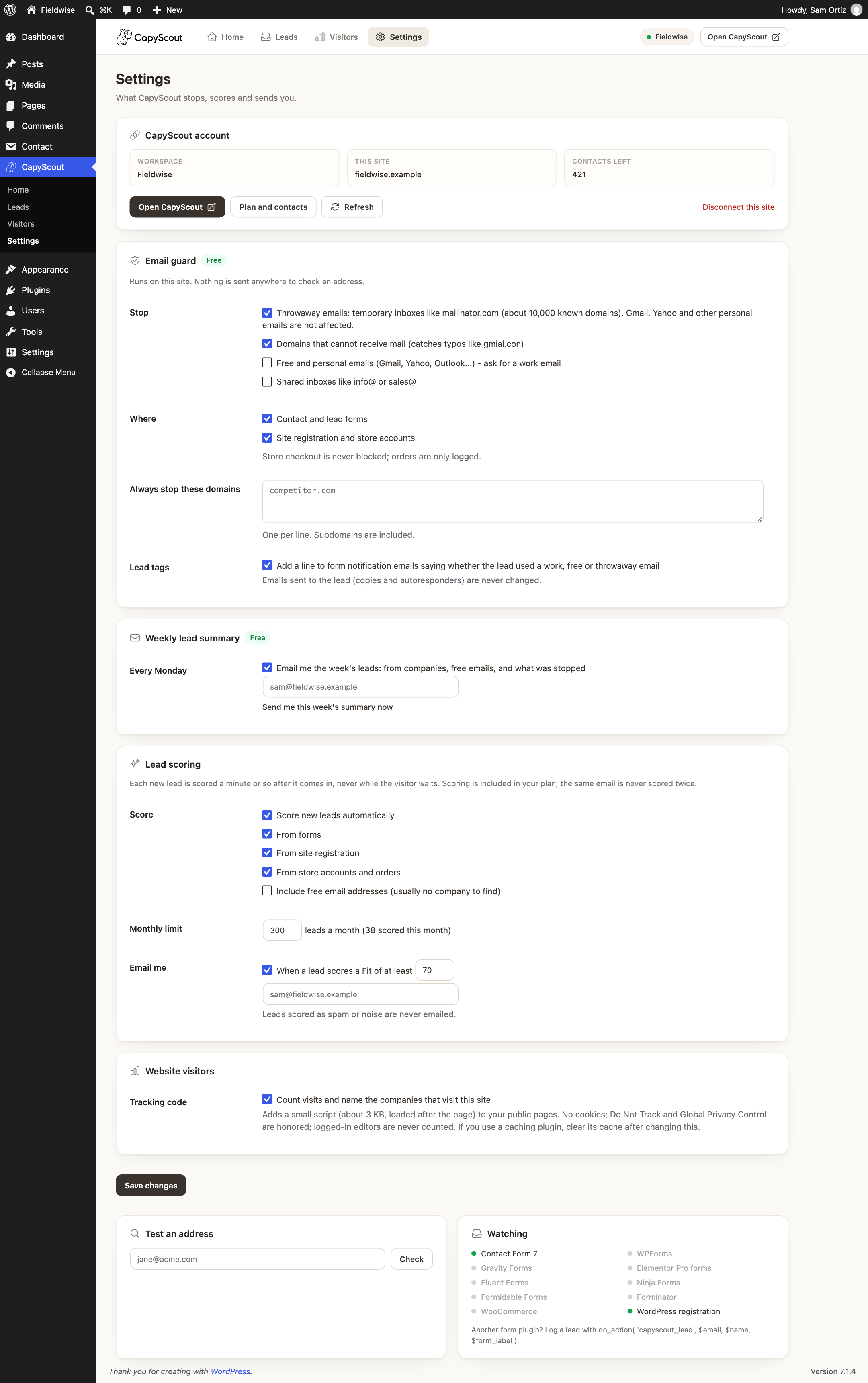
- Block disposable and fake emails - stop contact form submissions and registrations that use throwaway email addresses (about 10,000 known temporary-inbox domains, like mailinator.com) or a domain that cannot receive mail (typos like gmial.con). The visitor sees a clear message and can fix the address. Gmail, Yahoo and other personal emails are always accepted unless you choose otherwise.
- Require a business email (optional) - on B2B demo and quote forms, ask for a work email instead of Gmail or Yahoo. You can also stop shared inboxes like info@ and sales@, or block any domain you name.
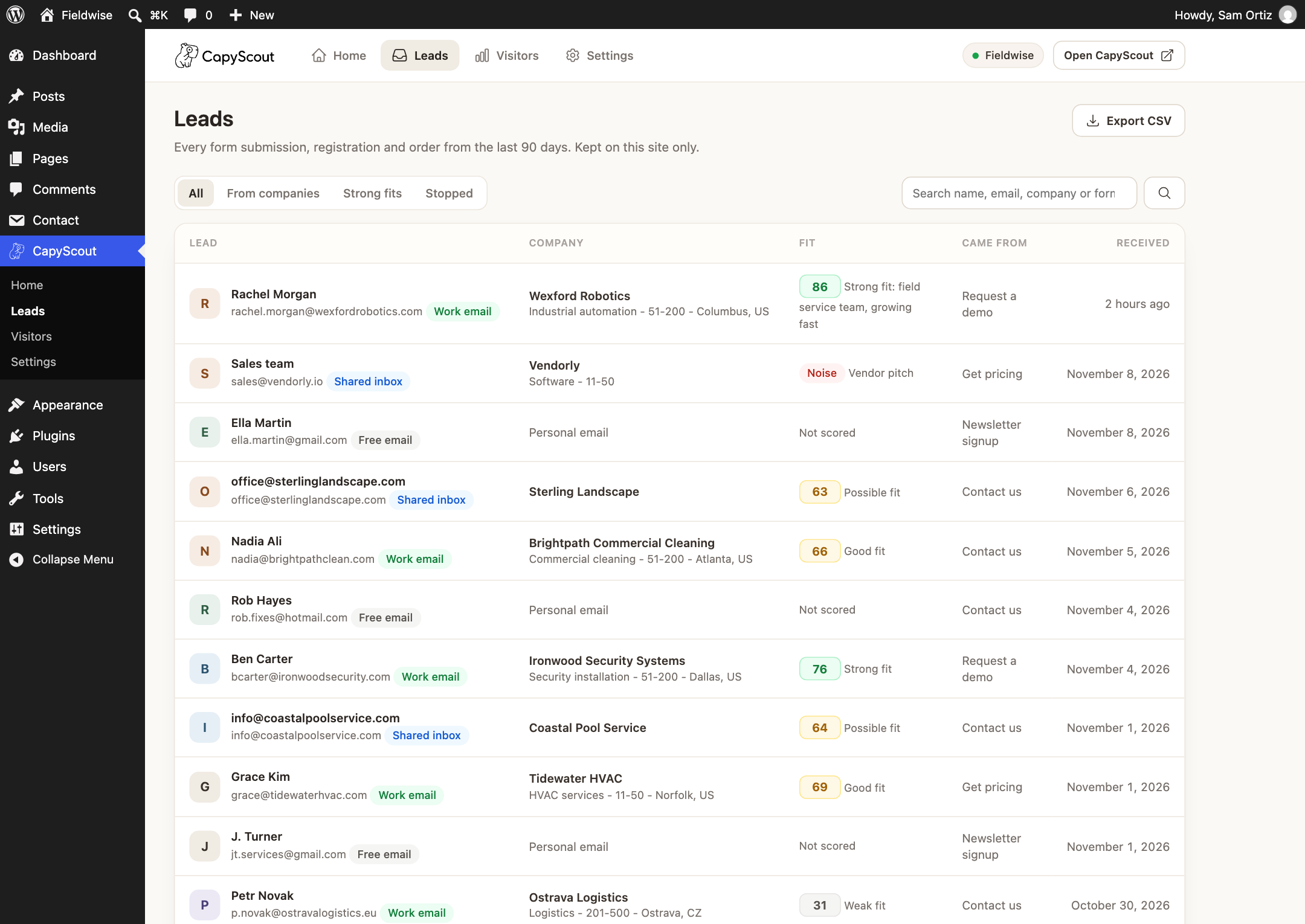
- Lead log - every lead from every form, registration and order in one list, filterable by leads from companies, with search and CSV export. Kept on your site for 90 days.
- Email validation tag in notifications - each form notification email gets one line: "CapyScout: Work email (acme.com)", "Free email" or "Throwaway email", so you know who to answer first.
- Weekly lead summary - every Monday: new leads, how many came from companies, and how much junk was stopped.
- Dashboard widget - this month's leads from companies at a glance.
- Contact Form 7
- WPForms (Lite and Pro)
- Gravity Forms
- Elementor Pro forms
- Fluent Forms
- Ninja Forms
- Formidable Forms
- Forminator
- WordPress user registration
- WooCommerce account registration and orders (checkout is never blocked)
- Forms never wait on CapyScout: research and lead scoring happen in the background with WP-Cron.
- Nothing is sent to CapyScout until you connect an account.
- The website visitor script is about 3 KB, loads after the page, sets no cookies, honors Do Not Track and Global Privacy Control, and skips logged-in editors.
- No password is stored in WordPress: you approve the site on capyscout.com and it gets a key you can revoke at any time.
- Leads stay on your site for 90 days, with the WordPress personal data exporter and eraser and suggested privacy policy text.
- Lead scoring and research are included in your CapyScout plan (the same email is never scored twice), within a monthly limit you set.
- Log a lead from any form:
do_action( 'capyscout_lead', $email, $name, $form_label, $message ); - Leave a lead out: filter
capyscout_log_lead(return false). - Hold the visitor script until consent, for example behind a cookie banner: filter
capyscout_track_page(return false). - Change who can see CapyScout screens: filter
capyscout_capability(defaultmanage_options).
安装:
- In WordPress, go to Plugins > Add New, search for "CapyScout", then click Install and Activate. Or upload the zip under Plugins > Add New > Upload Plugin.
- Open CapyScout in the admin menu and pick who you sell to, whether to stop throwaway emails, and whether to ask for a work email.
- Disposable email blocking is on right away, and new leads appear under CapyScout > Leads.
- Optional: click Start free trial (or Sign in) to turn on AI lead research, lead scoring, outreach campaigns and website visitors.
屏幕截图:

常见问题:
How do I block disposable emails in Contact Form 7?
Install and activate CapyScout. It checks every email field in Contact Form 7 forms automatically, with no form changes, and shows "Please use a permanent email address" for throwaway addresses. The same works in WPForms, Gravity Forms, Elementor Pro, Fluent Forms, Ninja Forms, Formidable Forms, Forminator and WordPress registration.
Will it block Gmail or Yahoo addresses?
No, not unless you ask it to. By default only temporary throwaway inboxes and domains that cannot receive mail are stopped. "Ask for a work email" is an option for B2B demo and quote forms. WooCommerce checkout is never blocked.
How do I require a business email on my form?
Turn on "Ask for a work email" in CapyScout > Settings (or during setup). Gmail, Yahoo, Outlook and other personal addresses then get a polite "Please use your work email" message.
How do I research a lead from my contact form?
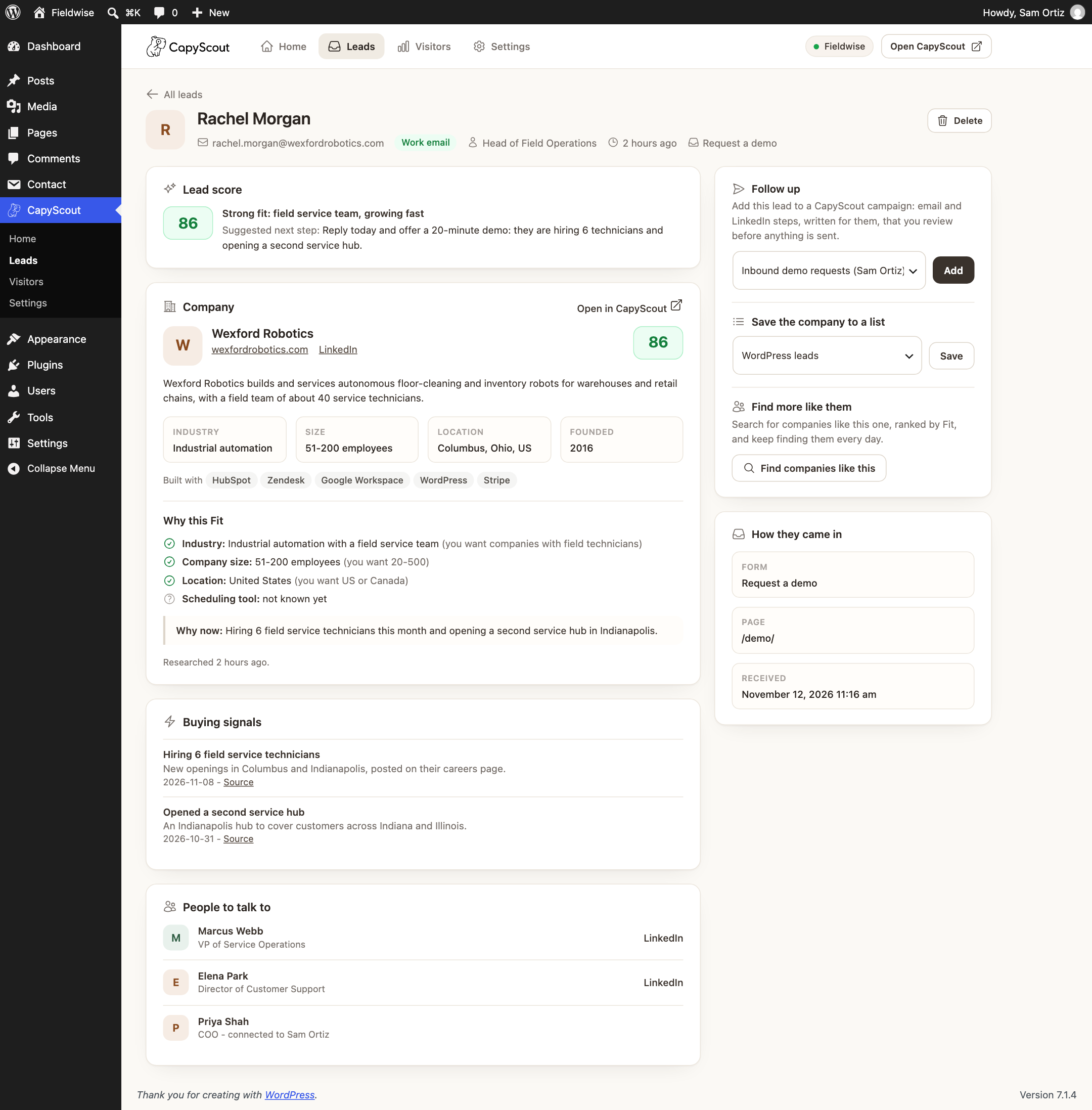
Open CapyScout > Leads and click the lead. With a CapyScout account connected you see the company behind their email address, what it does, company size, industry, buying signals, a Fit score with the reasons, and the people to talk to. If CapyScout has not seen the company yet, click Research this company.
What is lead scoring?
Lead scoring ranks leads by how likely they are to become customers. CapyScout gives every lead a Fit score from 0 to 100 against your ideal customer profile (industry, company size, location and signals), shows what matched and what did not, and emails you when a strong lead comes in.
Can I add WordPress form leads to a LinkedIn outreach campaign?
Yes. On a lead, pick a CapyScout campaign and click Add. Campaigns mix email and LinkedIn steps (connection requests, messages and profile visits), each message is written for that lead, and you review messages before they are sent.
How do I find more companies like my best leads?
Open a strong lead and click Find companies like this. CapyScout searches for lookalike companies, ranks them by Fit, and can keep finding new ones every day for B2B prospecting.
Can I see which companies visit my website?
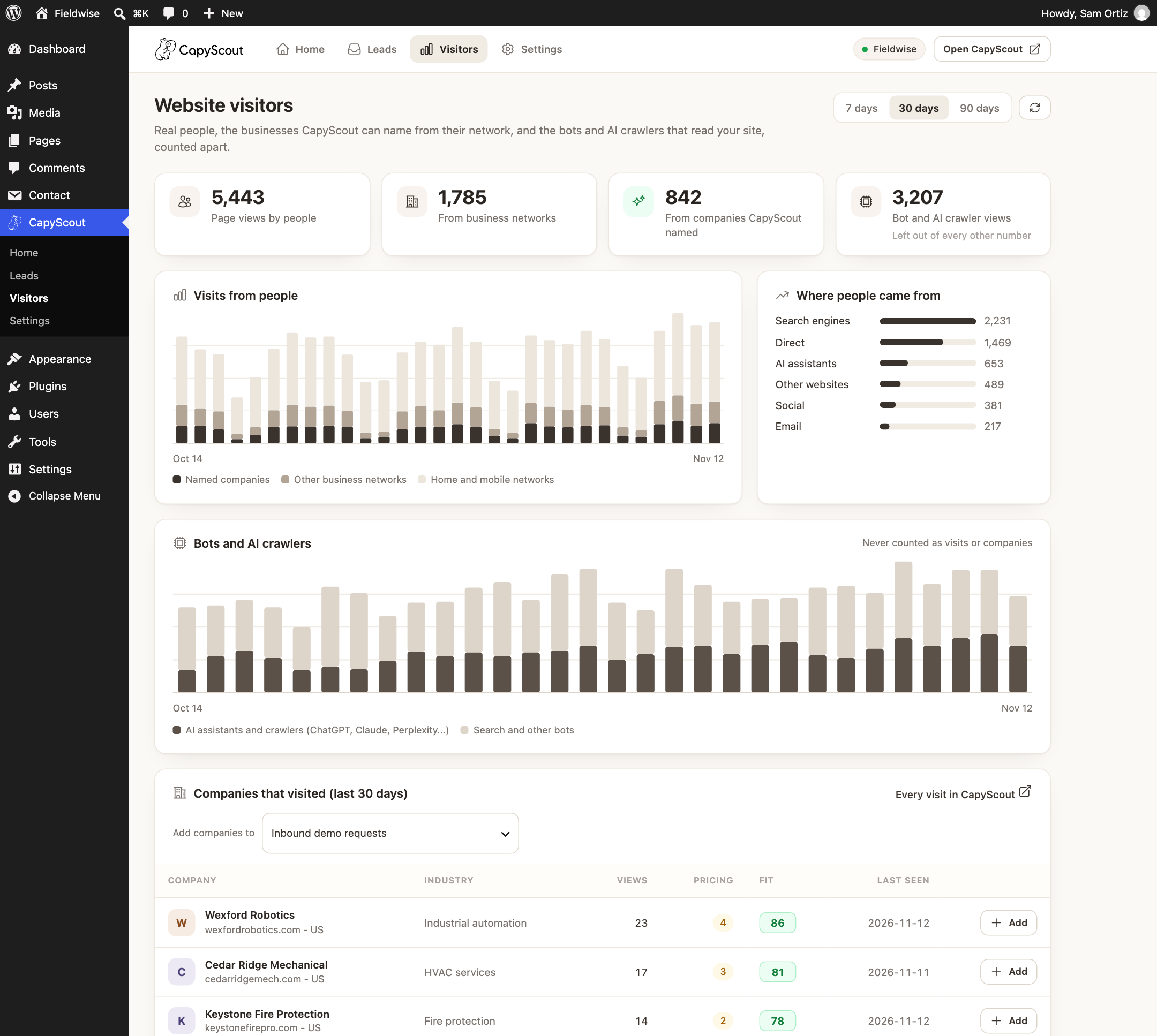
Yes, with a CapyScout account. Turn on Website visitors in Settings to see the businesses that read your pages and your pricing page, with a Fit score for each. CapyScout can only name a company when the visit comes from that company's own network, so many visits stay anonymous, and home and mobile networks are never named. Bots and AI crawlers are counted separately.
Does it work with HubSpot, Pipedrive or Attio?
Yes, through your CapyScout account: connect your CRM in CapyScout and send researched leads and replies to it.
Is it a CRM?
No. CapyScout is lead research, lead scoring and outreach. It keeps a simple lead log in WordPress and works alongside your CRM.
Does the free version send data anywhere?
No. Disposable email blocking, the lead log, notification tags, the weekly summary and the dashboard widget run on your site. The only outside lookup is a DNS check of the email's domain, made by your own server.
Does it slow down my forms or my site?
No. The email check runs on your server in milliseconds. Research and scoring happen in the background, never while the visitor waits, and the optional visitor script is about 3 KB and loads after the page.
Is it GDPR friendly?
Leads are stored on your own site and deleted after 90 days, and the plugin hooks into the WordPress personal data exporter and eraser. The visitor script sets no cookies, honors Do Not Track and Global Privacy Control, and can be held until consent with the capyscout_track_page filter. The plugin adds suggested text to your privacy policy guide.
What does it cost?
The plugin and its free features are free. A CapyScout account starts with a 7-day free trial, no credit card, and plans start at $49 a month. Lead research and scoring are included in your plan: each new email address is scored once, and the same address again is free. Set a monthly limit under CapyScout > Settings.
How do I disconnect?
CapyScout > Settings > Disconnect this site. The site key is revoked on CapyScout and removed from WordPress. Deleting the plugin does the same and removes its data.
更新日志:
- First release.
- Free: disposable and fake email blocking for 8 form plugins, WordPress registration and WooCommerce; optional business email requirement; lead log with CSV export; notification email tags; weekly lead summary; dashboard widget.
- With a CapyScout account: AI lead research, lead scoring with Fit reasons, email and LinkedIn outreach campaigns, lookalike B2B prospecting, lists, and website visitor identification with bot and AI crawler traffic counted apart.