
Careback – EU Withdrawal Button (Widerruf), Returns, Warranty & RMA for WooCommerce
| 开发者 | wedoingood |
|---|---|
| 更新时间 | 2026年11月25日 17:50 |
| 捐献地址: | 去捐款 |
| PHP版本: | 7.4 及以上 |
| WordPress版本: | 7.1 |
| 版权: | GPLv2 or later |
| 版权网址: | 版权信息 |
详情介绍:
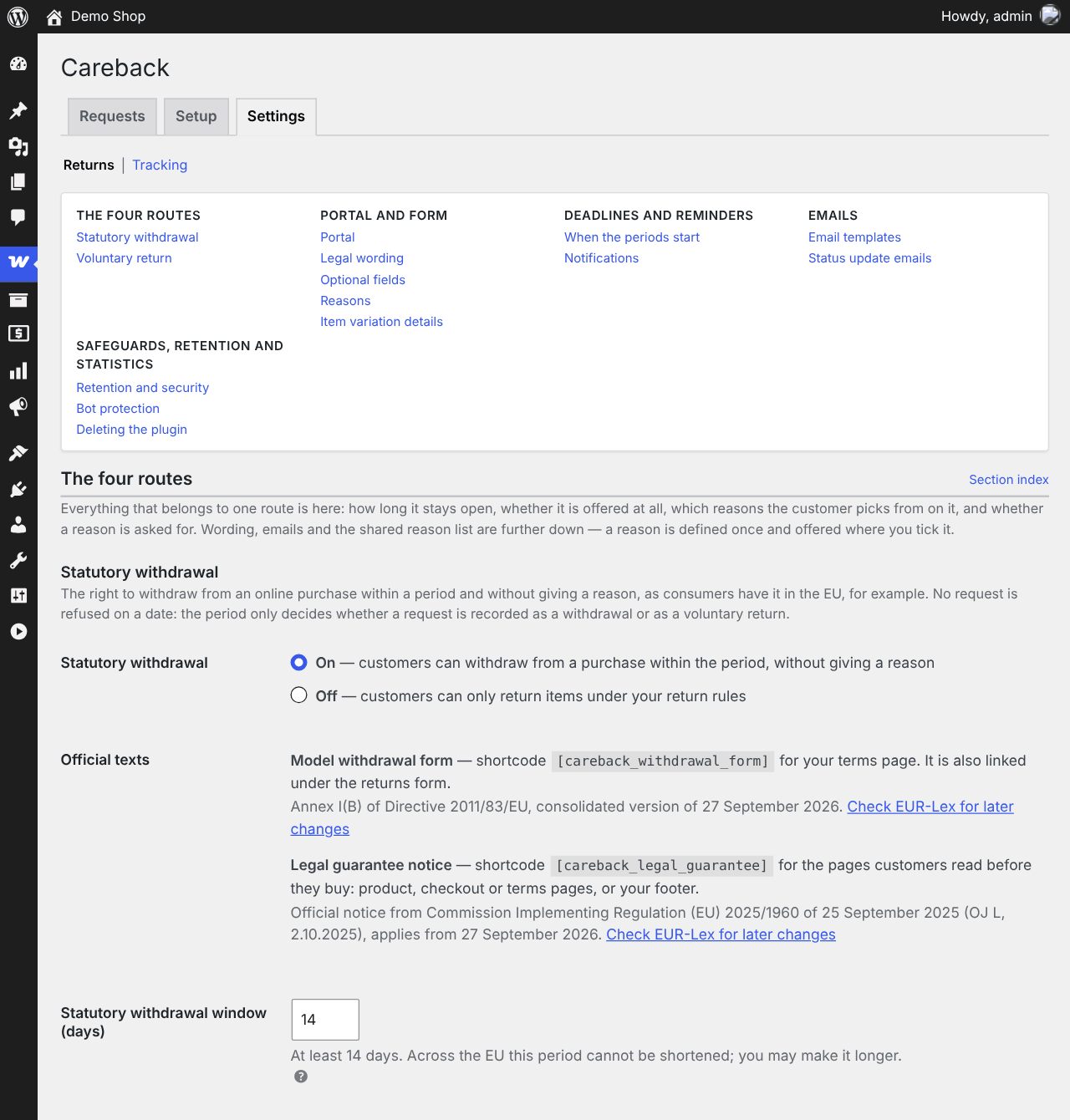
- Statutory withdrawal (Widerruf). EU law asks online shops for a withdrawal function. Careback adds one: a link labelled "Withdraw from contract here" and a button labelled "Confirm withdrawal". In German they read "Vertrag widerrufen" and "Widerruf bestätigen"; German shops call this the Widerrufsbutton. You can change both texts. The window is 14 days by default and can be made longer. It counts from delivery: you choose the order status that means delivered, plus an optional buffer of days.
- Voluntary returns (Retoure). Your own return offer, on your own terms: its own window (30 days by default), its own reasons, an optional consent to your return rules and a link to your returns policy page. You choose who pays for sending items back.
- Fault reports. Reasons such as a damaged or wrong item are marked as your fault, and you can mark others. A request with such a reason is flagged in the list, and the customer's email says that you will look into it.
- A form in three steps. The customer finds the order with its number and email address, chooses the items and quantities, then checks everything before sending. No order data is shown until the number and the email address match.
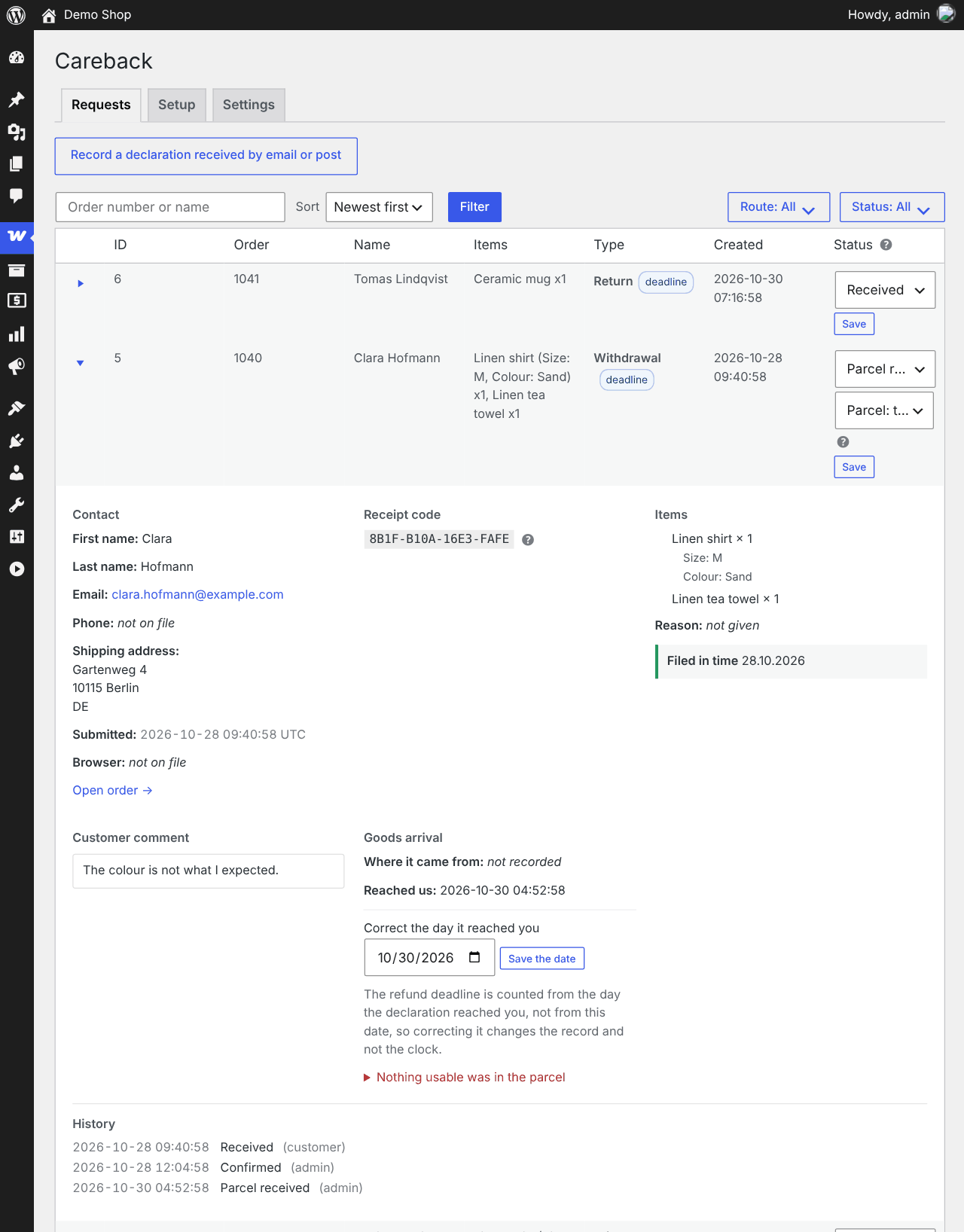
- One list of requests. Every request with its status, its items, the customer's comment and its history. Each request shows whether it came in inside the withdrawal window. Statuses run from "Received" to "Refunded", "Not accepted" or "Cancelled". You can also record a withdrawal that reached you by email or post. The order gets a note when a request is filed and at every status change.
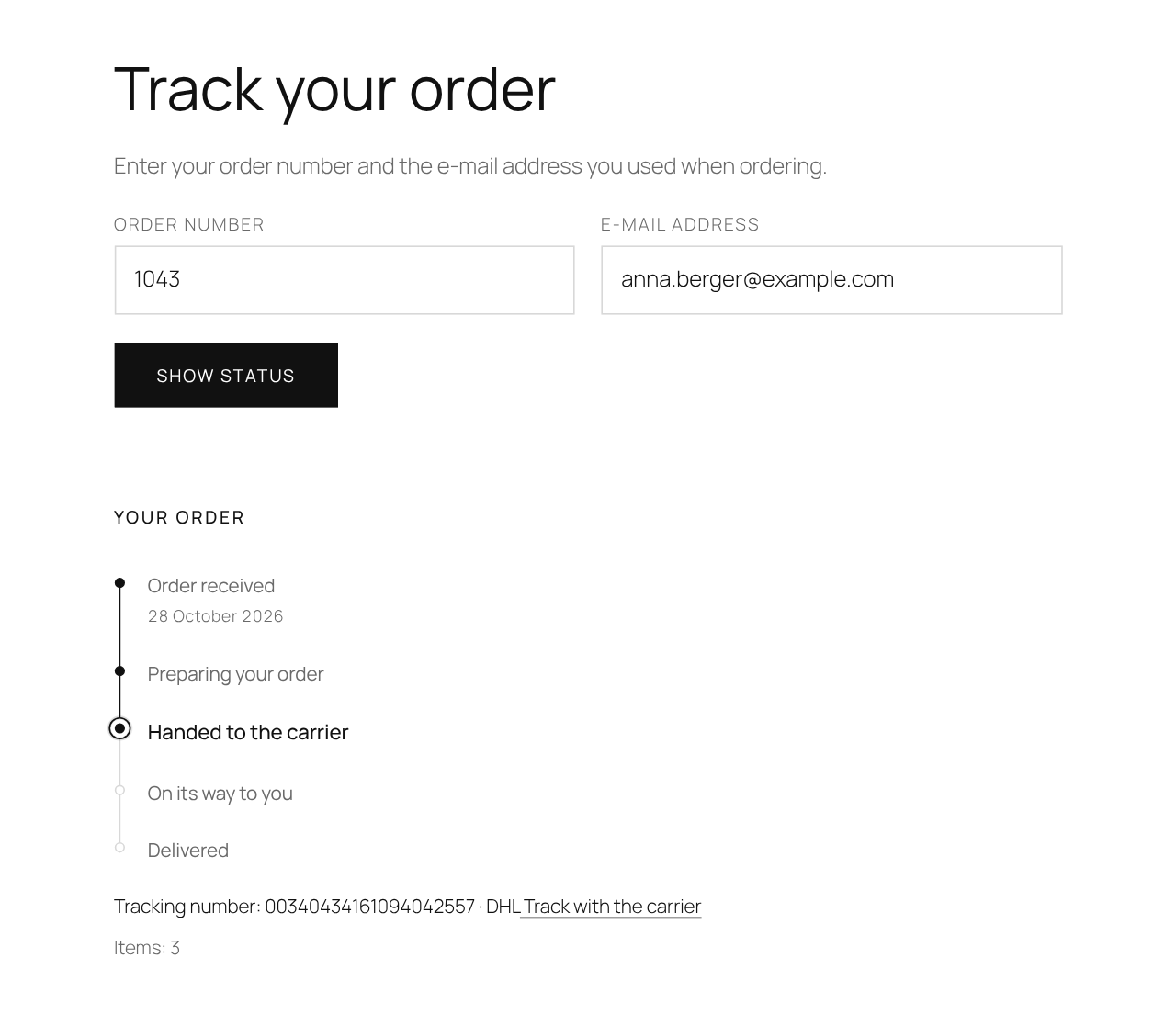
- Order-tracking page. The customer enters the order number and email address and sees where the order is. When you add a parcel's tracking number to the order, the page links to the delivery service's own tracking page.
- The official EU texts, with their versions. The model withdrawal form (Muster-Widerrufsformular, Annex I(B) of Directive 2011/83/EU), filled in with your shop's details, and the official notice on the legal guarantee (Implementing Regulation (EU) 2025/1960). Each is a shortcode. Settings and Setup name the version of each text and link to EUR-Lex, so you can check for later changes.
- Emails through WooCommerce. The customer gets a receipt with what was sent, when it arrived and a receipt code. Your team gets each new request with the order number and a link. Status emails to the customer can be switched on for each status; they are off by default. You find all of them under WooCommerce → Settings → Emails.
- Privacy tools. Careback takes part in WordPress's personal-data export and erasure and suggests a text for your privacy policy. A daily job removes personal fields from old requests.
- Languages. The admin screens follow each user's WordPress language, with translations from translate.wordpress.org, where we translate Careback into German (four variants: standard, formal and two regional) and Ukrainian. Every text a customer sees, in the form and in the emails, can be changed in Settings, in any language.
- Bot protection without outside services. A signed time token, a hidden honeypot field, rate limits and a temporary block for a source that keeps failing. Careback contacts no outside service.
- Setup in four steps. WooCommerce → Careback → Setup shows what is done and what is left, with the shortcodes to copy and a preview.
- It does not decide. No request is accepted, rejected or closed automatically, not even after a deadline. Deadlines can be extended by law, so the plugin marks a late request and leaves the decision to you.
- It does not refund. You refund in WooCommerce, as usual.
- It does not create return labels or contact a delivery service.
- It does not give legal advice. It gives you tools and the official texts. Your shop remains responsible for its legal information, its periods and its decisions.
careback_, for example careback_request_created and careback_status_changed.
Careback Pro
A paid add-on for shops where returns turn into exchanges, refunds and guarantee claims. Everything in Careback, plus:
✔ Exchanges, with the replacement held — the customer asks for another item instead of the money, and nobody else buys the replacement meanwhile.
✔ Exchange reminders and the exchange clock — reminders to send the item back, and the request cancelled when it does not come.
✔ Refunds from the request, with the refund clock — the date each refund is due, and the amount worked out and refunded through WooCommerce when you click.
✔ Returns marked on the order screen — every item a request covers is marked on the order, with how long the withdrawal window still runs.
✔ Guarantee claims — a “report a fault” option with no end date, and how long the guarantee runs on the request.
✔ Payment disputes flagged on requests — so the same money is not paid back twice.
✔ A daily summary of refunds due — one email with what is overdue, due today and due soon.
✔ Statistics and a security log — 90 days, a year or all time, and the refused lookups.
✔ Request timelines for customers, and your own wording — a timeline for each request on the tracking page, and your own texts.
And many more features: see the full list of Careback Pro features →
More
Setup guide, screenshots and how we test: wedoingood.com/plugins/careback. We build WooCommerce plugins as shop owners, from problems we hit in our own shop.
安装:
- Install and activate Careback. WooCommerce must be active.
- Go to WooCommerce → Careback → Setup. It lists four steps, each marked done or to do.
- Step 1: check statutory withdrawal. Keep it on if you sell to consumers in the EU.
- Step 2: put the
[careback]shortcode on your returns page. - Step 3: add a link to that page ("Withdraw from contract here") to your footer or menu.
- Step 4: switch the form on.
- In WooCommerce → Careback → Settings, enter the email address that receives new requests and a contact line for customers.
- Optional: put
[careback_tracking]on a page for order tracking, and[careback_withdrawal_form]and[careback_legal_guarantee]where you show your legal information.
wp-config.php before installing, and never change it afterwards:
define( 'CAREBACK_HASH_KEY', 'a long random string of your own' );
Every hash the plugin stores — the customer's email address, the source of a
request, the throttle counters — is derived from this key. It is how a customer
is found again when they ask what you hold on them, or ask you to erase it.
If you do not define it, the plugin creates a random key the first time it
hashes anything and keeps it in an option (a key an earlier version stored is
kept as it is). It never uses your site's WordPress keys or salts. That is safe,
but the key then lives in your database rather than in your configuration file.
If you use a page cache
The portal works behind one. It asks the server for a fresh anti-bot timestamp
every time it loads, so it does not matter how long ago the page itself was
rendered. Nothing needs excluding from the cache. If you would rather not have
the timestamp check at all, it is a single checkbox under Settings → Bot protection.屏幕截图:

常见问题:
Is there a paid version?
Yes: Careback Pro, a separate add-on that runs next to the free plugin. The free plugin stays complete on its own. What Pro adds
Can I hide the notes about Careback Pro?
Yes. Click "Hide Pro notes" under a note: the notes stay hidden until you log in again. They are never shown while Careback Pro is active, and site builders can turn them off with the careback_show_pro_notes filter.
Where do I find Careback after installing it?
In WooCommerce → Careback. It opens on the Requests tab, the list of requests. The Setup tab has the four steps and the shortcodes to place, with a preview. The Settings tab has everything you can set. The Settings link in Careback's row on the Plugins screen opens the Settings tab.
Which countries and laws does it cover?
Careback implements the EU rules for consumer sales: the right of withdrawal with its withdrawal function, the model withdrawal form of Directive 2011/83/EU and the official legal guarantee notice of Implementing Regulation (EU) 2025/1960. Countries add their own rules on top, such as longer periods. Check your country's rules and set the periods to match. Shops outside the EU set their own periods.
Country notes
Poland: under the legal guarantee, a fault that shows within 24 months of delivery is presumed to have been there at delivery. The EU minimum is 12 months. Careback itself keeps no guarantee periods; the setting for this one is in the optional add-on. Check your country's rules.
Does it refund automatically?
No. Careback never moves money. You refund in WooCommerce as usual, then set the request's status to "Refunded".
Can I switch statutory withdrawal off?
Yes, in Settings, if your customers have no such right, for example when you sell only to businesses. It is on by default and goes off only after you confirm. With it off, the voluntary return is the only choice in the form and the withdrawal texts are hidden. You can still record a withdrawal by hand on the Requests tab.
Where are the texts and translations?
Every text a customer sees, in the form and in the emails, is in Settings, where you can change it. What you write is used as you wrote it, in any language. The admin screens follow each user's WordPress language (Users → Profile → Language). Translations come from translate.wordpress.org: WordPress installs them for your site's language. We translate Careback into German and Ukrainian there.
Does it work with page builders and block themes?
Careback uses shortcodes, so it works wherever a shortcode can go: the Shortcode block in the block editor, or a page builder's shortcode element. For the link to the form, use a menu item, a Navigation block or a link in a footer template part. Setup looks for the form in the page content, and for the link in menus, Navigation blocks, template parts and widgets. If your builder keeps them somewhere else, Setup may show a step as to do although the form works.
WooCommerce has its own withdrawal form. Do I need both?
WooCommerce 11.1 and later has an optional withdrawal form of its own, off by default. While both are on, customers see two forms, and what is sent through WooCommerce's form ends up only in the order notes. Setup tells you when it is on and has a button to turn it off.
Does it issue return labels automatically?
No. Careback records and checks the request. You send the return instructions or a label yourself, then set the status "Return instructions sent".
Can a request be rejected automatically when the deadline passed?
No. Deadlines can be extended by law, so the plugin classifies and flags but never rejects on its own.
更新日志:
- WordPress.org: translations of the admin screens now come only from translate.wordpress.org. The plugin no longer carries its own translation files, only the template (languages/careback.pot).
- Readme: the plugin name says "Withdrawal Button"; German shop terms (Widerrufsbutton, Muster-Widerrufsformular, Retoure).
- The Requests list shows the date and time a request arrived, its history and the date of the agreed outcome in your site's time zone (they showed UTC).
- Returns form: when the customer picks a reason that is marked as your fault (for example a damaged item), the check step no longer says who pays for sending the item back; the receipt already says you will look into it.
- Security hardening.
- Improved limits for order lookups on the returns form and the tracking page.
- A note in the WooCommerce log (source "careback") when lookups for one order or e-mail address fail from many networks.
- Dev: new action
careback_lookup_spread.
- The card about Careback Pro above the request list ends with a line that Pro does more than these five features, with a link to the full list on the plugin page. Requests, settings and emails don't change.
- Readme: the Careback Pro section ends with a link to the full list of features.
- Short notes about Careback Pro on Careback's own screen only: a line at the end of four Settings groups (routes, notifications, emails, safeguards), one under the tracking page on the Setup tab, a card above the request list (five Pro features), and a "Careback Pro" tab listing what the add-on does, each with a picture. "Hide Pro notes" hides them until your next log-in. They are not shown while Careback Pro is active, and the
careback_show_pro_notesfilter turns them off. Nothing is loaded from the internet and nothing is sent. - Readme: a section about Careback Pro and two FAQ entries.
- Support forum link in the plugin row on the Plugins screen. No functional changes.
- WordPress.org review: every value of a request is sanitised where it is read, and settings forms reach
careback_save_settingsalready sanitised (plain text, or post HTML for the fields stored as HTML); every echo escapes its output.
- WordPress.org review: a random hashing key of the plugin's own (a stored key is kept), bundled translations only where WordPress has none, token checks in the REST permission callbacks, dismissible notices, each delivery service's terms and privacy policy under External services. Developers:
careback_text_countedtakes callables,careback_save_settingsgets the posted form.
- Cloudflare Turnstile is no longer part of Careback: it moved to Careback Pro 0.3.1, with its settings, which a site keeps. Careback contacts no outside service.
- The returns form and the tracking page have two filters for an add-on's bot check:
careback_bot_check_markupputs its markup into the form,careback_bot_check_verifyaccepts or refuses a lookup. Without an add-on both forms work as before, with the signed time token, the honeypot, the rate limits and the auto-block.
- The returns form has three steps: find the order, choose the items, then check and send. The last step shows what is being sent before the customer confirms, for every kind of request.
- The two texts the law asks for on a withdrawal: the link to the form ("Withdraw from contract here") and the button ("Confirm withdrawal"). Each language gets the words of its law where they are known; the shop can change both.
- Optional consent to the shop's return rules on a voluntary return, and a link to the returns policy page in the form. Variation attributes show as separate lines under the product name; so do the shop's own item details (filter
careback_item_details). - The model withdrawal form (Annex I(B) of Directive 2011/83/EU) filled with the shop's details, shortcode
[careback_withdrawal_form], and the official notice on the legal guarantee (Implementing Regulation (EU) 2025/1960), shortcode[careback_legal_guarantee]. Settings, Setup, the support report and this readme name the version of each official text and its date. - Settings: the statutory withdrawal can be switched off for shops outside its scope (on by default, off only after a confirmation; then the voluntary return is the only action and the withdrawal texts are hidden); which order status means delivered and a delivery buffer; who pays for sending items back; "required" and "recommended" marks; a warning, with a button to turn it off, when WooCommerce's own withdrawal form is on; a choice to delete all of the plugin's data when the plugin is deleted (off by default; orders and their notes always stay); a support report to copy, without personal data.
- Setup has a step for adding the "Withdraw from contract here" link to the footer or a menu.
- Emails go through WooCommerce's email system (WooCommerce → Settings → Emails), with a receipt code, the shop's time zone, a reply that reaches the customer, and the order number and a link in the team email. Texts that serve every kind of request say "request".
- The admin pages sit under WooCommerce → Careback, with tabs. Scripts and styles load from files; notices show only on the plugin's screens.
- Block checkout is declared compatible. A suggested text for the privacy policy. Each request records the moment in UTC and the browser it came from.
- Translations: German (four variants: standard, formal and two regional) and Ukrainian. Status names, badges, default reasons, request types and the full date show in the site's language; developers can change labels with
careback_status_label,careback_route_admin_labelandcareback_text_counted. The personal-data tools list the plugin's data as "Careback requests". - Removed: the "Commercial retention" field and older settings that were no longer shown.
- Requires WordPress 6.6 or newer.
- The plugin's own name everywhere. Its folder and main file are
careback/careback.php, its text domain iscareback, and every name it stores or registers carries thecarebackprefix: options (careback_settings…), tables (careback_requests,careback_events), order meta (_careback_…), scheduled events, hooks (careback_request_created,careback_status_changed…), the REST routes (careback/v1), the admin pages (careback,careback-setup,careback-settings), script and style handles and CSS classes (careback-…). Behaviour is unchanged. - Shortcodes:
[careback]for the returns form,[careback_tracking]for the tracking page. The tracking page's settings are called Tracking. - The hashing key constant for
wp-config.phpisCAREBACK_HASH_KEY. - Translations: English, German and Ukrainian ship in the plugin's languages folder, with this plugin's strings only; Careback Pro carries its own. The header names the folder (Domain Path), so the Plugins screen finds them too.
- The admin speaks each user's WordPress language (Users → Profile → Language). The plugin's own admin-language choice on the Settings screen, and the English it forced on its own screens when nothing was chosen, are gone.
- A store that ran the plugin under its former name moves to this release with the separate migration tool; this release reads none of the former names.
- Internal: the paid features are no longer part of this plugin. They come as the separate add-on Careback Pro, which keeps its own settings in an option of its own (moved there, once, from this plugin's option) and pauses with a notice instead of failing when this plugin is missing, inactive or too old.
- Data safety: with the add-on inactive, this plugin keeps every value the add-on stored and saves only its own settings.
- Multisite: activated for the whole network, the plugin sets up its tables on up to 20 sites at once and on each further site at its next admin or scheduled load; a site added to the network later is set up when it is created. Until a site is set up, its returns form and tracking page show a short "not available yet" message instead of an error.
- Uninstall also removes the scheduled events and the three options earlier versions kept for the paid features, when no add-on of this plugin is installed.
- Internal: the plugin's core now offers documented extension points (statuses, routes, the request form and lookup, the Requests screen, settings, texts, mails, tracking, the request table and its schema), and every paid feature reaches the core only through them. Nothing a shop, a customer or an operator sees changes.
- Fixed: the total under the request list ignored the "reserved exchanges" narrowing when no other filter was set.
- Data safety: saving the settings keeps every stored value the core does not manage itself (status e-mails and reason routes of statuses and routes it does not know); the daily clean-up removes only the log entries the core writes; a replacement line from an exchange is never offered again for a new request; the personal-data export carries every stored field of a request.
- Fixed: a reservation for an exchange did not hold back a variation (another size or colour) in the shop. The storefront reduction listened on hook names WooCommerce never fires for variations, so the held unit could still be sold; it now applies to variations with their own stock and to variations drawing on the parent's stock, once each.
- Fixed: a held variation drawing on its parent's stock was never marked short, and any product save while a unit was held (a sale, a REST update, a CSV import) could store "out of stock" from the reduced number and keep it after the hold ended. The stored stock status now always follows the real number; the reduction applies on the storefront only while the hold lasts.
- Fixed: payment disputes from the WooCommerce Stripe Gateway never reached a request. The bridge listened on action names the gateway does not fire; it now follows
wc_stripe_webhook_received(Stripe Gateway 9.9 and later) and the payment-error action before that. Checked against Stripe Gateway 11.1.1 and 9.5.3 with signed webhook events. - Fixed: a withdrawal entered by hand stored no product for its lines, and no request stored the variation, so per-product and per-variation return figures were missing or landed on the parent product. New requests store both; older ones are read from the order line.
- Fixed: the "filed in time" mark measured the declaration against the refund period instead of the withdrawal window.
- Fixed: the withdrawal window could be set below 14 days; 14 is now the floor (a stored lower value reads as 14). Shops may still widen it.
- Fixed: an order number typed as on the WooCommerce email ("#1234") was not found, on the form and on the tracking page.
- Changed: a new request can be filed only for an order that is processing, on hold, completed, or in a status the shop maps to a fulfilment stage (preparing, shipped, delivered). For any other status (pending, failed, cancelled, refunded) the form asks the customer to contact the shop; requests filed earlier stay visible and proof of posting can still be recorded. Developers can change the list with the
careback_eligible_order_statusesfilter. - Fixed: after a failed attempt, Cloudflare Turnstile was not reset, so the next attempt failed until the page was reloaded (form and tracking page).
- Fixed: on a phone the form fields ran past the edge of the portal, and at 360px the page scrolled sideways.
- Fixed: the tracking page now shows the day a request was closed.
- Fixed: the setup checklist said no carrier tracking link was configured after the tracking settings were saved.
- Fixed: the team-email hint promised a {status} token that is never replaced; it now names the tokens that are.
- Fixed: amounts larger than the database can hold were stored as its maximum while the screen said "Amounts saved."; they are now refused with a message.
- Fixed: every database update sent an invalid ALTER TABLE (SQL comments in a table definition) and, on MariaDB, re-declared unchanged integer columns.
- Fixed: the Statistics year list used a query MySQL 8 rejects, which left the Reasons and Products sections empty on such hosts.
- Tests: the behaviour suite now runs on a real WordPress, WooCommerce and MariaDB site instead of stubs, and the portal checks in a real browser. Earlier releases, 0.79.0 back to 0.1.0, are listed in changelog.txt in the plugin's folder.