
CartTrigger – BAG
| 开发者 | polettoespana |
|---|---|
| 更新时间 | 2026年9月7日 03:03 |
| PHP版本: | 7.4 及以上 |
| WordPress版本: | 7.1 |
| 版权: | GPLv2 or later |
| 版权网址: | 版权信息 |
详情介绍:
text-[11px]).
Awards
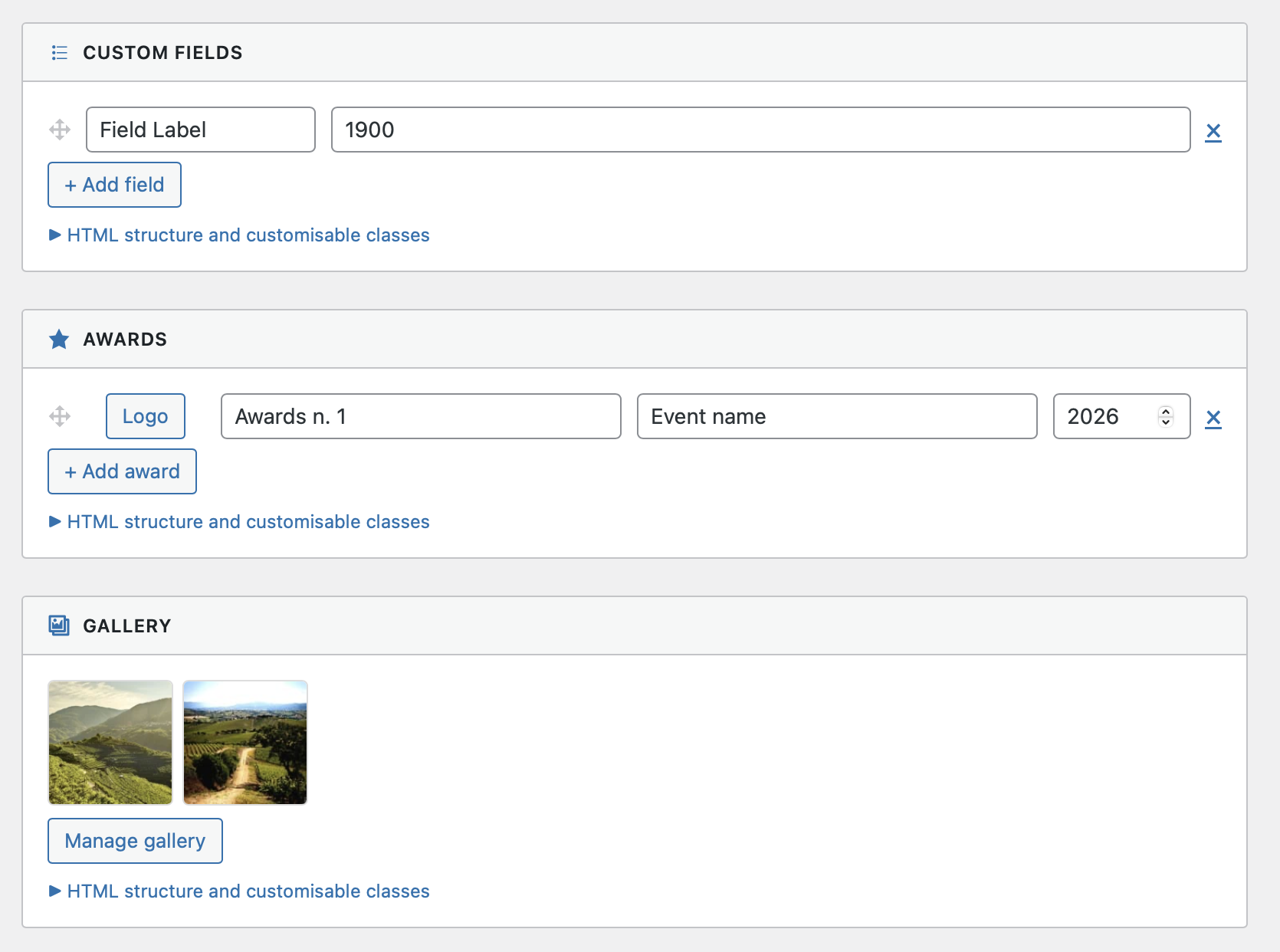
Manage a list of awards and recognitions for each brand — with optional logo, award name, event name, and year. Display them as a styled list using the [ctbag_awards] shortcode.
Gallery
Upload a curated image gallery per brand. Display it as a responsive grid with the [ctbag_gallery] shortcode. Optional native WooCommerce lightbox (PhotoSwipe) via lightbox="1".
Shortcodes
[ctbag_custom_fields]
Outputs brand custom fields as a <dl> list.
[ctbag_custom_fields brand="slug" wrapper_class="..." dt_class="..." dd_class="..."]
[ctbag_awards]
Outputs brand awards as a styled card list.
[ctbag_awards brand="slug" title="Awards" wrapper_class="..." card_class="..."]
[ctbag_gallery]
Outputs brand gallery as a responsive image grid.
[ctbag_gallery brand="slug" title="Gallery" wrapper_class="..." lightbox="1"]
PHP Helper Functions
All shortcodes are also available as direct PHP functions that bypass WordPress' shortcode parser — useful when Tailwind arbitrary-value classes (e.g. text-[11px]) would otherwise be mangled:
echo ctbag_custom_fields(['wrapper_class' => 'grid grid-cols-2 gap-4']);
echo ctbag_awards(['title' => ('Awards', 'your-textdomain')]);
echo ctbag_gallery(['title' => ('Gallery', 'your-textdomain'), 'lightbox' => '1']);
Professional Admin UI
All brand meta fields are presented in a clean, card-based admin interface grouped by module (HTML Description, Custom Fields, Awards, Gallery), with collapsible shortcode reference built in. Custom fields and awards support drag & drop reordering. Gallery images can be removed individually (× button on hover) and reordered by dragging.
安装:
- Upload the
carttrigger-bagfolder to the/wp-content/plugins/directory. - Activate the plugin through the Plugins menu in WordPress.
- Go to Products → Brands and edit any brand to start adding content.
屏幕截图:
常见问题:
Does this plugin require WooCommerce?
Yes. WooCommerce must be active before activating CartTrigger – BAG. The plugin declares a Requires Plugins: woocommerce dependency.
Does it require a specific WooCommerce version?
WooCommerce 8.0 or higher is recommended. The plugin has been tested up to WooCommerce 10.7.0.
Can I use Tailwind CSS classes in the shortcode attributes?
Yes, but classes containing square brackets (e.g. text-[11px]) will be interpreted as shortcode closing tags by WordPress. Use the PHP helper functions instead — they bypass the shortcode parser entirely.
Where is the gallery lightbox loaded?
The lightbox uses WooCommerce's bundled PhotoSwipe library. It is only active when lightbox="1" is set. On pages where WooCommerce scripts are disabled, a graceful fallback (open image in new tab) is used automatically.
Gallery images look blurry or load slowly — what image size should I use?
The size_thumb parameter controls which registered WordPress image size is used for gallery thumbnails. The default is medium_large (typically 768 px wide), which is appropriate for large single-column layouts. If your gallery is displayed in a multi-column grid (3–4 columns), use size_thumb="medium" (300 px) to reduce file weight by 4–6× with no visible quality loss:
[ctbag_gallery size_thumb="medium" lightbox="1"]
Or via PHP helper:
echo ctbag_gallery(['size_thumb' => 'medium', 'lightbox' => '1']);
Brand pages load slowly — any caching recommendations?
Brand taxonomy pages contain no user-specific content (no cart, no session), so they are ideal candidates for full-page caching. Make sure your caching plugin (LiteSpeed Cache, WP Rocket, W3 Total Cache…) does not exclude brand taxonomy pages from its cache. Since version 2.0.8, PhotoSwipe (4 CSS/JS files) is only enqueued on brand pages that actually have a gallery, so brands without a gallery already load significantly fewer assets. If you use LiteSpeed Cache and notice that brand pages are slow after a product update, check whether "Smart Purge on Product Update" is purging brand taxonomy pages. Enabling the LiteSpeed Crawler ensures the cache is regenerated automatically in the background so visitors never hit an uncached page.
更新日志:
- Compatibility: WordPress 7.1. Verified in production; jQuery UI 1.14.2 sortable usage in the admin UI reviewed — no changes required.
- Housekeeping: added "Requires at least" and "Requires PHP" fields to the plugin file header (Plugin Check).
- Compatibility: WordPress 7.0.
- Fix: replaced str_ends_with() with PHP 7.4 compatible equivalent.
- Fix: corrected Contributors username in readme.txt to match the WordPress.org plugin owner account.
- Perf: PhotoSwipe CSS and JS are now enqueued only on brand pages that have a gallery, instead of on every brand page. Brands without a gallery no longer load 4 unnecessary assets (2 CSS + 2 JS).
- Fix: gallery images not saved after selection in the media uploader. Root cause: HTML input had
id="ctb_gallery"while the admin JS targeted#ctbag_gallery, so the hidden field was never updated before form submission.
- Fix: fatal error on brand save due to mismatched method name after 2.0.5 prefix rename (
ctbag_save_term_meta). - Fix: added one-time migration to move existing term meta from legacy
ctb_*keys toctbag_*keys.
- Compliance: renamed all shortcodes and PHP helper functions from
ctb_*toctbag_*to meet the WordPress.org 5-character prefix requirement (ctbag= CartTrigger BAG). - Compliance: extracted inline gallery lightbox JavaScript to an external file (
assets/js/ctbag-gallery-lightbox.js) loaded viawp_enqueue_script(). - Compatibility: WC tested up to 10.7.0.
- New: Gallery — individual image removal with an × button that appears on hover, without reopening the media uploader.
- New: Gallery — drag & drop reordering of thumbnails (jQuery UI Sortable).
- New: Custom Fields — drag & drop reordering of field rows via a handle icon.
- New: Awards — drag & drop reordering of award rows via a handle icon.
- Fix: double-quote characters (
") in award names, event names, and custom field values were corrupted on save. Root cause: WordPress callswp_unslash()(stripslashes) on meta values insideadd_metadata(), which stripped the backslash from\"in the JSON string, producing invalid JSON. Fix: awards and custom fields are now stored as native PHP arrays viamaybe_serialize()— no backslash escaping involved, immune to the slashing issue. Backward-compatible: existing JSON-format data is still read correctly. - Fix: accented characters (é, à, ó…) in award/field text were silently dropped on some server configurations. Replaced
sanitize_text_field()withwp_strip_all_tags()to avoid the internalwp_check_invalid_utf8()call that incorrectly rejected valid multi-byte characters.
- Complete rewrite with professional admin UI (module cards).
- Added HTML Description module with TinyMCE editor on both Add and Edit brand screens.
- Added native WooCommerce lightbox (PhotoSwipe) support for gallery shortcode.
- Added activation notice with link to brand management screen.
- Plugin fully internationalised — translations available for Italian (it_IT) and Spanish (es_ES).