
Cascade Forge – No-Code Workflow Automation & Webhooks
| 开发者 | avakodeforge |
|---|---|
| 更新时间 | 2026年10月19日 18:36 |
| PHP版本: | 7.4 及以上 |
| WordPress版本: | 7.1 |
| 版权: | GPLv2 or later |
| 版权网址: | 版权信息 |
详情介绍:
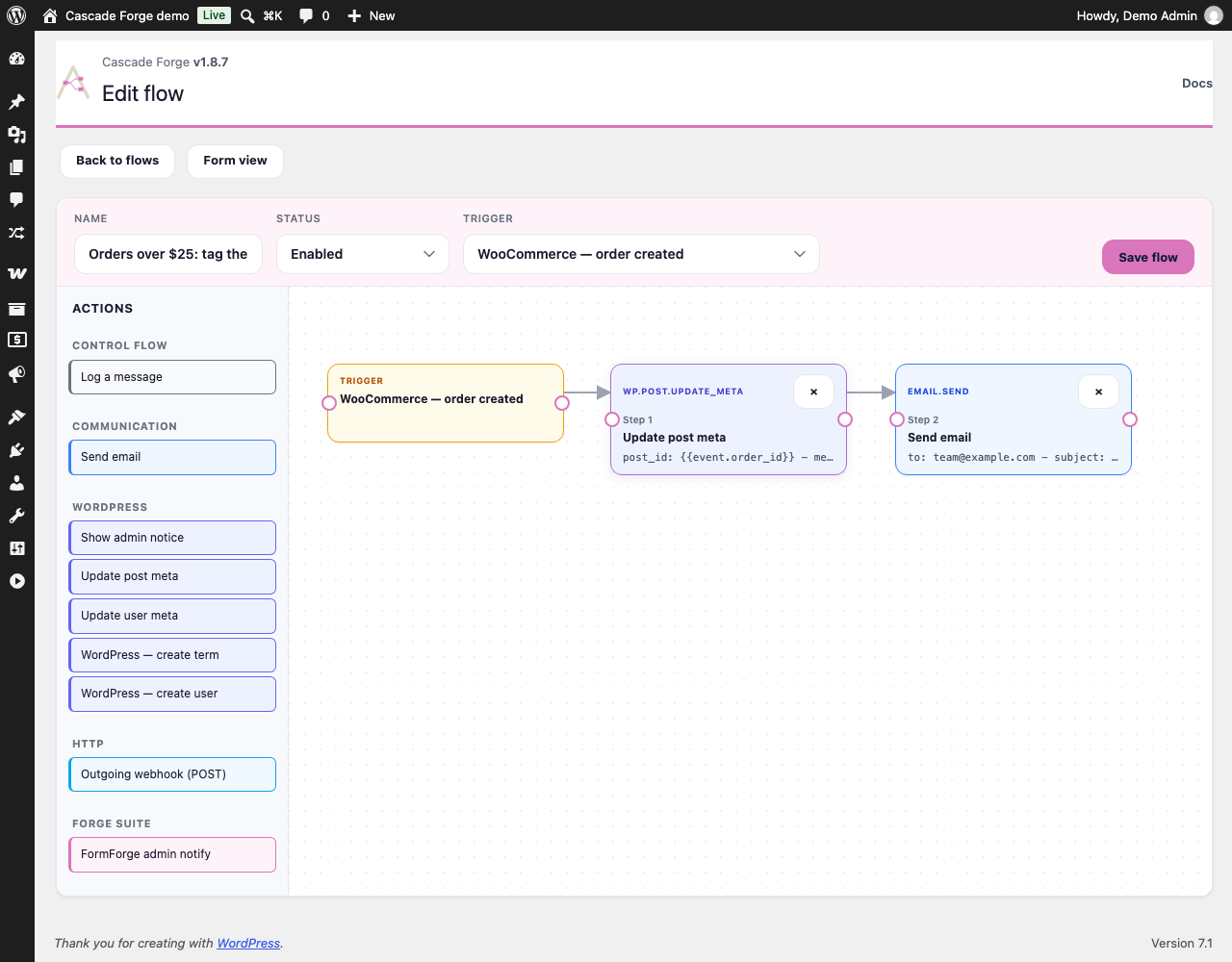
- Visual flow builder (form editor and drag-and-drop canvas), unlimited active flows
- No JSON required: each trigger and each step renders a form built from the parameters it declares, and an "Insert field" menu next to every text field drops in a value from the event with a real example beside it. The JSON textareas are still there under an "Advanced" toggle, and anything the form cannot draw safely — a nested condition group, a key no schema knows — opens as JSON with an explanation instead of being quietly rewritten
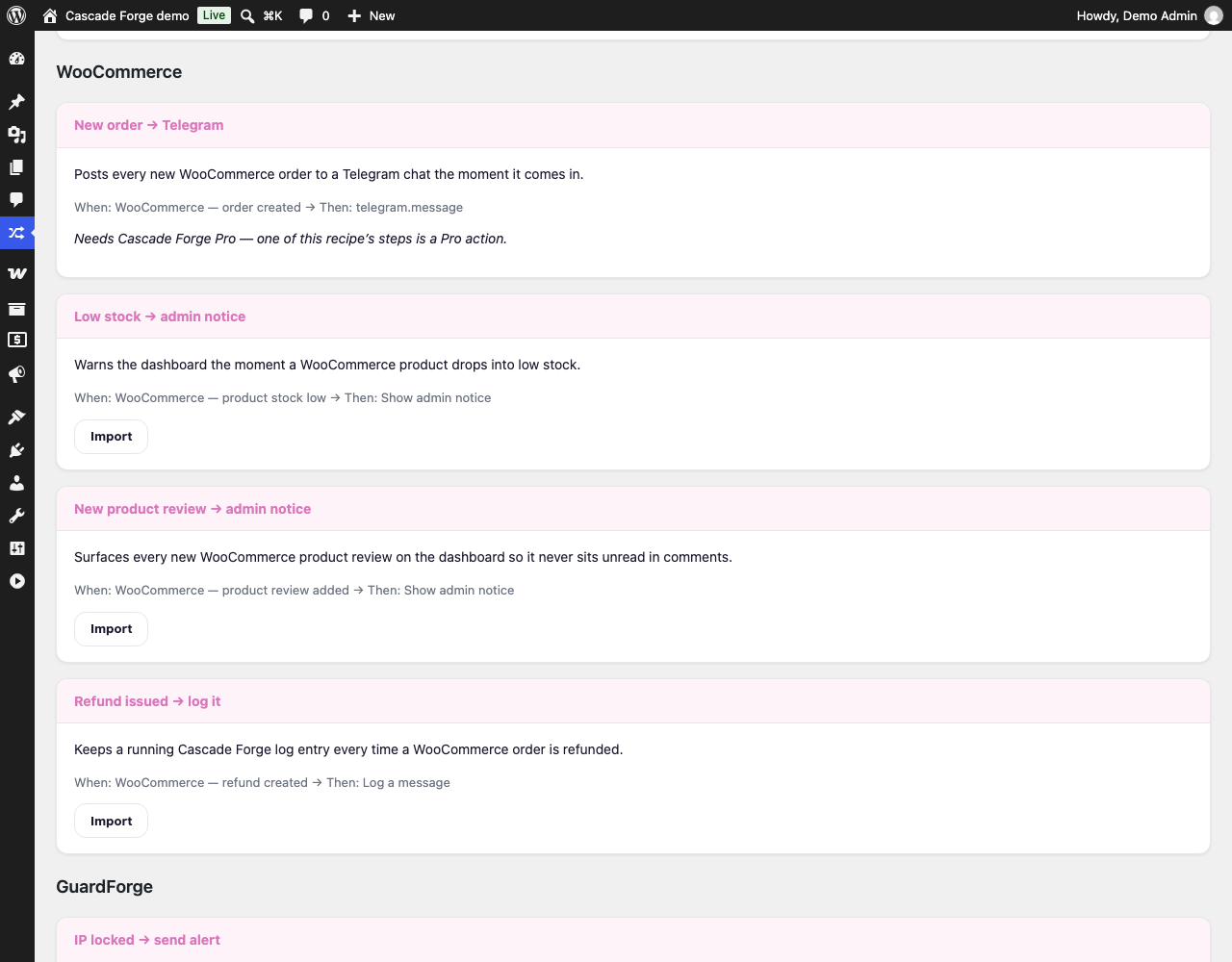
- A library of 20 ready-made flows, grouped by the plugin they lean on. Import lands a draft, never a live automation, and a recipe this site cannot run says which plugin is missing instead of showing a dead button
- Conditions on any trigger field, with AND/OR groups
- Retry with exponential backoff, a dead-letter queue you can read and act on, and a run log you control the retention of (Settings → Log retention, 1–365 days)
- An email when a run gives up or needs a manual decision — at most one per flow every 15 minutes, so a broken endpoint sends one message, not a storm (Settings → Notifications)
- Dispatch concurrency: a limit on how many runs execute at once, so a burst of events queues the rest instead of all firing together (Settings → Engine)
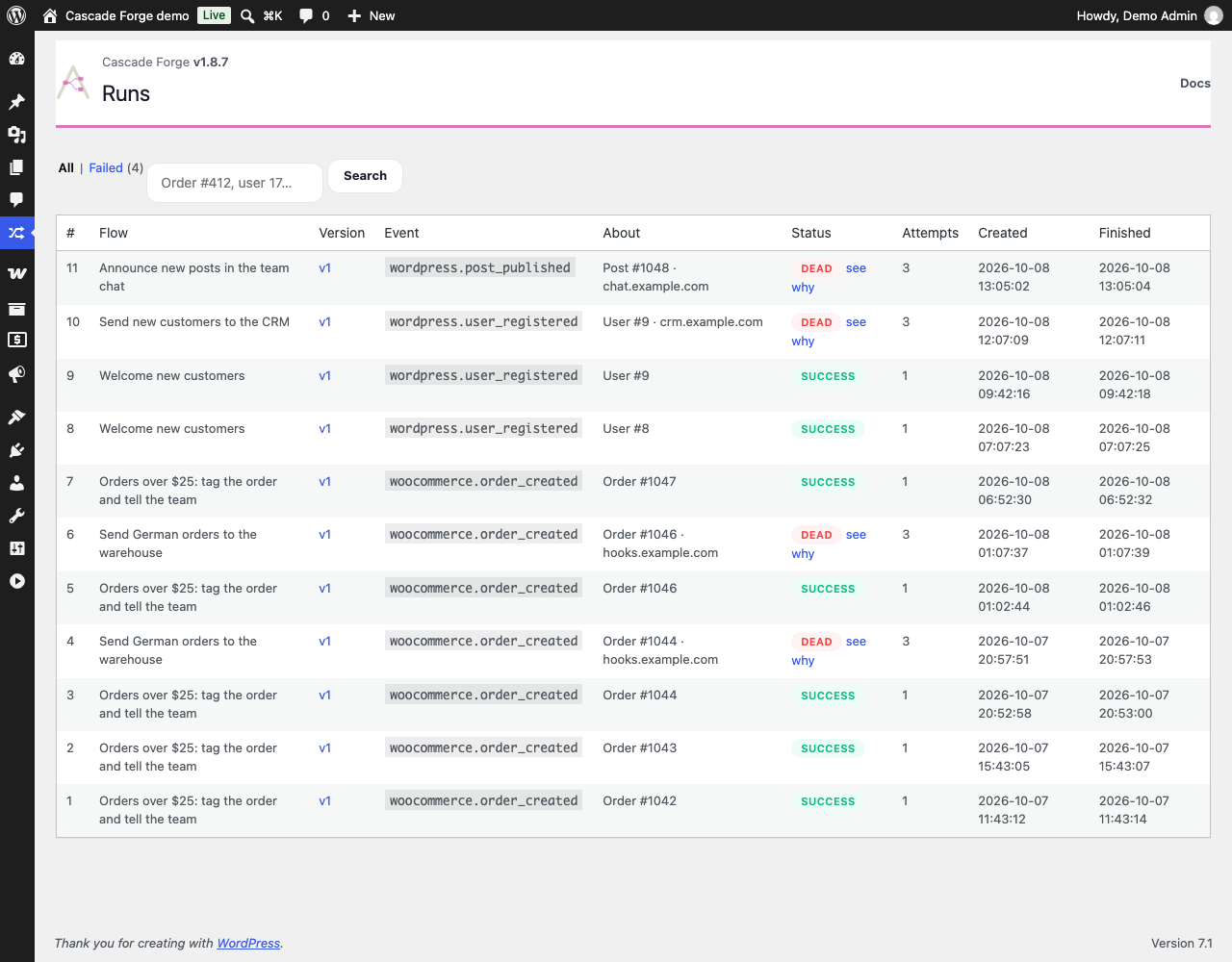
- A Failed view on the Runs screen: which step a run stopped on, the error it stopped with, a preview of what it was carrying, and one button that starts it again from that step
- A "run was dead-lettered" trigger, so a flow of your own can page you, open a ticket or post to a channel when another flow gives up
- 11 WordPress triggers: post published, user registered, user login, comment received, comment approved, post meta updated, term updated, attachment uploaded, user role changed, user deleted, password reset
- All 7 WooCommerce triggers when WooCommerce is active: order created, order status changed, payment complete, subscription status changed, refund created, product stock low, review added
- 9 actions: send email, show admin notice, log a message, update post meta, update user meta, create term, create user, FormForge admin notify, and outbound webhook (POST, with HMAC signing and an SSRF guard)
- Forge Suite event triggers, for the events those plugins publish from their own free cores: GuardForge IP lockout and integrity scan, FormForge submissions, FieldForge custom fields updated and field group saved, LangForge translation published, RankForge post analysis
- Inbound webhooks: a public URL per flow, HMAC-verified, de-duplicated and rate-limited
- Five more event triggers, for events only a paid sibling module can fire: GuardForge WAF block, malware finding and lockdown toggle; LangForge translation QA failure; RankForge whole-site audit complete
- Scheduled triggers: start a flow every so many minutes, or at a time of day on the weekdays you choose, read in the site's own timezone. A stretch of downtime produces one catch-up run, never a backlog of them
- A trigger for any WordPress hook: add a hook name to an allow-list on the Settings screen and it becomes a trigger in the editor, so a flow can react to an event no catalogue knows about
- Flow control steps: wait / delay, wait for a person's approval, conditional branch
- Wait for approval: the flow pauses and e-mails one person two links. Whichever they click is recorded, the run continues from where it paused, and later steps can read who decided and what they decided. Unanswered requests expire on a timer you set, and you choose in advance whether that counts as a rejection, an approval, or a reason to stop
- Retry every dead-lettered run of a flow at once, each from the step it stopped on
- Generic HTTP request step
- Messaging steps: Slack, Discord, Telegram, Mattermost, Microsoft Teams, Gmail send
- CRM and SaaS steps: ActiveCampaign, Pipedrive, Close, Mailchimp, Notion, Airtable, Google Sheets
- Storage steps: Dropbox, S3-compatible upload, media sideload from a URL
- Forge Suite action steps: LangForge translate post, GuardForge alert
- AI recipe generator — describe a workflow in plain language, get a draft flow. It costs 3 Forge credits per draft, and the number is printed on the button before you press it. The 20-recipe library in the free plugin costs nothing
安装:
- Upload the
flowforgefolder to/wp-content/plugins/, or install through Plugins → Add New. - Activate Cascade Forge through the Plugins menu.
- Open Cascade Forge → Flows and create your first automation.
屏幕截图:
常见问题:
Do I need an account or API key for the free version?
No. The free plugin runs entirely on your own server. See "External services" above for exactly what this download does and does not contact.
How do I get the Pro features?
Pro features ship in a separate "Cascade Forge Pro" add-on. Install this free plugin first, then add Pro from https://avakode.com.
How many flows can I create?
As many as you like. There is no cap on flows, active or draft, and none on runs. How long run history is kept is a setting (Settings → Log retention), not a limit.
Which triggers and actions do I get for free?
Every WordPress and WooCommerce trigger, the sibling events those plugins publish from their own free cores, the "a run was dead-lettered" trigger, and the nine actions listed above — including the outbound webhook. Nothing in the free plugin is switched off waiting for a licence; the Pro catalogue is a separate download and simply is not there until you install it.
Does Cascade Forge work with WooCommerce High-Performance Order Storage?
Yes. Cascade Forge declares itself compatible with High-Performance Order Storage, and it reads and writes orders only through WooCommerce's own order functions, so it does not depend on whether orders are kept in posts or in WooCommerce's order tables. Two things are worth knowing when a flow works on orders. The "Update post meta" step sets the meta on the order itself when the ID you give it is an order's. The "Post meta updated" trigger listens to WordPress post meta, and under High-Performance Order Storage an order's meta is not post meta, so it is not a reliable trigger for orders (with compatibility mode on, WooCommerce may still copy order meta to posts); for orders, use the WooCommerce triggers: order created, order status changed, payment complete and refund created.
Do I have to write JSON?
No. Every trigger and every step renders a form built from the parameters it declares, and conditions are rows: field, operator, value. The JSON textareas survive under an "Advanced" toggle for anyone who wants them. If a flow contains something the form cannot draw without risking your data — a nested condition group, a parameter no schema knows about, an OR group on a site without the Pro add-on — that panel opens as JSON with a note saying why, rather than being redrawn and silently truncated. Without JavaScript the screen falls back to the plain editor.
Where do the ready-made recipes come from?
They ship with the plugin as data, not as model output: 20 flows whose every trigger and action is a real id in Cascade Forge's catalogue, checked by the test suite against the live registries. Some of them lean on ids that belong to the Pro add-on or to a sibling plugin, so a recipe this site cannot run yet says which plugin it needs instead of offering a button that would fail. Importing one creates a draft — it cannot switch itself on — and any credential a step needs is left blank on purpose so you fill it in and read the flow before turning it on. Recipes cost nothing.
What happens when a flow fails in the middle of the night?
The run is kept. The Failed view on the Runs screen shows the step it stopped on, the error, and a preview of the payload it was carrying with anything token-shaped blanked out. Retry writes a new run that starts at that step with the original payload, so the steps that already succeeded do not run twice. It is refused if you have edited the flow since the failure, because the step it stopped on is then no longer that step; if the step's own connection is already known to be access-revoked, the button reads "Fix access, then resume" instead, because retrying now would only fail the same way again; and if the run stopped not knowing whether its last step reached its target, retrying could repeat that exact request, so the free screen explains that instead of offering a retry — start a new run of the flow, or resolve it from the Pro add-on's Inbox once you know what actually happened. An incident already resolved that way is not retried either. If you would rather be told than go looking, the "a run was dead-lettered" trigger lets one flow react to another giving up.
Can a flow wait for a person?
With the Pro add-on. The "Wait for approval" step pauses the run and e-mails one approver an Approve link and a Reject link; the decision is recorded and the run continues from exactly where it paused, with the decision, who made it and when available to every later step. Only a hash of the link's token is stored, a second click cannot change the answer, and you decide in advance what happens if nobody replies before the timeout — rejection is the default.
Does anything in the free plugin spend credits?
No. The only thing in Cascade Forge that spends Forge credits is the Pro add-on's AI recipe generator, at 3 credits per draft, and the button says so before you press it.
更新日志:
- Trigger settings now take effect. A flow set to "post published, post type = product" (or a meta key, a user role, an order status and so on) starts only for events that match; before, the settings were saved and shown but every event of that kind started the flow. Flows you already have begin to follow the settings they were saved with, so look at any flow whose settings you never meant to apply.
- A run in which a step was skipped because the flow's author no longer has the capability that step needs now finishes as "needs attention", with the step and the capability named, instead of reading as a plain success. "Test this flow" shows the same skipped step and the same result, and does not run the step.
- Requests from flow steps connect to the addresses the safety check approved; the check and the request no longer look the name up separately. A web address whose name cannot be looked up at that moment is not requested at all: the step is tried again later. The approved addresses are applied when your host's PHP uses cURL, which almost every host does.
- Deleting a flow also removes its webhook secret and any approval requests.
- The daily clean-up also removes inbound webhook deliveries older than a week from the log that stops a sender's retry from running a flow twice. Webhook addresses and secrets are never touched.
- The Flows screen says that drafting a flow with AI needs an active Pro licence, instead of "could not answer this time".
- The Webhooks screen shows the notice that Cascade Forge Pro 1.7.3 and newer give when webhooks cannot work.
- When AI credits run out, the message no longer promises a monthly reset and links to the page where you buy credits. The recipe generator on the Flows screen links there too.
- The plugin is listed as "Cascade Forge – No-Code Workflow Automation & Webhooks" in the Plugins list and on WordPress.org.
- The logo in the admin screens is the new mark.
- Security: the flow editor's save form is read field by field and sanitised on receipt; a flow that fails to save keeps only the sanitised text for you to correct, never the raw form.
- Database queries: the Runs screen search and flow filter, the run claim in the flow runner, the failed-run list and its counts, run clean-up, and the dashboard figures now use fixed query text with every value bound, instead of building the query from pieces.
- No change to what the screens show or to how flows run. Flows, settings and run history are untouched.
- New name: Cascade Forge. Flows, settings and run history carry over unchanged.
- Security: the settings form and every JSON field the flow editors post are sanitised as soon as they are received; the
flowforge/settings_savedhook now receives sanitised values. - Security: the "Create user" step may choose a role only when the flow's author can promote users, never a role with capabilities the author lacks, and never a role that manages users, plugins, themes or options. A refused role fails the step before any account is created.
- Outgoing webhooks are signed in the
X-CascadeForge-Signatureheader.
- This release needs Cascade Forge Pro 1.6.7 or newer if you run the add-on. The licence class, the License screen, the upgrade prompt and the plan badge in the screen header moved out of this plugin into the Cascade Forge Pro add-on. This plugin no longer carries any licence code: it asks only whether the add-on is installed. The License item in the Cascade Forge menu now comes from the add-on, so a site without it has no such item.
- An add-on older than 1.6.7 is not started beside this version, because it would look here for code that has moved. A notice on the Cascade Forge screens, the plugin list and the dashboard asks for the update and says where to get the package.
- On a site without the add-on, the Inbound webhooks screen names Cascade Forge Pro as the plugin that provides it and links to its page. Nothing on it is locked or greyed out.
- Fixed: with WP_DEBUG on, the flow editor, canvas and history screens no longer log "Deprecated: strip_tags(): Passing null to parameter #1" on PHP 8.1 and later; each of the three sets its own title before the admin header is printed.
- Admin output: the flow editor's inline save errors are escaped where they are printed.
- The empty Flows screen has a second button, “Start from a recipe”, next to “Create your first flow”: it opens the Recipes screen, where the ready-made flows are.
- Deleting the plugin leaves the job queue the Forge plugins share in place while another Forge plugin or add-on is still on the site. The check used to miss add-ons, and Rank Forge installed from the WordPress plugin directory, so the queue could be dropped while a neighbour still had jobs in it.
- Declared compatibility with WooCommerce High-Performance Order Storage. Cascade Forge reads and writes orders only through WooCommerce's own order functions.
- Fixed: the "Update post meta" step now sets the meta on the order itself when the ID it is given is a WooCommerce order. Under High-Performance Order Storage it wrote to the posts tables, where WooCommerce does not look.
- Fixed: the Recipes screen listed nothing in the packaged plugin because the build left the recipe catalogue out; the ready-made flows are in the package now.
- Fixed: the "Insert field" menu in a condition row no longer stretches to the width of its longest field name and squeezes the value box beside it.
- This release needs Cascade Forge Pro 1.6.2 or newer. A Pro step now checks its own licence inside the add-on; the free runner no longer asks about licences.
- The notice about an outdated Pro add-on appears on Cascade Forge screens, the plugin list and the dashboard only.
- Request input is sanitised where it is read, database queries are prepared or documented, and admin output is escaped.
- Admin script globals carry the full flowforge prefix instead of flf.
- The plugin's site is now cascadeforge.app: the plugin header and the translations link there.
- This release needs Cascade Forge Pro 1.2.0 or newer — unchanged from 1.7.1; an older add-on adds none of its steps or events, and an admin notice names both versions.
- The Runs screen now honours ?flow_id in its ordinary view, not only in the failed one, so a link that names a flow lands on that flow's runs instead of the newest hundred of every flow.
- This release needs Cascade Forge Pro 1.2.0 or newer. An older add-on adds none of its steps or events rather than adding them and failing halfway through a run. Until you update it, flows that use a Pro step stop at that step; an admin notice names both versions, and installing the current add-on brings them back.
- Deleting the last Forge product on a site now clears the job queue the Forge plugins share — its table, its two scheduled events and its version marker. While any other Forge product is still installed, deleting this one leaves the queue exactly as it is, because the pending jobs in those rows are that product's too.
- Contract regression checks. Record a flow's current behaviour — a depersonalised sample payload and the effects it produces — and every later save (or restore) of that flow replays the same sample and compares the result: still matches, differs (with what changed), or nothing recorded yet to compare against. Shown on the flow's own history screen, per version. This is a simulation, exactly like "Test this flow" — labelled as such on screen, and it never writes a run, a run step or a receipt.
- Two new database tables back this: one recorded contract per flow, and one check result per flow version. A free-only install can record a baseline and see checks with no Pro add-on required.
- Two new database tables backing the Pro add-on's Inbox and Connection Health screens: an audit ledger of human decisions on a dead-lettered or uncertain run, written only by the Pro Inbox; and a ledger of connection test results, which the free runner itself writes to whenever any step's access is revoked, Pro or not. A free-only install has no screen that shows either table. The connection-health ledger has no pre-flight check that acts on what it stores at all; the decision ledger does — an uncertain run's own free "Retry" now needs a decision recorded in it first, and only the Pro Inbox can record one, so the free Failed view explains that instead of offering a retry it is guaranteed to refuse.
- A Pro connector step whose credential is already known to be revoked — from a manual connection test, or from an earlier run that hit the same 401/403 — now refuses to start the run at all, before any step of it executes, instead of being discovered mid-run.
- The end of the JSON boxes. Every trigger and every step now draws its own form from the parameters it declares — a labelled field with the right control instead of a textarea you had to know the shape of. Conditions are rows: field, operator, value, with the operator list read from the engine itself so it can never offer one the engine does not implement.
- Next to every text field, an "Insert field" menu carrying the trigger's own values —
{{event.order.email}}and the like — each shown with a real example from that trigger's sample payload. A placeholder in a numeric field stays a placeholder instead of being coerced to zero. - The JSON is still there, under an "Advanced" toggle, and the builder refuses to redraw anything it cannot draw honestly: a nested condition group, a parameter no schema knows about, or an OR group on a site without the add-on opens as JSON with a note saying why. Without JavaScript the screen falls back to the previous editor, and nothing is lost either way.
- A library of ready-made flows. Twenty of them, grouped by the plugin they lean on — a form submission into Slack and a CRM, an order into a webhook, a locked-out IP to your team. Every trigger and action in the library is a real id in Cascade Forge's catalogue, not an invented one — and a recipe this site cannot run yet names the plugin it needs.
- Import lands a draft, never a live automation, and leaves credentials blank on purpose. A recipe this site cannot run — because a step belongs to the add-on, or the neighbouring plugin is not active — says so in words and offers no button, instead of a greyed-out one with no explanation.
- The AI "Draft the flow" button now quotes its price before the click: it spends 3 Forge credits, and the number comes from the shared price map rather than being typed into the screen. The recipe library next to it costs nothing.
- A human in the middle of a flow. The Pro add-on gains a "Wait for approval" step: the run pauses, one person gets an e-mail with an Approve link and a Reject link, and the flow continues from exactly where it paused as soon as they click. Later steps can read the decision, who made it and when.
- The links work once and stop working when the request expires. Only a hash of the link's token is ever stored, so the database never holds a working approve-this-run link.
- You choose what silence means. If nobody answers before the timeout — 24 hours unless you say otherwise — the run is rejected, approved or stopped, whichever the step was set to. The default is rejection: silence is not consent.
- A run can never get past an approval step without a decision. If something wakes a paused run early, it stops instead of walking through a gate nobody opened.
- A Failed view on the Runs screen, in the free plugin. A run that has used up its retries now shows the step it stopped on, the error, and a preview of the payload it was carrying — with anything that looks like a token, key or password blanked out, the same way the "Test this flow" report blanks them.
- "Retry from failed step", per run and free. It writes a new run that starts on the step that failed, with the original payload, so the steps that already succeeded are not run a second time. The failed run is kept exactly as it was, and the new one records which run it came from.
- A retry is refused if the flow has been edited since the run failed, because the step it stopped on is then no longer that step. The add-on adds "retry all failed runs of this flow" for when an API was down all night.
- New trigger: "a run was dead-lettered". A flow of your own can now react when another flow gives up — page someone, open a ticket, post to a channel. It carries the run, the flow, the step and the error, it fires once per failed run, and a flow can never be started by its own failure.
- A step whose HTTP response is 401 or 403 always dead-letters the run now, even one set to continue past a failure — the credential is what needs fixing, and continuing anyway used to read as though nothing had gone wrong.
- Flows that start on a clock. "Schedule — every N seconds" runs a flow on an interval; "Schedule — at a time of day" runs it at, say, 09:00 on Monday, Wednesday and Friday. Times are read in the site's own timezone, not UTC, so 09:00 means 09:00 where the site is.
- Missed schedules do not pile up. If wp-cron has been down for a week, a daily flow runs once when it comes back, not seven times, and an occurrence that a whole period has already passed over is abandoned rather than delivered late. On a site whose wp-cron does not run at all, a fallback catches up on ordinary page loads.
- Enabling a scheduled flow after today's time has passed waits for the next occurrence instead of firing immediately.
- A trigger for any WordPress hook. Settings gains an allow-list: write the hook name a plugin fires, give it a label, and it appears in the trigger picker like any other event. The hook's arguments arrive in the payload — objects are recorded as their class and id only, never unpacked, so a hook that happens to carry a user or an order cannot write private data into a run.
- Hooks that fire on every page load are refused, a watched hook can start at most twenty runs per request, and the list holds at most twenty hooks. Watching
initshould not be able to take a site down. - Both are Cascade Forge Pro triggers and require the add-on, version 1.3.0 or newer. Older add-ons keep working; they simply do not offer them.
- Run history is pruned at last. The Log retention setting has been on the Settings screen since the first release and nothing enforced it, so every run and every run step Cascade Forge had ever written was still in the database. A daily clean-up now removes finished runs older than the retention window, along with their step detail, in batches — a site with years of history catches up over a few nights instead of timing out and never finishing.
- Nothing the clean-up could damage is touched: a run still executing, and a run parked on a Wait step, are kept however old they are, and so is the most recent run of every flow — a scheduled flow uses that row to know it has already fired, and removing it would send the same digest twice.
- Deleting a flow now removes the canvas layout that was saved with it, instead of leaving one unreadable row behind per deleted flow.
- Flow history and rollback. Every save of a flow — from the form editor, from the canvas, or from an AI recipe — records what the flow's definition was at that moment: its trigger, the trigger parameters, the conditions and the ordered steps. A History screen on each flow lists them with who saved each one and when, and one button puts any of them back.
- Restoring is never destructive. The definition you are replacing is written to the history first, so a rollback can itself be rolled back. The flow's name and its enabled/disabled state are deliberately left alone — restoring an old draft must not switch off an automation that is live now.
- The Runs screen now shows which version of a flow each run actually executed, linked to that stored definition. A run that was queued before an edit and executed after it records the version whose steps it really ran, not the one it was queued under.
- The fifty most recent versions of a flow are kept. Sites that want a different depth can change it with the
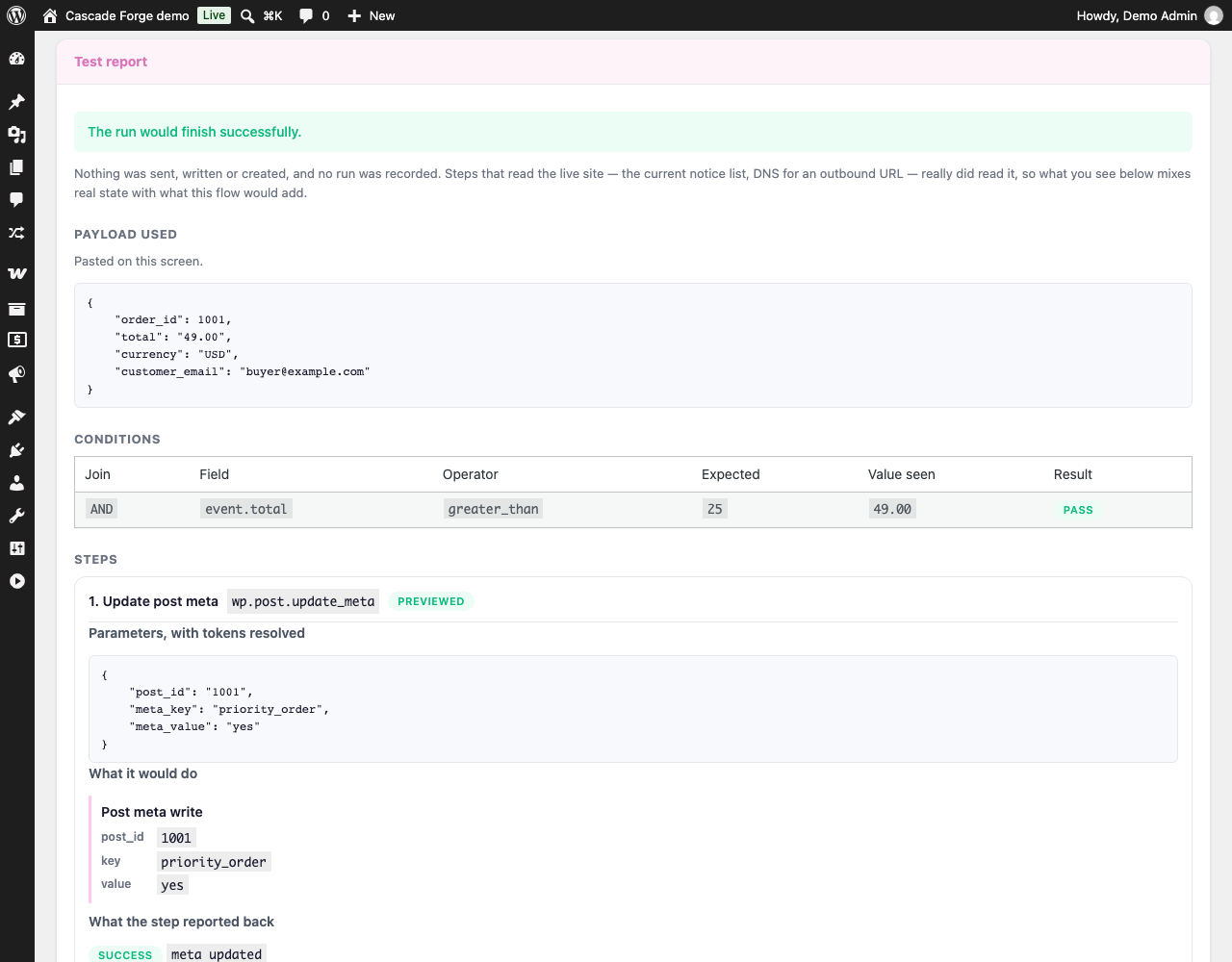
flowforge/flow_version_historyfilter. - Test this flow. A button on the flow editor and on the flows list walks a saved flow against the trigger's sample payload — or one you paste — and reports which condition rules matched and what value each of them actually saw, then, step by step, the exact request, message, option, meta, term or user each step would produce. Nothing is sent, written or created and no run is recorded.
- The preview runs the real step handlers, not a description of them, so what it reports is what a live run does. Every side effect is held back at a single gateway rather than being simulated in a second copy of the engine that could drift.
- A step is only ever previewed if the plugin that provides it has said its effects can be held back. Steps from other plugins are reported as not previewable and are never called — a step your site's own developer wrote can opt in by adding
'simulatable' => trueto its registration once every side effect it causes goes through FLOWFORGE_Effects. - Credentials are masked in the report, including where they sit inside a URL or a request body.
- Requires Cascade Forge Pro 1.2.0 or newer. An older add-on's steps still work; they are reported as not previewable in a test.
- The Pro catalogue is no longer part of this download. Every Pro step and Pro event now ships in the Cascade Forge Pro add-on and registers itself when that add-on is installed — nothing here is a switched-off copy waiting for a licence.
- All seven WooCommerce triggers and the outbound webhook action are Free. They used to require Pro while their code shipped here anyway.
- The numeric caps are gone: no 3-flow limit, no 100-row history limit. How long run history is kept is the Settings → Log retention option, as before.
- FieldForge triggers, at last: "custom fields updated on a post" and "field group saved". FieldForge has emitted both since 1.0; this catalogue never listened. The first is deliberately per post, not per field — FieldForge fires once for every field written, and a post with a dozen fields would otherwise start a dozen flow runs for one save.
- Sibling events fixed: LangForge translations and QA failures listen on the hooks LangForge actually emits, and the RankForge triggers use the
rankforge.ids (flows saved under the oldseoforge.ids keep working). The FormForge submission trigger fires on a submission instead of on a form being saved. - One FormForge submission trigger, not two. The event briefly had a second name while its original trigger was on the wrong hook; the trigger list now offers a single entry, and saved flows are moved onto it on upgrade. A flow the upgrade could not move keeps firing either way.
- "Run a shell command" is removed from the action catalogue.
- Requires Cascade Forge Pro 1.1.0 or newer. An older add-on registers no steps; Cascade Forge now says so instead of failing the flow silently.
- Wait / delay steps now really wait. A flow paused on a wait step keeps a resume cursor, shows as "waiting" in Runs with the time it comes back, and continues from the next step when the pause is over — previously the step after a wait fired immediately.
- A run parked on a wait step is abandoned instead of resumed if its flow is edited meanwhile, so an edited flow can never make a half-finished run send the wrong message.
- Database upgrade to 1.1.0 (two new columns on the runs table). The upgrade is verified before it is recorded, so a migration that could not run is retried instead of being skipped forever.
- AI recipes: describe an automation and get a draft flow, validated against the triggers and actions this site actually has.
- Initial public release. WordPress.org Free core; Pro features delivered by the separate Cascade Forge Pro add-on.