
CC Visual PDF Builder
| 开发者 | victorcc |
|---|---|
| 更新时间 | 2026年10月2日 22:22 |
| PHP版本: | 7.4 及以上 |
| WordPress版本: | 7.1 |
| 版权: | GPLv2 or later |
| 版权网址: | 版权信息 |
详情介绍:
CC Visual PDF Builder lets you design a PDF document visually and generate it automatically each time a form is submitted on your site. Place texts, variables, a logo and a table of the submitted answers exactly where you want them — no code required.
Features
- Drag & Drop visual builder: move every text, the logo and the answers table directly on the page preview, or type exact X / Y coordinates in millimetres.
- Full text styling: font (Arial / Helvetica, Times, Courier), size, style (normal, bold, italic, bold italic) and colour for every text.
- Template colour: used for the headings and the top border of the answers table.
- Undo / Redo (Ctrl+Z / Ctrl+Y), full-screen preview and "final render" mode.
- Page formats: A4, A5 and US Letter, portrait or landscape.
- Background image and logo: use your letterhead as a background; the logo can be set globally or per template. JPEG, PNG, GIF and WebP images are supported.
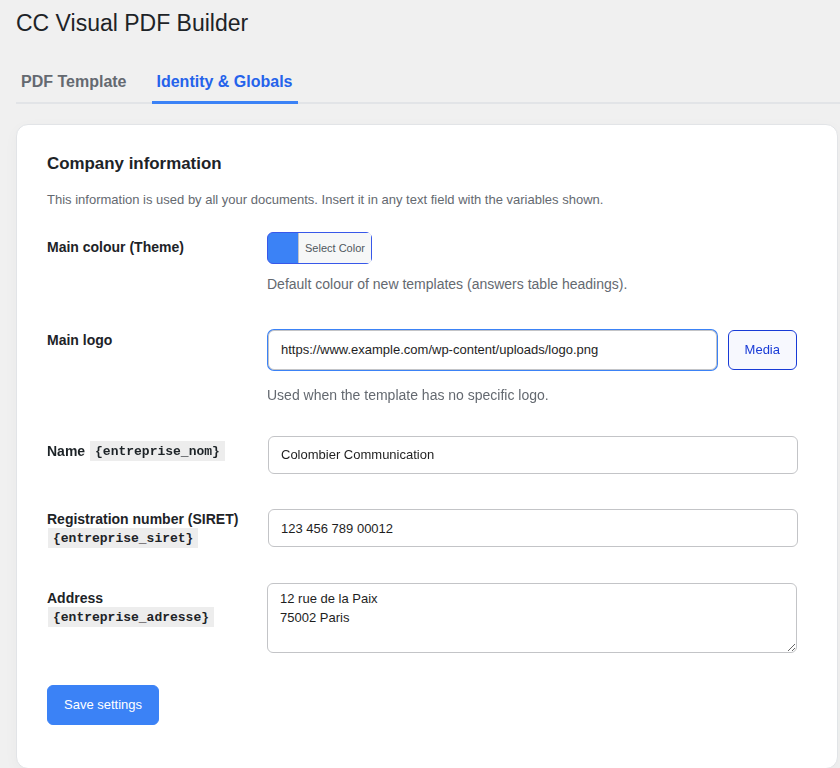
- Company identity: name, registration number and address are stored once and inserted anywhere with variables.
- Answers table: automatically lists every field of the submitted form (position, font and size are configurable). Long answers wrap and continue on a new page if needed.
- Form integrations: Contact Form 7, Elementor Pro Forms and WPForms. The generated PDF is attached to the notification e-mail sent by the form.
- PDF preview: generate a sample PDF of your template from the admin in one click.
- Accents and special characters (é, è, à, ç, €…) are supported.
{company_name},{company_id},{company_address}— company identity (settings page).{current_date},{current_time}— date and time of generation (in your site's date and time formats).- Every form field, between braces:
{your-name}for Contact Form 7, the field ID for Elementor (e.g.{name}), the field ID or the sanitized label for WPForms (e.g.{1}or{email}).
wp-content/uploads/cc-pdf-exports/ (with random file names and a protected folder) only so they can be attached to the e-mail; they are deleted automatically after 24 hours.
Third-party library
PDF rendering uses FPDF 1.86 by Olivier Plathey, released under a permissive license (no usage restriction). The bundled copy is placed in its own namespace (CCVPB\Libs) so it never conflicts with another plugin loading FPDF.
安装:
- Go to
Plugins > Add Newin your WordPress dashboard. - Search for "CC Visual PDF Builder", click "Install Now" and then "Activate".
- Open
CC PDF Builder > Identity & Globalsto enter your company details and logo. - Open
CC PDF Builder > PDF Templates, click "Edit" and design your document. - In "Automation & e-mails", choose your form plugin, enter the form ID (or name / title) and tick "Attach the PDF to the e-mail sent by the form".
屏幕截图:
常见问题:
Which form plugins are supported?
Contact Form 7, Elementor Pro Forms and WPForms.
How do I identify my form?
Enter the form ID, its name or its title in the "ID du Formulaire" field. For Contact Form 7 the ID is visible in the shortcode ([contact-form-7 id="123"]).
Will my accented characters display correctly?
Yes. Texts are converted to the encoding of the PDF fonts, so accents, the euro sign and typographic quotes are displayed correctly.
Can I import an existing layout?
Yes. Set your existing letterhead as the "Image de fond" and drag your dynamic texts over it.
Where are the generated files stored?
In wp-content/uploads/cc-pdf-exports/, only for the time needed to send the e-mail. A daily task deletes files older than 24 hours.
更新日志:
1.0.4
- The interface is now written in English and fully translated into French and Spanish (other languages can be translated on translate.wordpress.org).
- New variable names: {company_name}, {company_id}, {company_address}, {current_date}, {current_time}. The previous names still work.
- {current_date} and {current_time} use the date and time formats of your site.
- Developer hooks to extend the builder and the PDF engine.
- All design options are available: per-text font, style, size and colour, template colour, answers table position, font and size.
- Company identity settings (name, registration number, address, logo, colour) can now be saved and are used in the PDF.
- New: one-click PDF preview of the template from the admin.
- New: logo and answers table can be dragged on the preview.
- The bundled FPDF library is now namespaced to avoid conflicts with other plugins.
- WPForms: the PDF is now generated before the notification e-mails are sent.
- Generated files use random names, are stored in a protected folder and are deleted after 24 hours.
- WebP / AVIF images are converted automatically (transparency kept).
- Fixed the euro sign in PDFs, the template list and the "Identité & Globaux" menu link.
- Deactivation feedback form: now optional, with explicit consent and a clear description of what is sent.
- Removed the WooCommerce order-screen placeholders.
- Initial release.