Celestial Lunar Phase Widget
| 开发者 | johnfoo |
|---|---|
| 更新时间 | 2026年9月25日 23:28 |
| PHP版本: | 7.4 及以上 |
| WordPress版本: | 7.0 |
| 版权: | GPLv2 or later |
| 版权网址: | 版权信息 |
详情介绍:
- Current lunar phase name
- Moonrise time
- Moonset time
- Astronomical dawn time
- Astronomical dusk time
- Illumination percentage
- Bundled Moon phase image matched to the phase
- Optional location label
- Optional calculation/source note
- Local astronomy calculations; no API key required
- Moonrise and moonset times
- Astronomical dawn and dusk display
- Current lunar phase and illumination percentage
- Bundled Moon phase photos packaged locally
- Location lookup helper for admin setup
- Browser geolocation helper for admin setup
- Timezone dropdown to prevent typos and date-shift errors
- Latitude, longitude, timezone, and optional elevation settings
- Shortcode:
[celestial_lunar_phase_widget] - Gutenberg block: Celestial Lunar Phase Widget
- 12-hour or 24-hour time display
- Per-location and per-date caching for better performance
- Admin notice after update if location settings need to be completed
- Automatic Moon image orientation based on configured latitude
- Manual Northern Hemisphere, Southern Hemisphere, and Original image orientation options
安装:
- Upload the plugin folder to
/wp-content/plugins/or install the ZIP from Plugins > Add New > Upload Plugin. - Activate the plugin.
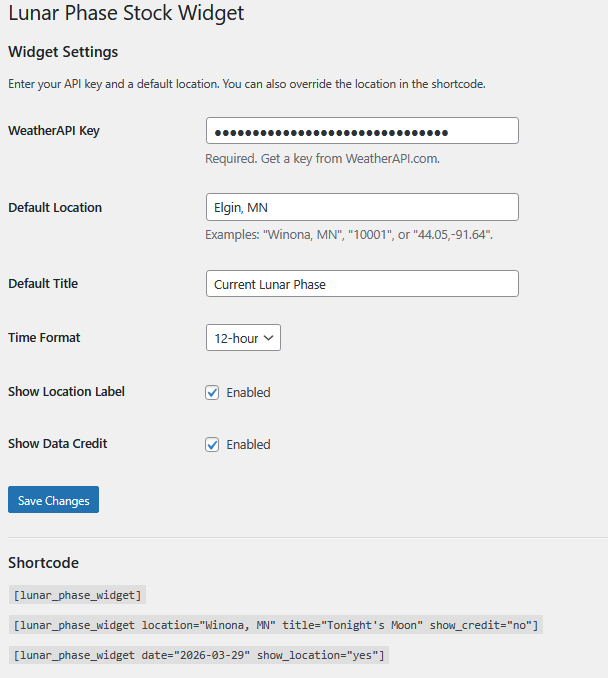
- Go to Settings > Celestial Lunar Phase Widget.
- Enter a city, state, address, or place name and click Lookup Location, or use Use My Current Location.
- Verify the timezone dropdown and save changes.
- Add the Celestial Lunar Phase Widget block or place
[celestial_lunar_phase_widget]into a post, page, or widget area.
屏幕截图:
常见问题:
Does the plugin require an API key?
No. Version 2.2 calculates the Moon phase, moonrise, moonset, astronomical dawn, and astronomical dusk locally. No WeatherAPI key or external astronomy data service is required.
Why do I need latitude and longitude?
Moonrise, moonset, dawn, and dusk are location-specific. Version 2.2 uses the configured latitude, longitude, and timezone to calculate the correct local values. The settings page includes Location Lookup and Use My Current Location helpers to make this easier.
What happens when upgrading from an older API-based version?
After the update, WordPress admins will see a notice asking them to complete the new location settings. The widget will display a safe setup message until latitude, longitude, and timezone are saved. Use Location Lookup or Use My Current Location from the settings page.
Why might times differ from Timeanddate.com or other services?
Moonrise and moonset times can differ between services because of location precision, elevation, terrain/horizon assumptions, atmospheric refraction, and calculation methods.
Does the plugin include Moon images?
Yes. Eight Moon phase images are bundled locally inside the plugin package.
Why does the Moon image orientation change?
Version 2.3 can orient the bundled Moon image for the observer's hemisphere. Automatic mode uses the configured latitude. The bundled images use a Southern Hemisphere orientation, so Northern Hemisphere display is rotated 180 degrees. This is a practical hemisphere representation; the Moon's exact apparent angle also varies with date, time, latitude, and position in the sky.
Does the plugin include a Gutenberg block?
Yes. The plugin includes a dynamic Gutenberg block with editor controls for location label, date, title, and display options.
更新日志:
- Added automatic moon image orientation based on hemisphere.
- Added manual orientation options (Automatic, Northern Hemisphere, Southern Hemisphere, Original).
- Improved WordPress.org metadata (5 tags, shorter description).
- Tested up to WordPress 7.0.
- Various usability improvements.
- Updated WordPress compatibility and plugin header metadata.
- Removed production debug logging flagged by the Plugin Check tool.
- Added translator context for the localized calculation credit.
- Limited directory tags and shortened the plugin description.
- Added Location Lookup helper using OpenStreetMap Nominatim from the admin settings page.
- Added timezone dropdown with common timezones and all IANA timezone identifiers.
- Improved setup guidance and admin notice language for upgrades from API-based versions.
- Kept local astronomy calculations only; WeatherAPI remains removed.
- Removed WeatherAPI mode and API key settings.
- Added local-only astronomy calculations.
- Added admin notice when latitude, longitude, or timezone settings are missing after update.
- Kept browser geolocation helper for easier setup.
- Updated branding and documentation for Celestial Web Development.
- Fixed local date handling for the configured observing timezone.
- Shortened astronomical twilight labels to Dawn and Dusk.
- Improved moonrise and moonset calculations using a SunCalc-style algorithm.
- Improved phase and illumination calculation.
- Added local calculation diagnostics and safer timezone handling.
- Added local astronomy calculation mode for moonrise and moonset.
- Changed local sun times display to astronomical dawn and astronomical dusk.
- Added latitude, longitude, timezone, and elevation settings.
- Added browser geolocation helper in admin.
- Added Gutenberg block support.
- Added bundled WordPress.org assets and screenshots.
- Initial release.