Centrex Smart Web Form Builder
| 开发者 | centrexsoftware |
|---|---|
| 更新时间 | 2026年7月28日 03:54 |
| PHP版本: | 7.4 及以上 |
| WordPress版本: | 7.0.2 |
| 版权: | GPLv2 or later |
| 版权网址: | 版权信息 |
详情介绍:
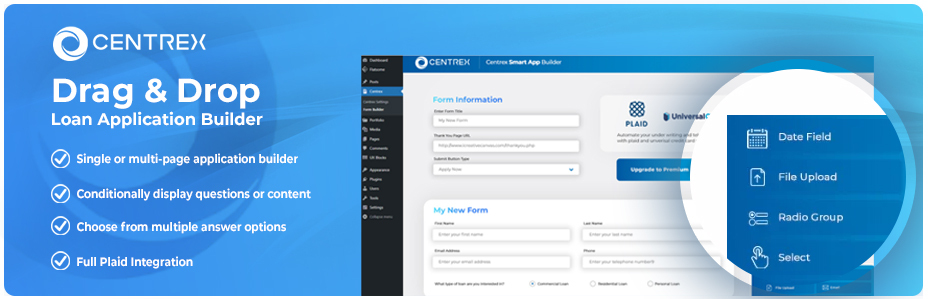
- Drag-and-Drop Form Builder - Build forms visually in the WordPress admin with an easy-to-use interface
- CRM Integration - Form submissions are sent directly to your Centrex CRM account
- Multiple Field Types - Text, email, phone, date, number, textarea, dropdowns, checkboxes, radio buttons, headers, and paragraphs
- Field Sets - Quickly add common field combinations like name, email, phone, and full address
- Custom CRM Field Mapping - Map form fields to your Centrex CRM custom fields
- URL Pre-Population - Dynamically populate form fields from URL parameters
- Shortcode Support - Embed forms anywhere with
[centrex_smart_app id="123"] - Gutenberg Block - Native block editor support with form picker and direct edit link
- WPBakery Integration - Native WPBakery Page Builder element
- Configurable Logging - Debug form submissions with built-in error, info, and debug logging
- Email Fallback - Form data sent via email if API submission fails
- Contact Updates - Update an existing CRM contact from a link, with identity verification before the form is shown or submitted
- File Uploads - Allow users to upload documents with drag-and-drop file upload fields
- Multi-Page Forms - Split long forms across multiple pages with page break fields
- Conditional Fields - Show or hide fields based on other field values
- Plaid Bank Linking - Integrate Plaid for financial account verification
- Clixsign Document Signing - Send documents for digital signature after form submission
- Track users by stealth
- Write any user personal data to a database outside the Centrex CRM/LOS
- Send any data to external servers unless using the Plaid element in the premium form builder
- Use Cookies
- Plaid
- Meridian Link
- CLEAR
安装:
- Go to
Pluginsin the Admin menu - Click on the button
Add new - Search for
Centrex Smart Web Form Builderand click 'Install Now' or click on theuploadlink to uploadcentrex-smart-web-form-builder.zip - Click on
Activate plugin - Go to the Centrex menu in your admin sidebar
- Enter your Centrex API credentials on the Settings page
- Navigate to Form Builder to create your first form
常见问题:
Do I need a Centrex Software CRM Account to use this plugin?
Yes, please go here to schedule a demo and get started with our CRM. You can still use the form builder without credentials, and submissions will be sent via email to the address configured in plugin settings.
Is there a limit on how many fields I can add using the free version?
No, you can add as many fields as you would like. However, if you wish to break your form into multiple pages, you will need the premium version.
Does the free version support uploading files to the CRM?
No, you will need to purchase the premium version here to upload files directly to the CRM.
Do I need my own Plaid Account or do I use the Centrex Plaid Account?
We recommend using the Centrex Plaid account as we get volume discount pricing, and we are month to month when Plaid will require a long term contract if you are on your own.
How do I embed a form on my site?
Use the shortcode [centrex_smart_app id="123"] where 123 is your form's ID. You can find the ID on the Form Builder list page. You can also use the Gutenberg block or WPBakery element.
Can I use this alongside the premium plugin?
We recommend using only one version at a time. If both are active, you will see a notice asking you to deactivate one to avoid conflicts.
更新日志:
- Intermittent fault that could record a single submission twice.
- A submission is now only counted as successful when the data source confirms it with a contact record.
- "Contact Updates via URL" now lives in Centrex Premium, where updating an existing contact is paired with identity verification. Forms in the free plugin always create a new contact, and existing forms are switched to create-only on update.
- Logging is off by default, log files are kept in a protected directory, and any existing log files are cleared during the update.
- When a submission cannot reach the CRM and falls back to email, the applicant is now told their information was received and is pending, rather than shown a success message.
- General security and privacy hardening across form submissions, logging, and administrative actions. Note: if you relied on updating existing contacts by URL, that capability now lives in Centrex Premium.
- Duplicate any field in the form builder. Hover a field and click the Duplicate button to clone it (options, width, required flag, and conditional rules included).
- SSN and EIN field types (Text subtypes) with auto-formatting masks and clean-digit submission to the CRM.
- Number and Currency field types, with dollar sign and comma formatting on Currency.
- Auto-generate a field name from its label. Improved
- The builder now warns before saving a co-applicant field whose name would not map at the CRM.
- General cleanup to reduce the plugin size.
- Security hardening: CSRF nonce protection on the contact-fields endpoint, output escaping, and direct-file-access guards. Fixed
- PHP 7.4 compatibility fix on the form submission path.
- Form builder reliability fixes (drag-and-drop, legacy date fields).
- Deleting the free plugin no longer removes your forms or settings when the Premium plugin is still installed (both use the same data).
- Hardened the admin form save, clone, and delete actions with stricter request validation.
- New drag-and-drop form builder with modular architecture
- Undo/redo support with full history stack
- CRM field mapping with searchable dropdown
- Field sets and presets for common fields (name, email, phone, address)
- URL pre-population for hidden and visible fields
- Contact update support via URL parameters
- Form settings flyout panel with organized tabs
- Gutenberg block editor support with branded placeholder and edit link
- WPBakery Page Builder integration
- Configurable logging with three log levels
- Forms list page with clone, delete, and copy shortcode actions
- Clean data removal on plugin uninstall
- Initial release