
Cost Calculator for Contact Form 7
| 开发者 | azmarket |
|---|---|
| 更新时间 | 2026年10月24日 23:39 |
| PHP版本: | 7.4 及以上 |
| WordPress版本: | 7.1 |
| 版权: | GPLv2 or later |
| 版权网址: | 版权信息 |
详情介绍:
Cost Calculator for Contact Form 7 turns any Contact Form 7 form into a quote, estimate or price calculator. Add priced options, then build the total with a visual formula builder and see the result live while you edit.
[youtube https://www.youtube.com/watch?v=9lUnzwNFjto]
Features
- Visual Formula Builder – pick a template, click or drag fields, add operators and functions. Switch to text mode at any time.
- Live preview – try the formula with sample values before you save.
- Unlimited totals – add as many Calculated fields as you need. A total can use another total (subtotal, tax, grand total).
- Number & currency format – symbol and position, thousand and decimal separators, decimals. Presets for $, €, £, ₫, ¥ and ₹.
- Hide a total – keep a subtotal off the form but still calculate it and send it by email.
- Totals in emails – use
[your-total]in the Mail tab; it is sent formatted. - Priced fields – Checkbox, Radio and Dropdown fields with "value|label" options. Contact Form 7 number, select, radio and checkbox fields work too.
- Formulas box – see and edit every formula from the editor sidebar.
- Safe evaluation – formulas are parsed by the plugin, never with
eval().
- Operators:
+ - * /and brackets( ) - Functions:
round(),ceil(),floor(),abs(),min(a, b),max(a, b) - Example:
quantity * unit_price + shipping
formula-builder folder; build it with npm install && npm run build.
安装:
- Install and activate Contact Form 7.
- Upload the plugin to
/wp-content/plugins/or install it from the Plugins screen, then activate it. - Edit a contact form. Under Calculation, add priced fields with Checkbox, Radio or Dropdown, then click Calculated to build the total.
屏幕截图:
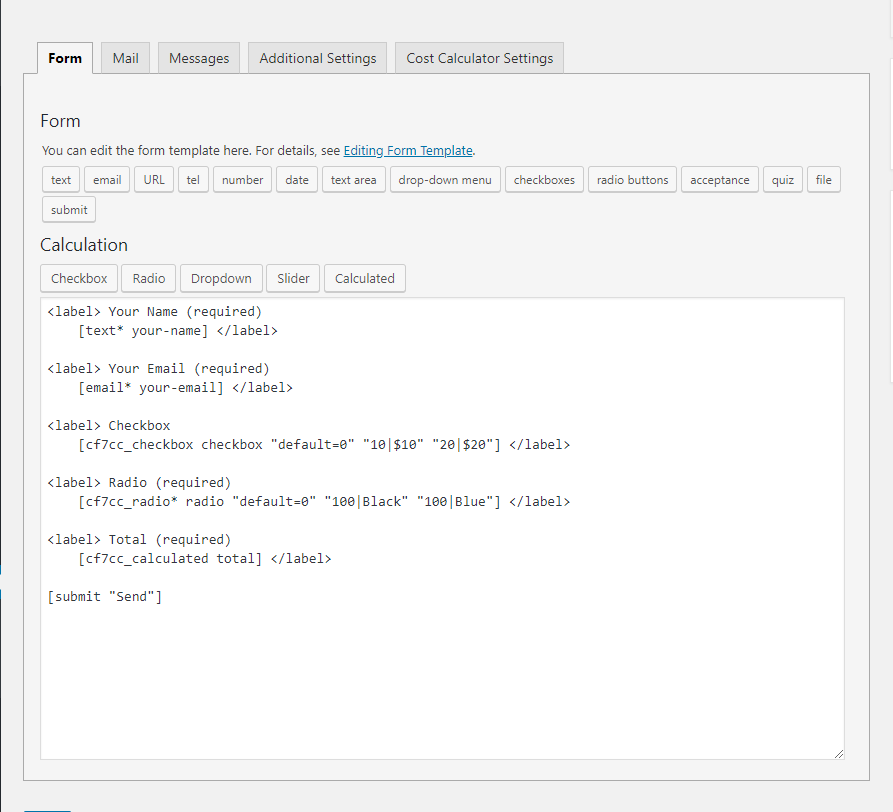

常见问题:
Where are formulas stored?
On the contact form itself (post meta). They are saved when you click Save formula in the builder or Save on the form.
Can a total use another total?
Yes. Totals are worked out in the order they appear in the form, so put the total you reuse above the one that uses it.
How do I show the total in the email?
Use the Calculated field's name as a mail-tag, for example [calculated-496]. It is formatted with the field's display settings.
Can I change the default currency symbol?
Yes, per total in the builder's Display section, or for new totals with the bh_cf7_cc_currency_symbol filter.
更新日志:
2.0.0
- New: visual Formula Builder (Vue 3) that opens from the Calculated button — templates, drag & drop fields, text mode and live preview.
- New: Formulas box in the editor sidebar to view and edit every formula.
- New: unlimited Calculated fields per form; a total can use another total.
- New: display settings for each total — currency symbol and position, separators, decimals (presets for $, €, £, ₫, ¥, ₹), hide on form, alignment.
- New: totals are submitted with the form and can be used as formatted mail-tags.
- New: Contact Form 7 number, select, radio and checkbox fields can be used in formulas.
- New: required (*) option for Checkbox, Radio and Dropdown fields; Slider renders as a range input.
- Improved: redesigned Calculation buttons; tag generator works with Contact Form 7 6.x.
- Security: formulas are evaluated by a built-in parser instead of
eval(); saving requires a nonce and edit permission; all output is escaped. - New: formulas and settings are removed when the plugin is deleted.
- Released.