Changelog as a Service - Publish, Display, and Communicate Beautiful Changelogs
| 开发者 |
wpsunshine
pinedigital changelogwp |
|---|---|
| 更新时间 | 2026年9月15日 23:16 |
| PHP版本: | 7.4 及以上 |
| WordPress版本: | 7.1 |
| 版权: | GPLv2 or later |
| 版权网址: | 版权信息 |
详情介绍:
- Building user trust by transparently showing what's changed
- Reducing support requests with clear update documentation
- Increasing user engagement with searchable, filterable changelogs
- Providing REST API endpoints for automation and syndication Our changelog plugin solves the problem of unprofessional changelog displays by giving you a dedicated post type, beautiful badge system, and flexible display options—all while using the familiar WordPress readme.txt format you already know.
- Dedicated Changelog Post Type - Manage all your changelogs in one place
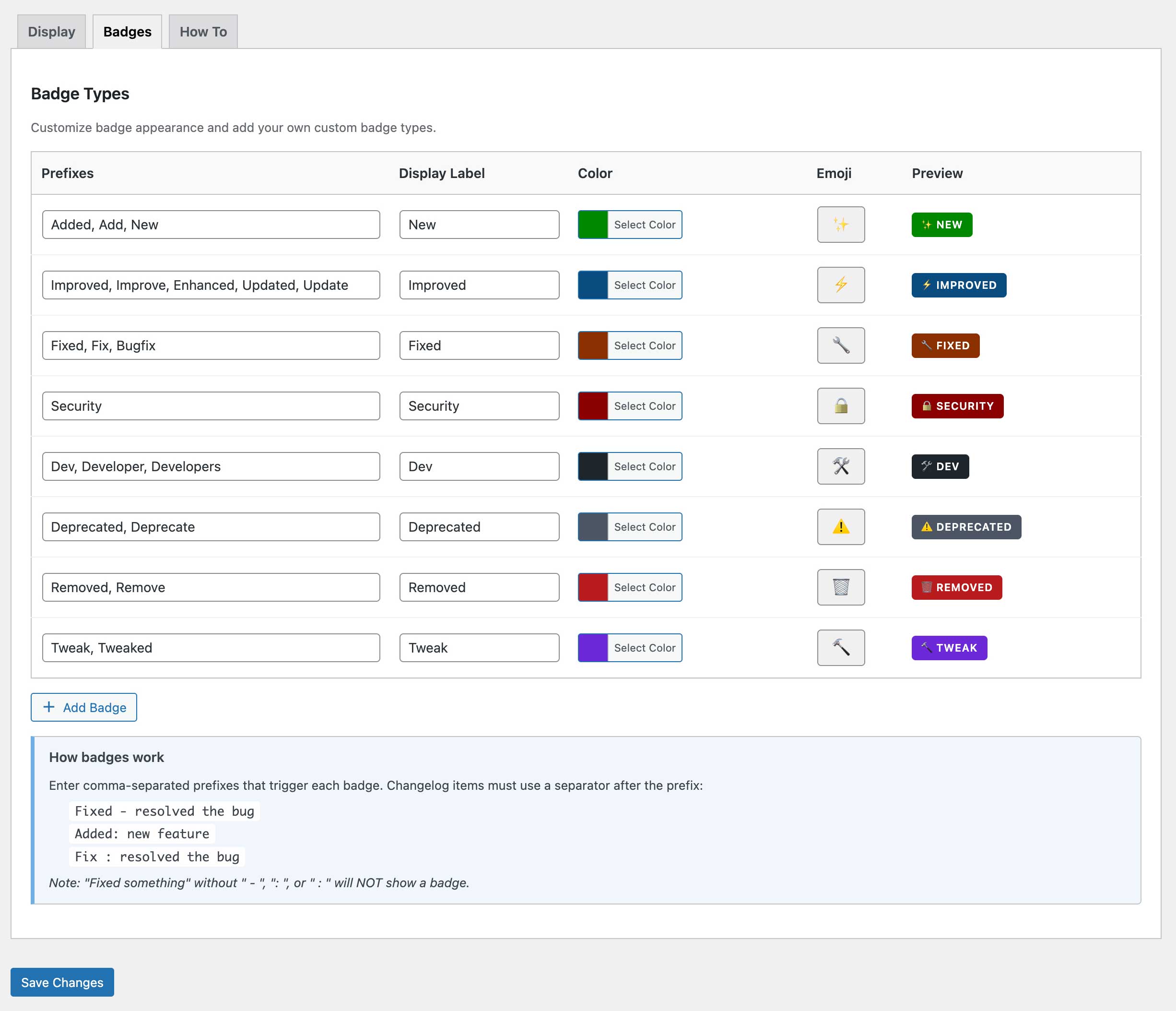
- Color-Coded Badge System - Automatic badges for Added, Fixed, Improved, Security, Dev, Deprecated, Removed, and Tweak
- Fully Customizable Badges - Customize colors, labels, emojis, and create unlimited custom badge types
- Shortcode & Gutenberg Block - Display changelogs anywhere with
[changelog_service]or use the modern block editor - WordPress.org Plugin Support - Display changelogs from any WordPress.org plugin by specifying its slug, with automatic daily caching
- Search & Filter Functionality - Let users search changelog content and filter by badge type
- REST API Endpoints - JSON endpoints for changelog syndication and automation
- EDD Integration - Works seamlessly with Easy Digital Downloads products
- Version Control Meta Fields - Track version, tested up to, requires WordPress/PHP, and homepage
- Copy Link Buttons - One-click copy links to specific versions (always enabled on hover)
- Signup Links - Let users subscribe to changelog updates via ChangelogWP.com with one click
- Responsive & Accessible - Full keyboard navigation, ARIA labels, and screen reader support
安装:
- Upload the
changelog-servicefolder to your/wp-content/plugins/directory, or install directly through the WordPress plugin screen. - Activate the plugin through the Plugins menu in WordPress.
- Go to Changelogs > Add New to create your first changelog using the familiar readme.txt format.
- Display your changelog anywhere using the
[changelog_service]shortcode or the Gutenberg block. - Optionally, customize badge colors, labels, and styles under Changelogs > Settings > Badges.
屏幕截图:
常见问题:
How do I display my changelog on my website?
You have three easy options:
- Shortcode: Use
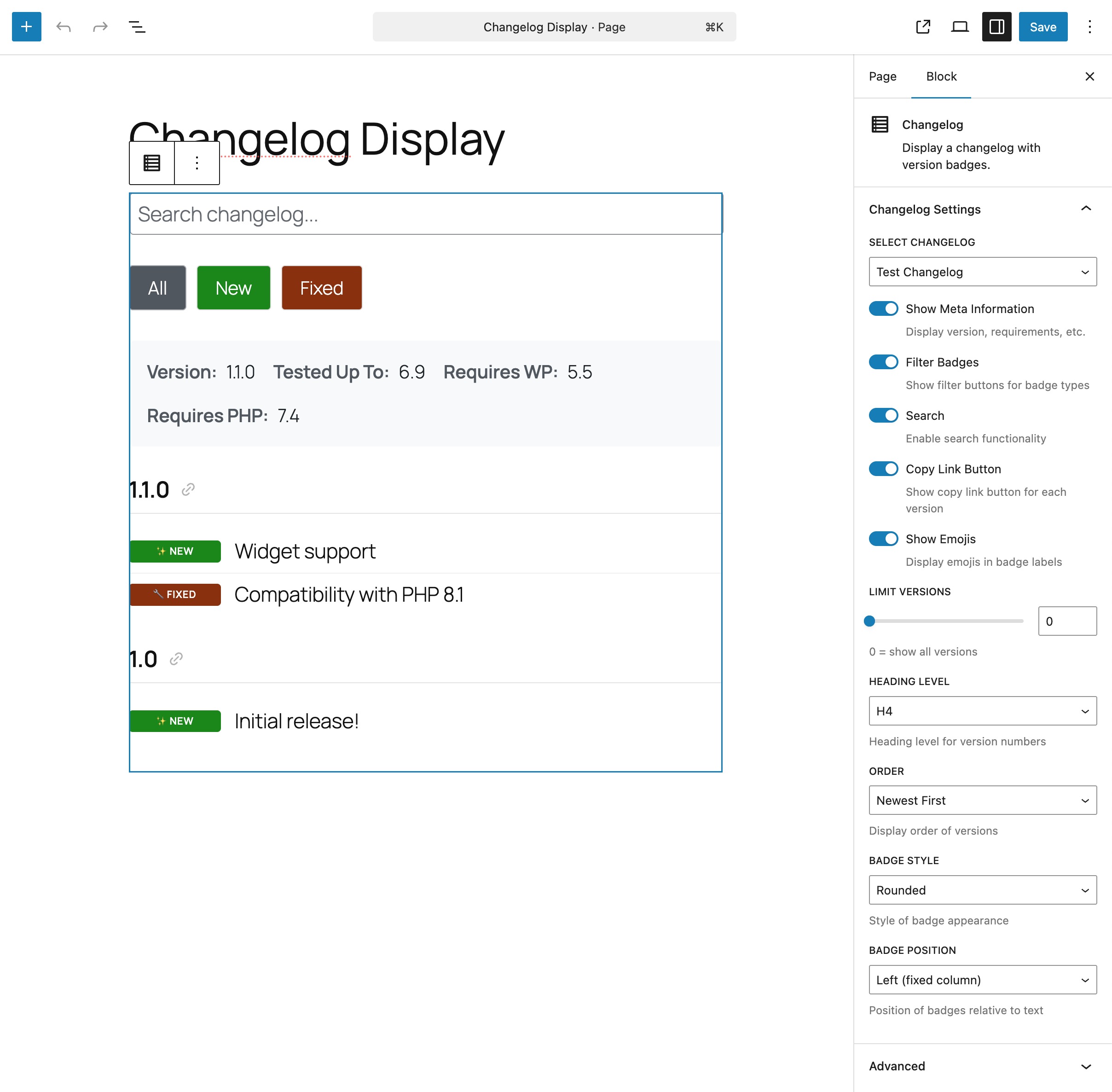
[changelog_service id="123"]or[changelog_service slug="my-plugin"]anywhere on your site - Gutenberg Block: Search for "Changelog" in the block inserter and select your changelog
- Automatic Display: If your changelog post type is public, it displays automatically on single changelog pages
Can I customize the badge colors and styles?
Absolutely! Go to Changelogs > Settings > Badges to customize colors, labels, and emojis for each badge type. Choose from three badge styles (rounded, square, or pill) and position them left or inline. You can also create unlimited custom badge types with your own prefixes.
Can I use this for WordPress themes or other projects?
Yes! While the terminology focuses on plugins, it works perfectly for themes, any WordPress product, or even non-WordPress project changelogs. Just create a changelog post and use the shortcode or block wherever you need it.
How do I format my changelog entries to get badges?
Use the format "Prefix - Description" or "Prefix: Description" or "Prefix : Description". For example:
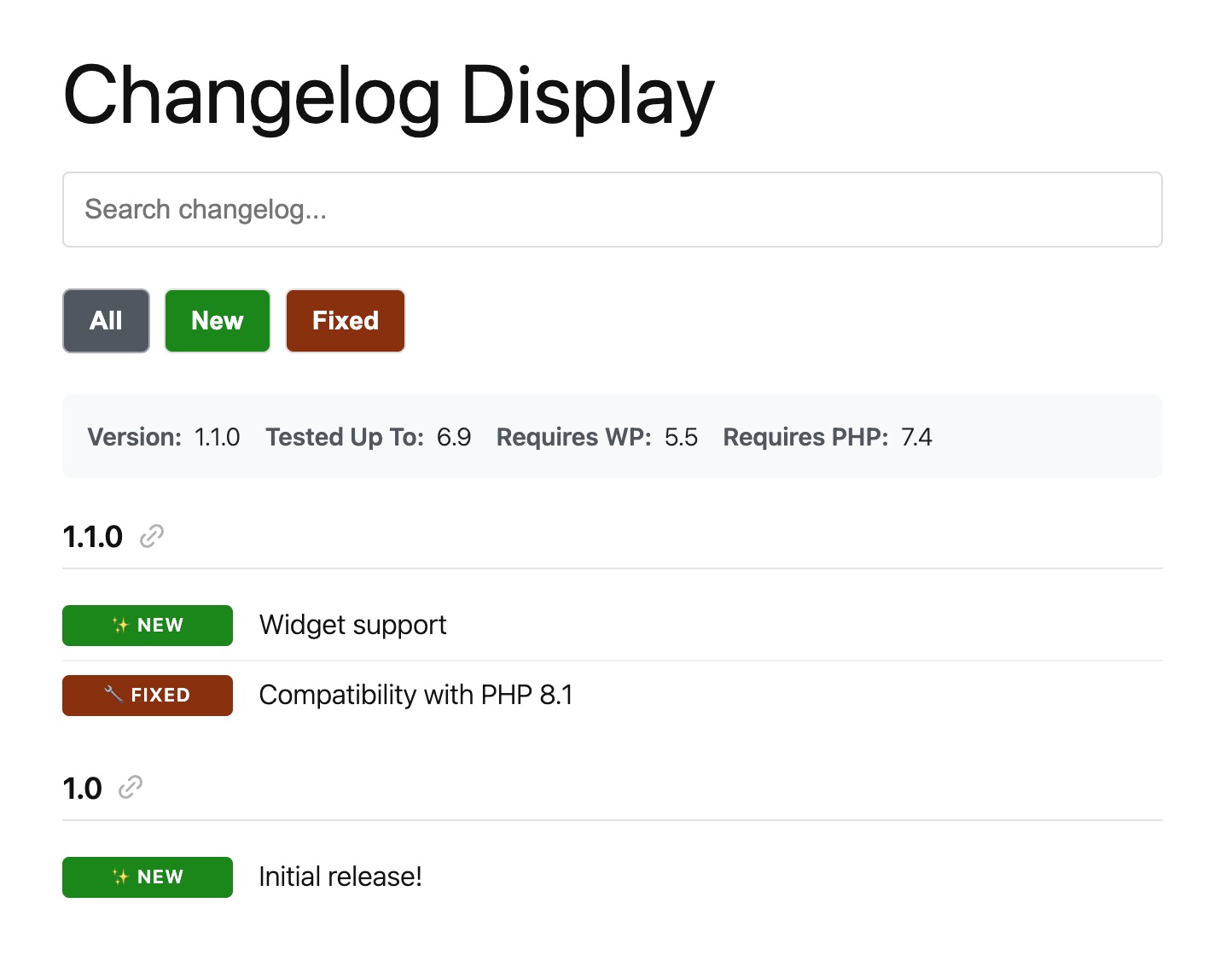
Added - New feature(shows green "New" badge)Fixed: Bug resolved(shows orange "Fixed" badge)Improved - Performance boost(shows blue "Improved" badge) See the Badge Format section below for all supported prefixes.
Does this work with page builders like Elementor, Beaver Builder, or Divi?
Yes! Use the [changelog_service] shortcode in any page builder that supports shortcodes. Most popular page builders have shortcode widgets or modules you can use.
Can I search and filter changelog entries?
Yes! Enable search and filtering in your shortcode: [changelog_service id="123" search="true" filter_badges="true"]. Users can search changelog content or filter by badge type (Added, Fixed, Improved, etc.). Results show version headers with matching items.
Is there a REST API I can use?
Yes! This changelog plugin provides REST API endpoints for changelog data:
GET /wp-json/changelogwp/v1/changelog/{slug}- Get single changelogGET /wp-json/changelogwp/v1/changelogs- Get all changelogs with pagination Perfect for automation, syndication, or integrating with external services.
Does this integrate with Easy Digital Downloads?
Yes! If you have EDD Software Licensing active, you can display changelogs for your EDD products using the edd_id attribute: [changelog_service edd_id="456"]. This is perfect for premium plugin developers managing product changelogs.
Is it accessible for screen readers?
Yes! It includes full accessibility support:
- Keyboard navigation for all interactive elements
- ARIA labels and roles for screen readers
- Visible focus indicators
- Semantic HTML structure
- Screen reader text for icon-only buttons like copy links
Can I create custom badge types?
Yes! Go to Changelogs > Settings > Badges and click "Add Badge" to create custom badge types with your own prefixes (like "Enhancement", "Performance", "Breaking"), colors, and emojis. No coding required.
How do I link to specific versions in my changelog?
Copy link buttons are always enabled and appear on hover next to each version number. Users can click to copy the URL with the version anchor, making it easy to share specific updates.
How do I add a signup link for update notifications?
Use the signup shortcode parameter to add a "Get notified of updates" link that connects to ChangelogWP.com:
For WordPress.org plugins (auto-generates URL from plugin slug):
[changelog_service plugin_slug="woocommerce" signup="true"]
For other sources (provide a custom URL):
[changelog_service id="123" signup="https://changelogwp.com/plugin/my-plugin/"]
You can also enable this globally in Changelogs > Settings > Display by checking "Signup Link". When using the Gutenberg block, toggle "Show Signup Link" in the block settings—if using a WordPress.org plugin, the URL is auto-generated; otherwise, enter a custom URL.
更新日志:
- Fix: Changelogs pulled from Easy Digital Downloads Software Licensing showed a backslash before quotes and apostrophes
- Fix: Allow x.x.x.x version numbers for version number parsing
- Fix: Allow pipe "|" as separator between version number and date
- Fix: Allow version line to include date without a separator
- New: Timeline template - a vertical timeline layout with version badges on the line and changelog items to the right
- New:
templateshortcode attribute - choose between "default" and "timeline" layouts - New: Template selector added to Gutenberg block editor
- New: Default template setting in plugin settings with customizable timeline colors (line, version badge background, version badge text)
- New: Release notes support - free-form text between a version header and list items is now displayed as release notes
- New: Inline markdown support - bold, italic, links, and code in release notes and changelog items
- New: Signup link setting to show "Get notified of updates" link to ChangelogWP.com
- New:
signupshortcode parameter - set to "true" to auto-generate URL from plugin_slug, or provide custom URL - New: Signup link attribute added to Gutenberg block with editor control
- New: Filter 'caas_shortcode_output'
- Fix: Settings page now preserves active tab after saving
- Fix: "View advanced usage" link in changelog editor now points to correct URL
- Fix: Badge parsing now supports en-dash (–) and em-dash (—) in addition to regular hyphen (-) for formats like "Fix – Description"
- New: WordPress.org plugin slug support - Display changelogs from any WordPress.org plugin by specifying its slug
- New: Filter for 'changelog-service' post type arguments
- Change: Post type rewrite slug changed to "changelog-details" to better avoid permalink collisions
- Fix: Processing EDD changelogs with HTML structure
- New: Changelog custom post type with plain text editor
- New: Color-coded badge system (Added, Fixed, Improved, Security, Dev, Deprecated, Removed, Tweak)
- New: Customizable badge colors, labels, and emojis
- New: Custom badge types with user-defined prefixes
- New: Shortcode support with flexible attributes
- New: Gutenberg block integration
- New: REST API endpoints for changelog data
- New: Search and filter functionality
- New: Copy link buttons for version anchors
- New: EDD Software Licensing integration
- New: Full accessibility support