
Chatbot Flow — AI Chatbot for Your Site
| 开发者 | winevizer |
|---|---|
| 更新时间 | 2026年8月17日 02:39 |
| PHP版本: | 8.1 及以上 |
| WordPress版本: | 7.0 |
| 版权: | GPLv2 or later |
| 版权网址: | 版权信息 |
详情介绍:
- Automatic indexing of pages, posts, and PDFs every 24h
- GPT-4o Mini as the default LLM (Managed plan) or bring your own OpenAI key (BYOK plan)
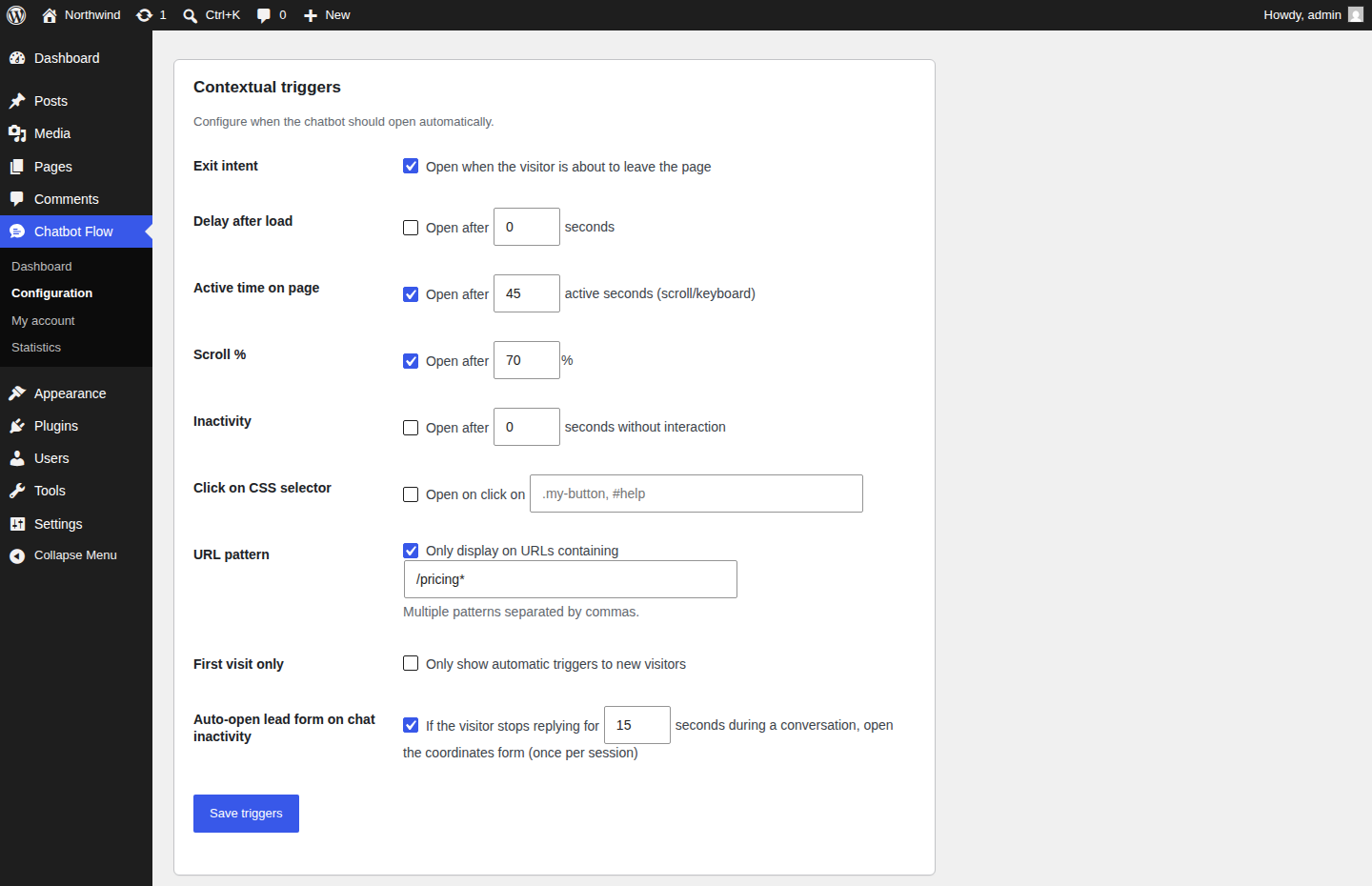
- Contextual triggers: exit intent, scroll %, time on page, inactivity, CSS click, URL pattern, first visit only
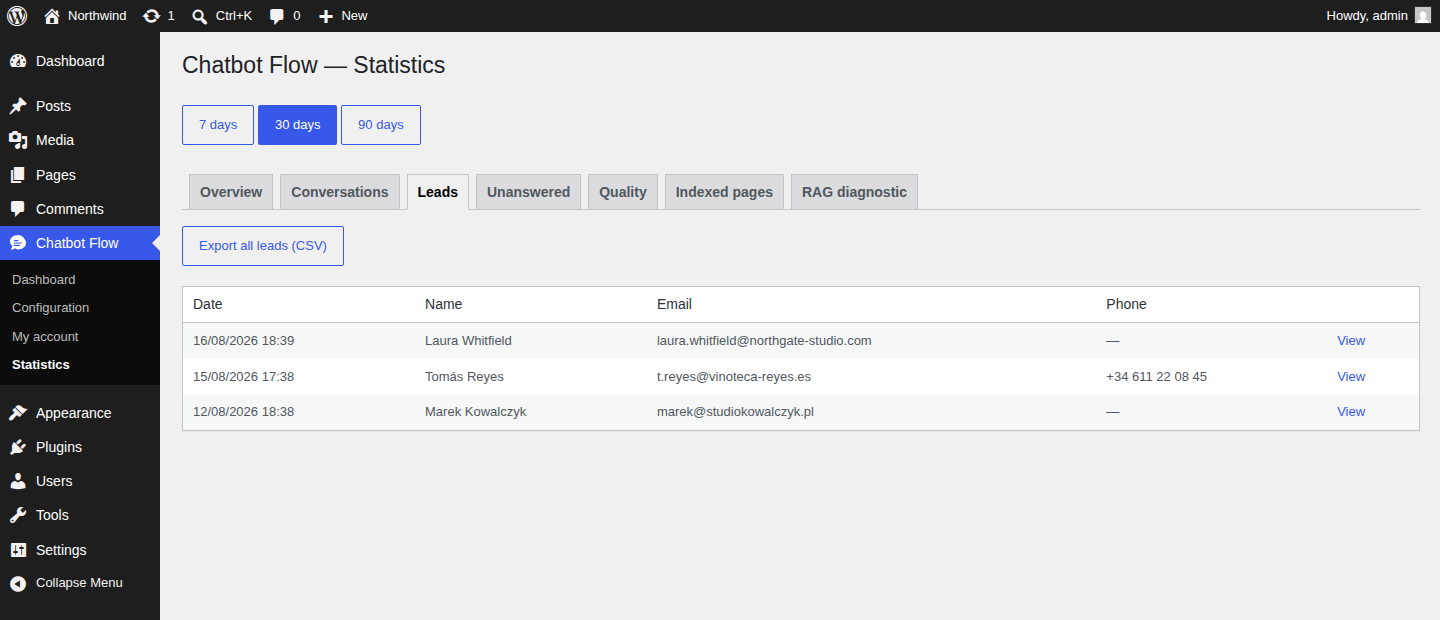
- Lead capture with instant email notification when a visitor leaves their details
- Proactive recontact prompt when the chatbot does not know the answer
- Detailed analytics: impressions, conversations, messages, leads, unanswered questions
- Custom content blocks: add FAQ entries, opening hours, or any text not on the site
- External URLs: index pages from other sites (external documentation, articles)
- Exclude URLs from indexing (private pages, cart, admin, etc.)
- GDPR-compliant: isolated database per client, data export and deletion on request
- Premium options: inter-session memory, multi-language behavior
- Volume option: up to 10,000 indexed pages
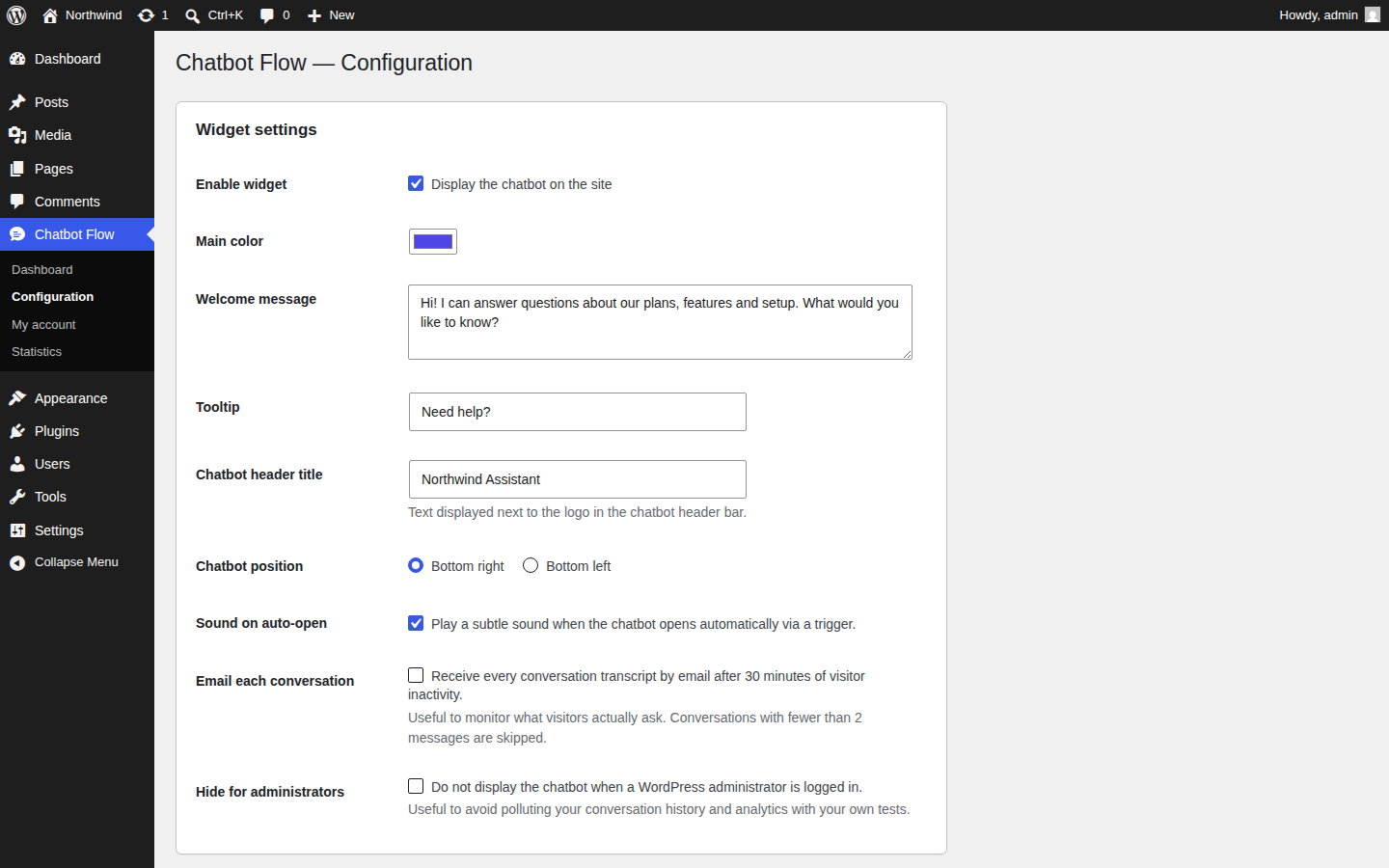
- Configurable widget: colors, header logo + custom title, position (left or right), open sound
- Install the plugin and create an account from your dashboard
- Choose a plan (BYOK 8€ incl. VAT/mo or Managed 13€ incl. VAT/mo) — payment via Stripe
- Your site is crawled and indexed automatically
- Enable the widget from the Configuration page
- The chatbot answers visitor questions based on your content
- BYOK — 8€ incl. VAT/month: up to 1,000 pages, you provide your LLM key, unlimited messages
- Managed — 13€ incl. VAT/month: 1,000 messages/mo included, up to 1,000 pages, LLM included
- + Premium (+3€): inter-session memory, advanced multi-language
- + Volume (+5€): up to 10,000 indexed pages
- All prices VAT included (21%). Valid EU VAT for non-Belgian businesses → VAT exempt (reverse charge).
- On signup (
POST https://api.chatbot-flow.com/api/register): your admin email, site URL, chosen plan, optional company name. - On widget display & visitor messages (
POST https://api.chatbot-flow.com/api/chat/message,POST /api/events): the visitor's anonymous session id, the page URL, the page title, the device type (mobile/desktop), the visitor's chat messages, and — only if the WordPress user is logged in or you explicitly pass it — the user's display name and email. - On lead submission (
POST https://api.chatbot-flow.com/api/leads): the email/name/phone the visitor entered. - On admin actions (account management, analytics, content, billing): the API key issued at signup, the data of the action.
- Outgoing connections the plugin opens: only
https://api.chatbot-flow.com(and the configured custom URL if you change it).
api.chatbot-flow.com:
/img/logo-180.png— small logo displayed in the widget header/sounds/notify.mp3— short notification sound played when the widget auto-opens (can be disabled in settings)
安装:
- Upload the plugin to
/wp-content/plugins/chatbot-flow/or install via the WordPress plugin directory - Activate the plugin through the "Plugins" menu in WordPress
- Go to Chatbot Flow → Dashboard and create your account
- Choose a plan and complete checkout via Stripe (or start a 30-day free trial)
- Return to WordPress — your API key is automatically saved
- Go to Configuration and enable the widget
- The chatbot appears on your site frontend
屏幕截图:

常见问题:
Is a Chatbot Flow account required?
Yes. The plugin is a frontend for the Chatbot Flow SaaS service. Indexing, language-model calls, conversation storage and email notifications all run on chatbot-flow.com servers. The plugin alone cannot answer messages.
Does the chatbot work without an internet connection?
No. Chatbot Flow is a SaaS service: the plugin communicates with our servers to generate answers.
Is my content secure?
Yes. Each client has a dedicated and isolated vector database. Your content is never used to train other models. OpenAI guarantees that API data is not used for training.
Can I use my own OpenAI key?
Yes, with the BYOK (Bring Your Own Key) plan at 8€ incl. VAT/month. The key is sent encrypted to Chatbot Flow servers and used only to generate answers for your site.
In which languages does the chatbot respond?
By default, the chatbot automatically detects the visitor's language and responds in the same language. The Premium option allows for per-language configuration.
Is the plugin admin interface translated?
The source language is English. French (fr_FR) is shipped. WordPress will automatically pick the right translation based on the site language. You can contribute additional translations via the WordPress.org translation portal.
What happens if I cancel my subscription?
The chatbot remains active until the end of the paid period. You then receive an email with a download link (valid 30 days) to export your data. After 30 days, everything is permanently deleted.
Does it support WooCommerce product pages?
Yes. All content exposed via the WordPress REST API (including WooCommerce products) is indexed.
Can I exclude specific pages from indexing?
Yes, from the Configuration → Excluded paths section.
Where is my data stored?
Servers are hosted in France (OVH). Each customer has an isolated PostgreSQL+pgvector database. See https://chatbot-flow.com/privacy for full details.
How do I uninstall the plugin completely?
Deactivating and deleting the plugin removes all WordPress options it stored. To also delete the data on Chatbot Flow servers (conversations, leads, indexed content), cancel your subscription from the My account page or contact support — a 30-day export window is offered before permanent deletion.
更新日志:
- Fix: the period switcher on the Statistics page ("7 days / 30 days / 90 days") was hardcoded in French and stayed French in every other language
- Fix: the example placeholder of the "Click on CSS selector" trigger was hardcoded in French
- Docs: screenshots added to the plugin page
- New: reconnect an existing account from the Dashboard. If the site lost its API key — after a disconnection, a plugin reinstall or a restore from backup — enter the account email, receive a 6-digit code by email and re-link the site. Signing up again was impossible, since the account email is unique
- Fix: the "Disconnect this site" and "Enable the widget" buttons always failed with "the link you followed has expired". Their nonce was checked against the default
_wpnoncefield instead of the one the form actually submits - Change: the disconnection warning now states that the API key is stored hashed and cannot be handed back, and points to the reconnection flow
- New: optional "Auto-open lead form on chat inactivity" trigger. If the visitor stops replying during a conversation for a configurable number of seconds (default 15s, range 5-600), the coordinates form opens automatically once per session. Configurable from Configuration → Triggers
- Fix: automatic page-cache purge when widget display exclusions are added or removed, so the changes apply immediately. Built-in support for WP Rocket, W3 Total Cache, WP Super Cache, Cache Enabler and LiteSpeed Cache. Custom action
cbflw_widget_exclusions_changedavailable for any other cache plugin - Hardening: replaced
wp_redirect()withwp_safe_redirect()for all internal admin redirects; nonce verification, input unslash and output escaping added on every admin-post and AJAX endpoint per Plugin Check - i18n: added missing translators comments on placeholders; removed redundant
load_plugin_textdomaincall (auto-loaded by WP.org since 4.6); bumped "Tested up to" to 7.0
- Fix: plugin option/function prefix changed from
chatbot_flow_to uniquecbflw_prefix per WordPress.org guidelines. Existing settings are migrated automatically on plugin activation - Fix: numeric trigger fields (delay, scroll %, inactivity) now sanitized with
absint()instead ofsanitize_text_field() - Fix: answer text field in unanswered-questions form now properly sanitized with
sanitize_textarea_field()
- New: widget display exclusions — hide the chatbot on specific pages or URL patterns (e.g. /cart, /checkout/, /my-account) from Configuration. Independent of crawl exclusions
- New: per-page context — for each indexed page in Statistics → "Indexed pages", you can add a free-text note (up to 2,000 chars). The note is auto-saved on blur and injected into the bot's system prompt with high priority when a visitor is on that page. Useful for "always cite VAT included" or "this page is about the 2024 collection only"
- New: visitor info passed to the bot — when a logged-in WP user chats, the bot knows their name (still asked never to reveal the email proactively). Already pre-filled in the contact form
- New: universal JS widget accepts
data-page-context="…"orwindow.ChatbotFlowPageContext = "…"— useful for SPAs that change route without reloading
- New: opt-in "Email each conversation" toggle in Settings → Widget. When on, every visitor conversation is emailed to the admin once it ends (30 min of inactivity). Conversations with fewer than 2 messages are skipped to avoid spam
- New: HTML transcript email styled like the lead notification, with the visitor's exchanges, page URL, device and a link to the full conversation in the dashboard
- New: inline "Yes, contact me back" button under bot bubbles when the bot itself proposes a callback (no need to type "yes")
- New: "Indexed pages" tab in Statistics — searchable list of every page in the knowledge base with one-click "Exclude" (creates an exclusion + purges the chunks)
- New: Volume add-on (+5€/mo) — toggle on the subscription cards, raises the limit to 10,000 pages and 5,000 WooCommerce products. Stripe checkout adds a 2nd line item; webhook detects and activates server-side
- New: daily check + email when a customer hits their indexing limit, with CTAs to manage exclusions or activate Volume
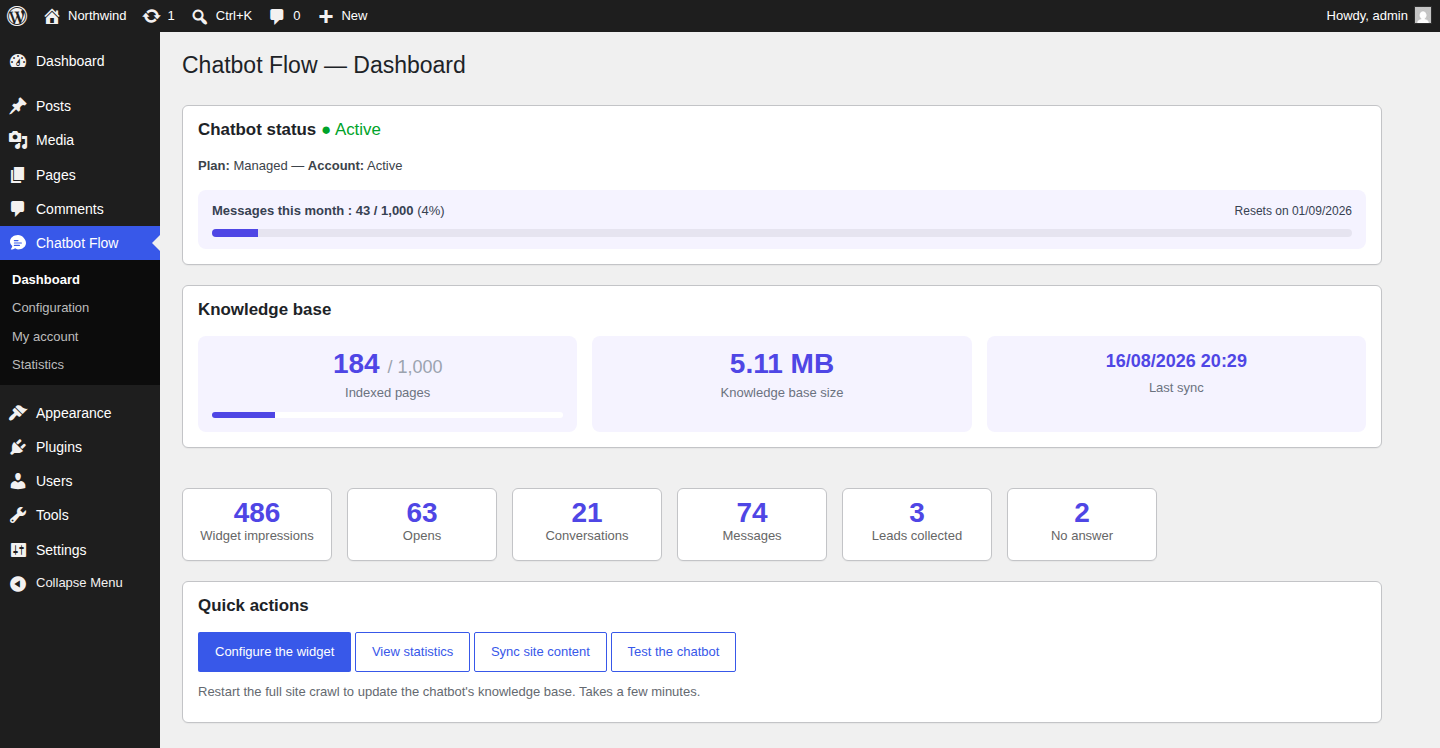
- New: indexed pages now shown as "X / 1000" on the Dashboard with a colored progress bar
- New: warning banner from 90% (1000-page plan: at 900 pages) inviting you to manage exclusions
- New: red blocking banner at 100% — newer pages no longer get added until you free up space via exclusions
- Fix: the indexing page limit (1000 by default, 10,000 with the Volume add-on) is now actually enforced server-side during the crawl
- New: bot personality — pick the tone (friendly / casual / professional / formal), the response length (concise / standard / detailed), the language (auto-detect or force one of FR / EN / ES / DE / IT / NL / PT) and add up to 1000 characters of free-form custom instructions
- New: end-to-end product cards — N8N now returns the matching products in the chat response so the widget can show product cards with image, price, stock and link
- New: WooCommerce intelligence — products are auto-detected and indexed alongside your site content. The chatbot can now answer "what's the price of X?" or "is Y in stock?" and shows product cards with image + price + link directly in the conversation. Up to 500 products (5,000 with the Volume add-on) — no extra cost
- New: hooks on product create/update push the change to the index in near real-time (30s debounce)
- New: per-category exclusions for products
- New: 👍 / 👎 thumbs under each chatbot answer — visitors can rate replies in one click
- New: "Quality" tab in Statistics — satisfaction score (all time + 30 days) and a list of the latest 👎 answers with a one-click "Improve" button to feed the right answer back into the knowledge base
- New: quick reply chips — clickable suggestions shown under the welcome message so visitors can engage in one tap. Up to 5 chips, configurable in Settings, with 3 sensible presets (disabled by default)
- New: "Test the chatbot" button on the dashboard — preview the widget without enabling it on the live site
- New: live progress indicator on the Knowledge base card during indexing (poll every 8s for 3 minutes)
- New: auto-resync after every content change (text/URL/PDF add or delete, excluded path) with 30s debounce
- New: smart defaults — sensible exclusions (/wp-admin, /cart, /checkout, etc.) added automatically at signup
- Improved: monthly quota — bot now asks for the visitor's contact details instead of refusing to answer
- Cleanup: removed last "RAG" mentions from the UI
- New: indexed pages count and knowledge base size shown on the Dashboard
- New: quick links "Dashboard" and "Settings" added to the WordPress plugins list
- New: chatbot can no longer be activated until the first content sync — clearer onboarding flow
- New: hover effect on plan selection cards
- Improved: wider dashboard layout to make space for all the cards
- Improved: clearer wording — "knowledge base", "site content" and "indexing" used throughout
- Removed: API URL field hidden from settings (irrelevant for end users)
- Translation: French translation updated with the new strings
- Fix: content sync no longer times out. The WordPress request now receives an immediate "queued" acknowledgement and the actual indexing runs in the background on Chatbot Flow servers.
- New: configurable bubble position (bottom-left or bottom-right)
- New: dedicated tab for unanswered questions with one-click "add answer" workflow that indexes the answer for future similar questions
- New: proactive lead capture when the visitor's message expresses recontact intent
- New: notification email colors now follow the widget color (with automatic contrast handling)
- New: "Activate widget" and "Settings" shortcut buttons on the dashboard when the chatbot is inactive
- New: option to play a discreet sound when the widget auto-opens via a trigger
- New: customizable chatbot header title next to the logo
- Fix: chat window now anchors at the bottom of the screen where the bubble was
- Fix: widget colour is consistently applied across all elements
- New: automatic prefill of lead form when WordPress user is logged in
- New: proactive lead form when chatbot cannot answer
- New: French translation shipped (
fr_FR) - New: lead CSV export from the Statistics page
- Improved: widget header now shows the Chatbot Flow logo
- New: external URLs as additional content source
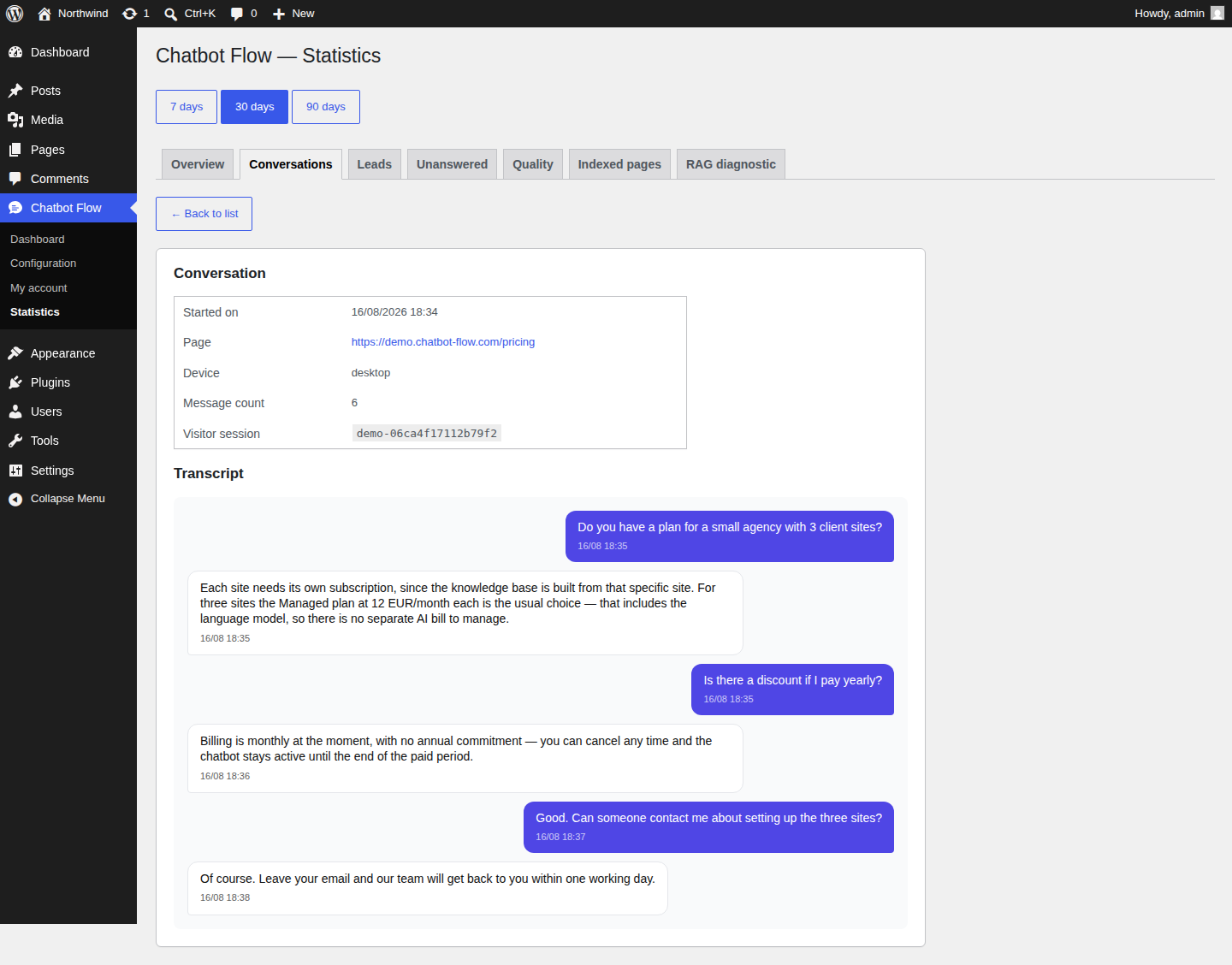
- New: full conversation detail and lead detail views
- New: monthly message quota visualisation for Managed plan
- New: 30-day free trial flow
- New: integrated Stripe billing with EU VAT (reverse-charge)
- New: billing information page and invoice list
- New: account disconnect feature
- Initial release
- AI chatbot answering from your site content with GPT-4o Mini
- Contextual triggers (exit intent, scroll, inactivity, etc.)
- Lead capture with email notifications
- Admin dashboard with statistics
- Content management (text blocks, PDF uploads)
- GDPR-compliant data lifecycle