Cinza Slider
| 开发者 |
madebycinza
razorfrog |
|---|---|
| 更新时间 | 2026年11月5日 07:58 |
| PHP版本: | 7.2 及以上 |
| WordPress版本: | 7.1 |
| 版权: | GPLv2 or later |
| 版权网址: | 版权信息 |
详情介绍:
Cinza Slider is a minimal slider plugin built with Flickity by Metafizzy. It makes lightweight and flexible sliders that can be easily customized with CSS.
Visit our website to view the plugin demo.
Sliders are built to meet WCAG 2.2: each slider and slide is named for screen readers, keyboard focus is always visible, and autoplaying sliders show a Play/Pause button, stop when a keyboard user tabs in, and stay still for visitors whose system is set to reduce motion. The Play/Pause button appears when autoplay is on and there are at least two slides. It can be hidden under Options > Navigation, but that isn't recommended.
安装:
Upload the Cinza Slider plugin to your WordPress site, activate it, and start creating sliders.
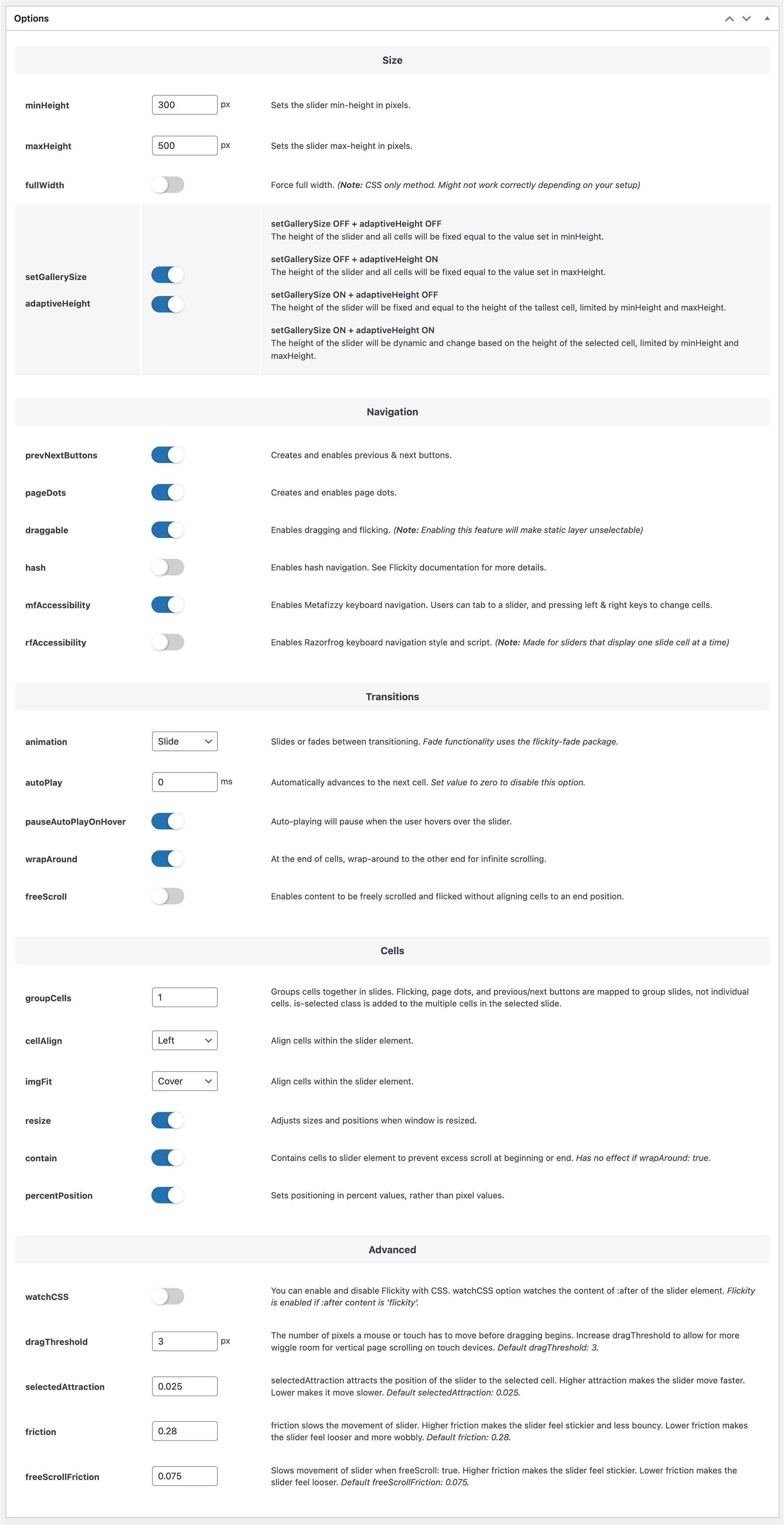
屏幕截图:

更新日志:
Newest first. Dates are YYYY-MM-DD.
2.1.0 (2026-11-04)
Accessibility release (WCAG 2.2). Existing autoplaying sliders now show the Play/Pause button.
Added
- Each slider is a named region ("Slideshow, carousel"; the cinza_slider_label filter changes the name), and each slide is labeled "1 of 5" and so on.
- Slide links now have a name: the slide's text, or else its image's alt text, plus "(opens in a new tab)" when they open one.
- Visible keyboard focus rings on the slider, its arrows, dots and slide links. They show only after a key press, never after a mouse click or tap, and Flickity's blue ring on clicked arrows is gone.
- Autoplay stops when a keyboard user tabs into the slider, and doesn't start for visitors whose system is set to reduce motion. The Play/Pause button can still start it. Changed
- The Play/Pause button now shows on every autoplaying slider. The old "Play/Pause button" checkbox is replaced by "Hide the Play/Pause button", which is off by default and not recommended.
- The rfAccessibility option no longer hides focus outlines or adds the pink focus highlight. It still controls which slider controls take keyboard focus.
- The plugin author and links now point to Razorfrog (razorfrog.com).
- The plugin demo is now at razorfrog.com/cinza-slider. Removed
- The Cinza button in the editor's Developers box.
- Tested with WordPress 7.1. Security
- Slide IDs, slide links and image alt text are now escaped in the slider output.
- Optional, keyboard-accessible Play/Pause button in the bottom-right corner. It is off by default and needs autoplay and at least two slides.
- Sliders paused with the button stay paused when the browser tab becomes visible again.
- The button is not duplicated when a slider is removed and set up again. Changed
- Tested with WordPress 7.1.3. Security
- The included PHP files can't be opened directly.
- Autoplay no longer stops for good after a tap on mobile when Pause autoplay on hover is off.
- Tested with WordPress 7.0. Fixed
- Autoplay no longer stops for good after a click when Pause autoplay on hover is off.
- Tested with WordPress 6.9. Security
- Security fixes.
- Tested with WordPress 6.6.2.
- Minor CSS accessibility fix.
- Sliders no longer have their own single page on the front end.
- Tested with WordPress 6.4.3.
- Tested with WordPress 6.4.2. Fixed
- Tab order with the rfAccessibility setting.
- Alt text on slide images.
- The lazyLoad setting.
- lazyLoad setting.
- Minor interface improvements.
- Conflict between the image size and the
<picture>tag.
- mfAccessibility and rfAccessibility settings for front-end accessibility.
-
Better support for the
<picture>tag. Changed - Updated how setGallerySize and adaptiveHeight work together.
- Checkboxes in the editor are now toggles.
- Updated the editor style, with accessibility improvements.
- Tested with WordPress 6.2.
- Updated the website and demo links.
- Tested with WordPress 6.1.1.
- Browser compatibility setting for gradient overlays. Changed
- Sliders no longer have single pages.
- The editor works better on smaller screens.
- Tested with WordPress 6.1.
- Tested with WordPress 6.1.
- Developers box in the editor. Changed
- Updated the editor style.
- Updated the plugin's WordPress.org images. Fixed
- PHP 8.0 compatibility fixes.
- With Rank Math, sliders are set to noindex, nofollow. Changed
- The Rank Math filters only run when Rank Math is active.
- Improved meta field validation.
- PHP 8 warnings.
- The static layer.
- Hash navigation setting, using Flickity hash 1.0.4 (modified from 1.0.3). Changed
- Updated Flickity from 2.2.2 to 2.3.0. Fixed
- Slide IDs.
- A unique ID for each slide. Changed
- Updated the shortcode validation.
- Tested with PHP 8.
- A front-end script error with the draggable setting.
- The editor style.
- Tested with WordPress 6.0.
- Custom post type and shortcode fixes.
- Interface improvements.
- Minor bug fixes.
- Minor bug fixes.