CiteBoost GEO
| 开发者 |
zivuch
freemius |
|---|---|
| 更新时间 | 2026年6月14日 15:20 |
| PHP版本: | 8.1 及以上 |
| WordPress版本: | 7.0 |
| 版权: | GPLv2 or later |
| 版权网址: | 版权信息 |
详情介绍:
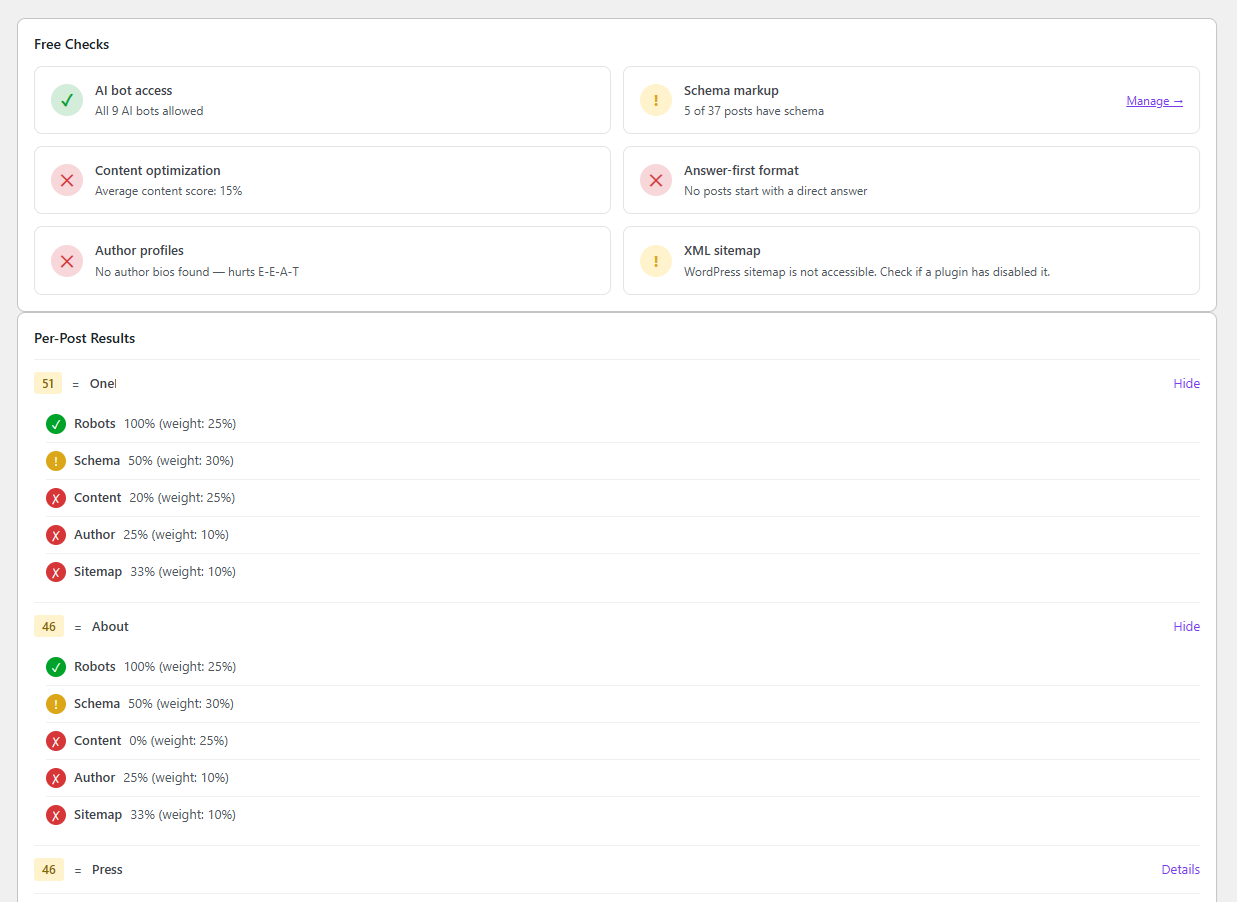
- AI Visibility Score — Scan all posts and pages to get a 0-100 readiness score for AI search engines
- Score Trend Chart — Visualize your site-wide AI visibility score over 7, 30, or 90 days with an interactive line chart
- Score Goal Line — Set a target AI visibility score; the chart shows a reference line so you always know where you stand
- Automatic Weekly Scan — Schedule a recurring scan so your score history stays fresh without manual effort
- Recommendations Checklist — Track your content optimization progress with checkboxes and a progress bar
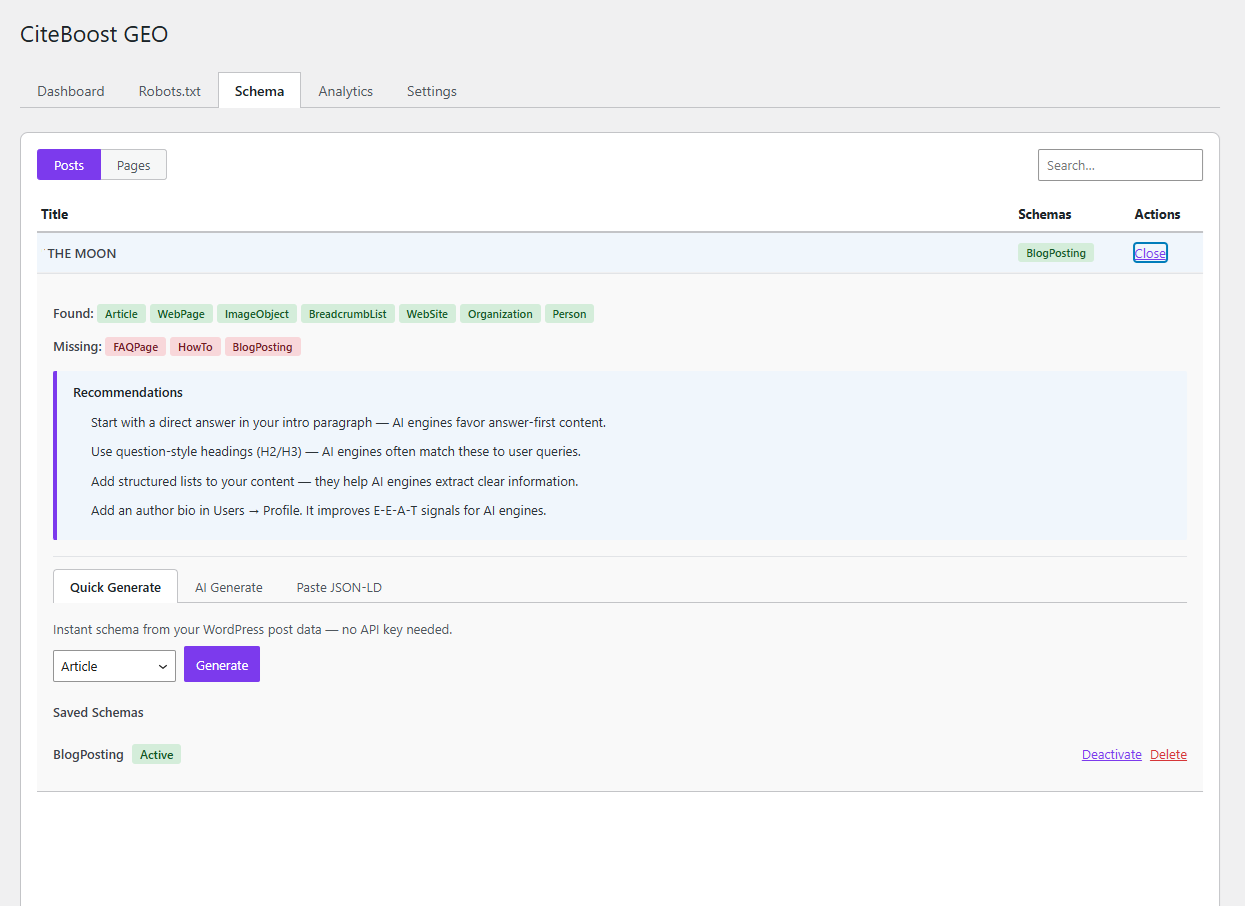
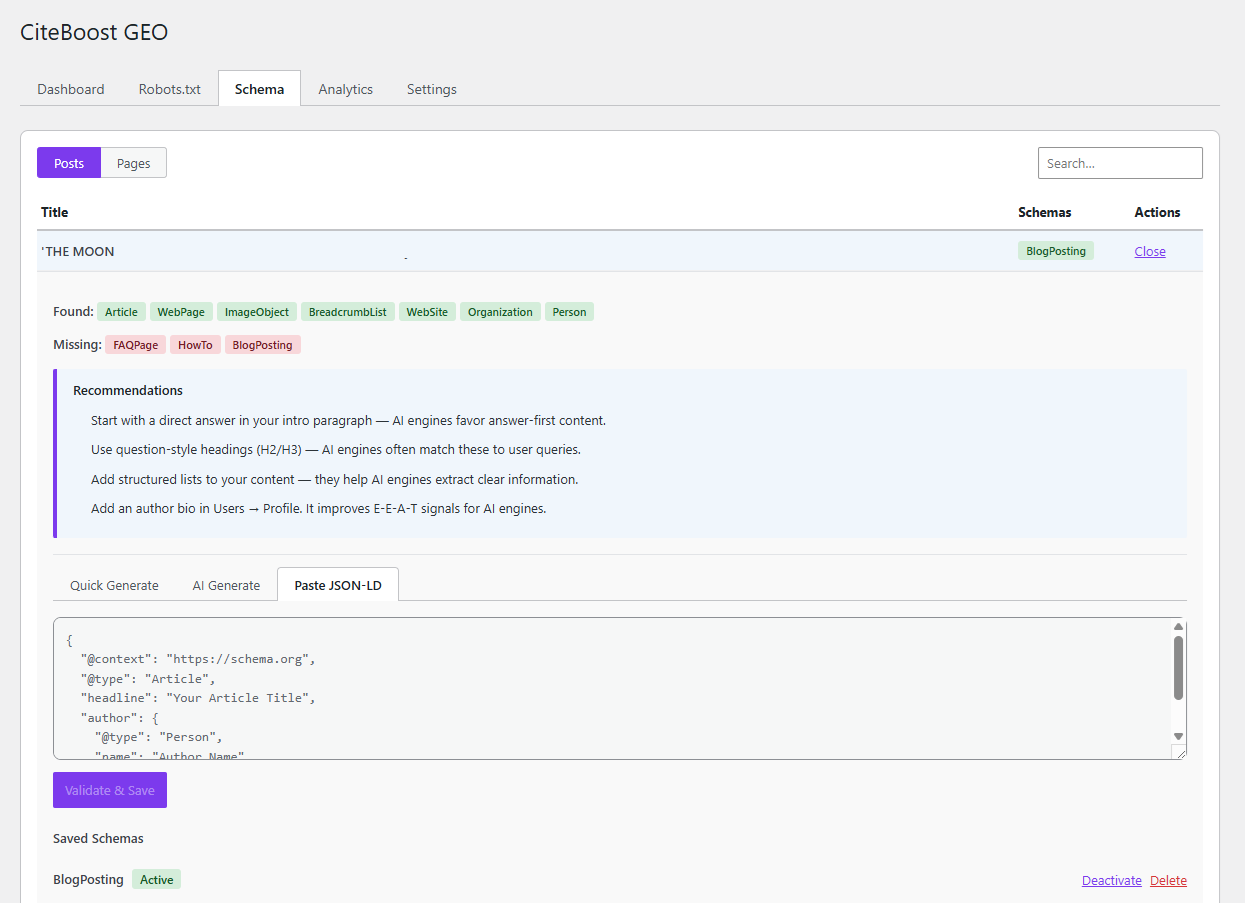
- Schema Detection — See which posts have JSON-LD structured data and which types are missing (including Product schema for WooCommerce)
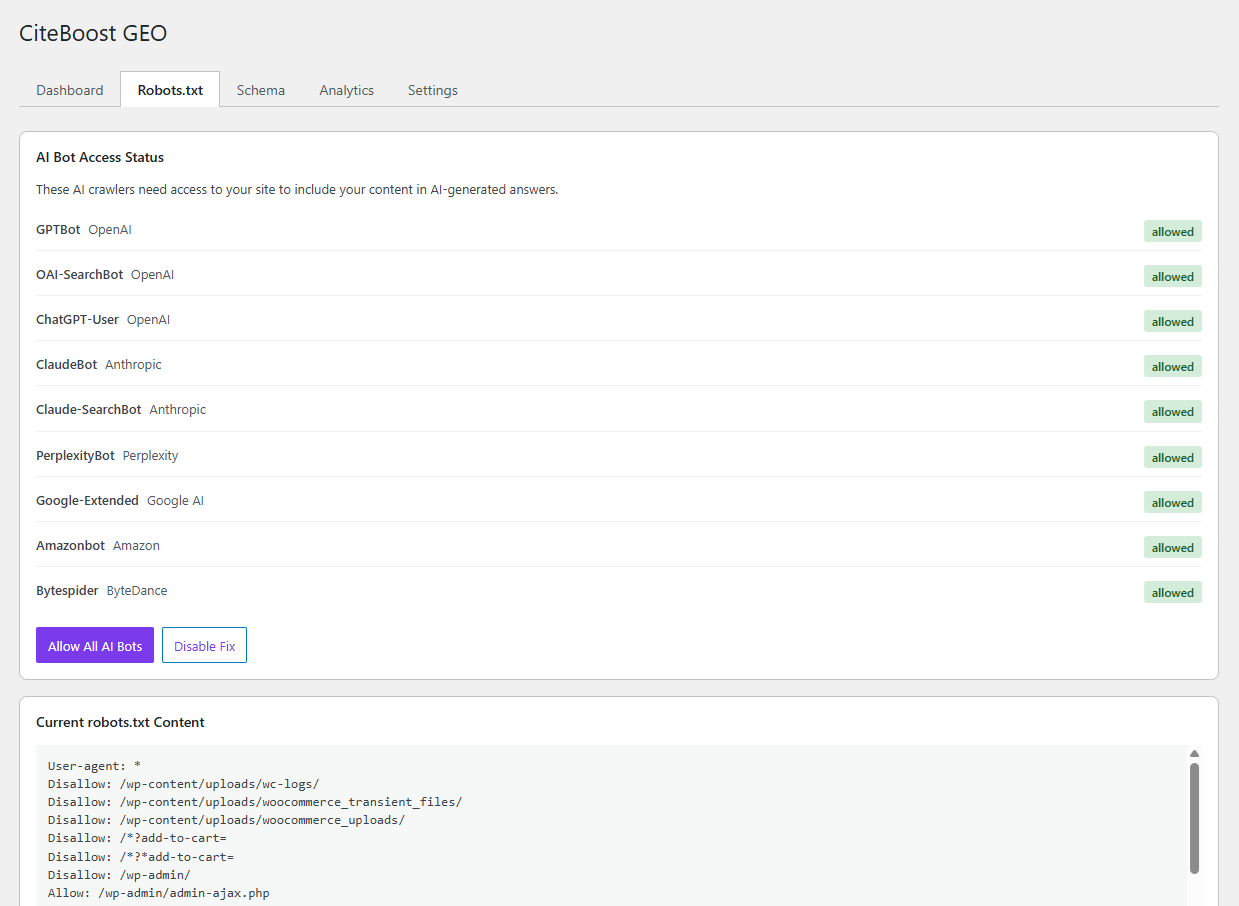
- Robots.txt Management — Detect and fix blocked AI bots with one click (supports both physical and virtual robots.txt)
- Manual JSON-LD Editor — Paste and validate your own JSON-LD schema, save it to any post, page, or product
- Individual Schema Management — Activate, deactivate, or delete each saved schema from its post's detail view
- Schema Backup & Transfer — Export all saved schemas to a JSON file and import on another site (great for staging → production)
- Schema Maintenance — Automatic one-time cleanup of orphaned schema rows; manual cleanup button in Settings
- Content Analysis — Actionable recommendations for heading structure, word count, and content quality
- Author E-E-A-T Checks — Verify author signals that AI engines look for
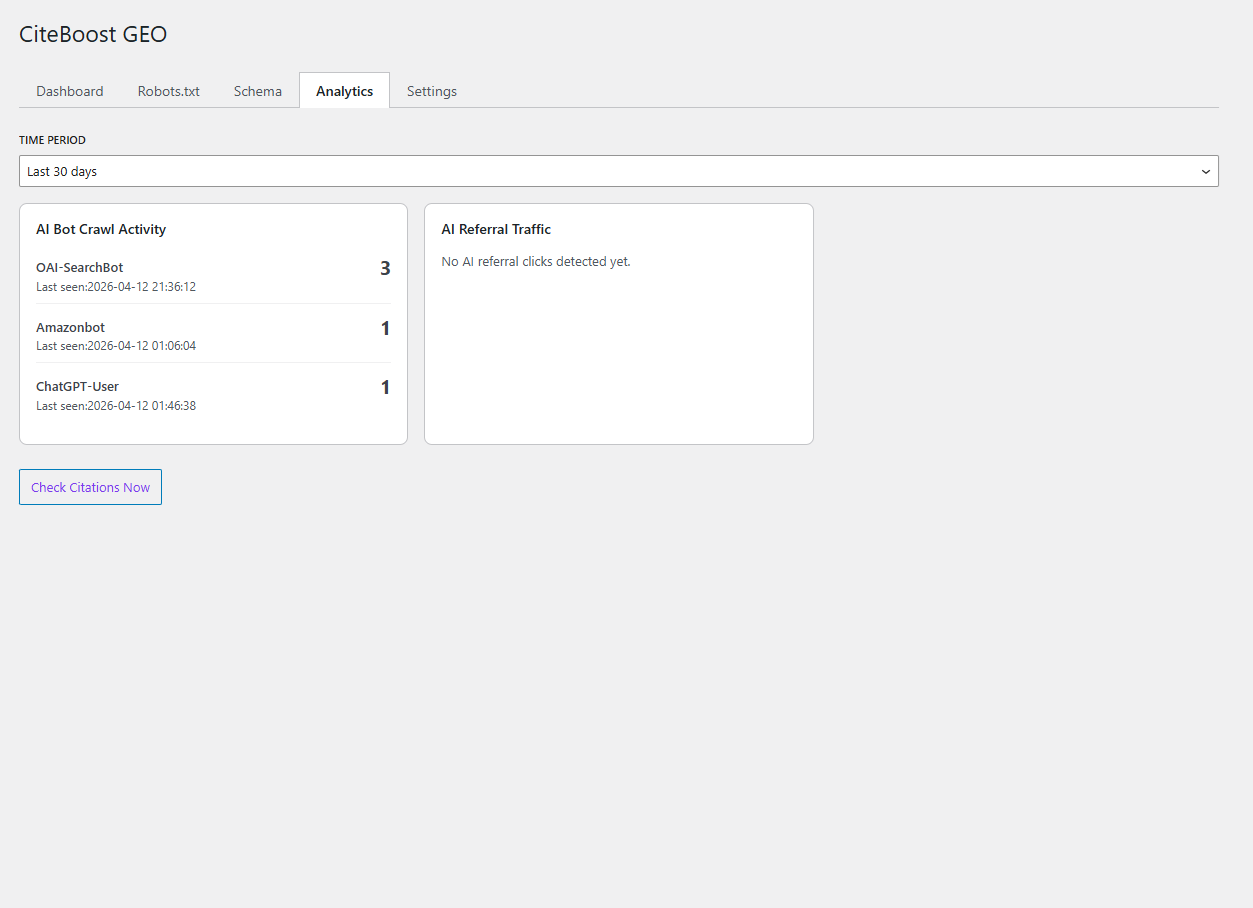
- Bot Crawl Tracking — See which AI crawlers visit your site
- AI Referral Tracking — Monitor clicks from ChatGPT, Claude, Perplexity, and other AI sources
- Accessible Dashboard — WCAG-compliant interface with keyboard navigation
- Quick Generate — Build full schema instantly from WordPress post data (Article, BlogPosting, BreadcrumbList) with zero manual entry
- AI Schema Generation — Generate optimized JSON-LD using Claude, GPT, or Gemini (FAQPage, HowTo, and more)
- WooCommerce Dynamic Product Schema — Automatic extraction of full product data into rich Product schema (name, price, SKU, brand, images, variations, aggregateRating, category)
- Schema Templates Library — One-click apply from a gallery of pre-built recipes (Product, Recipe, Event, LocalBusiness, Review, Course) with auto-populated fields
- Bulk Schema Operations — Generate, delete, activate, or deactivate schemas for up to 50 posts at once
- Per-Post Score History — See each page's AI visibility trend over time, right inside the Schema tab
- Weekly Email Digest — Receive a weekly summary email with score trend, top improvers, and bot activity
- Citation Monitoring — Check whether AI engines cite your content in their responses via the Perplexity API
- On-Demand Citation Checks — Run citation checks any time with the Check Citations Now button
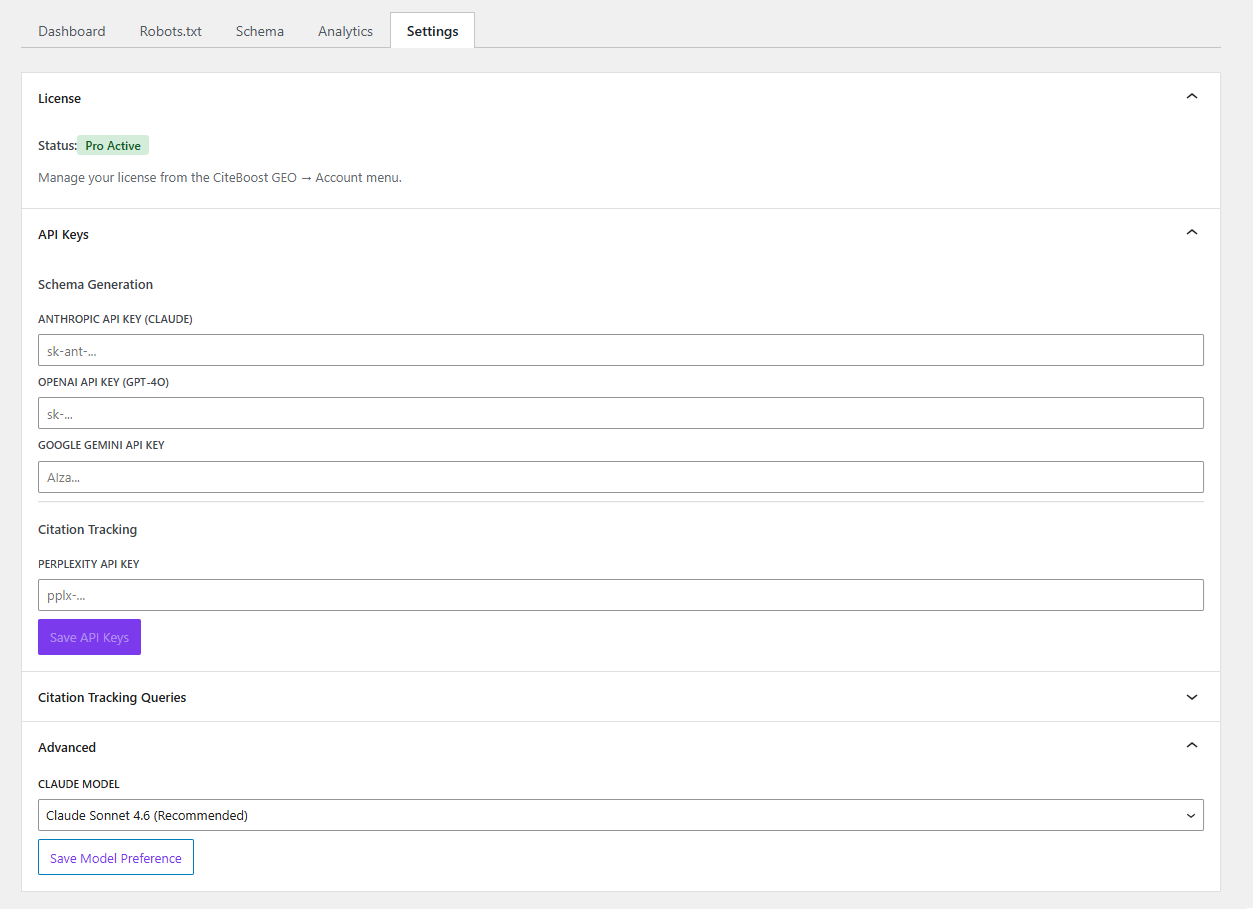
- Configurable AI Model — Choose which model to use for schema generation
- Encrypted API Key Storage — All API keys are encrypted at rest using Sodium
安装:
- Upload the
citeboost-geofolder to/wp-content/plugins/ - Activate the plugin through the Plugins menu in WordPress
- Go to CiteBoost GEO in the admin sidebar
- Click Run Full Scan to analyze your site
- Use the Robots.txt tab to allow AI bots if any are blocked
- Add schema markup from the Schema tab
屏幕截图:
常见问题:
My weekly digest emails are going to spam. How do I fix this?
This is a WordPress email deliverability issue, not a CiteBoost GEO bug. By default, WordPress sends email via PHP mail(), which lacks SPF, DKIM, and DMARC — so Gmail, Outlook, and other providers often flag it as spam.
The fix is to install an SMTP plugin and configure it with your email provider (SendGrid, Mailgun, Amazon SES, Gmail, etc.):
- WP Mail SMTP — https://wordpress.org/plugins/wp-mail-smtp/
- FluentSMTP — https://wordpress.org/plugins/fluent-smtp/
- Post SMTP — https://wordpress.org/plugins/post-smtp/
Which AI bots does CiteBoost GEO support?
The plugin tracks and manages access for 14 AI bots: GPTBot, OAI-SearchBot, ChatGPT-User, ClaudeBot, Claude-SearchBot, Claude-User, PerplexityBot, Perplexity-User, Google-Extended, Applebot-Extended, Amazonbot, Bytespider, CCBot, and Meta-ExternalAgent. The robots.txt fixer ensures all of these bots are allowed to crawl your site.
Is CiteBoost GEO free?
Yes. The free version includes AI visibility scanning for all posts and pages, robots.txt fixes, manual JSON-LD editing, content analysis, bot crawl tracking, and AI referral tracking. Pro adds AI-powered schema generation, citation monitoring, and additional dashboard checks.
Do I need API keys to use the plugin?
No. The free version works without any API keys. Pro users need API keys only for AI schema generation (Anthropic, OpenAI, or Google) and citation monitoring (Perplexity). All keys are encrypted at rest using Sodium.
Will CiteBoost GEO slow down my site?
No. The plugin only runs in the admin dashboard. The only frontend output is JSON-LD schema markup injected in the <head> tag, which is lightweight and does not affect page load speed.
What schema types can the plugin generate?
Pro users can generate Article, BlogPosting, FAQPage, HowTo, LocalBusiness, Product, BreadcrumbList, and other schema types using AI. Free users can paste any valid JSON-LD markup manually. All schemas are validated before saving.
Does the plugin modify my robots.txt permanently?
If you have a physical robots.txt file, the plugin edits it directly. If WordPress generates robots.txt dynamically, the plugin uses a filter. Both methods can be disabled at any time. A confirmation prompt appears before disabling the fix.
更新日志:
- New: AI bot access strategy — choose "Allow all", "Allow search crawlers, block training crawlers" (a 2026 best practice), or Custom per-bot control (Pro). Search crawlers drive live citations; training crawlers absorb content into models. The robots score now reflects search-crawler access, so deliberately blocking training bots no longer lowers your score.
- New: Image schema (multimodal) — generate ImageObject JSON-LD from featured images (Pro), or paste ImageObject/VideoObject in the manual editor (Free). AI engines increasingly cite images.
- New: Smarter content recommendations — flags overly long sentences and walls of text (AI extracts short, scannable passages), plus information-gain guidance (original data, first-hand experience, unique analysis).
- New: llms.txt generation (Free, opt-in) — serve a markdown index of your published content at /llms.txt for AI assistants that retrieve it. Emerging standard; experimental; does not affect your AI Visibility Score. Enable under Settings → Preferences.
- Improvement: "What's New" panel refreshed for 1.9.0.
- Database changes: None. New options only (cbgeo_robots_strategy, cbgeo_robots_custom_map, cbgeo_llms_txt_enabled).
- New: Expanded the tracked AI bot list from 9 to 14 — added Claude-User, Perplexity-User, Applebot-Extended, CCBot, and Meta-ExternalAgent. The robots.txt analyzer, one-click fix, and bot-crawl tracking all cover these automatically.
- Fix: Bot-crawl detection now correctly logs the user-agent crawlers (ChatGPT-User, Claude-User, Perplexity-User) and Meta-ExternalAgent, which a too-narrow detection filter previously skipped.
- Database changes: None.
- Fix: Dashboard no longer flashes the "Upgrade to Pro" banner for Pro users during the initial settings load. Now shows a loading spinner until settings are ready, matching the pattern used in the Robots, Schema, and Settings tabs. Eliminates the WhatsNewPanel delayed-appearance issue too.
- Database changes: None.
- New: "Start Here" priority card on the Dashboard — your single most urgent action shown above the metric grid, with a one-click button to fix it. Cascades automatically from blocked bots → zero schemas → low content → partial coverage → missing author bios → stale scan → all clear.
- New: Schema verification status — each saved schema now shows real-time status (Active & Validated, Validation warning, Validation error, or Inactive) with one-click links to view it in the live page source and test it with Google Rich Results.
- New: Page-specific recommendations — content tips now quote your actual content (your hedge opener, your statement headings, your post's word count) instead of generic advice. WooCommerce products get review-count and FAQ-section checks tailored to AI shopping assistants.
- New: Inline help system — small "?" icons next to every SEO term (Schema, JSON-LD, robots.txt, Bot Accessibility, Citations, and more) reveal plain-English explanations. "Why this matters" expanders on Dashboard metric cards.
- New: Score Trend annotation — above the chart, a one-line summary like "+8 since last scan. Main contributor: schema coverage." Highlights the biggest contributing factor when the score moves.
- New: REST: /score-history now returns a delta_summary; /analyze/{id} now returns a diagnoses array of page-specific findings.
- New: PHP class CBGEO_Content_Diagnoser — rule-based, no external API calls, runs in-process at scan time.
- Improvement: Frontend JSON-LD script tags now include an id attribute (cbgeo-jsonld-{id}) so verification links can scroll directly to the schema.
- Database changes: ALTER TABLE wp_cbgeo_schemas ADD COLUMN validation_status varchar(20) DEFAULT 'unknown', ADD COLUMN last_validated_at datetime DEFAULT NULL. Defensive SHOW COLUMNS check before each ALTER — safe to run repeatedly. No existing row data is modified.
- Compatibility: Tested up to WordPress 7.0.
- Database changes: None.
- Improvement: Hardened license check path. No feature changes.
- Database changes: None.
- New: WooCommerce Product schema support with full dynamic data extraction (name, SKU, price, brand, images, variations, aggregateRating, category, weight).
- New: Products tab in the Schema panel when WooCommerce is active.
- New: AggregateOffer for variable products with lowPrice, highPrice, offerCount.
- New: AggregateRating from WooCommerce reviews.
- New: Brand detection from product attributes, product_brand taxonomy (WooCommerce Brands), and WC 9.4+ native brand taxonomy.
- New: AI generation injects WooCommerce PRODUCT DATA block for richer results.
- New: Helpful error message when a conflicting plugin throws a fatal error mid-scan.
- New: Third-party admin notices are suppressed on the CiteBoost GEO admin page (core WordPress notices remain).
- Improvement: Schema analyzer is now context-aware — product pages score Product/Offer instead of Article/BlogPosting.
- Improvement: Dashboard schema coverage and analysis include the product post type when WooCommerce is active.
- Fix: Templates Library now correctly saves Recipe, Event, LocalBusiness, Review, and Course schemas (validator was rejecting these types in 1.6.0).
- Free/Pro repositioning: Pro now covers every automated schema-creation feature (Quick Generate for all types, Bulk Operations, Schema Templates Library, WooCommerce Dynamic Product). Free continues to include detection, analysis, Paste JSON-LD manual editor, individual per-schema activate/deactivate/delete, Robots.txt fix, and Score Trend chart.
- Compatibility: Requires WooCommerce 3.0+. No changes when WooCommerce is inactive. All new code is conditional on class_exists('WooCommerce').
- Database changes: None. No schema changes, no data modifications.
- New: Weekly email digest (Pro) — receive a weekly summary email with score trend, top improvers, pages that dropped, and bot activity. Configure day/hour in Settings → Preferences.
- New: Schema bulk operations (Free) — select multiple posts on the Schema tab and generate templates, delete, activate, or deactivate schemas in one click. Up to 50 posts per action.
- New: Recommendations checklist (Free) — content tips are now trackable checkboxes with a progress bar. Check them off as you apply them; state persists per post.
- New: Schema templates library (Free) — browse pre-built schema recipes (Product, Recipe, Event, LocalBusiness, Review, Course). Fill in placeholder values and apply with one click.
- New: REST endpoints: POST /cbgeo/v1/digest/test, POST /cbgeo/v1/schemas/bulk, POST /cbgeo/v1/recommendations/{post_id}, GET /cbgeo/v1/templates/library
- Database changes: None. No schema changes, no data modifications. New features use existing tables + post meta + options.
- New: Dashboard now shows "Last scan" timestamp and "Next auto-scan" time below the Re-Scan button, so you always know when the last analysis ran and when the next automatic one is coming
- Database changes: None.
- New: Per-post score history chart (Pro) — see how each page's AI visibility changed over time in the Schema tab detail view
- New: Score goal line on the Score Trend chart — set your target (default 80) in Settings → Preferences and a green reference line appears on the chart
- New: Automatic weekly scan (Free) — enable in Settings → Preferences, pick a day and hour, and CiteBoost GEO will re-scan your site weekly so the chart always has fresh data
- New: REST endpoint GET /cbgeo/v1/score-history/{post_id}
- New: REST endpoint POST /cbgeo/v1/settings/preferences
- Database changes: None. No schema changes, no data modifications.
- Fix: Removed stray development files (Facebook ad HTML/PNG, plugin icons) that were inadvertently included in the 1.4.0 plugin zip. No code changes — packaging fix only.
- New: Score Trend chart on Dashboard — visualize AI visibility score over 7, 30, or 90 days
- New: Schema Backup & Transfer — export all saved schemas to a JSON file, import on another site (staging → production workflows)
- New: Dashboard now restores previous scan results on load — no need to re-scan every session
- New: REST endpoint GET /cbgeo/v1/analyze/cached returns previously-stored scores
- New: REST endpoint GET /cbgeo/v1/score-history with server-side 5-minute transient cache
- New: REST endpoints GET /cbgeo/v1/schemas/export, POST /cbgeo/v1/schemas/import/preview, POST /cbgeo/v1/schemas/import/confirm
- New: Score-history cache auto-invalidates after each scan so the chart updates immediately
- New: Chart is WCAG-accessible with role="img" and descriptive aria-label for screen readers
- Improvement: Added analyzed_at index on cbgeo_scores table for faster score-history queries (DB v1.2.0)
- Improvement: Post titles now stripped of HTML tags in schema panel and posts list
- Improvement: Lazy-loaded Recharts library — main admin bundle reduced from 397KB to 51KB (87% smaller). Chart loads on demand when Dashboard tab is opened.
- Improvement: Automatic one-time cleanup of orphaned schema rows during DB migration (schemas whose post was deleted). Manual cleanup button also added to Settings → Schema Backup.
- Database changes: ADD KEY analyzed_at on wp_cbgeo_scores table. DELETE from wp_cbgeo_schemas where parent post is deleted/unpublished (one-time cleanup of orphaned rows only). No other data is modified.
- Fixed: schema type badge now updates immediately in post list after generating a schema
- Fixed: dashboard schema coverage now refreshes automatically when switching tabs
- Fixed: third-party plugin fatal errors no longer display raw HTML in the dashboard
- Fixed: third-party plugin fatal errors no longer display raw HTML in the dashboard
- Improved error handling sanitization across all panels
- Quick Generate (template-based schema from post data) is now free for all users
- Source code included in plugin package for WordPress.org compliance
- Renamed plugin to CiteBoost GEO
- Migrated licensing from LemonSqueezy to Freemius SDK
- In-plugin checkout — upgrade without leaving WordPress admin
- Automatic plugin updates for Pro users
- Documented all external service connections
- Updated all internal prefixes for WordPress.org compliance
- Added multilingual support: Hebrew, Spanish, Arabic, German, Russian, Chinese, Japanese
- Full RTL support for Hebrew and Arabic locales
- JavaScript translations via wp_set_script_translations()
- Plugin Check compliance: zero errors, zero warnings
- Improved batch scanning stability for sites with many posts
- Better error messages in the dashboard
- Minor UI polish and accessibility improvements
- Fixed schema validation edge case for nested JSON-LD arrays
- Improved robots.txt detection for non-standard server configurations
- Updated bot list with latest user agent strings
- Added Quick Generate for instant schema creation from post data (Pro)
- Added support for OpenAI and Google Gemini models for schema generation
- Added Check Citations Now button for on-demand citation checks (Pro)
- Added citations pagination with Load More
- Added score history with trend indicators
- Added cancel button for batch scanning
- Improved mobile responsive layout
- Tab state now persists across page loads
- Added BlogPosting schema type support
- Added rate limiting for schema generation (10 requests/min)
- Added OAI-SearchBot and Amazonbot to tracked bot list
- Improved database reliability with atomic write operations
- Added WCAG accessible tab navigation with keyboard support
- Added confirmation prompt before disabling robots.txt fix
- Internationalization improvements for score descriptions
- Initial release