
Clever Linked Terms
| 开发者 |
jealbr75
jeffbrigman |
|---|---|
| 更新时间 | 2026年8月28日 02:33 |
| PHP版本: | 8.1 及以上 |
| WordPress版本: | 7.0 |
| 版权: | GPLv2 or later |
| 版权网址: | 版权信息 |
详情介绍:
- A public glossary or knowledge base for your WordPress site.
- Automatically linked definitions inside articles, documentation, lessons, tutorials, reviews, and community posts.
- A semantic term network using synonyms, aliases, abbreviations, and variations.
- Better content discovery through related terms, tags, categories, sources, and glossary maps.
- FluentCommunity glossary support for communities that need definitions, shared vocabulary, and learning resources inside the portal.
- Create and manage glossary terms in WordPress.
- Automatically link terms inside selected WordPress content areas.
- Show hover tooltips with concise definitions.
- Link terms to full public glossary pages.
- Control link limits so long articles do not become overloaded.
- Exclude individual terms, posts, pages, or content areas from automatic linking.
- Create a public A-Z glossary index page.
- Customize the glossary index slug and title.
- Sort index entries while optionally ignoring leading words such as "a", "an", and "the".
- Choose from multiple glossary index layouts.
- Customize tooltip, index, and single-term styling.
- Dashboard overview for plugin status and quick access.
- Term Manager with cards, search, status filters, pagination, and per-page display controls.
- Term Studio for creating and editing terms without relying on the default post editor workflow.
- Status support for Published, Draft, Scheduled, Pending Review, Private, and Trash.
- Cleaner persistent navigation across modern Clever Linked Terms screens.
- Better Community and User Manual links in admin headers.
- Semantic Relationships
- Relationship Phrase Linking
- Term Health & Conflicts
- Admin Term Map
- Public Term Connections
- Glossary Knowledge Map
- Tag IQ
- Bulk Tools
- Synonyms
- Aliases
- Abbreviations
- Variations
- Admin Term Map helps you inspect term relationships and refocus the map around selected terms.
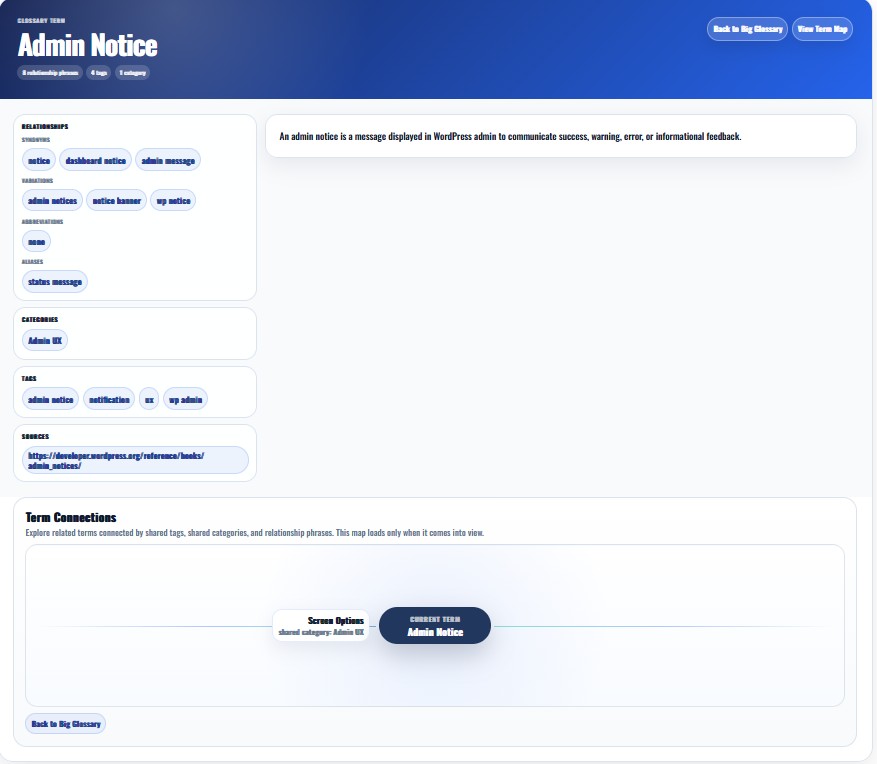
- Public Term Connections can appear on single term pages.
- Glossary Knowledge Map can be opened from the glossary index without taking up page space by default.
- Modern Cards
- Compact Directory
- Split Index
- Minimal List
- Feature Grid
- Glossy Panels
- Knowledge Base
- Theme Default
- Clean Card
- Hero Card
- Split Panel
- Resource Hub
- Editorial
- Minimal Modern
- FluentCommunity integration
- Analytics
- Import / Export
- Term Discovery
- Terms Engine
安装:
- Upload the plugin files to the
/wp-content/plugins/clever-linked-termsdirectory, or install the plugin through the WordPress plugins screen directly. - Activate the plugin through the 'Plugins' screen in WordPress.
- Navigate to Linked Terms -> Settings to configure the plugin.
- Create your first glossary term from Linked Terms -> Add New Term.
- Optional: create a glossary index from Settings -> General -> Glossary Pages.
屏幕截图:


常见问题:
Does Clever Linked Terms work with normal WordPress posts and pages?
Yes. You can enable term linking for posts, pages, and selected public custom post types.
Does this work with FluentCommunity?
Yes. Enable the FluentCommunity add-on in Settings -> Add-Ons, then configure the FluentCommunity tab. The integration is designed for SPA-style portal navigation.
Can I control which post types have term linking?
Yes. In the WordPress Content settings you can choose which public post types should be processed.
Can I stop a term from linking automatically?
Yes. Terms can be excluded from WordPress content, FluentCommunity content, or both. Individual posts/pages can also be excluded.
What is Terms Engine?
Terms Engine is an optional modular layer for semantic relationships, conflict review, term maps, public term connections, Tag IQ, and bulk tools. It can be enabled only when you need advanced relationship features.
Are synonyms and aliases automatically linked?
Only if Relationship Phrase Linking is enabled and the relevant global, per-type, and per-term rules allow it.
Can I create a public glossary index?
Yes. Go to Settings -> General -> Glossary Pages to create or manage the index page. You can customize the slug and title.
Can I change the glossary index title directly in WordPress?
Yes. Version 1.1.0 tracks the generated index page by stored page ID, shortcode, and plugin marker data so changing the title directly should not cause duplicate index pages.
Does Clever Linked Terms call external APIs automatically?
No. External lookups only happen when Term Discovery is enabled and an administrator actively runs a lookup or API test.
更新日志:
- Improved frontend performance for large glossaries by keeping tooltip payloads compact and honoring the Tooltip Characters setting.
- Improved WordPress Content and FluentCommunity tooltip payloads so they prefer term excerpts before falling back to definition content.
- Reduced frontend DOM size by avoiding repeated tooltip data on every linked term occurrence.
- Improved Block Editor-authored glossary definition rendering for embeds and dynamic block elements.
- Improved embedded Block Editor scrolling inside Term Studio.
- Improved Relationship Phrase Linking setting persistence.
- Thank you to Fabien Fons.
- Added optional Gutenberg / WordPress Block Editor support inside Term Studio for glossary term definitions.
- Added an embedded Block Editor workflow so users can edit richer definition content while Term Studio continues to manage structured term data.
- Added coordinated Save Term handling so block definition changes and Term Studio fields save together from the Term Studio screen.
- Added Fullscreen Mode for the definition editor while keeping the focused embedded editor available inside Term Studio.
- Added Term Discovery support for inserting fetched definition content into the Block Editor when Block Editor access is enabled.
- Preserved the existing Classic/WYSIWYG definition editor workflow when Block Editor access is disabled.