ClickTrail – UTM, Click ID & Ad Tracking (with Consent)
| 开发者 | hugoc |
|---|---|
| 更新时间 | 2026年10月24日 00:16 |
| PHP版本: | 8.1 及以上 |
| WordPress版本: | 7.1 |
| 版权: | GPLv2 or later |
| 版权网址: | 版权信息 |
标签
下载
详情介绍:
- WooCommerce store: turn on Capture and WooCommerce. Orders carry the campaign. Add storefront events later if you want funnel signals.
- Lead forms: turn on Capture and Forms. Contact Form 7 and Fluent Forms get hidden fields on their own. Gravity Forms and WPForms fill the
ct_*fields you add. - GTM or server-side GTM: turn on Capture, Events, and Delivery. Events go to the
dataLayer, and ClickTrail can send canonical JSON to an endpoint you set.
- Capture: first-touch and last-touch UTMs, ad click IDs, and the referrer, with organic, social, and referral fallback when there are no UTMs. When a visitor comes back through a new ad, the newest click is the one that travels. Context lives in first-party storage, falls back to
sessionStoragewhen cookies are blocked, and your own admin browsing stays out of it. - WooCommerce: attribution saved on the order before an off-site payment redirect (classic and block checkout), with returns from payment hosts such as PayPal or Stripe never overwriting the stored touch, an enriched purchase event on the thank-you page, optional storefront events (
view_item,view_item_list,view_cart,add_to_cart,remove_from_cart,begin_checkout), and optional order-status milestones. Order metadata has export, erase, retention, and uninstall handling. - Forms: Contact Form 7 and Fluent Forms get hidden fields automatically. Gravity Forms and WPForms fill the
ct_*fields you add; Gravity Forms also gets a channel label, nine{clicutcl_*}merge tags, and a per-form switch. Elementor Forms (Pro) and Ninja Forms keep attribution with the submission record. A client-side fallback covers cached pages and forms that load late, and WhatsApp links can carry the context too. - Bookings and your other domains: links to domains you approve carry the campaign, with a signed token between your own sites. Calendly booking links hold the newest click and the visitor's consent decision, and the signed Calendly webhook records the booking as
book_appointmentwith its UTMs. - Events and delivery: browser events to the
dataLayer, a REST intake, webhooks from Calendly, HubSpot, and Typeform, lifecycle updates, and one-time WordPress events such aslogin,sign_up, andcomment_submit. Optional server-side delivery adds a retry queue and diagnostics.
- It does not prove which click caused a sale, and it does not decide which channel deserves the revenue.
- It does not resolve one person's identity across devices.
- It is not an attribution dashboard, a hosted server-side GTM platform, a lead manager, or an ad optimizer. It works alongside GA4 and GTM. For call tracking, lead scoring, or ad-spend optimization, pair it with a specialist tool.
- It does not install ad pixels. The Meta Pixel, Google tag, TikTok Pixel, LinkedIn Insight Tag, Pinterest Tag, and Reddit Pixel stay yours, usually through GTM.
- Server-side delivery sends JSON to the endpoint you configure. The adapters named after Meta, Google Ads / GA4, LinkedIn, Pinterest, and TikTok exist in the code, but we have not verified that any provider accepts them end to end. Reddit is a relay-only destination.
- We have not yet verified a live Calendly booking round trip.
- Google:
gclid,wbraid,gbraid - Meta:
fbclid - TikTok:
ttclid - Microsoft:
msclkid - X / Twitter:
twclid - LinkedIn:
li_fat_id - Snapchat:
sccid,snap_cid - Pinterest:
epik,pin_cid - Reddit:
rdt_cid - Mailchimp:
mc_cid,mc_eid - Display & Video 360:
dclid
- Forms: Contact Form 7, Elementor Forms (Pro), Fluent Forms, Gravity Forms, Ninja Forms, WPForms
- Commerce: WooCommerce
- Consent sources: ClickTrail banner, Cookiebot, OneTrust, Complianz, GTM, custom
- Webhooks: Calendly, HubSpot, Typeform
- Server-side adapter keys: generic collector, sGTM, Meta CAPI, Google Ads / GA4, LinkedIn CAPI, Pinterest Conversions API, TikTok Events API (status above)
- Extra fields captured:
utm_id,utm_source_platform,utm_creative_format,utm_marketing_tactic,fbc,fbp,_ttp,li_gc,ga_client_id,ga_session_id - Caching and minification: ClickTrail script tags carry exclusion attributes for Autoptimize, Cloudflare Rocket Loader, WP Rocket, and LiteSpeed Cache.
安装:
- If you only want attribution inside WooCommerce or forms, you can leave server-side delivery disabled.
- If your site already loads Google Tag Manager, do not add the GTM container ID again in ClickTrail.
- If you use Gravity Forms or WPForms, add the
ct_*hidden fields you want stored or exported before testing. - If your site has consent requirements, decide whether ClickTrail or your existing CMP should be the consent source.
- Install the plugin through WordPress or upload it to
/wp-content/plugins/click-trail-handler/. - Activate the plugin.
- Open ClickTrail > Settings.
- In Capture:
- keep attribution enabled
- choose a retention window that matches your sales cycle
- enable cross-domain continuity only if visitors move between approved domains or subdomains
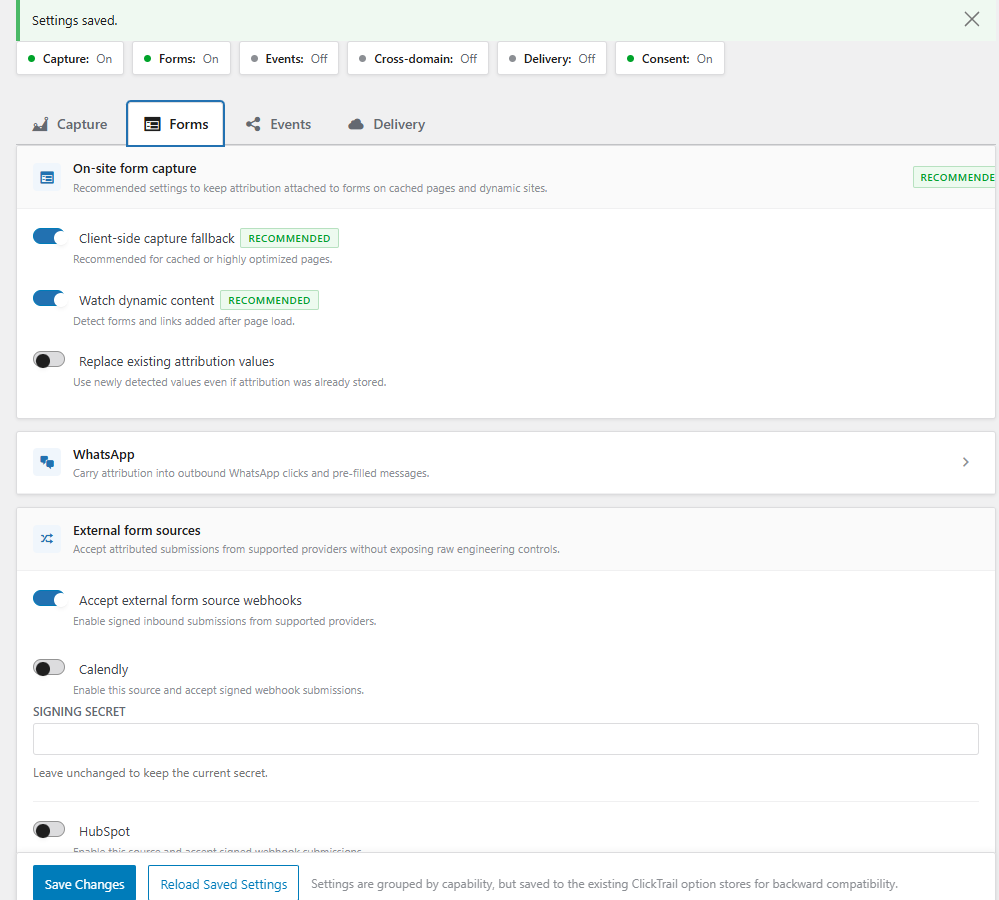
- In Forms:
- enable only the integrations you actually use
- for Contact Form 7 and Fluent Forms, ClickTrail can add attribution hidden fields automatically
- for Gravity Forms and WPForms, add the matching
ct_*hidden fields you want to preserve, such asct_ft_source,ct_lt_source, orct_gclid(latest click; usect_ft_gclidorct_lt_gclidto pin a touch) - In Events:
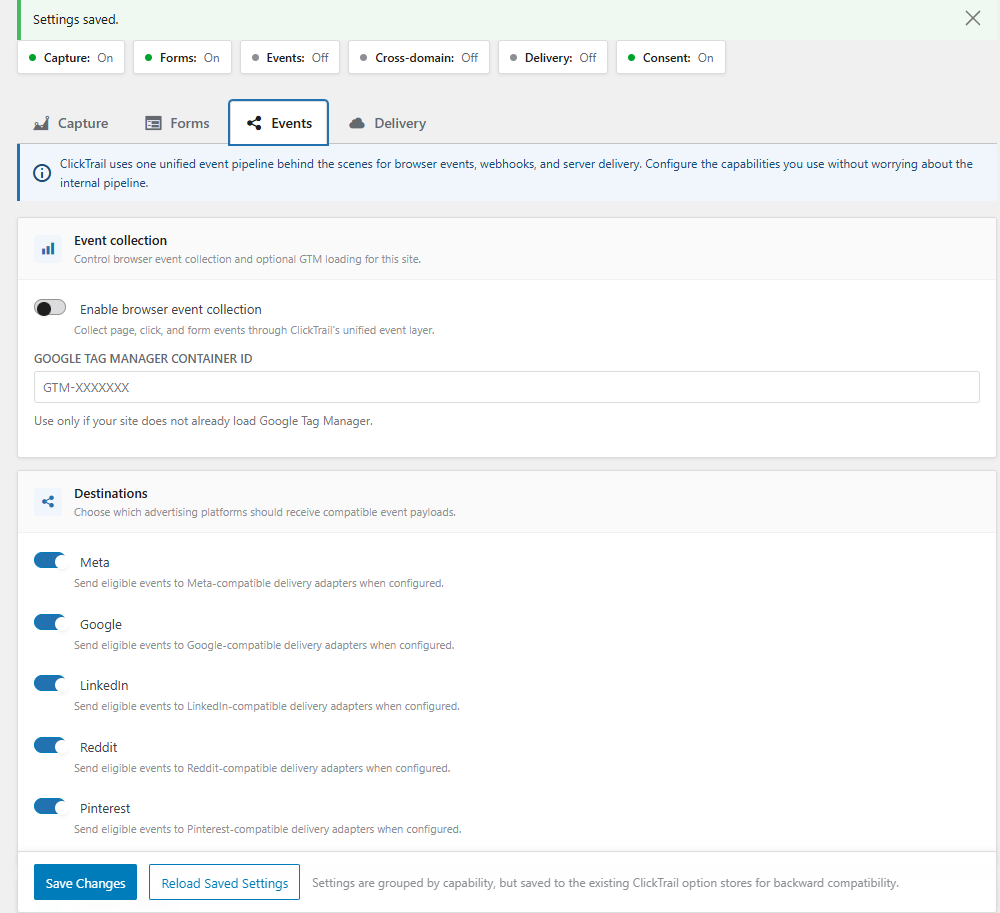
- leave browser events enabled only if you want
dataLayerpushes and on-site event capture - enable WooCommerce storefront events only if you want
view_item,view_item_list,view_cart,add_to_cart,remove_from_cart, andbegin_checkoutin the browser event layer - enable the richer Woo
dataLayercontract only if you wantevent_idand consent-awareuser_datafor GTM-first flows - add a GTM container ID only if your site does not already inject GTM somewhere else
- switch GTM to sGTM compatibility mode when you want a tagging-server URL, first-party script delivery, or a custom loader path, then run the preview checks before rollout
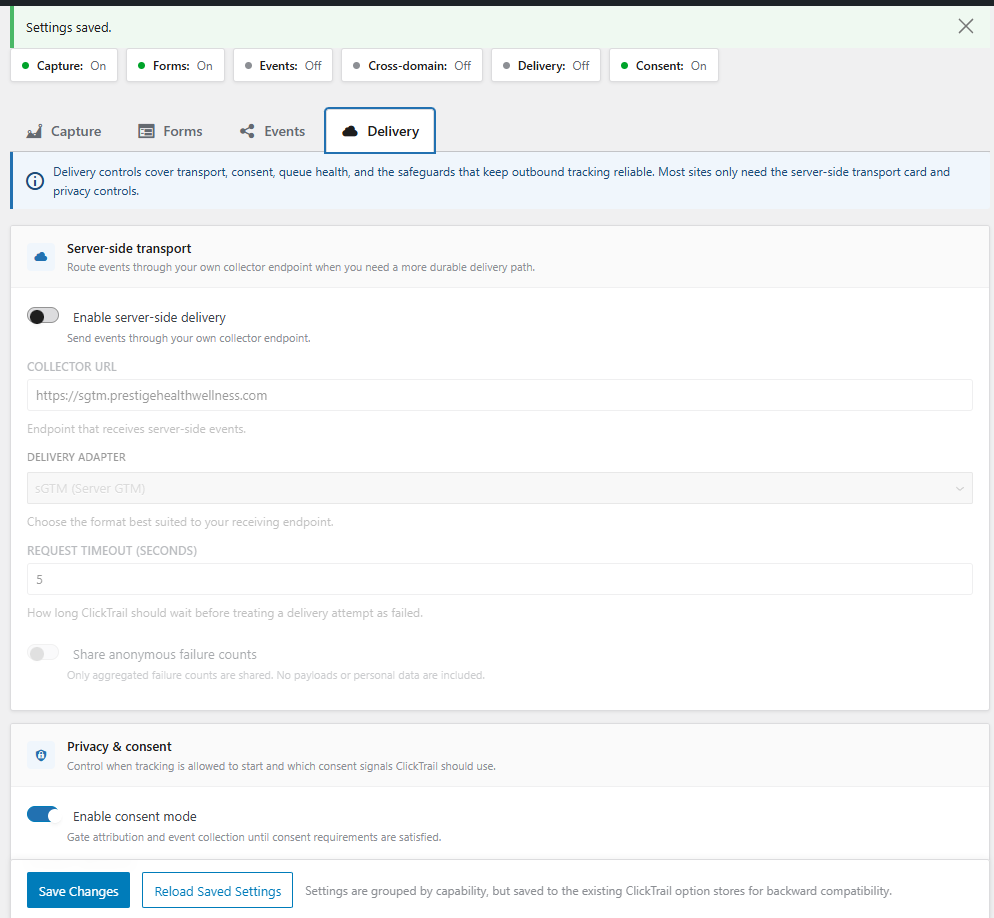
- In Delivery:
- leave server-side delivery off if you do not have a collector, sGTM, or advertising endpoint yet
- if you do use server-side delivery, configure the adapter, endpoint, and timeout here
- if consent is required, choose the correct consent source and mode before going live
- Open ClickTrail > Diagnostics and run the relevant checks, especially Endpoint Test, Conflict Scan, and Woo Order Trace Lookup when applicable.
- Visit your site with a test URL such as
?utm_source=test&utm_medium=cpc&utm_campaign=clicktrail-install-check. - Browse to another page, then place a test WooCommerce order or submit a configured form.
- Confirm the expected result:
- the WooCommerce order or form entry contains attribution values
- Woo purchase events appear in your GTM preview or
dataLayer - if Woo storefront events are enabled,
view_item,view_item_list,view_cart,add_to_cart,remove_from_cart, andbegin_checkoutappear in GTM preview or thedataLayer - if sGTM mode is enabled, the Events-tab preview checks reach the configured loader or collector URLs
- Diagnostics and Logs show intake or delivery activity if Delivery is enabled
屏幕截图:

常见问题:
Where does WooCommerce attribution appear?
ClickTrail stores attribution on the WooCommerce order. The plugin also adds Woo attribution views inside the Woo admin experience where supported, and purchase events carry the same campaign context into the dataLayer and optional server-side delivery.
Does ClickTrail support WooCommerce HPOS?
ClickTrail now declares compatibility with WooCommerce custom order tables (HPOS) and keeps WooCommerce runtime storage on Woo order APIs for order attribution and purchase tracking.
What do the WooCommerce storefront events do?
When you enable WooCommerce storefront events in the Events tab, ClickTrail emits view_item, view_item_list, view_cart, add_to_cart, remove_from_cart, and begin_checkout through the same browser event layer used for other ClickTrail events. They are off by default on upgrades.
What does sGTM mode change?
sGTM mode changes how ClickTrail loads the GTM container and how the Events tab validates a GTM-first rollout. You can configure a tagging-server URL, first-party script delivery, or a custom loader path, then run preview checks before switching Delivery to the sGTM adapter when needed.
Does ClickTrail replace GA4 or GTM?
No. ClickTrail complements them. It preserves attribution inside WordPress, pushes event data to the dataLayer, and can optionally deliver events through its server-side pipeline.
Does it work only with WooCommerce?
No. WooCommerce is one documented conversion surface; ClickTrail also has lead-form, webhook-ingress, and broader WordPress attribution paths.
What happens if my site uses aggressive caching?
ClickTrail includes a client-side fallback and dynamic-content support so attribution can still reach supported form fields when server-rendered fields are not enough.
Do I need to add hidden fields to every form?
No. Contact Form 7 and Fluent Forms can receive attribution hidden fields automatically. Gravity Forms and WPForms work best when you add the matching ct_* hidden fields you want stored or exported. Elementor Forms (Pro) and Ninja Forms use their submission hooks and stored attribution paths rather than automatic hidden-field injection.
Can I use it without server-side delivery?
Yes. Attribution capture, WooCommerce order attribution, purchase event pushes, and form enrichment all work without enabling server-side delivery.
Is consent mode required?
Consent mode is optional in configuration. When enabled, ClickTrail applies the configured behavior; the current audit found a legacy require_consent mismatch when mode is disabled, so optional mode is not a compliance or delivery guarantee until the next runtime release passes its tests.
Can I keep using my existing consent platform?
Yes. ClickTrail can listen to its own banner, Cookiebot, OneTrust, Complianz, GTM, or a custom source. You do not need to replace an existing CMP just to use the plugin.
更新日志:
docs/reference/INTEGRATIONS.md and docs/guides/SECURITY-PRIVACY.md; earlier claims may describe intended
behavior that still requires current runtime verification. In particular, older wording that calls platform-named
server paths “first-class native delivery adapters” predates the current evidence classification: those paths are
configured-endpoint relays whose provider authentication, acceptance, and runtime delivery remain unverified.
1.11.0
- WooCommerce: a buyer who pays on PayPal, Stripe Checkout, Mollie, Klarna or another payment page and comes back to your thank-you page keeps the ad or campaign they arrived from. Before, the return could replace the last-touch source with the payment site.
- WooCommerce: Checkout Block orders now store their attribution before the buyer leaves for the payment page, so the order keeps its source even if the buyer never returns.
- HubSpot: submissions of HubSpot forms embedded on your pages now produce a
leadevent (with consent). Failed submissions produceform_submit_failed. - HubSpot webhooks: newer HubSpot signatures (v3) are verified with a 5-minute replay window, and HubSpot events that are not leads (deletions, merges, privacy deletions) are acknowledged without recording a lead.
- Attribution: when a visitor comes back through a new ad, ClickTrail now sends the new click ID (for example
gclid) in decorated links, Calendly bookings, form fields, WooCommerce orders and server-side events. Before, the click ID from the first visit was sent alongside current UTMs, so a CRM could credit the wrong ad click. First-touch fields are unchanged. - Attribution: when a visitor clicks ads on different platforms, ClickTrail records which click is the newest (
attribution_selected_click_id) and uses it for Calendly bookings. - Privacy: withdrawing consent on a page now also removes ClickTrail's parameters from links it already decorated. Before, a link decorated earlier could still carry the click ID.
- Forms: attribution fields ClickTrail filled are refreshed before submit; values your site or the visitor entered in other fields are never overwritten.
- Contact Form 7: a visitor who lands from a new ad and submits on the same page is now credited to that ad. Before, the form could send the previous visit's campaign.
- Admin: the setup wizard now matches the refreshed ClickTrail screens. Visual only; completing the wizard still saves your settings.
- Admin: fixed a stray check icon on the wizard's GA4 summary line and Next/Back arrows that sat above the text baseline.
- Consent: Cookiebot changes made in the page (for example withdrawing consent in the renew dialog) now clear ClickTrail storage immediately instead of on the next page load.
- Consent: fixed Complianz support, which could treat an accepted banner as a refusal. ClickTrail now reads Complianz's accepted categories.
- Privacy: removed an unused browser storage write that happened even after consent was refused. The thank-you-page lead marker is only stored with consent and is cleared on withdrawal.
- Calendly: bookings are now recorded as
book_appointment(previouslylead), cancellations are no longer counted, the booking's UTMs are attached, and Calendly's native webhook signature is supported. - Calendly: with link decoration enabled and
calendly.comallowed, booking links, inline widgets, and the Calendly popup API carry the click ID and the visitor's live consent decision insalesforce_uuid, so consented bookings keep their ad click. - Admin: refreshed look for the Settings, Logs, and Diagnostics screens. Visual only; settings and behavior are unchanged.
- Docs: a browser storage inventory with recommended CMP categories (Cookiebot, OneTrust, Complianz).
- Consent: when required marketing consent is denied or withdrawn, ClickTrail no longer writes attribution to WooCommerce order metadata, form-provider entries, or its own submission log (Contact Form 7, Elementor, Fluent Forms, Gravity Forms, Ninja Forms, WPForms).
- Consent: queued server retries, follow-up events, WooCommerce purchase dataLayer output, and browser CF7/WhatsApp listeners re-check live consent before sending.
- Security hardening: browser identifiers use the Web Crypto API when
crypto.randomUUIDis unavailable, link decoration only touches http(s) links, and booking-link detection matches the Calendly/Acuity host instead of a URL substring.
- Contact Form 7: record conversions only after successful submission, excluding aborted and failed sends.
- WooCommerce: check current visitor consent before processing thank-you purchase events.
- Delivery: queued retries use current visitor-specific consent and respect local/development delivery restrictions. When required consent cannot be resolved, retries remain deferred; integrations must provide durable consent through
clicutcl_queue_consent_snapshot. - Reporting: prevent duplicate touch-event records with an automatic database schema upgrade that preserves existing records.
- Consent-safe delivery: queued retries recheck the current consent snapshot immediately before adapter delivery, so a withdrawal is not replayed from historical queue state.
- Cross-tab consent authority: browser consent state now uses versioned timestamped authority, same-tab events, and cross-tab storage synchronization; stale plugin-cookie and banner values cannot revive a withdrawal.
- WooCommerce privacy lifecycle: order metadata is managed through an explicit ClickTrail allowlist, with personal-data export/erase, bounded retention, manual purge, uninstall cleanup, and classic/HPOS-compatible CRUD access. Unrelated order metadata is preserved.
- Form evidence contract: deterministic six-case manifests cover Contact Form 7, Fluent Forms, Gravity Forms, WPForms, Ninja Forms, and Elementor. These manifests remain explicitly runtime-unverified without pinned WordPress/plugin staging evidence.
- Free capture layer: normalized marketing-trail envelopes now carry stable event, trail, anonymous, lead, workspace, and site identifiers alongside first/last-touch attribution, UTMs, click IDs, landing page, referrer, consent, and form context.
- Diagnostics and quality: added readiness analyzers, consent snapshot contracts, WooCommerce classic/HPOS contract coverage, pinned supply-chain workflows, Dependabot, OSV, Scorecard, and contributor/security guidance.
- Release boundary: provider acceptance, compliance, and complete runtime integration claims remain evidence-gated. See the integration reference and security guide for the current limits.
- Fluent Forms fix: attribution now persists in Fluent Forms submission metadata using its
response_idschema column. - Compatibility: tested up to WordPress 7.1.
- New foundation (no visible UI change): ClickTrail writes structured touch-event records in
clicutcl_touch_eventsalongside the legacy diagnostics table. This is a reporting foundation, not a complete privacy certificate: the current audit found hashed-identity matching gaps, WooCommerce order-meta lifecycle gaps, retention coupling, and queue/revocation boundaries. Seedocs/architecture/DATA-MODEL.mdanddocs/guides/SECURITY-PRIVACY.mdfor the current evidence status.
- Maintenance: removed dead Settings API code left over from before the unified settings screen (
includes/admin/class-admin.php, ~890 lines removed). Verified against every live admin page before removal. No functional or user-facing changes.
- Maintenance: expanded the automated test suite to cover REST API auth boundaries (token validation, webhook signatures, CRM lifecycle tokens) and queue retry-backoff logic. No functional or user-facing changes.
- Diagnostics: the Conflict Scan now detects active call tracking scripts (CallRail, CallTrackingMetrics, WhatConverts, and others) and surfaces an informational note explaining that ClickTrail already skips
tel:link decoration automatically — no action needed. - UX: corrected the Conflict Scan card description on the Diagnostics screen, which had fallen out of sync with what the scan actually checks.
- Diagnostics UX: the "Lookup Order" tool now explains when an order's attribution is empty because marketing consent was denied at capture time, instead of just showing empty first-touch/last-touch data. Closes GitHub issue #44, where a consent-denied order correctly fell back to "Direct" but the diagnostics gave no indication why.
- Security (informational hardening): the per-IP rate limiter now uses an atomic increment-then-check when a persistent object cache is available, closing a small burst-margin race under concurrent requests from the same IP; falls back to the existing transient-based check otherwise.
- Security (informational hardening): classic UTM/click-ID attribution fields are now capped at 255 characters before being stored in the attribution cookie, session storage, and WooCommerce order meta, matching the length cap already used for the signed cross-domain attribution token.
- Packaging fix:
config/feature-registry.jsonwas accidentally excluded from every shipped release build, including the current WordPress.org version, causing the delivery-adapter dropdown and destinations list to render empty. The config directory now ships again. - Security UX: the settings backup export now carries an explicit on-screen warning that the downloaded file contains live, unmasked webhook secrets and should be handled like a credentials file.
- Docs: corrected a stale reference to a removed legacy API file in the REST API reference.
- Maintenance: internal dev-tooling cleanup (removed unused local Claude Flow tooling, added GitHub Spec Kit for planning). No functional or user-facing changes.
- Security and consent hardening: browser REST intake now accepts only ClickTrail's real browser events, applies a per-page-token replay limit, preserves separate analytics and marketing consent categories across supported CMPs, honors custom consent cookies server-side, and never lets an external CMP re-enable gating when Consent Mode is disabled.
- Attribution reliability: cross-domain verification now sends the required page token; attribution cookies are encoded, size-bounded, and cleared instead of leaving stale server values; pre-consent attribution is not persisted while consent is required.
- Webhook and privacy fixes: Typeform and HubSpot use their native signatures, HubSpot batches are handled item by item, consent-skipped webhook/lifecycle responses report their real status, retry rows no longer persist raw IP or user agent, and consent withdrawal removes pending attribution plus browser identifiers.
- Maintenance and tests: removed dead legacy tracking-v2 AJAX handlers and added focused PHP/JavaScript boundary regressions.
- UX: clearer in-app explanation of how ClickTrail preserves landing-page attribution across the consent banner.
- Maintenance: internal code cleanup. No functional changes.
- Security: server-side delivery endpoint is validated against SSRF: The collector / server-side GTM endpoint URL is now checked on save (internal, loopback, and non-public addresses are rejected), and every outbound delivery request rejects unsafe URLs, so a misconfigured or hostile endpoint can no longer be pointed at internal network resources.
- Security: webhook signature and secret handling hardened: Inbound webhook signatures are compared on the raw value with strict format validation, and provider secrets are stored exactly as entered (they are no longer truncated or whitespace-stripped, which previously could corrupt long secrets and break verification). Replay protection is now race-safe on sites with a persistent object cache.
- Security: cross-domain attribution-token verification now requires the page token, matching the signing endpoint and removing an unauthenticated request path.
- Privacy: visitor IP is anonymized in the diagnostic event log (the full IP is still used only transiently for server-side conversion matching). The personal-data eraser now also clears queued server-side delivery records.
- Privacy: geo-based consent no longer trusts client-supplied country headers by default, since those headers can be spoofed unless set by a trusted CDN. An unknown region now safely defaults to requiring consent. Sites behind a trusted edge can re-enable header trust with the
clicutcl_trust_geo_request_headersfilter, or provide an authoritative country withclicutcl_request_country_code. - Security: Gravity Forms attribution merge tags are always HTML-escaped in output.
- Admin: a warning now appears when "encrypt secrets at rest" is enabled but the server cannot support it, so secrets are not silently stored unencrypted.
- i18n: German (de_DE) JavaScript translations now load: Added the script-translation JSON for the React settings app. Without this file, the de_DE locale shipped in v1.8.7 only translated PHP-side strings; the JS-side React UI (Capture/Forms/Events/Delivery tabs) stayed in English. Generated via
wp i18n make-jsonforassets/js/admin-settings-app.js.
- Security: Reject unsubstituted ad-platform dynamic-parameter macros (Facebook
{{campaign.name}},{{adset.name}}, etc.) during attribution capture. These placeholders appear literally in landing-page URLs when ads aren't served through the ad platform, and previously flowed into attribution storage and downstream destinations as if they were real campaign names. Applied to both PHP server-side sanitizer and the client-sidesanitizeValue()helper. - Fix: Consent gate no longer defaults to ON when Consent Mode is disabled. Two paths previously read a removed legacy
require_consentoption (default TRUE) — on any site without Consent Mode + a CMP, that implicit default silently blocked all attribution. Now the gate is only active when Consent Mode is explicitly enabled. - Housekeeping: GTM Starter Kit lead-magnet banner disabled in-plugin; the kit is now distributed via the website. The class file stays for future re-activation; the runtime init() call is commented out and the source files added to
.distignoreso they're not bundled in the WP.org SVN release.
- Brazilian Portuguese (pt_BR) translations refreshed: Regenerated from current source code (was last updated at v1.5.2). 533 strings translated, 81 strings carried over from the prior translation but flagged for human review where the underlying source string changed.
- German (de_DE) translations added: Full translation of all 614 strings — first locale beyond Portuguese.
- Block third-party promotional banners: Bundle-sale ads and other plugin notices can no longer inject promotional banners into the ClickTrail wizard, settings, logs, or diagnostics pages.
- Admin UI consistency pass: Expanded design tokens (status colors, background scale, 8px spacing scale), aligned card and section header padding, removed a duplicated 90-line GTM-offer CSS block.
- WordPress 7.0 compatibility: Tested up to WordPress 7.0 "Armstrong" (released 2026-05-20). Requires WooCommerce 10.4.2 or later for WP 7.0 compatibility.
- Script enqueue refactor: Removed dead pre-WP-6.3 fallback from
clicutcl_script_args(). All supported installs (WP 6.5+) now use the array-form registration and optionaldefer/asyncstrategy keys. - Deprecation scan in CI: Added
composer phpcompatand a PHPCompatibilityWP GitHub Actions workflow to flag PHP and WordPress deprecated/removed API usage on every push.
- NitroPack compatibility: ClickTrail now detects NitroPack and automatically attempts to exclude its scripts from NitroPack's "Postpone JS" feature via two mechanisms: the
nitropack_js_url_excludefilter and thedata-nitropack-excludeHTML attribute on script tags. Without this, postponed scripts can cause empty UTM data on leads when users navigate away before interacting with the page. - NitroPack diagnostic warning: The Diagnostics conflict scan now surfaces a
warnfinding when NitroPack is active, with instructions to verify script exclusions in NitroPack → Optimization → JavaScript → Script exclusions. - pt-BR playbook — webhook middleware pattern: Expanded the Padrão 5 section in the Portuguese Implementation Playbook to document the three-layer webhook architecture (script → webhook middleware → CRM), the complete field reference for Google Ads and Meta Ads attribution, PipeRun-specific notes on custom field IDs, and common errors including the silent field-drop behaviour when CRM fields do not exist before the first webhook call.
- Setup Wizard: Added a 3-step onboarding wizard that fires automatically on first activation. Step 1 auto-detects active form plugins, WooCommerce, CMPs, and caching layers. Step 2 collects the GA4 Measurement ID. Step 3 confirms attribution is active with a quick-test link. All external admin notices are suppressed while the wizard is open. A permanent "Setup Wizard" link is added to the plugin action row on the Plugins screen.
- Activation fix:
Setup_Wizard::init()now registers before the preflight class check so the activation redirect fires reliably on all environments. - Two-phase consent capture: UTMs and click IDs are now buffered to
sessionStorageimmediately on page load before any consent banner fires. On consent grant the pending buffer is promoted to the attribution cookie, preserving first-touch even when the user accepts the banner on a later page. - Call tracking MutationObserver skip: The MutationObserver watching for dynamically inserted links now bails early when every new anchor has a skippable scheme (
tel:,mailto:,#). Eliminates wasted debounce cycles from Dynamic Number Insertion tools such as CallRail, CallTrackingMetrics, and WhatConverts. - GF / WPForms attribution field diagnostic: The Diagnostics conflict scan now checks every active Gravity Forms and WPForms form for
ct_*hidden fields. Forms without attribution fields surface a warning with a direct edit link. No new AJAX endpoints. - Cross-domain decoration checklist warning: The setup checklist now shows a
warnstate when link decoration is on but no allowed domains are listed, and an informational note about external payment providers when decoration is correctly configured. - Cross-domain limitations documentation: Added a "Cross-Domain Limitations" section to the Implementation Playbook and a payment provider table to the Integrations reference covering Stripe, PayPal, Mollie, and Square.
- Portuguese (pt-BR) Implementation Playbook: Added
IMPLEMENTATION-PLAYBOOK.pt-BR.mdcovering all rollout patterns including webhook/CRM integrations, thewindow.ClickTrailJS API field reference, and external checkout limitations. - WP.org compliance: Plugin zip folder renamed from
cthtoclick-trail-handlerto match the WordPress.org plugin slug requirement. - Elementor Forms popup fix: Attribution data is now injected reliably when an Elementor popup opens and when new form inputs appear in the DOM after initial page load.
- CI: Fixed CodeQL workflow — removed PHP from the language matrix and updated action refs to v4.
- Hardening release. No user-visible feature changes; addresses ten findings from the 1.6.0 internal code review.
- Fixed admin QA mode cache-poisoning risk:
adminQaModeis no longer baked into the localized attribution config, where a full-page cache plugin could capture it from an admin-viewed response and serve it to anonymous visitors. It is now a 1-hourclicutcl_admin_qacookie set oninitonly for logged-inmanage_optionsusers, which cache plugins correctly exclude. - Fixed minification-exclusion attributes: the previous set advertised support for WP Rocket and LiteSpeed but used non-existent attribute names. Replaced with the canonical attributes each tool actually reads:
data-no-optimize,data-noptimize,data-cfasync,data-no-defer,data-no-minify. - Replaced
str_replace(' src=', ...)injection with regex-based injection after the opening<scripttoken, robust to attribute order and leading/trailing whitespace. - Refactored
Gravity_Forms_Adapterfrom ~660 lines into four focused classes:Gf_Channel_Resolver,Gf_Form_Settings_Tab,Gf_Merge_Tags,Gf_Minification_Protector. The adapter is now a thin coordinator under 350 lines. All public method signatures preserved;resolve_channel_fallback()kept as a backward-compat shim. - Memoized
Attribution_Settingsinstance inside the adapter and shared it with the extracted classes — fewer redundantOption_Cachereads per request. - Added PHPUnit unit-test suite for
Gf_Channel_Resolvercovering 10 classification rules, including thegemini.google.comprecedence over Google Organic and the fbclid+paid-medium gate. - Added documentation in HOOKS-REFERENCE.md clarifying that
ct_*entry meta is registered for all forms but values are gated per-form, and that channel labels are stored data values (not UI strings) and should not be wrapped with__(). - Added inline comments documenting fail-open semantics when GF form context is unavailable, and the GF 2.5+ single-arg signature of
gform_pre_form_settings_save.
- Added full channel classification to Gravity Forms entries:
ct_ft_channelstores a human-readable label (Google Ads, ChatGPT, Mailchimp, etc.) derived from click IDs, UTM parameters, or referrer context; server-side fallback computes the label when JS is unavailable. - Added six new click IDs to the capture schema:
rdt_cid(Reddit),pin_cid(Pinterest),snap_cid(Snapchat),mc_cidandmc_eid(Mailchimp), anddclid(Display & Video 360). - Added nine
{clicutcl_*}merge tags for Gravity Forms notifications and confirmations, including{clicutcl_channel},{clicutcl_click_id}, and seven UTM-based tags. - Added per-form attribution tracking toggle in Gravity Forms form settings, with a global default option and
clicutcl_gf_tracking_enabledfilter for developer overrides. - Added admin QA mode: attribution data is written to
sessionStorageonly when amanage_optionsuser is logged in, preventing admin browsing from polluting attribution records. - Added
sessionStoragefallback for attribution capture when browser cookies are blocked. - Added minification-exclusion data attributes to ClickTrail script tags to prevent cache and optimization plugins from deferring or bundling them.
- Added entry-edit safety for Gravity Forms:
ct_*attribution meta is excluded from the editable fields screen and restored automatically if cleared during a manual entry edit.
- Normalized mixed line endings in core PHP handlers to keep standards checks deterministic across environments.
- Resolved the remaining PHPCS findings in the consent, attribution-token, and privacy handlers.
- Kept runtime behavior unchanged from
1.5.1.
- Aligned the public plugin version to
1.5.1across release surfaces. - Cleaned up public changelog wording to keep it competitor-neutral and product-focused.
- Kept runtime behavior unchanged from
1.5.0.
- Declared WooCommerce HPOS compatibility during bootstrap and kept Woo order tracking on Woo order APIs.
- Enriched WooCommerce purchase payloads with additive order totals, coupon/status data, richer item detail, and customer/order metadata.
- Added opt-in WooCommerce storefront events for
view_item,view_item_list,view_cart,add_to_cart,remove_from_cart, andbegin_checkout, including richer product-list context. - Added a dedicated sGTM compatibility mode with tagging-server URL support, first-party or custom-loader GTM delivery, and preview checks in the Events tab.
- Added Woo order milestone delivery for
order_paid,order_refunded, andorder_cancelled, plus Diagnostics trace lookup for stored payload snapshots. - Added setup checklist, conflict scan, backup restore, and Woo order trace lookup in the admin surfaces.
- Added Pinterest Conversions API and TikTok Events API as first-class native delivery adapters.
- Added registry-backed QA/docs alignment for the expanded destination and diagnostics surface.
- Included the recent WordPress.org deployment cleanup, Plugin Check fixes, privacy-query hardening, and better debug visibility.
- Made WordPress privacy export and erasure safer by escaping
user_idfragments used insideLIKE-based event matching. - Improved large-site privacy erasure performance by deleting matched event rows in batches.
- Added lightweight caching for frequently read plugin settings.
- Stopped loading the frontend consent bridge script on pages that do not need attribution capture, consent handling, or browser events.
- Added clearer debug output for invalid attribution-token payloads and for database-level failures during privacy erasure.
- Added a smarter referrer fallback for visits that arrive without UTMs or click IDs.
- ClickTrail now classifies common search, social, and external referral traffic into first-touch and last-touch
source/mediumvalues.
- Introduced dedicated session management with a 30-minute inactivity model and separate session storage.
- Added client-side and server-side session helpers so forms, purchases, and event payloads can include consistent session information.
- Added native Elementor Forms support and completed the Ninja Forms submission-storage path.
- Expanded the capture schema to include newer UTM fields and browser/platform identifiers.
- Split browser event collection from browser event transport and moved frontend attribution onto the shared consent bridge.
- Rebuilt the main settings experience around four capability-based tabs: Capture, Forms, Events, and Delivery.
- Removed user-facing "Tracking v2" language from the main admin flow while keeping backward-compatible internal storage where needed. Older release notes remain available in `changelog.t