
ClickTrace - Click Tracking for Phone, Email and Custom Links
| 开发者 | mbienterprises |
|---|---|
| 更新时间 | 2026年8月14日 06:58 |
| PHP版本: | 7.4 及以上 |
| WordPress版本: | 7.1 |
| 版权: | GPLv2 or later |
| 版权网址: | 版权信息 |
详情介绍:
- Automatic click tracking for phone number links, no setup required
- Automatic click tracking for email links, no setup required
- Add unlimited custom links to track (booking buttons, WhatsApp, quote forms, anything)
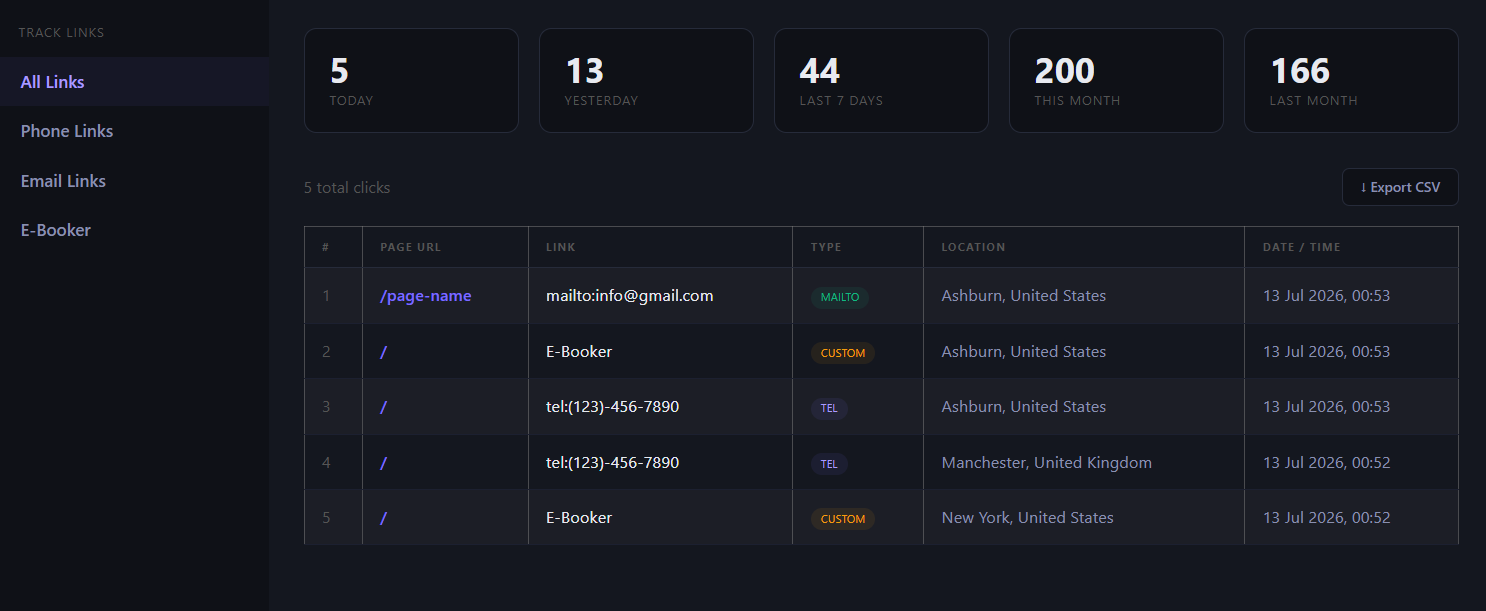
- Stats for today, yesterday, last 7 days, this month and last month
- Month-over-month percentage change, so you can see if clicks are trending up or down
- See exactly which page each click came from
- Approximate visitor location (city and country) per click
- Full click log with page, link, location and timestamp, with pagination and a rows-per-page choice
- One-click CSV export of your full click data
- A simple shortcode to drop a full stats dashboard onto any page
- Mobile responsive dashboard that matches your site, not a separate app
- Works with any WordPress theme, no page builder or theme requirement
[clicktrace]
That page becomes a full dashboard: stats broken down by time period, a sidebar to filter by link type, a click log, and CSV export.
To track a custom link, open ClickTrace in your WordPress admin menu, add the link's name and its exact URL, and it appears as its own filter in the dashboard, tracked separately from your phone and email numbers.
安装:
- Upload the clicktrace folder to the /wp-content/plugins/ directory, or install directly through the WordPress Plugins screen
- Activate the plugin through the "Plugins" screen in WordPress
- Go to ClickTrace in your WordPress admin menu to add custom tracked links (phone and email tracking work automatically, no setup needed)
- Create a new page and add the shortcode [clicktrace] to display your stats dashboard
屏幕截图:
常见问题:
Does this track phone number and email clicks automatically?
Yes. As soon as you activate the plugin, every tel: and mailto: link on your site is tracked with no additional configuration.
Can I track a specific button or link that is not a phone or email link?
Yes. Go to ClickTrace in your WordPress admin, add the link's exact URL and a name for it, and it is tracked separately from your general stats.
Does this replace Google Analytics?
No, and it is not trying to. Google Analytics tells you about page views and sessions. ClickTrace focuses specifically on one thing it does not cover well: whether people are actually tapping your phone number, email or key buttons.
Is this GDPR friendly?
ClickTrace only stores the approximate city and country derived from a visitor's IP address at the moment they click a tracked link, it does not store names, emails or full IP addresses tied to identity, and it does not track page views or set marketing cookies. Check the External Services section above for exactly which services are contacted.
Can I track WhatsApp or booking links?
Yes. Any link, including WhatsApp click-to-chat links and third-party booking links, can be added as a custom tracked link.
Does this slow down my website?
No. The tracking script is small and loads asynchronously. It does not affect your page load speed in any meaningful way.
Where do I see the click stats?
Add the [clicktrace] shortcode to any page in WordPress. That page displays your full stats dashboard.
Is visitor location data accurate?
Location is estimated from the visitor's IP address and shows city and country level accuracy. It is not exact GPS location.
Does this work with any WordPress theme?
Yes. ClickTrace works independently of your theme and does not require any specific theme features.
Can I export the data?
Yes. Every report includes a CSV export option so you can download your click data at any time.
更新日志:
- Confirmed compatible with WordPress 7.1
- Replaced the click log pagination with truncated page numbers, ellipsis and previous/next arrows, so large click logs no longer render dozens of page buttons
- Added a rows-per-page choice (15, 30, 50, 100) that is remembered in the page URL
- Added an optional, dismissible admin notice inviting long-time active users to leave a review, shown only after 14 days of use and at least 10 tracked clicks
- Rewritten plugin description and FAQ
- Initial release
- Automatic tel: and mailto: link tracking
- Custom link tracking with names
- Stats dashboard: today, yesterday, last 7 days, this month, last month
- Month-over-month percentage comparison
- Visitor location tracking (city and country)
- Full click log with pagination
- CSV export
- Sidebar filter by link type
- Mobile responsive dashboard