Cliredas - Client Dashboard for Google Analytics (GA4)
| 开发者 | vzisis |
|---|---|
| 更新时间 | 2026年9月24日 20:56 |
| PHP版本: | 7.4 及以上 |
| WordPress版本: | 7.1 |
| 版权: | GPLv2 or later |
| 版权网址: | 版权信息 |
详情介绍:
安装:
- Upload the plugin folder to /wp-content/plugins/ or install via Plugins > Add New (when published).
- Activate the plugin.
- Go to Client Report in the admin menu.
- Go to Settings > Client Report and open the GA4 Setup Assistant.
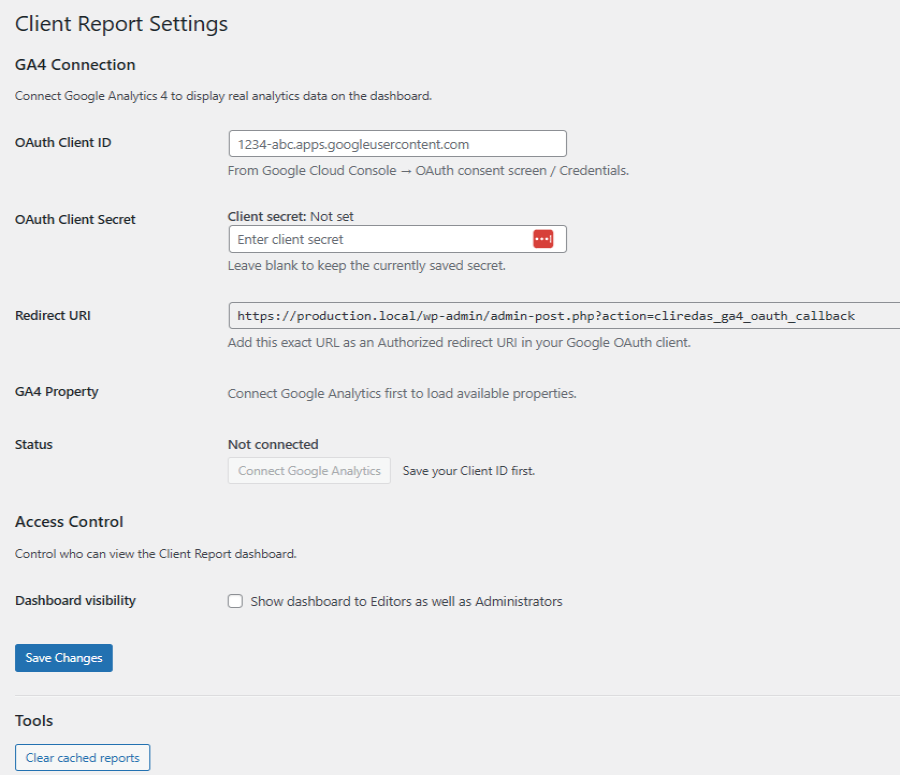
- Add your Google OAuth Client ID and Client Secret.
- If the site is behind a public tunnel or reverse proxy (for example, ngrok), enter the public site URL in Public OAuth base URL and save settings.
- In Google Cloud Console, add the Redirect URI shown in Settings as an Authorized redirect URI.
- Click Connect Google Analytics, complete the consent screen, then select a GA4 Property.
- Run diagnostics to verify the refresh token and property access.
屏幕截图:


常见问题:
Does this connect to Google Analytics 4?
Yes. Use Settings > Client Report to connect GA4 via OAuth and select a property.
Why does Google block my redirect URI on a local domain?
Google OAuth redirect URIs must use a public top-level domain (e.g. .com, .org). For local development, use a public tunnel (e.g. ngrok) or a real domain. When using a tunnel, enter the tunnel's public site URL in Public OAuth base URL, save settings, and then copy the generated Redirect URI into Google Cloud Console.
Does this plugin store tokens/secrets in the database?
Yes. OAuth credentials and tokens are stored in the WordPress options table under the cliredas_settings option. The plugin never displays your saved client secret back in the UI.
The latest connection diagnostic result is stored in user meta for the administrator who ran it. It contains statuses, safe messages, a timestamp, and a non-sensitive configuration fingerprint; it does not contain credentials, tokens, or raw Google responses.
Can Editors see the dashboard?
Yes. Enable the option in Settings > Client Report.
更新日志:
- Added a rerunnable GA4 Setup Assistant to the plugin settings page.
- Added protected diagnostics for OAuth URL configuration, token health, and GA4 property access.
- Consolidated settings-page token and property requests through the shared GA4 API client.
- Added accessible sorting for every Top pages column.
- Top pages sorting persists across date-range changes and browser visits.
- Added a protected CSV export for all built-in dashboard report blocks.
- CSV exports clearly identify sample or fallback data and guard against spreadsheet formula injection.
- Increased the Top pages table from 10 to up to 25 rows.
- Added previous-period percentage changes to all dashboard KPI cards.
- Added calendar-aligned comparisons for This month and Last month.
- Added This month, Last month, and Last 90 days dashboard date presets.
- GA4 OAuth connect + disconnect
- GA4 property listing + selection
- Real GA4 dashboard data (Data API)
- Dashboard improvements: chart toggle, pageviews KPI, traffic sources, caching + clear cache