
CodeCrafters URL Indexing for Google and IndexNow
| 开发者 | codecraftersbd |
|---|---|
| 更新时间 | 2026年10月5日 19:52 |
| PHP版本: | 8.1 及以上 |
| WordPress版本: | 7.1 |
| 版权: | GPLv2 or later |
| 版权网址: | 版权信息 |
详情介绍:
- Google Indexing API — Authenticates with a Google Cloud service account (OAuth 2.0 / JWT) and publishes URL_UPDATED or URL_DELETED notifications to Google’s Indexing API. Ideal for sites that need timely Google awareness of content changes.
- IndexNow — Submits URLs to the IndexNow protocol used by Bing, Yandex, Naver, and other participating engines. A site key is generated on activation and verified via a rewrite-served key file—no manual upload to your server disk.
- Pure WordPress APIs—no Composer runtime libraries, no jQuery admin scripts, no heavy SDKs
- API pings are offloaded to WP-Cron so saving a post never waits on a remote request
- Google access tokens are cached in WordPress transients, and the daily Google quota counter is updated atomically so concurrent pings cannot exceed it
- Credentials stay in your database (
wp_options); the Google JSON key is never written to the uploads folder
- You change content. You publish, update, unpublish, trash, or permanently delete a post, page, or any monitored post type.
- The plugin queues a ping. It picks the right notification type (
URL_UPDATEDfor published content,URL_DELETEDwhen a published URL is removed or unpublished) and schedules a single WP-Cron event. Your save finishes immediately. - Search engines are notified in the background. The cron job sends the URL to the Google Indexing API (if enabled and within your daily quota) and to IndexNow (if enabled), which shares it with Bing, Yandex, Naver, and other participating engines.
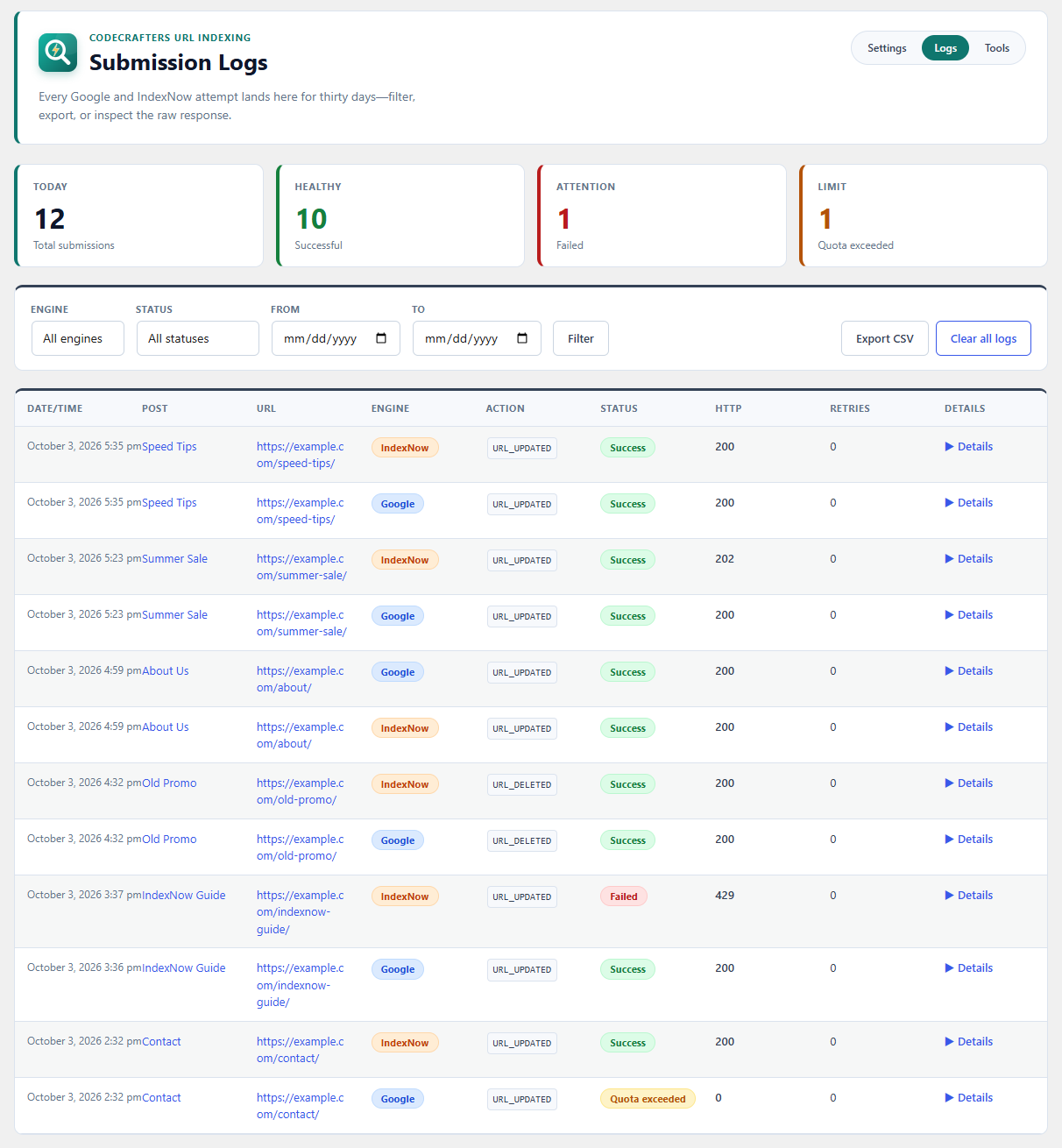
- Every result is logged. The outcome (success, failed, skipped, or quota exceeded), HTTP code, and raw response are saved to the Submission Logs screen so you can see exactly what happened.
- Google Indexing API notifies Google Search. You provide a Google Cloud service account JSON key and add that service account as an Owner in Google Search Console. Up to 200 requests per day per Google Cloud project. One-time setup takes about 10–15 minutes.
- IndexNow notifies Bing, Yandex, Naver, and other IndexNow partners. You provide nothing: the plugin generates the key and serves the verification file for you. It works the moment you enable it.
ccurlidx_post_types— filter the list of monitored post types.ccurlidx_should_ping— returnfalseto skip pings for a specific post or status transition.ccurlidx_should_ping_google/ccurlidx_should_ping_indexnow— skip a single engine for a given URL.
安装:
- Upload the
codecrafters-url-indexingfolder to/wp-content/plugins/, or install the plugin from Plugins → Add New in your WordPress admin. - Activate CodeCrafters URL Indexing through the Plugins menu. An IndexNow API key is generated automatically on activation.
- Go to URL Indexing → Settings. Enable Google and/or IndexNow, and choose which post types should trigger automatic pings.
- For Google: create a Google Cloud service account with the Indexing API enabled, download the JSON key, paste it into the settings field, and add the service account email as an owner in Google Search Console for your property. Click Test Google Connection.
- For IndexNow: confirm the key file URL is reachable (served by the plugin via rewrite rules), then click Test IndexNow Connection. Save settings—new publishes, updates, and deletes will ping the enabled engines asynchronously.
屏幕截图:


常见问题:
Do I need both Google and IndexNow?
No. Use either or both. IndexNow covers Bing and other partners with almost no setup. Google requires a Google Cloud project, Search Console ownership, and has a daily quota. Many sites start with IndexNow and add Google later.
Do I need a Google account?
Only if you enable the Google Indexing API. IndexNow works independently with the key generated by the plugin and does not require a Google account.
How do I get Google Indexing API credentials?
- Open Google Cloud Console and create (or select) a project.
- Go to APIs & Services → Library, search for Web Search Indexing API, and click Enable.
- Go to IAM & Admin → Service Accounts → Create service account. Give it a clear name; no extra Cloud roles are needed.
- Open the service account, go to Keys → Add key → Create new key → JSON, and download the file. Copy the service account email (it looks like
name@project-id.iam.gserviceaccount.com). - Open Google Search Console, select the property for your site, go to Settings → Users and permissions, and add the service account email with Owner permission.
- In WordPress, go to URL Indexing → Settings, enable Google Indexing API, paste the entire JSON file into Service account JSON, save, and click Test Google Connection.
Where should I paste the Google JSON key?
In URL Indexing → Settings → Service account JSON. Paste the full contents of the downloaded .json file. Do not upload the file to your media library or leave it in a public folder. On later saves, leave the field blank to keep the stored key unchanged.
Is my Google JSON key safe?
The key is stored in the WordPress options table, never as a publicly accessible file, and is not autoloaded on every page. Still treat it like a password: limit who has administrator access, use HTTPS, and never commit the key to version control or show it in screenshots.
Why does Google need a JSON key while IndexNow does not?
Google authenticates with a service account (OAuth 2.0 signed with the private key in the JSON file) and requires that account to own the site in Search Console. IndexNow proves ownership differently: search engines fetch a key file from your domain. The plugin creates that key and serves the file automatically.
How does the IndexNow key file work?
On activation the plugin generates a random 32-character key and serves it at https://yoursite.com/{key}.txt through a WordPress rewrite rule. No physical file is written to your server. Search engines fetch that URL to confirm you control the site.
Is IndexNow free? Is the Google Indexing API free?
IndexNow is a free, open protocol. Google's Indexing API is generally free within its documented quota (commonly 200 requests per day per Google Cloud project). Check Google's current quotas and billing policies for your project.
What's the Google API daily limit?
Google typically allows about 200 Indexing API requests per day per Cloud project. The plugin lets you set a lower cap (180 by default, up to 200) and stops sending Google requests once it is reached; those attempts are logged as "Quota exceeded". The counter resets at midnight UTC, and current usage is shown on the Settings and Tools screens.
Does IndexNow have a quota?
IndexNow does not publish a small daily cap like Google's. Still, only notify real changes and avoid repeated resubmissions of the same URL.
Will this get my pages indexed instantly?
No plugin can guarantee that. Notifications ask search engines to crawl your URL sooner, but Google, Bing, and others still decide whether and when to index it based on quality, crawl budget, and their own systems.
Will this slow down my site or the editor?
No. Saving a post never waits on a remote API. Pings are scheduled through WP-Cron and run in the background after the request finishes. Nothing is loaded on the front end of your site, and the admin screens use lightweight vanilla JavaScript with no jQuery dependency.
What happens when I unpublish, trash, or delete a post?
When a published post is moved to draft, pending, private, scheduled, or trash, or is permanently deleted, the plugin sends a URL_DELETED notification to Google and notifies IndexNow of the change, so engines can drop or recrawl the stale URL faster.
Can I submit a URL manually?
Yes. Open any published post or page in the editor and use Submit to Google or Submit to IndexNow in the CodeCrafters URL Indexing panel in the sidebar. The panel also shows the last submission result for each engine. Results appear in the Submission Logs.
Which post types are supported?
Posts and pages are monitored by default. In Settings you can select any public post type with front-end URLs, such as WooCommerce products. Developers can adjust the list with the ccurlidx_post_types filter.
The Google connection test fails. What should I check?
- The Web Search Indexing API is enabled in the same Cloud project as the key.
- You pasted the entire JSON, including
private_keyandclient_email. - The service account email is an Owner of the correct Search Console property.
- Your WordPress site URL matches the Search Console property (www vs. non-www, http vs. https).
- The OpenSSL PHP extension is available on your server (required to sign the request).
The IndexNow connection test fails. What should I check?
- IndexNow is enabled and settings are saved.
- Open the Key file URL in a private browser window. It should show only the key text.
- If that URL returns a 404, go to Settings → Permalinks and click Save Changes once to refresh rewrite rules.
- Make sure a security plugin or firewall is not blocking the
.txtURL. - If you just regenerated the key, wait a few minutes and test again.
Should I regenerate my IndexNow key?
Only if the key may have been exposed or you need to rotate it. Regenerating creates a new key and verification URL, and the old key stops working; search engines will re-verify the new key file.
Do I need Bing Webmaster Tools or Search Console for IndexNow?
No. Search Console ownership is required only for the Google Indexing API. Verifying your site in Bing Webmaster Tools is optional but lets you see IndexNow submissions there.
Does this replace my XML sitemap?
No. Keep your sitemap (WordPress core sitemaps or your SEO plugin). This plugin adds instant push notifications on top of normal crawler discovery.
How long are logs kept?
30 days by default. You can change the retention period (7 to 365 days) in Settings, and old entries are pruned automatically by a daily scheduled task. You can also export logs to CSV or clear them from the Submission Logs screen.
Is this GDPR compliant?
The plugin sends page URLs (and for IndexNow, your host and API key) to search engines. It does not send personal data such as names, emails, or visitor identifiers, and it adds no tracking to your site. Credentials are stored in your WordPress database. Review Google's and Microsoft's privacy policies linked in the External Services section, and mention these transfers in your own privacy policy if required.
What happens when I uninstall the plugin?
Deleting the plugin from the Plugins screen removes its settings, stored credentials, quota counters, scheduled events, and the submission log table.
更新日志:
- Fixed the Settings, Logs, and Tools header links so they use the registered admin page slugs.
- Initial release