
CodeFaeries Top Customers - Customer Ranking, Segments and CSV Export
| 开发者 | lwsdevelopers |
|---|---|
| 更新时间 | 2026年11月20日 17:32 |
| PHP版本: | 7.4 及以上 |
| WordPress版本: | 7.1 |
| 版权: | GPL-2.0-or-later |
| 版权网址: | 版权信息 |
详情介绍:
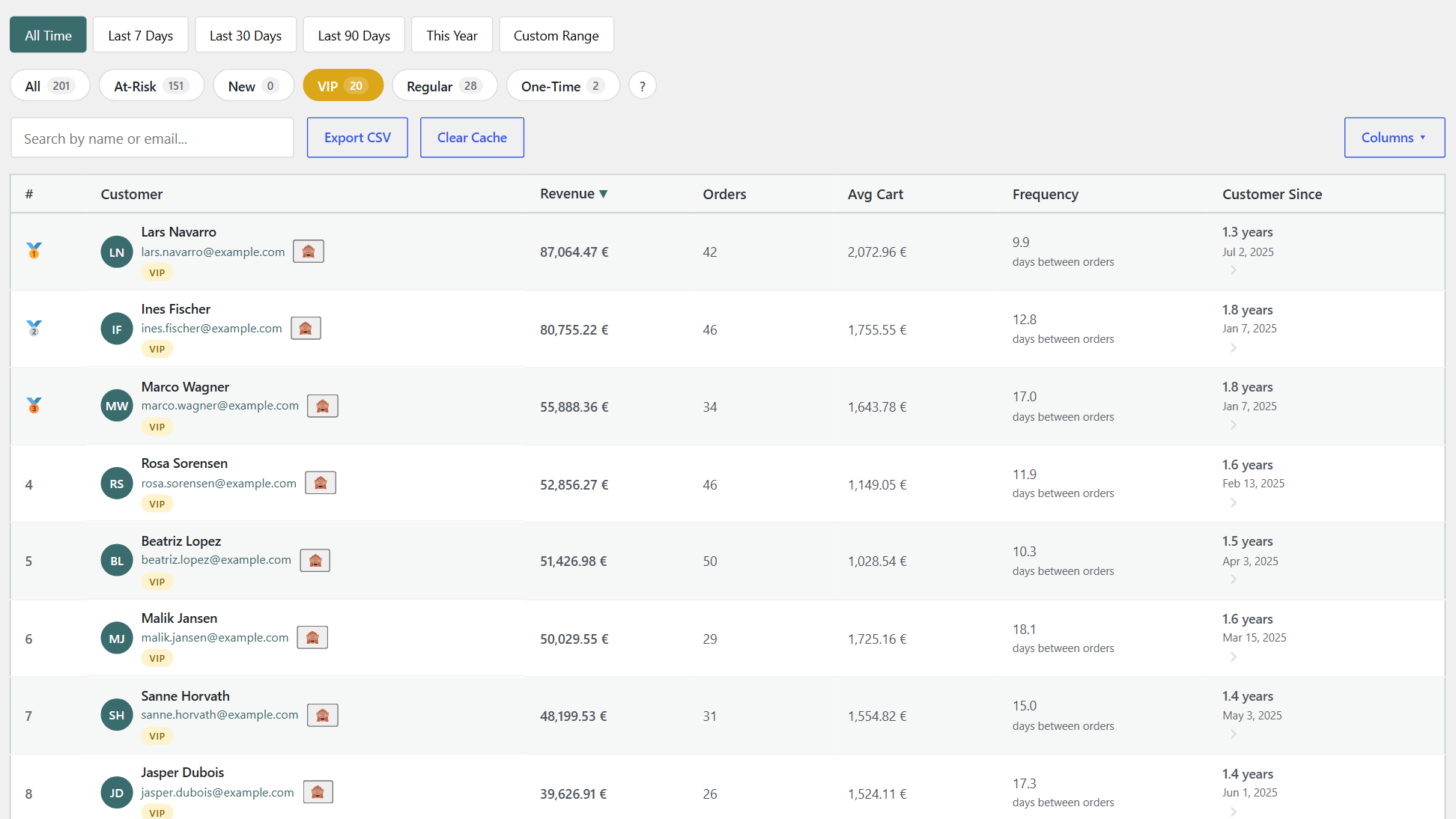
- Sortable ranking table - Customer name, revenue, order count, average cart, frequency and customer since
- Summary cards - Totals and per-customer averages for any date range
- Date-range presets and custom range
- Live search and column visibility toggles
- Guest orders included - Guests are grouped by billing email
- Segment pills - At-Risk, New, VIP, Regular and One-Time customers, with live counts
- Top 10 revenue bar chart - Your ten top customers by revenue
- Revenue concentration doughnut chart
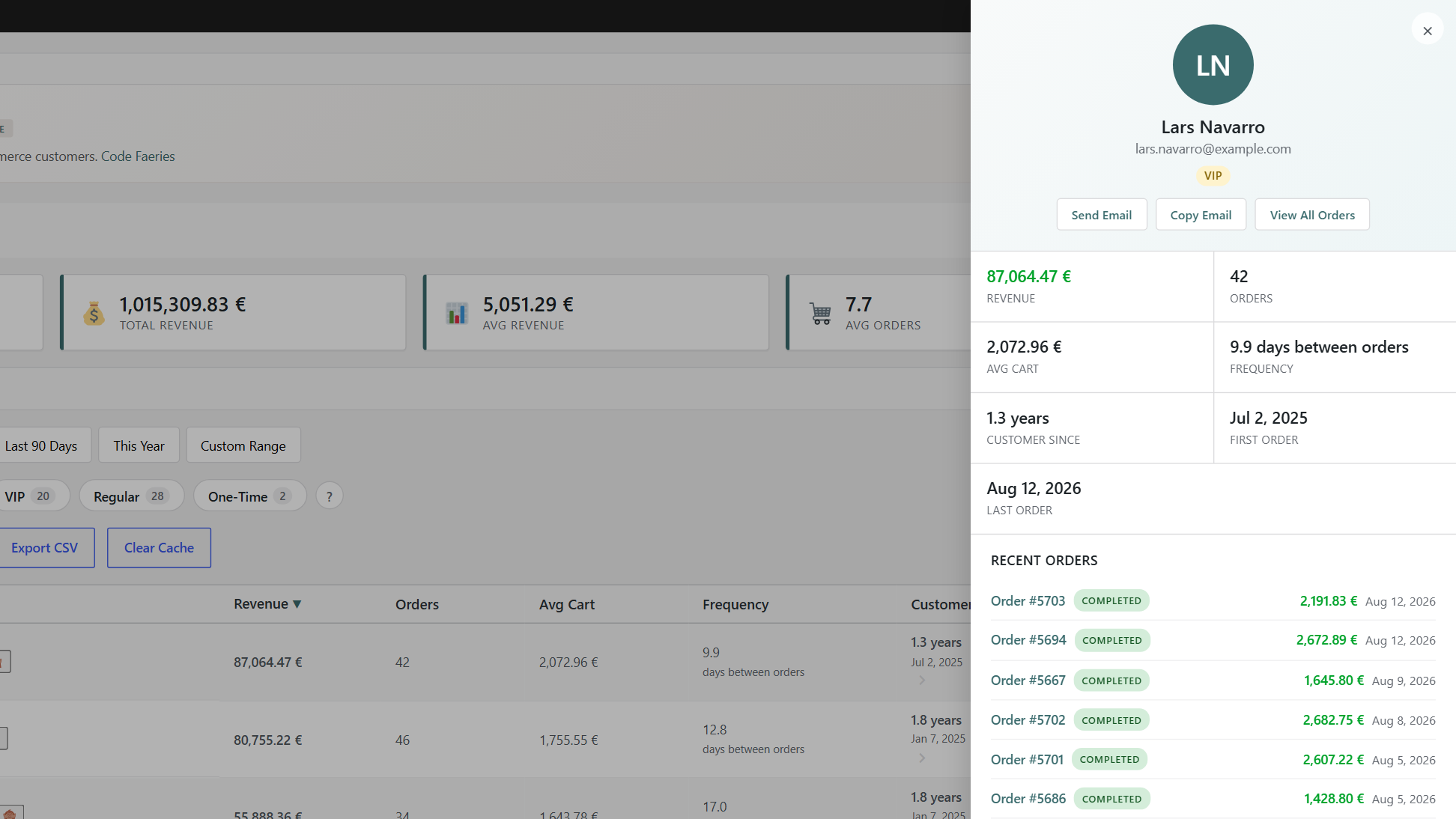
- Customer detail panel - Recent orders, top products and profile link
- Customer summary on orders - A Top Customers box on the WooCommerce order screen shows the customer's segment, revenue, order count, average cart and customer since
- Segment in the users list - A Segment column in the WordPress users list, linked to the customer ranking
- Acquisition source - The customer detail panel shows how the first order was attributed by WooCommerce order attribution
- Ignore and restore customers - Keep staff, test or wholesale accounts out of the customer ranking
- CSV export of the customer list
- Only completed and processing orders are counted - Pending, on-hold, cancelled, refunded and failed orders are excluded from rankings and totals
- HPOS-ready - Automatic detection of WooCommerce High-Performance Order Storage
- WooCommerce Subscriptions aware - Active subscribers are flagged (WooCommerce Subscriptions optional)
- GDPR personal-data exporter and eraser, with anonymized customers reported as a single aggregate row
- No database table, no cron job created by the plugin
安装:
- Upload the plugin files to
/wp-content/plugins/codefaeries-top-customers, or install it directly from the WordPress admin interface. - Activate the plugin through the Plugins menu.
- Visit WooCommerce → Top Customers.
屏幕截图:
常见问题:
Is CodeFaeries Top Customers free?
Yes. Every feature listed under "Free customer ranking features for WooCommerce" is free and never expires. Top Customers Pro is a separate add-on with RFM scoring, Customer Lifetime Value estimation, custom segmentation rules, lifecycle analysis, custom reports and automated email campaigns.
Where do I find my top customers?
After activation, visit WooCommerce > Top Customers. The page shows summary cards, charts and the customer ranking table.
How are WooCommerce customers ranked?
By revenue, order count, average cart, purchase frequency or customer age: every column of the ranking table is sortable. You choose the date range with presets or a custom range.
Which customer segments are available?
At-Risk, New, VIP, Regular and One-Time. Each customer gets one segment, evaluated by priority, and the segment pills show live counts.
My totals differ from the WooCommerce sales report.
Top Customers only counts orders in the Completed or Processing status. Small differences from core reports are expected.
Are guest orders included?
Yes. Guests are grouped by billing email. Customers without a billing email cannot be ranked.
Can I exclude staff, test or wholesale accounts from the ranking?
Yes. You can ignore a customer to keep the account out of the ranking, and restore it later.
Can I export my customer list?
Yes. The customer list exports to CSV.
Does it work with WooCommerce HPOS?
Yes. High-Performance Order Storage is detected automatically.
Does it work with WooCommerce Subscriptions?
Yes. WooCommerce Subscriptions is optional: when it is active, the plugin is aware of active subscribers.
Does it handle multiple currencies?
No. Revenue is reported in your store's base currency without conversion.
Does the plugin send my customer data anywhere?
No. All customer ranking data is computed locally from your own WooCommerce database. The plugin does not contact any external service.
Is it GDPR friendly?
The plugin adds a personal-data exporter and eraser to the WordPress privacy tools. Anonymized customers are reported as a single aggregate row.
A user has orders but no segment in the users list.
The segment is found through the account's billing email, or its account email. A customer whose orders all carry another billing email is ranked under that email and shows no segment in the users list. The figures in the users list and on orders are all-time: the date range of the Top Customers page does not apply to them.
Where does the acquisition source come from?
It is read from WooCommerce order attribution, on the customer's first counted order, and shown in the customer detail panel. It is empty when WooCommerce recorded no attribution for that order.
What happens on uninstall?
If "Delete all plugin data when uninstalling" is enabled on the Top Customers page, all options and transients created by the plugin are removed. Otherwise, your settings are preserved so you can reinstall later. The plugin creates no database table and schedules no cron job.
Where do I get help?
On the wordpress.org support forum of the plugin.
更新日志:
- New: a Top Customers box on the WooCommerce order screen shows the customer's segment, revenue, order count, average cart and customer since.
- New: a Segment column in the WordPress users list, linked to the customer ranking.
- New: the customer detail panel shows the acquisition source of the first order, read from WooCommerce order attribution.
- Improved: the plugin's WordPress.org page says what the plugin does in the words store owners search for, with a longer FAQ.
- Fixed: with WP_DEBUG on, the plugin no longer writes a "RateLimiter: no instance registered" line to the debug log on every page load.
- Fixed: the Top 10 and revenue concentration charts keep their full height when the charts panel is first opened, reopened, or shown on a narrow screen.
- Fixed: amounts and dates in the customer table and its charts follow your WordPress language instead of your browser's.
- Fixed: the RFM Score column separates the score from the segment name.
- Fixed: the help tab's support link leads to the contact page.
- Fixed: on a site that also runs a CodeFaeries Pro plugin, this plugin's bundled toolkit can no longer take the place of the Pro's and cause a critical error.
- Improved: an add-on can leave part of an order's total out of customer revenue, which Top Customers Pro uses to exclude products, categories and payment methods.
- Improved: the bundled admin toolkit is updated to its latest release.
- Compatibility: tested up to WordPress 7.1.
- Improved: usage tracking has been removed entirely from the free plugin — it no longer collects any data or contacts external services.
- Improved: the contextual help tab and readme now state clearly that the plugin makes no outbound network requests — all processing stays on your site.
- Improved: simplified the admin navigation by removing the locked Pro teaser tabs.
- Improved: updated the bundled charting library to Chart.js 4.5.1.
- Improved: customer avatars are now drawn locally from name initials — the plugin no longer contacts any external avatar service.
- Improved: documentation now lists the opt-in telemetry service the plugin can contact.
- Improved: distribution package hardened for the WordPress.org Plugin Directory.
- Compatibility: minimum PHP requirement stated as 7.4, which is what the plugin has always needed.
- Code quality: passes WordPress Plugin Check cleanly.
- Fixed: removed repeated "Invalid plugin file" errors that WooCommerce logged on every admin request when the plugin runs alongside its Pro add-on.
- Fixed: database queries hardened and graceful handling when optional dependencies are missing.
- Fixed: stability fixes at plugin startup — internal services now initialize reliably alongside the shared toolkit.
- Fixed: correct loading when the plugin runs alongside its Pro add-on.
- Customer ranking dashboard with sortable columns and visual charts.
- Customer segments (top spenders, frequent buyers, and more).
- CSV export of the customer list.
- GDPR data exporter and eraser.
- Opt-in anonymized telemetry.
- HPOS and legacy order-table support.