
CodeFaeries Views Metrics
| 开发者 | lwsdevelopers |
|---|---|
| 更新时间 | 2026年10月8日 23:01 |
| PHP版本: | 7.4 及以上 |
| WordPress版本: | 7.1 |
| 版权: | GPL-2.0-or-later |
| 版权网址: | 版权信息 |
详情介绍:
- Universal Tracking - Works with posts, pages, WooCommerce products, and any custom post type
- Dashboard Widget - At-a-glance statistics with interactive chart on WordPress dashboard
- Gutenberg Blocks - Post Views and Most Viewed Posts blocks for the block editor
- Most Viewed Posts Widget - Sidebar widget to display popular content
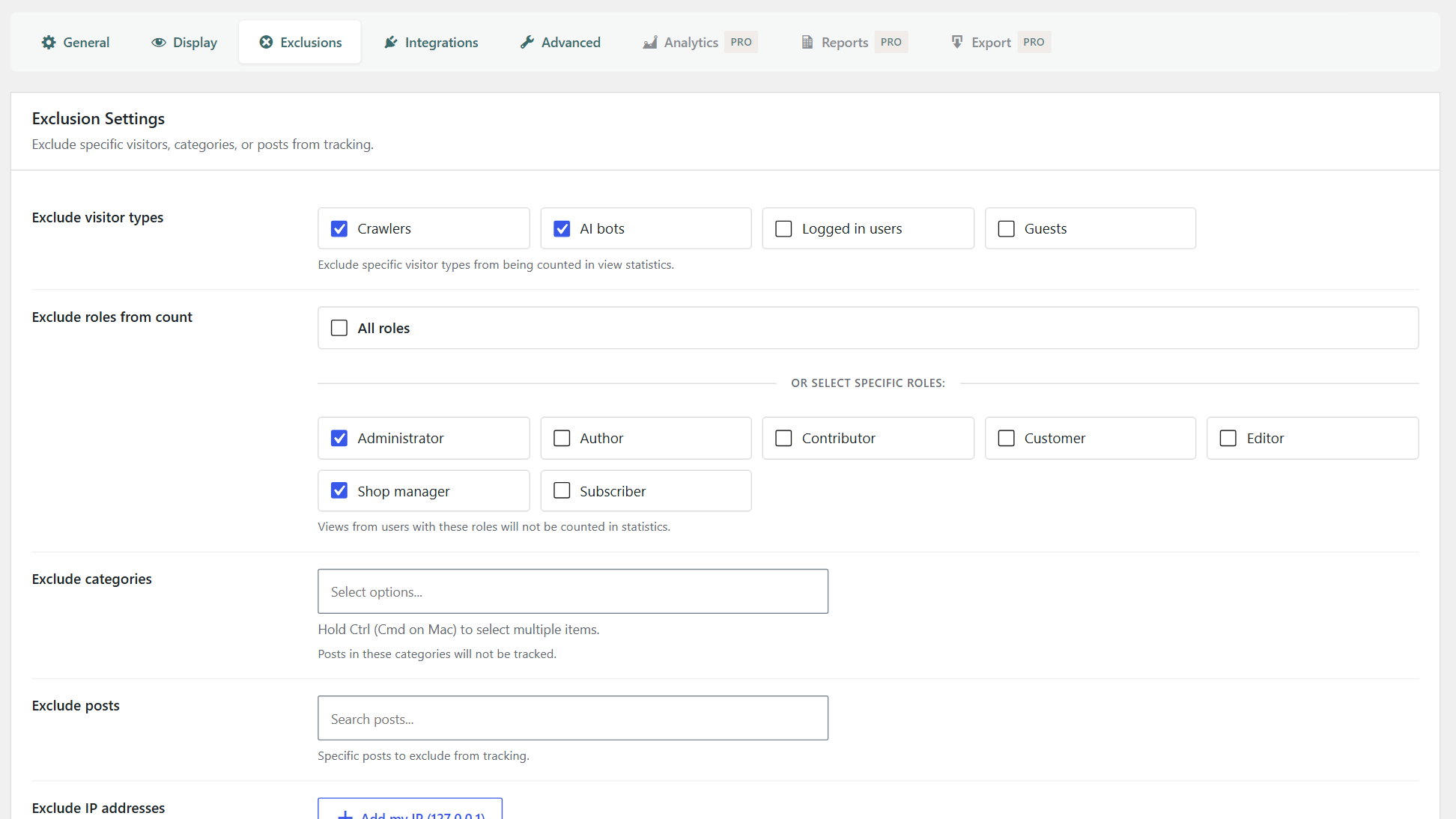
- Smart Exclusions - Exclude crawlers, AI bots, logged-in users, guests, specific roles, categories, or individual posts
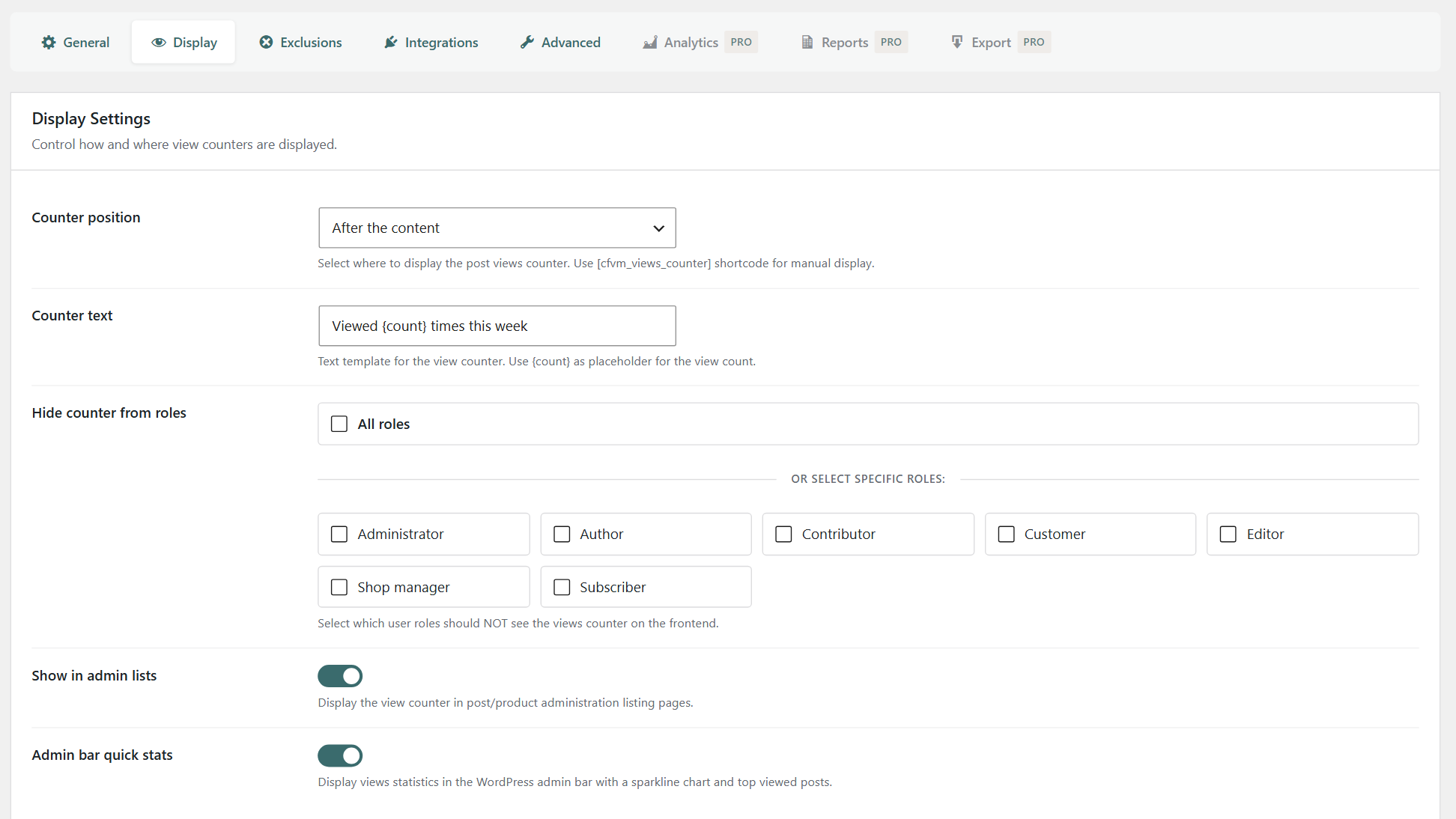
- Flexible Display - Show counters before content, after content, or manually via shortcode with customizable text
- Role-Based Visibility - Control which user roles can see view counters
- Role-Based Counting - Exclude specific roles from being counted (admins and shop managers by default)
- Performance Optimized - Multiple tracking methods (PHP, JavaScript, REST API) including async modes for cached sites
- WooCommerce Integration - Track and display view counts on product pages
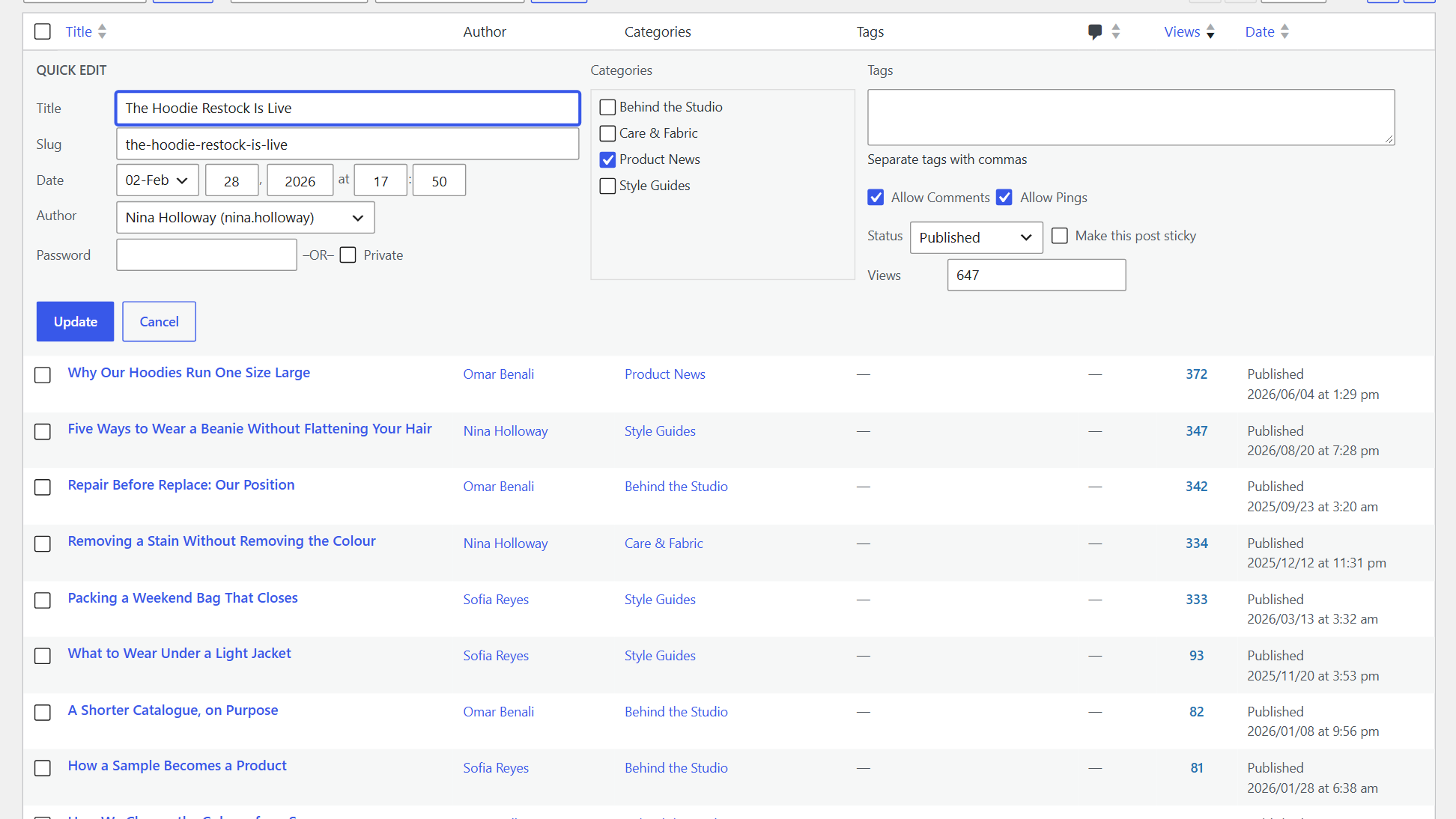
- Quick/Bulk Edit - Manually adjust view counts directly from admin lists
- Import Tool - Migrate view data from WP-PostViews or other plugins
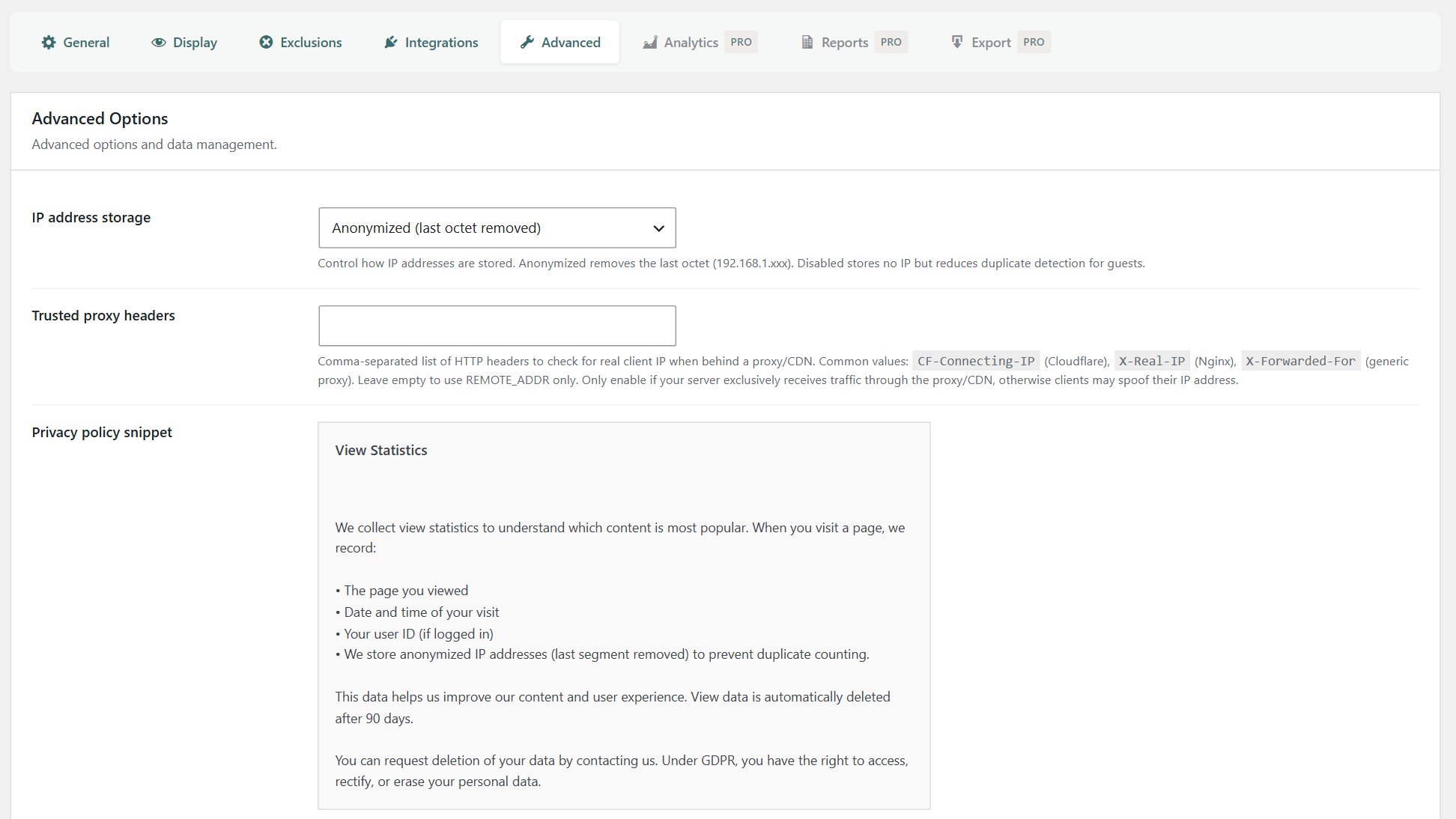
- GDPR Compliant - IP anonymization options and privacy policy snippet
- Developer Friendly - Clean, well-documented code with filters and hooks
- Admin Integration - View counts in post/product listing pages with sorting
- Real-Time Statistics - Dashboard showing total, today, yesterday, weekly, and monthly views
安装:
- Upload the
codefaeries-views-metricsfolder to the/wp-content/plugins/directory, or install directly through the WordPress plugin screen. - Activate the plugin through the 'Plugins' menu in WordPress.
- Navigate to Views Metrics in the WordPress admin menu.
- Configure your tracking and display settings.
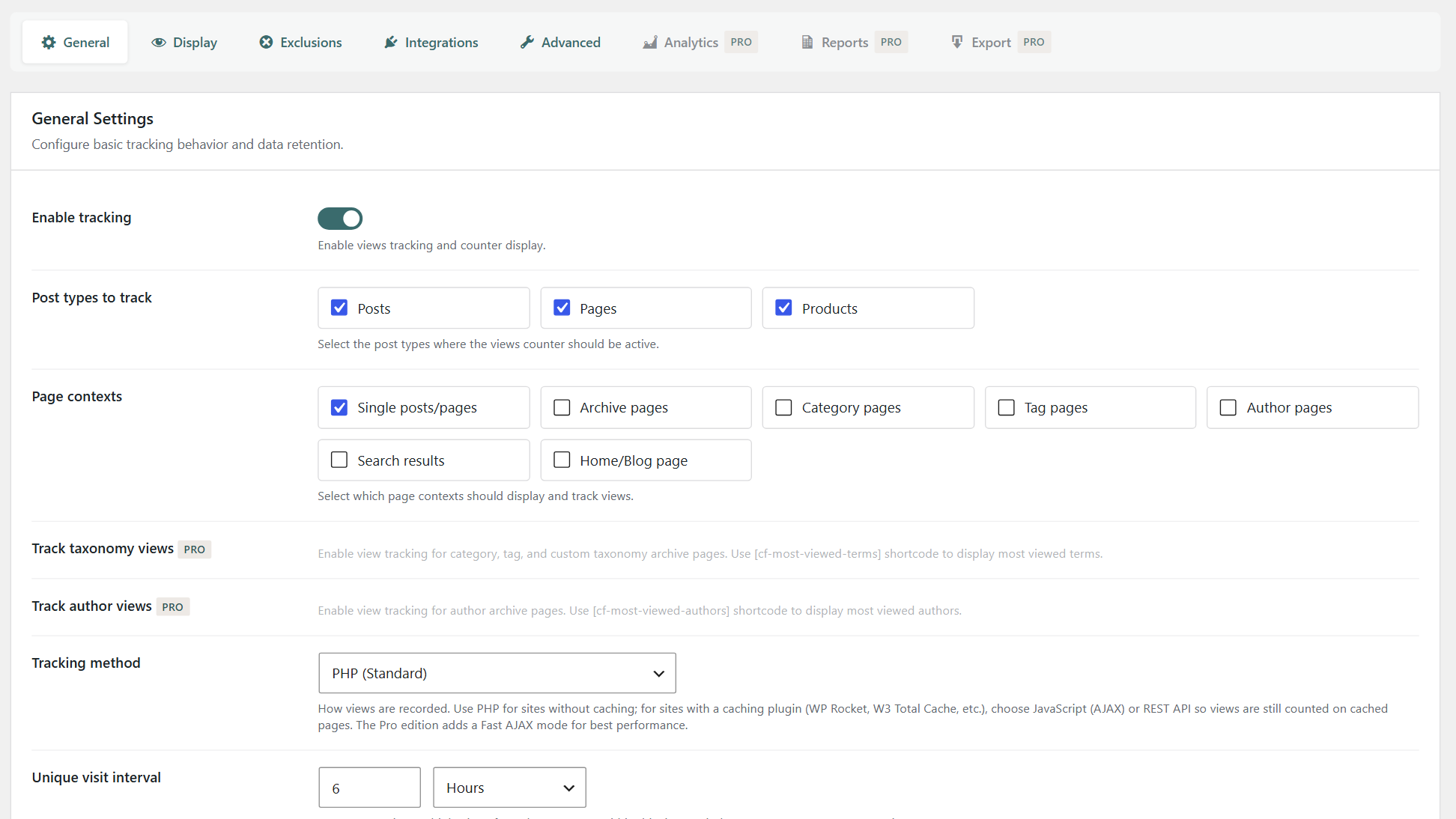
- Post types - Select which post types to track (posts, pages, products, etc.)
- Tracking method - PHP (Standard), JavaScript (AJAX), or REST API (the async modes are recommended for cached sites)
- Unique visit throttle - Prevent counting duplicate views from the same user within a time period
- Counter position - Before/after content or manual via
[cfvm_views_counter]shortcode - Exclusions - Exclude crawlers, AI bots, specific roles, categories, posts, or IP addresses
屏幕截图:


常见问题:
Does this plugin require WooCommerce?
No. Views Metrics works with any WordPress site. WooCommerce is completely optional. When WooCommerce is installed, you get bonus features like product view tracking.
Which tracking method should I use?
If your site uses a caching plugin (WP Rocket, W3 Total Cache, LiteSpeed Cache, etc.), choose JavaScript (AJAX) or REST API. These record views asynchronously and keep counting correctly even when pages are served from cache. For sites without caching, PHP (Standard) is the simplest option.
How does the unique visit throttle work?
The throttle prevents the same visitor from inflating view counts. When set to e.g. 1 hour, a second page view from the same user within that hour is not counted. Set to 0 to count every page view.
Is the plugin GDPR compliant?
Yes. You can choose how IP addresses are stored: full (best duplicate detection), anonymized (last octet removed), or disabled (no IP storage at all). A ready-to-use privacy policy snippet is provided under Advanced settings.
Can I exclude bots and crawlers from view counts?
Yes. By default, crawlers (Googlebot, Bingbot, etc.) and AI bots (GPTBot, ClaudeBot, Google Extended, etc.) are excluded. You can also exclude logged-in users, guests, specific roles, categories, posts, and IP addresses.
Can I import views from another plugin?
Yes. Go to Views Metrics > Advanced and use the Import tool. It supports WP-PostViews (views meta key), Post Views Counter (post_views_count), or any custom meta key. Preview the import before running it.
How do I display the view counter manually?
Use the [cfvm_views_counter] shortcode. It supports attributes for period (today, week, month, total), custom text with a {count} placeholder, and more. Two Gutenberg blocks are also available: Post Views and Most Viewed Posts.
Does it work on multisite?
Yes. Views Metrics supports multisite with network-wide activation. Tables are created for each site automatically, including newly created sites.
更新日志:
- Fixed: the Post Views block and the views counter shortcode no longer show a count for one period under the wording of another. Without a text of their own, they now say "Viewed 647 times" for all time instead of "Viewed 647 times this week".
- Compatibility: requires WordPress 5.6 or later. The plugin already relied on functions missing from earlier versions.
- Fixed: in the block editor, the Post Views block sits in the content column like the other blocks instead of against the left edge.
- Fixed: the Post Views and Most Viewed Posts blocks now apply their alignment, HTML anchor and additional CSS class on the site.
- Fixed: the Views Trend chart of the dashboard widget no longer draws the remaining days of the current month as zero views.
- Fixed: the "Anonymized" choice of the IP address storage setting is no longer cut off.
- Fixed: the "Visit plugin site" link, the "Views Metrics Pro" link in the help tab and the "Upgrade to Pro" button of the cache warning now open the Views Metrics product page; the last two led to a missing page.
- Compatibility: tested with WordPress 7.1.
- Improved: the bundled admin toolkit is updated to its latest release. No change to features or settings.
- Improved: the bundled admin toolkit is updated to its latest release. No change to features or settings.
- Improved: the plugin no longer ships the usage statistics code of its shared admin toolkit; that code was never active in this edition.
- Improved: the bundled admin toolkit is now a published release instead of a development snapshot.
- Includes the 1.0.5 fixes below, which were not published on WordPress.org.
- Fixed: the "Post Views" and "Most Viewed Posts" blocks, the "Most Viewed" widget and the admin bar quick stats were not loaded; they are available again.
- Fixed: the views chart opened from the post list now draws instead of staying on its loading spinner.
- Fixed: the dashboard widget chart no longer stays on its loading spinner.
- Fixed: "Top Posts This Month" skips deleted posts and shows a message when there is nothing to list.
- Fixed: the "Total" label in the post views chart window is readable.
- Fixed: settings reserved for the Pro edition are no longer changed by saving or resetting settings in the free edition.
- Fixed: with the JavaScript or REST tracking method, a content blocker could block the tracking script because of its file name, and those views were not counted.
- Improved: the tracking script is no longer loaded when the PHP tracking method is used, since it is not needed there.
- Changed: media attachment pages are no longer tracked by default. The settings page never offered them, and saving the General tab already turned them off.
- Fixed: a PHP notice on the settings page on sites without WooCommerce — the searchable dropdowns now load their own library instead of relying on WooCommerce.
- Fixed: the tracking method description was cut off and now explains which method to use with a caching plugin.
- Compatibility: minimum PHP requirement lowered to 7.3 — the plugin now runs on a wider range of hosts.
- Code quality: additional WordPress Plugin Check findings resolved.
- Changed: shortcode renamed from
[cf-views]to[cfvm_views_counter].
- Fixed: stability fixes at plugin startup — internal services now initialize reliably alongside the shared toolkit.
- Fixed: cleanup cron now scheduled correctly on activation; admin bar caches invalidated when needed.
- Fixed: Fast AJAX bootstrap and multisite hooks hardened; admin code cleanup.
- Code quality: passes WordPress Plugin Check and PHPCS WordPress Coding Standards cleanly.
- Improved: input sanitization and output escaping reviewed across the codebase.
- Improved: error logging now gated behind
WP_DEBUG(no log noise in production).
- New: Dashboard widget with an interactive chart and statistics.
- New: Gutenberg blocks "Post Views" and "Most Viewed Posts".
- New: "Most Viewed Posts" sidebar widget.
- New: Quick Edit and Bulk Edit support for view counts.
- New: import tool for migrating from WP-PostViews and similar plugins.
- New: IP anonymization modes (full, anonymized, disabled) and a privacy-policy snippet generator.
- New: sortable Views column in admin post lists.
- Improved: admin UI with modern pill-style tabs.
- Changed: shortcode renamed from
[post-views]to[cf-views]. - New: shortcode attributes —
period,text,hide_zero,class. - New: "Exclude roles from count" setting.
- New: WooCommerce "Most viewed" sort option.
- Improved: default exclusions now cover crawlers, AI bots, administrators, and shop managers.
- Improved: counter hides automatically when count is zero.
- Fixed: Fast AJAX tracking mode.