
CodePoint Server-to-Server Migration
| 开发者 | thecodepoint |
|---|---|
| 更新时间 | 2026年8月28日 03:03 |
| PHP版本: | 7.4 及以上 |
| WordPress版本: | 7.0 |
| 版权: | GPLv2 or later |
| 版权网址: | 版权信息 |
详情介绍:
- the new site sits on a temporary IP address before you point the domain,
- your own upload bandwidth is limited,
- the hosts involved offer no SSH/WP-CLI access,
- shared-hosting execution limits kill long-running processes.
- One-time, expiring connection keys — the old site issues a key valid for 72 hours. Access is granted only by a constant-time comparison of the secret itself, backed by per-IP and global lockouts. No key exists until you create one, you can revoke it at any moment, and it is destroyed automatically when a migration completes or is abandoned.
- Direct file streaming — files transfer straight from the old server into place on the new one, in resumable 16MB batches. No archive is built, no extraction step runs, and no double disk space is needed on either side.
- Chunked everything — scanning, transfer, database export, and import all run in ~6-second increments. Pause, close the tab, resume — even mid-file.
- Safe URL rewriting — serialized PHP data is unserialized, replaced recursively, and re-serialized; JSON-escaped URL variants are covered; table prefix differences are reconciled (capabilities, user_roles).
- Staged, atomic switchover — the database imports into staging tables while the live site keeps working. Finalize swaps every table in a single statement, so either the whole switch happens or nothing does, and your previous tables are kept as a rollback backup (prefixed cps2s_old_ after your own table prefix, e.g. wp_cps2s_old_options).
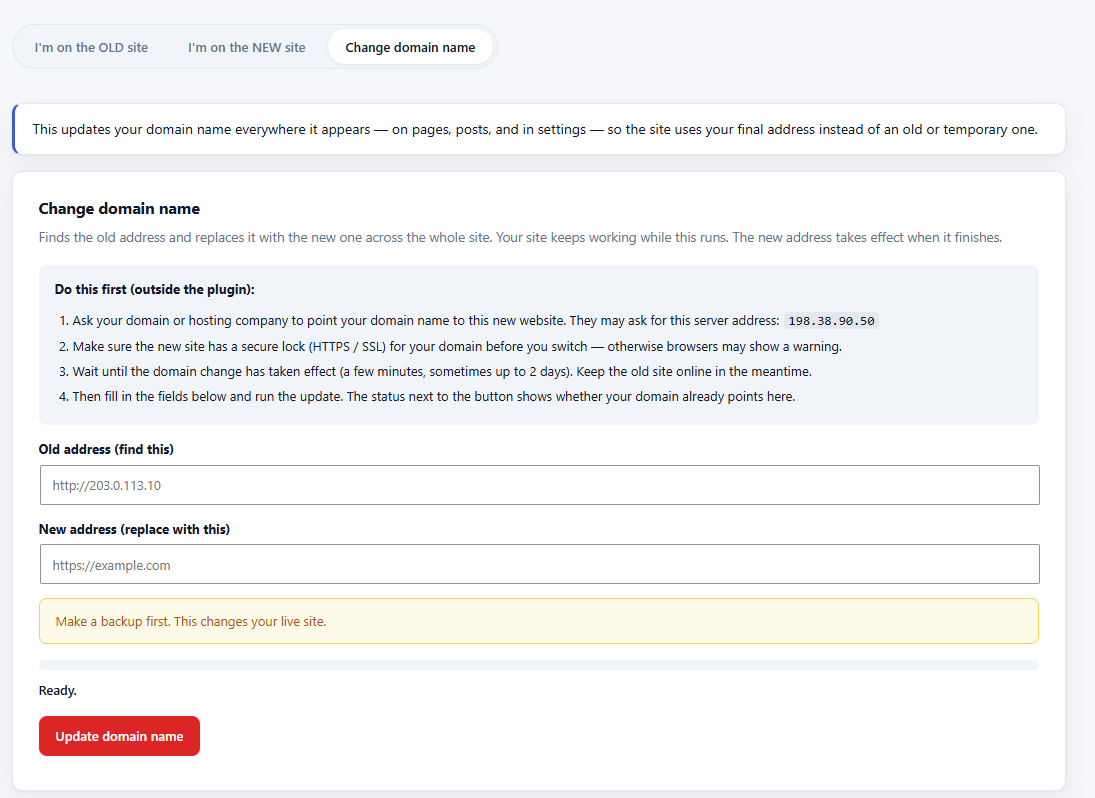
- Change domain name — after your domain points to the new site, run a chunked, serialized-safe search/replace to swap the temporary URL for the final domain across pages, posts, and settings.
- Pre-flight checks — multisite, WordPress/PHP version mismatches, disk space, plain-HTTP transport, and same-URL mistakes are flagged before anything runs.
- Security hardened — capability + nonce checks on every request, expiring single-use connection keys verified by a constant-time secret comparison, brute-force lockout on the transfer endpoints, randomized and access-protected work directory, strict file-path and SQL-identifier validation.
- WordPress core files (the destination must already be a working install)
- Multisite networks
- wp-config.php and .htaccess
安装:
- Install and activate the plugin on BOTH sites.
- On the old site: Tools → CodePoint Migration → "I'm on the OLD site" → copy the connection key. Optionally list folders to skip.
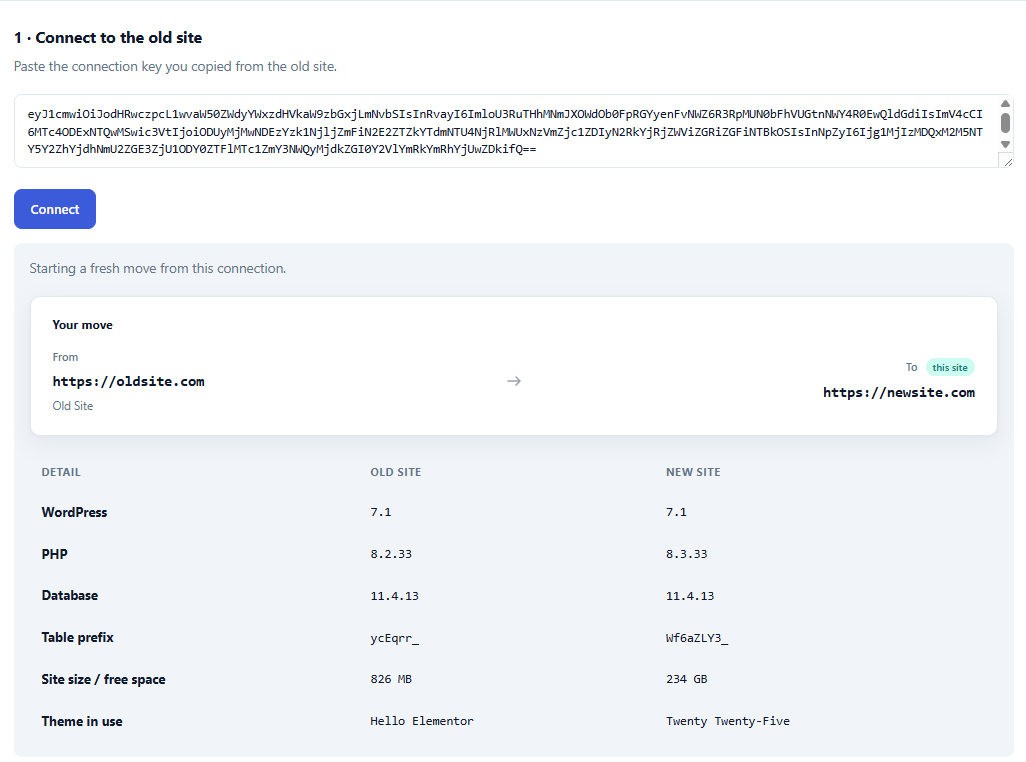
- On the new site: "I'm on the NEW site" → paste the key → Connect. Review the comparison and any warnings.
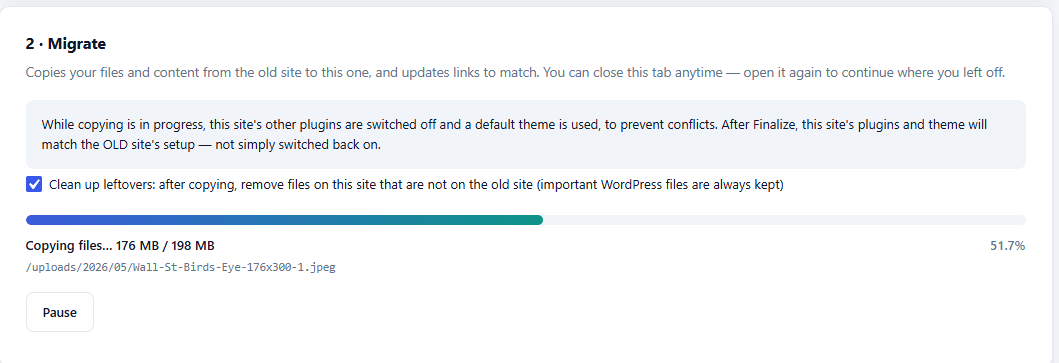
- Start migration. You may pause, close the tab, and resume at any point.
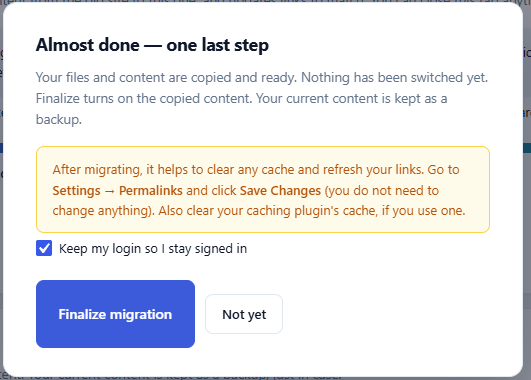
- Finalize. If "Keep my login" is checked (default), you usually stay signed in; otherwise log in with the OLD site's username and password.
- After your domain points to the new site, use the "Change domain name" tab to replace the temporary address with the final domain, then go to Settings → Permalinks and click Save Changes.
- Deactivate and delete the plugin on both sites. Drop the rollback tables (your table prefix followed by cps2s_old_, e.g. wp_cps2s_old_options) once the site is confirmed healthy.
屏幕截图:
常见问题:
When do I change DNS, and does the plugin do it?
DNS changes happen at your domain registrar or hosting/DNS provider — no plugin can do them for you. Ask them to point your domain at the new website (the Change domain name tab shows this server's address if available), make sure a secure certificate (HTTPS / SSL) for the domain is installed on the new server, wait until the change has taken effect while the old site keeps serving visitors, and only then run the domain update. The button checks whether the domain currently points here and warns — without blocking — if it does not yet.
Why am I logged out after finalizing?
Finalizing switches in the old site's database, including its users. If your login could not be kept (same username already exists on the old site, or you unticked "Keep my login"), you need to sign in with the old site's admin username and password. That is normal.
The connection fails with HTTP 404
The old site's REST API is not reachable at /wp-json/. Enable pretty permalinks on the old site (Settings → Permalinks → anything except Plain) and confirm the plugin is active there.
The connection fails with HTTP 403
The key is wrong, expired (72-hour lifetime), or was invalidated by a completed migration. Copy a fresh key from the old site. After 10 failed attempts the old site locks the requesting server out for 15 minutes.
Can I run a second migration to the same site?
Yes. Connect again with a fresh key. Before files are copied, other plugins on the new site are temporarily turned off (and a default theme is used) so overwriting plugins like Rank Math cannot crash the migration mid-run. Before the new database is installed, the plugin also frees space from the previous previous rollback backup. Press Start over first if a previous attempt left the site mid-migration.
What happens to plugins or themes that were only on the new site?
They are not restored. Migrating makes this site match the OLD site's plugins, theme, and active-plugin list — it is a replacement, not a merge. If "Clean up leftovers" is checked (the default), anything this site had that the old site didn't is deleted during the copy. If you uncheck it, those files are left on disk but end up inactive, since the imported database's active-plugin list only knows about the old site's plugins. Either way, reinstall or reactivate anything you want to keep that wasn't on the old site.
Does this preserve database foreign key constraints?
No, by design. A small number of tables (some of WooCommerce's newer order-related tables are the confirmed case) use real foreign key constraints between tables, in addition to the relationships WordPress and its plugins already manage in PHP. Recreating those constraints exactly would require staging every table in dependency order instead of one at a time, and every row of data on both sides of the relationship is copied in full regardless — so the constraint itself is dropped during the copy rather than recreated. The data, and the relationships that data represents, are unaffected.
Can I roll back after finalizing?
Yes — your previous tables are preserved with an cps2s_old_ prefix inserted after your own table prefix (so wp_options is kept as wp_cps2s_old_options). Renaming them back (via phpMyAdmin or WP-CLI) restores the pre-migration database. Files are not backed up automatically; transferred files overwrite in place. The prefix includes your site's own table prefix so that installs sharing a database cannot overwrite each other's rollback copies.
Does it work behind Cloudflare or Wordfence?
Usually, but aggressive rate limiting can interrupt the chunked transfer. If you see repeated failures, allowlist the new server's IP address on the old site for the duration of the migration.
Does it migrate multisite?
No. Single-site to single-site only.
更新日志:
- Compliance: two identifiers were the same codepoint_s2s prefix in a different casing convention (JS camelCase, PHP class Title_Case) rather than a different prefix, but did not literal-match the plugin's established lowercase form. Localized JS variable renamed to codepoint_s2s_data (and every reference in admin.js updated); main class renamed to CODEPOINT_S2S_Migration, matching the all-caps form already used by this plugin's own constants. No functional change.
- Docs: added a FAQ entry disclosing that foreign key constraints are intentionally not recreated during migration (see 3.0.2), so this is easy to find without reading the changelog
- Fix: staging a table with a real foreign key constraint (some of WooCommerce's newer order-related tables are a confirmed real-world case, e.g. wc_download_log) failed with MySQL error 150, "Foreign key constraint is incorrectly formed" -- the constraint's own name was already rewritten to avoid collisions, but the table it REFERENCES was still the source's original name, which does not exist under that name on the destination. This is not an ordering issue; it failed the same way regardless of table creation order. Foreign key constraints are now removed from the captured table definition before staging -- WordPress and its plugins manage relationships in PHP, not through database-enforced foreign keys, so this costs nothing functionally and the complete data on both sides of the relationship is still copied in full.
- Fix: staging a table whose own name is already long (Amelia's relational tables are the confirmed real-world case, e.g. amelia_providers_to_specialdays_periods_location) could push the combined name past MySQL's hard 64-character identifier limit once this plugin's own site-scoped staging prefix was added on top, failing with "Incorrect table name" and stopping the migration. Table names are now checked against that limit; only when a name would overflow is it shortened with a short deterministic suffix, and the real name is recorded so finalize still renames it back correctly. Ordinary table names are completely unaffected.
- Changed: every name the plugin introduces now derives from its slug. Options, transients, cron hooks, admin-ajax actions, the REST namespace, script and style handles, the pairing header, the work directory and the staging/rollback table prefixes all moved off the plugin's original working name onto a single codepoint_s2s prefix derived from the plugin slug. Database table prefixes use a contraction of the same slug so that table names stay inside MySQL's 64-character limit.
- Note: because the pairing header and REST namespace changed, both sites must run 3.0.0 or later to connect to each other. Update the old site and the new site before starting a migration.
- Note: a migration left unfinished under 2.9.9 does not carry over. Finish it on 2.9.9, or press Reset after updating and start again.
- Note: scratch and rollback tables written by 2.9.9 are left in place, and are skipped rather than treated as site content, so they cannot be dragged into a later migration. If you no longer need that rollback backup you can drop those tables yourself in phpMyAdmin.
- Renamed: the plugin is now CodePoint Server-to-Server Migration. Settings live under Tools -> CodePoint Migration.
- Fixed: staging and rollback tables are now scoped with the site's own table prefix. Several WordPress installs commonly share one database on shared hosting, separated only by that prefix; previously a finalize on one site could pick up another site's staged tables, and a cleanup could drop another site's rollback backup.
- Fixed: the switchover now runs as a single atomic RENAME TABLE. If it cannot complete, nothing changes at all and the site keeps running on its current database, instead of being left half-swapped.
- Added: an unfinished migration no longer leaves a database dump in uploads indefinitely. A scheduled cleanup removes the work directory and closes the pairing window after 72 hours.
- Added: "Revoke key now" closes the pairing window immediately. Opening the plugin screen no longer creates a key on its own — a key exists only once you ask for one, so a site used purely as a destination never starts answering migration requests.
- Added: brute-force protection now counts failures globally as well as per IP address, so the limit still works behind a proxy or CDN where every request shares one address.
- Added: work directories are now protected on Apache 2.2, Apache 2.4 and IIS.
- Improved: bulk database inserts are fully parameterised through $wpdb->prepare().
- Improved: the path check that confines writes to wp-content now runs before any directory is created, and no longer treats a sibling folder with a similar name as being inside wp-content.
- Improved: the domain-change tool now requires both entries to look like real addresses, so a partial word cannot trigger a site-wide replacement by mistake.
- Improved: on this plugin's own screen, only success and information notices from other plugins are hidden. Errors and warnings — including recovery mode and update notices — stay visible.
- Housekeeping: coding-standards pass; older changelog entries moved to changelog.txt.
- Compliance: class renamed from DSM_Direct_Site_Migration to Direct_Site_Migration. PrefixAllGlobals checks whether a name STARTS WITH the approved prefix, not whether it appears anywhere within it -- "DSM_Direct_Site_Migration" starts with "DSM_", which the checker does not recognize, regardless of the slug text that follows. Dropping the abbreviation entirely means the name now starts with the slug-derived text itself
- Compliance: Tested up to reverted to 7.0 (major.minor only, per the automated Plugin Check requirement -- a specific patch version like 7.0.2 is flagged as invalid)
- Compliance: uninstall.php rewritten as a single properly-prefixed function (direct_site_migration_uninstall()) instead of file-scope variables -- eliminates the global-variable-prefix warning entirely rather than guessing at an acceptable prefix
- Compliance: the two global constants (DSM_VERSION/DSM_FILE) renamed to DIRECT_SITE_MIGRATION_VERSION/DIRECT_SITE_MIGRATION_FILE -- the short "DSM_" form used the same abbreviation pattern just proven insufficient for the uninstall.php variables, so it was replaced proactively rather than waiting to hit the same finding again
- Compliance: renamed the internal class (Site_Puller_Migrate -> DSM_Direct_Site_Migration) and the two global constants (SPMIGRATE_VERSION/SPMIGRATE_FILE -> DSM_VERSION/DSM_FILE) to match the plugin's actual slug -- leftover names from an earlier iteration of the plugin, unrelated to its current identity. Local variables in uninstall.php renamed to match
- Fix: notice-hiding on this plugin's own screen no longer removes any action hook (which had also removed WordPress core's own notices, not just cosmetic ones from other plugins). It is now a CSS-only rule, scoped to a stylesheet that is never enqueued anywhere else, so every notice still renders and functions exactly as normal -- only its visual presentation is suppressed on this one screen
- Fix: a malformed or truncated line in the database dump could produce a PHP warning on every row instead of being skipped cleanly
- Docs: corrected "HMAC-signed keys" language that overstated what the connection-key envelope check provides. The actual protection -- rejecting access from anyone without the real key -- is a constant-time secret comparison on the paired site, which was already correct; only the description was imprecise
- Readme: swapped the redundant "wordpress migration" tag for "move site"
- Readme: updated Tags to migration, wordpress migration, backup, staging, clone
- Readme: Tested up to bumped to 7.0.2
- Wording: the caching drop-in warning no longer says "ask your host" — it now says the file should be removed if pages look wrong after migrating, since this is usually something the site owner can do directly
- Cleanup: removed two unused constants left over from an earlier note that no longer appears (the large-table note, naming specific tables and row counts, is unaffected and still shown)
- Confirmed: license header was already GPLv2 (no space) throughout
- Fix: 2.9.2's charset fix didn't actually resolve emoji/4-byte-UTF8 insert failures for every case — it changed the DB connection's charset, but WordPress's own invalid-data check validates each value against the TARGET COLUMN's own declared charset (looked up via SHOW FULL COLUMNS), independent of the connection. If the source table's column charset itself wasn't utf8mb4, migrating it verbatim carried that restriction over. Staged tables are now explicitly converted to utf8mb4 right after creation (ALTER TABLE ... CONVERT TO CHARACTER SET utf8mb4), regardless of what the source's schema specified, which is the layer where this actually needed to be fixed
- Fix: rows containing real emoji or other 4-byte UTF-8 characters (Google review text, some comments, etc.) could fail to import with "Could not perform query because it contains invalid data" — WordPress's own safety check refusing the query because the destination's database connection was still on plain 3-byte utf8, even though the migrated table itself was utf8mb4. Both the export and import ticks now switch their connection to utf8mb4 using WordPress's own set_charset() API, which updates wpdb's internal validation along with the live connection — a raw SQL command alone would not have been enough, since wpdb checks its own cached charset setting, not just what MySQL is actually doing
- Simplified the large-site pre-flight note to a plain reassurance (no file counts or byte totals) — the total size already shows in the comparison table above it, so the note just says migration may take a little longer than average and that this is expected
- New: pre-flight reassurance for big sites. Connecting now checks for large database tables (via fast information_schema estimates, never a slow COUNT) and large media libraries, and shows a calm note naming them upfront — "this will take longer than usual, that is expected, not a sign it is stuck" — instead of the person discovering that mid-migration with no context
- New: while exporting a table already flagged as large, the progress label shows live row counts (e.g. "redirection_404 — 420,000 of ~647,950 rows") instead of just the table name, so a big table's progress is visible rather than looking frozen
- No changes to file-transfer progress, which already showed live byte counts and the current filename
- Fix: database export used LIMIT offset,N pagination, which gets slower on every batch as the offset grows — on a large table (a busy site's Redirection 404 log, WooCommerce order meta, analytics tables, etc.) this could look like the migration had frozen partway through. Export now walks forward from the last-seen primary key (a direct index seek) instead of counting offsets, so cost per batch stays flat regardless of how far into the table the export has progressed. Falls back to the previous method only for the rare table without a single-column primary key
- Fix: an already-built manifest on the old site was reused as-is even after updating the plugin, so a scan-logic fix (like 2.8.9's cache-folder exclusion) had no effect unless the migration was started completely fresh. The manifest is now stamped with the plugin version that built it; any mismatch forces a full rescan automatically, so a plugin update always takes effect on the very next tick regardless of what was cached before
- This closes the general case, not just the 2.8.9 instance: any future fix to what gets included in a migration will now apply immediately, without needing a manual Reset to take effect
- Fix: the built-in exclusion meant for WordPress's own top-level wp-content/cache directory was matched as a substring anywhere in a file's path, not anchored to that specific folder. This silently dropped any plugin's own internal folder merely named "cache" (e.g. MonsterInsights/Google Analytics for WordPress' includes/cache/) from the transfer with no warning, causing a fatal error the first time WordPress tried to load that plugin after migration. The exclusion is now anchored to the literal top-level directory only; every other built-in exclusion was reviewed and is unaffected, since they either need to match at any depth for a legitimate reason or use strings specific enough that a real collision is not plausible
- UX: unrelated admin notices (from other plugins, or WordPress core update/nag notices) no longer appear on this plugin's own settings screen — they were competing for attention during a focused, multi-step process. Every other admin screen is unaffected; notices still show everywhere else as normal
- Fix: the plugin/theme-parking disclosure said plugins "come back automatically" at Finalize. That is only true for plugins the OLD site also has. Anything that existed only on the destination is removed by mirror cleanup (if "Clean up leftovers" is checked, the default) or left installed but inactive (if unchecked) — Finalize replaces the active-plugin/theme set with the OLD site's, it does not restore what the destination had. Wording corrected in the pre-flight warning, the Migrate card notice, and the Start-over confirmation
- New FAQ entry: "What happens to plugins or themes that were only on the new site?"
- Compliance: plugin/theme parking during file copy now uses WordPress core's own deactivate_plugins() / activate_plugins() with their built-in silent mode, instead of writing the active_plugins option directly. Same practical effect (the risky per-plugin activation/deactivation hooks are skipped) but through the supported API, which also handles multisite network-activated plugins correctly and, on restore, has core's own before-reactivating fatal-error check rather than none at all
- Disclosure: the plugin/theme "parking" that happens during file copy (other plugins switched off, a default theme used, to prevent conflicts) is now stated clearly before you start — as a permanent notice on the Migrate card and as the first pre-flight warning after connecting — not only in the FAQ. The Start over confirmation also now states plainly that plugins/theme stay off if copying already began, until you finish a migration or turn them back on yourself
- Compliance: three admin-page strings that embedded HTML tags directly inside translatable text now use the safer placeholder pattern (HTML outside the translated string) for translator-friendliness, matching the convention already used elsewhere in the file
- No other functional changes
- Fix: mirror cleanup now also removes orphan upload folders (year/month and other subfolders) that are not on the source site. Only folders that still contain files from the new site are kept; the current work directory is never deleted
- Fix: mirror cleanup now removes leftover plugin and theme folders (not only their files) when they are absent from the source site. Empty uploads year/month folders are still left in place
- Fix: orphaned uploads/codepoint-s2s-* work folders from earlier runs are deleted; only the current run's work directory is kept
- Fix: second migrations no longer fatal with Composer autoload errors (e.g. Rank Math "ComposerAutoloaderInit… not found") when overwriting active plugins mid-transfer. Before file copy begins, other plugins are deactivated and the site switches to a bundled default theme so admin-ajax can keep running while wp-content is replaced
- Start over / fresh Connect restores parked plugins and theme only if file copy never started; after a partial copy they stay off so half-written plugins are not loaded. Finalize discards the park list because the migrated database defines what should be active
- Fix: second migrations (same or different source) no longer fail with HTTP 500 caused by leftover cps2s_old_ rollback tables stacking on top of live + staging copies. Before import, previous cps2s_old_ tables are dropped in small chunks to free space
- Fix: fresh Connect clears leftover staging tables, mints a new work directory, and resets a stale export job on the source so a prior run cannot poison the next one
- Fix: finalize now raises the time limit, purges work files before the table swap (so the correct folder is cleaned), and removes migrated pairing options (auth / source job / workdir) from the live options table after swap
- Fix: CREATE TABLE foreign-key constraint names are rewritten for staging so a second import cannot collide with constraint names already used by live tables
- Fix: mirror cleanup no longer deletes uploads/codepoint-s2s-* work folders (the previous path check only matched a root /codepoint-s2s- prefix and missed the real location under uploads)
- UX: clearer plain-language admin copy, how-to steps, and "Change domain name" wording; modernized light admin layout (centered panel)
- UX: finalize network errors now show in the UI instead of failing silently
- New: the finalize modal now shows a targeted post-migration reminder. If Elementor was active on the migrated site, it points to Elementor -> Tools -> Clear Files & Data and Sync Library (the front end can otherwise look broken). Otherwise, a general reminder to reset permalinks (Settings -> Permalinks -> Save) and clear any caching plugin
- No other functional changes For releases before 2.8.0, see changelog.txt included with the plugin.