
Colciudades - Ciudades de Colombia para WooCommerce
| 开发者 | davidzoque |
|---|---|
| 更新时间 | 2026年10月13日 23:30 |
| PHP版本: | 7.4 及以上 |
| WordPress版本: | 7.1 |
| 版权: | GPLv2 or later |
| 版权网址: | 版权信息 |
详情介绍:
- City dropdown that depends on the selected department, in the WooCommerce block checkout and the classic checkout (shipping and billing addresses).
- In classic stores it also works in My Account > Addresses and in the cart shipping calculator, with a search box.
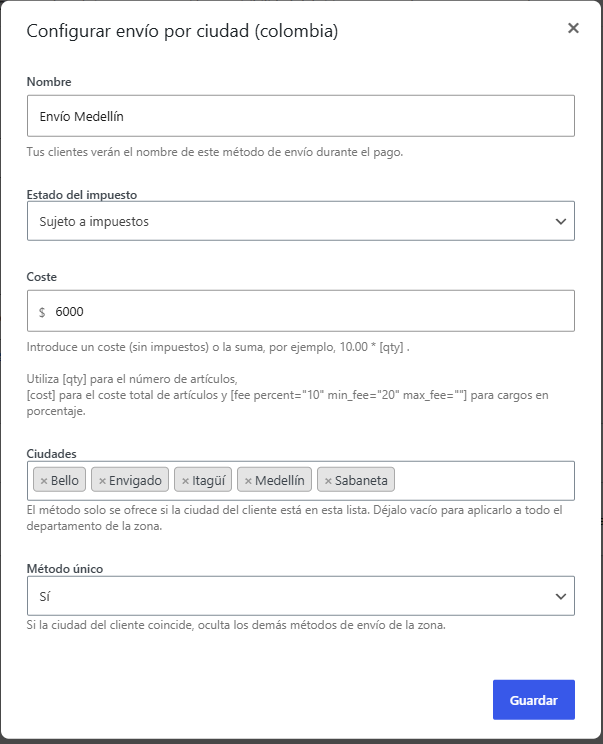
- Adds a per-city shipping method (based on flat rate): pick the cities and a cost inside a zone, with an option to hide the other methods when it applies. The city selector is a search box.
- "Rest of the zone" rates: a general rate that is only offered to cities without a special rate of their own, so a customer in a city with its own price never sees the cheaper general one too.
- Bundles Colombia's 1,104 official municipalities (DANE), with correct accents.
- Uses WooCommerce's native departments (ISO 3166-2). No other plugin required.
- Saves the value in the standard
cityfield, so shipping, taxes and the invoice get it unchanged. - Compatible with HPOS and the cart/checkout blocks. Translation ready, with Spanish included.
安装:
colciudades folder to /wp-content/plugins/ (or install the ZIP from Plugins > Add New > Upload Plugin), then activate it. Make sure WooCommerce is active. It works with the block Checkout and with the classic one. For per-city shipping, go to WooCommerce > Settings > Shipping, add the "Shipping by city (Colombia)" method to a zone, and pick the cities and the cost.屏幕截图:
常见问题:
Do I need another "Colombia departments and cities" plugin?
No. It uses WooCommerce's own departments plus its own municipality list and its own per-city shipping.
Does it work in the classic checkout?
Yes. In the classic checkout, My Account > Addresses and the cart shipping calculator the City field becomes a searchable dropdown, like the Department field. The per-city shipping method works in both checkouts, because it is a standard WooCommerce shipping method.
I have special prices for some cities and one general price for the rest. Customers see both
Add the general price as a "Shipping by city (Colombia)" rate with an empty city list and set Rest of the zone to Yes. It will only be offered when the customer's city is not in the list of any other "Shipping by city" rate of the zone, and only once the customer has entered a city (until then it is not known whether a special rate applies). Free shipping, local pickup and other methods are not affected.
Some town names exist in more than one department
Palestina, Rionegro, La Unión and about 60 other names exist in several departments. When a zone covers more than one department (or all of Colombia), the city selector shows those names with their department, for example "Palestina (Huila)", and the rate only applies in that department. Lists saved before 1.1.1 keep working as before; a repeated name saved without a department shows as "(any department)" and you can replace it with the one you meant.
A customer's town is not in the list
The list has the official DANE municipalities. You can add values with the colciu_ciudades filter.
更新日志:
- Fix: a "Rest of the zone" rate was offered while the customer had picked a department but no city yet, so the cart could show the general rate to a customer whose city has another price (or free shipping). It now waits until there is a city. A rate with an empty list without "Rest of the zone" (the whole department) still works with just the department.
- Fix: per-city rates compared only the city name, so a rate for Palestina (Huila) also applied to Palestina (Caldas) in zones covering several departments. The city must now belong to the customer's department, and names repeated across the zone's departments are offered with their department in the city selector. Existing lists keep working.
- New: "Rest of the zone" option in the per-city shipping method. A rate with this option is only offered when the customer's city is not covered by another per-city rate with its own city list, so the general rate and the special city rate are never shown together. Free shipping, local pickup and other methods are left alone.
- Hardening after a security review: the city list for the shipping method is only built for users who can manage WooCommerce, and the city data printed on the checkout is encoded so that no name can ever close the script tag.
- Fix: a shipping cost typed with a backslash lost it, because the value was unslashed once more than WooCommerce does.
- Renamed to "Colciudades - Ciudades de Colombia para WooCommerce".
- New: the city dropdown now also works in the classic checkout, My Account > Addresses and the classic cart shipping calculator, as a search box like the Department field.
- For Colombia, Department now comes before City in the address forms (classic and block), so the city list matches the chosen department.
- Per-city shipping now matches cities ignoring accents and case, so a city typed as "medellin" (block cart shipping calculator, addresses saved before the plugin) matches "Medellín".
- Saved addresses whose city lacks accents are now recognised in the dropdown instead of being cleared.
- "Single method" also works when the city list is empty (whole department), and it only hides other methods in the package where this method applies.
- The hidden original City input no longer takes keyboard focus.
- The checkout script stops looking for the block checkout after 30 seconds on pages that do not use it.
- Fix: on stores whose thousand separator is a dot (e.g. COP), the per-city shipping cost could lose its thousands when saved (50.000 became 50). WooCommerce 11 shows the localised value in the settings modal but only de-localises its own flat rate fields on save; the cost is now interpreted using the store's separators. Cost formulas keep working as before.
- City label position fix on some themes.
- Per-city shipping method with a searchable city selector, and support for country-level zones.
- Translation ready, with Spanish included.
- Initial release: department-dependent city dropdown in the block checkout, and per-city shipping method.