
ConfigOps – Configuration Management
| 开发者 | pyrra |
|---|---|
| 更新时间 | 2026年8月25日 20:51 |
| PHP版本: | 8.2 及以上 |
| WordPress版本: | 7.1 |
| 版权: | GPLv2 or later |
| 版权网址: | 版权信息 |
详情介绍:
configops_apply capability can replace human confirmation for one mutation only by sending dangerouslyRunUndo: true or --dangerously-run-undo. That acknowledgement does not bypass scope, conflict, reference, lock, audit, verification, or compensation checks. ConfigOps exposes no generic option writer, raw SQL tool, or plugin installer.
Visit the ConfigOps website or read the documentation.
Change a supported WordPress or plugin setting as usual. ConfigOps automatically opens an isolated observation for that save, groups the resulting writes, and reduces repeated writes to the same option into the original-to-final change.
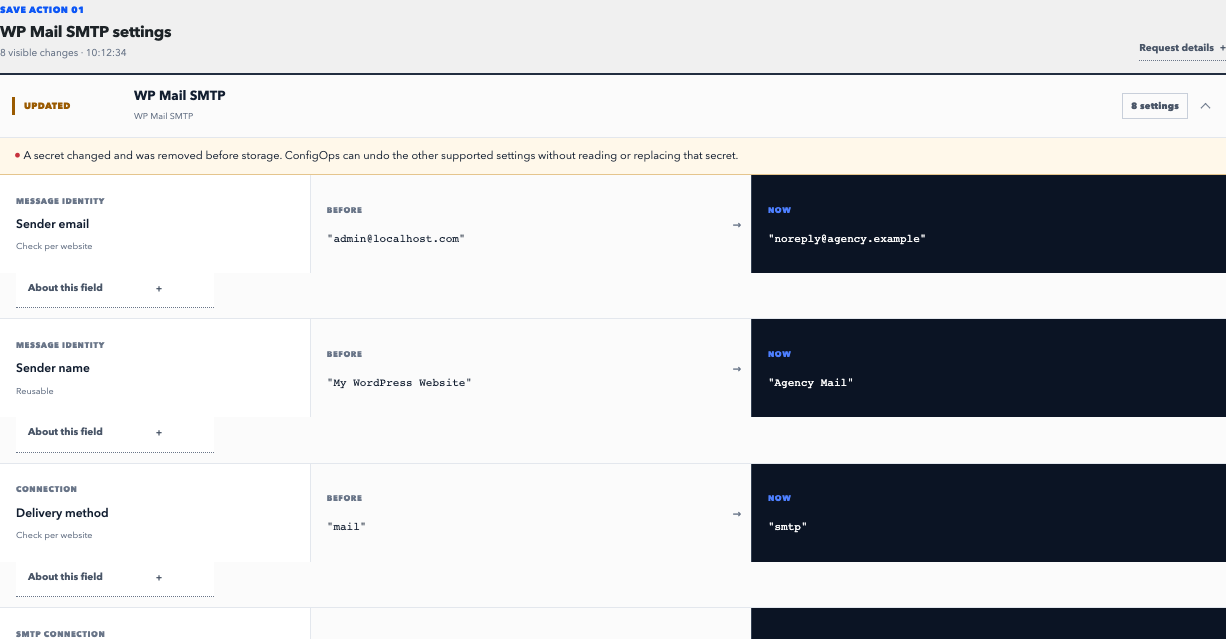
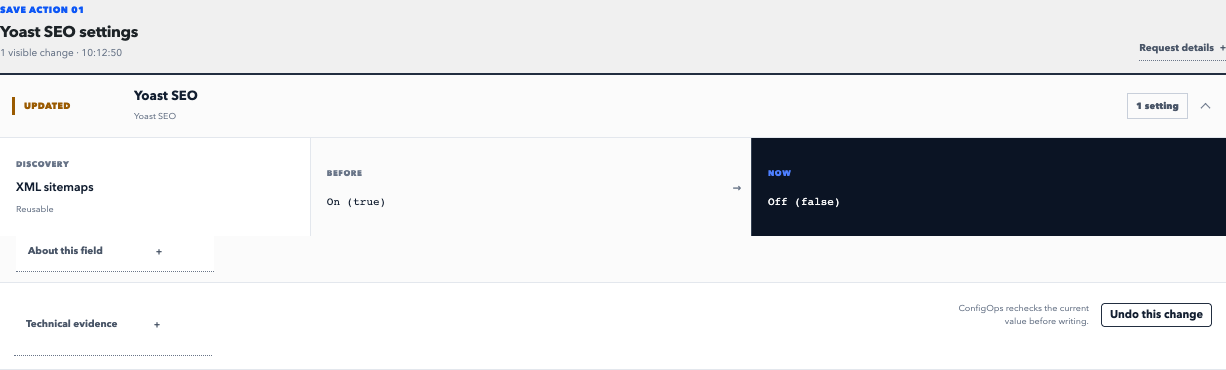
A compact evidence card states how many values WordPress wrote, separates likely decisions from housekeeping, and links to the stored diff. Whole-save Undo appears only when every recorded value is restorable and still passes the conflict check.
Version 0.7 adds private Configuration Packs. Save a completed Change Session as a declarative .configops.json desired state, remove individual settings, import it on another website, inspect the complete Apply Preview, and apply it as an ordinary undoable History session.
Packs are not database snapshots. They contain no old values, autoload flags, table names, SQL, or executable code. Complete options containing protected data are excluded before export. Import rechecks the destination's WordPress and plugin versions, adapter ownership, local references, protected values, current baselines, and site scope before writing. URLs, absolute paths, email addresses, and environment-specific values are warned instead of silently rewritten.
Private Packs remain deliberately local files. Version 0.7 includes no cloud, marketplace, account, synchronization, variable substitution, or drift engine.
One action. The hidden writes behind it. A clear diff. A conflict-checked undo.
What a settings save actually wrote
ConfigOps is not a generic activity log. It does more than report that somebody clicked Save: it records the supported Options API writes caused by the request, separates likely decisions from plugin housekeeping, and attributes the responsible component and code path where possible.
ConfigOps is not a backup. It restores only supported setting values that still match the recorded state, so a later legitimate change is not silently overwritten.
ConfigOps is not plugin-version rollback. It works with configuration values, not plugin or theme code.
What ConfigOps records and checks
- Agent-ready discovery through the native WordPress Abilities API.
- Machine-readable JSON
wp configopscommands designed for scripts and language-model tool use. - Read-only restore planning that checks scope, conflicts, references, autoload state, filtered option reads, adapters, and verified generic-array paths without writing.
- Explicit agent undo for one mutation when
configops_applyand thedangerously-run-undoacknowledgement are both present; all ordinary restore checks remain active. - Automatic local evidence for authorized settings changes made through WordPress admin, REST, and WP-CLI requests.
- Plain-language nested diffs that turn option arrays into recognizable settings.
- An immediate link to the recorded diff and whole-save Undo only when every value passes the restore policy.
- Named Change Sessions for planned maintenance, support cases, and investigations that span several requests.
- Private declarative Configuration Packs exported from completed Change Sessions.
- Complete Apply Preview with requirements, matching state, changes, skips, conflicts, and portability warnings.
- One-use, expiring Apply plans with destination drift checks before the first write.
- Pack application recorded in History with Pack ID/version provenance and ordinary whole-session Undo.
- Provenance for the user, request, component, code path, capture-time plugin version, and direct-versus-registered source basis where ConfigOps can determine it.
- Secret redaction before mutation history is stored.
- Conflict checks before every restore.
- Isolated site evidence across network-active WordPress Multisite installations.
- Multi-Network boundaries tied to each site's real network ownership, including fail-closed foreign-network writes and lifecycle switches.
- A separate Network Admin ledger for Network Options changes.
- Named Network Change Sessions for planned work that spans several Network Admin requests.
- Mutation-level undo for complete Network Options additions and updates.
- Optional experimental undo for verified keys in ordinary, unclaimed associative wp_options arrays.
- WordPress Core 7.0–7.1
- WP Mail SMTP Free 4.7–4.9
- Yoast SEO Free 28.1–28.3
- WooCommerce 10.3, 10.7, 10.9, and 11.0 core settings, feature flags, performance controls, and Point of Sale receipt details
安装:
- Upload the ConfigOps ZIP through Plugins > Add Plugin > Upload Plugin.
- Activate ConfigOps.
- Change one WordPress or plugin setting as usual.
- Use the ConfigOps evidence card to review the hidden writes or undo a save whose recorded values all pass the restore policy.
- For a multi-request task, open ConfigOps and start a named Change Session.
屏幕截图:


常见问题:
Does ConfigOps observe custom plugin tables?
Not generically. ConfigOps records a value-free warning when it observes a direct database write, but understanding or reversing a custom table requires an explicit adapter.
Is ConfigOps an activity log, backup, or plugin rollback tool?
No. An activity log records events, a backup restores a broad site state, and plugin rollback replaces code. ConfigOps explains the supported setting writes behind a save and restores only values that still pass its safety checks.
What does ConfigOps record automatically?
ConfigOps observes supported Options API mutations in authorized WordPress admin, REST, and WP-CLI requests. It does not record anonymous front-end traffic as settings evidence. Named Change Sessions are available when you want to group several requests into one investigation. WP-CLI's optional --user parameter is not required for observation. A shell-authorized command without a WordPress user is recorded with actor ID 0. If another plugin virtualizes a site or network target through an Options API read filter, ConfigOps refuses undo before writing instead of treating the virtual value as stored database state.
Does ConfigOps support WordPress Multisite?
Yes. Version 0.7 supports network activation, isolated per-site evidence, lifecycle and retention across sites, Multi-Network ownership boundaries, and a separate Network Admin ledger for supported Network Options changes. Named Network Change Sessions can group a planned task, and complete network additions and updates can be undone one mutation at a time. Packs remain site-scoped; Network Packs, network deletes, whole-network-change undo, cross-site aggregation, and bulk actions are not supported.
What is inside a Configuration Pack?
A Pack is strict JSON containing a format and schema version, stable Pack identity and version, a name and description, WordPress/plugin requirements, and a list of desired option states pinned to adapter schemas. It contains no before-state, database metadata, SQL, PHP, callbacks, or executable templates. Reserved variable and extension objects must remain empty in schema version 1. Export is conservative: only complete, restorable, non-secret options owned by a currently available tested adapter are selectable. Import repeats those checks against the destination. A warning is not an automatic rewrite; remove a questionable setting from the preview or configure that value explicitly after Apply.
Can automation tools operate ConfigOps?
Yes. ConfigOps is agent-ready through site-scoped native WordPress Abilities and machine-readable JSON WP-CLI commands for authenticated state, capture and mutation reads, named capture control, restore planning, and deliberately authorized single-mutation undo. The same discoverable abilities can be exposed by compatible MCP adapters.
Use a dedicated least-privilege WordPress service user. Mutation evidence may contain non-secret configuration values, even though probable credentials are removed before storage. Do not grant configops_apply unless the agent may actually change settings. The danger acknowledgement skips human confirmation but never the normal safety checks. Generic option-writing tools are not available.
Example commands:
wp --user=configops-agent configops state
wp --user=configops-agent configops captures list --limit=20
wp --user=configops-agent configops restore plan --mutation=842
wp --user=configops-agent configops restore apply --mutation=842 --dangerously-run-undo
Can ConfigOps undo an array without a plugin adapter?
Complete generic Options API values already use exact current-value checks. Site administrators can additionally enable Verified key undo for plugin arrays under Support contracts. For unclaimed associative wp_options updates, it cross-checks the complete patch against both typed snapshots, reverses only captured target keys, and preserves unrelated later keys. Current adapter ownership and current parent shapes are checked again before apply. It refuses secrets, root replacements, integer-keyed parent arrays, list-index edits, redacted or truncated evidence, malformed or overlapping paths, autoload drift, adapter-owned options, and any target key that changed again.
Are secrets stored in the mutation history?
Probable secret fields and options are replaced before persistence. Supported adapters may undo neighboring non-secret fields while preserving the current credential. ConfigOps never reconstructs a redacted secret.
Is rollback guaranteed?
No. ConfigOps restores supported Options API values after a conflict check. Side effects in files, caches, remote services, or custom tables may remain. The interface states when undo is limited or unavailable. If earlier referenced media or content has since been deleted or moved to the trash, ConfigOps refuses to restore its local ID.
What happens when observation storage fails?
The host settings request is allowed to finish. ConfigOps marks the observation incomplete through a value-free emergency marker and disables whole-save undo after storage recovers.
How long is local history kept?
While ConfigOps is active, completed and interrupted observations are kept for 30 days by default. Cleanup is bounded and never selects an active Change Session. Developers may change the window with the configops_retention_days filter. Uninstalling ConfigOps removes its observation history, installation options, scheduled cleanup, and capabilities.
How do I report a security issue?
Email felix@pyrra.net. Do not post credentials, configuration values, database exports, or customer data in a public support thread.
更新日志:
- Saves safe, complete, adapter-backed settings from a completed Change Session as a private
.configops.jsondesired state. - Excludes complete options containing protected data and warns about source URLs, absolute paths, email addresses, environment values, and local references.
- Previews WordPress/plugin requirements and every destination diff before writing; one-use plans are invalidated by destination drift.
- Applies under the ordinary site safety boundary with per-write verification and compensation, then records Pack identity/version in History.
- Makes Pack applications undoable through the existing whole-session conflict checks.
- Reserves variables and extensions for a future schema while keeping both non-executable and empty in version 1; no cloud, marketplace, accounts, or sync are included.
- Adds a WooCommerce core adapter for the WordPress.org-visible 10.3, 10.7, 10.9, and 11.0 lines, including core settings, feature flags, performance controls, and Point of Sale receipt details.
- Audits every supported plugin release’s published settings surface in CI and rejects fields or newly visible version lines without a tested contract.
- Records adapterless plugin identity, capture-time version when resolvable, direct-versus-Settings-API ownership basis, and readable nested leaf labels without claiming plugin semantics.
- Adds a ninth site-scoped WordPress Ability and matching JSON WP-CLI command for explicitly authorized single-mutation undo.
- Keeps restore apply human-authorized by default while allowing a
configops_applyservice user to acknowledgedangerously-run-undo; the flag does not bypass restore checks, locking, audit, verification, or compensation.
- Adds eight site-scoped WordPress Abilities for state, evidence discovery, named Change Sessions, and read-only restore planning.
- Adds machine-readable JSON
wp configopscommands with the same capability checks and bounded response contracts. - Keeps restore apply human-authorized: automation can inspect evidence and validate a plan but cannot write settings.
- Records WP-CLI observations without
--useras shell-authorized actor ID 0 instead of silently dropping them. - Refuses site and network undo before writing when a
pre_*filter or path-relevant missing-row default virtualizes the target, without falsely blocking normal post-read transforms such as Yoast'soption_wpseo. - Avoids synchronous all-site traversal on large-network activation and provisions existing sites lazily.
- Adds opt-in verified key undo for ordinary plugin settings arrays without requiring a dedicated ConfigOps adapter.
- Preserves unrelated later keys, rechecks current structure and adapter ownership, and refuses the complete patch when snapshots, target paths, secrets, autoload state, or ownership fail the restore policy.
- Adds named Network Change Sessions for planned Network Admin work without enabling unsafe whole-network-change undo.
- Makes named-session pointer release owner-conditional across site and network scopes and prevents activation races from resurrecting or orphaning sessions.
- Serializes site and network retention with restore so cleanup cannot remove evidence from an in-flight undo.
- Adds a tested WordPress 7.1 Core compatibility contract for single-site and Multisite settings evidence, review, and guarded undo.
- Extends the Core adapter through WordPress 7.1 while continuing to fail closed for untested WordPress 7.2 releases.
- Adds permanent WordPress 7.1 release-candidate lanes across PHP, exact adapters, browser flows, MySQL, and MariaDB.
- Adds a guided WordPress Playground preview that opens WP Mail SMTP with ConfigOps active and ready to observe one sender-email change.
- Adds an end-to-end release gate for the public demo's direct landing, focused Evidence Card, Review, and conflict-checked Undo flow.
- Keeps runtime behavior and the version 0.4 Multisite support contract unchanged.
- Adds visible links to the ConfigOps website and documentation on the WordPress.org plugin page.
- Keeps the runtime behavior and Multisite support contract unchanged from 0.4.0.
- Adds network activation with isolated evidence, capabilities, retention, migration, site deletion, deactivation, and uninstall lifecycle across WordPress Multisite.
- Adds automatic Network Options evidence in a dedicated Network Admin ledger.
- Adds conflict-checked, mutation-level undo for complete Network Options additions and updates, with locking, audit records, verification, and compensation.
- Keeps network deletes, lifecycle and authority state, named network sessions, whole-change undo, cross-site aggregation, and bulk operations explicitly unavailable.
- Includes the navigation-safe evidence delivery and maintainability hardening developed after 0.3.0.
- Prevents automatic evidence cards from being lost when a settings save navigates between admin requests.
- Consolidates shared command, adapter, request-evidence, pagination, browser-test, and CI workflows.
- Moves the public plugin website to configops.pyrra.net and documentation to configops.pyrra.net/docs/.
- Records authorized settings saves automatically in isolated request-local observations.
- Shows immediate evidence with write, decision, technical, and protected-secret counts plus direct review and conflict-checked undo actions.
- Keeps named Change Sessions as the focused mode for planned multi-request work.
- Preserves automatic observations and named Change Sessions as distinct modes through the schema, review, retention, and uninstall lifecycle.
- Repositions ConfigOps as the undo and evidence layer for WordPress settings with a new directory title, description, and artwork.
- Supports PHP 8.2 through 8.5 with full minimum-runtime and endpoint browser contracts.
- Enforces 70% production and 75% trust-boundary PHP line coverage in CI.
- Adds hostile-input, warning/deprecation, dependency-advisory, and runtime-lifecycle gates.
- Builds a byte-reproducible release archive before WordPress Plugin Check.
- Publishes a complete operator, safety, support, and development documentation site through GitHub Pages.
- First technical preview by pyrra.
- Explicit local captures with request grouping and source attribution.
- Local intent correlation matches touched admin-field names and labels to saved option paths without reading field values or expanding undo permissions.
- Same-request option-write chains collapse to their original and final state; complete same-owner reverts disappear from review.
- Typed nested diffs, conservative noise classification, and secret redaction before persistence.
- A WordPress Core 7.0 settings contract for General, Writing, Reading, Discussion, Media, and Permalink settings.
- Conflict-checked field and session undo with value-free audit records and compensating recovery.
- Exact deep-field contracts for every bundled WP Mail SMTP Free 4.9.0 mailer and the Yoast SEO Free 28.2 feature, crawl, schema, search, social, and LLMs.txt families.
- Media and content identity review for WordPress site icons/logos and supported Yoast image/page fields, including missing-target undo protection.
- Fail-closed capture finalization, schema recovery, bounded 30-day retention, and integrity warnings.
- Performance-budgeted React review interface with responsive and keyboard-tested states.