
Consortia Quick Find & Replace
| 开发者 | tommyhansen21 |
|---|---|
| 更新时间 | 2026年8月15日 21:12 |
| PHP版本: | 7.4 及以上 |
| WordPress版本: | 7.1 |
| 版权: | GPL v2 or later |
| 版权网址: | 版权信息 |
详情介绍:
- Block Editor (Gutenberg)
- Classic Editor
- Code Editor
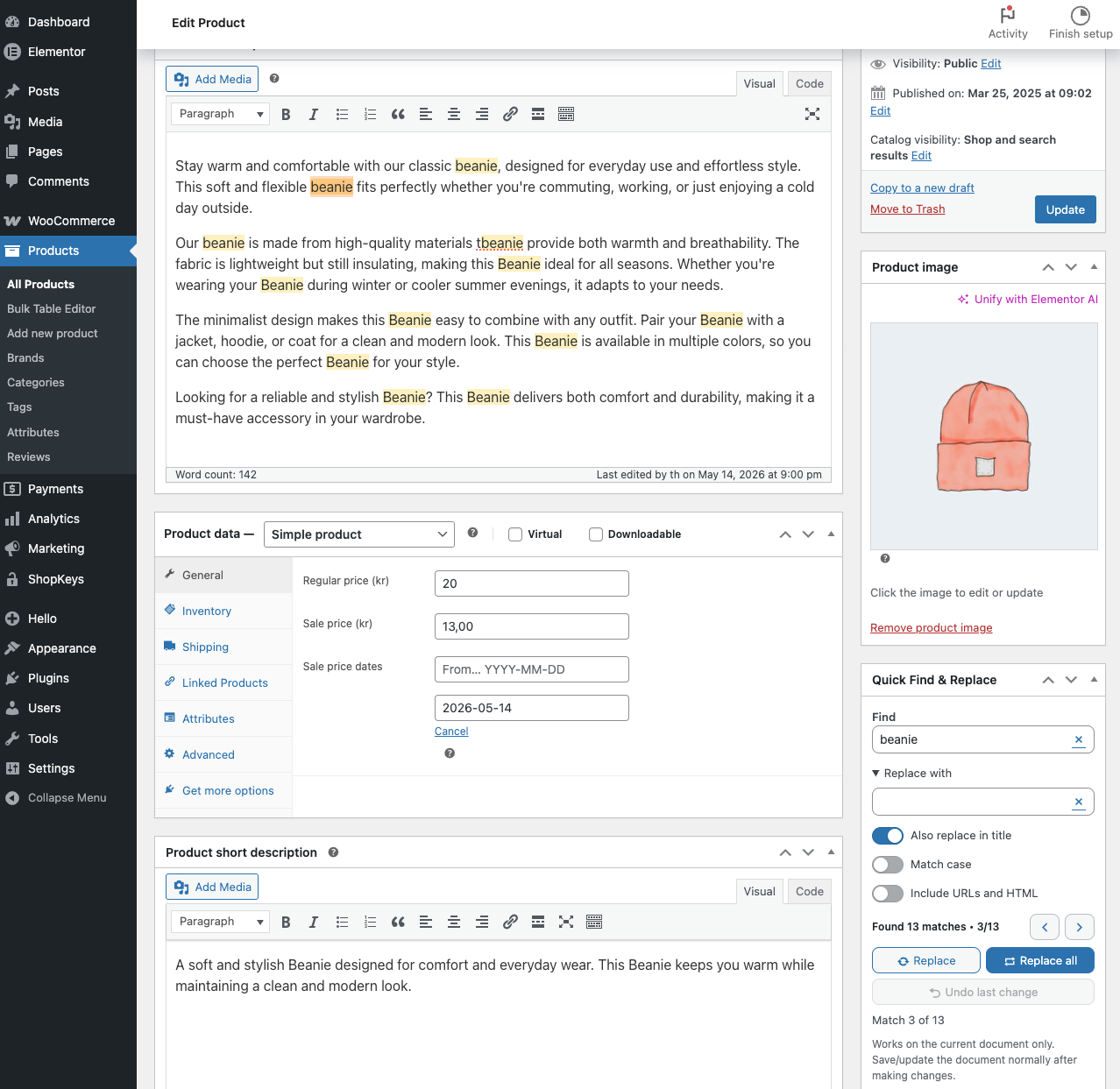
- WooCommerce products
- Posts and pages
- Supported custom post types
- Fixing repeated words or phrases
- Updating outdated wording in long articles
- Cleaning up WooCommerce product descriptions
- Replacing text in titles and content
- Reviewing changes before publishing
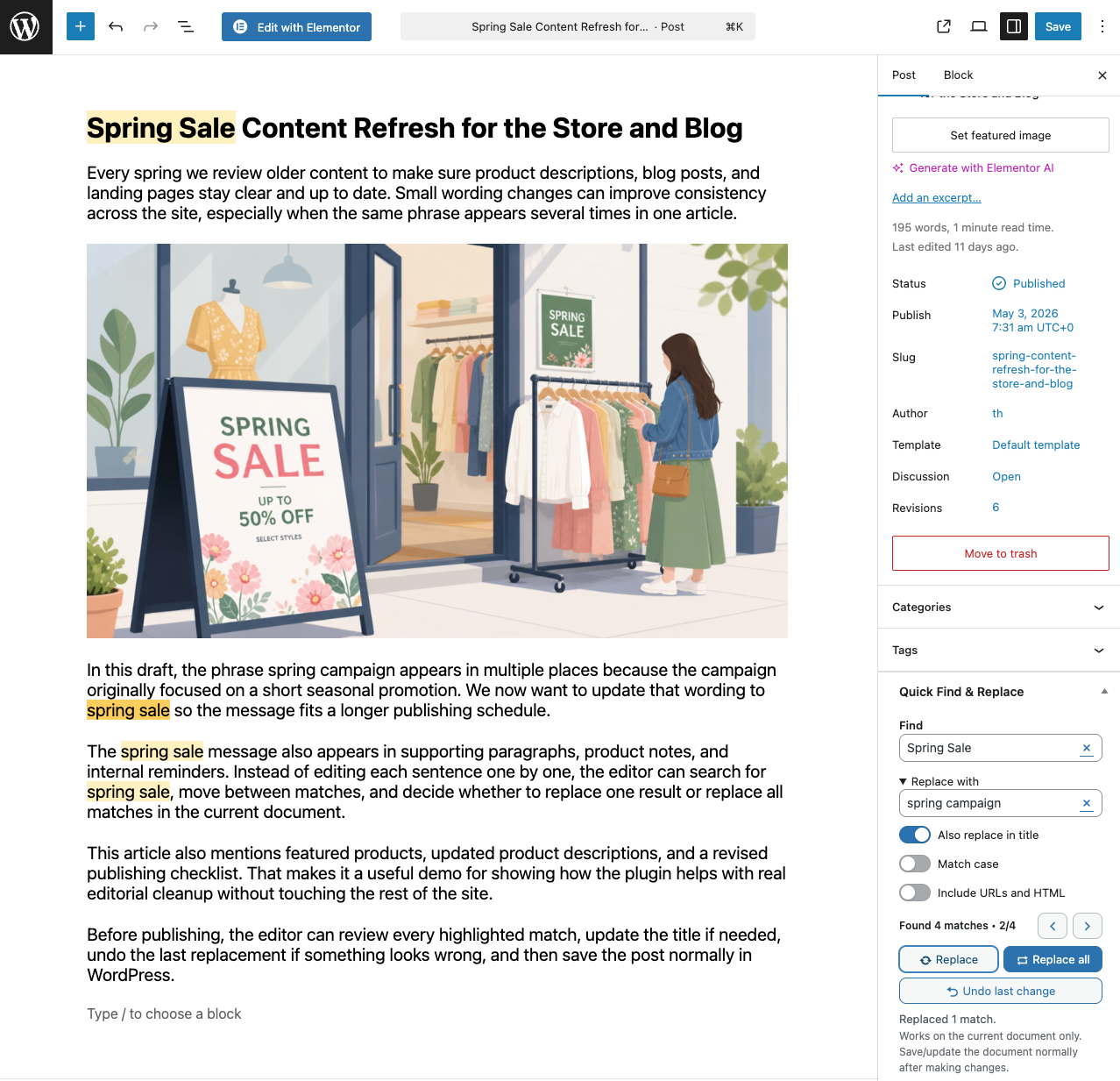
- Find text in the current document
- Highlight matching text
- Previous and Next navigation between matches
- Replace one match or Replace All
- Undo the last replacement before saving
- Optional title replacement
- Case-sensitive matching
- Block Editor, Classic Editor, and Code Editor support
- WooCommerce product content support
- Saved Find & Replace presets
- Replacement history
- Undo all changes in the current session
- Remembered workflow preferences
- Draggable floating panel
- Additional WooCommerce field support
- Open a post, page, product, or supported content type.
- Enter the word or phrase you want to find.
- Review the highlighted matches.
- Use Previous and Next to move between them.
- Enter your replacement text.
- Replace one match or all matches.
- Undo the last change if needed.
- Save or publish through WordPress as usual.
安装:
- Upload the plugin files to the
/wp-content/plugins/consortia-quick-find-replace/directory - Activate the plugin through the 'Plugins' menu in WordPress
- Open or create a post, page, docs entry, or product
- Use the "Quick Find & Replace" meta box in the editor sidebar
- Save or update the document normally after making changes
屏幕截图:
常见问题:
Where does the tool appear?
Quick Find & Replace appears inside supported editor screens for posts, pages, docs entries, and WooCommerce products.
Does this change content across the whole site?
No. It only works on the document you are editing. It does not run database-wide replacements.
Do I need to save after replacing text?
Yes. The plugin changes the open editor content, then WordPress saves the document when you click Update, Publish, or Save Draft.
Can I undo a replacement?
Yes. Undo last change restores the most recent replacement made during the current editor session.
Does it support WooCommerce products?
Yes. The free version supports the main product content editor. More product-specific fields, such as short description, are better suited to Pro.
What does Pro add?
Pro is aimed at heavier editing workflows. Depending on the package and release stage, it may include features such as saved presets, replacement history, undo all changes in the current session, remembered workflow preferences, a floating panel, and extra WooCommerce field support.
更新日志:
- Removed a duplicate support note from the WordPress.org description.
- Refreshed the WordPress.org description to explain free features, safe editing, Pro options, and support more clearly.
- Tested with WordPress 7.1 and improved highlight refresh handling for the always-iframed post editor.
- Kept the WordPress.org build cleaner by removing Pro trial configuration from the free package.
- Added Freemius configuration for a 7-day Pro trial without requiring payment details.
- Improved restored searches so highlights rebuild automatically after reopening the same editor screen.
- Added the branded admin header to the WordPress.org free information page.
- Improved the free editing flow by remembering the Replace value on the same editor screen and reopening the Replace section when needed.
- Sharpened the WordPress.org readme opening copy to explain the plugin value faster.
- Tested with WordPress 7.0 and updated the plugin admin experience with a cleaner branded header.
- Improved WordPress 7.0 editor compatibility in block editor replace flows and refreshed the match-navigation button styling for the updated admin UI.
- Improved WordPress 7.0 editor compatibility in block editor replace flows.
- Fixed the match-navigation button styling for the updated WordPress 7.0 admin UI.
- Fixed single Replace so visible match navigation lines up better with the actual replaced result.
- Added an Include URLs and HTML switch so Replace all no longer touches image and link URLs unless you explicitly allow it.
- Remembered the Find value on the same editor screen after save or refresh, while keeping the stronger cross-screen workflow memory in Pro.
- Added documentation links in the admin welcome flow and plugin info screen.
- Improved the WordPress.org readme copy to explain the editor workflow and ideal use cases more clearly.
- Remembered the Replace section open/closed state between editor loads.
- Improved keyboard flow so Tab from Find can open Replace and move focus directly into the field.
- Refined the Quick Find & Replace panel UI with cleaner clear buttons and a more compact match-navigation row.
- Improved Pro floating-panel behavior so docked or floating mode is remembered across refreshes.
- Improved single-replace flow and editor highlighting so navigation and visual feedback stay more consistent across title, WooCommerce, and code-editor workflows.
- Improved Pro floating-panel behavior so it can be closed back into the sidebar and reopened without refreshing the editor.
- Added better HTML/code editor handling for search, replace, and highlight updates.
- Added stronger WooCommerce product-description and short-description highlighting, including better Next/Previous navigation in TinyMCE fields.
- Fixed Replace all so title replacements stay stable when "Also replace in title" is enabled.
- Improved keyboard flow so Tab moves from Find directly into Replace when the Replace field is open.
- Refreshed the WordPress.org readme and screenshot planning materials.
- Built a true-free WordPress.org package that replaces locked local Pro features with dedicated free override files.
- Kept the full-featured Freemius package unchanged for Pro distribution.
- Refreshed the review build for a clean WordPress.org resubmission.
- Added a one-time welcome notice after activation with a quick link to the Tools page.
- Added a clearer "How it works" explanation on the plugin info page.
- Moved the plugin info page under Tools for a more natural workflow location.
- Internal test build for activation onboarding and Tools-page polish.
- Simplified the free settings screen to keep Pro visible with a lighter, review-friendly upgrade notice.
- Replaced direct AJAX
$_POSTreads with helper methods for more consistent request handling. - Refreshed the WordPress.org free package for approval testing.
- Rebuilt fresh Freemius and WordPress.org packages after the review fixes and slug alignment.
- Aligned the plugin folder, bootstrap file, text domain, and Freemius slug with the assigned WordPress.org slug.
- Updated contributor and naming details for the WordPress.org review process.
- Added Pro saved presets for reusable Find and Replace pairs.
- Added a collapsible Pro tools section that remembers its open or closed state.
- Refined the Pro tools layout and preset select width.
- Added Pro highlight color settings with reset to default colors.
- Improved floating panel controls and remembered search refresh behavior.
- Polished editor and settings controls.
- Refreshed the editor widget controls with toggle switches and button icons.
- Made the floating editor panel draggable and remembered its position.
- Kept the active match position more stable after replacing a single match.
- Added a clear search button to reset the current search and highlights.
- Renamed the editor meta box for consistent plugin branding.
- Added a Pro tool to swap Find and Replace values.
- Added Pro support for optional WooCommerce product short description replacements.
- Added tabbed settings navigation for General and Pro settings.
- Added settings architecture for editor workflow preferences.
- Added Pro settings for opening Replace by default, remembering editor values, and using a floating editor panel.
- Added Pro-only architecture for advanced editor tools.
- Added Pro-only undo all changes and replacement history foundations.
- Added WordPress.org release packaging support.
- Documented match highlight refresh behavior after replacements.
- Updated the plugin display name for WordPress.org naming guidelines.
- Added Freemius basename handling for free/pro activation compatibility.
- Updated Freemius bootstrap for the new paid Pro plan.
- Added guarded Freemius bootstrap support.
- Refactored the plugin bootstrap into a Pro-ready architecture.
- Added Undo last change for the current editor session.
- Added a broader iframe fallback for WooCommerce product editor highlighting.
- Fixed search input focus so typing a search term does not jump into the editor content.
- Added highlight support for iframe-based block editor canvases.
- Added Gutenberg visual highlighting using browser-native CSS highlights where available.
- Added block editor title support when "Also replace in title" is enabled.
- Added soft yellow match highlighting with a stronger active match color for title and plain text editor searches.
- Moved admin JavaScript into
assets/js/admin.js. - Moved admin CSS into
assets/css/admin.css. - Aligned the readme with the current document-level editor workflow.
- Fixed asset loading for product edit screens.
- Initial release
- Basic current-document find and replace functionality