
Corevum: Admin Dashboard & Client Workspace
| 开发者 | dawsonyweb |
|---|---|
| 更新时间 | 2026年10月27日 07:32 |
| PHP版本: | 8.1 及以上 |
| WordPress版本: | 7.1 |
| 版权: | GPLv2 or later |
| 版权网址: | 版权信息 |
详情介绍:
- Build contact, quote, call-back and newsletter forms from templates, with a live preview.
- Text, email, phone, message, number, web address, date, dropdown, radio buttons, checkboxes, consent and section headings, full or half width.
- Add a form to any page with the Form block or a shortcode.
- Entries are kept in the workspace with an inbox, search, spam and trash, and can be exported to CSV.
- Email notifications with placeholders and reply-to.
- Spam protection that works with page caching: a hidden honeypot, a signed time check and a per-visitor limit. No puzzles, no cookies and no IP addresses stored.
- Forms work without JavaScript, and submit in place when it is available.
- Entries are included in WordPress's personal data export and erase tools.
- Create custom post types such as Projects, Team or Testimonials, with their own icon, address, archive and editor features.
- Create category-style or tag-style taxonomies and attach them to any content type.
- Add field groups to any content type: text, paragraph, number, email, web address, date, dropdown, radio buttons, checkboxes, yes/no, image and colour.
- Show fields with the
[corevum_field]shortcode,corevum_the_field()orcorevum_get_field(). Values are ordinary custom fields, soget_post_meta()works too, and they are available in the REST API.
- An overview with publishing activity, things that need attention and a site status panel.
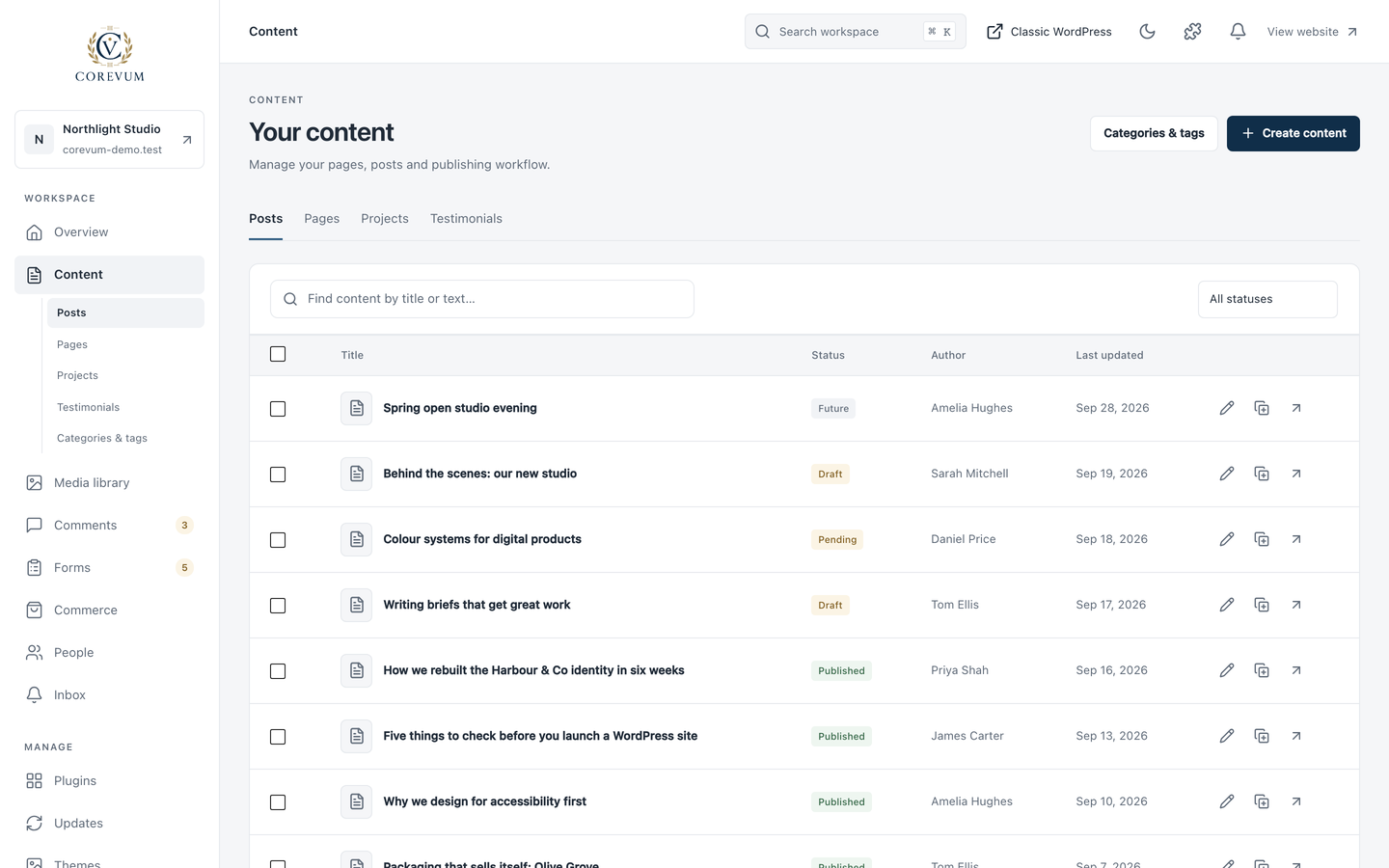
- Content with bulk status changes and one-click duplication, with custom post types listed alongside posts and pages.
- Categories, tags and custom taxonomies in one place, with drag-and-drop nesting.
- A media library with nested folders (also in the WordPress media picker), an image editor that crops to common shapes, rotates, flips and resizes while keeping the original, and ZIP downloads.
- Comment moderation with approve, reply, spam and trash, one at a time or in bulk.
- A compact plugin manager, themes, updates and Site Health.
- Jump anywhere with Cmd/Ctrl + K, keyboard shortcuts, light and dark themes and a collapsible sidebar.
- Performance switches to remove emoji scripts, embeds, XML-RPC, the generator tag, jQuery Migrate on the website and more. Each one is off by default and fully reversible.
安装:
- Install and activate Corevum from Plugins > Add New, or upload the plugin folder to
/wp-content/plugins/. - Choose Corevum in the admin menu. Your choice of workspace is remembered each time you log in.
- Open Modules to switch off anything you do not need.
屏幕截图:




常见问题:
Does Corevum change my website's design?
No. Corevum only changes the admin area. Forms and fields appear on your website only where you add them, and take their fonts and colours from your theme.
Will it work with my other plugins?
Corevum keeps native WordPress editors and plugin screens available, and WordPress permissions decide who sees what. Compatibility can vary with third-party plugins; test your usual workflows before using Corevum on a live site. Screens that draw their own full-screen interface, such as some page builders, open in classic WordPress.
I already use Gravity Forms, ACF or another plugin.
Switch off the matching Corevum module. The Modules screen points out when another plugin that does the same job is active.
What happens to my forms and fields if I switch a module off?
Nothing is deleted. Forms, entries, post types, taxonomies and field values stay in the database and come back when you switch the module on again.
Does Corevum send data anywhere?
Corevum Free does not include Dawsony telemetry or a licence-server connection. Form entries stay in your site's database when storage is enabled; notification emails use WordPress and your configured mail provider. Spam prevention uses a temporary salted hash derived from the request IP address, without storing raw IP addresses in entries. WordPress updates, Gravatar and scripts you add can make their own external requests. See Privacy and external services below.
What is removed when I delete the plugin?
By default, nothing: your settings are kept in case you reinstall. Tick "Remove Corevum settings, forms and form entries when the plugin is deleted" in Workspace settings to remove Corevum's own data. Your posts, pages, media, users and custom post type content are never removed.
更新日志:
- Improved plugin directory listing and documentation. Updated relevant directory tags. No functionality changes.
- Improved plugin directory listing and documentation.
- Updated the public plugin name and listing text. No feature, settings or data changes.
- Added: unsaved-change warnings for forms, field groups, content types and workspace settings, including browser back navigation.
- Added: test form notification with an explicit mail-acceptance result and per-form optional 30, 90, 180 or 365-day entry cleanup.
- Added: a locally generated, reviewable compatibility and support report without licence keys, site addresses or raw logs.
- Fixed: saving a newly created form again updates the same form instead of creating another.
- Corevum Pro 1.1.0 adds the client help centre, agency setup packs and publishing calendar; these features are not part of Free.
- New: Trash filter and single or bulk restoration for pages, posts and custom content.
- Fixed: Changing the content status filter clears selections; failed bulk operations remain selected for retry.
- First stable release of the Corevum workspace.
- Includes the reviewed permission checks, editor appearance loading and workspace recovery improvements.
- Preserves existing saved data when upgrading from earlier Corevum releases.
- Fixed: WordPress asset enqueueing and REST permission callbacks.
- Added: source and reproducible build documentation for directory review.
- Add a reload action and clearer guidance when an open tab cannot load updated workspace files.
- Allow navigation to another screen after a workspace rendering error.
- New: account-based onboarding and replayable help tours in the Free workspace.
- Changed: use WordPress-provided React instead of a bundled runtime.
- Changed: Header & footer code is now provided only by the separately distributed Pro add-on. Existing snippet settings are preserved, but Free no longer runs them. Sites using snippets should arrange a replacement or update Pro before updating Free.
- Added privacy guidance and expanded documentation.
- New: Modules screen. Every feature can be switched off, and switched-off modules load no code.
- New: Forms with templates, a block and shortcode, entries, notifications, CSV export and cache-safe spam protection.
- New: Custom post types, taxonomies and custom field groups.
- New: Performance switches. Header and footer snippets were included in this version but moved out of Free in 0.7.1.
- New: Categories & tags, with drag-and-drop nesting, for every taxonomy. Custom post types are listed under Content.
- New: Plugins can be activated, deactivated and deleted in bulk.
- Changed: Pro features moved into the separate Corevum Pro add-on.
- New: comment moderation, site status on the overview, keyboard shortcuts, and light or dark theme that follows your system until you choose.
- New: media folders, image editor, file replacement, featured images, content duplication, bulk status changes and a compact plugin manager.