Coywolf Code Block Enhancer
| 开发者 | jonhenshaw |
|---|---|
| 更新时间 | 2026年8月13日 20:52 |
| PHP版本: | 7.4 及以上 |
| WordPress版本: | 7.1 |
| 版权: | GPLv2 or later |
| 版权网址: | 版权信息 |
详情介绍:
core/code block. In the editor
it adds a "Code language" dropdown to the block sidebar; on the front end
it highlights the code with Prism.js using a custom token palette, prints
the language name as a small label on the block, and pins a
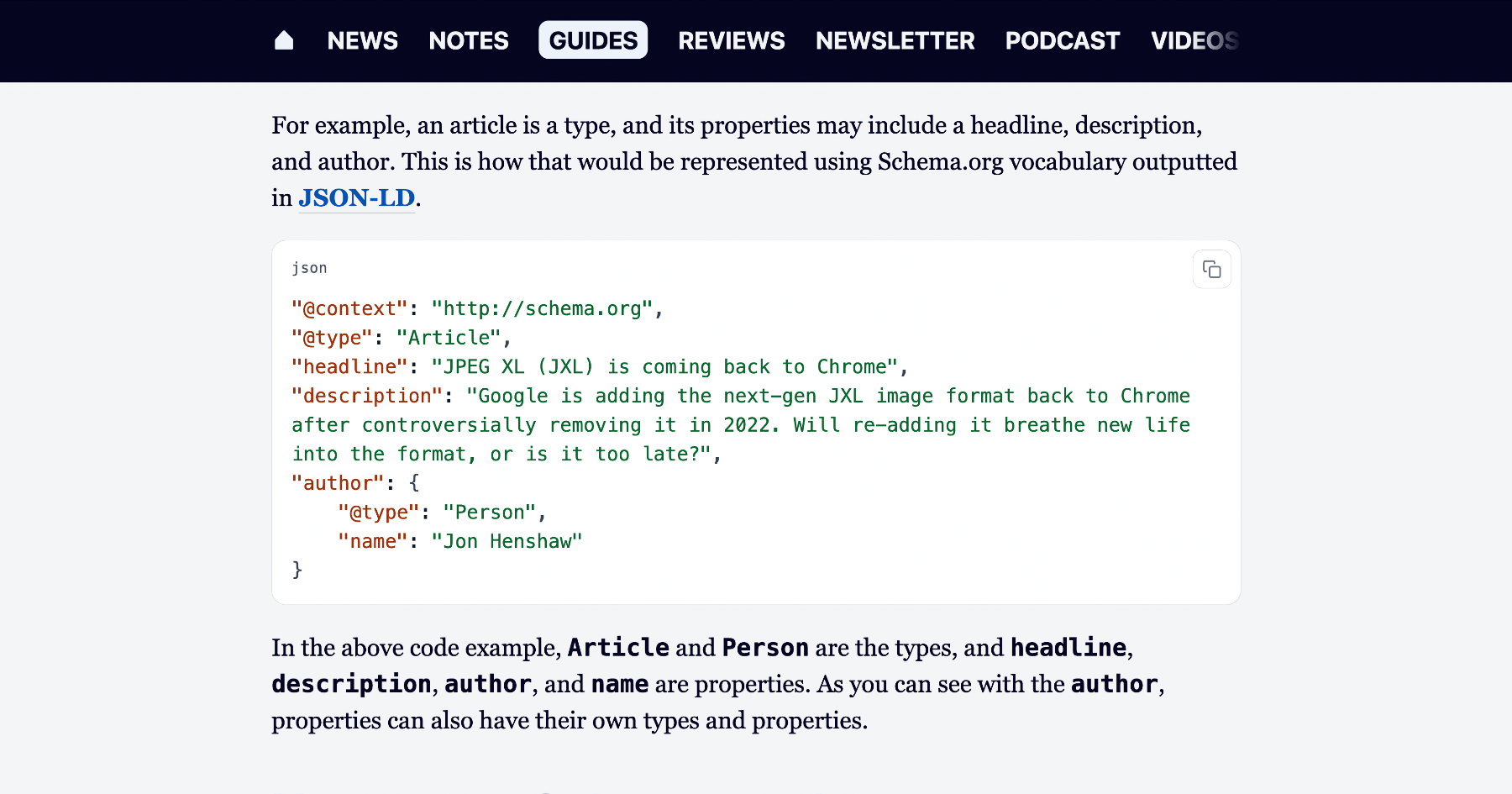
copy-to-clipboard button to the top-right corner.
- Adds a "Code language" dropdown to the core Code block's sidebar. A baseline of 9 languages (Bash, CSS, HTML/Markup, JavaScript, JSON, PHP, Python, SQL, YAML) is always loaded; an additional 40 grammars can be toggled on via Language packs in Tools → Code Blocks (Web/App dev — TypeScript, JSX/TSX, SCSS, Sass, Less, GraphQL — is enabled by default).
- Highlights code on the front end with Prism.js. Pick from 45 bundled themes — the 8 stock Prism themes (Prism Default, Coy, Dark, Funky, Okaidia, Solarized Light, Tomorrow Night, Twilight) plus 37 community themes from PrismJS/prism-themes (a11y Dark, Atom Dark, Dracula, Nord, One Dark, Night Owl, Synthwave '84, Gruvbox, Material, VS Code Dark+, and more) — or the bundled Default palette (selected on first install).
- Adds a small language label in the top-left of each highlighted block (only when a language is set).
- Adds an accessible copy-to-clipboard button —
aria-label, a polite status region that announces "Copied to clipboard," and a visible "✓" state for two seconds after a successful copy. Falls back todocument.execCommand('copy')on non-HTTPS or older browsers. - Assets load only on singular posts/pages that contain a code block;
Prism core and grammars are loaded with the
deferstrategy so they never block rendering. - Dark-mode aware out of the box — with the bundled Default — Auto
theme (selected on first install), code blocks follow each visitor's
prefers-color-schemeautomatically. Override from Tools → Code Blocks by switching to Default — Always light / Always dark, or by picking any of the static Prism themes.
language block attribute on
core/code, which lives in the block delimiter comment rather than the
saved markup. That means blocks without a language stay valid and
existing content is never migrated.
On render, the plugin uses WP_HTML_Tag_Processor to add data-language
to the <pre> and language-xxx to the <code> server-side — so KSES
won't strip data-* attributes for non-admin authors, and there is no
block-validation churn.
Prism core and the per-language grammars are bundled under
assets/prism/ at v1.30.0 (MIT — see assets/prism/LICENSE.txt). They
register as deferred scripts with explicit dependency ordering (e.g.
markup-templating before php, clike before languages that extend
it). The copy-button script depends on the last grammar in the chain,
so all of Prism is present before the copy UI is wired up. Reading
code.textContent returns the original source even after Prism wraps
tokens in spans, so the copied text is unaffected by highlighting.
Self-hosting Prism (rather than loading from a public CDN) keeps the
third-party-script supply chain off the plugin's surface and means the
plugin works on sites with strict CSPs or no external egress.
安装:
- Upload the
code-block-enhancerfolder to/wp-content/plugins/, or upload the .zip via Plugins → Add New → Upload Plugin. - Activate the plugin.
- Edit a post or page, add (or open) a Code block, and pick a language from the "Code language" panel in the block sidebar. The code is highlighted on the front end and a copy button appears in the top-right of the block.
屏幕截图:
常见问题:
Which languages are supported out of the box?
Bash/Shell, CSS, HTML/Markup, JavaScript, JSON, PHP, Python, SQL, and YAML. The dropdown also includes "None (plain text)" to render a block without highlighting.
How do I add another language?
Open Tools → Code Blocks → Language packs and enable the pack that contains the language you need. The baseline 9 languages are always available; the other 40 grammars are grouped into packs you can toggle on. Anything you enable shows up in the Code block's "Code language" dropdown automatically — no code editing required.
Will this break my existing code blocks?
No. The language is stored as a block attribute, not baked into the saved markup, so blocks without a language stay valid and the front-end language class is applied at render time. Existing content is not migrated and is unaffected.
Does Prism load on every page?
No. The token CSS only enqueues on singular posts/pages where
has_block( 'core/code' ) is true, and the Prism scripts are only
enqueued from inside the render_block filter for core/code — so a
page with no code block ships none of these assets. Prism is also loaded
with the defer strategy so it never blocks rendering.
My site has a Content Security Policy. What do I need to allow?
Nothing extra. Prism and the copy-button script are bundled with the
plugin and served from your own origin, so a script-src 'self' policy
is enough. There is no external CDN call from the front end.
How do I change the theme?
Go to Tools → Code Blocks in WP Admin. The "Code block theme" dropdown lists every bundled theme in three groups: Coywolf (Default — Auto / Always light / Always dark), Prism (built-in), and Prism Themes (community). Below the dropdown a live preview pane re-renders a sample PHP snippet in the highlighted theme on every change — your site keeps the previously saved theme until you click Save Changes. The selected theme's stylesheet is enqueued only on posts that contain a code block; only one theme file is ever loaded per request.
How do I lock code blocks to light or dark mode for everyone?
If you're on the bundled Default — Auto theme (the first-install
default), switch to Default — Always light or
Default — Always dark in Tools → Code Blocks. Picking any of the Prism themes also locks the
appearance — those themes are static and don't react to OS dark mode.
The lock is implemented in CSS — there is no inline <style> injected
per request — so it composes cleanly with caching plugins.
Where do the Prism themes come from?
The 8 stock themes are bundled from PrismJS/prism at v1.30.0 (MIT — see
assets/themes/LICENSE-prism.txt). The 37 community themes are bundled
from PrismJS/prism-themes (MIT — see
assets/themes/LICENSE-prism-themes.txt). They are served from your own
origin alongside the rest of the plugin's assets — no external request
at runtime.
Why is the language label not appearing on a particular block?
The label only renders when a language is set (the CSS rule is
.wp-block-code[data-language]::before). If the block was created
before the plugin was installed, open it in the editor and pick a
language from the sidebar so the language attribute is saved.
更新日志:
- Confirm WordPress 7.1 compatibility (Tested up to: 7.1) (#61).
- Dedupe the per-request block scans on code-block pages (#60).
- Updater: run GitHub release checks in the background so the Updates screen never hangs (#59).
- Refresh settings screenshot and reword its caption (#58).
- Remove custom-theme upload feature; rename license files to .txt (WP.org review) (#57).
- Fix WP.org review feedback: enqueue inline JS, 4-char prefixes, DB-stored custom theme (#56).
- Readme: state the privacy-first stance (no analytics, no data gathering) (#55).
- Security: the custom CSS theme check now also blocks @import and remote / protocol-relative url(), so an uploaded theme cannot fetch from or beacon to a third-party origin.
- Editor: the "Code language" sidebar control is now translatable (i18n).
- Accessibility: honor prefers-reduced-motion, raise the dark-mode language-label contrast to WCAG AA, and announce custom-theme admin notices to screen readers (role="alert").
- Performance: memoize the custom-theme lookup so it is not re-read on every front-end request.
- Docs/build: strip the GitHub-updates FAQ from the WordPress.org build, and correct the upload-security and "add a language" docs.
- Render plugin screenshots in the GitHub readme (#53).
- Resolve remaining Plugin Check warnings (#52).
- Fix WordPress.org review issue: match text domain to the .org slug (#51).
- CI: upgrade actions to Node 24-native versions (#50).
- CI: run bundled JS actions on Node 24 (#49).
- Set distinct Plugin URI and Author URI (#48).
- Add WordPress.org screenshots + captions (#47).
- Fix readme Contributors/Tags header line (#46).
- Set readme Contributors to jonhenshaw (#45).
- Fix all WordPress.org Plugin Check errors (#44).
- Add WordPress.org variant build + gated SVN deploy (#43).
- Add Atom-feed fallback when the GitHub API is rate-limited (#42).
- Fix: don't block manual zip uploads (untrusted host error) (#41).
- Harden guard_pre_download: use hook_extra, fail closed (#40).
- Perf: honour _neg cache + cache wp_error failures in updater (#39).
- Perf: memoize the language registry (audit finding) (#38).
- Preload grammars at low priority (fetchpriority="low") (#37).
- Preload grammar scripts in to break the critical request chain (#36).
- Default light palette: higher-contrast colors (WCAG AA / AAA) (#35).
- Bump Tested up to: 7.0 (#34).
- Settings: unsaved-changes guard with 3-button modal (#33).
- Settings: Custom theme into Appearance, Languages last (#32).
- Languages: Web/App dev is the new baseline pack (#31).
- Settings preview JS: replace innerHTML with DOM APIs (defense in depth) (#30).
- Per-language toggles + per-page lazy grammar enqueue (#29).
- Add Language packs setting — 5 togglable groups of 40 extra Prism grammars (#28).
- Update plugin description copy (#27).
- Test the v1.0.24 updater-flush refresh-current_version fix (#26).
- Updater: refresh current_version after upgrade (fix the double-update prompt) (#25).
- Test the v1.0.22 updater-flush fix (#24).
- Updater: clear update_plugins transient after self-update (#23).
- Fix: stray ?> leaked PHP source into the settings preview (#22).
- Custom upload: drop strict MIME sniff (rejected valid CSS files) (#21).
- Preview: fix Default light stripes; add side padding (#20).
- Settings: download link, custom theme name, Save at bottom, auto-activate (#19).
- Default theme: continuous background; preview alignment (#18).
- Rename Coywolf theme to default.css; add custom-theme upload (#17).
- Default theme: set bg to #ffffff (light) and #050520 (dark) (#16).
- Rename Prism 'Default' → 'Prism Default'; rename Claude → Default (#15).
- Live theme preview on the Tools → Code Blocks settings page (#14).
- Rename bundled palette label from 'Coywolf Claude' to 'Claude' (#13).
- Bundle all 45 Prism themes; theme picker on settings page (#12).
- Auto dark mode + Tools settings page for theme override (#11).
- No-op release to verify the plugin icon shows on the Updates row once the site is running an icon-aware updater (1.0.8+).
- Show plugin icon on Updates / Plugins / View-details (#9).
- Self-host Prism and allowlist the language attribute (security) (#8).
- Add coywolf logo to .wordpress-org/ and readme.md (#7).
- Mirror readme.md as a peer to readme.txt; dual-bump in release workflow (#6).
- Rename plugin title to 'Coywolf Code Block Enhancer' (#5).
- Mirror readme.txt into README.md for GitHub rendering (#4).
- Rewrite readme.txt in coywolf-link-checker format (#3).
- Add GitHub updater, uninstall cleanup, expanded readme (#2).
- Initial release.