Crypto QR Code WP
| 开发者 | ksym04 |
|---|---|
| 更新时间 | 2026年9月25日 04:06 |
| PHP版本: | 7.4 及以上 |
| WordPress版本: | 7.1 |
| 版权: | GPLv3 |
| 版权网址: | 版权信息 |
详情介绍:
- Accepting Bitcoin and crypto donations on a blog, portfolio, or nonprofit site.
- Adding a tip jar or donate button with a scannable wallet QR code.
- Showing several cryptocurrency wallet addresses together on one page.
- A settings page where you manage a library of wallets, each with a ready made shortcode you can copy.
- A click to reveal QR code tooltip that keeps your page tidy.
- A copy button so visitors can copy your wallet address in one click.
- Built in coin presets and icons for Bitcoin, Ethereum, Litecoin, Tether, Dogecoin, Solana, Bitcoin Cash, and Monero.
- A widget and shortcode, so you can place a wallet in posts, pages, sidebars, or footers.
- QR codes generated in the browser. No server side files, no uploads folder, and no third party services.
- An Appearance tab with a live preview, so you can set the QR size, the QR colors, and the tooltip colors and see the result as you design.
- Works with any theme, including block and Full Site Editing themes.
- Open Crypto QR Code in your admin menu and add a wallet (label, address, and an optional tooltip heading).
- Copy the generated shortcode, for example:
[cqcw_generator heading="Donate" label="BTC" address="bc1qexampleaddress"] - Paste it into any post, page, or widget. Visitors click the address to reveal the QR code.
安装:
- In your WordPress admin, go to Plugins, then Add New.
- Search for "Crypto QR Code WP".
- Click Install Now, then Activate.
- Open the Crypto QR Code menu, add a wallet, and copy its shortcode into your content.
- Download the plugin zip from WordPress.org.
- Upload the
crypto-qr-code-wpfolder to/wp-content/plugins/. - Activate the plugin through the Plugins menu in WordPress.
屏幕截图:
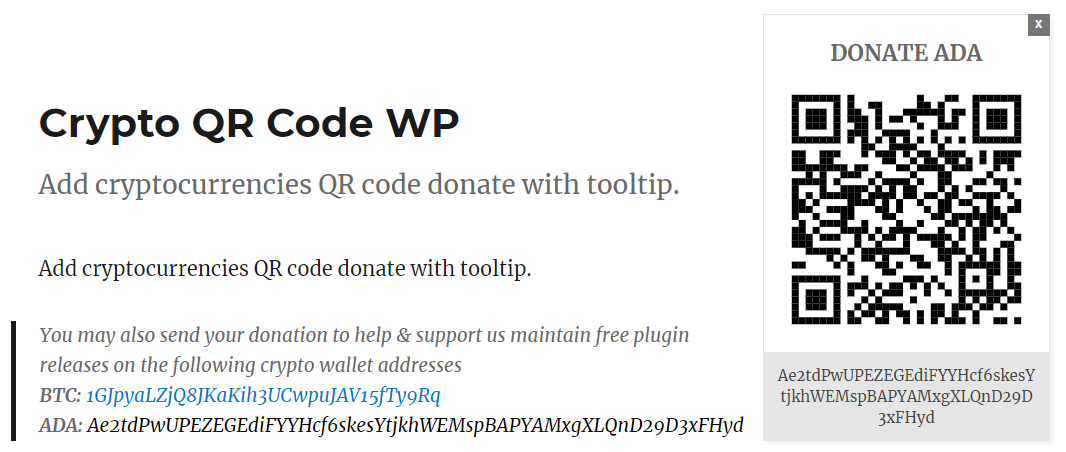
常见问题:
How do I add a wallet?
Open the Crypto QR Code menu in your WordPress admin, click Add Wallet, enter a label (such as BTC) and your public wallet address, then save. Each wallet shows a shortcode you can copy.
How do I use the shortcode?
The shortcode cqcw_generator accepts three parameters: heading, label, and address. Example: [cqcw_generator heading="Donate" label="BTC" address="bc1qexampleaddress"]
Is my wallet address safe to display?
Yes. A public wallet address is meant to be shared so people can send you funds. Never enter your private key anywhere.
Where is the QR code image stored?
Nowhere. The QR code is drawn in the visitor's browser each time the page loads, so the plugin does not create files or folders on your server.
Does it work with the block editor and widgets?
Yes. You can use the shortcode in a block, or add the Crypto QR Code WP widget to any widget area.
What happens to my wallets if I delete the plugin?
Deleting the plugin from the Plugins screen removes your saved wallet list, your appearance settings, and your widget settings. Deactivating the plugin keeps everything. Shortcodes already in your posts keep their wallet details, because the details are written into each shortcode. While the plugin is not active they show as plain shortcode text, and they work again once the plugin is installed and active, using the default size and colors.
更新日志:
- Fixed - A wallet heading, label, or address with double quotes or square brackets gave a shortcode that did not work. The custom heading was replaced by "Donate", or part of the shortcode showed as plain text on the page. Double quotes now become single quotes and square brackets become round brackets, and wallets you saved before this update get a working shortcode too. If a shortcode you already pasted into a page did not work, copy it again from the settings page.
- Fixed - The Crypto QR Code WP widget showed no QR code when its heading, label, or address contained square brackets. Square brackets now become round brackets there too.
- Fixed - The settings page now shows a "Settings saved" message after you save.
- Fixed - The settings page mentioned a Crypto QR Code WP block that does not exist. It now points you to the widget, or to a Shortcode block in the block editor. The plugin description is corrected the same way.
- Change - Deleting the plugin now removes its saved settings, including your wallet list, and its widget settings. Deactivating the plugin still keeps everything.
- Tested with WordPress 7.1.2.
- Fixed - WordPress 6.7 and newer logged a "translation loading was triggered too early" notice for this plugin on sites with debugging enabled. The plugin name was being translated while the plugin loaded, before WordPress is ready to serve translations.
- Tweak - the version used to cache bust the plugin assets now comes from a single source, so it can never fall out of step with the plugin version.
- Tested with WordPress 7.1.
- New - Appearance tab with a live preview so you can design the tooltip, including the QR colors, tooltip, address bar, and copy button.
- New - Choose your own QR code foreground and background colors.
- Tweak - The settings screen is now split into Settings and Appearance tabs.
- Tweak - Added a link to more DopeThemes resources on the settings screen.
- Fix - The donation widget now keeps its own styling on every theme, including block and Full Site Editing themes that do not add a body class.
- Fix - Theme button and link styles can no longer override the tooltip, copy button, or close button.
- Fix - QR code is now reliably centered in the tooltip.
- New - Copy button so visitors can copy your wallet address in one click.
- New - Coin presets and icons for Bitcoin, Ethereum, Litecoin, Tether, Dogecoin, Solana, Bitcoin Cash, and Monero.
- New - Quick coin picker on the settings page that fills the label for you.
- Tweak - Coin icon shown next to the label on the front end.
- New - QR codes are now generated entirely in the browser, so nothing is written to your server.
- New - Settings page to manage your wallet addresses and copy ready made shortcodes.
- Security - Full output escaping across the shortcode and widget, resolving a stored cross site scripting risk.
- Security - Removed the bundled phpqrcode library and the server side file generation it required.
- Tweak - Assets now load only on pages that actually use the QR code.
- Tweak - Confirmed compatibility with WordPress 7.0 and PHP 8.
- Fix - Corrected the widget display name and sanitized all saved widget fields.
- Fix - Widget issue
- Tweak - Improved CSS theme compatibility
- New - Added 'Crypto QR Code' widget
- Tweak - Enhanced file security
- Initial release