
Cryptoway – Crypto Payment Gateway for Easy Digital Downloads
| 开发者 | cryptoway |
|---|---|
| 更新时间 | 2026年10月16日 20:56 |
| PHP版本: | 8.1 及以上 |
| WordPress版本: | 7.1 |
| 版权: | GPL-2.0+ |
| 版权网址: | 版权信息 |
详情介绍:
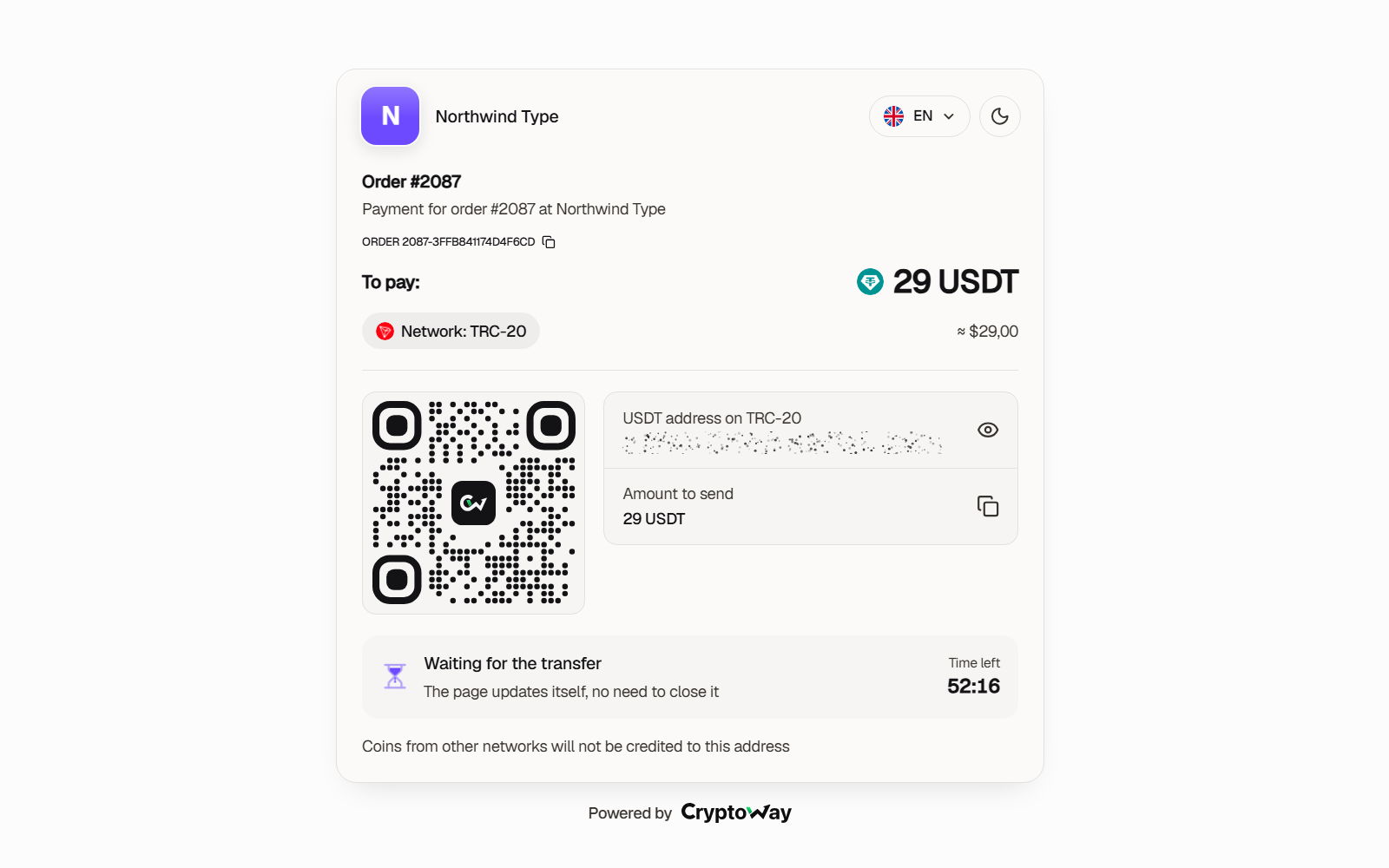
- At checkout the customer picks Cryptoway and is sent to the Cryptoway payment page.
- There they choose a coin and network and pay by QR code or address before the time runs out (60 minutes unless you change it).
- Cryptoway notifies your store. The plugin reads the invoice back from Cryptoway and checks the amount and currency.
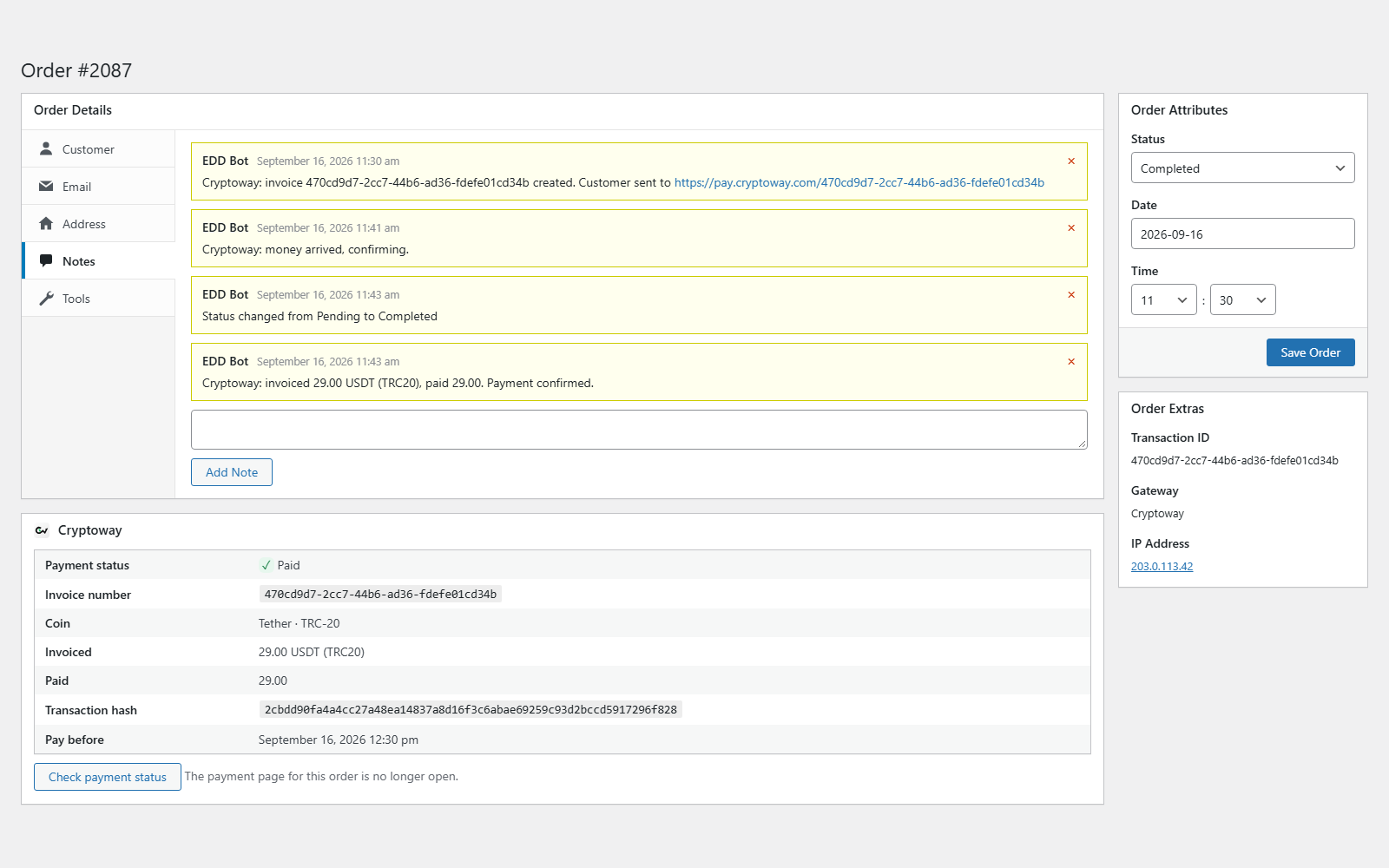
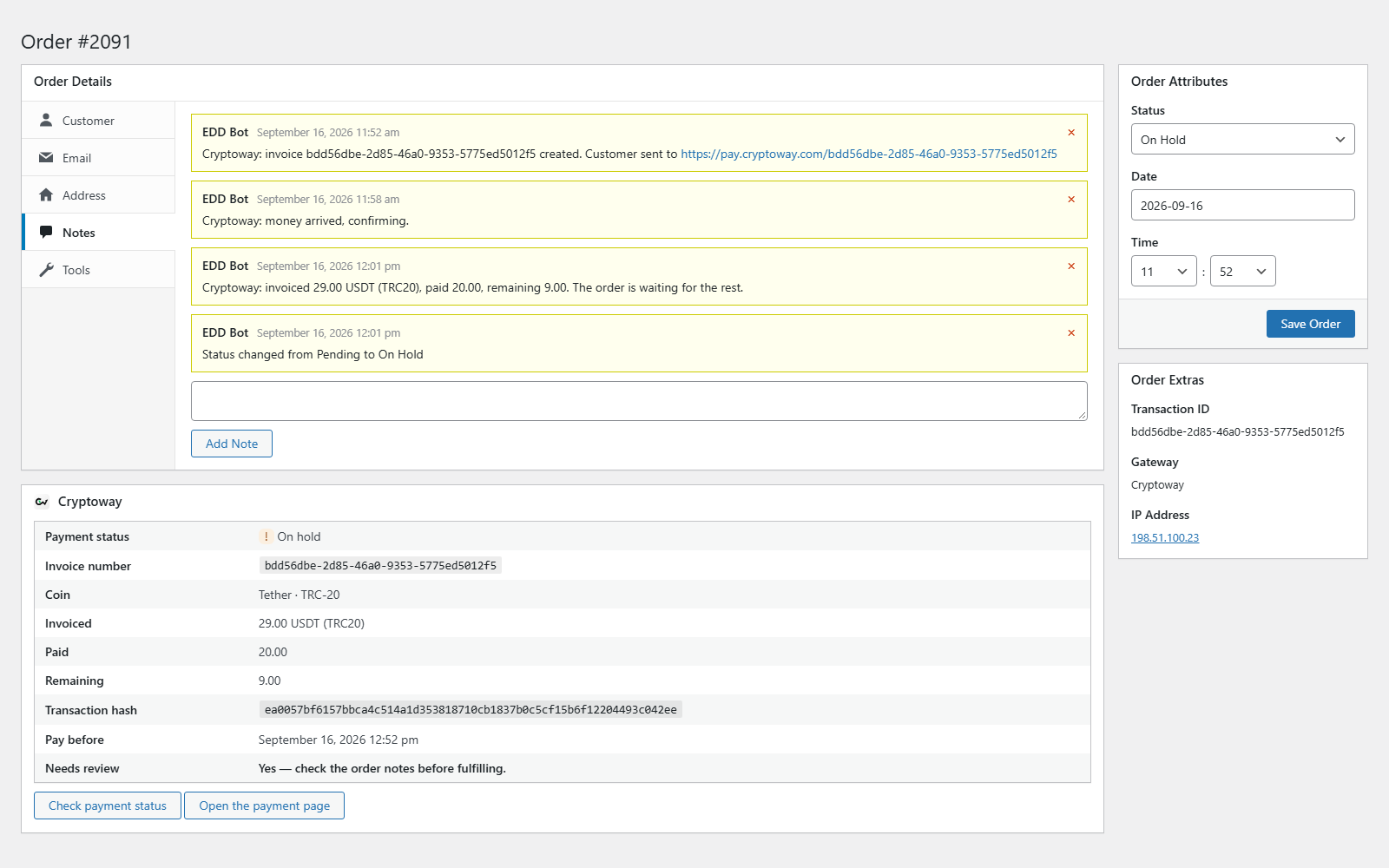
- The order becomes Complete and the download link works — or the order goes On Hold with a note saying how much is missing.
- BTC on Bitcoin
- ETH on Ethereum (ERC-20) and Arbitrum
- SOL on Solana
- DOGE on Dogecoin
- LTC on Litecoin
- TRX on Tron (TRC-20)
- BNB on BNB Smart Chain (BEP-20)
- POL on Polygon
- GRAM on The Open Network
- A Cryptoway box on every order: payment status, invoice number, coin and network, invoiced and paid amounts, what is still owed or was overpaid, transaction hash and the deadline to pay. A button re-checks the payment with Cryptoway.
- One short order note per event, with amounts in the customer's coin: invoiced, paid, remaining or overpaid.
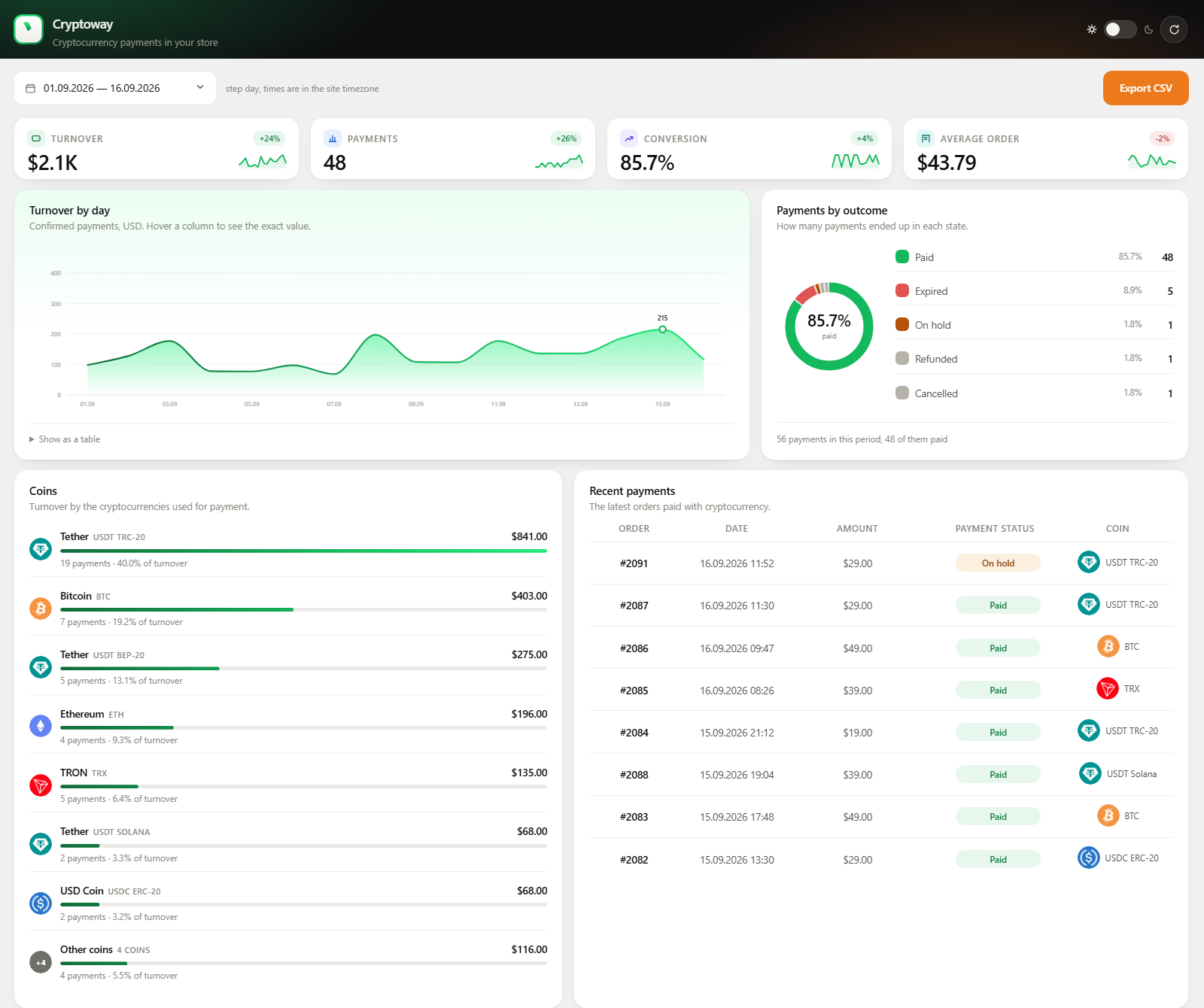
- A Cryptoway menu with statistics for any period — turnover, payments, conversion, average order, a chart, outcomes and coins — and CSV export.
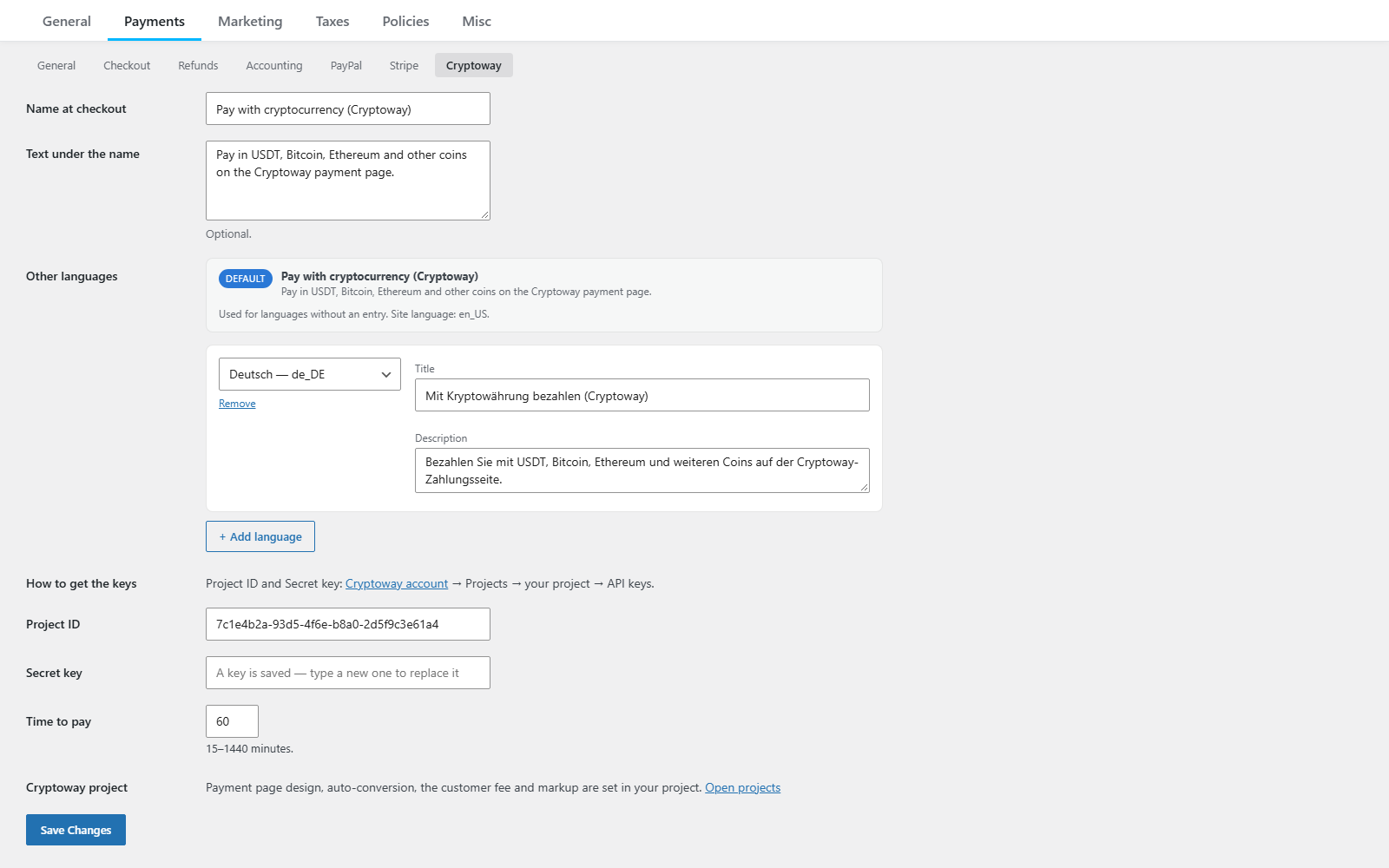
- Other languages: the payment method's name and description for each language your store runs in, set in the gateway settings.
- A status check every 10 minutes for payments whose notification did not arrive, and a check at the deadline.
- No ads, no upsell notices, no tracking.
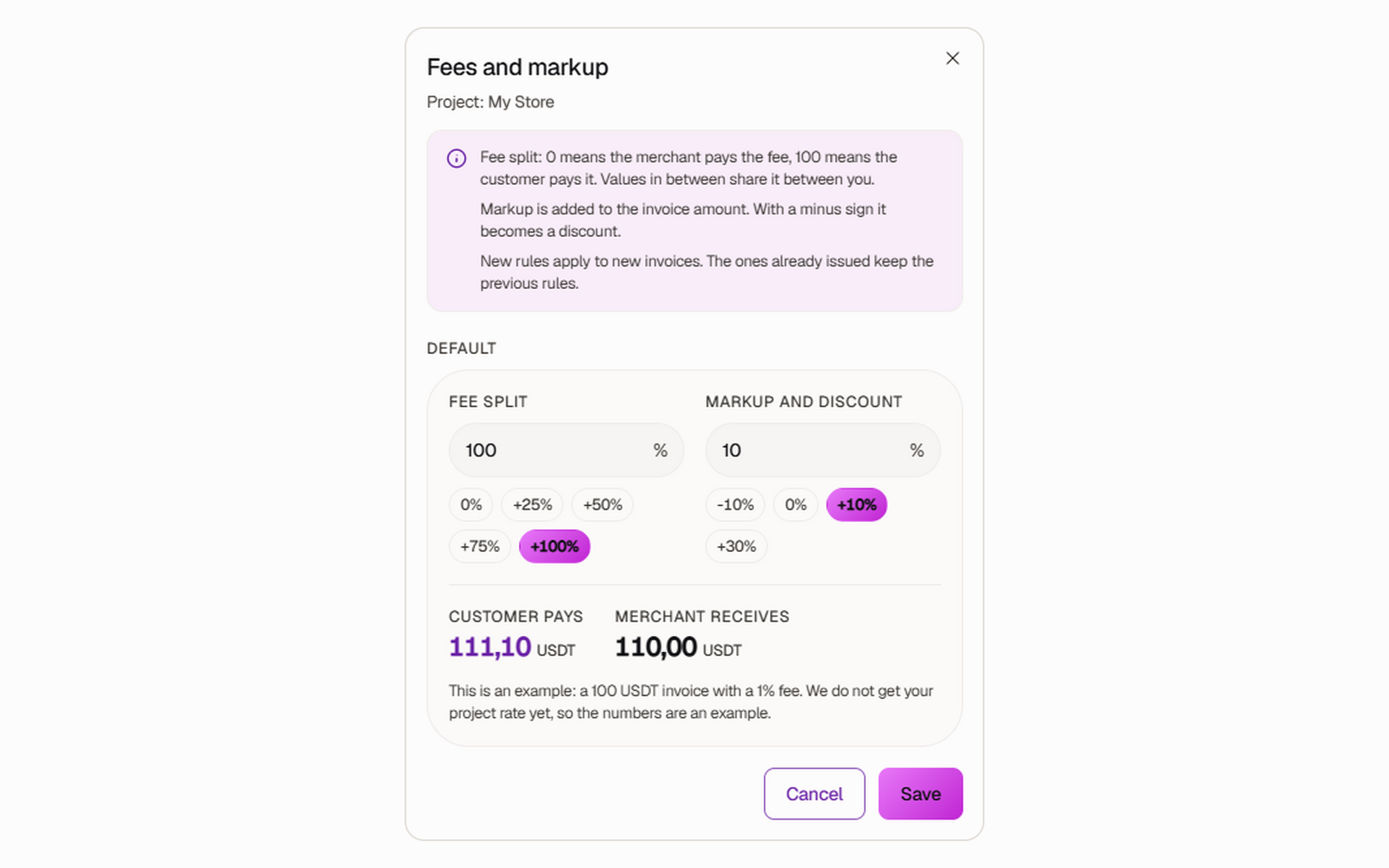
- Fees and markup: who pays the Cryptoway fee (0 means you, 100 the customer) and a markup. With a markup or the fee on the customer, the invoice asks for more than the order total, and the store accepts it. Keep the markup at zero or above: with a discount (a minus markup) the invoice is below the order total, and the plugin puts the order on hold for you to check.
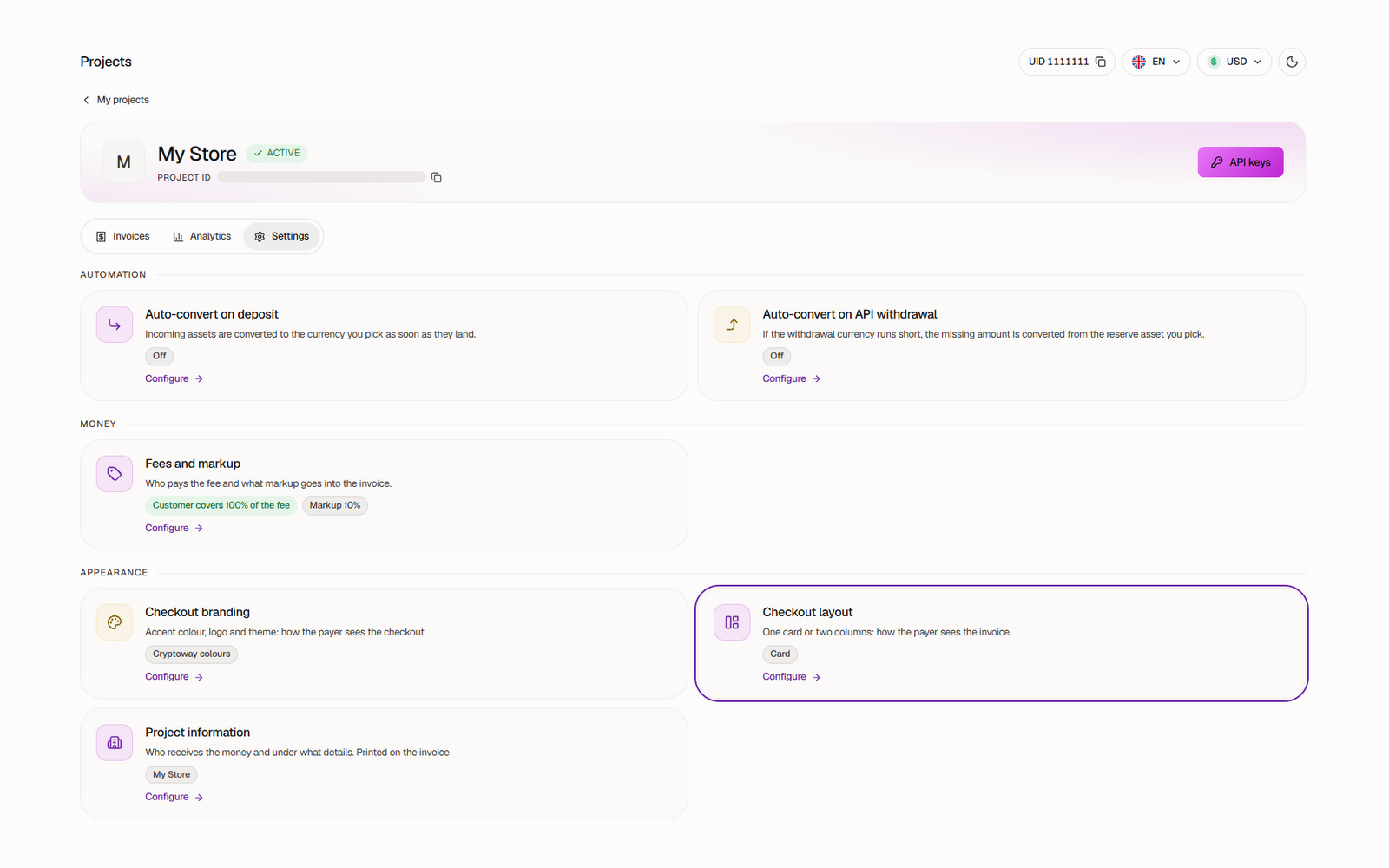
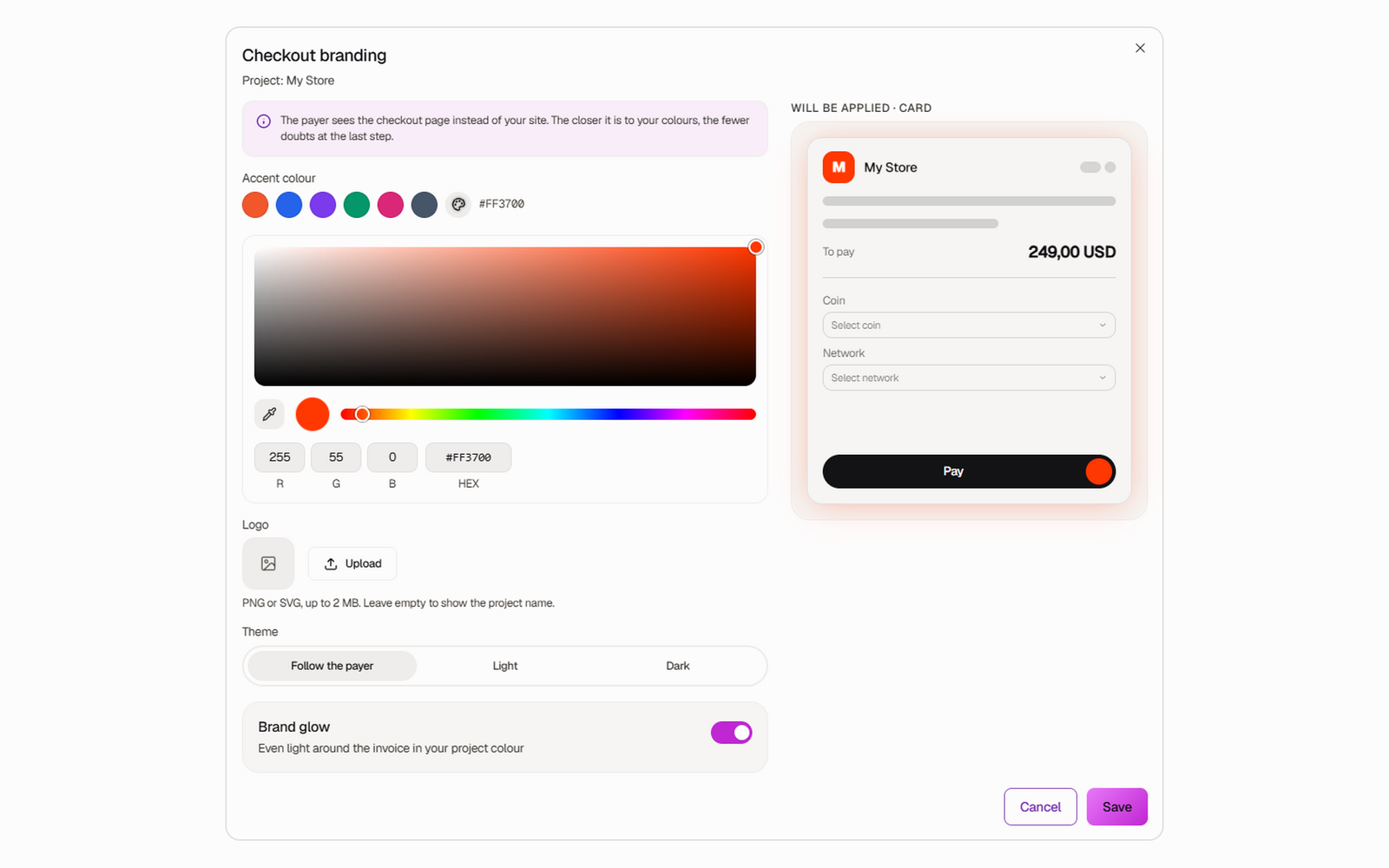
- Checkout branding and layout: your colour, logo and theme on the payment page, as one card or two columns.
- Auto-convert on deposit: incoming coins are converted to the currency you pick.
- A Cryptoway account with an active project. Create an account.
- Easy Digital Downloads 3.0 or later, on a site reachable from the internet.
- One project per store: Cryptoway ties a project's keys to the IP address of the server that first uses them.
安装:
- In Plugins → Add New Plugin, search for "Cryptoway", install and activate it. Easy Digital Downloads must be active.
- In your Cryptoway account open Projects → your project → API keys.
- In Downloads → Settings → Payments → Cryptoway paste the Project ID and Secret key and save. The callback key that verifies payment notifications is fetched automatically.
- On the General tab of Payments, tick Cryptoway under Active Gateways. The box stays greyed out until the keys are saved.
- Change Time to pay if 60 minutes does not suit you (15 to 1440 minutes).
- Buy one of your own downloads for a small amount and check that the order becomes Complete with a Cryptoway note.
屏幕截图:
常见问题:
What if the customer pays less, more, or late?
- Less: the order goes On Hold with a note such as "invoiced 12.17 USDT (TRC20), paid 10.00, remaining 2.17. The order is waiting for the rest." If the rest arrives in time, the order completes.
- More: the order completes. From 1% over the invoice, the note shows the overpaid amount to return from your Cryptoway account.
- Nothing within Time to pay: the order is marked Abandoned.
- Late, after the time ran out: the order goes On Hold with the amounts and "The money is with Cryptoway — settle it manually". No file is released until you decide.
Which coins can customers pay with?
BTC, ETH, USDT, USDC, SOL, DOGE, TRX, BNB, LTC, POL and GRAM, on the networks listed in the Description. The customer picks the coin and network on the payment page.
Which languages does the plugin speak?
English, Russian, Spanish and Turkish — the settings, the checkout and the order notes. The Cryptoway payment page itself is available in English, Russian, Spanish and Turkish too, and the customer can switch the language there.
Who pays the network fee?
The customer's wallet adds it on top. A customer paying from an exchange that deducts its withdrawal fee sends less, and the order goes On Hold as a short payment.
Can I test without real money?
No. Cryptoway has no test environment, and EDD's Test Mode does not change how the gateway works: every order creates a real invoice. Make one real payment a little above the coin's minimum deposit (for example 5 USDT) from your own wallet.
How do I refund a payment?
From your Cryptoway account, as a new transfer to an address the customer gives you. The plugin does not send refunds; mark the order as refunded in EDD yourself.
Does it work with subscriptions?
No. Orders from EDD Recurring Payments are not supported: a crypto transfer cannot be charged again automatically.
An order did not update after payment. What can I check?
- Payment notifications arrive at
https://your-domain/index.php?edd-listener=cryptoway. The address is sent with each invoice and must be reachable from the internet. - Open the order and press "Check payment status" in the Cryptoway box. If the check fails, the order note says why.
- The 10-minute status check runs on WP-Cron, which WordPress starts from visits to the site. On a shop with few visitors set up a server cron job: add
define( 'DISABLE_WP_CRON', true );towp-config.phpand callwp-cron.phpevery five minutes. Without it a lost notification may go unnoticed until someone opens the site. - Logs are in Downloads → Tools → Debug Log. Errors and payment events are always written there; with EDD's Debug Mode on, the full exchange with Cryptoway is added.
Where are my keys, and what is sent to Cryptoway?
The keys are stored with the other EDD settings. The Secret key only signs requests: it is never sent, shown again or logged. The plugin relies on the Cryptoway payment service (API: https://api.cryptoway.com) and makes no requests until the keys are saved:
- At checkout: the order total, currency, order number and reference, store name, payment deadline, and the notification and return addresses, to create the invoice.
- Every 10 minutes while a payment is unresolved, at the payment deadline, on payment notifications and on "Check payment status": a request for that invoice's status. Cryptoway sends payment notifications to your site.
- When you save the settings, and again while the callback key is missing: a request for the project's callback key.
更新日志:
- Added: Spanish and Turkish translations; the Russian one was proofread.
- Added: USDC, Solana (SOL) and Dogecoin (DOGE), and USDT on Solana — the coins Cryptoway accepts now.
- Changed: the statistics screen lists eight coins and sums the rest into one "Other coins" row, so the rows add up to the total.
- Changed: the Cryptoway logo in the admin menu, the order screen and the statistics now matches the current Cryptoway brand.
- Fixed: a payment on Arbitrum was named by its raw code in the order notes, and its amount was shown with eight decimals instead of two.
- Fixed: a period picked in the statistics covers whole days, so the figures and the CSV no longer depend on the time of day.
- Fixed: the Cryptoway box on the order screen is styled again, and it stops asking for a review once the order is settled.
- Changed: deleting the plugin now removes the stored keys as well; WordPress 6.5 is enough to run it.