
Simple Mortgage Calculator
| 开发者 |
rmcalculator
mlcalc |
|---|---|
| 更新时间 | 2026年10月24日 18:15 |
| PHP版本: | 7.4 及以上 |
| WordPress版本: | 7.1 |
| 版权: | GPLv2 or later |
| 版权网址: | 版权信息 |
详情介绍:
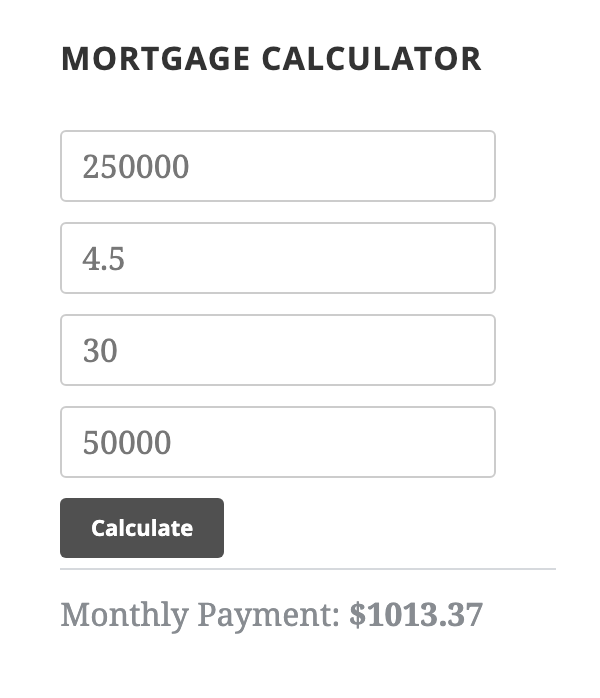
- Four inputs: home price, interest rate, term in years and down payment
- Instant monthly payment result in the browser
- Sidebar widget with a custom title and currency symbol
[mortgage_calc]shortcode for pages and posts- Clean flat styling for the widget; its fields adapt to the width of the sidebar
- Translation-ready
- No settings page and no account needed
[mortgage_calc]
As a widget: go to Appearance > Widgets and add "Simple Mortgage Calculator" to a sidebar or widget area. You can set the widget title and the currency symbol shown in the field hints and the result.
How the payment is calculated
The calculator uses the standard amortization formula for a fixed-rate loan: the loan amount is the home price minus the down payment, and the monthly payment is calculated from the monthly interest rate (annual rate divided by 12) and the number of monthly payments (term in years times 12). The result covers principal and interest only.
Who it is for
Real-estate agents, home-buying blogs, mortgage brokers and any site that wants to give visitors a quick payment estimate.
安装:
- Upload the /ct-mortgage-calculator/ folder to the /wp-content/plugins/ directory.
- Activate the Simple Mortgage Calculator plugin through the "Plugins" menu in WordPress.
- Add the widget under Appearance > Widgets, or paste the shortcode
[mortgage_calc]into a page or post. - And you're good to go!
屏幕截图:
常见问题:
How do I add the calculator to a page?
Paste the shortcode [mortgage_calc] into the page or post. In the block editor use a Shortcode block.
Can I use it as a sidebar widget?
Yes. Add "Simple Mortgage Calculator" under Appearance > Widgets and choose a title and currency symbol.
How is the monthly payment calculated?
With the standard fixed-rate amortization formula, using the home price minus the down payment as the loan amount, the annual interest rate divided by 12 and the term in years times 12 payments.
Does the result include property tax, insurance or PMI?
No. The result is principal and interest only. Taxes, home insurance, PMI and fees are not included, so the real monthly cost will be higher. The calculator gives an estimate, not a loan offer.
Can I change the currency or colors?
The widget has a currency field. The shortcode version always shows a dollar sign. The widget styling lives in the plugin stylesheet (assets/style.css) and can be overridden with your own CSS. The shortcode form mostly inherits your theme's form styles.
Does the plugin send visitors' data anywhere?
No. The calculation runs in the visitor's browser and the numbers entered are not saved or sent to a server.
更新日志:
- Security: escape all output; the widget title and currency are now sanitized when saved and escaped when printed.
- Security: shortcode field labels are escaped inside the inline focus/blur handlers.
- Text domain changed to the plugin slug; internal functions and the widget class use a unique prefix (saved widgets are unaffected).
- Tested with WordPress 7.1. Outbound credit links now carry rel="nofollow".
- Small fix
- Fixed shortcode bugs
- Added screenshots
- Added widget icon
- Fixed old bugs
- Removed mortgage resources (question mark)
- Added default values for Currency ($) and Title (Mortgage Calculator)
- Added labels to increase accessibility
- Added faq for tool Q&A
- Updated input placeholder text
- Updated language files