Custom Breakpoints for Elementor
| 开发者 |
jwthemeltd
litonice13 |
|---|---|
| 更新时间 | 2025年12月11日 16:02 |
| PHP版本: | 7.0 及以上 |
| WordPress版本: | 6.9 |
| 版权: | GPLv3 or later |
| 版权网址: | 版权信息 |
详情介绍:
17+ default breakpoints Works Exact same as Elementors Breakpoints No Breakpoints Limits (Pro Version) Set max-width for automatic sorting Breakpoint positions Export Breakpoints Option Import Breakpoints Option Reset Breakpoints Option Multisite SupportsElementor Breakpoints will help you to create a responsive website perfectly fit to any device. By default, there are three breakpoints in Elementor. But it's not enough when you try to target devices with their specific min - max width.
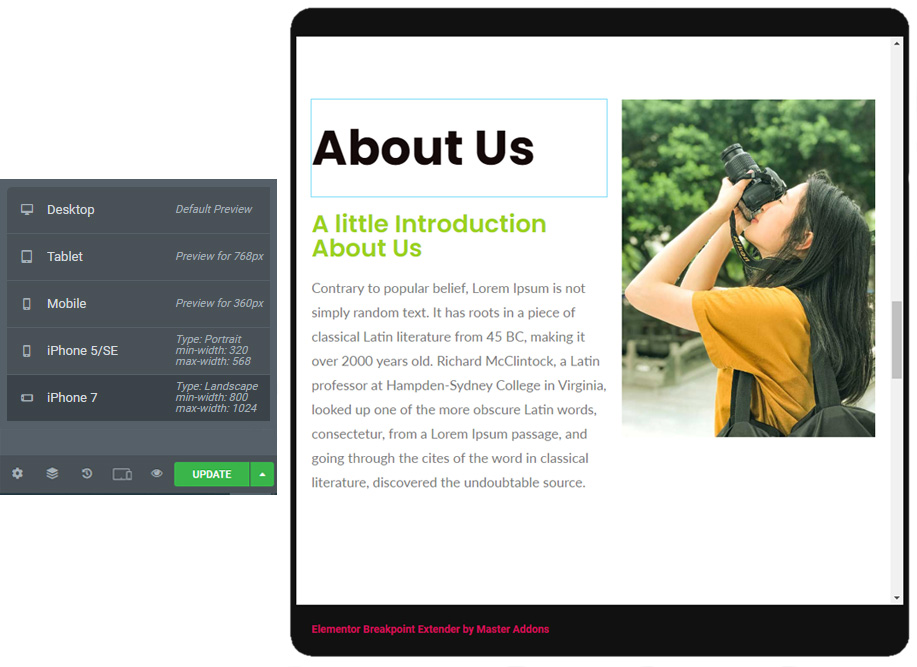
Master Addons for Elementor Don't forget to check our Exclusive & must have Elementor Addons which includes 40+ Addons, 10+ Extensions & 10+ Landing Pages. All Addons | Support | Docs | Tutorials | Upgrade ProThis Custom Breakpoint plugin will help you to set a specific property of elements for your custom made breakpoint. Just install and activate the plugin and you able to see a new option inside elementor called "Breakpoints". Set your desired device value in the breakpoint and arrange pages properly.
安装:
- Upload the Downloaded "Elementor-Custom-Breakpoints.zip" Folder to the
/wp-content/plugins/directory - Or, UNZIP "custom-breakpoints-for-elementor.zip" folder and Upload "custom-breakpoints-for-elementor" on "wp-content/plugins/" folder via FTP or Copy and Paste on your Local Computer
- Activate the "Custom Breakpoints for Elementor" Plugin through the 'Plugins' menu in WordPress
屏幕截图:
常见问题:
Can I use "Custom Breakpoints for Elementor" Plugin without Elementor WordPress Plugin?
No, Elementor page builder plugin is required to use Instagram Feed for Elementor Plugin. You must have Installed "Elementor" Page builder plugin to work with this plugin. If you forgot to Install or Active, you'll see a notice for Installing/Activate.
How to Install this Plugin ?
Installation Process has been discussed on "Installation" Section. Video Tutorial will help you about Installation Process. Learn from our Tutorials on Youtube Channel
How to Configure this Plugin?
Basically, there's no configuration required for using "Custom Breakpoints for Elementor" Plugin. You'll find "Breakpoint" inside "Elementor" options, or if you are "Master Addons" user, then you will see the optin inside "Master Addons".
How to add a Custom Breakpoint?
Navigate to the breakpoint option. You will see default breakpoint there. Just customize the default breakpoint with your own value and property. You can add new breakpoint too.
Is it compatible with any Theme?
Yes, it's compatible with any WordPress Theme.
How can I get faster Support?
We've two ways to give Supports for "Custom Breakpoints for Elementor" Plugin - 1. WordPress Support Forum and 2. Website Contact Form.