
Custom Order Status for WooCommerce
| 开发者 | tychesoftwares |
|---|---|
| 更新时间 | 2026年9月1日 19:02 |
| PHP版本: | 7.4 及以上 |
| WordPress版本: | 7.0.2 |
| 版权: | GNU General Public License v3.0 |
| 版权网址: | 版权信息 |
标签
下载
详情介绍:
Custom Order Status for WooCommerce lets you create and manage your own order statuses directly from the WooCommerce dashboard. Customize each status with its own label, icon, and color, choose default statuses for supported payment methods, and send email notifications when an order moves to a custom status.
Key Features
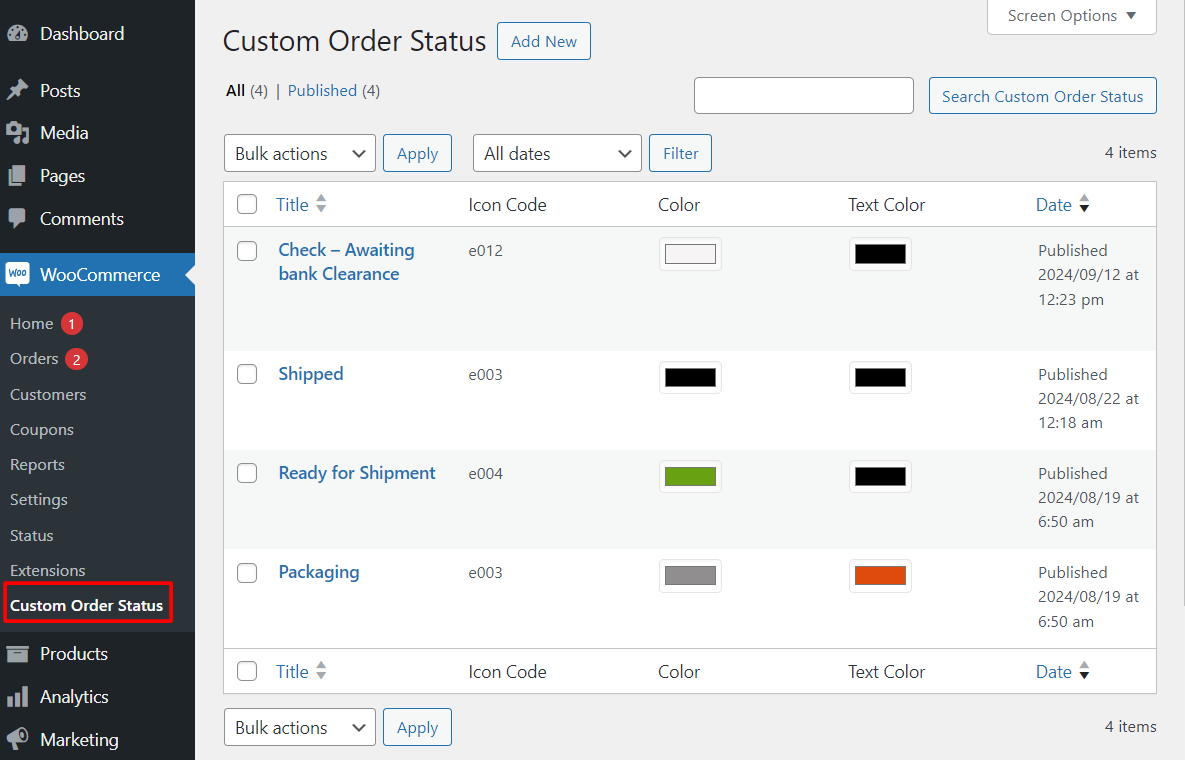
Create Your Own Custom Order Statuses
Add your own order statuses to WooCommerce without writing code.
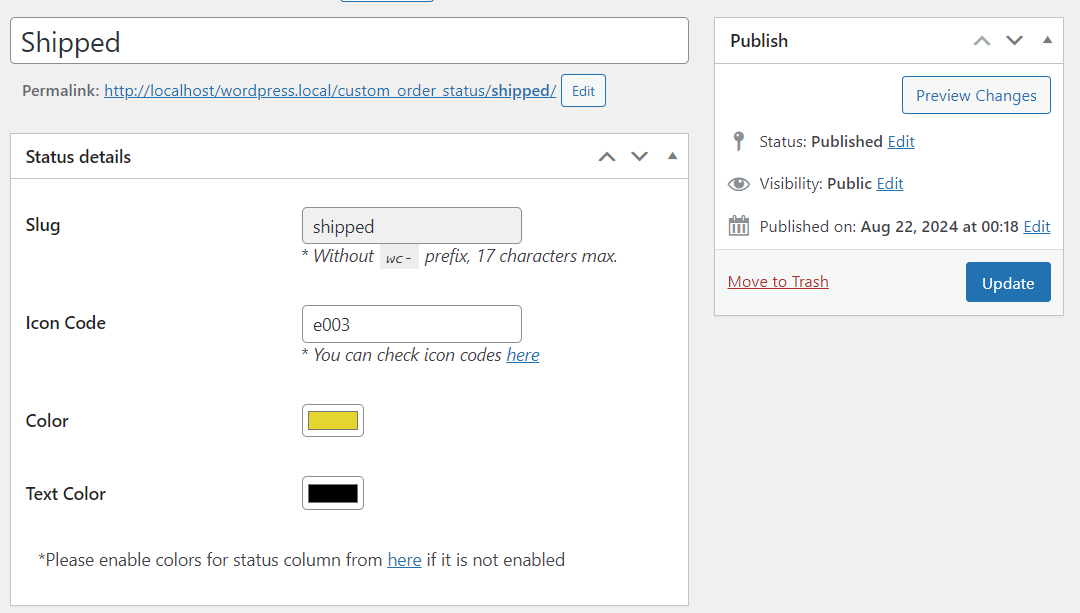
For each custom status you can configure:
- Status label
- Status slug
- Icon
- Display color This makes it easier to organize orders according to your own fulfillment process.
- Add fulfillment stages such as Packed, Shipped, or Ready for Pickup
- Create custom manufacturing or production workflows
- Improve warehouse and order management processes
- Notify customers when orders reach important milestones
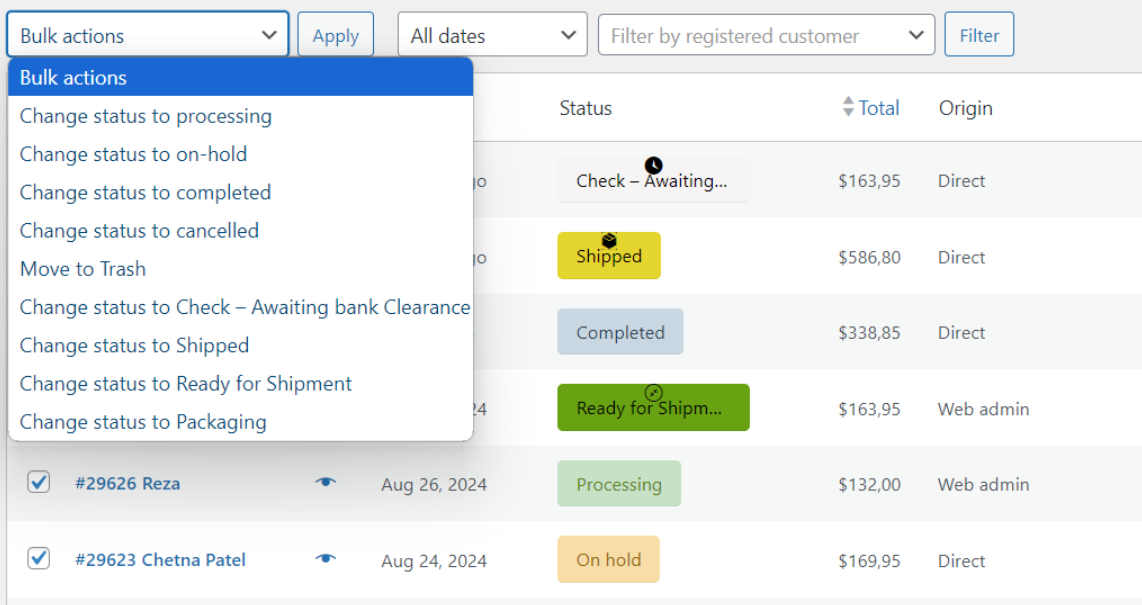
- Manage orders more efficiently using bulk status updates
- Visit the WordPress support forums
- Check the documentation for common answers
- Try the live demo to see how the plugin works on the storefront.
- Flexi BOGO for WooCommerce
- Abandoned Cart Pro for WooCommerce
- Booking & Appointment Plugin for WooCommerce
- Order Delivery Date Pro for WooCommerce
- Product Delivery Date Pro for WooCommerce
- Deposits For WooCommerce
- Payment Gateway Based Fees and Discounts for WooCommerce - Pro
- Custom Order Numbers for WooCommerce - Pro
- Product Input Fields for WooCommerce - Pro
- Call for Price for WooCommerce - Pro
- Currency per Product for WooCommerce - Pro
- Price based on User Role for WooCommerce - Pro
- Abandoned Cart for WooCommerce
- Order Delivery Date for WooCommerce - Lite
- Product Delivery Date for WooCommerce - Lite
- Payment Gateway Based Fees and Discounts for WooCommerce
- Custom Order Status for WooCommerce
- Custom Order Numbers for WooCommerce
- Product Input Fields for WooCommerce
- Call for Price for WooCommerce
- Price based on User Role for WooCommerce
- Currency per Product for WooCommerce
安装:
- Upload the entire plugin folder to the
/wp-content/plugins/directory. - Activate the plugin through the "Plugins" menu in WordPress.
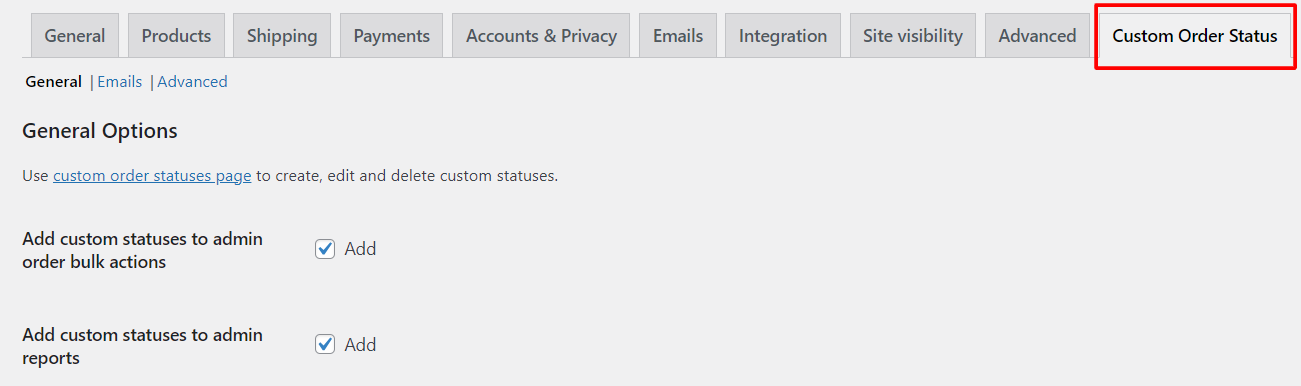
- Start by visiting plugin settings at "WooCommerce > Settings > Custom Order Status".
屏幕截图:
常见问题:
Can I create my own WooCommerce order statuses?
Yes. The plugin lets you create custom order statuses with your own labels, icons, colors, and slugs.
Can I choose the default order status?
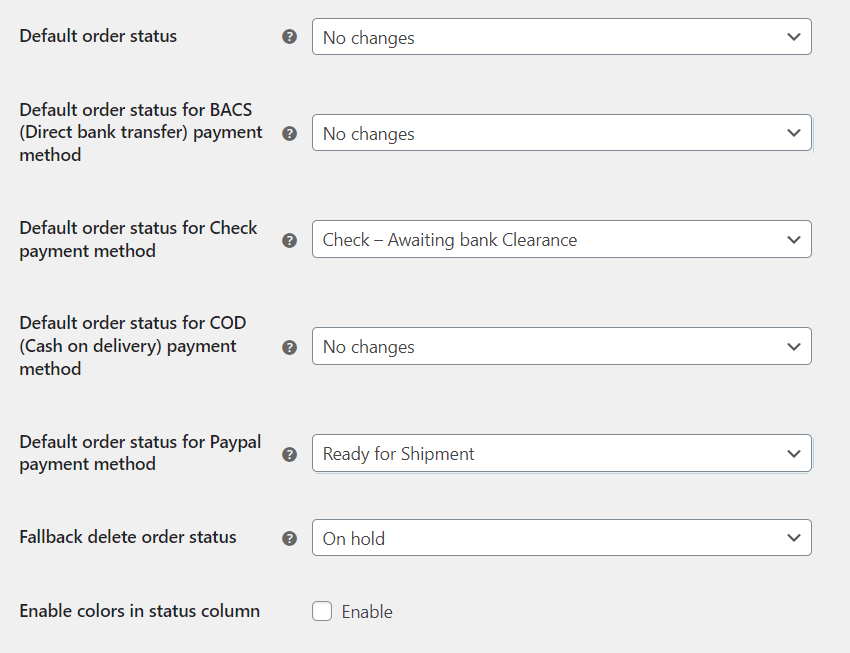
Yes. You can configure the default WooCommerce order status, including the default status for supported WooCommerce payment gateways.
Can customers receive email notifications when the order status changes?
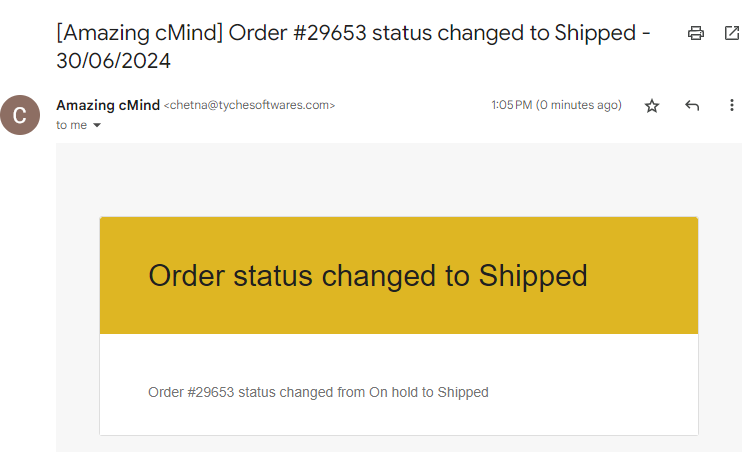
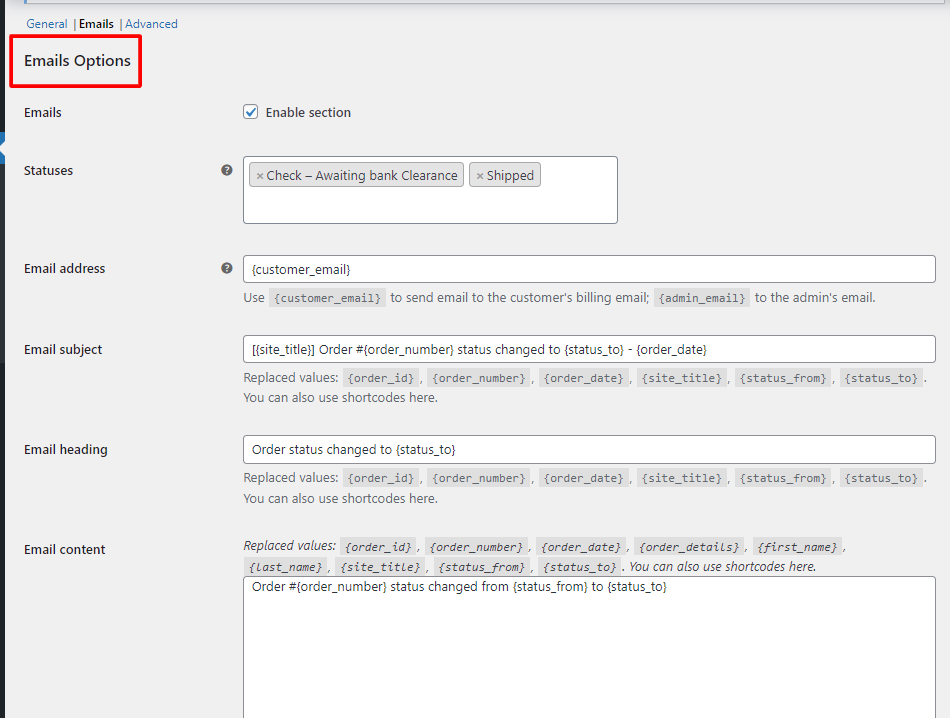
Yes. The Lite version allows you to send email notifications to customers and administrators when an order changes to a custom status.
Can I edit orders with custom statuses?
Yes. Orders assigned to custom statuses can remain editable, allowing you to continue updating them as needed.
Will custom statuses appear in WooCommerce reports?
Yes. Orders using custom statuses are included in WooCommerce Analytics reports.
Can I update multiple orders at once?
Yes. Custom statuses are available from WooCommerce Bulk Actions, making it easy to update several orders simultaneously.
更新日志:
3.0.1 - 28/07/2026
- Fix - Default WooCommerce order status labels are displayed in English instead of the translated labels.
- New - React-based admin interface for Status Manager, Settings, Rules, Emails, SMS, Status by Payments, Labels, and License pages.
- Dev - Introduced a REST API layer (cos-pro/v1) for plugin settings operations.
- Dev - All global plugin settings consolidated from individual alg_orders_custom_statuse_* wp_options rows into a single cos_pro_settings option.
- Update - Compatibility with WordPress 7.0.
- Update - Compatibility with WooCommerce 10.9.1.
- Enhancement - Added options to make orders with custom order statuses editable and allow them to be marked as paid.
- Tweak - Updated for compatibility with WordPress 6.9.0.
- Tweak - Updated for compatibility with WooCommerce 10.4.3.
- Fix - PHP warning: Undefined array key "status_slug" when a custom order status is moved to trash or deleted.
- Tweak - Updated for compatibility with WooCommerce 9.9.4.
- Fix - Added Plugin Name and Plugin Description strings for translation.
- Fix - PHP Warning: Undefined variable $result when custom status is deleted.
- Fix - Resolved all PHPCS warnings and aligned the code with WordPress Coding Standards to enhance quality and maintainability.
- Tweak - Updated for compatibility with WordPress 6.8.
- Tweak - Updated for compatibility with WooCommerce 9.8.1.
- Fix - Translation loading was triggered too early, causing errors when changing the site language in WordPress 6.7.
- Tweak - Removed the call to our tracking server to fetch the deactivation reasons and added them in the plugin itself.
- Fix - Deactivation survey request was being sent even though 'Skip & deactivate' was selected while deactivating the plugin.
- Fix - Compatibility issue with "ActiveMember360" plugin causing fatal error on frontend.
- Fix - Cross Site Request Forgery (CSRF) vulnerability.
- Fix - The order page is crashed if the Custom Order Status has "%" sign included.
- Tweak - Update compatibility with WordPress 6.5
- Tweak - Update compatibility with WooCommerce 8.7
- Fix - Fixed Cross Site Request Forgery (CSRF) vulnerability.
- Enhancement - Added deactivation survey v2.
- Fix - Compatibility with PHP 8.2.2.
- Fix - Compatibility declaration for WooCommerce Product Editor option.
- Fix - Compatibility with High-Performance Order Storage (COT).
- Fix - "Fallback delete order status" setting was not working.
- Fix - Fatal error upon activation of the plugin when Custom Order Number plugin was installed and activated.
- Fix - Fatal error on the Order Received page.
- Enhancement - Introduced compatibility with WooCommerce High Performance Order Storage.
- Fix - Custom Order Status plugin conflict with Custom order number plugin due to same function name.
- Fix - Duplicate Queries on Custom Order Status page.
- Fix - Plugin setting link was missing on the plugin page.
- Fix - Notice to enable color setting was missing.
- Enhancement - Added an option to select the default status for Cheque and Paypal payment methods.
- Fix - After migration, slugs were coming empty in some site. This is fixed now.
- Fix - When slug in custom order status starts with wc- then order status don't gets changed to that custom order status. This is fixed now.
- Fix - Text color for the custom order status was coming on the orders page even if the settings for enabling color option is kept disabled. This is fixed now.
- Fix - Order status was getting changed when we refresh the Thankyou page. This has been fixed.
- Fix - When we change the slug of the custom order status, orders having that custom status was not seen on the orders page. This has been fixed.
- Enhancement - Added new setting "Enable color" to show background color for the statuses in the order page.
- Fix - When we click on the "Custom Order Status Tool" link from the plugin, it shows an error. This has been fixed.
- Fix - After deleting the plugin old data does not get removed. This has been fixed.
- Fix - Orders are getting deleted which has the custom order status when the plugin is deleted. This has been fixed.
- Fix - The status is not getting changed to the custom one when the status is created with 3 words. This has been fixed.
- Fix - Added icons to the labels. This has been fixed.
- Feature - Added Custom Post Type for custom statuses with the support of previous tool page.
- Feature - Added Global level email function to send the email to customer & admin on change of custom order status.
- Updated compatibility with WordPress 5.5
- Updated compatibility with WC 4.5
- Updated compatibility with WC 4.0.0
- Made the plugin code compliant with WPCS standards.
- Added uninstall.php to ensure the plugin settings are removed from the DB when the plugin is deleted.
- Added check to ensure slugs from WC core cannot be added as custom statuses. This has been done to avoid conflicts.
- Applied some bug fixes to ensure the plugin is in sync with the PRO version.
- Author name and URL updated due to handover of the plugins.
- Compatibility with WooCommerce 3.5.0 tested.
- Feature - Emails - Email content -
{order_details}replaced value added. - Feature - Default order status - "Default order status for BACS / COD" options added (instead of forcing BACS and COD to "default order status", as was added in previous plugin version 1.4.3).
- Dev - Default order status - Forcing BACS and COD payment gateways to "default order status".
- Dev - WPML / Polylang plugins compatibility (
wpml-config.xmlfile) added.
- Feature - "Add custom statuses to admin order preview action buttons" option added.
- Dev - Code refactoring.
- Dev - Minor admin settings restyling.
- Feature - "Emails" section added.
- Feature - "Make custom status orders paid" option added.
- Dev - Code refactoring.
- Dev - Admin settings divided into sections, restyled and descriptions updated.
- Dev - "Enable plugin" option removed.
- Feature - "Make custom status orders editable" option added.
- Dev - Plugin URI updated to wpfactory.com.
- Dev - Settings are saved as main class property.
- Dev - "Advanced: Filters priority" option added.
- Dev - "Text Color" option added.
- Dev - "Enable Colors in Status Column" option added.
- Dev - "WC tested up to" added to the plugin header.
- Fix -
Too few arguments to function Alg_WC_Custom_Order_Statuses_Settings_Section::get_settings()fixed.
- Dev - WooCommerce 3.x.x compatibility - Order ID.
- Dev - Custom Order Status Tool - Sanitizing slug before adding new status.
- Dev - Custom Order Status Tool - "Delete with fallback" separate button added. Simple "Delete" button now deletes statuses without any fallback.
- Dev - Custom Order Status Tool - "Edit" functionality moved from Pro to free version.
- Tweak - readme.txt and plugin header updated.
- Tweak - Custom Order Status Tool - Restyled.
- Tweak - Custom Order Status Tool - Code refactoring.
- Tweak - Link changed from
coder.fmtowpcodefactory.com.
- Dev - "Reset settings" button added.
- Tweak - readme.txt fixed.
- Fix - Tool - Add - Checking for duplicate default WooCommerce status added.
- Dev - Tool - "Edit" custom status button added.
- Dev - Fallback status on delete.
- Dev - "Add Custom Statuses to Admin Order List Action Buttons" options added.
- Dev - Extended (paid) version added.
- Tweak - Plugin "Tags" updated.
- Fix -
load_plugin_textdomain()moved frominithook to constructor. - Fix - All
get_optioncalls have default value now. - Dev - Language (POT) file added. Domain 'custom-order-statuses-for-woocommerce' changed to 'custom-order-statuses-woocommerce'.
- Dev - Bulk actions added in proper way for WordPress version >= 4.7.
- Tweak - Donate link updated.
- Initial Release.