Cybokron Consent Manager Translations for YOOtheme Pro
| 开发者 | cybokron |
|---|---|
| 更新时间 | 2026年3月31日 18:19 |
| PHP版本: | 7.4 及以上 |
| WordPress版本: | 6.9 |
| 版权: | GPLv2 or later |
| 版权网址: | 版权信息 |
详情介绍:
- Translate all 25 Consent Manager strings
- 36 pre-configured language presets
- Locale-scoped overrides for multilingual setups
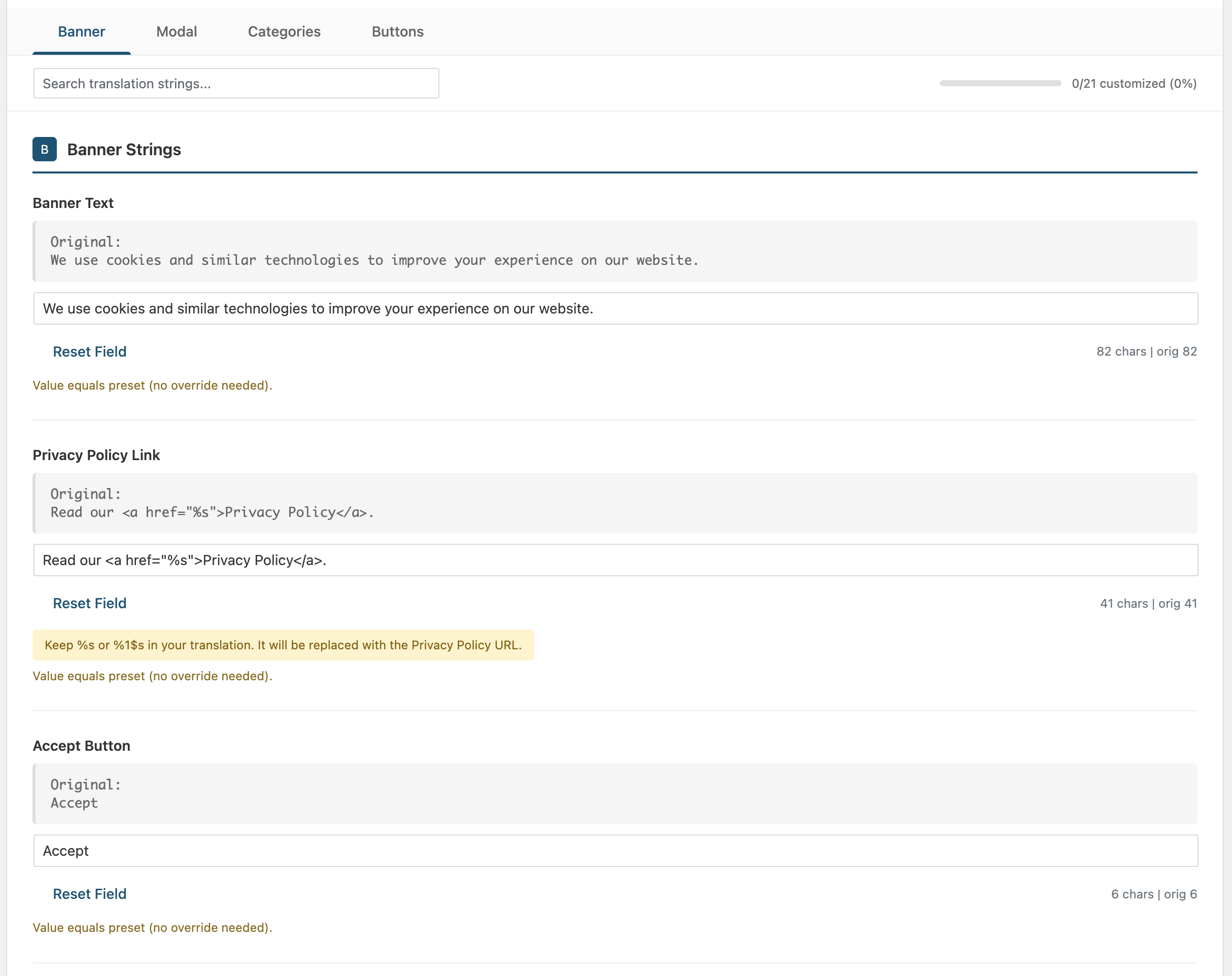
- Easy-to-use tabbed interface
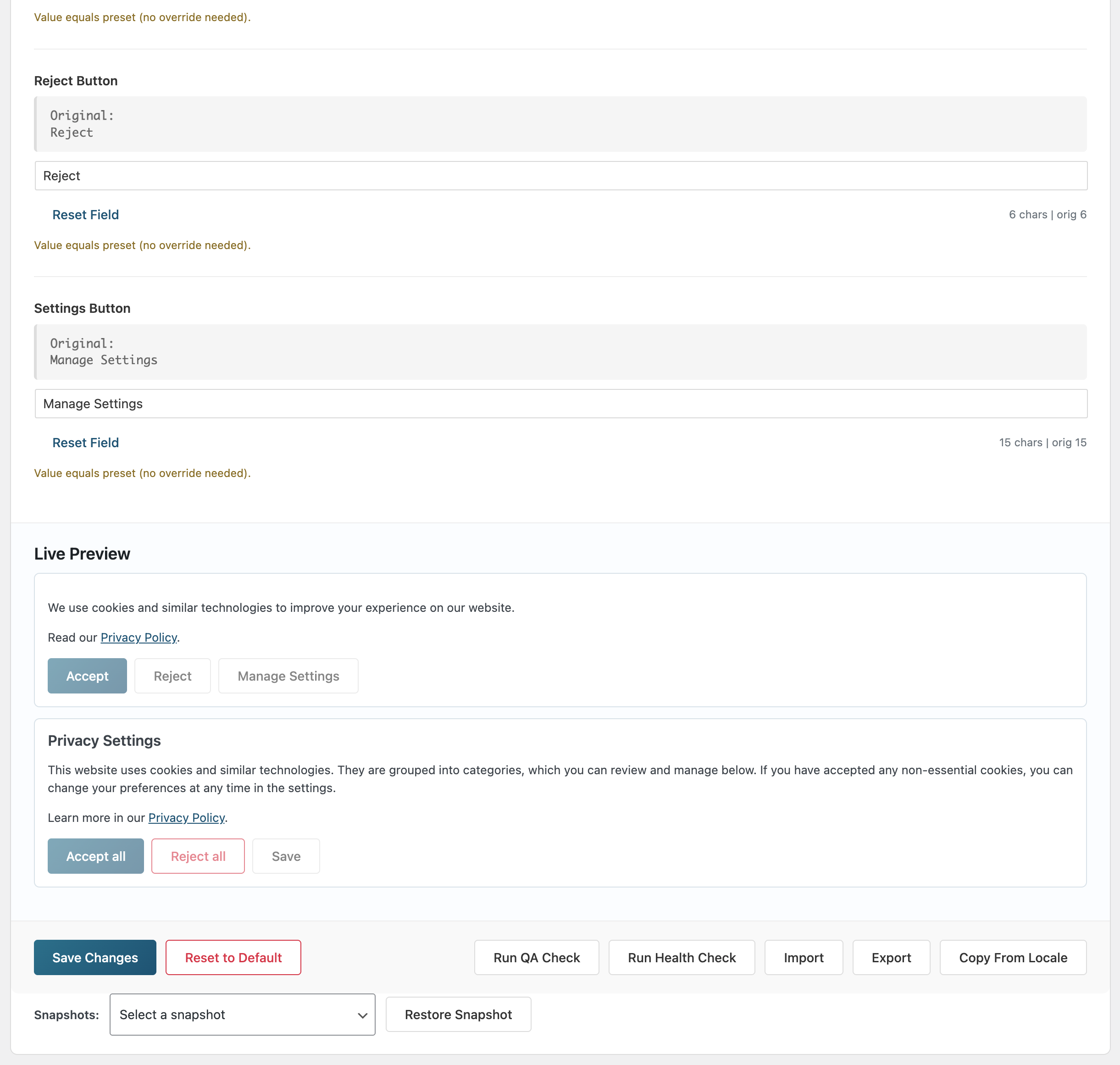
- Live preview, inline QA checks, and compatibility health panel
- Snapshot history with rollback support
- Import/Export settings as JSON
- WordPress.org update status panel with site-wide periodic checks
- No coding required
- Compatible with WPML and Polylang
- Banner text and buttons (Accept, Reject, Manage Settings)
- Privacy Settings modal content
- Category titles (Functional, Preferences, Statistics, Marketing)
- Category descriptions
- Modal buttons (Accept all, Reject all, Save)
- Show/Hide Services toggles
- Service consent text (OpenStreetMap, Google Maps, Vimeo, YouTube)
安装:
- Upload the
cybokron-consent-manager-translations-yoothemefolder to the/wp-content/plugins/directory - Activate the plugin through the 'Plugins' menu in WordPress
- Go to Settings → Cybokron Consent Manager Translations for YOOtheme Pro to configure
屏幕截图:
常见问题:
Does this plugin require YOOtheme Pro?
Yes, this plugin is designed specifically for translating the YOOtheme Pro 5 Consent Manager. It won't have any effect without YOOtheme Pro installed.
Can I add my own custom language?
Yes! Simply select any language preset and modify the texts to your needs. Your custom translations will override the preset values.
Does it work with multilingual plugins?
The plugin supports locale-scoped settings (for example en_US, tr_TR) so you can maintain different overrides per locale while still using shared language presets.
How do I backup my translations?
Use the Export button to download a JSON file of your current settings. You can Import this file later to restore your translations.
How does the updater panel work?
Enable periodic checks from plugin settings. The plugin reads WordPress core update metadata every 12 hours and shows current update status in the updater panel. Use "Check Now" for an immediate refresh.
My translations are not showing up
- Make sure the plugin is enabled (check the toggle in settings)
- Clear any caching plugins
- Clear your browser cache
- Make sure you're using YOOtheme Pro 5 with the Consent Manager enabled
更新日志:
- New: Added 4 missing service consent text strings — OpenStreetMap, Google Maps, Vimeo, and YouTube service descriptions are now translatable (fixes #34).
- New: New "Services" tab group in admin settings exposes these strings for all 36 language presets.
- Fixed: Language fallback in sanitize_options now correctly defaults to 'auto' instead of 'en', consistent with the default introduced in 1.4.3.
- Fixed: WPML/Polylang compatibility — translations now auto-detect from WordPress locale when no locale-specific settings exist, fixing missing translations on multilingual sites.
- Changed: Default language setting changed from 'en' to 'auto' for better out-of-the-box multilingual support.
- Packaging: Removed
.distignoreand.githubfrom distribution to resolve Plugin Check errors. - Tested up to WordPress 6.9.
- Changed: Admin sidebar and settings page header now use white plugin icon for better visibility on dark admin backgrounds.
- CI: Fixed ABSPATH guard validation to accept WP_UNINSTALL_PLUGIN as valid guard for uninstall.php.
- New: Plugin icon now displayed in WordPress admin sidebar menu.
- New: Plugin icon added to settings page header.
- Changed: Plugin menu moved to top-level admin menu with custom icon for better visibility.
- CI: Added GitHub Actions workflow for automatic WordPress.org SVN deployment on release.
- Fixed Contributors field: removed invalid WordPress.org username
ercanatay, kept only validcybokronaccount.
- Removed discouraged load_plugin_textdomain() call per Plugin Check (WordPress 4.6+ loads translations automatically for WordPress.org hosted plugins).
- Security: added wp_kses output sanitization to gettext filter for defense-in-depth against stored XSS in custom translation strings.
- Security: added type check after maybe_unserialize in locale option scan to prevent object injection.
- Performance: added rate-limiting (1-hour interval) to health report DB persistence to avoid writes on every frontend page load.
- Improvement: replaced uniqid() with wp_generate_uuid4() for snapshot IDs (cryptographically stronger, WordPress-native).
- Improvement: replaced file_get_contents with wp_json_file_decode (WP 5.9+) for language JSON loading with legacy fallback.
- Improvement: implemented load_plugin_textdomain() for proper i18n text domain loading.
- Cleanup: removed unnecessary flush_rewrite_rules() calls from activation/deactivation hooks.
- Text domain: corrected all gettext text domain values from
cybokron-consent-manager-translations-yootheme-maintocybokron-consent-manager-translations-yoothemeto match the plugin slug exactly. - Packaging: removed
tests/andscripts/directories from the distribution package entirely. - Added
.distignoreto prevent development-only files from being included in future release archives.
- Plugin Check compatibility: aligned plugin header and gettext text domain to
cybokron-consent-manager-translations-yoothemematching the plugin slug. - Packaging cleanup: removed hidden/workflow root entries from plugin root (
.distignore,.github) to avoid Plugin Check warnings.
- WordPress.org review compliance: aligned all gettext text domains with plugin slug
cybokron-consent-manager-translations-yootheme. - Refactor: replaced generic identifiers with a unique plugin prefix (
cybocoma_/CYBOCOMA_) across classes, constants, hooks, options, and AJAX actions. - Packaging: added
.distignoreguidance and prepared release distribution to exclude non-production paths such astests/andscripts/. - Metadata: updated contributors list and synchronized plugin/readme/composer versions to
1.3.13.
- i18n fix: restored plugin text domain usage to
cybokron-consent-manager-translations-yoothemeacross plugin/admin/health/strings/updater modules for Plugin Check compatibility. - Updated plugin header
Text Domaintocybokron-consent-manager-translations-yootheme. - Synced plugin metadata/versioning to
1.3.12.
- Renamed plugin display name and slug to
Cybokron Consent Manager Translations for YOOtheme Pro/cybokron-consent-manager-translations-yoothemefor WordPress.org naming compliance. - Updated plugin metadata, admin settings page slug, text domain, and package file naming to align with the new slug.
- QA: reran tests, PHP syntax checks, and static scan with clean results.
- Synced plugin metadata/versioning to
1.3.11.
- Bugfix (i18n): localized admin statistics summary text generated in JavaScript via
wp_localize_script. - QA: reran tests, PHP syntax checks, JSON validation, and static scan with clean results.
- Synced plugin metadata/versioning to
1.3.10.
- Security: Sanitized admin live-preview link HTML to only preserve safe anchor output (
<a href title>) and forcedrel="noopener noreferrer". - SQL safety: Removed redundant
esc_sql()wrappers around$wpdb->esc_like()wildcard queries in scoped option scans and uninstall cleanup. - Performance: Persisted snapshot/health/updater internal options with
autoload=falseto reduce autoload pressure. - Uninstall hygiene: Added updater cron hook cleanup (
cybocoma_updater_cron_check) for single-site and multisite uninstall paths, including WordPress pre-6.1 fallback logic. - Cache consistency: Reset translator original-string map during cache clear and aligned test bootstrap
update_option()signature with current core usage. - Synced plugin metadata/versioning to
1.3.9.
- Accessibility: added semantic ARIA roles/attributes for admin translation tabs (
tablist,tab,tabpanel) with deterministic rovingtabindex. - Keyboard UX: added Left/Right plus Home/End navigation support for tab controls.
- Accessibility state sync: tab panels now consistently toggle both
hiddenandaria-hidden. - Packaging: removed accidental
.Julesdevelopment artifact from release tree. - Synced plugin metadata/versioning to
1.3.8.
- WordPress.org compliance: removed custom updater hooks that altered core update routines.
- Updater refactor: switched updater state checks to WordPress core update metadata and human-readable admin status labels.
- i18n: standardized text domain usage to
cybokron-consent-manager-translations-yoothemeacross plugin files. - Compatibility: removed deprecated
wp_targeted_link_rel()usage from admin sanitization flow. - Tests: added direct file access guards and updated updater tests for the new metadata-driven flow.
- Synced plugin metadata/versioning to
1.3.7.
- Security: Added reverse tabnabbing protection to sanitized consent links via
wp_targeted_link_rel(). - Security: Added admin AJAX security headers (
X-Content-Type-Optionsand fallbackX-Frame-Options) without overriding stricter pre-existing frame policies. - Tests: Added admin AJAX header regression coverage (
tests/test_admin_headers.php) and bootstrap stubs for header helpers. - Packaging: Removed non-production
.julesartifact from release tree. - Synced plugin metadata/versioning and text-domain references to
1.3.6.
- Completed Romanian preset translation gap: updated
button_acceptfromAccepttoAcceptă. - Synced plugin metadata/versioning and text-domain references to
1.3.5.
- Added GitHub stable auto-update channel using WordPress Upgrader with
releases/latest+zipball_urlfallback. - Added site-wide updater controls/status panel and manual "Check Now" action in settings.
- Added 12-hour scheduled update checks (
twicedaily) with retry-on-failure and persisted last-error reporting. - Added updater-focused test coverage and uninstall cleanup for updater options.
- Synced plugin metadata/versioning to
1.3.4.
- Full double-check release: reran syntax/tests/JSON/security scans across the plugin and validated clean results.
- Maintenance: version/text-domain sync for current release packaging.
- Plugin Check hardening: added sanitized
filter_input()request handling in admin flows and clarified nonce handling for upload endpoints. - i18n: aligned all translatable strings with updated text domain and fixed ordered placeholder usage with translator guidance.
- Packaging: removed non-production root artifacts flagged by Plugin Check (
.github,.gitignore, shell runner, and daily markdown report). - Performance/quality: added cache layer for locale option scan and documented one-time uninstall wildcard query usage.
- Fixed i18n coverage for snapshot/quality-check admin messages by replacing hardcoded JavaScript text with localized strings
- Fixed uninstall script block structure for multisite cleanup flow
- Removed redundant
gmdate()test bootstrap shim to avoid dead-code shadowing in PHP environments - Docs: Clarified "add new language" workflow with explicit JSON-file requirements
- Added locale-scoped settings storage for multilingual workflows (WPML/Polylang friendly)
- Added compatibility health reporting for potential YOOtheme source string drift
- Implemented documented extension APIs:
cybocoma_translationsfilter andCYBOCOMA_DISABLEDconstant behavior - Added live preview panel, inline field validation, field-level reset actions, and unsaved-change protection
- Added settings snapshots with one-click rollback
- Added release-gate workflow and lightweight PHP tests
- Performance: Replaced repeated array scans with constant-time lookup maps (
isset) in language/placeholder validation paths - Improved: Added
CYBOCOMA_Strings::is_valid_language()helper and reused it in admin validation flow - Quality: Minor internal cleanups and formatting consistency updates for admin/settings rendering
- Tooling: Added security policy, daily review workflow, and maintenance scripts for code scanning/reporting
- Docs: Updated contributor workflow and compatibility notes in repository documentation
- Fixed: Auto language preset now resolves to detected WordPress locale in admin preview/load flows
- Improved: custom_strings are now stored as diff-only values against selected preset (save/import normalization)
- Validation: Save and import now block invalid privacy link strings missing required %s or %1$s placeholders
- Code Style: Converted 4-space indentation to tabs in all PHP files
- WordPress Coding Standards compliance
- No functional changes, only whitespace formatting
- Bugfix: Fixed missing strict comparison in has_placeholder() method (class-strings.php:390)
- Security: Enforced POST method for settings export (removed GET support)
- Added JSON validation script for language files (scripts/validate_json.py)
- Code quality: Added strict comparison to all in_array() calls
- Fixed: WordPress Plugin Check compliance - all warnings resolved
- Added cybocoma_ prefix to all template variables
- Improved input sanitization with wp_unslash()
- Enhanced $_FILES validation
- Fixed: Admin settings page not appearing due to hook timing issue
- The admin_init hook was running after admin_menu, preventing menu registration
- Major refactoring: moved translations to external JSON files
- Each language now has its own JSON file (36 files)
- Implemented lazy loading - only requested language is loaded
- Reduced memory usage by ~95% on typical requests
- Better code organization and maintainability
- Added 30 new language presets (36 total)
- Chinese, Spanish, French, Portuguese, Russian, Japanese
- Indonesian, Italian, Dutch, Polish, Vietnamese, Thai
- Ukrainian, Czech, Greek, Romanian, Hungarian, Swedish
- Danish, Finnish, Norwegian, Hebrew, Malay, Bengali
- Persian, Tamil, Telugu, Marathi, Swahili, Filipino
- Extended WordPress locale mapping for auto-detection
- Total translations: 900 (36 languages × 25 strings)
- Initial release
- 6 language presets included
- 21 translatable strings
- Import/Export functionality
- Tabbed admin interface