
Cycloon
| 开发者 | cycloon |
|---|---|
| 更新时间 | 2026年10月16日 18:30 |
| PHP版本: | 8.1 及以上 |
| WordPress版本: | 7.1 |
| 版权: | GPL-2.0-or-later |
| 版权网址: | 版权信息 |
详情介绍:
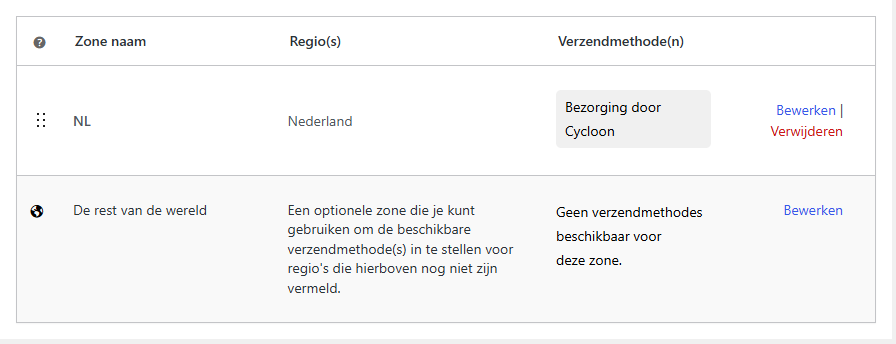
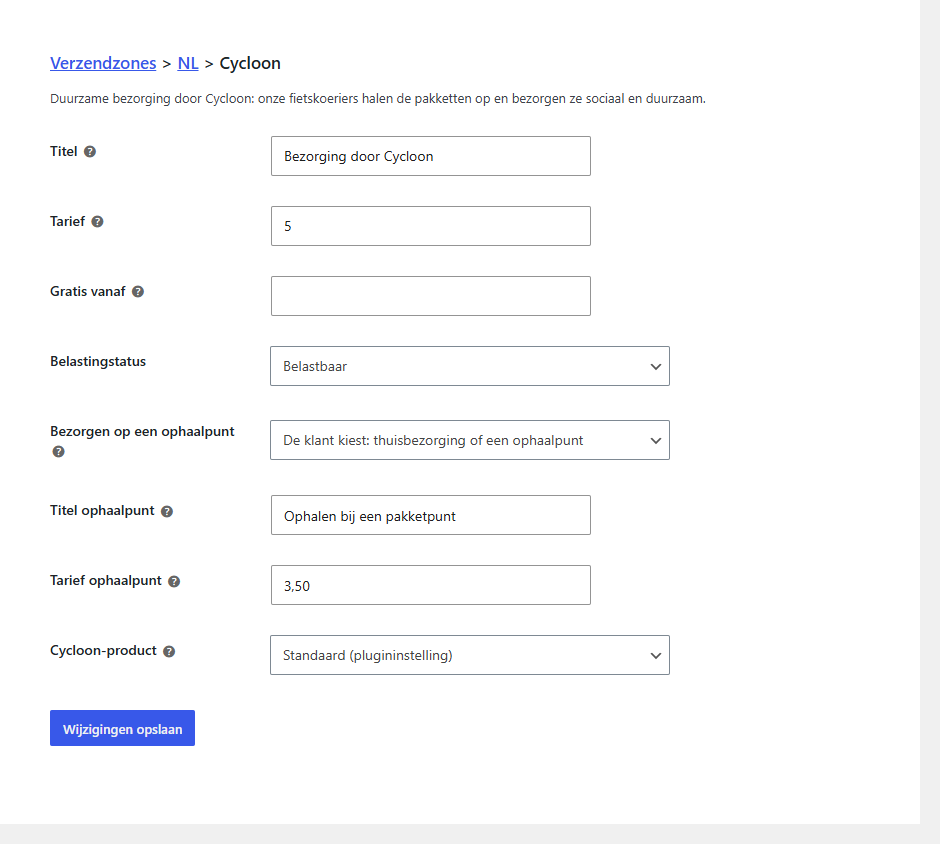
- Shipping method at checkout: add "Delivery by Cycloon" to your shipping zones, with its own rate per zone, an optional free-shipping threshold and a fixed Cycloon product per method. Works in both the classic checkout and the checkout blocks.
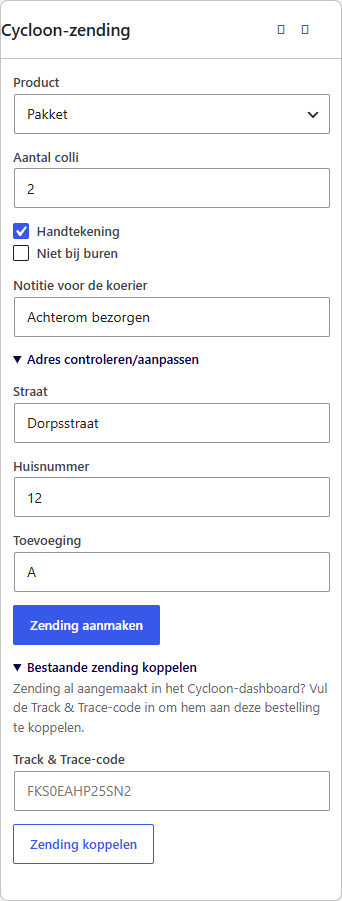
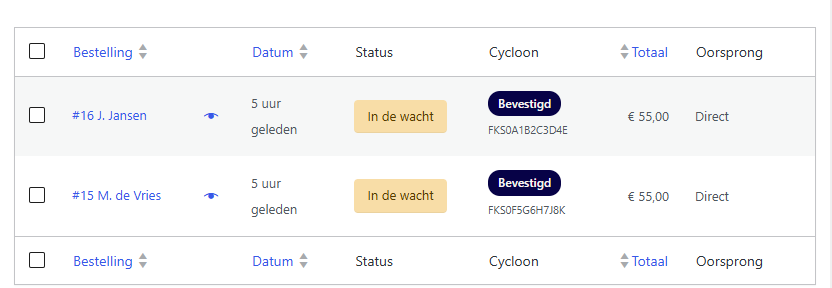
- Create a shipment from the order page, or automatically when an order reaches "Processing" — for all orders, or only for orders where the customer chose Cycloon at checkout. Choose the product (Pakket, Pakket XL, Brievenbuspakket, Aangetekende brief, Aangetekend pakket), the number of parcels, and the "Handtekening" (signature) and "Niet bij buren" (no delivery to neighbours) options.
- PDF labels per order, or in bulk from the order list. ZPL for label printers is available as a setting.
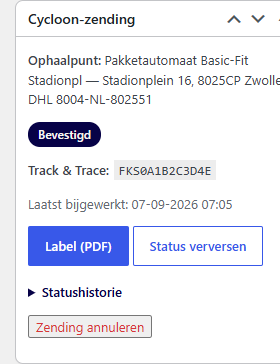
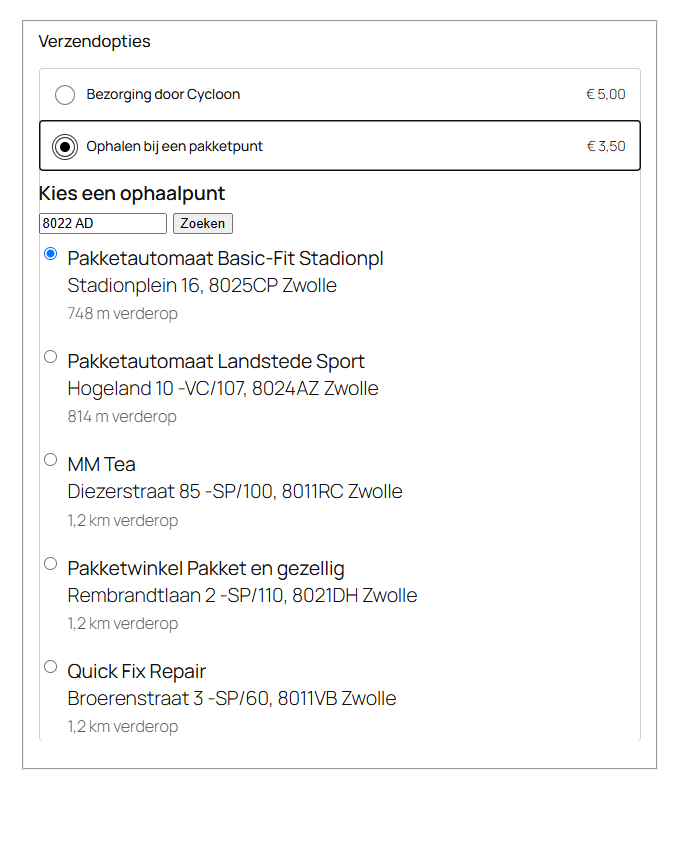
- Pickup points: let customers choose a nearby parcel point at checkout. Enable it per shipping method, either alongside home delivery or on its own.
- Link an existing shipment: created a shipment in the Cycloon dashboard? Enter its track & trace code on the order and the plugin pulls in the status, the history and the labels.
- Track & trace: refresh the status per order, an hourly automatic sync through Action Scheduler, and a webhook receiver for push updates, secured with HMAC verification. The link to the public tracking page comes from the API, so there is nothing to configure.
- Customer communication: the track & trace code in the order emails and on the "My account" order page.
- Customs: the customs form is shown and required for destinations outside the EU, pre-filled from the order.
- Translation ready: English source strings and a bundled .pot template; translations are delivered through translate.wordpress.org.
安装:
- Upload the plugin folder to
/wp-content/plugins/and activate the plugin. - Go to WooCommerce ▸ Settings ▸ Shipping ▸ Cycloon.
- Enter your email address and API key, save, and click "Test connection".
- Under WooCommerce ▸ Settings ▸ Shipping ▸ Shipping zones, add the "Cycloon" method to the zones you want and set the rate.
- Open an order and create your first shipment from the "Cycloon shipment" panel.
https://yourshop.com/wp-json/cycloon/v1/webhook to klant@cycloon.eu. Without a secret the webhook endpoint rejects every request, so no one else can change your shipment data.屏幕截图:
常见问题:
Do I need a Cycloon account?
Yes. Request an email address and API key through klant@cycloon.eu, then enter both under WooCommerce ▸ Settings ▸ Shipping ▸ Cycloon.
Why is the shipping method missing at checkout?
Cycloon only collects parcels in the Netherlands, so the plugin requires the store location under WooCommerce ▸ Settings ▸ General to be set to the Netherlands. Check that first; the plugin also shows a notice in the admin explaining this.
Can customers choose between home delivery and a pickup point?
Yes. Enable pickup point delivery in the plugin settings, then open your Cycloon shipping method and set "Pickup point delivery" to "The customer chooses". That single shipping method then offers both options at checkout, each with its own title and rate.
Does the plugin fetch shipping rates from Cycloon?
No. The API does not offer a rates endpoint, so you set the shipping costs per zone yourself.
Can I print labels for several orders at once?
Yes. Select the orders in the order list and choose the "Cycloon: download labels" bulk action. You get one merged PDF, or one ZPL file if you set the label format to ZPL.
更新日志:
- Pickup point requests (lookup and selection) now require the checkout's REST nonce. Requests from other sites are refused with a 403; the checkout itself works as before.
- Tested up to WooCommerce 11.2 (plugin header).
- Bulk label links keep a shipment ID of "0" instead of dropping it.
- First version in the WordPress.org plugin directory. The plugin itself is unchanged; this release adds the screenshots and the images for the directory page.
- The webhook endpoint now requires an HMAC secret. Incoming status updates are only accepted when their X-Fietskoeriers-Hash header matches that secret; without a secret every request is rejected. If you use the webhook, enter a secret under WooCommerce ▸ Settings ▸ Shipping ▸ Cycloon and pass it to klant@cycloon.eu.
- Translations are delivered through translate.wordpress.org; the plugin only ships the .pot template.
- Admin notices are limited to the screens where they belong: the WooCommerce requirement and the Dutch shop location requirement only show up on the plugin list and on the Cycloon settings section, and all notices can be dismissed. On the order page the shop location requirement was already explained in the Cycloon panel itself.
- First release: shipping method for the checkout (per zone, with a free-shipping threshold), shipment creation, PDF labels (per order and in bulk), status sync (manual, hourly and webhook), track & trace in customer emails, customs for destinations outside the EU, and pickup point delivery.