
Darkstar File Manager
| 开发者 |
darkstarmedia
justinblayney |
|---|---|
| 更新时间 | 2026年9月8日 00:16 |
| PHP版本: | 7.4 及以上 |
| WordPress版本: | 7.1 |
| 版权: | GPLv2 or later |
| 版权网址: | 版权信息 |
详情介绍:
- Secure File Storage - Store files outside your web root for maximum security
- User Isolation - Each client can only access their own documents
- Two-Way File Sharing - Administrators can upload files for clients, and clients can upload files back
- Separate File Sections - Client view shows "Documents from Professional" and "Your Uploaded Documents" separately
- Simple Shortcode -
[dsfm_client_login]displays login form and document manager - File Type Validation - Configurable allowed file types (PDF, DOC, DOCX, XLS, XLSX, images, etc.)
- File Size Limits - Set maximum upload size (1-100 MB, default 50 MB)
- MIME Type Checking - Prevents malicious file uploads
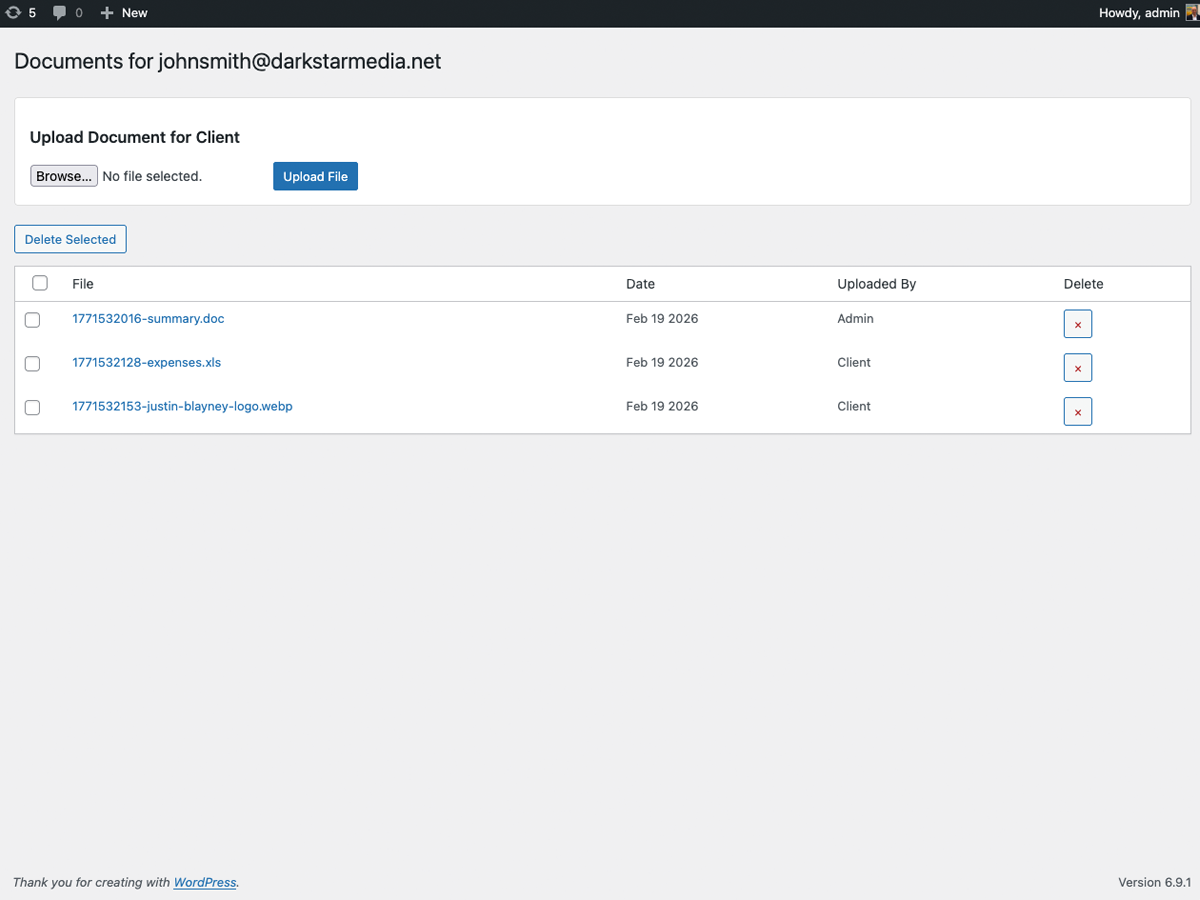
- Bulk Operations - Delete multiple files at once from admin panel
- Translation Ready - Full internationalization support with Polylang integration
- Responsive Design - Works on desktop, tablet, and mobile devices
- Create a Client Portal Page - Add the shortcode
[dsfm_client_login]to any page - Configure Settings - Set upload path (outside web root recommended), file types, and size limits
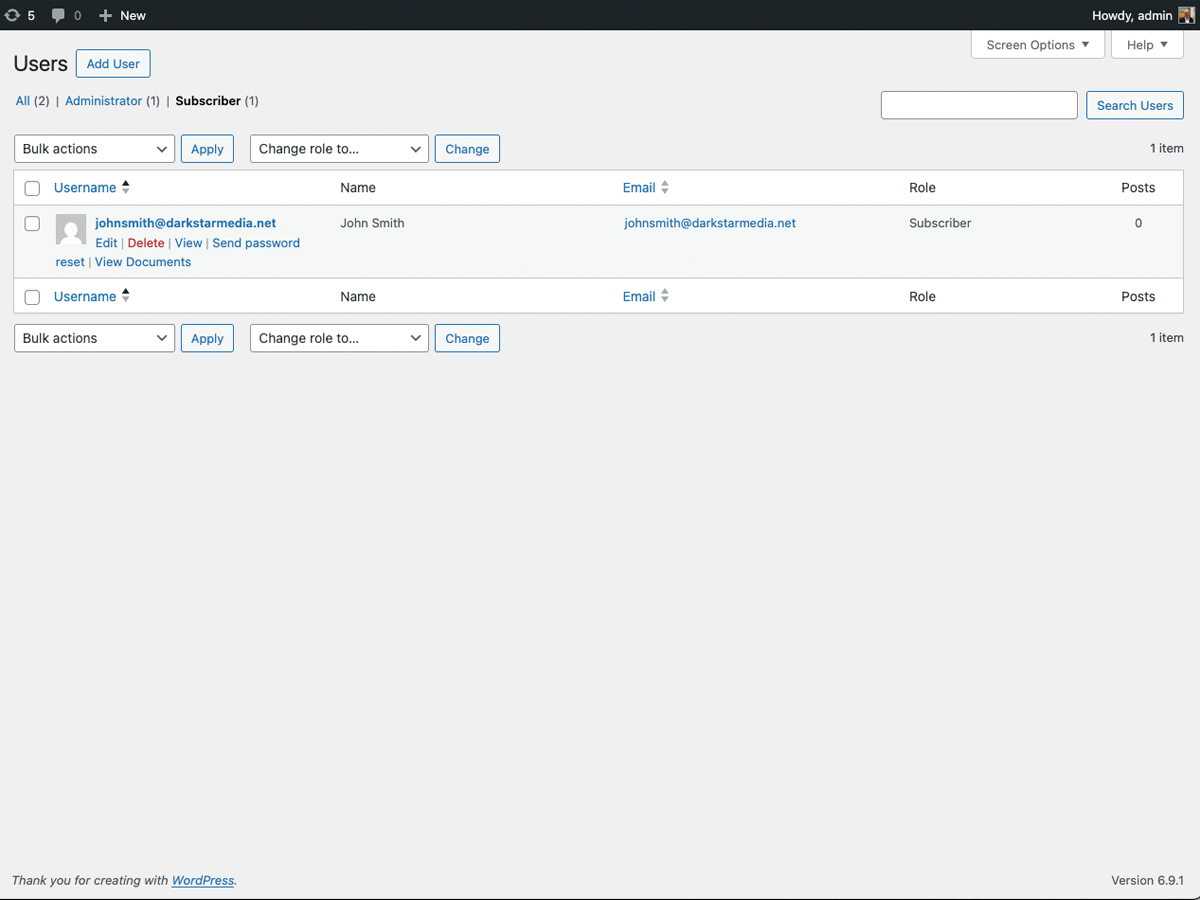
- Upload Files for Clients - Go to Users → hover over user → click "View Documents" to upload
- Clients Access Files - Clients log in and visit the portal page to view and upload documents
- All files served through authenticated download handler (not direct file access)
- Path traversal protection with directory separator enforcement
- User authentication required
- Nonce verification on all forms and downloads
- CSRF protection on admin file downloads
- File type, MIME, and WordPress built-in type validation
- ZIP bomb protection (uncompressed content limit)
- Upload rate limiting (20 uploads per user per hour)
- Files stored outside web root by default
- Protective
.htaccessandindex.phpwritten to upload directory on activation - Each user can only access their own files
move_uploaded_file() directly after passing validation through WordPress's wp_check_filetype_and_ext(), our own MIME type check, extension allowlist, and size limits. Files cannot be stored through wp_handle_upload() without placing them inside the publicly accessible uploads directory, which would reduce security.
Perfect For
- Tax professionals sharing documents with clients
- Lawyers exchanging contracts and legal documents
- Consultants sharing reports
- Any business requiring secure client file exchange
安装:
- Log in to your WordPress admin panel
- Go to Plugins → Add New
- Search for "Darkstar File Manager"
- Click "Install Now" and then "Activate"
- Download the plugin zip file
- Log in to your WordPress admin panel
- Go to Plugins → Add New → Upload Plugin
- Choose the zip file and click "Install Now"
- Activate the plugin
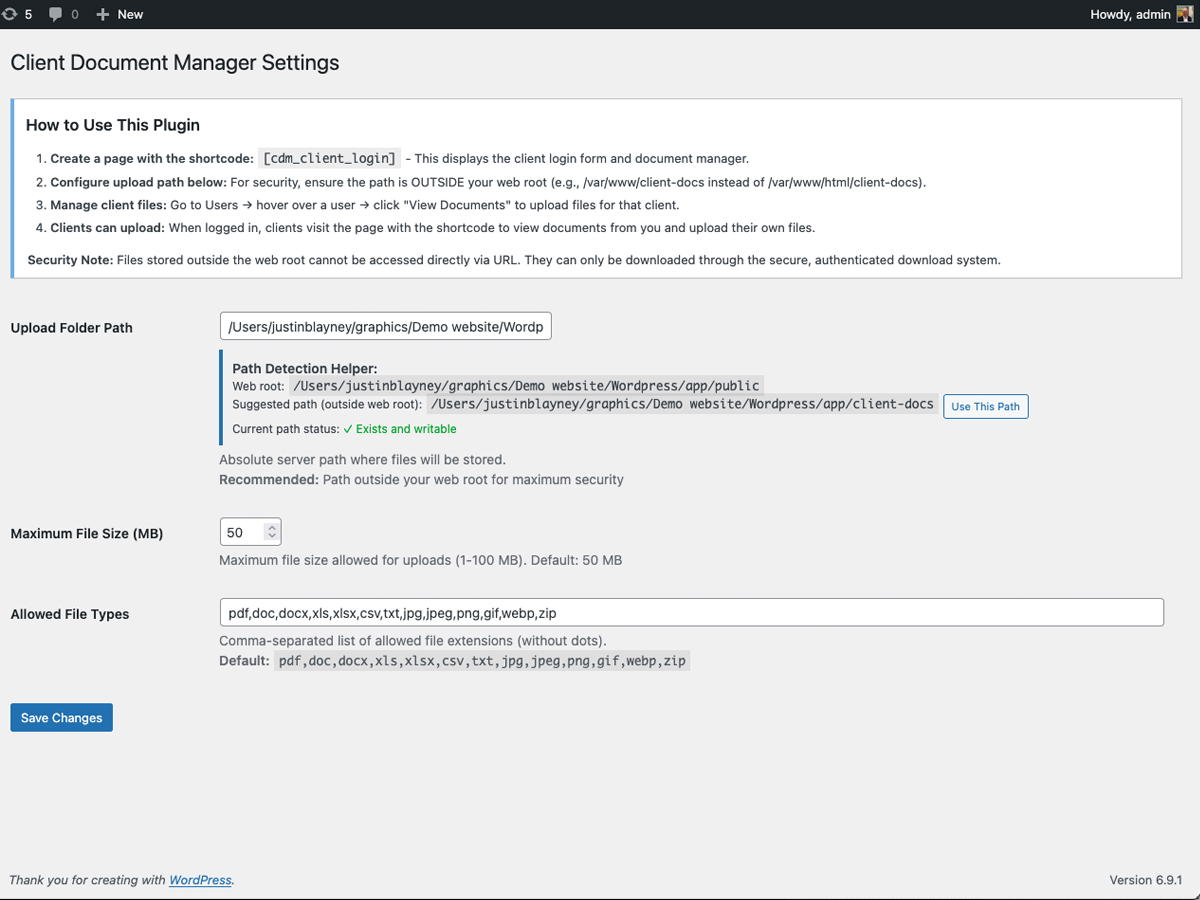
- Go to Settings → Darkstar File Manager
- Configure the upload folder path (recommended: outside web root for security)
- Set allowed file types and maximum file size
- Create a new page (e.g., "Client Portal")
- Add the shortcode:
[dsfm_client_login] - Publish the page
- Share the page URL with your clients
屏幕截图:
常见问题:
How do I upload files for a specific client?
Go to Users in your WordPress admin panel. Hover over the user you want to upload files for, and click "View Documents". You'll see an upload form where you can select and upload files for that client.
Where are the files stored?
Files are stored in the path you configure in Settings → Darkstar File Manager. For maximum security, we recommend storing files outside your web root (e.g., /var/www/client-docs instead of /var/www/html/wp-content/client-docs).
Can clients see other clients' files?
No. Each client can only see and download files in their own folder. The plugin enforces strict user isolation.
What file types are allowed?
By default: PDF, DOC, DOCX, XLS, XLSX, CSV, TXT, JPG, JPEG, PNG, GIF, WEBP, and ZIP files. You can customize this list in Settings → Darkstar File Manager.
How do I change the maximum file size?
Go to Settings → Darkstar File Manager and adjust the "Maximum File Size (MB)" setting. You can set it between 1 and 100 MB.
Is this plugin translation ready?
Yes! The plugin is fully internationalization-ready and includes Polylang integration for multilingual sites. Translation files are located in the /languages directory.
Can clients delete files I upload for them?
No. Files uploaded by administrators appear in a separate "Documents for you" section (read-only). Clients can only delete files they uploaded themselves.
How do clients access their documents?
Clients simply log in to your WordPress site and visit the page where you added the [dsfm_client_login] shortcode. After logging in, they'll see all their documents and can upload new ones.
Does this work with iThemes Security, Wordfence, or other security plugins?
Yes! The plugin automatically detects and uses the custom login URL configured by security plugins like iThemes Security, Wordfence, or any other plugin that changes the WordPress login page. The login form on the shortcode page will work seamlessly with these security plugins.
Is this secure?
Yes. The plugin implements multiple security layers:
- Files are served through an authenticated handler (not direct URLs)
- User authentication required
- Path traversal protection
- File type, MIME, and WordPress built-in type validation
- Nonce verification on all actions
- Files can be stored outside web root
更新日志:
- Updated tested up to WordPress 7.1
- Updated tested up to WordPress 7.0
- Renamed plugin to Darkstar File Manager with new slug darkstar-file-manager
- Updated all function, option, and constant prefixes from cdm_ to dsfm_
- Added wp_check_filetype_and_ext() to upload validation for WordPress-native file type checking
- Added justinblayney as contributor
- Initial release
- Secure file upload and download system
- Admin can upload files for clients via Users admin panel
- Clients can upload and download files via shortcode portal
- Separate sections for admin-uploaded vs client-uploaded files
- Configurable file types, size limits, and upload path
- File type, MIME type, and WordPress built-in type validation
- ZIP bomb protection (uncompressed size limit)
- Upload rate limiting (20 uploads per user per hour)
- CSRF protection on all forms and file downloads
- Path traversal protection with directory separator enforcement
- Protective
.htaccessandindex.phpauto-written to upload directory - Upload directory defaults to outside web root for security
- Bulk delete functionality for admins
- Privacy policy content registered with WordPress
- Clean uninstall removes all plugin options
- Translation ready with Polylang support
- Responsive design